steering VOLVO V60 2021 Owners Manual
[x] Cancel search | Manufacturer: VOLVO, Model Year: 2021, Model line: V60, Model: VOLVO V60 2021Pages: 661, PDF Size: 12.68 MB
Page 323 of 661
DRIVER SUPPORT
321
Symbol Message Meaning
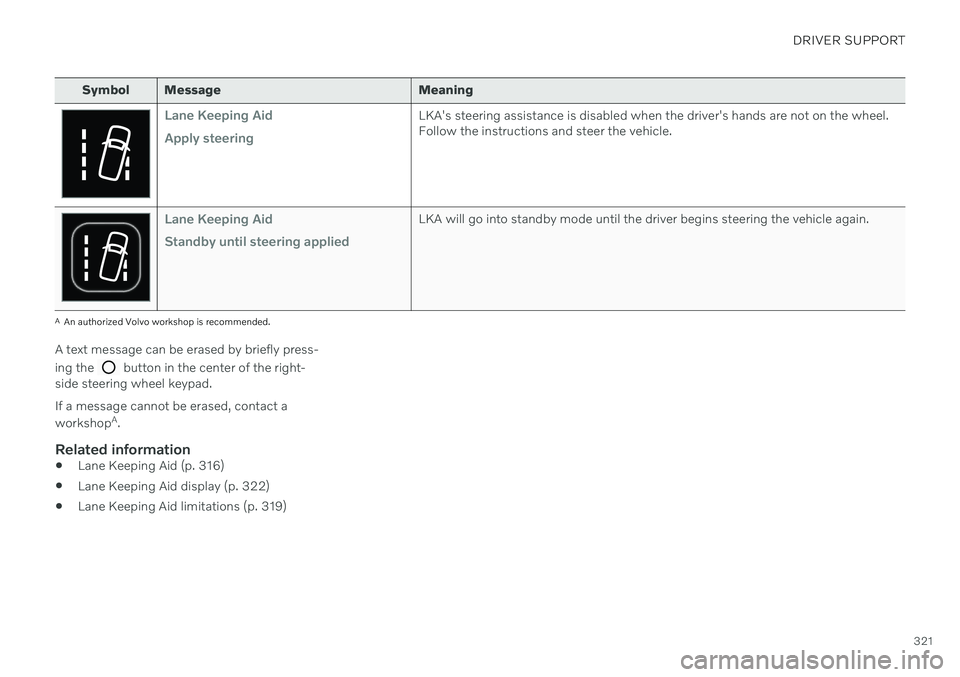
Lane Keeping Aid Apply steeringLKA's steering assistance is disabled when the driver's hands are not on the wheel. Follow the instructions and steer the vehicle.
Lane Keeping Aid Standby until steering appliedLKA will go into standby mode until the driver begins steering the vehicle again.
AAn authorized Volvo workshop is recommended.
A text message can be erased by briefly press- ing the
button in the center of the right-
side steering wheel keypad. If a message cannot be erased, contact a workshop A
.
Related information
Lane Keeping Aid (p. 316)
Lane Keeping Aid display (p. 322)
Lane Keeping Aid limitations (p. 319)
Page 324 of 661
DRIVER SUPPORT
322
Lane Keeping Aid display Lane Keeping Aid (LKA74
) uses symbols in
the instrument panel for various situations.
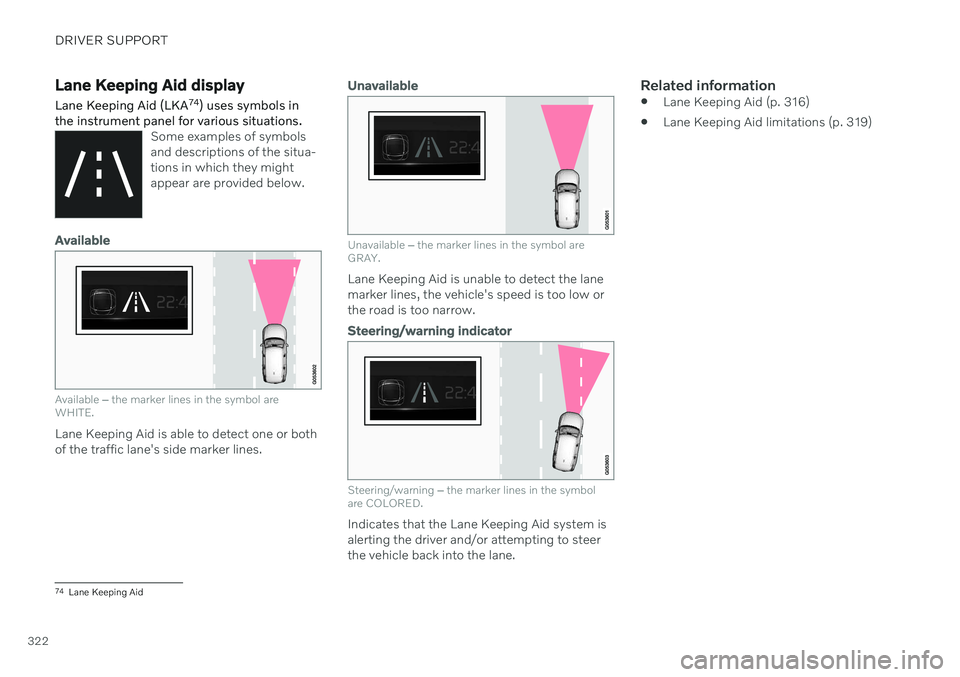
Some examples of symbols and descriptions of the situa-tions in which they mightappear are provided below.
Available
Available ‒ the marker lines in the symbol are
WHITE.
Lane Keeping Aid is able to detect one or both of the traffic lane's side marker lines.
Unavailable
Unavailable ‒ the marker lines in the symbol are
GRAY.
Lane Keeping Aid is unable to detect the lane marker lines, the vehicle's speed is too low orthe road is too narrow.
Steering/warning indicator
Steering/warning ‒
the marker lines in the symbol
are COLORED.
Indicates that the Lane Keeping Aid system is alerting the driver and/or attempting to steerthe vehicle back into the lane.
Related information
Lane Keeping Aid (p. 316)
Lane Keeping Aid limitations (p. 319)
74
Lane Keeping Aid
Page 325 of 661
DRIVER SUPPORT
}}
323
City Safety™
City Safety 75
can alert the driver with light,
sound and pulsations in the brake pedal to help the driver detect pedestrians, cyclists,large animals and vehicles.
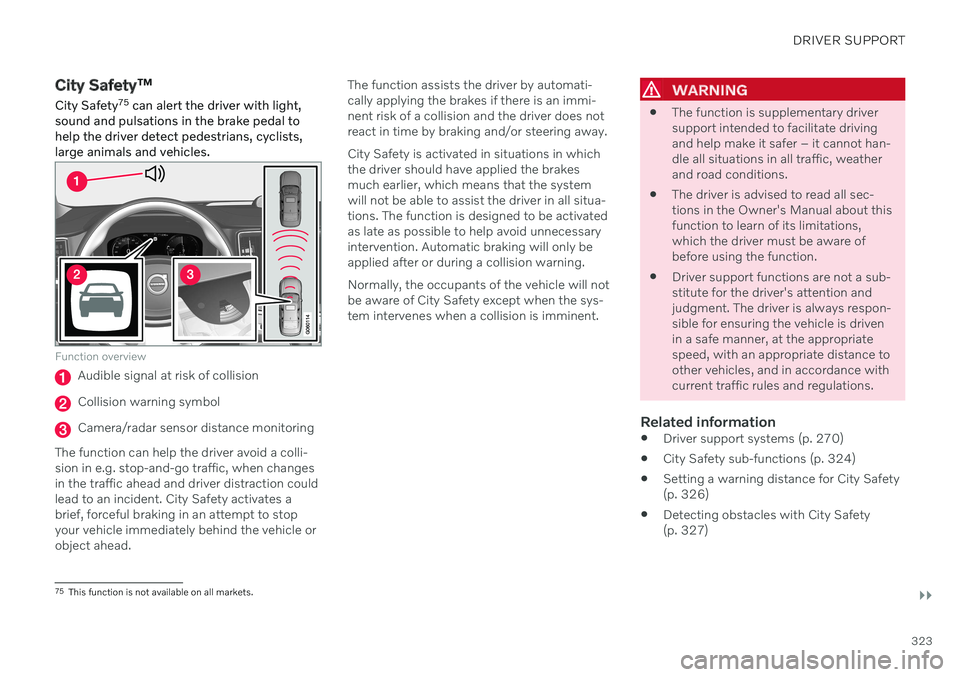
Function overview
Audible signal at risk of collision
Collision warning symbol
Camera/radar sensor distance monitoring
The function can help the driver avoid a colli- sion in e.g. stop-and-go traffic, when changesin the traffic ahead and driver distraction couldlead to an incident. City Safety activates abrief, forceful braking in an attempt to stopyour vehicle immediately behind the vehicle orobject ahead. The function assists the driver by automati-cally applying the brakes if there is an immi-nent risk of a collision and the driver does notreact in time by braking and/or steering away. City Safety is activated in situations in which the driver should have applied the brakesmuch earlier, which means that the systemwill not be able to assist the driver in all situa-tions. The function is designed to be activatedas late as possible to help avoid unnecessaryintervention. Automatic braking will only beapplied after or during a collision warning. Normally, the occupants of the vehicle will not be aware of City Safety except when the sys-tem intervenes when a collision is imminent.
WARNING
The function is supplementary driver support intended to facilitate drivingand help make it safer – it cannot han-dle all situations in all traffic, weatherand road conditions.
The driver is advised to read all sec-tions in the Owner's Manual about thisfunction to learn of its limitations,which the driver must be aware ofbefore using the function.
Driver support functions are not a sub-stitute for the driver's attention andjudgment. The driver is always respon-sible for ensuring the vehicle is drivenin a safe manner, at the appropriatespeed, with an appropriate distance toother vehicles, and in accordance withcurrent traffic rules and regulations.
Related information
Driver support systems (p. 270)
City Safety sub-functions (p. 324)
Setting a warning distance for City Safety(p. 326)
Detecting obstacles with City Safety(p. 327)
75
This function is not available on all markets.
Page 326 of 661
DRIVER SUPPORT
324
City Safety braking for oncoming vehicles (p. 332)
Automatic braking during delayed evasivemaneuvers with City Safety (p. 331)
City Safety in crossing traffic (p. 329)
City Safety steering assistance for evasivemaneuver (p. 330)
City Safety limitations (p. 333)
City Safety messages (p. 336)
City Safety sub-functions
City Safety 76
can help prevent a collision or
lower the vehicle's speed at the point of impact. The function consists of several sub-functions.
Ability to reduce speedIf the difference in speed between your vehicle and the obstacle is greater than the speedsspecified below, the City Safety auto-brakefunction cannot prevent a collision, but it canhelp mitigate its effects.
Vehicles
City Safety can help prevent a collision with a vehicle ahead by reducing your vehicle's speedby up to 60 km/h (37 mph).
Cyclists
City Safety can help prevent a collision with a cyclist ahead by reducing your vehicle's speedby up to 50 km/h (30 mph).
Pedestrians
City Safety can help prevent a collision with a pedestrian ahead by reducing your vehicle'sspeed by up to 45 km/h (28 mph).
Large animals
If there is a risk of colliding with a large ani- mal, City Safety can help reduce your vehicle's speed by up to 15 km/h (9 mph). The braking function for large animals is pri- marily intended to mitigate the force of a colli-sion at higher speeds. Braking is most effec-tive at speeds above 70 km/h (43 mph) andless effective at lower speeds.
City Safety stepsCity Safety carries out three steps in the fol-lowing order:
1. Collision warning
2. Brake assistance
3. Auto-brake
76
This function is not available on all markets.
Page 332 of 661
DRIVER SUPPORT
330
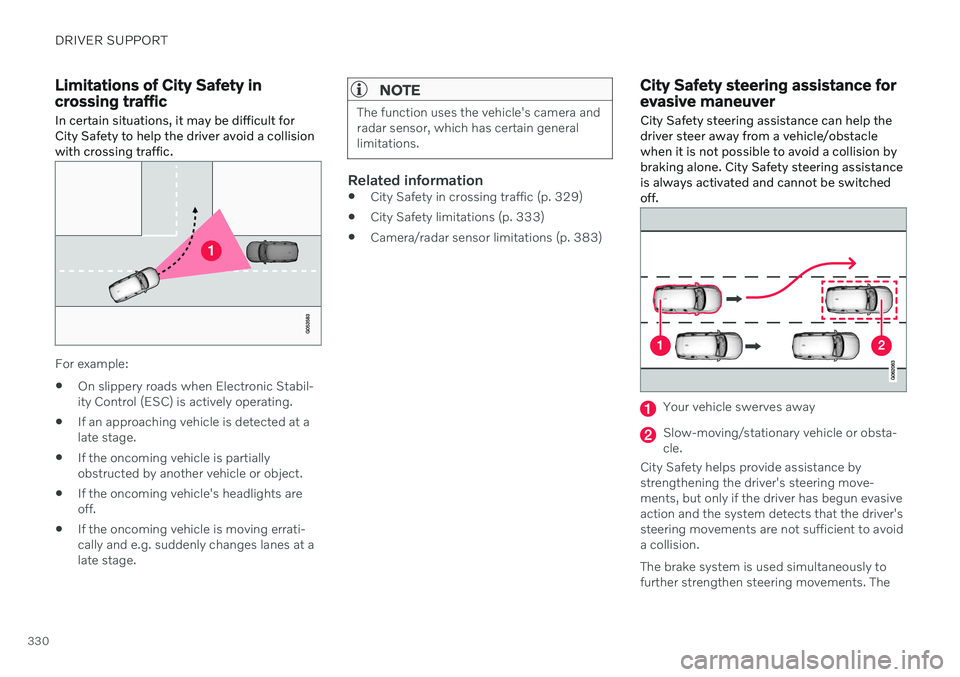
Limitations of City Safety in crossing traffic
In certain situations, it may be difficult for
City Safety to help the driver avoid a collisionwith crossing traffic.
For example:
On slippery roads when Electronic Stabil- ity Control (ESC) is actively operating.
If an approaching vehicle is detected at alate stage.
If the oncoming vehicle is partiallyobstructed by another vehicle or object.
If the oncoming vehicle's headlights areoff.
If the oncoming vehicle is moving errati-cally and e.g. suddenly changes lanes at alate stage.
NOTE
The function uses the vehicle's camera and radar sensor, which has certain generallimitations.
Related information
City Safety in crossing traffic (p. 329)
City Safety limitations (p. 333)
Camera/radar sensor limitations (p. 383)
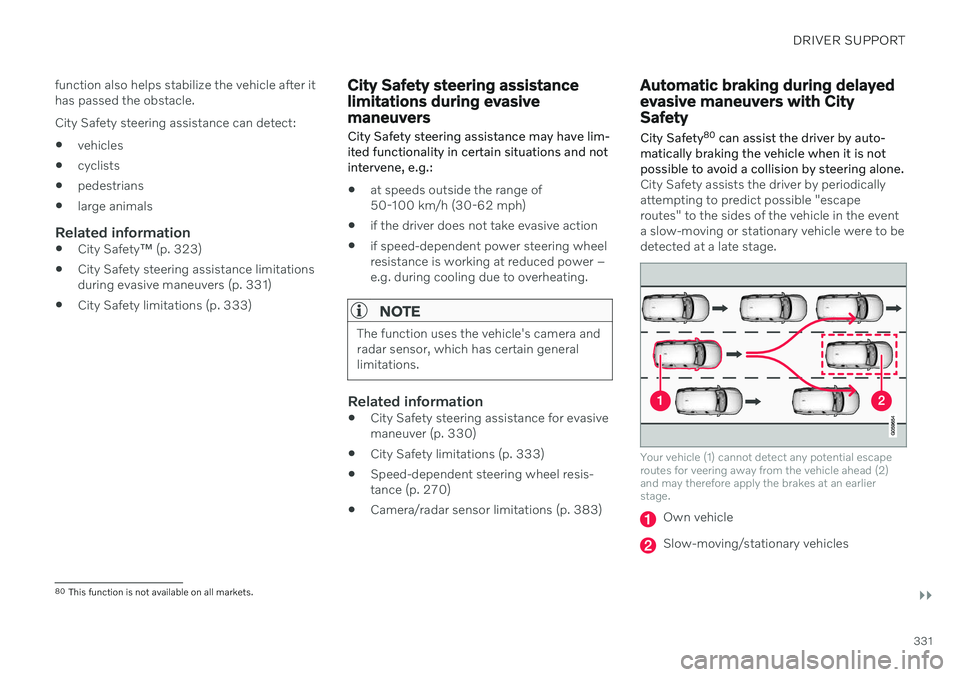
City Safety steering assistance for evasive maneuver City Safety steering assistance can help the driver steer away from a vehicle/obstaclewhen it is not possible to avoid a collision bybraking alone. City Safety steering assistanceis always activated and cannot be switchedoff.
Your vehicle swerves away
Slow-moving/stationary vehicle or obsta- cle.
City Safety helps provide assistance bystrengthening the driver's steering move-ments, but only if the driver has begun evasiveaction and the system detects that the driver'ssteering movements are not sufficient to avoida collision. The brake system is used simultaneously to further strengthen steering movements. The
Page 333 of 661
DRIVER SUPPORT
}}
331
function also helps stabilize the vehicle after it has passed the obstacle. City Safety steering assistance can detect:
vehicles
cyclists
pedestrians
large animals
Related information
City Safety
™ (p. 323)
City Safety steering assistance limitations during evasive maneuvers (p. 331)
City Safety limitations (p. 333)
City Safety steering assistance limitations during evasivemaneuvers
City Safety steering assistance may have lim- ited functionality in certain situations and notintervene, e.g.:
at speeds outside the range of 50-100 km/h (30-62 mph)
if the driver does not take evasive action
if speed-dependent power steering wheelresistance is working at reduced power –e.g. during cooling due to overheating.
NOTE
The function uses the vehicle's camera and radar sensor, which has certain generallimitations.
Related information
City Safety steering assistance for evasive maneuver (p. 330)
City Safety limitations (p. 333)
Speed-dependent steering wheel resis-tance (p. 270)
Camera/radar sensor limitations (p. 383)
Automatic braking during delayed evasive maneuvers with CitySafety
City Safety 80
can assist the driver by auto-
matically braking the vehicle when it is not possible to avoid a collision by steering alone.
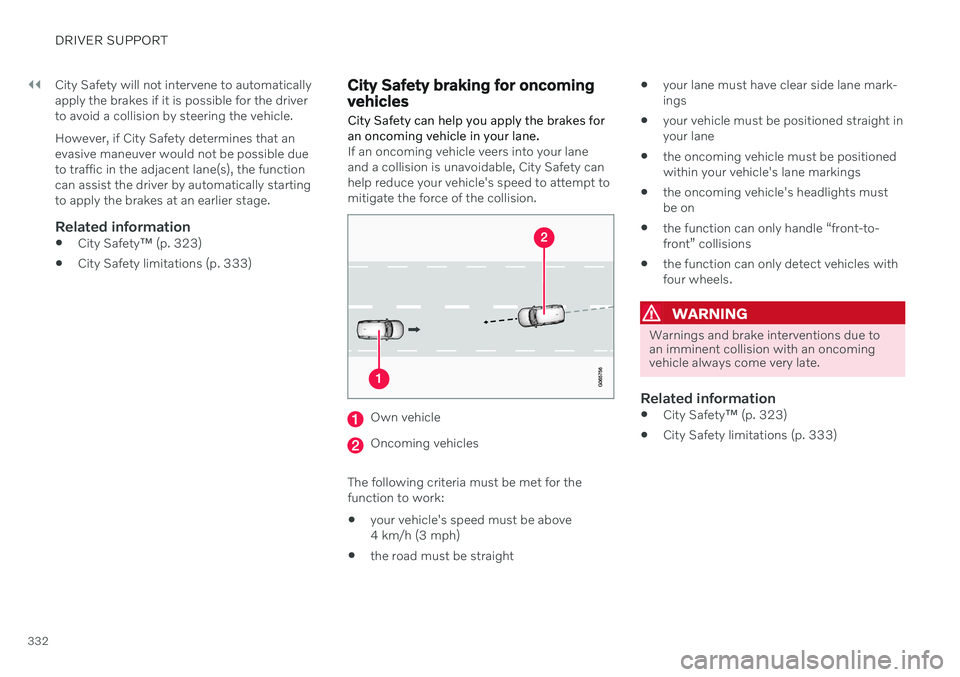
City Safety assists the driver by periodically attempting to predict possible "escaperoutes" to the sides of the vehicle in the eventa slow-moving or stationary vehicle were to bedetected at a late stage.
Your vehicle (1) cannot detect any potential escape routes for veering away from the vehicle ahead (2)and may therefore apply the brakes at an earlierstage.
Own vehicle
Slow-moving/stationary vehicles
80 This function is not available on all markets.
Page 334 of 661
||
DRIVER SUPPORT
332City Safety will not intervene to automatically apply the brakes if it is possible for the driverto avoid a collision by steering the vehicle. However, if City Safety determines that an evasive maneuver would not be possible dueto traffic in the adjacent lane(s), the functioncan assist the driver by automatically startingto apply the brakes at an earlier stage.
Related information
City Safety
™ (p. 323)
City Safety limitations (p. 333)
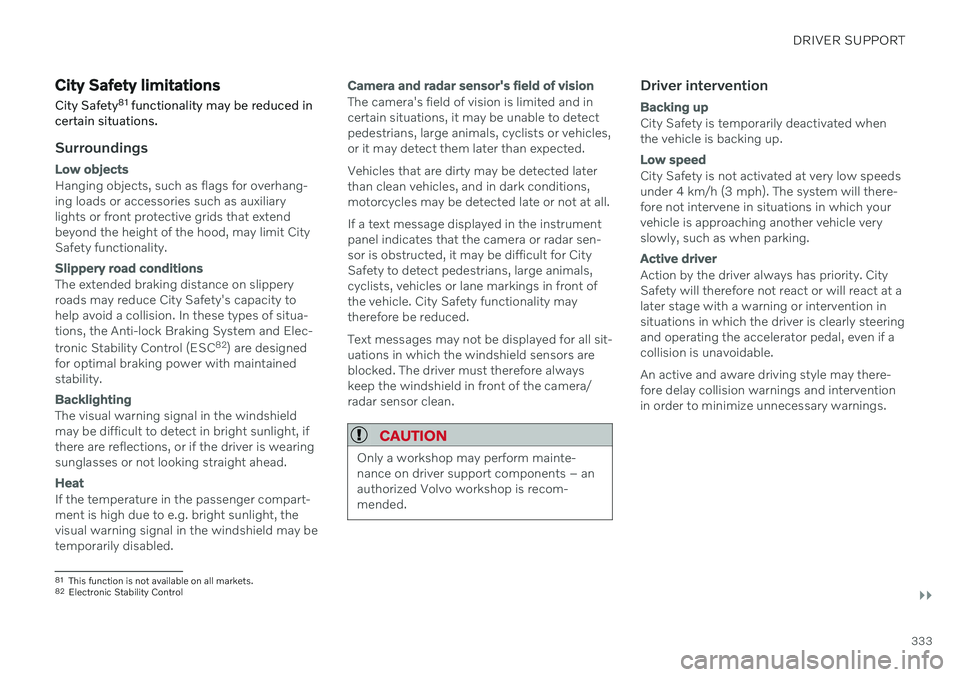
City Safety braking for oncoming vehicles City Safety can help you apply the brakes for an oncoming vehicle in your lane.
If an oncoming vehicle veers into your lane and a collision is unavoidable, City Safety canhelp reduce your vehicle's speed to attempt tomitigate the force of the collision.
Own vehicle
Oncoming vehicles
The following criteria must be met for the function to work:
your vehicle's speed must be above4 km/h (3 mph)
the road must be straight
your lane must have clear side lane mark-ings
your vehicle must be positioned straight inyour lane
the oncoming vehicle must be positionedwithin your vehicle's lane markings
the oncoming vehicle's headlights mustbe on
the function can only handle “front-to-front” collisions
the function can only detect vehicles withfour wheels.
WARNING
Warnings and brake interventions due to an imminent collision with an oncomingvehicle always come very late.
Related information
City Safety
™ (p. 323)
City Safety limitations (p. 333)
Page 335 of 661
DRIVER SUPPORT
}}
333
City Safety limitationsCity Safety 81
functionality may be reduced in
certain situations.
Surroundings
Low objects
Hanging objects, such as flags for overhang- ing loads or accessories such as auxiliarylights or front protective grids that extendbeyond the height of the hood, may limit City Safety functionality.
Slippery road conditions
The extended braking distance on slippery roads may reduce City Safety's capacity tohelp avoid a collision. In these types of situa-tions, the Anti-lock Braking System and Elec- tronic Stability Control (ESC 82
) are designed
for optimal braking power with maintained stability.
Backlighting
The visual warning signal in the windshield may be difficult to detect in bright sunlight, ifthere are reflections, or if the driver is wearingsunglasses or not looking straight ahead.
Heat
If the temperature in the passenger compart- ment is high due to e.g. bright sunlight, thevisual warning signal in the windshield may betemporarily disabled.
Camera and radar sensor's field of vision
The camera's field of vision is limited and in certain situations, it may be unable to detectpedestrians, large animals, cyclists or vehicles,or it may detect them later than expected. Vehicles that are dirty may be detected later than clean vehicles, and in dark conditions,motorcycles may be detected late or not at all. If a text message displayed in the instrument panel indicates that the camera or radar sen-sor is obstructed, it may be difficult for CitySafety to detect pedestrians, large animals,cyclists, vehicles or lane markings in front ofthe vehicle. City Safety functionality maytherefore be reduced. Text messages may not be displayed for all sit- uations in which the windshield sensors areblocked. The driver must therefore alwayskeep the windshield in front of the camera/radar sensor clean.
CAUTION
Only a workshop may perform mainte- nance on driver support components – anauthorized Volvo workshop is recom-mended.
Driver intervention
Backing up
City Safety is temporarily deactivated when the vehicle is backing up.
Low speed
City Safety is not activated at very low speeds under 4 km/h (3 mph). The system will there-fore not intervene in situations in which yourvehicle is approaching another vehicle veryslowly, such as when parking.
Active driver
Action by the driver always has priority. City Safety will therefore not react or will react at alater stage with a warning or intervention insituations in which the driver is clearly steeringand operating the accelerator pedal, even if acollision is unavoidable. An active and aware driving style may there- fore delay collision warnings and interventionin order to minimize unnecessary warnings.
81 This function is not available on all markets.
82 Electronic Stability Control
Page 337 of 661
DRIVER SUPPORT
335
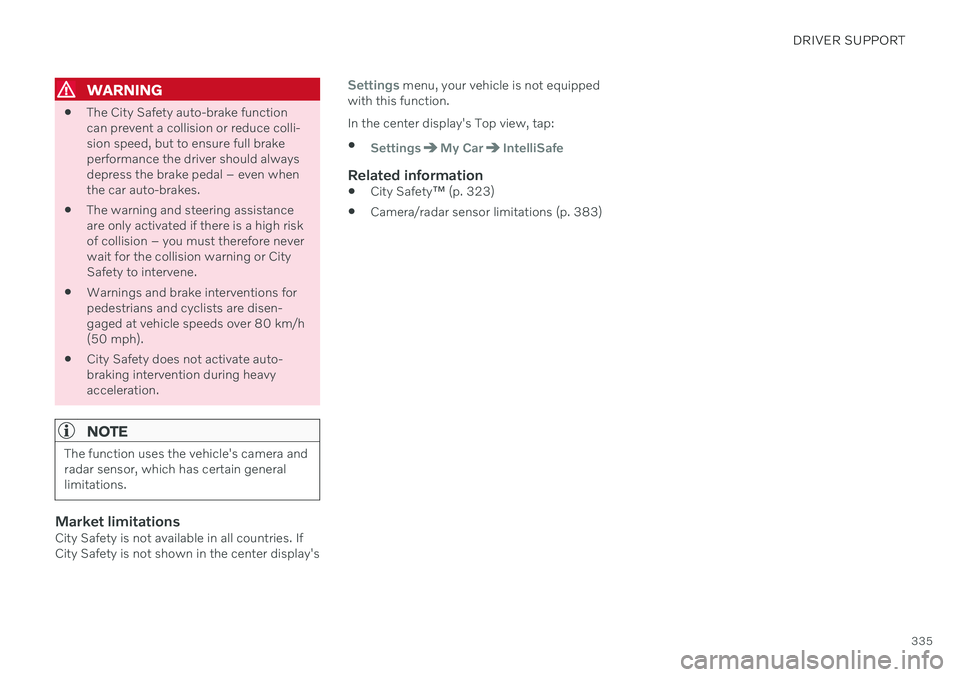
WARNING
The City Safety auto-brake function can prevent a collision or reduce colli-sion speed, but to ensure full brakeperformance the driver should alwaysdepress the brake pedal – even whenthe car auto-brakes.
The warning and steering assistanceare only activated if there is a high riskof collision – you must therefore neverwait for the collision warning or CitySafety to intervene.
Warnings and brake interventions forpedestrians and cyclists are disen-gaged at vehicle speeds over 80 km/h(50 mph).
City Safety does not activate auto-braking intervention during heavyacceleration.
NOTE
The function uses the vehicle's camera and radar sensor, which has certain generallimitations.
Market limitationsCity Safety is not available in all countries. If City Safety is not shown in the center display's
Settings menu, your vehicle is not equipped
with this function. In the center display's Top view, tap:
SettingsMy CarIntelliSafe
Related information
City Safety
™ (p. 323)
Camera/radar sensor limitations (p. 383)
Page 338 of 661
DRIVER SUPPORT
336
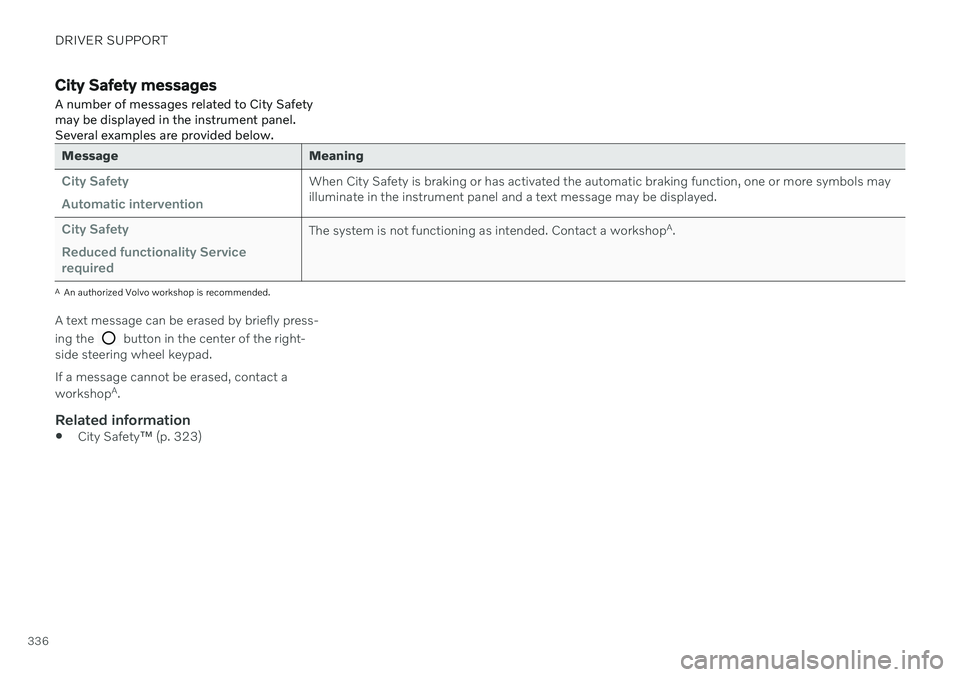
City Safety messages
A number of messages related to City Safety may be displayed in the instrument panel.Several examples are provided below.
Message Meaning
City Safety Automatic interventionWhen City Safety is braking or has activated the automatic braking function, one or more symbols may illuminate in the instrument panel and a text message may be displayed.
City Safety Reduced functionality Service requiredThe system is not functioning as intended. Contact a workshop A
.
A An authorized Volvo workshop is recommended.
A text message can be erased by briefly press- ing the
button in the center of the right-
side steering wheel keypad. If a message cannot be erased, contact a workshop A
.
Related information
City Safety
™ (p. 323)