remote start VOLVO V90 2017 User Guide
[x] Cancel search | Manufacturer: VOLVO, Model Year: 2017, Model line: V90, Model: VOLVO V90 2017Pages: 594, PDF Size: 15.07 MB
Page 210 of 594
||
CLIMATE CONTROL
* Option/accessory.
208 To be able to also cool the passenger compart- ment to the comfort temperature (with the car'sair conditioning) the engine remote start function Engine Remote Start - ERS
5
via the Volvo On
Call * app. can be used.
Related information
• Parking climate
* (p. 206)
• Timer for preconditioning
* (p. 208)
• Starting/switching off climate comfort reten- tion
* (p. 210)
• Symbols and messages for parking climatecontrol
* (p. 212)
• Heater
* (p. 213)
Timer for preconditioning *
The timer can be set so that the preconditioning is finished at a predetermined time.
The timer can handle up to 8 different settings for:
• A time on a single date
• A time on one or more days of the week, withor without repetition.
Related information
•
Parking climate
* (p. 206)
• Setting the timer for preconditioning
*
(p. 208)
• Activating/deactivating the timer for precon- ditioning
* (p. 210)
• Starting/stopping preconditioning
* (p. 207)
• Symbols and messages for parking climatecontrol
* (p. 212)
Setting the timer for preconditioning *
The timer for preconditioning can manage up to 8 time settings.
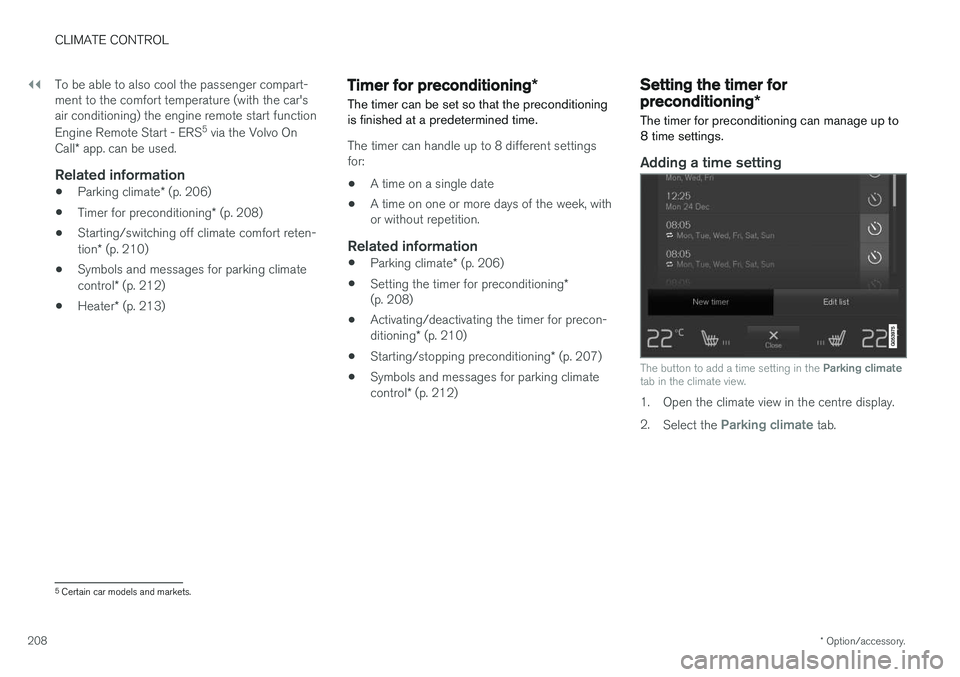
Adding a time setting
The button to add a time setting in the Parking climate
tab in the climate view.
1. Open the climate view in the centre display. 2. Select the
Parking climate tab.
5
Certain car models and markets.
Page 238 of 594
LOCKS AND ALARM
* Option/accessory.
236
Remote control key
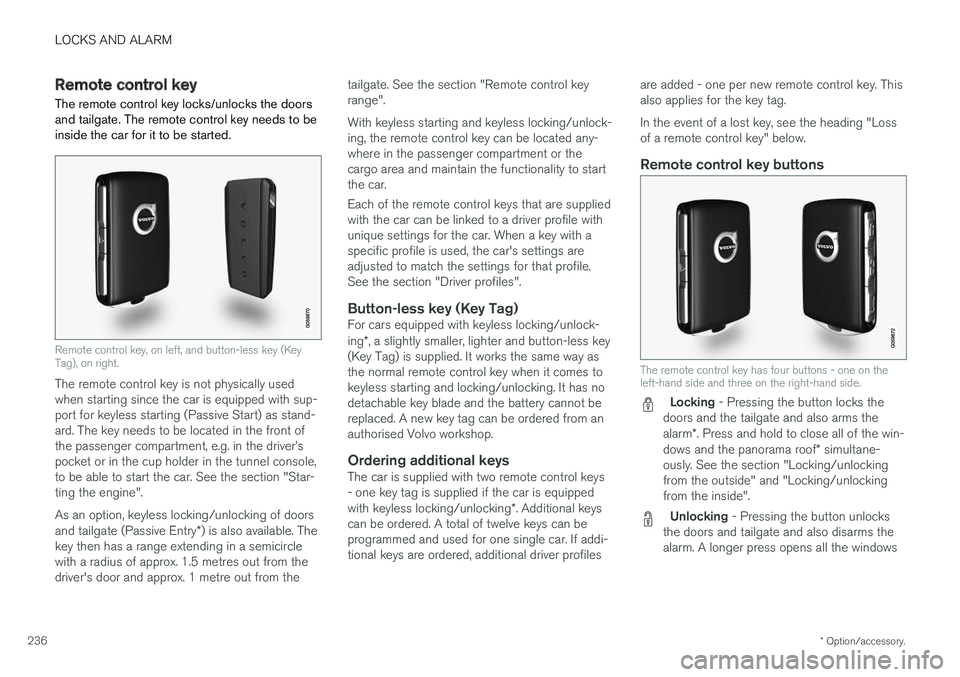
The remote control key locks/unlocks the doors and tailgate. The remote control key needs to beinside the car for it to be started.
Remote control key, on left, and button-less key (Key Tag), on right.
The remote control key is not physically used when starting since the car is equipped with sup-port for keyless starting (Passive Start) as stand-ard. The key needs to be located in the front ofthe passenger compartment, e.g. in the driver
Page 239 of 594
LOCKS AND ALARM
}}
* Option/accessory.237
simultaneously, also called Global opening
1
.
See the section "Locking/unlocking from the outside".
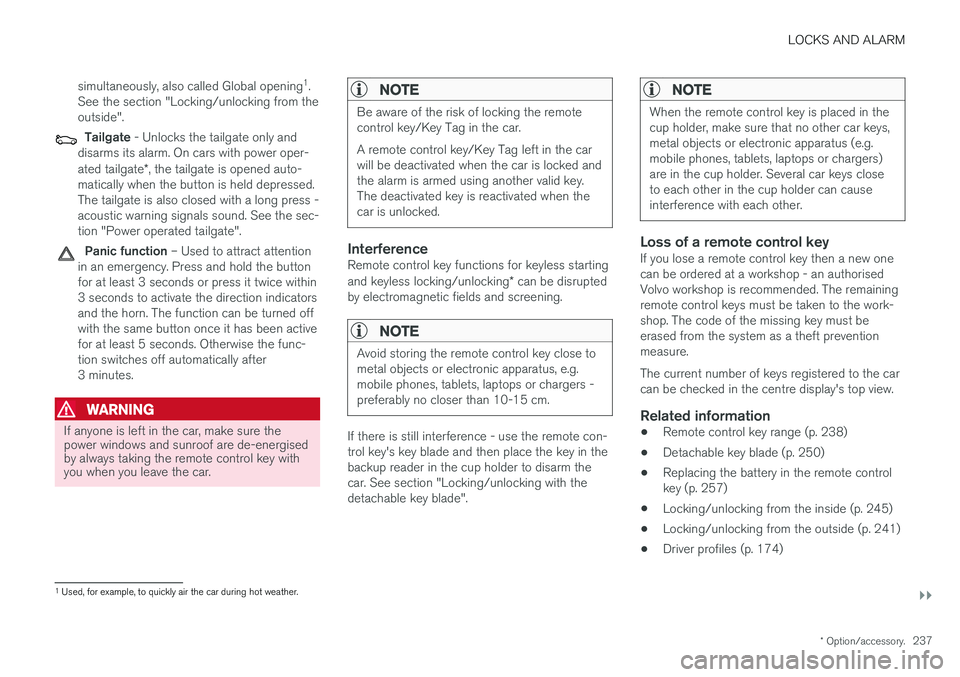
Tailgate - Unlocks the tailgate only and
disarms its alarm. On cars with power oper- ated tailgate *, the tailgate is opened auto-
matically when the button is held depressed. The tailgate is also closed with a long press -acoustic warning signals sound. See the sec-tion "Power operated tailgate".
Panic function – Used to attract attention
in an emergency. Press and hold the button for at least 3 seconds or press it twice within3 seconds to activate the direction indicatorsand the horn. The function can be turned offwith the same button once it has been activefor at least 5 seconds. Otherwise the func-tion switches off automatically after3 minutes.
WARNING
If anyone is left in the car, make sure the power windows and sunroof are de-energisedby always taking the remote control key withyou when you leave the car.
NOTE
Be aware of the risk of locking the remote control key/Key Tag in the car. A remote control key/Key Tag left in the car will be deactivated when the car is locked andthe alarm is armed using another valid key.The deactivated key is reactivated when thecar is unlocked.
InterferenceRemote control key functions for keyless starting and keyless locking/unlocking * can be disrupted
by electromagnetic fields and screening.
NOTE
Avoid storing the remote control key close to metal objects or electronic apparatus, e.g.mobile phones, tablets, laptops or chargers -preferably no closer than 10-15 cm.
If there is still interference - use the remote con- trol key's key blade and then place the key in thebackup reader in the cup holder to disarm thecar. See section "Locking/unlocking with thedetachable key blade".
NOTE
When the remote control key is placed in the cup holder, make sure that no other car keys,metal objects or electronic apparatus (e.g.mobile phones, tablets, laptops or chargers)are in the cup holder. Several car keys closeto each other in the cup holder can causeinterference with each other.
Loss of a remote control keyIf you lose a remote control key then a new one can be ordered at a workshop - an authorisedVolvo workshop is recommended. The remainingremote control keys must be taken to the work-shop. The code of the missing key must beerased from the system as a theft preventionmeasure. The current number of keys registered to the car can be checked in the centre display's top view.
Related information
• Remote control key range (p. 238)
• Detachable key blade (p. 250)
• Replacing the battery in the remote controlkey (p. 257)
• Locking/unlocking from the inside (p. 245)
• Locking/unlocking from the outside (p. 241)
• Driver profiles (p. 174)
1
Used, for example, to quickly air the car during hot weather.
Page 240 of 594
LOCKS AND ALARM
* Option/accessory.
238 •
Power operated tailgate
* (p. 253)
• Starting the car (p. 386)
• Red Key - Restricted remote control key
*
(p. 239)
Remote control key range In order for the remote control key to work prop- erly it needs to be within a certain distance fromthe car.
For manual useThe remote control key's functions for e.g. lock- ing/unlocking that are activated by pressing on
or have a range that extends approx.
20 metres from the car. If the car does not verify a button being pressed - move closer and try again.
For keyless use 2
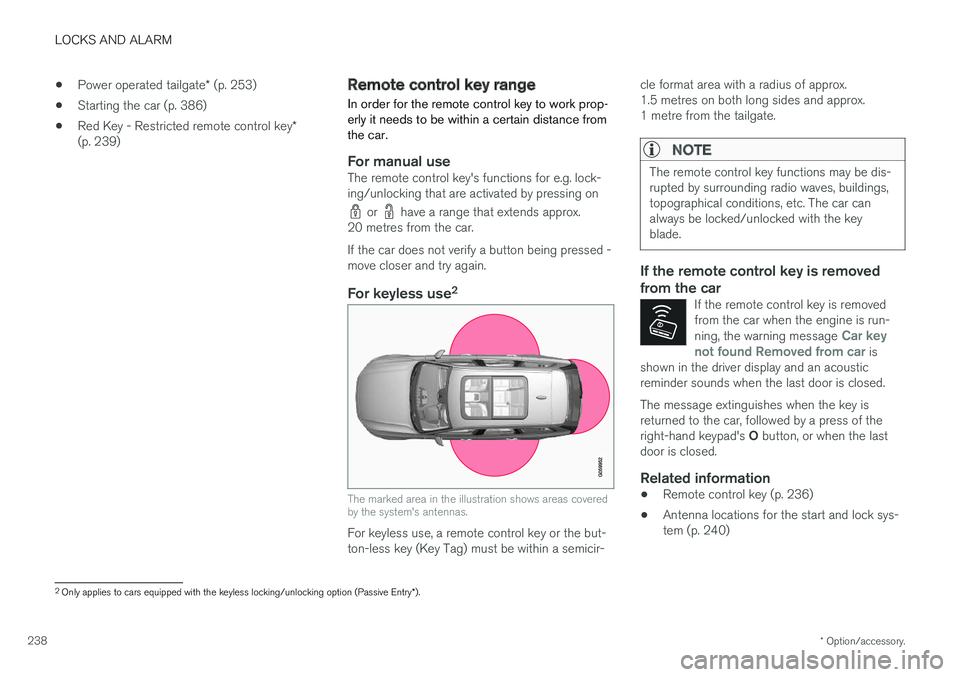
The marked area in the illustration shows areas covered by the system's antennas.
For keyless use, a remote control key or the but- ton-less key (Key Tag) must be within a semicir- cle format area with a radius of approx.1.5 metres on both long sides and approx.1 metre from the tailgate.
NOTE
The remote control key functions may be dis- rupted by surrounding radio waves, buildings,topographical conditions, etc. The car canalways be locked/unlocked with the keyblade.
If the remote control key is removed from the car
If the remote control key is removed from the car when the engine is run- ning, the warning message
Car key
not found Removed from car is
shown in the driver display and an acoustic reminder sounds when the last door is closed.
The message extinguishes when the key is returned to the car, followed by a press of the right-hand keypad's O button, or when the last
door is closed.
Related information
• Remote control key (p. 236)
• Antenna locations for the start and lock sys- tem (p. 240)
2
Only applies to cars equipped with the keyless locking/unlocking option (Passive Entry *).
Page 242 of 594
||
LOCKS AND ALARM
* Option/accessory.
240
Related information
• Remote control key (p. 236)
• Adaptive cruise control
* (p. 290)
• Distance Warning
* (p. 288)
• Blind Spot Information
* (p. 340)
• City Safety (p. 330)
• Lane Keeping Aid (p. 354)
• Driver Alert Control (p. 352)
• Road Sign Information
* (p. 348)
• Driver profiles (p. 174)
Antenna locations for the start and lock system
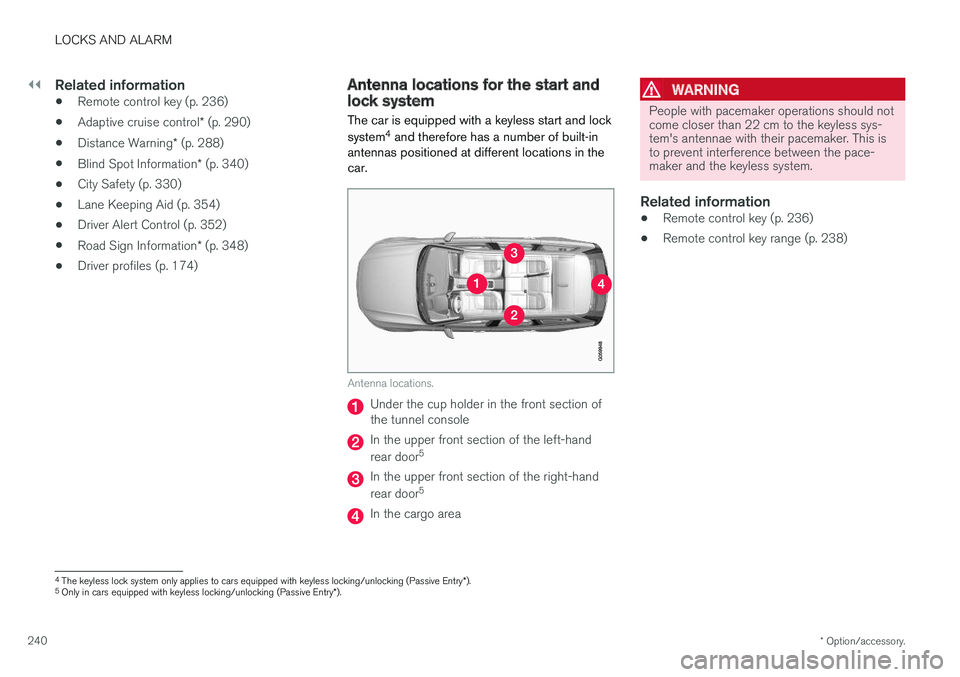
The car is equipped with a keyless start and lock system 4
and therefore has a number of built-in
antennas positioned at different locations in the car.
Antenna locations.
Under the cup holder in the front section of the tunnel console
In the upper front section of the left-hand rear door 5
In the upper front section of the right-hand rear door5
In the cargo area
WARNING
People with pacemaker operations should not come closer than 22 cm to the keyless sys-tem's antennae with their pacemaker. This isto prevent interference between the pace-maker and the keyless system.
Related information
•
Remote control key (p. 236)
• Remote control key range (p. 238)
4
The keyless lock system only applies to cars equipped with keyless locking/unlocking (Passive Entry *).
5 Only in cars equipped with keyless locking/unlocking (Passive Entry *).
Page 244 of 594
||
LOCKS AND ALARM
* Option/accessory.
242
Touch-sensitive surfaces
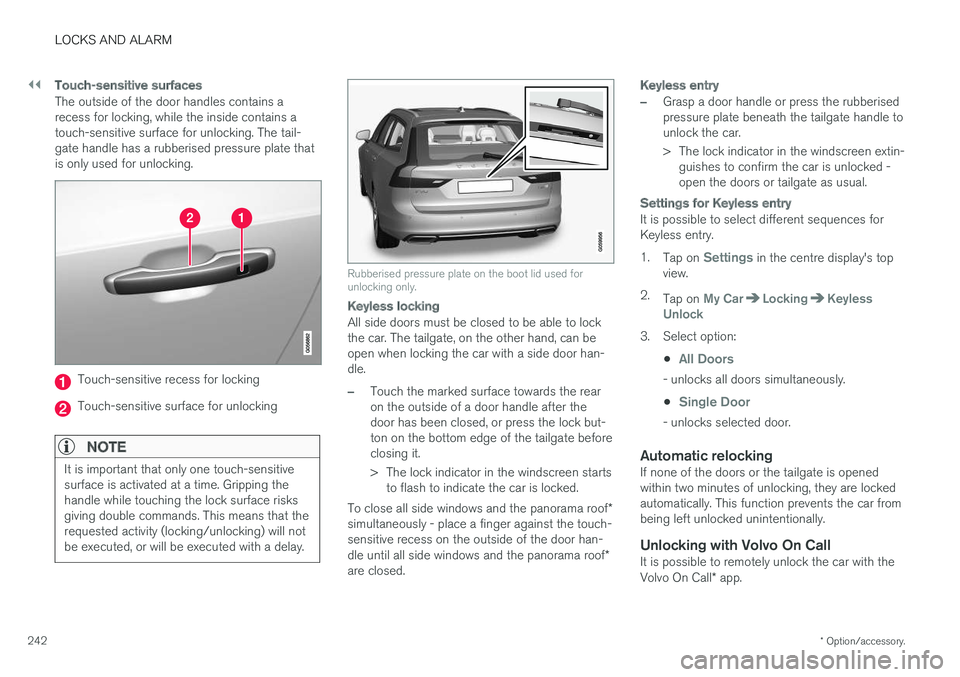
The outside of the door handles contains a recess for locking, while the inside contains atouch-sensitive surface for unlocking. The tail-gate handle has a rubberised pressure plate thatis only used for unlocking.
Touch-sensitive recess for locking
Touch-sensitive surface for unlocking
NOTE
It is important that only one touch-sensitive surface is activated at a time. Gripping thehandle while touching the lock surface risksgiving double commands. This means that therequested activity (locking/unlocking) will notbe executed, or will be executed with a delay.
Rubberised pressure plate on the boot lid used for unlocking only.
Keyless locking
All side doors must be closed to be able to lock the car. The tailgate, on the other hand, can beopen when locking the car with a side door han-dle.
–Touch the marked surface towards the rear on the outside of a door handle after thedoor has been closed, or press the lock but-ton on the bottom edge of the tailgate beforeclosing it.
> The lock indicator in the windscreen starts
to flash to indicate the car is locked.
To close all side windows and the panorama roof *
simultaneously - place a finger against the touch- sensitive recess on the outside of the door han- dle until all side windows and the panorama roof *
are closed.
Keyless entry
–Grasp a door handle or press the rubberised pressure plate beneath the tailgate handle tounlock the car.
> The lock indicator in the windscreen extin- guishes to confirm the car is unlocked - open the doors or tailgate as usual.
Settings for Keyless entry
It is possible to select different sequences for Keyless entry. 1. Tap on
Settings in the centre display's top
view.
2. Tap on
My CarLockingKeyless
Unlock
3. Select option:
•
All Doors
- unlocks all doors simultaneously.
•
Single Door
- unlocks selected door.
Automatic relockingIf none of the doors or the tailgate is opened within two minutes of unlocking, they are lockedautomatically. This function prevents the car frombeing left unlocked unintentionally.
Unlocking with Volvo On CallIt is possible to remotely unlock the car with the Volvo On Call * app.
Page 248 of 594
||
LOCKS AND ALARM
* Option/accessory.
246
Settings for automatic lockingThe doors and tailgate can be locked automati- cally when the car starts to move. 1.
Tap on
Settings in the centre display's top
view.
2. Press
My CarLocking.
3. Select
Auto Lock Doors While Driving.
Related information
• Locking/unlocking from the outside (p. 241)
• Indication on locking/unlocking the car (p. 243)
Deadlocks
*
Deadlocks means that all door handles are mechanically disengaged, which prevents doorsbeing opened from the inside.
Deadlocks are activated with the remote control key and in keyless locking (Passive Entry) *.
Deadlocks are activated with a delay of about 10 seconds after the doors have locked.
NOTE
If a door is opened within the delay time then the sequence is interrupted and the alarm isdeactivated.
The car can only be unlocked with the remote control key, keyless unlocking or the Volvo On Call * app when deadlocks are activated.
The front left door can also be unlocked with the detachable key blade. If the car is unlocked with the detachable key blade, the alarm * will be trig-
gered. See the section "Alarm" for switching off the alarm.
WARNING
Do not allow anyone to remain in the car with- out first deactivating the deadlocks in order toavoid the risk of anyone being locked in.
Switching off deadlocks temporarilyIf someone is going to stay in the car but the doors must be locked from the outside, thendeadlocks can be temporarily switched off with the
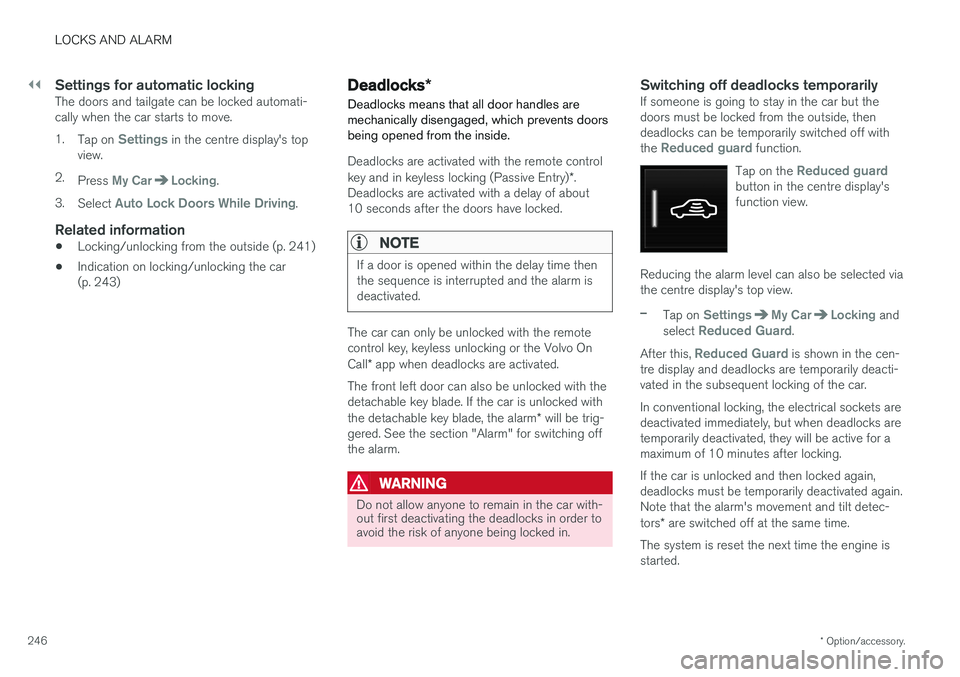
Reduced guard function.
Tap on the
Reduced guardbutton in the centre display's function view.
Reducing the alarm level can also be selected via the centre display's top view.
–Tap on SettingsMy CarLocking and
select Reduced Guard.
After this,
Reduced Guard is shown in the cen-
tre display and deadlocks are temporarily deacti- vated in the subsequent locking of the car. In conventional locking, the electrical sockets are deactivated immediately, but when deadlocks aretemporarily deactivated, they will be active for amaximum of 10 minutes after locking. If the car is unlocked and then locked again, deadlocks must be temporarily deactivated again.Note that the alarm's movement and tilt detec- tors * are switched off at the same time.
The system is reset the next time the engine is started.
Page 250 of 594
||
LOCKS AND ALARM
* Option/accessory.
248
Keyless unlocking of the tailgate *
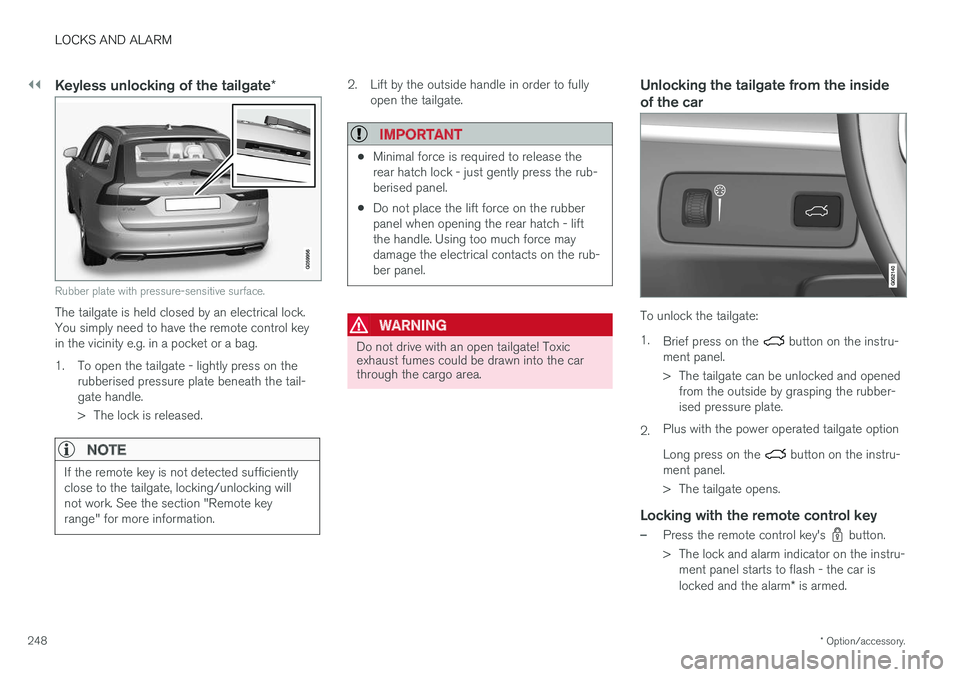
Rubber plate with pressure-sensitive surface.
The tailgate is held closed by an electrical lock. You simply need to have the remote control keyin the vicinity e.g. in a pocket or a bag.
1. To open the tailgate - lightly press on the
rubberised pressure plate beneath the tail- gate handle.
> The lock is released.
NOTE
If the remote key is not detected sufficiently close to the tailgate, locking/unlocking willnot work. See the section "Remote keyrange" for more information.
2. Lift by the outside handle in order to fullyopen the tailgate.
IMPORTANT
•Minimal force is required to release the rear hatch lock - just gently press the rub-berised panel.
• Do not place the lift force on the rubberpanel when opening the rear hatch - liftthe handle. Using too much force maydamage the electrical contacts on the rub-ber panel.
WARNING
Do not drive with an open tailgate! Toxic exhaust fumes could be drawn into the carthrough the cargo area.
Unlocking the tailgate from the inside of the car
To unlock the tailgate: 1.
Brief press on the
button on the instru-
ment panel.
> The tailgate can be unlocked and opened from the outside by grasping the rubber- ised pressure plate.
2. Plus with the power operated tailgate option Long press on the
button on the instru-
ment panel.
> The tailgate opens.
Locking with the remote control key
–Press the remote control key's button.
> The lock and alarm indicator on the instru- ment panel starts to flash - the car is locked and the alarm * is armed.
Page 253 of 594
LOCKS AND ALARM
}}
251
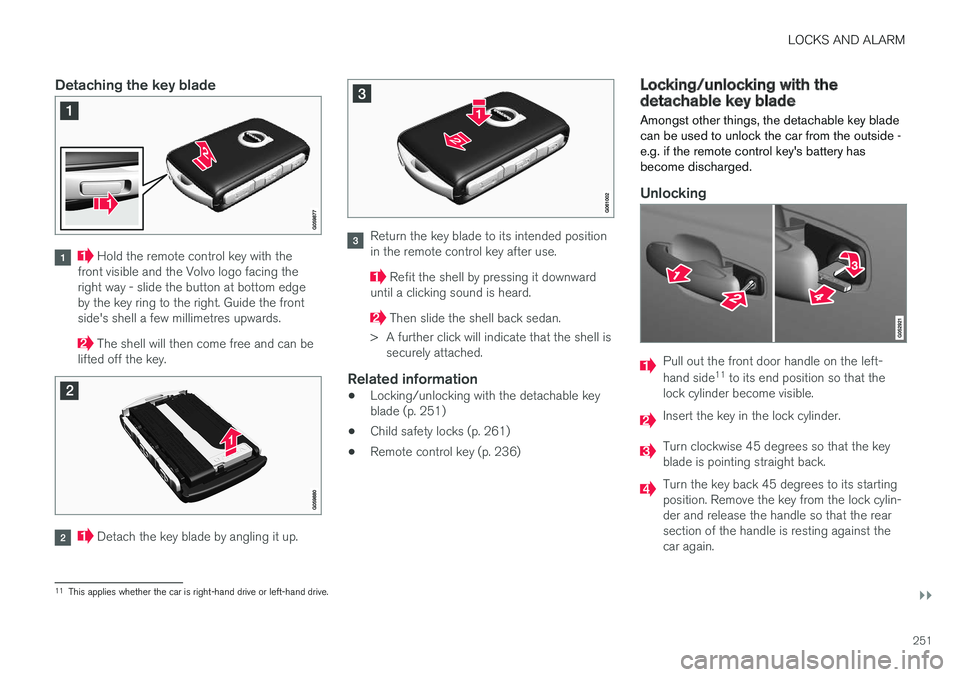
Detaching the key blade
Hold the remote control key with the
front visible and the Volvo logo facing the right way - slide the button at bottom edgeby the key ring to the right. Guide the frontside's shell a few millimetres upwards.
The shell will then come free and can be
lifted off the key.
Detach the key blade by angling it up.
Return the key blade to its intended position in the remote control key after use.
Refit the shell by pressing it downward
until a clicking sound is heard.
Then slide the shell back sedan.
> A further click will indicate that the shell is securely attached.
Related information
• Locking/unlocking with the detachable key blade (p. 251)
• Child safety locks (p. 261)
• Remote control key (p. 236)
Locking/unlocking with the detachable key blade
Amongst other things, the detachable key blade can be used to unlock the car from the outside -e.g. if the remote control key's battery hasbecome discharged.
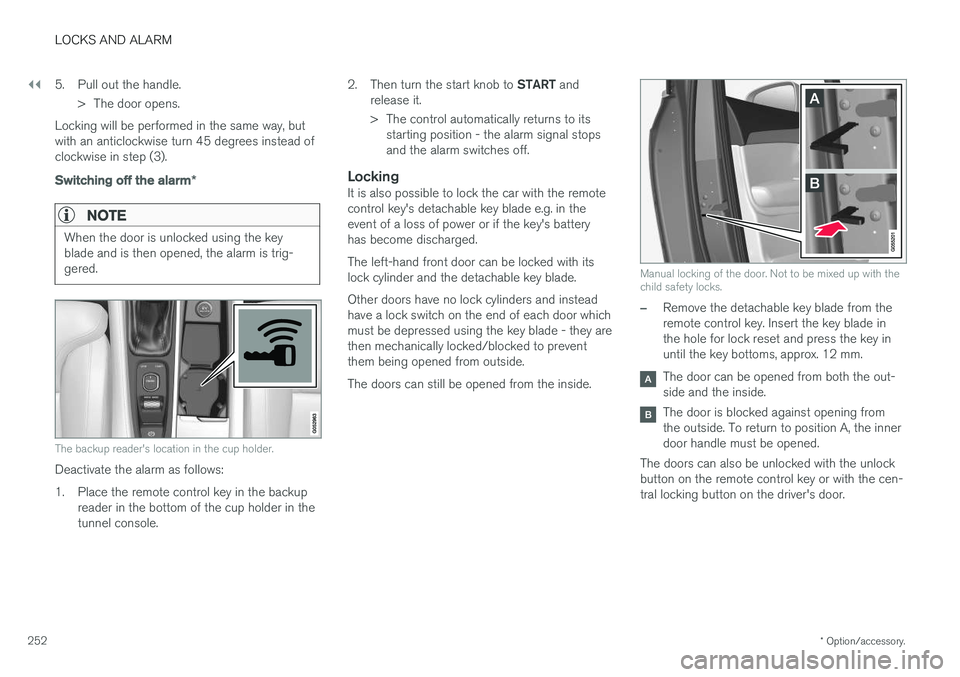
Unlocking
Pull out the front door handle on the left- hand side 11
to its end position so that the
lock cylinder become visible.
Insert the key in the lock cylinder.
Turn clockwise 45 degrees so that the key blade is pointing straight back.
Turn the key back 45 degrees to its starting position. Remove the key from the lock cylin-der and release the handle so that the rearsection of the handle is resting against thecar again.
11 This applies whether the car is right-hand drive or left-hand drive.
Page 254 of 594
||
LOCKS AND ALARM
* Option/accessory.
252 5. Pull out the handle.
> The door opens.
Locking will be performed in the same way, but with an anticlockwise turn 45 degrees instead ofclockwise in step (3).
Switching off the alarm *
NOTE
When the door is unlocked using the key blade and is then opened, the alarm is trig-gered.
The backup reader's location in the cup holder.
Deactivate the alarm as follows:
1. Place the remote control key in the backup
reader in the bottom of the cup holder in the tunnel console. 2.
Then turn the start knob to START and
release it.
> The control automatically returns to its starting position - the alarm signal stops and the alarm switches off.
LockingIt is also possible to lock the car with the remotecontrol key's detachable key blade e.g. in theevent of a loss of power or if the key's batteryhas become discharged. The left-hand front door can be locked with its lock cylinder and the detachable key blade. Other doors have no lock cylinders and instead have a lock switch on the end of each door whichmust be depressed using the key blade - they arethen mechanically locked/blocked to preventthem being opened from outside. The doors can still be opened from the inside.
Manual locking of the door. Not to be mixed up with the child safety locks.
–Remove the detachable key blade from the remote control key. Insert the key blade inthe hole for lock reset and press the key inuntil the key bottoms, approx. 12 mm.
The door can be opened from both the out- side and the inside.
The door is blocked against opening from the outside. To return to position A, the innerdoor handle must be opened.
The doors can also be unlocked with the unlockbutton on the remote control key or with the cen-tral locking button on the driver's door.