service VOLVO V90 2017 User Guide
[x] Cancel search | Manufacturer: VOLVO, Model Year: 2017, Model line: V90, Model: VOLVO V90 2017Pages: 594, PDF Size: 15.07 MB
Page 72 of 594
||
SAFETY
70
Related information
•Safety (p. 56)
• Starting/moving the car after safety mode (p. 70)
Starting/moving the car after safety mode
If the car is set in safety mode, it is possible to try to start and then move the car from a danger-ous position.
Starting the car after safety mode1. First, check that no fuel is leaking from the car. There must be no smell of fuel either. If everything seems normal and you have checked for indications of fuel leakage, youmay attempt to start the car.
WARNING
Never, under any circumstances, attempt to restart the car if it smells of fuel when the
Safety mode See Owner's manual mes-
sage is shown in the driver display. Leave the car at once.
2. Turn the start knob to STOP and release it. 3. Then try to start the car.
> The car's electronics carry out a systemscheck and then try to resume normal sta- tus.
IMPORTANT
If the message Safety mode See Owner's
manual is still shown on the display the car
must not be driven or towed but a vehicle recovery service must then be used instead.Even if the car appears to be driveable, hid-den damage may make the car impossible tocontrol once moving.
Moving the car after safety mode1. If the message Normal mode The car is
now in normal mode is shown in the driver
display after a start attempt, the car can be moved carefully out of a dangerous position.
2. Do not move the car further than necessary.
WARNING
If the car is in safety mode it must not be towed. It must be transported from its loca-tion. Volvo recommends that it is transportedto an authorised Volvo workshop.
Related information
• Safety mode (p. 69)
Page 102 of 594
||
INSTRUMENTS AND CONTROLS
100University of California, Berkeley and its contributors.
4. Neither the name of the University nor the names of its contributors may be used toendorse or promote products derived fromthis software without specific prior writtenpermission.
THIS SOFTWARE IS PROVIDED BY THEREGENTS AND CONTRIBUTORS ``AS IS'' ANDANY EXPRESS OR IMPLIED WARRANTIES,INCLUDING, BUT NOT LIMITED TO, THEIMPLIED WARRANTIES OF MERCHANTABILITYAND FITNESS FOR A PARTICULAR PURPOSEARE DISCLAIMED. IN NO EVENT SHALL THEREGENTS OR CONTRIBUTORS BE LIABLEFOR ANY DIRECT, INDIRECT, INCIDENTAL,SPECIAL, EXEMPLARY, OR CONSEQUENTIALDAMAGES (INCLUDING, BUT NOT LIMITED TO,PROCUREMENT OF SUBSTITUTE GOODS ORSERVICES; LOSS OF USE, DATA, OR PROFITS;OR BUSINESS INTERRUPTION) HOWEVERCAUSED AND ON ANY THEORY OF LIABILITY,WHETHER IN CONTRACT, STRICT LIABILITY,OR TORT (INCLUDING NEGLIGENCE OROTHERWISE) ARISING IN ANY WAY OUT OFTHE USE OF THIS SOFTWARE, EVEN IFADVISED OF THE POSSIBILITY OF SUCHDAMAGE.
BSD 3-clause "New" or "Revised"
License
Copyright (c) 2011-2014, Yann Collet. Redistribution and use in source and binaryforms, with or without modification, are permittedprovided that the following conditions are met:
1. Redistributions of source code must retain
the above copyright notice, this list of conditions and the following disclaimer.
2. Redistributions in binary form must reproduce the above copyright notice, this listof conditions and the following disclaimer inthe documentation and/or other materialsprovided with the distribution.
3. Neither the name of the organisation nor the names of its contributors may be used toendorse or promote products derive from thissoftware without specific prior writtenpermission.
THIS SOFTWARE IS PROVIDED BY THECOPYRIGHT HOLDERS AND CONTRIBUTORS"AS IS" AND ANY EXPRESS OR IMPLIEDWARRANTIES, INCLUDING, BUT NOT LIMITEDTO, THE IMPLIED WARRANTIES OFMERCHANTABILITY AND FITNESS FOR APARTICULAR PURPOSE ARE DISCLAIMED. INNO EVENT SHALL THE COPYRIGHT HOLDEROR CONTRIBUTORS BE LIABLE FOR ANYDIRECT, INDIRECT, INCIDENTAL, SPECIAL,EXEMPLARY, OR CONSEQUENTIAL DAMAGES(INCLUDING, BUT NOT LIMITED TO,PROCUREMENT OF SUBSTITUTE GOODS ORSERVICES; LOSS OF USE, DATA, OR PROFITS;OR BUSINESS INTERRUPTION) HOWEVERCAUSED AND ON ANY THEORY OF LIABILITY, WHETHER IN CONTRACT, STRICT LIABILITY,OR TORT (INCLUDING NEGLIGENCE OROTHERWISE) ARISING IN ANY WAY OUT OFTHE USE OF THIS SOFTWARE, EVEN IFADVISED OF THE POSSIBILITY OF SUCHDAMAGE.
BSD 2-clause “Simplified” licenseCopyright (c)
reserved. Redistribution and use in source and binary forms, with or without modification, are permittedprovided that the following conditions are met:
1. Redistributions of source code must retain the above copyright notice, this list of conditions and the following disclaimer.
2. Redistributions in binary form must reproduce the above copyright notice, this listof conditions and the following disclaimer inthe documentation and/or other materialsprovided with the distribution.
THIS SOFTWARE IS PROVIDED BY THECOPYRIGHT HOLDERS AND CONTRIBUTORS"AS IS" AND ANY EXPRESS OR IMPLIEDWARRANTIES, INCLUDING, BUT NOT LIMITEDTO, THE IMPLIED WARRANTIES OFMERCHANTABILITY AND FITNESS FOR APARTICULAR PURPOSE ARE DISCLAIMED. INNO EVENT SHALL THE COPYRIGHT OWNEROR CONTRIBUTORS BE LIABLE FOR ANYDIRECT, INDIRECT, INCIDENTAL, SPECIAL,
Page 103 of 594
INSTRUMENTS AND CONTROLS
}}
101
EXEMPLARY, OR CONSEQUENTIAL DAMAGES (INCLUDING, BUT NOT LIMITED TO,PROCUREMENT OF SUBSTITUTE GOODS ORSERVICES; LOSS OF USE, DATA, OR PROFITS;OR BUSINESS INTERRUPTION) HOWEVERCAUSED AND ON ANY THEORY OF LIABILITY,WHETHER IN CONTRACT, STRICT LIABILITY,OR TORT (INCLUDING NEGLIGENCE OROTHERWISE) ARISING IN ANY WAY OUT OFTHE USE OF THIS SOFTWARE, EVEN IFADVISED OF THE POSSIBILITY OF SUCHDAMAGE. The views and conclusions contained in the software and documentation are those of theauthors and should not be interpreted asrepresenting official policies, either expressed orimplied, of the FreeBSD Project.
FreeType Project License1. 1 Copyright 1996-1999 by David Turner,
Robert Wilhelm, and Werner LembergIntroduction The FreeType Project isdistributed in several archive packages; someof them may contain, in addition to theFreeType font engine, various tools andcontributions which rely on, or relate to, theFreeType Project. This license applies to allfiles found in such packages, and which donot fall under their own explicit license. Thelicense affects thus the FreeType fontengine, the test programs, documentationand makefiles, at the very least. This licensewas inspired by the BSD, Artistic, and IJG (Independent JPEG Group) licenses, whichall encourage inclusion and use of freesoftware in commercial and freewareproducts alike. As a consequence, its mainpoints are that: o We don't promise that thissoftware works. However, we are beinterested in any kind of bug reports. (`as is'distribution) o You can use this software forwhatever you want, in parts or full form,without having to pay us. (`royalty-free'usage) o You may not pretend that you wrotethis software. If you use it, or only parts of it,in a program, you must acknowledgesomewhere in your documentation thatyou've used the FreeType code. (`credits')We specifically permit and encourage theinclusion of this software, with or withoutmodifications, in commercial products,provided that all warranty or liability claimsare assumed by the product vendor. LegalTerms 0. Definitions Throughout this license,the terms `package', `FreeType Project', and`FreeType archive' refer to the set of filesoriginally distributed by the authors (DavidTurner, Robert Wilhelm, and WernerLemberg) as the `FreeType project', be theynamed as alpha, beta or final release. `You'refers to the licensee, or person using theproject, where `using' is a generic termincluding compiling the project's source codeas well as linking it to form a `program' or`executable'. This program is referred to as `aprogram using the FreeType engine'. This
license applies to all files distributed in theoriginal FreeType archive, including all sourcecode, binaries and documentation, unlessotherwise stated in the file in its original,unmodified form as distributed in the originalarchive. If you are unsure whether or not aparticular file is covered by this license, youmust contact us to verify this. The FreeTypeproject is copyright (C) 1996-1999 by DavidTurner, Robert Wilhelm, and WernerLemberg. All rights reserved except asspecified below. 1. No Warranty THEFREETYPE ARCHIVE IS PROVIDED `AS IS'WITHOUT WARRANTY OF ANY KIND,EITHER EXPRESSED OR IMPLIED,INCLUDING, BUT NOT LIMITED TO,WARRANTIES OF MERCHANTABILITY ANDFITNESS FOR A PARTICULAR PURPOSE.IN NO EVENT WILL ANY OF THEAUTHORS OR COPYRIGHT HOLDERS BELIABLE FOR ANY DAMAGES CAUSED BYTHE USE OR THE INABILITY TO USE, OFTHE FREETYPE PROJECT. As you have notsigned this license, you are not required toaccept it. However, as the FreeType projectis copyrighted material, only this license, oranother one contracted with the authors,grants you the right to use, distribute, andmodify it. Therefore, by using, distributing, ormodifying the FreeType project, you indicate
Page 109 of 594
INSTRUMENTS AND CONTROLS
}}
107
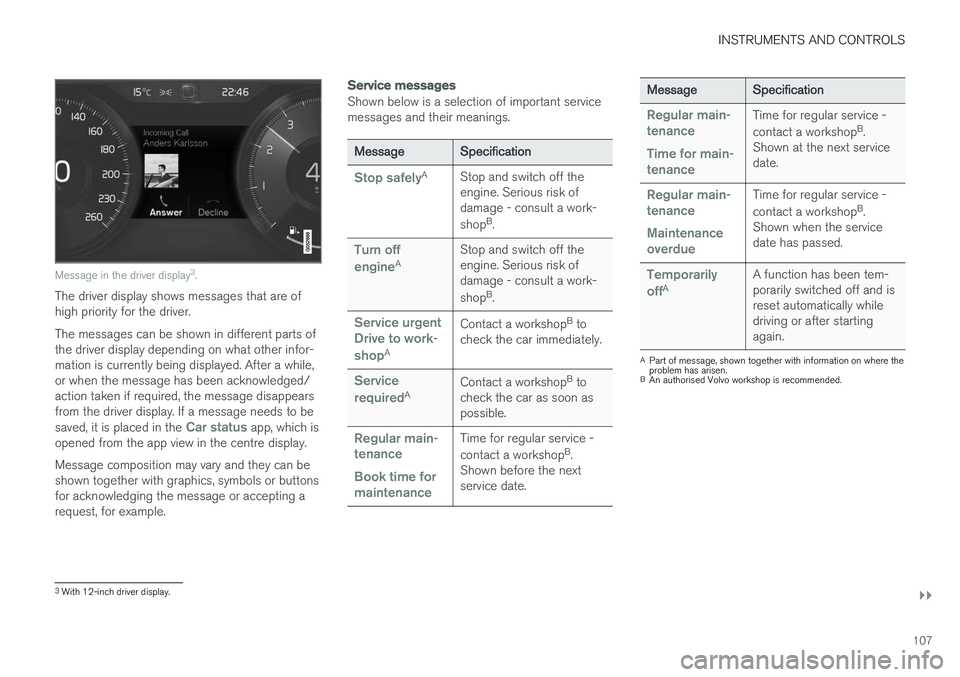
Message in the driver display3
.
The driver display shows messages that are of high priority for the driver. The messages can be shown in different parts of the driver display depending on what other infor-mation is currently being displayed. After a while,or when the message has been acknowledged/action taken if required, the message disappearsfrom the driver display. If a message needs to be saved, it is placed in the
Car status app, which is
opened from the app view in the centre display. Message composition may vary and they can be shown together with graphics, symbols or buttonsfor acknowledging the message or accepting arequest, for example.
Service messages
Shown below is a selection of important service messages and their meanings.
Message Specification
Stop safelyA
Stop and switch off the engine. Serious risk ofdamage - consult a work- shopB
.
Turn off engineA Stop and switch off the engine. Serious risk ofdamage - consult a work- shop
B
.
Service urgent Drive to work- shop
A Contact a workshop
B
to
check the car immediately.
Service requiredA Contact a workshop
B
to
check the car as soon as possible.
Regular main- tenance Book time for maintenanceTime for regular service - contact a workshop B
.
Shown before the next service date.
Message Specification
Regular main- tenance Time for main- tenanceTime for regular service - contact a workshopB
.
Shown at the next service date.
Regular main- tenance Maintenance overdueTime for regular service - contact a workshop B
.
Shown when the service date has passed.
Temporarily offA A function has been tem- porarily switched off and isreset automatically whiledriving or after startingagain.
A
Part of message, shown together with information on where the problem has arisen.
B An authorised Volvo workshop is recommended.
3With 12-inch driver display.
Page 113 of 594
INSTRUMENTS AND CONTROLS
111
Managing a saved message
In maximised mode, some messages have two buttons available to book service or read theowner's manual. To book service for a saved message:
–In maximised mode for the message, pressRequest appoint.Call to make Appointment6 for help in booking service.
> With
Request appoint.: TheAppointments tab opens in the app and
creates a request to book service and repair work. With
Call to make Appointment: The
phone app is initiated and calls a service centre to book service and repair work.
To read the owner's manual for a saved mes-sage:
–In maximised mode for the message, pressOwner's manual to read about the mes-
sage in the owner's manual.
> The owner's manual opens in the centre display and shows information linked to the message.
Saved messages in the app are deleted automat-ically each time the engine is started.
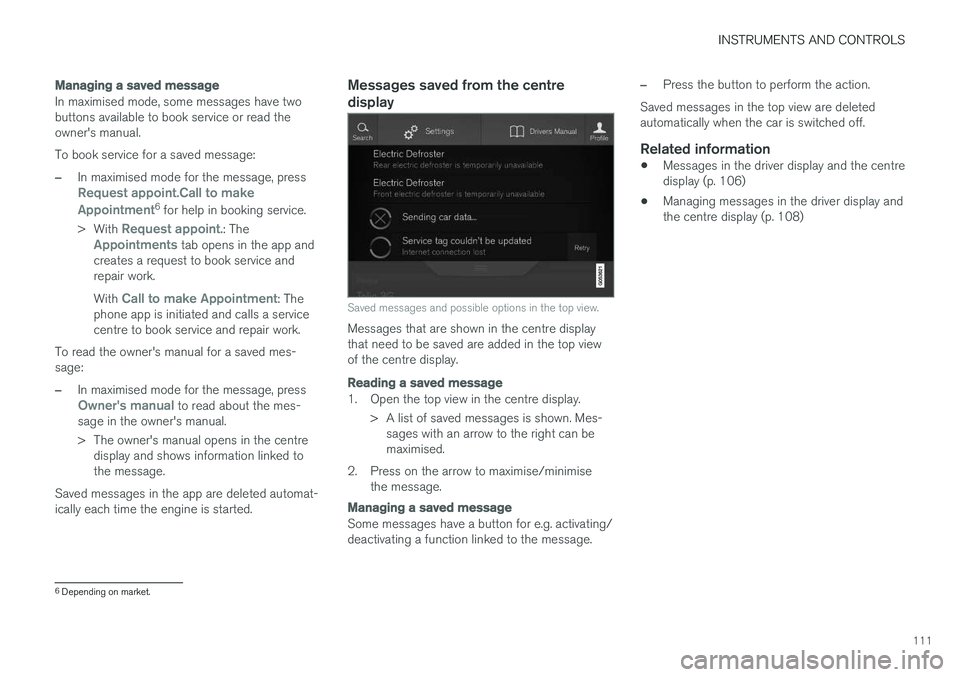
Messages saved from the centre display
Saved messages and possible options in the top view.
Messages that are shown in the centre display that need to be saved are added in the top viewof the centre display.
Reading a saved message
1. Open the top view in the centre display. > A list of saved messages is shown. Mes-sages with an arrow to the right can be maximised.
2. Press on the arrow to maximise/minimise the message.
Managing a saved message
Some messages have a button for e.g. activating/ deactivating a function linked to the message.
–Press the button to perform the action.
Saved messages in the top view are deleted automatically when the car is switched off.
Related information
• Messages in the driver display and the centredisplay (p. 106)
• Managing messages in the driver display andthe centre display (p. 108)
6
Depending on market.
Page 151 of 594
INSTRUMENTS AND CONTROLS
}}
149
Continuous wipingRaise the stalk switch for the wipers to sweep at normal speed.
Raise the stalk switch further for the wip- ers to sweep at high speed.
IMPORTANT
Before activating the wipers - ensure that the wiper blades are not frozen in, and that anysnow or ice on the windscreen (and rear win-dow) is scraped away.
IMPORTANT
Use plenty of washer fluid when the wipers are cleaning the windscreen. The windscreenmust be wet when the windscreen wipers areoperating.
Related information
•Activating/deactivating the rain sensor (p. 149)
• Windscreen and headlamp washers (p. 150)
• Wiper blades in service position (p. 527)
Activating/deactivating the rain sensor
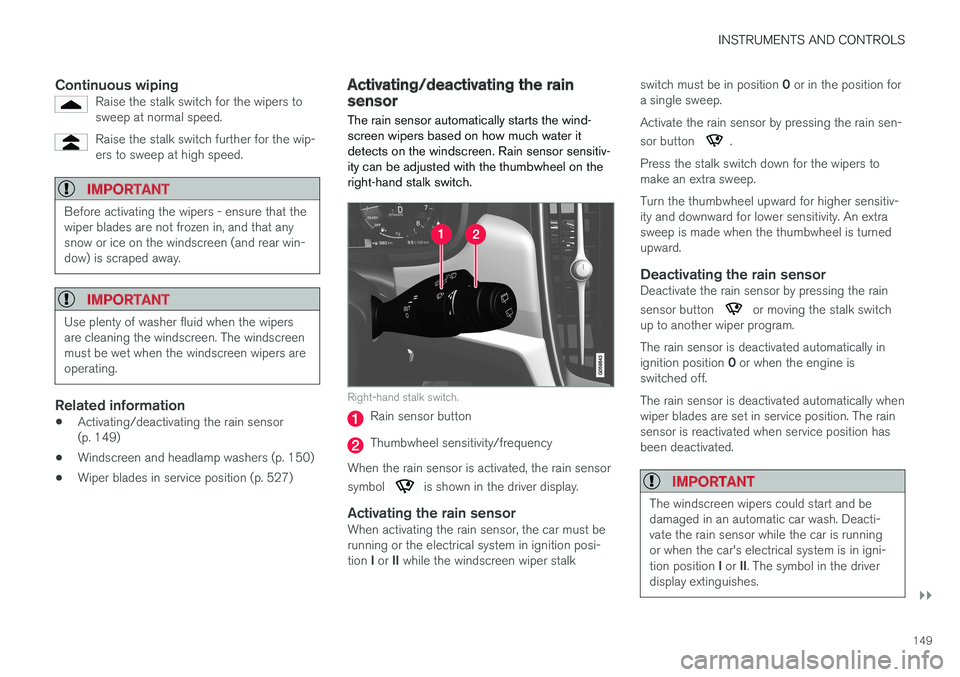
The rain sensor automatically starts the wind- screen wipers based on how much water itdetects on the windscreen. Rain sensor sensitiv-ity can be adjusted with the thumbwheel on theright-hand stalk switch.
Right-hand stalk switch.
Rain sensor button
Thumbwheel sensitivity/frequency
When the rain sensor is activated, the rain sensor symbol
is shown in the driver display.
Activating the rain sensorWhen activating the rain sensor, the car must be running or the electrical system in ignition posi- tion I or II while the windscreen wiper stalk switch must be in position
0 or in the position for
a single sweep. Activate the rain sensor by pressing the rain sen- sor button
.
Press the stalk switch down for the wipers to make an extra sweep. Turn the thumbwheel upward for higher sensitiv- ity and downward for lower sensitivity. An extrasweep is made when the thumbwheel is turnedupward.
Deactivating the rain sensorDeactivate the rain sensor by pressing the rain sensor button
or moving the stalk switch
up to another wiper program. The rain sensor is deactivated automatically in ignition position 0 or when the engine is
switched off. The rain sensor is deactivated automatically when wiper blades are set in service position. The rainsensor is reactivated when service position hasbeen deactivated.
IMPORTANT
The windscreen wipers could start and be damaged in an automatic car wash. Deacti-vate the rain sensor while the car is runningor when the car's electrical system is in igni- tion position I or II. The symbol in the driver
display extinguishes.
Page 152 of 594
||
INSTRUMENTS AND CONTROLS
* Option/accessory.
150
Activating/deactivating the memory function
The memory function for the rain sensor can be activated in such a way that the rain sensor but-ton does not need to be depressed each time thecar is started: 1.
Press
Settings in the top view in the centre
display.
2. Press
My CarWipers.
3. Select
Rain Sensor Memory to activate/
deactivate the memory function.
Related information
• Using windscreen wipers (p. 148)
• Wiper blades in service position (p. 527)
• Rear window wiper and washer (p. 151)
Windscreen and headlamp washers
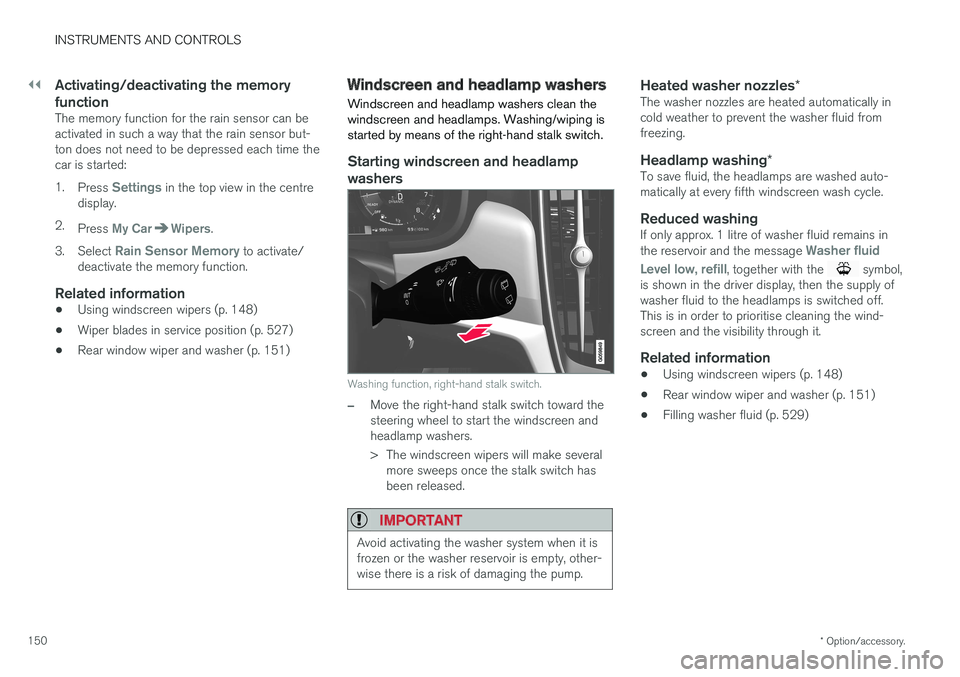
Windscreen and headlamp washers clean the windscreen and headlamps. Washing/wiping isstarted by means of the right-hand stalk switch.
Starting windscreen and headlamp
washers
Washing function, right-hand stalk switch.
–Move the right-hand stalk switch toward the steering wheel to start the windscreen andheadlamp washers.
> The windscreen wipers will make several more sweeps once the stalk switch has been released.
IMPORTANT
Avoid activating the washer system when it is frozen or the washer reservoir is empty, other-wise there is a risk of damaging the pump.
Heated washer nozzles *The washer nozzles are heated automatically in cold weather to prevent the washer fluid fromfreezing.
Headlamp washing*To save fluid, the headlamps are washed auto-matically at every fifth windscreen wash cycle.
Reduced washingIf only approx. 1 litre of washer fluid remains in the reservoir and the message Washer fluid
Level low, refill
, together with the symbol,
is shown in the driver display, then the supply of washer fluid to the headlamps is switched off.This is in order to prioritise cleaning the wind-screen and the visibility through it.
Related information
• Using windscreen wipers (p. 148)
• Rear window wiper and washer (p. 151)
• Filling washer fluid (p. 529)
Page 173 of 594
INSTRUMENTS AND CONTROLS
}}
* Option/accessory.171
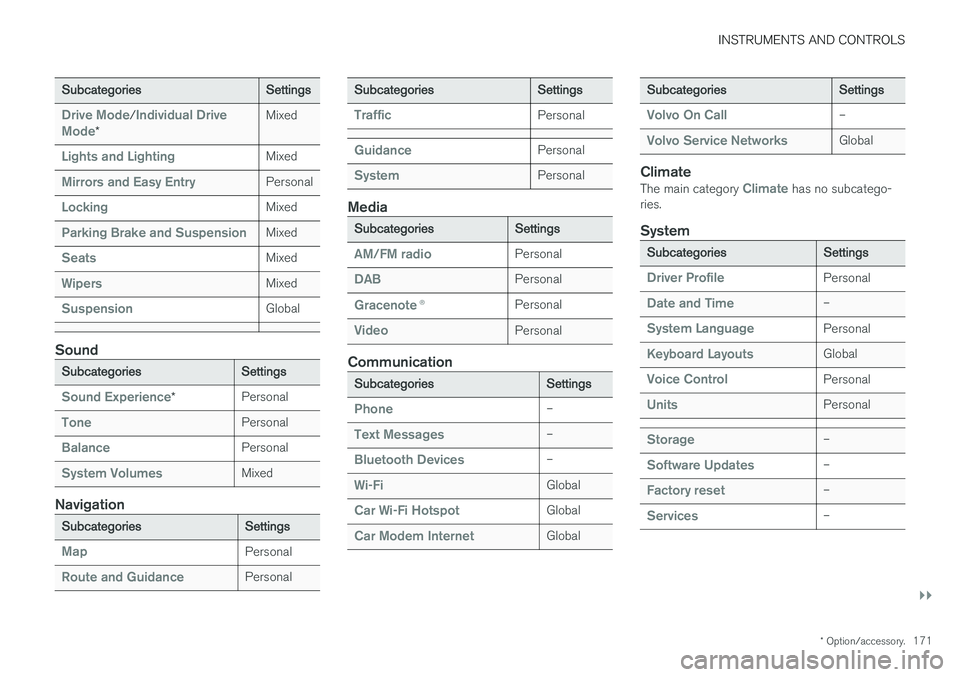
Subcategories Settings
Drive Mode/Individual Drive
Mode* Mixed
Lights and LightingMixed
Mirrors and Easy EntryPersonal
LockingMixed
Parking Brake and SuspensionMixed
SeatsMixed
WipersMixed
SuspensionGlobal
Sound
Subcategories
Settings
Sound Experience*Personal
TonePersonal
BalancePersonal
System VolumesMixed
Navigation
Subcategories
Settings
MapPersonal
Route and GuidancePersonal
SubcategoriesSettings
TrafficPersonal
GuidancePersonal
SystemPersonal
Media
SubcategoriesSettings
AM/FM radioPersonal
DABPersonal
Gracenote®Personal
VideoPersonal
Communication
Subcategories Settings
Phone–
Text Messages–
Bluetooth Devices–
Wi-FiGlobal
Car Wi-Fi HotspotGlobal
Car Modem InternetGlobal
SubcategoriesSettings
Volvo On Call–
Volvo Service NetworksGlobal
ClimateThe main category Climate has no subcatego-
ries.
System
Subcategories Settings
Driver ProfilePersonal
Date and Time–
System LanguagePersonal
Keyboard LayoutsGlobal
Voice ControlPersonal
UnitsPersonal
Storage–
Software Updates–
Factory reset–
Services–
Page 174 of 594
||
INSTRUMENTS AND CONTROLS
172
Related information
•Settings view (p. 169)
• Changing system settings in the settings view (p. 172)
Changing system settings in the settings view The
System category in the settings view col-
lects general settings and information for car systems, such as language and units.
The system settings under Driver Profile, Date
and Time, Keyboard Layouts, Voice Control,Software Updates, Factory reset, Factory
Reset and Services are described in the corres-
ponding section of the owner's manual.
Changing system language1. Press Settings in the top view in the centre
display.
2. Press
SystemSystem Language.
3. Select system language. Languages that support voice recognition have a voice recog- nition symbol.
> The language in the driver display, centredisplay and head-up display is changed.
Changing system units
Changing length and volume units
1. Press Settings in the top view in the centre
display.
2. Press
SystemUnitsUnits of
Measurement. 3. Select from the following unit standards:
•
Metric - kilometres, litres and degrees
Celsius.
•
Imperial - miles, gallons and degrees
Celsius.
•
US - miles, gallons and degrees Fahren-
heit.
> The units in the driver display, centre dis- play and head-up display are changed.
See storage information1. Press Settings in the top view in the centre
display.
2. Press
SystemStorage.
> Storage information for the car's hard disk is shown, including total capacity, available capacity and how much space installedapplications are using.
See the car's vehicle identification number
1. Press Settings in the top view in the centre
display.
2. Press
SystemVehicle Identification
Number.
> The car's vehicle identification number (VIN 37
) is shown.
37 Vehicle Identification Number.
Page 175 of 594
INSTRUMENTS AND CONTROLS
173
Related information
•Categories in the settings view (p. 170)
• Driver profiles (p. 174)
• Clock (p. 99)
• Using the keyboard in the centre display (p. 49)
• Settings for voice recognition (p. 117)
• System updates (p. 510)
• Resetting settings in the settings view(p. 173)
• Book service and repair (p. 506)
Resetting settings in the settings view
It is possible to reset all modified settings in the settings view to their default values at once.
Types of resetsThere are three different types of resets for set- tings in the settings view:
•
Factory Reset - clears all data and media
and resets all settings to their default values.
•
Reset Car Settings - resets global settings
to their default values.
•
Reset Personal Settings - clears personal
data and resets personal settings to their default values.
Resetting settings
NOTE
Factory reset is only possible when the car
is stationary.
1. Press Settings in the top view in the centre
display.
2. Press
SystemFactory reset.
3. Select the required reset type. > A pop-up window is shown. 4.
Press
OK to confirm the reset.
For
Reset Personal Settings, the reset
must be confirmed by pressing Reset for
the active profile or Reset for all profiles.
> Selected settings are reset.
Related information
• Changing system settings in the settings view (p. 172)
• Driver profiles (p. 174)
• Resetting user data for change of ownership(p. 179)