service VOLVO V90 2017 Owner's Manual
[x] Cancel search | Manufacturer: VOLVO, Model Year: 2017, Model line: V90, Model: VOLVO V90 2017Pages: 594, PDF Size: 15.07 MB
Page 181 of 594
INSTRUMENTS AND CONTROLS
* Option/accessory.179
Resetting user data for change of ownership
In the event of a change of ownership, user data and system settings should be restored to fac-tory settings.
The settings in the car can be reset at different levels. Restore all user data and system settingsto the original factory settings in the event of achange of ownership. In the event of a change ofownership it is also important to change the owner of the Volvo On Call * service.
Related information
• Resetting settings in the settings view (p. 173)
• Volvo ID (p. 23)
Page 187 of 594
CLIMATE CONTROL
}}
* Option/accessory.185
Passenger compartment filter All air entering the car's passenger compartment is cleaned with a filter.
Replacing the passenger compartment
filter
To maintain high climate system performance, the filter must be changed at regular intervals.Follow the Volvo Service Programme for the rec-ommended replacement intervals. If the car isused in a severely contaminated environment, itmay be necessary to replace the filter more often.
NOTE
There are different types of passenger com- partment filter. Make sure that the correct fil-ter is fitted.
Related information
• Air quality (p. 184)
• Clean Zone Interior Package
* (p. 185)
• Interior Air Quality System
* (p. 185)
• Volvo service programme (p. 506)
Clean Zone Interior Package
*
Clean Zone Interior Package (CZIP) comprises a series of modifications that keep the passen-ger compartment even clearer from allergy andasthma-inducing substances.
The following is included:
• An enhanced fan function that means that the fan starts when the car is unlocked withthe remote control key. The fan fills the pas-senger compartment with fresh air. The func-tion starts when required and is disengagedautomatically after a time or when one of thepassenger compartment doors is opened.The amount of time the fan runs is reducedgradually due to reduced need up until thecar is 4 years old.
• The fully automatic air quality system InteriorAir Quality System (IAQS).
Related information
•
Air quality (p. 184)
• Passenger compartment filter (p. 185)
• Interior Air Quality System
* (p. 185)
Interior Air Quality System *
Interior Air Quality System (IAQS) is a fully auto- matic air quality system that separates gasesand particles to reduce the levels of odours andcontaminants in the passenger compartment.
IAQS is a part of the Clean Zone Interior Package (CZIP) and cleans the air in the passen-ger compartment from contaminants such as par-ticles, hydrocarbons, nitrous oxides and ground-level ozone. If the air quality sensor senses that the outside air is contaminated, the air intake is closed andair recirculation is activated.
NOTE
The air quality sensor must always be enabled to ensure the best air in the passenger com-partment. In a cold climate recirculation is limited so as to prevent misting. In the event of misting, the defrost functions for windscreen, side windows and rear win-dow should be used.
Activating/deactivating the air quality sensor
It is possible to set whether the air quality sensor should be activated/deactivated.
Page 214 of 594
CLIMATE CONTROL
* Option/accessory.
212
Symbols and messages for parking climate control *
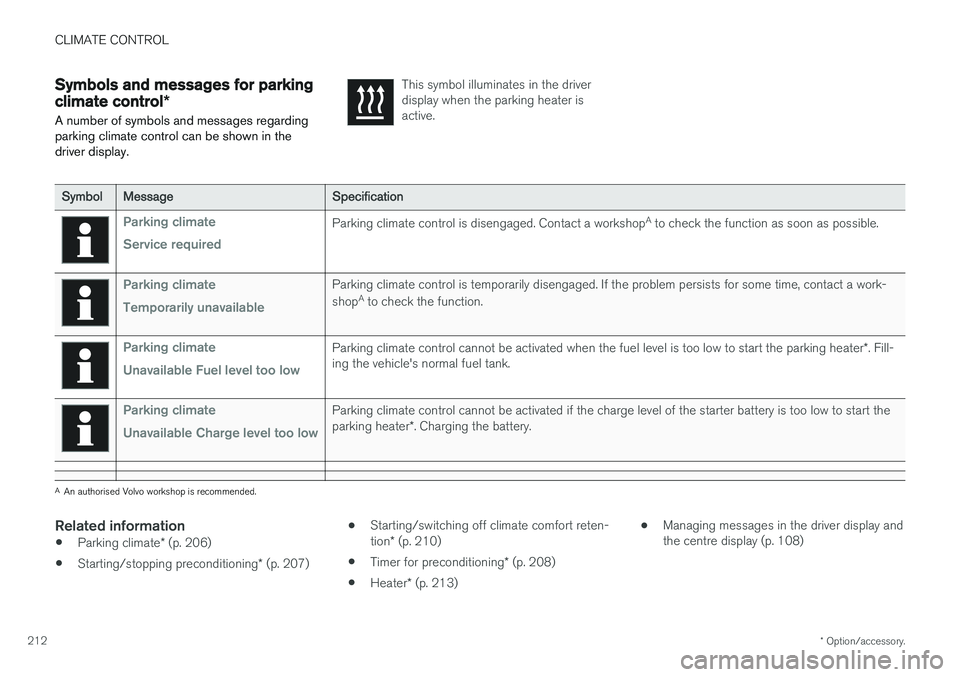
A number of symbols and messages regarding parking climate control can be shown in thedriver display.This symbol illuminates in the driver display when the parking heater isactive.
Symbol Message Specification
Parking climate Service requiredParking climate control is disengaged. Contact a workshop A
to check the function as soon as possible.
Parking climate Temporarily unavailableParking climate control is temporarily disengaged. If the problem persists for some time, contact a work- shop A
to check the function.
Parking climate Unavailable Fuel level too lowParking climate control cannot be activated when the fuel level is too low to start the parking heater *. Fill-
ing the vehicle's normal fuel tank.
Parking climate Unavailable Charge level too lowParking climate control cannot be activated if the charge level of the starter battery is too low to start the parking heater *. Charging the battery.
A
An authorised Volvo workshop is recommended.
Related information
• Parking climate
* (p. 206)
• Starting/stopping preconditioning
* (p. 207) •
Starting/switching off climate comfort reten- tion
* (p. 210)
• Timer for preconditioning
* (p. 208)
• Heater
* (p. 213) •
Managing messages in the driver display and the centre display (p. 108)
Page 227 of 594
LOADING AND STORAGE
}}
* Option/accessory.225
3. Refit the ashtray and allow it to slide down in
the tracks on the sides.
4. Carefully press the two short sides of the ashtray.
> The catch that holds the ashtray in placereattaches.
Related information
• Passenger compartment interior (p. 218)
• Tunnel console (p. 219)
• Using the cigarette lighter
* (p. 224)
Using the glovebox
The glovebox is located on the passenger side.
The printed owner's manual and maps can be kept in the glovebox, for example. There is also apen holder on the inside of the lid.
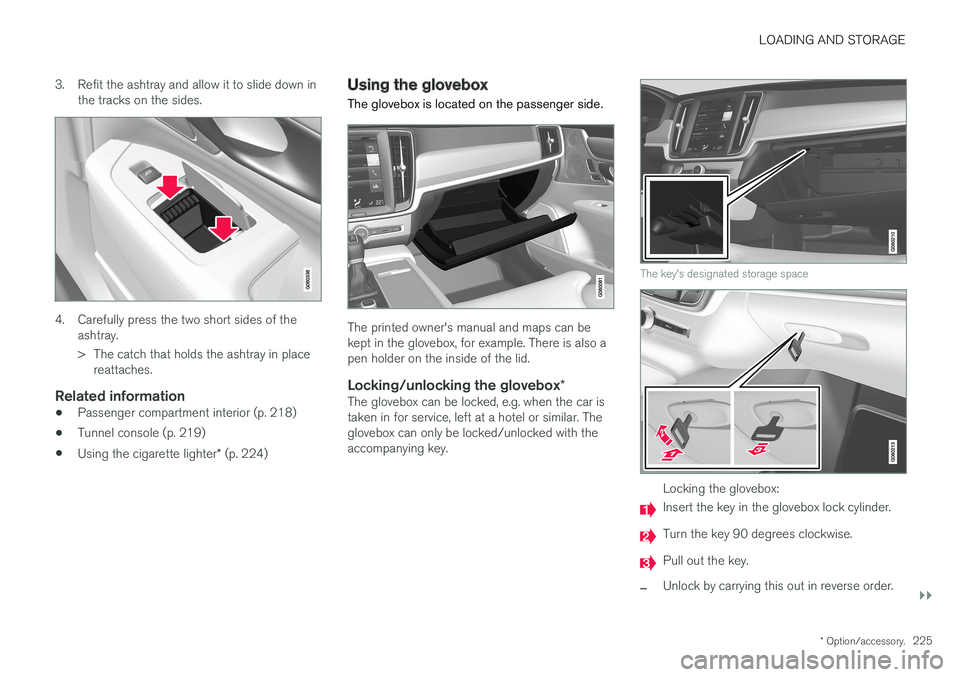
Locking/unlocking the glovebox *The glovebox can be locked, e.g. when the car istaken in for service, left at a hotel or similar. Theglovebox can only be locked/unlocked with theaccompanying key.
The key's designated storage space
Locking the glovebox:
Insert the key in the glovebox lock cylinder.
Turn the key 90 degrees clockwise.
Pull out the key.
–Unlock by carrying this out in reverse order.
Page 251 of 594
LOCKS AND ALARM
}}
* Option/accessory.249
Related information
•Remote control key (p. 236)
• Power operated tailgate
* (p. 253)
• Opening/closing the tailgate with foot move- ment
* (p. 256)
Using private locking
The tailgate can be locked with the private lock- ing function when the car is taken in for service,left at a hotel or similar.
NOTE
The car needs to be in ignition mode I as a
minimum for the private locking function to be activated.
Function button for private locking. Depending on the cur- rent status of the lock,
Private
locking unlocked or Private
locking locked is shown.
Enter the security code before using for the first time
A security code needs to be selected during the first time the function is used. It can then be usedto deactivate private locking if the selected PINcode has been lost or forgotten. The securitycode acts as a PUK code for all subsequent PINcodes set for the private locking function. Save the security code in a safe place. 1. The security code can be activated from the
function view or the top view in the centre display.
• Tap on the
Private Locking button in the
function view.
Or:
• Tap on
Settings in the top view. Tap on
My CarLocking and select Private
Locking.
> A pop-up window is shown.
2. Enter the desired security code. > The security code is saved. The privatelocking function is now ready to be acti- vated.
If the system has been reset then the above pro-cedure needs to be repeated.
Activate private locking1. The function can be activated from the func- tion view or the top view in the centre display.
• Tap on the
Private Locking button in the
function view.
Or:
• Tap on
Settings in the top view. Tap on
My CarLocking and select Private
Locking.
> A pop-up window is shown.
Page 259 of 594
LOCKS AND ALARM
}}
* Option/accessory.257
NOTE
There is a risk of reduced function, or no function, if the rear bumper is loaded withlarge amounts of ice, snow, dirt or similar. Forthis reason, make sure you keep it clean.
NOTE
Pay attention to the possibility that the sys- tem may be activated in a car wash or similarif the remote key is within range.
Related information
•Locking/unlocking the tailgate (p. 247)
• Power operated tailgate
* (p. 253)
• Remote control key range (p. 238)
Replacing the battery in the remote control key
The battery in the remote control key needs to be replaced when it has become discharged.
NOTE
All batteries have a limited service life and must eventually be replaced (does not applyto Key Tag). The service life of the battery var-ies depending on how often the vehicle/keyis used.
The battery for the remote control key should be replaced if:
the information symbol illuminates and the message
Car key battery low
See Owner's manual is shown in the
driver display
and/or
• the locks repeatedly do not react to signals from the remote control key within 20 metresfrom the car.
NOTE
Always try moving closer to the car and mak- ing another unlock attempt.
The battery in the button-less key 16
(Key Tag)
cannot be replaced - a new key can be ordered from an authorised Volvo workshop.
IMPORTANT
A discharged Key Tag must be handed over to an authorised Volvo workshop. The keymust be deleted from the car since it is stillpossible to use it to start the car via back-upstart.
16 This key is supplied with a car equipped with the keyless locking/entry option (Passive Entry *).
Page 262 of 594
||
LOCKS AND ALARM
* Option/accessory.
260
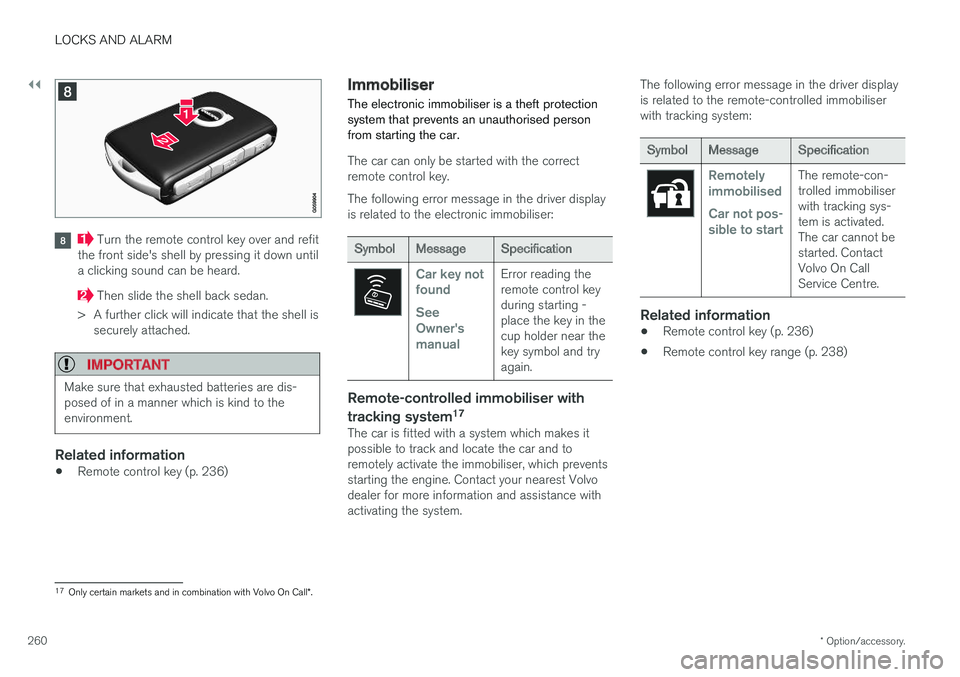
Turn the remote control key over and refit
the front side's shell by pressing it down until a clicking sound can be heard.
Then slide the shell back sedan.
> A further click will indicate that the shell is securely attached.
IMPORTANT
Make sure that exhausted batteries are dis- posed of in a manner which is kind to theenvironment.
Related information
• Remote control key (p. 236)
Immobiliser
The electronic immobiliser is a theft protection system that prevents an unauthorised personfrom starting the car.
The car can only be started with the correct remote control key. The following error message in the driver display is related to the electronic immobiliser:
Symbol Message Specification
Car key not found See Owner'smanualError reading the remote control keyduring starting -place the key in thecup holder near thekey symbol and tryagain.
Remote-controlled immobiliser with tracking system 17
The car is fitted with a system which makes it possible to track and locate the car and toremotely activate the immobiliser, which preventsstarting the engine. Contact your nearest Volvodealer for more information and assistance withactivating the system. The following error message in the driver displayis related to the remote-controlled immobiliserwith tracking system:
Symbol
Message Specification
Remotely immobilised Car not pos- sible to startThe remote-con- trolled immobiliserwith tracking sys-tem is activated.The car cannot bestarted. ContactVolvo On CallService Centre.
Related information
•Remote control key (p. 236)
• Remote control key range (p. 238)
17
Only certain markets and in combination with Volvo On Call *.
Page 264 of 594
||
LOCKS AND ALARM
* Option/accessory.
262
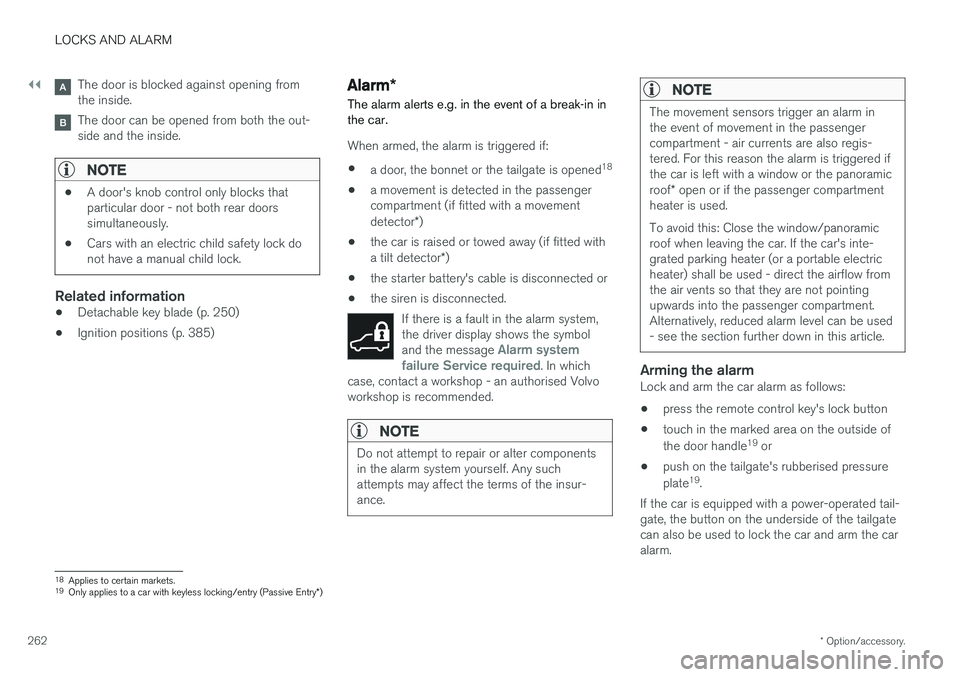
The door is blocked against opening from the inside.
The door can be opened from both the out- side and the inside.
NOTE
• A door's knob control only blocks that particular door - not both rear doorssimultaneously.
• Cars with an electric child safety lock donot have a manual child lock.
Related information
• Detachable key blade (p. 250)
• Ignition positions (p. 385)
Alarm
*
The alarm alerts e.g. in the event of a break-in in the car.
When armed, the alarm is triggered if:
• a door, the bonnet or the tailgate is opened 18
• a movement is detected in the passenger compartment (if fitted with a movement detector
*)
• the car is raised or towed away (if fitted witha tilt detector
*)
• the starter battery's cable is disconnected or
• the siren is disconnected.
If there is a fault in the alarm system, the driver display shows the symbol and the message
Alarm system
failure Service required. In which
case, contact a workshop - an authorised Volvo workshop is recommended.
NOTE
Do not attempt to repair or alter components in the alarm system yourself. Any suchattempts may affect the terms of the insur-ance.
NOTE
The movement sensors trigger an alarm in the event of movement in the passengercompartment - air currents are also regis-tered. For this reason the alarm is triggered ifthe car is left with a window or the panoramic roof * open or if the passenger compartment
heater is used. To avoid this: Close the window/panoramic roof when leaving the car. If the car's inte-grated parking heater (or a portable electricheater) shall be used - direct the airflow fromthe air vents so that they are not pointingupwards into the passenger compartment.Alternatively, reduced alarm level can be used- see the section further down in this article.
Arming the alarmLock and arm the car alarm as follows:
• press the remote control key's lock button
• touch in the marked area on the outside of the door handle 19
or
• push on the tailgate's rubberised pressureplate 19
.
If the car is equipped with a power-operated tail- gate, the button on the underside of the tailgatecan also be used to lock the car and arm the caralarm.
18 Applies to certain markets.
19 Only applies to a car with keyless locking/entry (Passive Entry *)
Page 277 of 594
DRIVER SUPPORT
}}
275
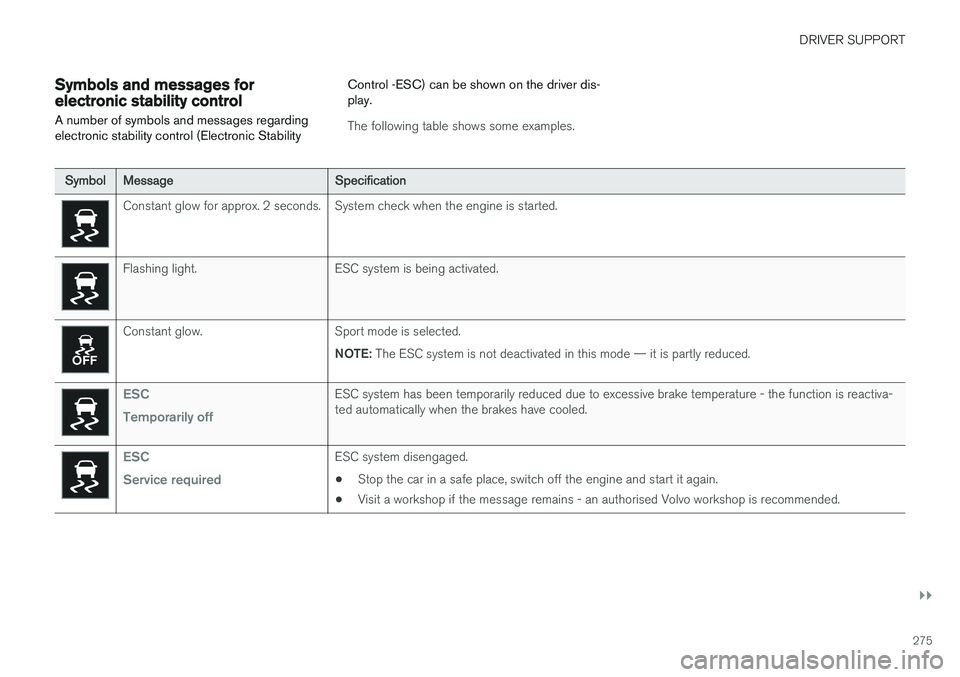
Symbols and messages for electronic stability control
A number of symbols and messages regarding electronic stability control (Electronic Stability Control -ESC) can be shown on the driver dis-play.
The following table shows some examples.
Symbol
Message Specification
Constant glow for approx. 2 seconds. System check when the engine is started.
Flashing light. ESC system is being activated.
Constant glow. Sport mode is selected.
NOTE: The ESC system is not deactivated in this mode — it is partly reduced.
ESC Temporarily offESC system has been temporarily reduced due to excessive brake temperature - the function is reactiva- ted automatically when the brakes have cooled.
ESC Service requiredESC system disengaged.
• Stop the car in a safe place, switch off the engine and start it again.
• Visit a workshop if the message remains - an authorised Volvo workshop is recommended.
Page 305 of 594
DRIVER SUPPORT
* Option/accessory.303
SymbolMessage Specification
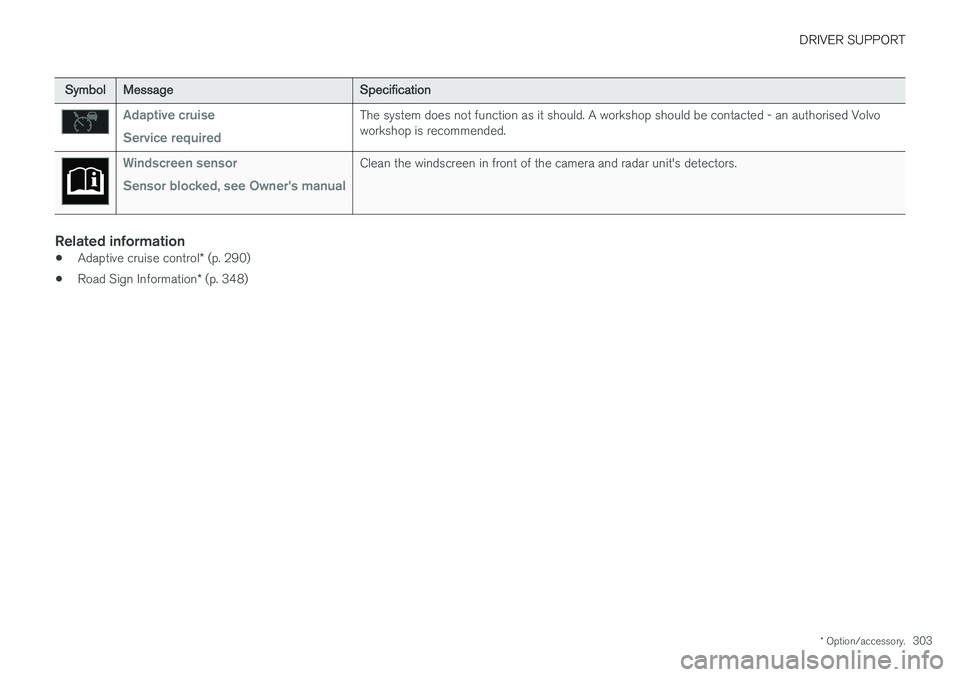
Adaptive cruise Service requiredThe system does not function as it should. A workshop should be contacted - an authorised Volvo workshop is recommended.
Windscreen sensor Sensor blocked, see Owner's manualClean the windscreen in front of the camera and radar unit's detectors.
Related information
•Adaptive cruise control
* (p. 290)
• Road Sign Information
* (p. 348)