service VOLVO V90 2017 Workshop Manual
[x] Cancel search | Manufacturer: VOLVO, Model Year: 2017, Model line: V90, Model: VOLVO V90 2017Pages: 594, PDF Size: 15.07 MB
Page 467 of 594
AUDIO AND MEDIA
}}
* Option/accessory.465
When a phone is connected to the car, it is saved for future use. When the maximum number ofsaved phones (50) is reached, the first con-nected phones are deleted. To show the list ofsaved networks or manually delete saved net- works, press
SettingsWi-FiSaved
networks.
For network connection requirements, see the section “Technology and security for Wi-Fi”.
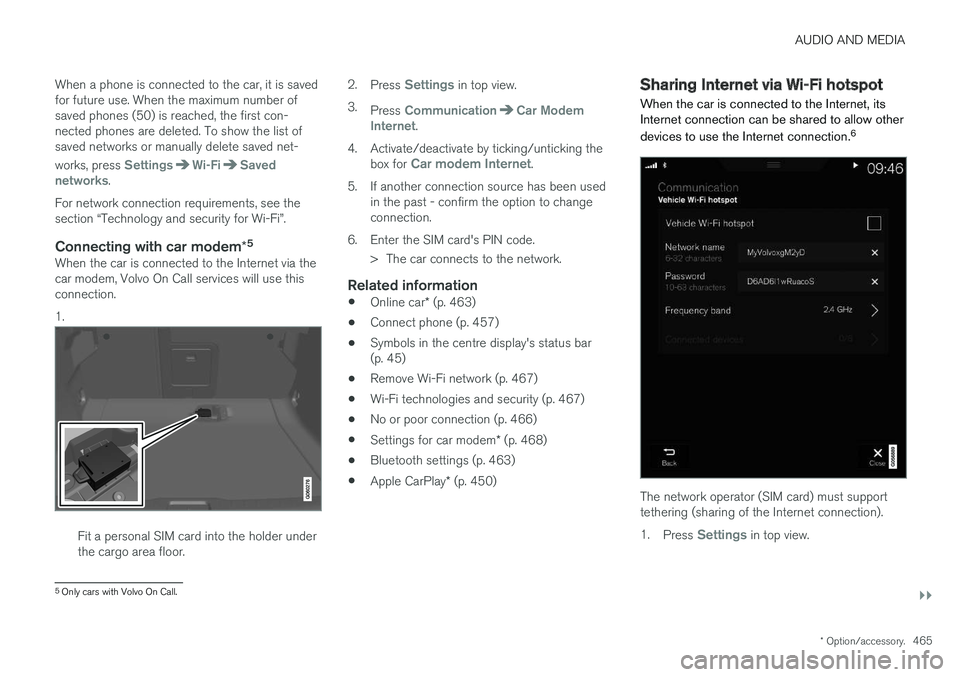
Connecting with car modem *5When the car is connected to the Internet via thecar modem, Volvo On Call services will use thisconnection. 1.
Fit a personal SIM card into the holder under the cargo area floor. 2.
Press
Settings in top view.
3. Press
CommunicationCar Modem
Internet.
4. Activate/deactivate by ticking/unticking the box for
Car modem Internet.
5. If another connection source has been used in the past - confirm the option to change connection.
6. Enter the SIM card's PIN code. > The car connects to the network.
Related information
• Online car
* (p. 463)
• Connect phone (p. 457)
• Symbols in the centre display's status bar(p. 45)
• Remove Wi-Fi network (p. 467)
• Wi-Fi technologies and security (p. 467)
• No or poor connection (p. 466)
• Settings for car modem
* (p. 468)
• Bluetooth settings (p. 463)
• Apple CarPlay
* (p. 450)
Sharing Internet via Wi-Fi hotspot
When the car is connected to the Internet, its Internet connection can be shared to allow other devices to use the Internet connection. 6
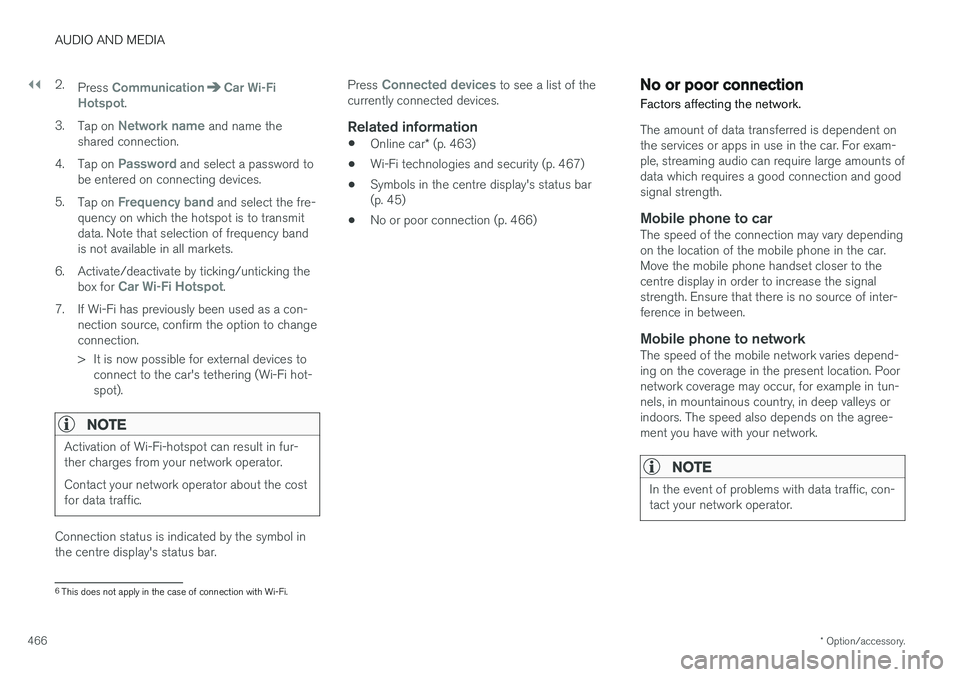
The network operator (SIM card) must support tethering (sharing of the Internet connection). 1.
Press
Settings in top view.
5
Only cars with Volvo On Call.
Page 468 of 594
||
AUDIO AND MEDIA
* Option/accessory.
466 2.
Press
CommunicationCar Wi-Fi
Hotspot.
3. Tap on
Network name and name the
shared connection.
4. Tap on
Password and select a password to
be entered on connecting devices.
5. Tap on
Frequency band and select the fre-
quency on which the hotspot is to transmit data. Note that selection of frequency bandis not available in all markets.
6. Activate/deactivate by ticking/unticking the box for
Car Wi-Fi Hotspot.
7. If Wi-Fi has previously been used as a con- nection source, confirm the option to change connection.
> It is now possible for external devices toconnect to the car's tethering (Wi-Fi hot- spot).
NOTE
Activation of Wi-Fi-hotspot can result in fur- ther charges from your network operator. Contact your network operator about the cost for data traffic.
Connection status is indicated by the symbol in the centre display's status bar. Press
Connected devices to see a list of the
currently connected devices.
Related information
• Online car
* (p. 463)
• Wi-Fi technologies and security (p. 467)
• Symbols in the centre display's status bar (p. 45)
• No or poor connection (p. 466)
No or poor connection
Factors affecting the network.
The amount of data transferred is dependent on the services or apps in use in the car. For exam-ple, streaming audio can require large amounts ofdata which requires a good connection and goodsignal strength.
Mobile phone to carThe speed of the connection may vary dependingon the location of the mobile phone in the car.Move the mobile phone handset closer to thecentre display in order to increase the signalstrength. Ensure that there is no source of inter-ference in between.
Mobile phone to networkThe speed of the mobile network varies depend-ing on the coverage in the present location. Poornetwork coverage may occur, for example in tun-nels, in mountainous country, in deep valleys orindoors. The speed also depends on the agree-ment you have with your network.
NOTE
In the event of problems with data traffic, con- tact your network operator.
6 This does not apply in the case of connection with Wi-Fi.
Page 470 of 594
AUDIO AND MEDIA
* Option/accessory.
468
Settings for car modem *8
The car is equipped with a modem that can be used to connect the car to the Internet. It is alsopossible to share the Internet connection viaWi-Fi.
1. Press Settings in top view.
2. Press
CommunicationCar Modem
Internet and select settings:
•
Car modem Internet - select whether to
use the car modem as Internet connection.
•
Data usage - tap on Reset resets the
counters for received and sent data volume.
•
Network Select network operator
- automatic or
manual selection of network operator.
Data roaming - if the box is ticked, the car
modem will attempt to connect to the Inter- net when the car is abroad and outside itshome network. Note that this may result inheavy costs. Check your roaming agreementfor data traffic abroad with your network pro-vider in your home country.
•
SIM card PIN Change PIN
- a maximum of 4 digits can be
entered.
Disable PIN - select whether the PIN code
shall be required for access to the SIM card. •
Send request code — used e.g. to top up
or check the balance on a prepaid card. Functionality depends on the provider.
Related information
• Online car
* (p. 463)
• Sharing Internet via Wi-Fi hotspot (p. 465)
Downloading, updating and uninstalling apps
When the car is online there is the option to download new apps, keep existing apps upda-ted or uninstall apps.
NOTE
Data download may affect other services that transmit data, e.g. Internet radio. If the effecton other services is experienced as disruptivethen the download can be interrupted. Alter-natively, it may be appropriate to switch off orinterrupt other services.
The apps are managed viaDownload Centre in applica-
tion view. To be able to download, update or uninstall apps, the car mustbe online.
Downloading an app
1. Open the app Download Centre.
2. Select
New apps in order to open a list of
apps that are available but not installed in the car.
8 Only cars with Volvo On Call.
Page 473 of 594
AUDIO AND MEDIA
}}
471
Parts of the content are copyright
© of
Gracenote or its suppliers. Gracenote,Gracenote logo and logotype, "Powered by Gracenote" and Gracenote MusicIDare either registered trademarks or trademarks ofGracenote, Inc. in the USA and/or other coun-tries.
Gracenote ®
End User License Agreement
This program or device contains software from Gracenote, Inc. of Emeryville, California, USA("Gracenote"). The software from Gracenote("Gracenote software") activates this program toperform disc and/or file identification and obtainmusic-related information, including name, artist,track and title ("Gracenote data") from onlineservers or embedded databases (together called"Gracenote servers") and in order to performother actions. You may only use Gracenote datain accordance with the intended end-user func-tions for this program or this device. You agree to only use Gracenote data, Gracenote software and Gracenote servers for your ownpersonal non-commercial use. You agree not toassign, copy, transfer or transmit this Gracenotesoftware or any Gracenote data to any third party.YOU AGREE NOT TO USE OR EXPLOITGRACENOTE DATA, GRACENOTE SOFTWAREOR GRACENOTE SERVERS, EXCEPT ASEXPRESSLY PERMITTED IN THIS AGREEMENT. You agree that your non-exclusive right to use Gracenote data, Gracenote software and Grace- note servers will be terminated if you violatethese restrictions. If your license is terminatedyou agree to cease all use of Gracenote data,Gracenote software and Gracenote servers.Gracenote holds exclusive rights to all Gracenotedata, all Gracenote software and all Gracenoteservers, including all ownership rights. Gracenotewill under no circumstances have any obligationto pay you for any information you provide. Youagree that Gracenote, Inc. may enforce the com-pany's rights under this agreement against youdirectly in its own name. The Gracenote service uses a unique identifier to track enquiries for statistical purposes. The pur-pose of a randomly assigned numeric identifier isto enable the Gracenote service to count enqui-ries without knowing anything about who you are.Additional information is available on the webpage for Gracenote's privacy policy for the Grace-note service. The Gracenote software and everything included in Gracenote data are licensed to you "as is".Gracenote provides no undertakings or warran-ties, express or implied, as to the accuracy of theGracenote data contained in the Gracenote serv-ers. Gracenote reserves the right to delete datafrom the Gracenote servers or to change datacategories for any reason that Gracenote deemssufficient. No warranty is provided that the Grace-note software or Gracenote servers are fault-freeor that the Gracenote software or Gracenoteservers will operate without interruption. Grace-
note has no obligation to provide you with new,improved or additional data types or categoriesthat Gracenote may provide in the future, and thecompany reserves the right to discontinue itsservices at any time. GRACENOTE DISCLAIMS ALL WARRANTIES, EITHER EXPRESS OR IMPLIED, INCLUDING,BUT NOT LIMITED TO, THE IMPLIED WARRAN-TIES OF MERCHANTABILITY, FITNESS FOR APARTICULAR PURPOSE, TITLE AND NON-INFRINGEMENT OF INTELLECTUAL PROP-ERTY RIGHTS. GRACENOTE DOES NOT GUAR-ANTEE THE RESULTS OBTAINED THROUGHYOUR USE OF THE GRACENOTE SOFTWAREOR A GRACENOTE SERVER. GRACENOTEWILL IN NO EVENT BE LIABLE FOR ANY CON-SEQUENTIAL DAMAGE OR FOR ANY LOSTPROFITS OR REVENUES.
©
Gracenote, Inc. 2009
Sensus software
This software uses parts of sources from clib2 and Prex Embedded Real-time OS - Source(Copyright (c) 1982, 1986, 1991, 1993, 1994),and Quercus Robusta (Copyright (c) 1990,1993), The Regents of the University ofCalifornia. All or some portions are derived frommaterial licensed to the University of California byAmerican Telephone and Telegraph Co. or UnixSystem Laboratories, Inc. and are reproducedherein with the permission of UNIX SystemLaboratories, Inc. Redistribution and use in
Page 474 of 594
||
AUDIO AND MEDIA
472source and binary forms, with or without modification, are permitted provided that thefollowing conditions are met: Redistributions ofsource code must retain the above copyrightnotice, this list of conditions and the followingdisclaimer. Redistributions in binary form mustreproduce the above copyright notice, this list ofconditions and the following disclaimer in thedocumentation and/or other materials providedwith the distribution. Neither the name of the
THIS SOFTWARE, EVEN IF ADVISED OF THEPOSSIBILITY OF SUCH DAMAGE. This software is based in part on the work of the Independent JPEG Group. This software uses parts of sources from "libtess". The Original Code is: OpenGL SampleImplementation, Version 1.2.1, released January26, 2000, developed by Silicon Graphics, Inc. TheOriginal Code is Copyright (c) 1991-2000 SiliconGraphics, Inc. Copyright in any portions createdby third parties is as indicated elsewhere herein.All Rights Reserved. Copyright (C) [1991-2000]Silicon Graphics, Inc. All Rights Reserved.Permission is hereby granted, free of charge, toany person obtaining a copy of this software andassociated documentation files (the "Software"),to deal in the Software without restriction,including without limitation the rights to use,copy, modify, merge, publish, distribute,sublicense, and/or sell copies of the Software,and to permit persons to whom the Software isfurnished to do so, subject to the followingconditions: The above copyright notice includingthe dates of first publication and either thispermission notice or a reference to http://oss.sgi.com/projects/FreeB/ shall be included inall copies or substantial portions of the Software.THE SOFTWARE IS PROVIDED "AS IS",WITHOUT WARRANTY OF ANY KIND,EXPRESS OR IMPLIED, INCLUDING BUT NOTLIMITED TO THE WARRANTIES OFMERCHANTABILITY, FITNESS FOR A
PARTICULAR PURPOSE ANDNONINFRINGEMENT. IN NO EVENT SHALLSILICON GRAPHICS, INC. BE LIABLE FOR ANYCLAIM, DAMAGES OR OTHER LIABILITY,WHETHER IN AN ACTION OF CONTRACT,TORT OR OTHERWISE, ARISING FROM, OUTOF OR IN CONNECTION WITH THE SOFTWAREOR THE USE OR OTHER DEALINGS IN THESOFTWARE. Except as contained in this notice,the name of Silicon Graphics, Inc. shall not beused in advertising or otherwise to promote thesale, use or other dealings in this Softwarewithout prior written authorization from SiliconGraphics, Inc. This software is based in parts on the work of the FreeType Team. This software uses parts of SSLeay Library: Copyright (C) 1995-1998 Eric Young([email protected]). All rights reserved
Linux software
This product contains software licensed underGNU General Public License (GPL) or GNULesser General Public License (LGPL), etc. You have the right of acquisition, modification, and distribution of the source code of the GPL/LGPL software. You may download Source Code from the following website at no charge: http://www.embedded-carmultimedia.jp/linux/oss/download/TVM_8351_013
Page 475 of 594
AUDIO AND MEDIA
}}
473
The website provides the Source Code "As Is" and without warranty of any kind. By downloading Source Code, you expressly assume all risk and liability associated withdownloading and using the Source Code andcomplying with the user agreements thataccompany each Source Code. Please note that we cannot respond to any inquiries regarding the source code.
camellia:1.2.0Copyright (c) 2006, 2007 NTT (Nippon Telegraph and Telephone Corporation). All rights reserved. Redistribution and use in source and binary forms, with or without modification, are permittedprovided that the following conditions are met:
1. Redistributions of source code must retain
the above copyright notice, this list of conditions and the following disclaimer asthe first lines of this file unmodified.
2. Redistributions in binary form must reproduce the above copyright notice, this listof conditions and the following disclaimer inthe documentation and/or other materialsprovided with the distribution.
THIS SOFTWARE IS PROVIDED BY NTT ``ASIS'' AND ANY EXPRESS OR IMPLIEDWARRANTIES, INCLUDING, BUT NOT LIMITEDTO, THE IMPLIED WARRANTIES OFMERCHANTABILITY AND FITNESS FOR A PARTICULAR PURPOSE ARE DISCLAIMED. INNO EVENT SHALL NTT BE LIABLE FOR ANYDIRECT, INDIRECT, INCIDENTAL, SPECIAL,EXEMPLARY, OR CONSEQUENTIAL DAMAGES(INCLUDING, BUT NOT LIMITED TO,PROCUREMENT OF SUBSTITUTE GOODS ORSERVICES; LOSS OF USE, DATA, OR PROFITS;OR BUSINESS INTERRUPTION) HOWEVERCAUSED AND ON ANY THEORY OF LIABILITY,WHETHER IN CONTRACT, STRICT LIABILITY,OR TORT (INCLUDING NEGLIGENCE OROTHERWISE) ARISING IN ANY WAY OUT OFTHE USE OF THIS SOFTWARE, EVEN IFADVISED OF THE POSSIBILITY OF SUCHDAMAGE.
Unicode: 5.1.0COPYRIGHT AND PERMISSION NOTICE Copyright c 1991-2013 Unicode, Inc. All rights reserved. Distributed under the Terms of Use inhttp://www.unicode.org/copyright.html. Permission is hereby granted, free of charge, to any person obtaining a copy of the Unicode datafiles and any associated documentation (the"Data Files") or Unicode software and anyassociated documentation (the "Software") todeal in the Data Files or Software withoutrestriction, including without limitation the rightsto use, copy, modify, merge, publish, distribute,and/or sell copies of the Data Files or Software,and to permit persons to whom the Data Files orSoftware are furnished to do so, provided that (a)
the above copyright notice(s) and this permissionnotice appear with all copies of the Data Files orSoftware, (b) both the above copyright notice(s)and this permission notice appear in associateddocumentation, and (c) there is clear notice ineach modified Data File or in the Software aswell as in the documentation associated with theData File(s) or Software that the data or softwarehas been modified. THE DATA FILES AND SOFTWARE ARE PROVIDED "AS IS", WITHOUT WARRANTY OFANY KIND, EXPRESS OR IMPLIED, INCLUDINGBUT NOT LIMITED TO THE WARRANTIES OFMERCHANTABILITY, FITNESS FOR APARTICULAR PURPOSE ANDNONINFRINGEMENT OF THIRD PARTYRIGHTS. IN NO EVENT SHALL THECOPYRIGHT HOLDER OR HOLDERSINCLUDED IN THIS NOTICE BE LIABLE FORANY CLAIM, OR ANY SPECIAL INDIRECT ORCONSEQUENTIAL DAMAGES, OR ANYDAMAGES WHATSOEVER RESULTING FROMLOSS OF USE, DATA OR PROFITS, WHETHERIN AN ACTION OF CONTRACT, NEGLIGENCEOR OTHER TORTIOUS ACTION, ARISING OUTOF OR IN CONNECTION WITH THE USE ORPERFORMANCE OF THE DATA FILES ORSOFTWARE. Except as contained in this notice, the name of a copyright holder shall not be used in advertisingor otherwise to promote the sale, use or other
Page 482 of 594
AUDIO AND MEDIA
480
Terms and conditions for services and Customer Privacy Policy
Read the terms and conditions for services and the Customer Privacy Policy atsupport.volvocars.com.
Terms & Conditions for ServicesVolvo is committed to offering you the absolute best services to ensure that it is as safe, comfort-able and pleasant as possible for you to driveyour Volvo. Volvo offers a wide range of services,from assistance in emergency situations to navi-gation in various infotainment services. Read these terms and conditions ("Service Terms and Conditions") carefully before using the serv-ices - support.volvocars.com.
Customer Privacy PolicyThis policy applies for the processing of customerdata and personal data. The purpose of the policyis to provide our existing, previous and prospec-tive customers with a general understanding of: • The circumstances in which we gather and process your personal data.
• The types of personal data we gather.
• The reasons we gather your personal data.
• How we handle your personal data.
This policy can be read in its entirety atsupport.volvocars.com.
Related information
• License agreement for audio and media(p. 470)
• License agreement for the driver display(p. 99)
• Type approval for radar units (p. 323)
Page 486 of 594
WHEELS AND TYRES
484
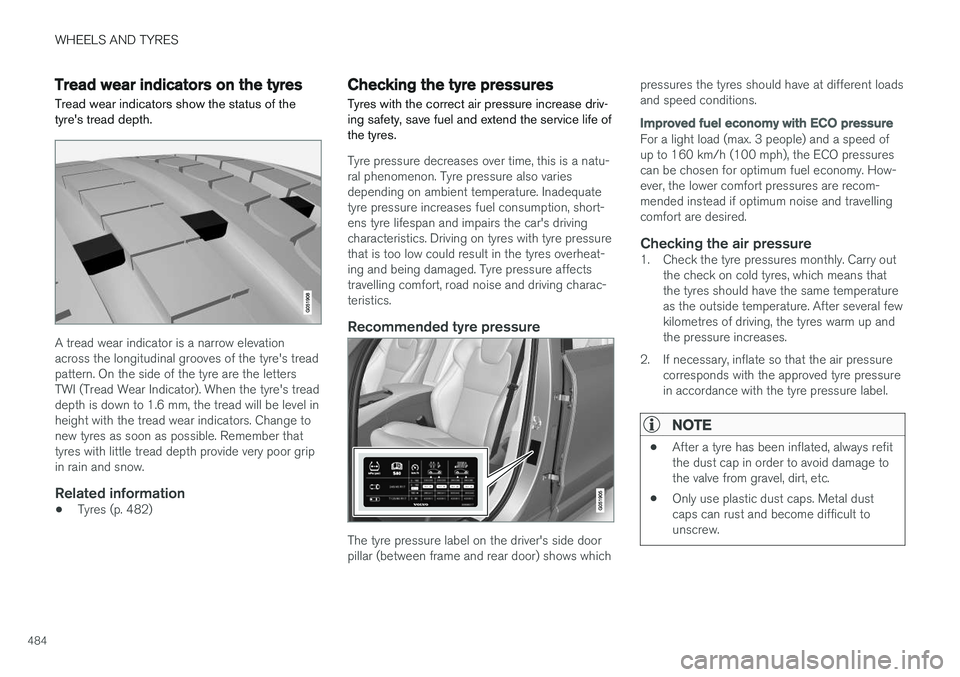
Tread wear indicators on the tyres Tread wear indicators show the status of the tyre's tread depth.
A tread wear indicator is a narrow elevation across the longitudinal grooves of the tyre's treadpattern. On the side of the tyre are the lettersTWI (Tread Wear Indicator). When the tyre's treaddepth is down to 1.6 mm, the tread will be level inheight with the tread wear indicators. Change tonew tyres as soon as possible. Remember thattyres with little tread depth provide very poor gripin rain and snow.
Related information
•Tyres (p. 482)
Checking the tyre pressures Tyres with the correct air pressure increase driv- ing safety, save fuel and extend the service life ofthe tyres.
Tyre pressure decreases over time, this is a natu- ral phenomenon. Tyre pressure also variesdepending on ambient temperature. Inadequatetyre pressure increases fuel consumption, short-ens tyre lifespan and impairs the car's drivingcharacteristics. Driving on tyres with tyre pressurethat is too low could result in the tyres overheat-ing and being damaged. Tyre pressure affectstravelling comfort, road noise and driving charac-teristics.
Recommended tyre pressure
The tyre pressure label on the driver's side door pillar (between frame and rear door) shows which pressures the tyres should have at different loadsand speed conditions.
Improved fuel economy with ECO pressure
For a light load (max. 3 people) and a speed of up to 160 km/h (100 mph), the ECO pressurescan be chosen for optimum fuel economy. How-ever, the lower comfort pressures are recom-mended instead if optimum noise and travellingcomfort are desired.
Checking the air pressure1. Check the tyre pressures monthly. Carry out
the check on cold tyres, which means thatthe tyres should have the same temperatureas the outside temperature. After several fewkilometres of driving, the tyres warm up andthe pressure increases.
2. If necessary, inflate so that the air pressure corresponds with the approved tyre pressurein accordance with the tyre pressure label.
NOTE
• After a tyre has been inflated, always refit the dust cap in order to avoid damage tothe valve from gravel, dirt, etc.
• Only use plastic dust caps. Metal dustcaps can rust and become difficult tounscrew.
Page 488 of 594
||
WHEELS AND TYRES
* Option/accessory.
486
General information on the tyre monitoring system
In the information below, the tyre monitoring sys- tem is referred to generically as TPMS. Each tyre, including the spare tyre *, should be
checked once a month. When checking, the tyre should be cold and have the air pressure recom-mended by the car manufacturer specified on thetyre pressure label or in the tyre pressure table. Ifthe car has tyres of a different size than that rec-ommended by the manufacturer, find out whatthe correct air pressure level is for these. As an extra safety feature, the car is equipped with a tyre pressure monitoring system (TPMS),which shows when the air pressure in one ormore tyres is too low. When the indicator symbolfor low air pressure is lit, stop and check the tyresas soon as possible and inflate to the correct airpressure. Driving with tyres that have tyre pressure that is too low may cause the tyre to overheat, whichcan cause a puncture. Low tyre pressure alsoreduces fuel efficiency as well as tyre service life,and can affect car handling and stopping ability.Note that TPMS does not replace regular tyremaintenance. It is the driver's responsibility tomaintain correct tyre pressure, even if the limit forlow tyre pressure has not been reached so thatthe indicator symbol illuminates. The car is also equipped with a TPMS system fault indicator, which indicates when the system is not functioning correctly. The TPMS systemfault indicator is combined with the indicator sym-bol for low tyre pressure. When the systemdetects a fault, the symbol in the driver displaywill flash for about one minute and then remainilluminated. This procedure will be repeated whenthe car is started until the fault has been rectified.When the symbol is illuminated, the system's abil-ity to detect or warn of low tyre pressure may beaffected. A TPMS system fault can occur for several rea- sons, such as after changing to a spare tyre, orchanging tyres or wheels that prevent TPMS fromfunctioning correctly. Always check the indicator symbol for TPMS after changing one or more tyres in order toensure the new tyre or wheel is working correctlywith TPMS.
Messages in the driver displayThe following messages may be shown when theindicator symbol is illuminated:
•
Tyre pressure low Check tyres, calibrate
after fill
•Tyre pressure system Temporarily
unavailable
•Tyre pressure system Service required.
If the system cannot determine which tyre has low pressure, all four tyres will be indicated in thecentre display.
To bear in mind
• Always calibrate the system after a wheelchange or tyre pressure adjustment. See thetyre pressure label on the driver's side doorpillar for Volvo's recommended tyre pres-sures.
• The system does not replace normal tyremaintenance.
• There is no option to deactivate ITPMS.
Related information
•Tyres (p. 482)
• Checking tyre pressure with the tyre monitor- ing system
* (p. 487)
• Calibrating tyre monitoring
* (p. 489)
• Rectifying low tyre pressure with tyre moni-toring
* (p. 488)
Page 489 of 594
WHEELS AND TYRES
* Option/accessory.487
Checking tyre pressure with the tyre monitoring system *
With the system for tyre monitoring, Indirect Tyre Pressure Monitoring System (ITPMS), tyre pres-sure status can be viewed in the centre display.
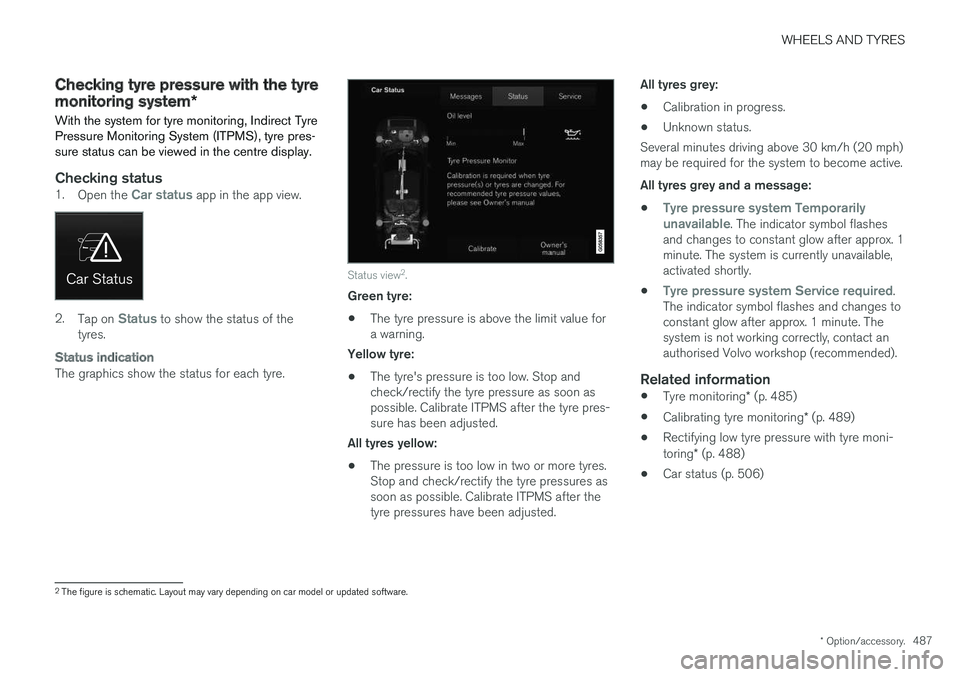
Checking status1. Open the Car status app in the app view.
2.Tap on Status to show the status of the
tyres.
Status indication
The graphics show the status for each tyre.
Status view 2
.
Green tyre:
• The tyre pressure is above the limit value for a warning.
Yellow tyre:
• The tyre's pressure is too low. Stop andcheck/rectify the tyre pressure as soon aspossible. Calibrate ITPMS after the tyre pres-sure has been adjusted.
All tyres yellow:
• The pressure is too low in two or more tyres.Stop and check/rectify the tyre pressures assoon as possible. Calibrate ITPMS after thetyre pressures have been adjusted. All tyres grey:
• Calibration in progress.
• Unknown status.
Several minutes driving above 30 km/h (20 mph)may be required for the system to become active. All tyres grey and a message:
•
Tyre pressure system Temporarily
unavailable. The indicator symbol flashes
and changes to constant glow after approx. 1 minute. The system is currently unavailable,activated shortly.
•
Tyre pressure system Service required.
The indicator symbol flashes and changes to constant glow after approx. 1 minute. Thesystem is not working correctly, contact anauthorised Volvo workshop (recommended).
Related information
• Tyre monitoring
* (p. 485)
• Calibrating tyre monitoring
* (p. 489)
• Rectifying low tyre pressure with tyre moni- toring
* (p. 488)
• Car status (p. 506)
2
The figure is schematic. Layout may vary depending on car model or updated software.