warning lights VOLVO V90 2017 User Guide
[x] Cancel search | Manufacturer: VOLVO, Model Year: 2017, Model line: V90, Model: VOLVO V90 2017Pages: 594, PDF Size: 15.07 MB
Page 344 of 594
||
DRIVER SUPPORT
* Option/accessory.
342
WARNING
The system is a supplement to, not a replace- ment for, a safe driving style and use of therearview mirrors. It can never replace the driv-er's attention and responsibility. The responsi-bility for changing lanes safely always restswith the driver.
Related information
• Activate/deactivate Blind Spot Information
*
(p. 342)
• Limitations of Blind Spot Information
*
(p. 343)
• Messages for Blind Spot Information
* and
Cross Traffic Alert * (p. 347)
• Cross Traffic Alert
* (p. 343)
Activate/deactivate Blind Spot Information *
The Blind Spot Information (BLIS) function can be activated/deactivated.
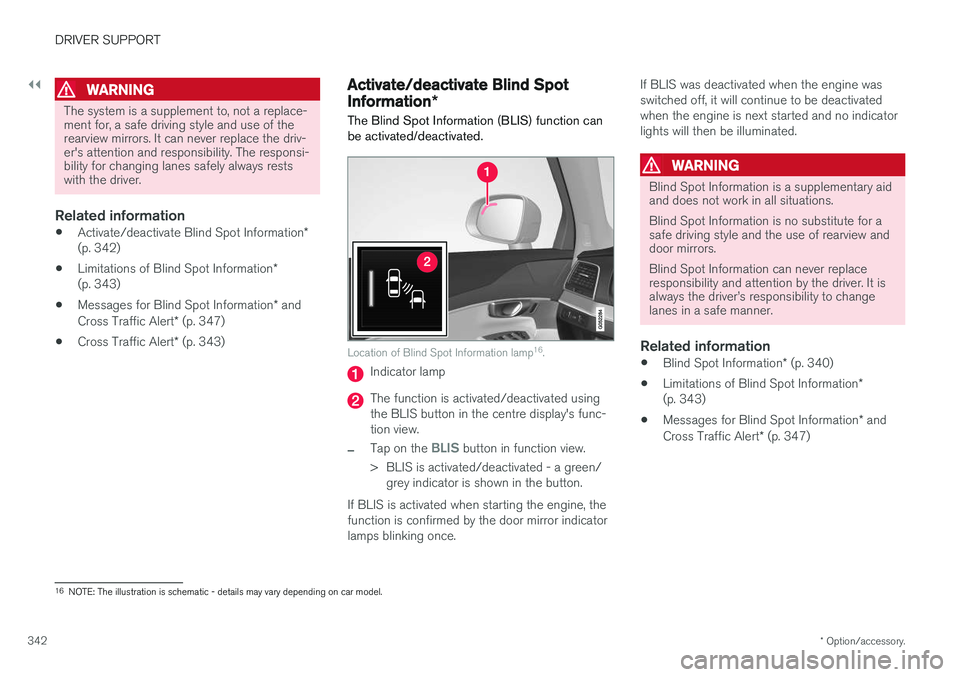
Location of Blind Spot Information lamp 16
.
Indicator lamp
The function is activated/deactivated using the BLIS button in the centre display's func-tion view.
–Tap on the BLIS button in function view.
> BLIS is activated/deactivated - a green/ grey indicator is shown in the button.
If BLIS is activated when starting the engine, the function is confirmed by the door mirror indicatorlamps blinking once. If BLIS was deactivated when the engine wasswitched off, it will continue to be deactivatedwhen the engine is next started and no indicatorlights will then be illuminated.
WARNING
Blind Spot Information is a supplementary aid and does not work in all situations. Blind Spot Information is no substitute for a safe driving style and the use of rearview anddoor mirrors. Blind Spot Information can never replace responsibility and attention by the driver. It isalways the driver
Page 409 of 594
STARTING AND DRIVING
407
•
Brake now and again to remove any layer of salt. Make sure that other road users are notput at risk by the braking.
• Gently depress the brake pedal after finish-ing driving and before starting your next trip.
MaintenanceTo keep the car as safe and reliable as possible,follow the Volvo service intervals as specified inthe Service and Warranty Booklet. New and replaced brake linings and brake discs do not provide optimal braking effect until theyhave been "worn in" a few hundred kilometres.Compensate for the reduced braking effect bydepressing the brake pedal harder. Volvo recom-mends only fitting brake linings that are approvedfor your Volvo.
IMPORTANT
The wear on the brake system's components must be checked regularly. Contact a workshop for information about the procedure or engage a workshop to carry outthe inspection - an authorised Volvo work-shop is recommended.
Symbols in the driver display
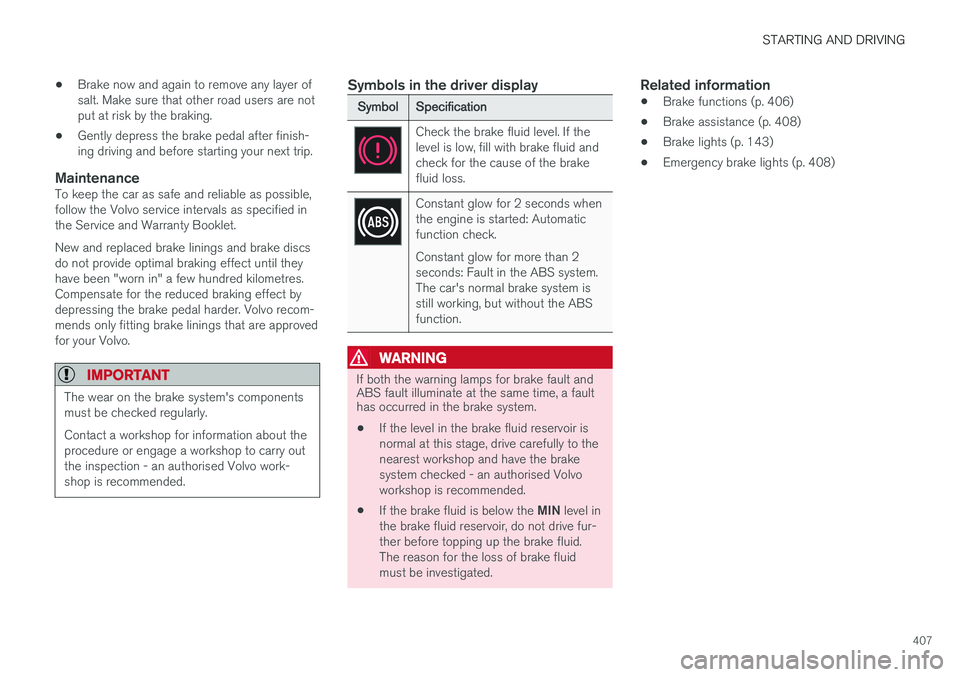
Symbol
Specification
Check the brake fluid level. If the level is low, fill with brake fluid andcheck for the cause of the brakefluid loss.
Constant glow for 2 seconds when the engine is started: Automaticfunction check. Constant glow for more than 2 seconds: Fault in the ABS system.The car's normal brake system isstill working, but without the ABSfunction.
WARNING
If both the warning lamps for brake fault and ABS fault illuminate at the same time, a faulthas occurred in the brake system.
• If the level in the brake fluid reservoir is normal at this stage, drive carefully to thenearest workshop and have the brakesystem checked - an authorised Volvoworkshop is recommended.
• If the brake fluid is below the
MIN level in
the brake fluid reservoir, do not drive fur-ther before topping up the brake fluid.The reason for the loss of brake fluidmust be investigated.
Related information
• Brake functions (p. 406)
• Brake assistance (p. 408)
• Brake lights (p. 143)
• Emergency brake lights (p. 408)
Page 410 of 594
STARTING AND DRIVING
408
Emergency brake lightsEmergency brake lights are activated to alert vehicles behind about heavy braking. The func-tion means that the brake light flashes instead of- as in normal braking - shining with a constantglow.
The emergency brake lights are activated during heavy braking or if the ABS system is activated athigh speeds. After emergency braking to a lowspeed, the brake lights return from flashing to thenormal constant glow. The car's hazard warningflashers are activated at the same time. Theseflash until the driver accelerates the car to ahigher speed again or switches off the hazardwarning flashers.
Related information
• Foot brake (p. 406)
• Hazard warning flashers (p. 143)
• Brake lights (p. 143)
Brake assistance
The brake assist system, BAS (Brake Assist System), helps to increase brake force duringbraking, thereby shortening the braking distance.
The system detects the way in which the driver brakes and increases brake force where neces-sary. The brake force can be boosted up to thelevel when the ABS system is engaged. Thefunction is suspended when the pressure on thebrake pedal decreases.
NOTE
When BAS is activated the brake pedal low- ers slightly more than usual, depress (hold)the brake pedal as long as necessary. When the brake pedal is released, all braking ceases.
Related information
• Foot brake (p. 406)
Auto braking after a collision In the event of a collision in which the activation level is reached for the pyrotechnic seatbelt ten-sioners or airbags, or if a collision with a largeanimal is detected, the car's brakes are automat-ically applied. This function is to prevent orreduce the effects of any subsequent collision.
After a serious collision there is a risk that it is no longer possible to control and steer the car. Inorder to avoid or mitigate a possible further colli-sion with a vehicle or an object in the vehicle'spath, the auto braking system is activated auto-matically and brakes the car in a safe manner. Brake lights and hazard warning lights are acti- vated during braking. When the car has stopped,the hazard warning lights continue to flash andthe parking brake is applied. If braking is not appropriate, e.g. if there is a risk of being hit by following traffic, the system can beoverridden by the driver depressing the accelera-tor pedal. The function assumes that the brake system is intact after the collision. See also the sections "Rear Collision Warning" and "Blind Spot Information".
Related information
• Brake functions (p. 406)
• Seatbelt tensioner (p. 59)
• Airbags (p. 63)
Page 428 of 594
STARTING AND DRIVING
426
Driving with a trailer
When driving with a trailer, there are a number of points that are important to think about regar-ding the towing bracket, the trailer and how theload is positioned in the trailer.
Payload depends on the car's kerb weight. The total of the weight of the passengers and allaccessories, e.g. towbar, reduces the car's pay-load by a corresponding weight. The car is supplied with the necessary equipment for towing a trailer.
• The car's towing bracket must be of anapproved type.
• Distribute the load on the trailer so that theweight on the towing bracket complies withthe specified maximum towball load. Towballload is calculated as part of the car's payload.
• Increase the tyre pressure to the recom-mended pressure for a full load. For moreinformation on tyre pressure, see the section"Approved tyre pressures".
• The engine is loaded more heavily than usualwhen driving with a trailer.
• Do not tow a heavy trailer when the car isbrand new. Wait until it has been driven atleast 1000 km.
• The brakes are loaded much more than usualon long and steep downhill slopes. Downshiftto a lower gear and adjust your speed. •
Follow the regulations in force for the permit-ted speeds and weights.
• Maintain a low speed when driving with atrailer up long, steep ascents.
• The maximum trailer weights given only applyto altitudes up to 1000 metres above sealevel. At higher altitudes, engine power andthus the car's climbing ability is decreaseddue to the reduced air density, and the maxi-mum trailer weight must therefore bereduced. The weight of the car and trailermust be decreased by 10 % for each addi-tional 1000 m (or part thereof).
• Avoid driving with a trailer on inclines of morethan 12%.
NOTE
Extreme weather conditions, driving with a trailer or driving at high altitudes in combina-tion with fuel quality are factors that consider-ably increase the car's fuel consumption.
Trailer connectorAn adapter is required if the car's towing bracket has a 13 pin connector and the trailer has a 7 pinconnector. Use an adapter approved by Volvo.Make sure the cable does not drag on theground.
IMPORTANT
When the engine is switched off, the constant battery voltage to the trailer connector can beswitched off automatically so as not to drainthe starter battery.
Trailer weightsInformation about Volvo's permitted trailer weights is available in the article "Towingcapacity and towball load".
WARNING
Follow the stated recommendations for trailer weights. Otherwise, the car and trailer may bedifficult to control in the event of suddenmovement and braking.
NOTE
The stated maximum permitted trailer weights are those permitted by Volvo. National vehicleregulations can further limit trailer weightsand speeds. Towbars can be certified forhigher towing weights than the car canactually tow.
Direction indicators and brake lights on the trailer
If one or more of the trailer's direction indicators or brake light bulbs is broken, the driver display
Page 493 of 594
WHEELS AND TYRES
}}
491
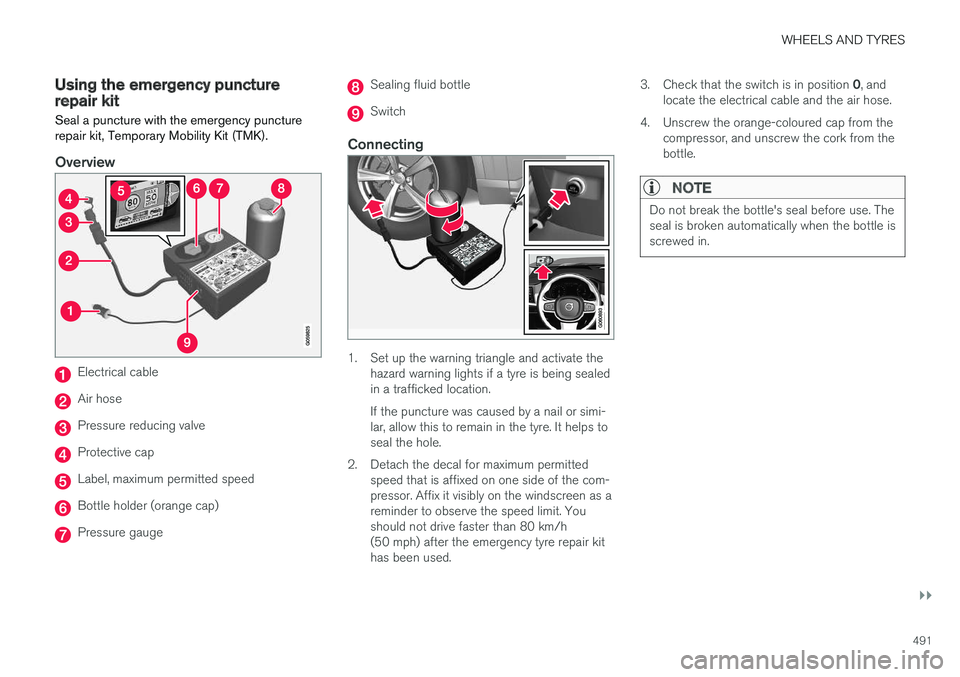
Using the emergency puncture repair kit Seal a puncture with the emergency puncture repair kit, Temporary Mobility Kit (TMK).
Overview
Electrical cable
Air hose
Pressure reducing valve
Protective cap
Label, maximum permitted speed
Bottle holder (orange cap)
Pressure gauge
Sealing fluid bottle
Switch
Connecting
1. Set up the warning triangle and activate thehazard warning lights if a tyre is being sealed in a trafficked location. If the puncture was caused by a nail or simi- lar, allow this to remain in the tyre. It helps toseal the hole.
2. Detach the decal for maximum permitted speed that is affixed on one side of the com-pressor. Affix it visibly on the windscreen as areminder to observe the speed limit. Youshould not drive faster than 80 km/h(50 mph) after the emergency tyre repair kithas been used. 3.
Check that the switch is in position 0, and
locate the electrical cable and the air hose.
4. Unscrew the orange-coloured cap from the compressor, and unscrew the cork from thebottle.
NOTE
Do not break the bottle's seal before use. The seal is broken automatically when the bottle isscrewed in.
Page 497 of 594
WHEELS AND TYRES
}}
* Option/accessory.495
IMPORTANT
Risk of overheating. The compressor must not run for more than 10 minutes.
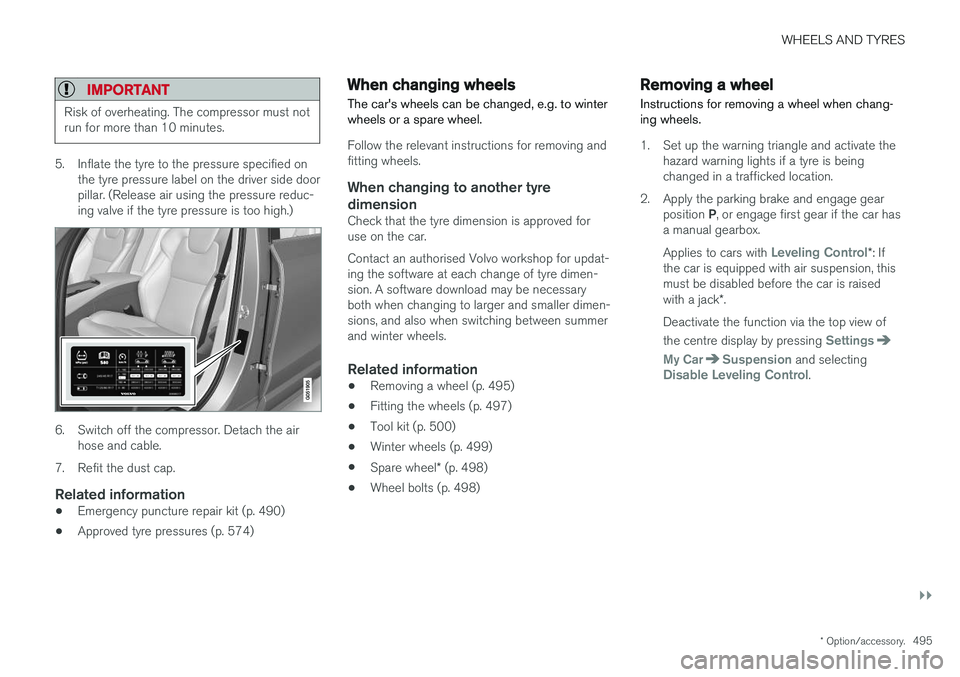
5. Inflate the tyre to the pressure specified on
the tyre pressure label on the driver side door pillar. (Release air using the pressure reduc-ing valve if the tyre pressure is too high.)
6. Switch off the compressor. Detach the airhose and cable.
7. Refit the dust cap.
Related information
• Emergency puncture repair kit (p. 490)
• Approved tyre pressures (p. 574)
When changing wheels
The car's wheels can be changed, e.g. to winter wheels or a spare wheel.
Follow the relevant instructions for removing and fitting wheels.
When changing to another tyre
dimension
Check that the tyre dimension is approved foruse on the car. Contact an authorised Volvo workshop for updat- ing the software at each change of tyre dimen-sion. A software download may be necessaryboth when changing to larger and smaller dimen-sions, and also when switching between summerand winter wheels.
Related information
• Removing a wheel (p. 495)
• Fitting the wheels (p. 497)
• Tool kit (p. 500)
• Winter wheels (p. 499)
• Spare wheel
* (p. 498)
• Wheel bolts (p. 498)
Removing a wheel
Instructions for removing a wheel when chang- ing wheels.
1. Set up the warning triangle and activate the hazard warning lights if a tyre is being changed in a trafficked location.
2. Apply the parking brake and engage gear position P, or engage first gear if the car has
a manual gearbox. Applies to cars with
Leveling Control* : If
the car is equipped with air suspension, this must be disabled before the car is raised with a jack *.
Deactivate the function via the top view of the centre display by pressing
Settings
My CarSuspension and selectingDisable Leveling Control.
Page 523 of 594
MAINTENANCE AND SERVICE
}}
* Option/accessory.521
NOTE
Points to remember when the cover is refit- ted: •The pin in the clip needs to be pressed back fully before the clip is refitted in thecover.
• When the cover is refitted, the pin mustbe pressed in until the end surface islevel with the surface of the clip.
The reversing lamp bulb and the rear fog lamp bulb can be replaced without assistance from aworkshop. Contact a workshop 9
if there is a fault in bulbs
other than the bulbs in the halogen headlamps, the reversing lamp bulb or the rear fog lamp bulb. If a fault occurs in LED 10
lamps, the entire lamp
unit usually must be replaced.
WARNING
The car's electrical system must be in ignition position 0 when replacing bulbs.
IMPORTANT
Never touch the glass part of the bulbs with your fingers. Grease from your fingers isvaporised by the heat, coating the reflectorand then causing damage.
NOTE
If an error message remains after the broken bulb has been replaced then we recommendvisiting an authorised Volvo workshop.
NOTE
Outside lighting such as headlamps and rear lamps may temporarily have condensation onthe inside of the lens. This is normal, all exte-rior lighting is designed to withstand this.Condensation is normally vented out of thelamp housing when the lamp has beenswitched on for a time.
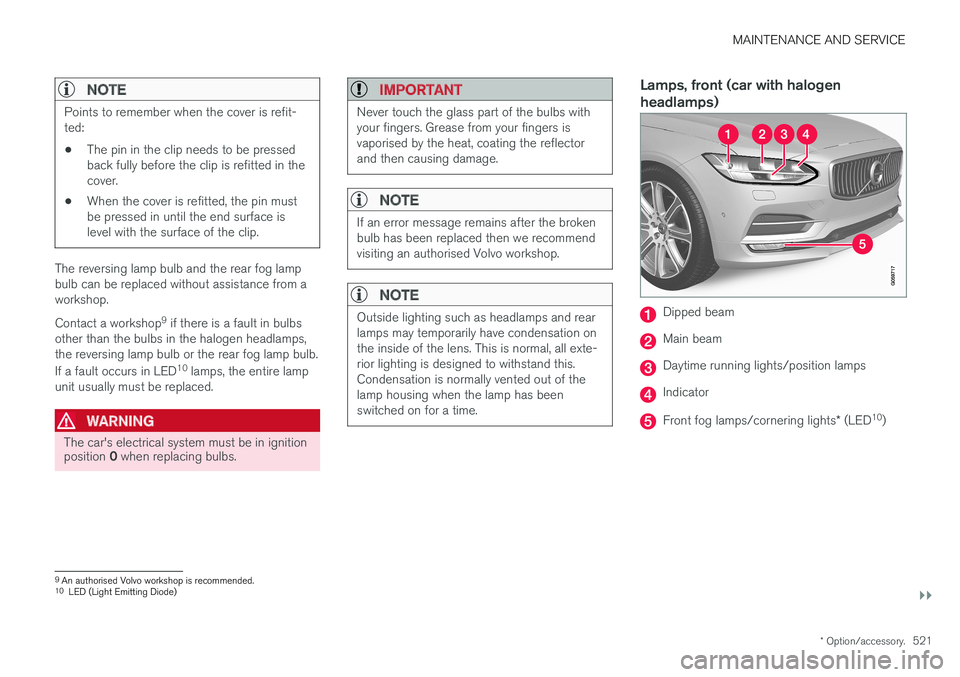
Lamps, front (car with halogen headlamps)
Dipped beam
Main beam
Daytime running lights/position lamps
Indicator
Front fog lamps/cornering lights * (LED 10
)
9An authorised Volvo workshop is recommended.
10 LED (Light Emitting Diode)
Page 580 of 594
ALPHABETICAL INDEX
578Automatic car washes 549 Automatic engine stop
auto-stop 396
Automatic gearbox 390 trailer 428
Automatic relocking 242
Automatic speed limiter 281AUX jack for connecting media 448
Auxiliary heater 215
AWD, All Wheel Drive 405
B
Backrest front seat, adjusting 121, 122, 124
rear seat, lowering 130
Bag holder 228
Battery 388, 530 jump starting 388
maintenance 530
overload 415
start 530
support 533
symbols on the battery 533
warning symbols 533
Bi-Fuel introduction 54
BLIS 340, 342, 343 Bluetooth connect 447
connect car to Internet 464
phone 456
settings 463
Bonnet, opening 514
Book service and repair 506Brake assist after collision 408
Brake fluid grade 570
Brake functions 406
Brake light 143
Brakes 406 Anti-lock braking system, ABS 406
automatic when stationary 412
brake assist system, BAS 408
brake light 143
brake system 406
emergency brake lights 408
handbrake 409, 410, 411
bulbs, specifications 526C
Camera sensor 337
Car care 549 Leather upholstery 552
Car functions in centre display 47
Cargo area 226 electrical socket 220
lighting 146
mounting points 228
protective net 232
Cargo cover 230
Cargo grille 233
Car holiday 415
Car key battery low 257Car modem connect car to Internet 464
settings 468
Car status 506 Tyre pressure 487
Car upholstery 552
Car washing 549Catalytic converter Recovery 432
CD player 446
central locking 245
Page 581 of 594
ALPHABETICAL INDEX
579
Centre display
change settings 45
cleaning 553
climate control 187
messages 106
operation 36, 40
overview 33
symbols in status bar 45
Checking the engine oil level 517
Child safety 71
Child safety locks 261
Child seat 71 integrated booster cushion 82
i-Size/ISOFIX mounting points 77
lower mounting points 74
positioning/fitting 71
table for location 75
table of i-Size 81
table of ISOFIX 78
Upper mounting points 73
Cigarette lighter 224 City Safety ™330, 332, 333, 335, 336,
337, 339
Cleaning automatic car wash 549
car washing 549
centre display 553
Fabric upholstery 552
rims 551
seatbelts 553
upholstery 552
Clean Zone Interior Package 185
Climate control 182, 186 auto-regulation 189
centre display 187
experienced temperature 183
fan control 193
Parking 206
rear seat 188
sensors 183
temperature control 190
voice control 119
zones 182
Clock, adjustment 99 CO 2 emissions 572
Collision 56, 59, 63, 69
Collision warning 330Collision warning system Pedestrian detection 333
Radar sensor 318
Colour code, paint 554
Combined instrument panel 90 settings 94
Compass 156 calibration 157
Condensation in headlamps 549Controls lighting 135
Coolant 570
Coolant, filling 518Cooling system overheating 414
Cornering lights 142
Corner Traction Control 273Cover cargo area 230
Crash, see Collision 56
Cruise control 284 deactivate 287
managing speed 284, 285
temporary deactivation 286
CTA 343, 344, 345
Cyclist detection 333
CZIP (Clean Zone Interior Package) 185
D
DAB Radio 440 Data recording 22
transfer between car and workshop 511
Data link connector 23
Daytime running lights 137
Page 585 of 594
ALPHABETICAL INDEX
583
L
Labels 558
Laminated glass 32
Lamps 520
Lane Keeping Aid - LKA 354, 356, 358Lane keeping assistantoperation 356
Leather upholstery, washing instructions 552
Level control 405
License agreement 470
Lifting tool 501Lighting active bending lights 141
approach lighting 148automatic lighting, passenger compart-
ment 145
Automatic main beam 138
bulbs, specifications 526
controls 134, 145
controls lighting 135
cornering lights 142
daytime running lights 137
dipped beam 137
display lighting 135
fog lamp 142
headlamp levelling 135
home safe lighting 148
instrument lighting 135
in the passenger compartment 145
main beam 138
position lamps 136
rear fog lamp 142
Lighting, bulb replacement 520 daytime running lights/position lamps
front 524
dipped beam 522
direction indicators front 524
main beam 523
rear fog lamp 526
Reversing lamp 525
LKA - Lane Keeping Aid 354, 356, 358 Loading cargo area 227
General 227
load retaining eyelets 228
long load 227
Loading hooks 228 Load retaining eyelets cargo area 228
Lock locking 241, 245
unlocking 241, 245
Lockable wheel bolts 498
Lock confirmation 243Locking/unlocking tailgate 247, 249
Low battery voltage Battery 415
M
Main beam 138
Maintained climate comfort 206start/shut-off 210
maintenance Rustproofing 552
Manual gearbox 392
Max. roof load 563
Media player 442 compatible file formats 455
voice control 118
Messages and symbols Adaptive Cruise Control 302
Collision Warning with Auto Brake 339
Messages in BLIS 347
Messages in displays 106 manage 108
saved 110
Metric, Imperial, US 98
Mileage 165