buttons VOLVO V90 2017 Owner's Manual
[x] Cancel search | Manufacturer: VOLVO, Model Year: 2017, Model line: V90, Model: VOLVO V90 2017Pages: 594, PDF Size: 15.07 MB
Page 166 of 594
||
INSTRUMENTS AND CONTROLS
1645.
Depress the programmed HomeLink ®
button
and check the indicator lamp. > Constant green glow: If the indicator
lamp illuminates in a constant green glow, programming is complete . The garage
door, gate or similar should now be acti- vated when the programmed button isdepressed. Flashes green 10 times per second: Depress the button being programmed, hold it depressed for 2 seconds and then release it . Repeat the sequence of
pressing/holding/releasing a second timeand, depending on the receiver model,even a third time. Programming shouldnow be complete and the garage door,gate or similar should now be activatedwhen the programmed button isdepressed. If the receiver is still not activated: Continue with programming steps 6-8 to complete programming.
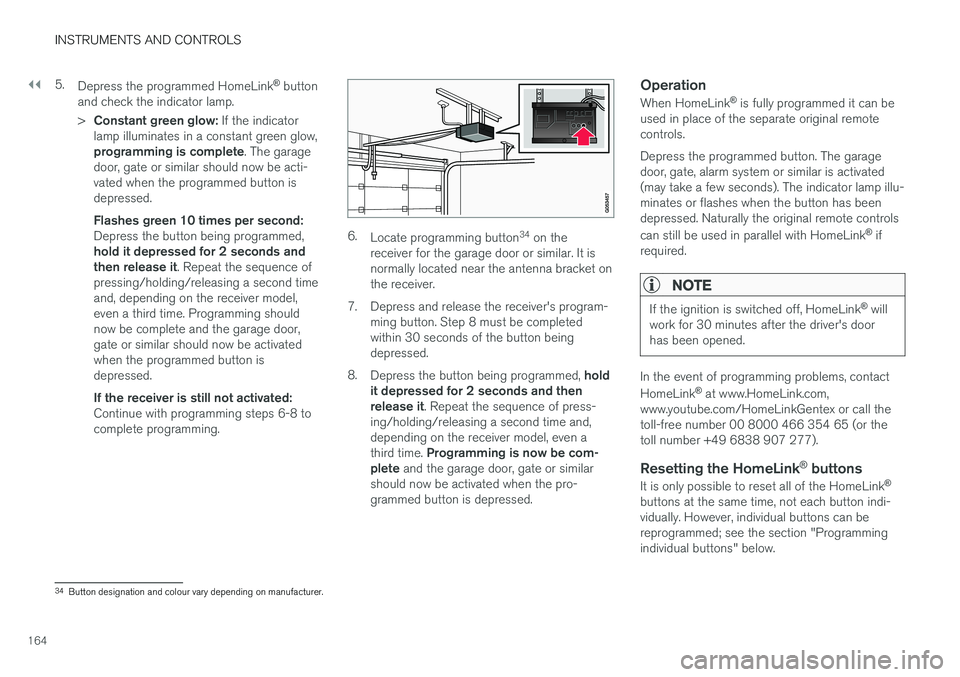
6. Locate programming button 34
on the
receiver for the garage door or similar. It is normally located near the antenna bracket onthe receiver.
7. Depress and release the receiver's program- ming button. Step 8 must be completedwithin 30 seconds of the button beingdepressed.
8. Depress the button being programmed, hold
it depressed for 2 seconds and thenrelease it . Repeat the sequence of press-
ing/holding/releasing a second time and,depending on the receiver model, even a third time. Programming is now be com-
plete and the garage door, gate or similar
should now be activated when the pro- grammed button is depressed.
Operation
When HomeLink ®
is fully programmed it can be
used in place of the separate original remotecontrols. Depress the programmed button. The garage door, gate, alarm system or similar is activated(may take a few seconds). The indicator lamp illu-minates or flashes when the button has beendepressed. Naturally the original remote controls can still be used in parallel with HomeLink ®
if
required.
NOTE
If the ignition is switched off, HomeLink ®
will
work for 30 minutes after the driver's door has been opened.
In the event of programming problems, contact HomeLink ®
at www.HomeLink.com,
www.youtube.com/HomeLinkGentex or call the toll-free number 00 8000 466 354 65 (or thetoll number +49 6838 907 277).
Resetting the HomeLink ®
buttons
It is only possible to reset all of the HomeLink ®
buttons at the same time, not each button indi-vidually. However, individual buttons can bereprogrammed; see the section "Programmingindividual buttons" below.
34 Button designation and colour vary depending on manufacturer.
Page 167 of 594
INSTRUMENTS AND CONTROLS
}}
* Option/accessory.165
1.
Depress buttons 1 and 3 on HomeLink ®
and
hold them depressed until the indicator lamp begins flashing green (about 10 seconds).
2. Release the buttons. >HomeLink ®
is now set to "learn mode"
and is ready to be reprogrammed; see the section "Programming HomeLink ®
"
above.
Programming individual buttons
To reprogram an individual HomeLink ®
button,
proceed as follows: 1. Depress the required button and do not
release .
2. After approx. 20 seconds when the indicator lamp on HomeLink ®
starts to flash yellow,
start with step 1 from the section "Program- ming HomeLink ®
" above.
Note: If the button to be reprogrammed is
not programmed with a new unit, it will resume the previously saved programming.
For more information or to provide feedback about HomeLink ®
, visit www.HomeLink.com,
www.youtube.com/HomeLinkGentex or call the toll-free number 00 8000 466 354 65 (or thetoll number +49 6838 907 277).
Related information
• HomeLink ®
* (p. 162)
Trip computer The car's trip computer records and calculates vales such as e.g. distance, fuel consumptionand average speed whilst driving.
In order to facilitate fuel-efficient driving, informa- tion is recorded about both instantaneous andaverage fuel consumption. The information fromthe trip computer can be shown in the driver dis-play.
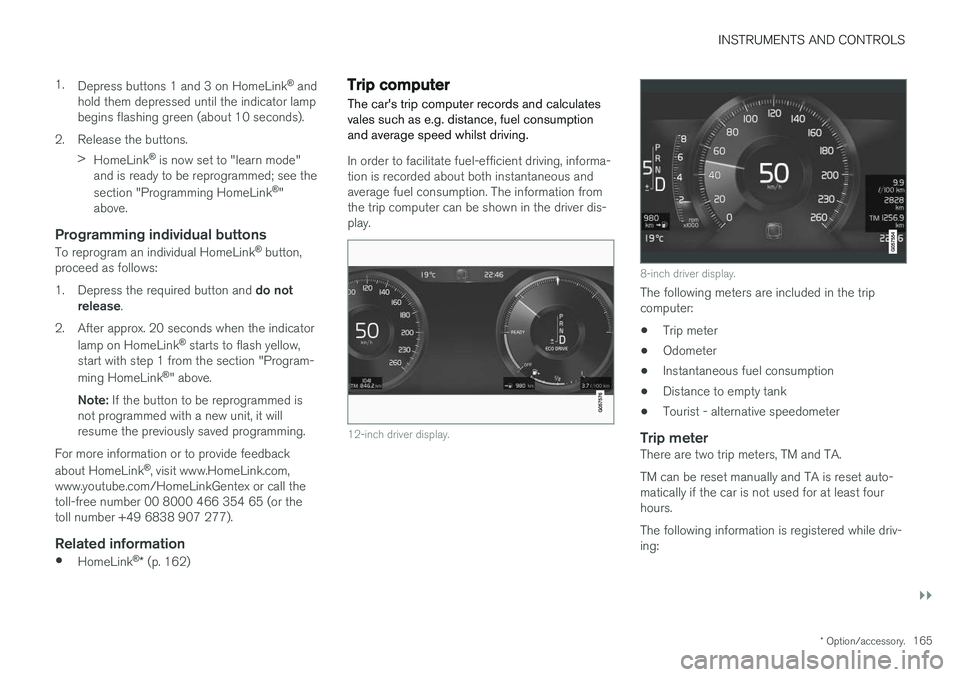
12-inch driver display.
8-inch driver display.
The following meters are included in the trip computer:
• Trip meter
• Odometer
• Instantaneous fuel consumption
• Distance to empty tank
• Tourist - alternative speedometer
Trip meterThere are two trip meters, TM and TA. TM can be reset manually and TA is reset auto- matically if the car is not used for at least fourhours. The following information is registered while driv- ing:
Page 169 of 594
INSTRUMENTS AND CONTROLS
}}
167
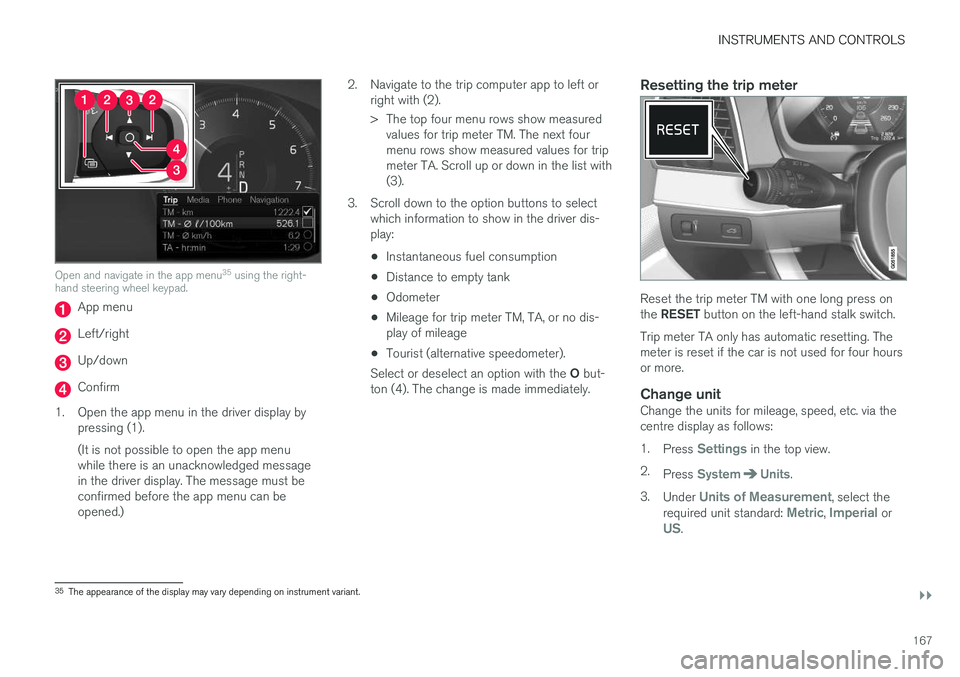
Open and navigate in the app menu35
using the right-
hand steering wheel keypad.
App menu
Left/right
Up/down
Confirm
1. Open the app menu in the driver display by pressing (1). (It is not possible to open the app menu while there is an unacknowledged messagein the driver display. The message must beconfirmed before the app menu can beopened.) 2. Navigate to the trip computer app to left or
right with (2).
> The top four menu rows show measuredvalues for trip meter TM. The next four menu rows show measured values for tripmeter TA. Scroll up or down in the list with(3).
3. Scroll down to the option buttons to select which information to show in the driver dis-play:
• Instantaneous fuel consumption
• Distance to empty tank
• Odometer
• Mileage for trip meter TM, TA, or no dis-play of mileage
• Tourist (alternative speedometer).
Select or deselect an option with the O but-
ton (4). The change is made immediately.
Resetting the trip meter
Reset the trip meter TM with one long press on the RESET button on the left-hand stalk switch.
Trip meter TA only has automatic resetting. The meter is reset if the car is not used for four hoursor more.
Change unitChange the units for mileage, speed, etc. via thecentre display as follows: 1. Press
Settings in the top view.
2. Press
SystemUnits.
3. Under
Units of Measurement, select the
required unit standard: Metric, Imperial orUS.
35 The appearance of the display may vary depending on instrument variant.
Page 185 of 594
CLIMATE CONTROL
* Option/accessory.183
Climate control - sensors The climate control system has a number of sen- sors to help control the climate in the car.
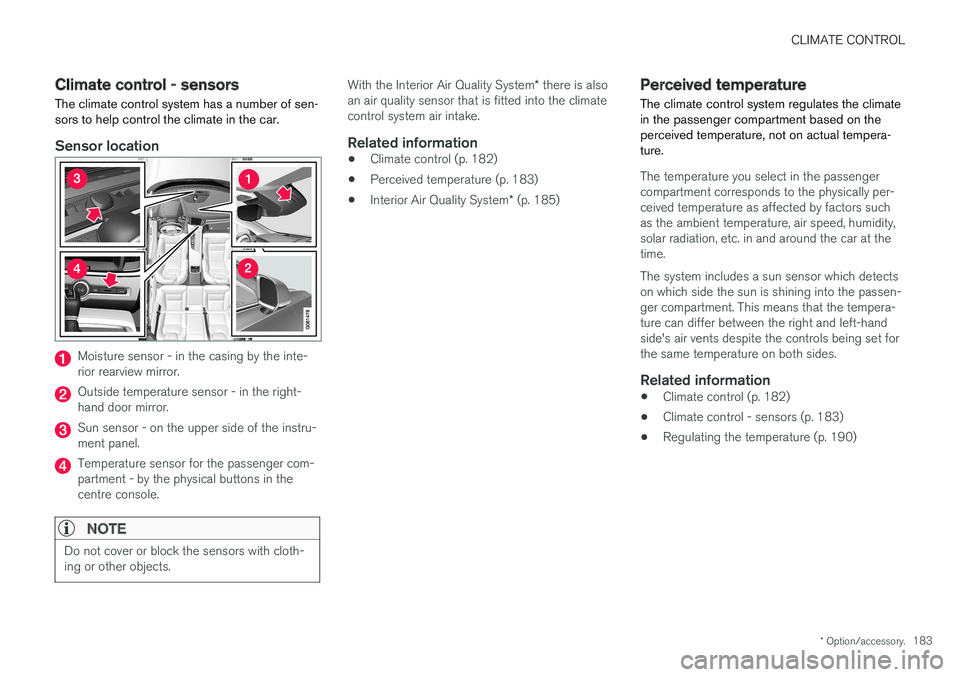
Sensor location
Moisture sensor - in the casing by the inte- rior rearview mirror.
Outside temperature sensor - in the right- hand door mirror.
Sun sensor - on the upper side of the instru- ment panel.
Temperature sensor for the passenger com- partment - by the physical buttons in thecentre console.
NOTE
Do not cover or block the sensors with cloth- ing or other objects.
With the Interior Air Quality System * there is also
an air quality sensor that is fitted into the climate control system air intake.
Related information
• Climate control (p. 182)
• Perceived temperature (p. 183)
• Interior Air Quality System
* (p. 185)
Perceived temperature
The climate control system regulates the climate in the passenger compartment based on theperceived temperature, not on actual tempera-ture.
The temperature you select in the passenger compartment corresponds to the physically per-ceived temperature as affected by factors suchas the ambient temperature, air speed, humidity,solar radiation, etc. in and around the car at thetime. The system includes a sun sensor which detects on which side the sun is shining into the passen-ger compartment. This means that the tempera-ture can differ between the right and left-handside's air vents despite the controls being set forthe same temperature on both sides.
Related information
• Climate control (p. 182)
• Climate control - sensors (p. 183)
• Regulating the temperature (p. 190)
Page 188 of 594
||
CLIMATE CONTROL
* Option/accessory.
186 1.
Press
Settings in the top view in the centre
display.
2. Press
Climate.
3. Select
Air Quality Sensor to activate/deac-
tivate the air quality sensor.
Related information
• Air quality (p. 184)
• Passenger compartment filter (p. 185)
• Clean Zone Interior Package
* (p. 185)
• Activating/deactivating air recirculation (p. 196)
Climate controls
The climate control system's functions are con- trolled from the centre display, physical buttonsin the centre console and the climate panel at the rear of the tunnel console *.
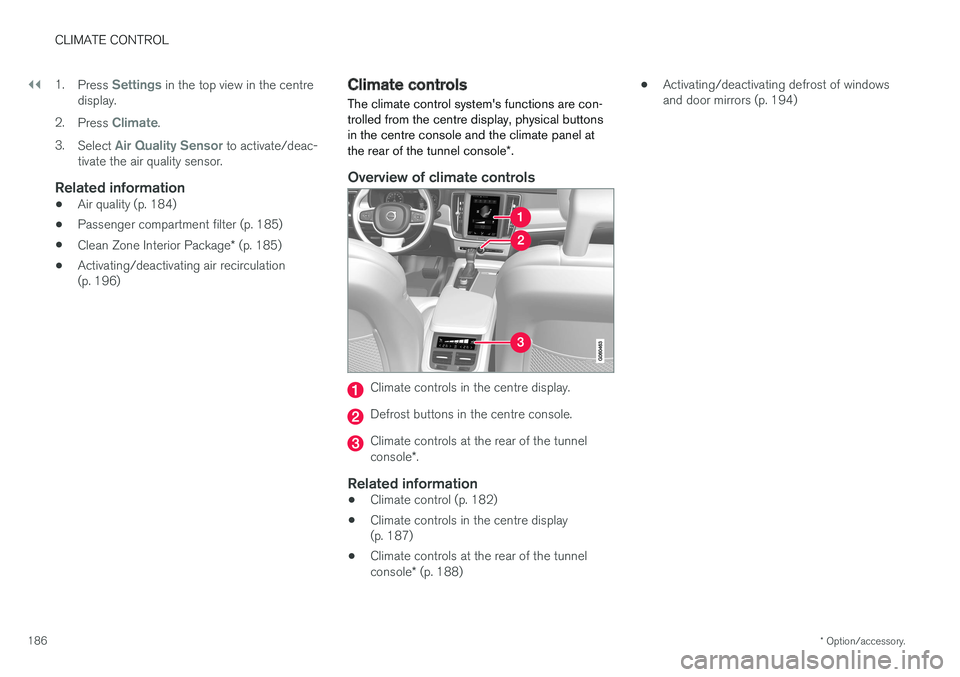
Overview of climate controls
Climate controls in the centre display.
Defrost buttons in the centre console.
Climate controls at the rear of the tunnel console *.
Related information
• Climate control (p. 182)
• Climate controls in the centre display (p. 187)
• Climate controls at the rear of the tunnel console
* (p. 188) •
Activating/deactivating defrost of windows and door mirrors (p. 194)
Page 190 of 594
||
CLIMATE CONTROL
* Option/accessory.
188
Rear climate control *
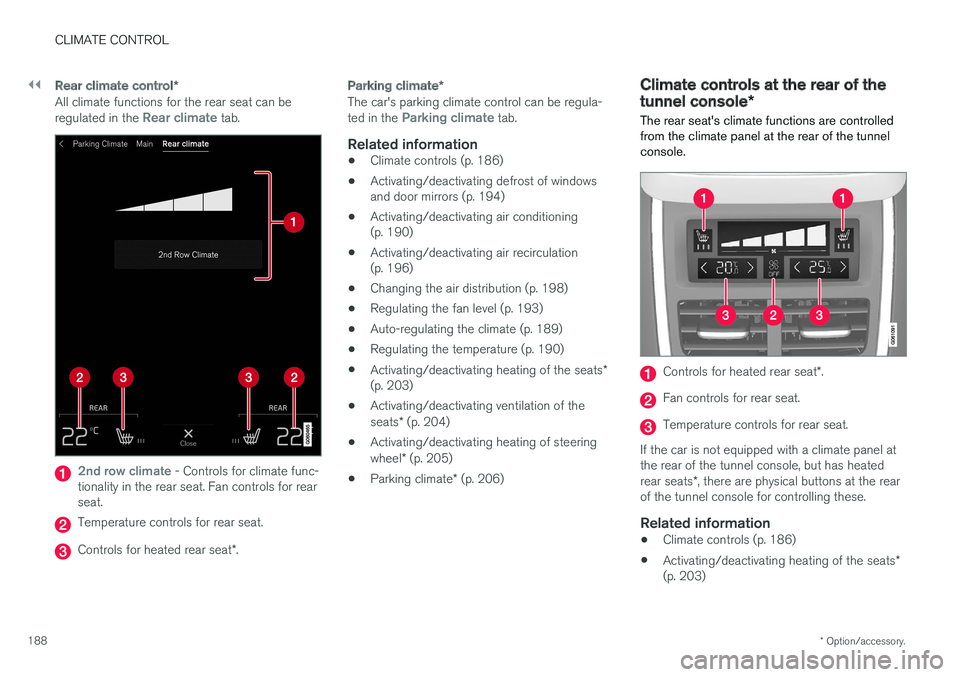
All climate functions for the rear seat can be regulated in the Rear climate tab.
2nd row climate - Controls for climate func-
tionality in the rear seat. Fan controls for rear seat.
Temperature controls for rear seat.
Controls for heated rear seat *.
Parking climate *
The car's parking climate control can be regula- ted in the Parking climate tab.
Related information
•Climate controls (p. 186)
• Activating/deactivating defrost of windows and door mirrors (p. 194)
• Activating/deactivating air conditioning(p. 190)
• Activating/deactivating air recirculation(p. 196)
• Changing the air distribution (p. 198)
• Regulating the fan level (p. 193)
• Auto-regulating the climate (p. 189)
• Regulating the temperature (p. 190)
• Activating/deactivating heating of the seats
*
(p. 203)
• Activating/deactivating ventilation of the seats
* (p. 204)
• Activating/deactivating heating of steeringwheel
* (p. 205)
• Parking climate
* (p. 206)
Climate controls at the rear of the tunnel console *
The rear seat's climate functions are controlled
from the climate panel at the rear of the tunnel console.
Controls for heated rear seat *.
Fan controls for rear seat.
Temperature controls for rear seat.
If the car is not equipped with a climate panel at the rear of the tunnel console, but has heated rear seats *, there are physical buttons at the rear
of the tunnel console for controlling these.
Related information
• Climate controls (p. 186)
• Activating/deactivating heating of the seats
*
(p. 203)
Page 192 of 594
CLIMATE CONTROL
* Option/accessory.
190
Activating/deactivating air conditioning
The air conditioning cools and dehumidifies incoming air as required.
Activating/deactivating the main air conditioning
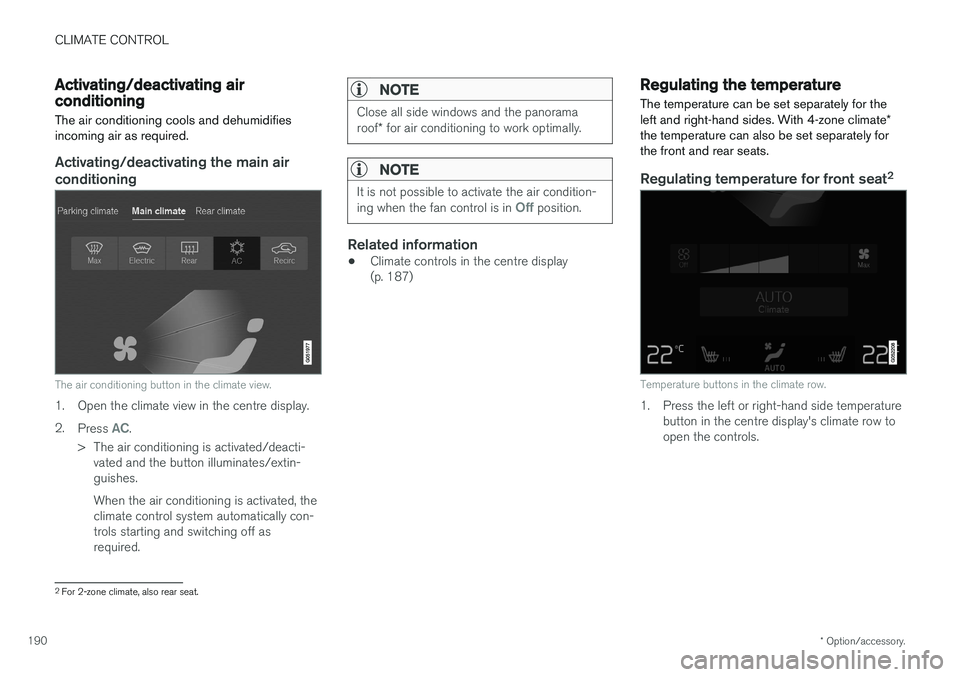
The air conditioning button in the climate view.
1. Open the climate view in the centre display. 2. Press
AC.
> The air conditioning is activated/deacti- vated and the button illuminates/extin- guishes. When the air conditioning is activated, the climate control system automatically con-trols starting and switching off asrequired.
NOTE
Close all side windows and the panorama roof * for air conditioning to work optimally.
NOTE
It is not possible to activate the air condition- ing when the fan control is in Off position.
Related information
• Climate controls in the centre display (p. 187)
Regulating the temperature
The temperature can be set separately for the left and right-hand sides. With 4-zone climate *
the temperature can also be set separately for the front and rear seats.
Regulating temperature for front seat 2
Temperature buttons in the climate row.
1. Press the left or right-hand side temperature
button in the centre display's climate row to open the controls.
2For 2-zone climate, also rear seat.
Page 193 of 594
CLIMATE CONTROL
}}
* Option/accessory.191
Temperature control.
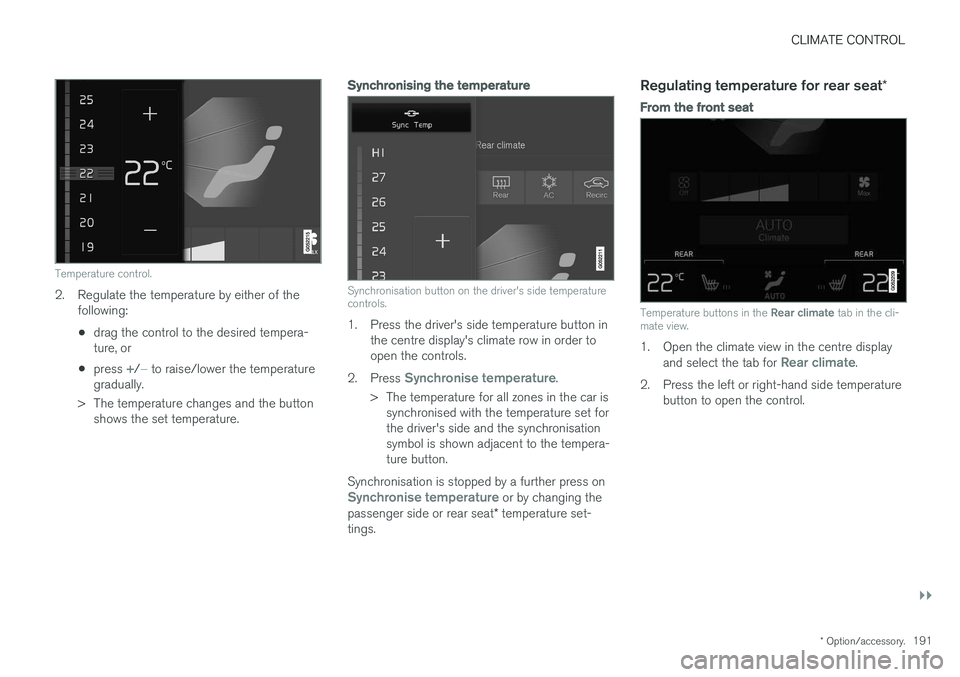
2. Regulate the temperature by either of the
following:
• drag the control to the desired tempera- ture, or
• press
+/− to raise/lower the temperature
gradually.
> The temperature changes and the button shows the set temperature.
Synchronising the temperature
Synchronisation button on the driver's side temperature controls.
1. Press the driver's side temperature button in the centre display's climate row in order to open the controls.
2. Press
Synchronise temperature.
> The temperature for all zones in the car is synchronised with the temperature set for the driver's side and the synchronisationsymbol is shown adjacent to the tempera-ture button.
Synchronisation is stopped by a further press on
Synchronise temperature or by changing the
passenger side or rear seat * temperature set-
tings.
Regulating temperature for rear seat *
From the front seat
Temperature buttons in the Rear climate tab in the cli-
mate view.
1. Open the climate view in the centre display
and select the tab for Rear climate.
2. Press the left or right-hand side temperature button to open the control.
Page 194 of 594
||
CLIMATE CONTROL
* Option/accessory.
192
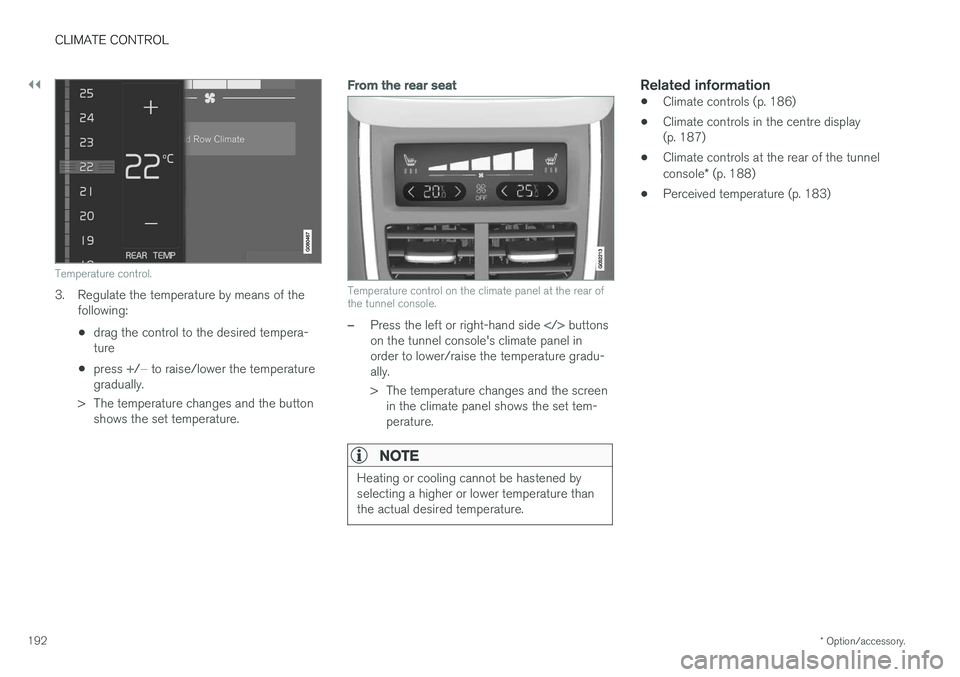
Temperature control.
3. Regulate the temperature by means of the
following:
• drag the control to the desired tempera- ture
• press
+/− to raise/lower the temperature
gradually.
> The temperature changes and the button shows the set temperature.
From the rear seat
Temperature control on the climate panel at the rear of the tunnel console.
–Press the left or right-hand side buttons
on the tunnel console's climate panel in order to lower/raise the temperature gradu-ally.
> The temperature changes and the screen in the climate panel shows the set tem- perature.
NOTE
Heating or cooling cannot be hastened by selecting a higher or lower temperature thanthe actual desired temperature.
Related information
• Climate controls (p. 186)
• Climate controls in the centre display (p. 187)
• Climate controls at the rear of the tunnel console
* (p. 188)
• Perceived temperature (p. 183)
Page 195 of 594
CLIMATE CONTROL
}}
* Option/accessory.193
Regulating the fan level
The fan can be set to five different automatic fan levels as well as
Off and Max. With 4-zone cli-
mate * the fan level can be set separately for the
front and rear seats.
Regulating fan level for front seat 3
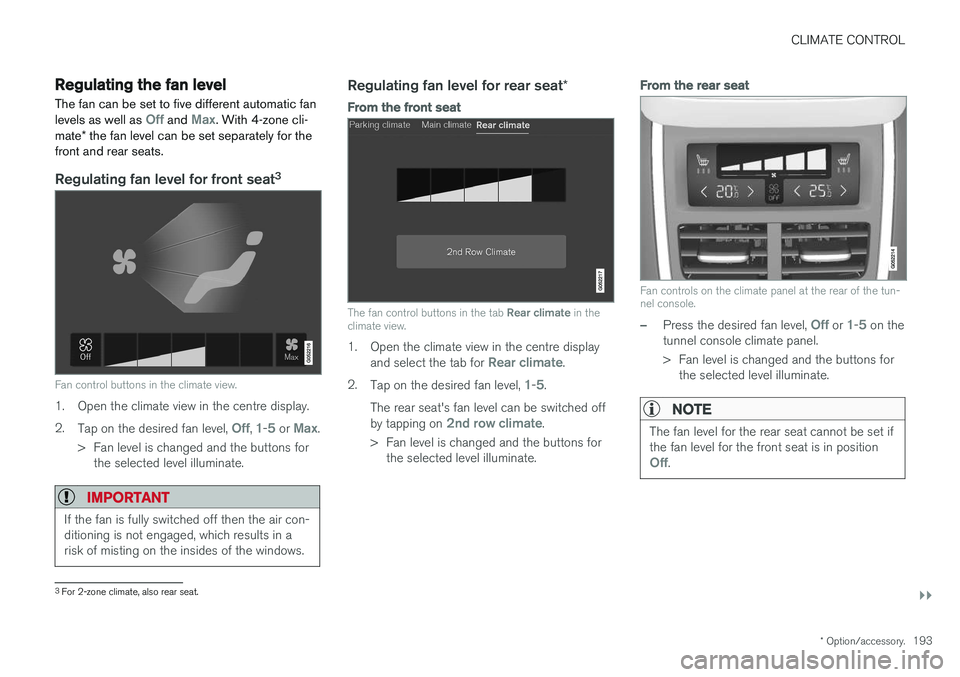
Fan control buttons in the climate view.
1. Open the climate view in the centre display. 2.
Tap on the desired fan level,
Off, 1-5 or Max.
> Fan level is changed and the buttons for the selected level illuminate.
IMPORTANT
If the fan is fully switched off then the air con- ditioning is not engaged, which results in arisk of misting on the insides of the windows.
Regulating fan level for rear seat *
From the front seat
The fan control buttons in the tab Rear climate in the
climate view.
1. Open the climate view in the centre display
and select the tab for Rear climate.
2. Tap on the desired fan level,
1-5.
The rear seat's fan level can be switched off by tapping on
2nd row climate.
> Fan level is changed and the buttons for the selected level illuminate.
From the rear seat
Fan controls on the climate panel at the rear of the tun- nel console.
–Press the desired fan level, Off or 1-5 on the
tunnel console climate panel.
> Fan level is changed and the buttons for the selected level illuminate.
NOTE
The fan level for the rear seat cannot be set if the fan level for the front seat is in position
Off.
3For 2-zone climate, also rear seat.