buttons VOLVO V90 2017 User Guide
[x] Cancel search | Manufacturer: VOLVO, Model Year: 2017, Model line: V90, Model: VOLVO V90 2017Pages: 594, PDF Size: 15.07 MB
Page 112 of 594
||
INSTRUMENTS AND CONTROLS
110e.g. activating/deactivating a function linked to the message.
Managing a new message
For messages with buttons:
–Press the button to perform the action or allow the message to close automaticallyafter a while.
> The message disappears from the status
bar.
For messages without buttons:
–Close the message by tapping on it, or allow the message to close automatically after awhile.
> The message disappears from the status bar.
If a message needs to be saved, it is positioned in the top view in the centre display.
Related information
• Messages in the driver display and the centredisplay (p. 106)
• Managing messages saved from the driverdisplay and centre display (p. 110)
Managing messages saved from the driver display and centre display
Whether saved from the driver display or the centre display, messages are managed in thecentre display.
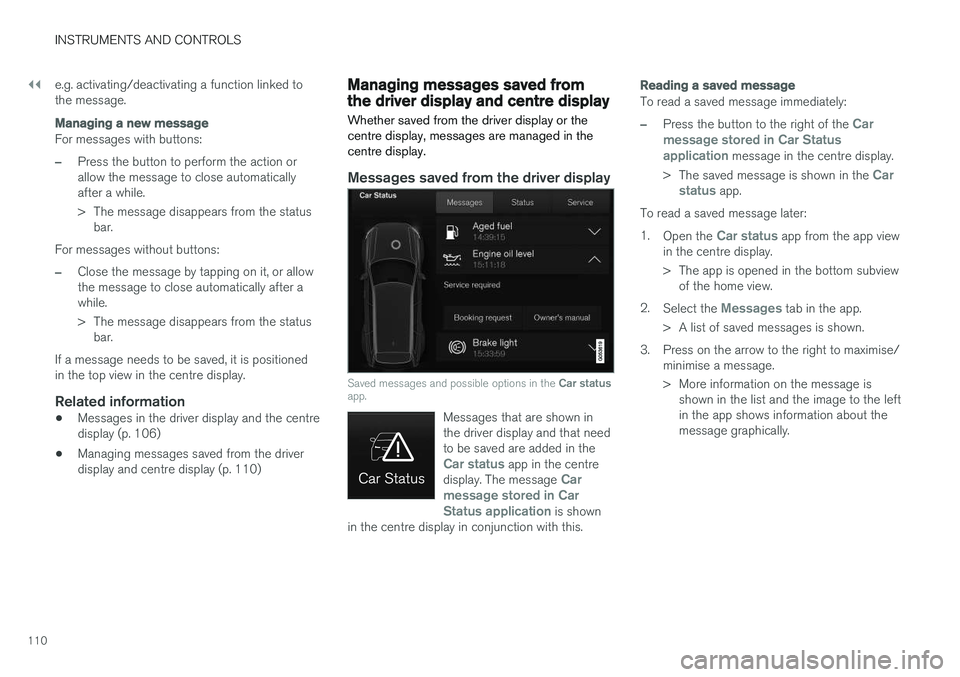
Messages saved from the driver display
Saved messages and possible options in the Car status
app.
Messages that are shown in the driver display and that needto be saved are added in the
Car status app in the centre
display. The message Car
message stored in Car Status application
is shown
in the centre display in conjunction with this.
Reading a saved message
To read a saved message immediately:
–Press the button to the right of the Car
message stored in Car Status application
message in the centre display.
> The saved message is shown in the
Car
status app.
To read a saved message later: 1. Open the
Car status app from the app view
in the centre display.
> The app is opened in the bottom subview of the home view.
2. Select the
Messages tab in the app.
> A list of saved messages is shown.
3. Press on the arrow to the right to maximise/ minimise a message.
> More information on the message isshown in the list and the image to the left in the app shows information about themessage graphically.
Page 113 of 594
INSTRUMENTS AND CONTROLS
111
Managing a saved message
In maximised mode, some messages have two buttons available to book service or read theowner's manual. To book service for a saved message:
–In maximised mode for the message, pressRequest appoint.Call to make Appointment6 for help in booking service.
> With
Request appoint.: TheAppointments tab opens in the app and
creates a request to book service and repair work. With
Call to make Appointment: The
phone app is initiated and calls a service centre to book service and repair work.
To read the owner's manual for a saved mes-sage:
–In maximised mode for the message, pressOwner's manual to read about the mes-
sage in the owner's manual.
> The owner's manual opens in the centre display and shows information linked to the message.
Saved messages in the app are deleted automat-ically each time the engine is started.
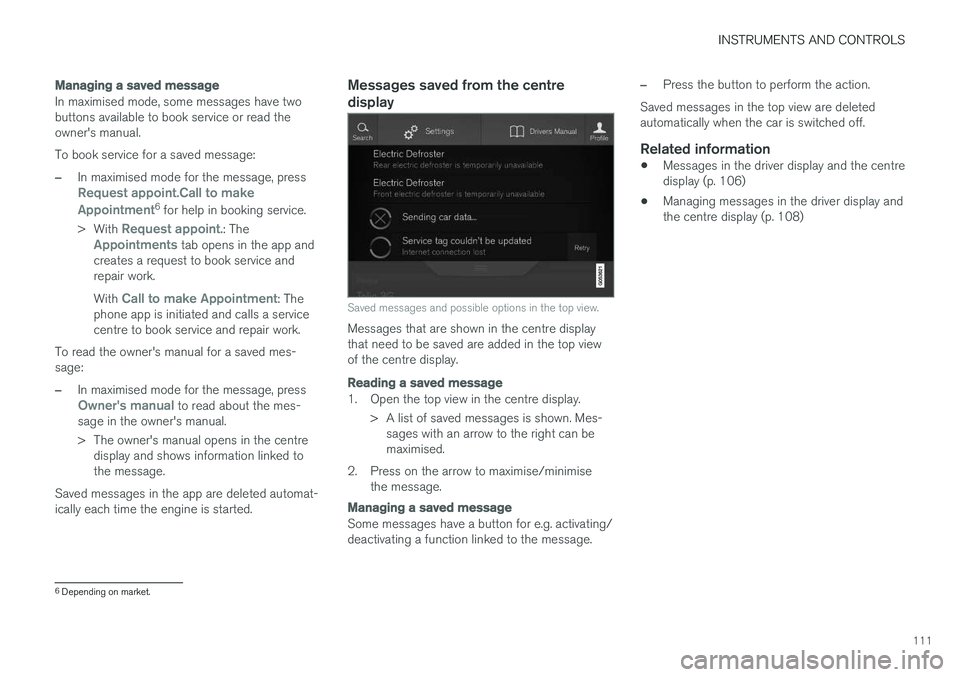
Messages saved from the centre display
Saved messages and possible options in the top view.
Messages that are shown in the centre display that need to be saved are added in the top viewof the centre display.
Reading a saved message
1. Open the top view in the centre display. > A list of saved messages is shown. Mes-sages with an arrow to the right can be maximised.
2. Press on the arrow to maximise/minimise the message.
Managing a saved message
Some messages have a button for e.g. activating/ deactivating a function linked to the message.
–Press the button to perform the action.
Saved messages in the top view are deleted automatically when the car is switched off.
Related information
• Messages in the driver display and the centredisplay (p. 106)
• Managing messages in the driver display andthe centre display (p. 108)
6
Depending on market.
Page 117 of 594
INSTRUMENTS AND CONTROLS
}}
* Option/accessory.115
When replacing the windscreen - contact an authorised workshop
7
. The correct version of the
windscreen must be fitted in order that the head- up display's graphics shall be displayed correctly.
Related information
• Function view with buttons for car functions(p. 47)
• Settings view (p. 169)
• Steering wheel (p. 131)
• Using the memory function in the power front seat
* (p. 122)
• Driver display (p. 90)
Voice recognition 8
The voice recognition system allows the driver to use voice recognition to control certain functionsof the media player, Bluetooth-connected phone,the climate system and Volvo's navigation sys- tem *.
Voice commands offer convenience and help the driver to avoid being distracted, and instead con-centrate on driving and focus attention on theroad and the traffic conditions.
WARNING
The driver always holds overall responsibility for driving the vehicle in a safe manner andcomplying with all applicable rules of the road.
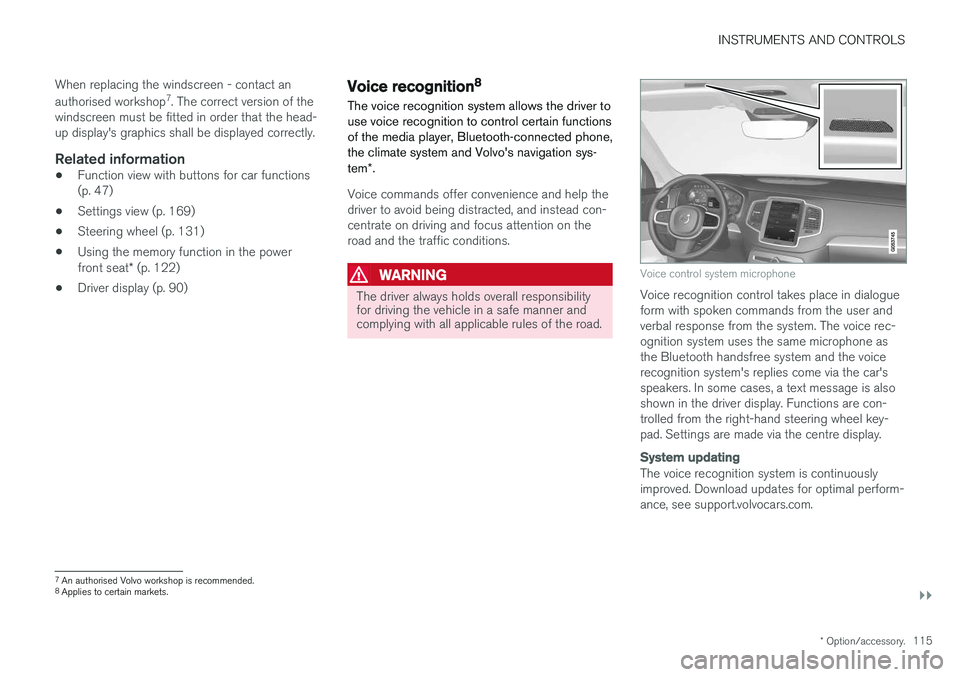
Voice control system microphone
Voice recognition control takes place in dialogue form with spoken commands from the user andverbal response from the system. The voice rec-ognition system uses the same microphone asthe Bluetooth handsfree system and the voicerecognition system's replies come via the car'sspeakers. In some cases, a text message is alsoshown in the driver display. Functions are con-trolled from the right-hand steering wheel key-pad. Settings are made via the centre display.
System updating
The voice recognition system is continuously improved. Download updates for optimal perform-ance, see support.volvocars.com.
7
An authorised Volvo workshop is recommended.
8 Applies to certain markets.
Page 125 of 594
INSTRUMENTS AND CONTROLS
}}
* Option/accessory.123
3.
Within three seconds, depress the 1 or 2
button.
> When the position has been stored in the selected memory button an acoustic sig- nal sounds and the light indicator in the M
button extinguishes.
If none of the memory buttons is depressedwithin three seconds then the M button extin-
guishes and no storing takes place. The seat must be adjusted again before a new memory can be set.
Using a stored settingA stored setting can be used with the front dooreither open or closed:
Open front door
–Depress one of the memory buttons 1 or 2
with a short press. Seat, door mirrors and head-up display move and then stop at thepositions stored in the selected memory but-ton.
Closed front door
–Hold one of the memory buttons 1 or 2
depressed until seat, door mirrors and head- up display stop in the positions that arestored in the selected memory button.
If the memory button is released, the movementof the seat, door mirrors and head-up display willbe stopped.
WARNING
Risk of crushing! Make sure that children do not play with the keypad. Check that there areno objects in front of, behind or under theseat during adjustment. Make sure that noneof the passengers in the rear seat is in dangerof becoming trapped.
Related information
• Power front seat
* (p. 121)
• Adjusting the power front seat
* (p. 122)
Multi-functional front seat *
Enhance the seating comfort using the multi- function control.
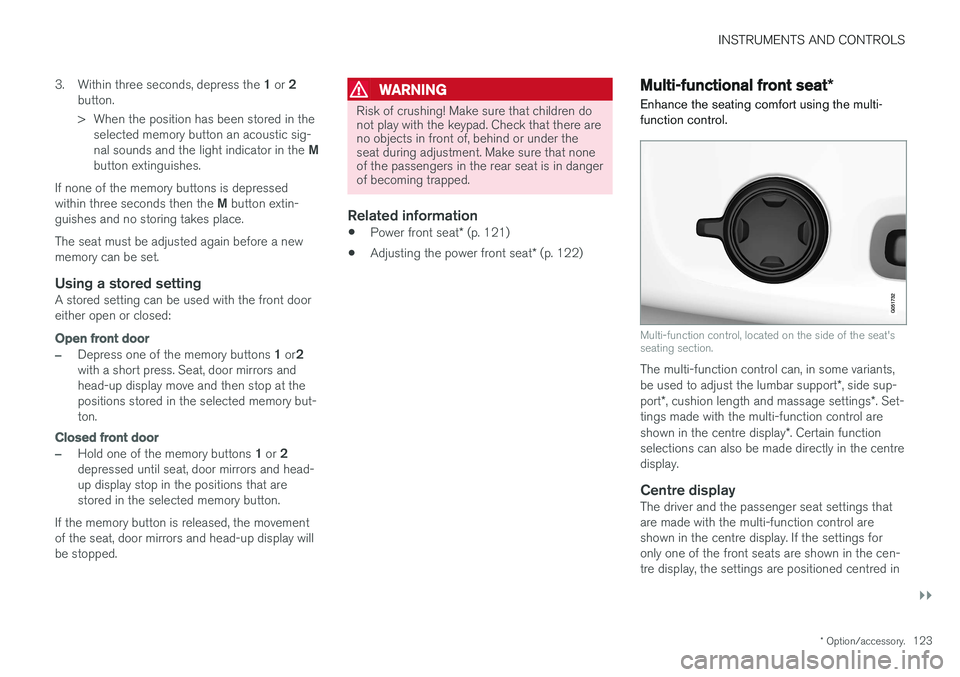
Multi-function control, located on the side of the seat's seating section.
The multi-function control can, in some variants, be used to adjust the lumbar support *, side sup-
port *, cushion length and massage settings *. Set-
tings made with the multi-function control areshown in the centre display *. Certain function
selections can also be made directly in the centre display.
Centre displayThe driver and the passenger seat settings thatare made with the multi-function control areshown in the centre display. If the settings foronly one of the front seats are shown in the cen-tre display, the settings are positioned centred in
Page 132 of 594

INSTRUMENTS AND CONTROLS
* Option/accessory.
130
Lowering the backrests in the rear seat
The rear seat's backrest is divided into two parts. The two parts can be lowered forwardindividually.
WARNING
Adjust the seat and fix it before driving away. Take care when adjusting the seat. Uncontrol-led or careless adjustment can lead to trap-ping injuries.
IMPORTANT
There must be no objects on the rear seat when the backrest is to be folded down. Theseat belts must not be connected either. Oth-erwise there is a risk of damaging the rearseat upholstery.
IMPORTANT
The integrated booster cushions * on the
outer seats must be lowered before lowering the seat. The armrest * for the centre seat must be
raised before lowering the seat. If the car has private locking, the tailgate must be closed before lowering the seat.
NOTE
The front seats may need to be pushed for- wards, and/or the backrests adjustedupwards, in order that the rear backrests canbe fully folded forward.
Lowering the backrest
Car with electronic folding
If the car is equipped with electronic folding of the rear seat * there are buttons located in the
cargo area. The backrests can also be lowered manually.
WARNING
Pay attention that people are not at risk of being trapped during the automatic folding ofthe rear seat. Since this takes place automati-cally on the press of a button, no one must beon or too close to the rear seat.
For electronically controlled folding of backrests:
1. Ensure that there are no occupants or objects in the rear seat.
2. Lower the centre seat's head restraint man- ually.
3. Hold the button for folding depressed. The buttons are marked L and R for left and right backrest section respectively.
4. The backrests are lowered automatically to horizontal position. The head restraints arealso lowered automatically.
To facilitate folding of the rear seat, the car mustbe stationary and the tailgate open. To lower the backrest manually:
Page 147 of 594
INSTRUMENTS AND CONTROLS
}}
145
Passenger compartment lighting
The passenger compartment lighting is acti- vated/deactivated with the buttons in the over-head controls above the front seats and the rearseat.
All lighting in the passenger compartment can be switched on and off manually within 30 minutesfrom when:
• the car has been switched off and its electri- cal system is in ignition position
0
• the car has been unlocked but it has not been started.
Front lighting
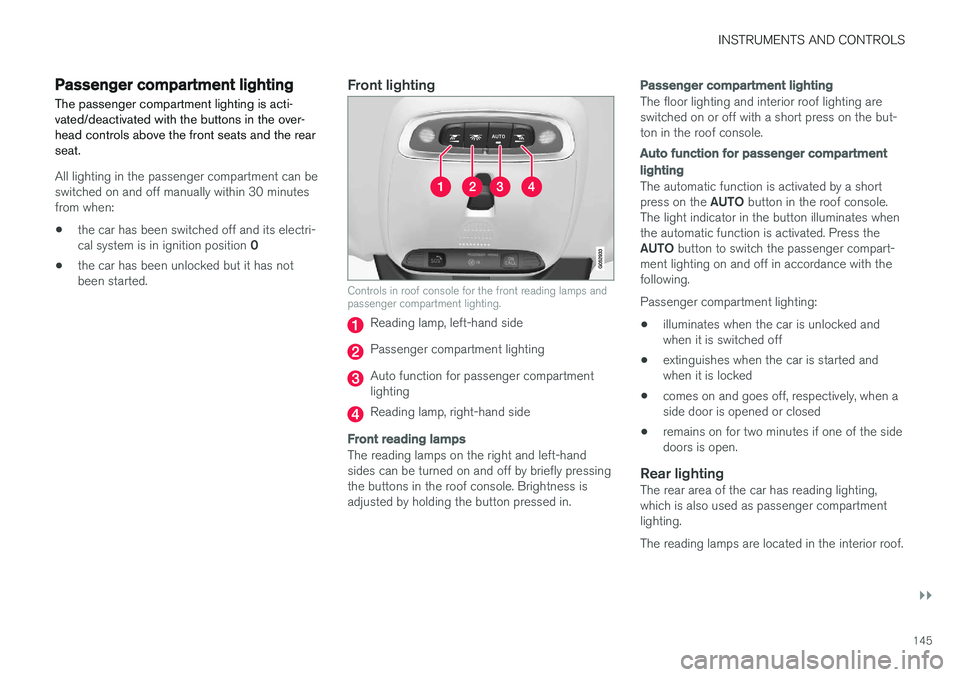
Controls in roof console for the front reading lamps and passenger compartment lighting.
Reading lamp, left-hand side
Passenger compartment lighting
Auto function for passenger compartment lighting
Reading lamp, right-hand side
Front reading lamps
The reading lamps on the right and left-hand sides can be turned on and off by briefly pressingthe buttons in the roof console. Brightness isadjusted by holding the button pressed in.
Passenger compartment lighting
The floor lighting and interior roof lighting are switched on or off with a short press on the but-ton in the roof console.
Auto function for passenger compartment lighting
The automatic function is activated by a short press on the
AUTO button in the roof console.
The light indicator in the button illuminates when the automatic function is activated. Press the AUTO button to switch the passenger compart-
ment lighting on and off in accordance with the following. Passenger compartment lighting: • illuminates when the car is unlocked and when it is switched off
• extinguishes when the car is started andwhen it is locked
• comes on and goes off, respectively, when aside door is opened or closed
• remains on for two minutes if one of the sidedoors is open.
Rear lightingThe rear area of the car has reading lighting,which is also used as passenger compartmentlighting. The reading lamps are located in the interior roof.
Page 156 of 594
||
INSTRUMENTS AND CONTROLS
* Option/accessory.
154
Memory function in power front seat *Door mirror positions can be saved in the mem- ory function of the power front seat.
Angling the door mirror when parking 28The door mirror can be angled down for thedriver to view the side of the road when parkingfor example.
–Engage reverse gear and press the
L or R
button.
When reverse gear is disengaged the mirror automatically returns to its original position afterapprox. 10 seconds, or earlier by pressing the button labelled L or R respectively.
Automatic angling of the door mirror
when parking 28
When reverse gear is engaged the door mirror is automatically angled down so that the driver cansee the side of the road when parking for exam-ple. When reverse gear is disengaged the mirrorautomatically returns to its original position aftera short time. Settings for this function are set via the centre display: 1.
Press
Settings in the top view.
2. Press
My CarMirrors and Easy Entry. 3.
Under
Exterior Mirror Tilt at Reverse,
select Off, Driver, Passenger or Both to
activate/deactivate and to select which review mirror should be angled.
Automatic retraction when locking *When the car is locked/unlocked with the remotecontrol key the door mirrors are automaticallyretracted/extended. The function can be activated/deactivated via the centre display: 1.
Press
Settings in the top view.
2. Press
My CarMirrors and Easy Entry.
3. Select
Fold Mirror When Locked to acti-
vate/deactivate.
Resetting to neutralMirrors that have been moved out of position by an external force must be reset electrically to theneutral position for electric retracting/extendingto work correctly: 1. Retract the mirrors with the L and R buttons.
2. Fold them out again with the L and R but-
tons.
3. Repeat the above procedure as necessary.The mirrors are now reset in neutral position.
Automatic dimming *Bright light from behind is automatically dimmed by the interior rearview and door mirrors. For the door mirrors to be fitted with this function requires that the interior rearview mirror also hasautomatic dimming, see the section "Interior rear-view mirror". Automatic dimming is always active while driving, apart from when gearbox reverse position isselected. Dimming sensitivity can be adjusted inthree levels and will affect the interior rearviewand the door mirrors.
NOTE
When sensitivity is changed there is no imme- diately noticeable change in dimming, but thechange will be complete after a while.
Settings for this function are set via the centre display: 1.
Press
Settings in the top view.
2. Press
My CarMirrors and Easy Entry.
3. Under
Rearview Mirror Auto Dimming,
select Normal, Dark or Light.
28 Only in combination with power seat with memory.
Page 157 of 594
INSTRUMENTS AND CONTROLS
}}
* Option/accessory.155
Retractable power door mirrors *The mirrors can be retracted for parking/driving in narrow spaces: 1.
Depress the L and R buttons simultaneously
(ignition position must be at least I).
2. Release them after approximately 1 second. The mirrors automatically stop in the fully retracted position.
Fold out the mirrors by pressing down the L and
R buttons simultaneously. The mirrors automati-
cally stop in the fully extended position.
Related information
• Interior rearview mirror (p. 155)
• Settings view (p. 169)
• Using the memory function in the power front seat
* (p. 122)
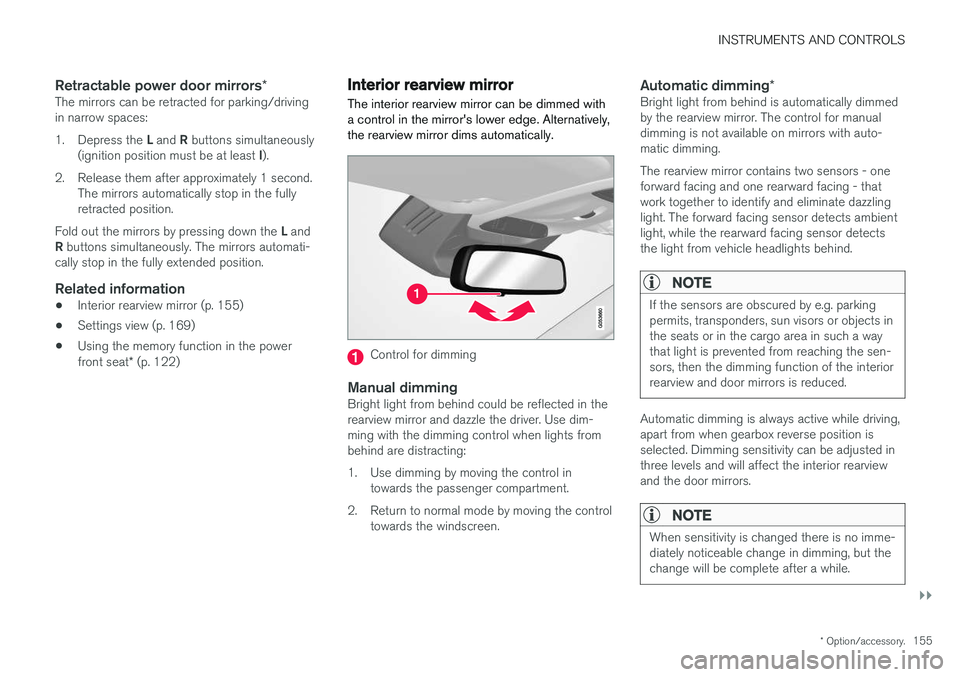
Interior rearview mirror The interior rearview mirror can be dimmed with a control in the mirror's lower edge. Alternatively,the rearview mirror dims automatically.
Control for dimming
Manual dimmingBright light from behind could be reflected in the rearview mirror and dazzle the driver. Use dim-ming with the dimming control when lights frombehind are distracting:
1. Use dimming by moving the control in
towards the passenger compartment.
2. Return to normal mode by moving the control towards the windscreen.
Automatic dimming *Bright light from behind is automatically dimmed by the rearview mirror. The control for manualdimming is not available on mirrors with auto-matic dimming. The rearview mirror contains two sensors - one forward facing and one rearward facing - thatwork together to identify and eliminate dazzlinglight. The forward facing sensor detects ambientlight, while the rearward facing sensor detectsthe light from vehicle headlights behind.
NOTE
If the sensors are obscured by e.g. parking permits, transponders, sun visors or objects inthe seats or in the cargo area in such a waythat light is prevented from reaching the sen-sors, then the dimming function of the interiorrearview and door mirrors is reduced.
Automatic dimming is always active while driving, apart from when gearbox reverse position isselected. Dimming sensitivity can be adjusted inthree levels and will affect the interior rearviewand the door mirrors.
NOTE
When sensitivity is changed there is no imme- diately noticeable change in dimming, but thechange will be complete after a while.
Page 164 of 594
||
INSTRUMENTS AND CONTROLS
* Option/accessory.
162 blind once more in the same direction without pinch protection, if this is done within 10 secondsafter pinch protection deployment. It is thereforepossible to override the pinch protection whenclosing has been interrupted e.g. if ice hasformed around the glass cover, by continuallypressing the control forward/downward until theglass cover and/or sun blind is closed.
Related information
•
Panorama roof
* (p. 158)
• Ignition positions (p. 385)
• Remote control key (p. 236)
• Locking/unlocking from the inside (p. 245)
• Locking/unlocking from the outside (p. 241)
HomeLink ®
*30
HomeLink ®
is a programmable remote control
that is integrated into the car's electrical system.
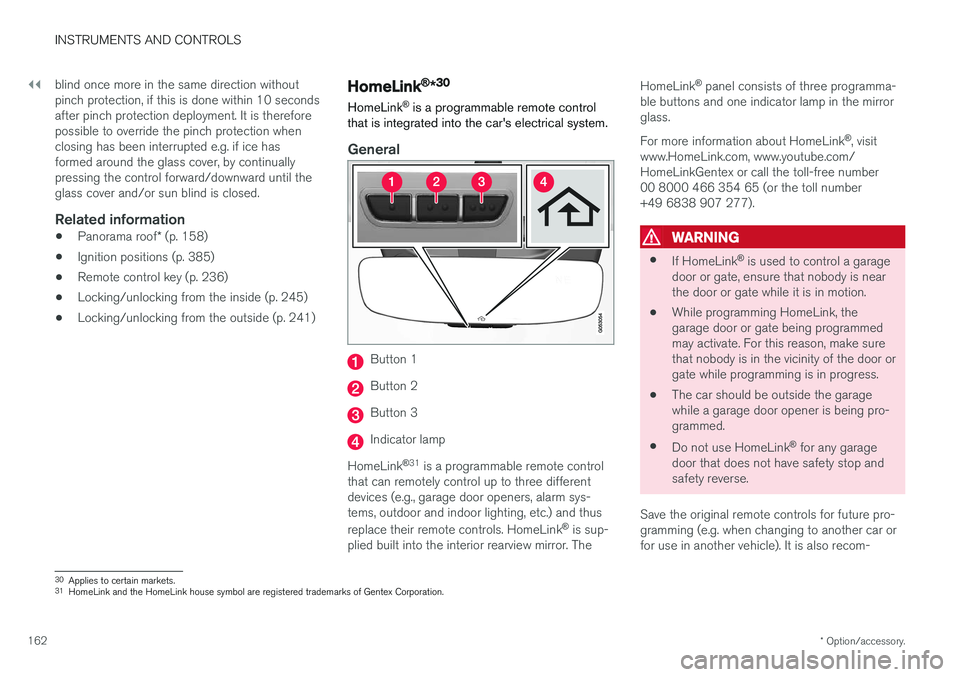
General
Button 1
Button 2
Button 3
Indicator lamp
HomeLink ®
31
is a programmable remote control
that can remotely control up to three different devices (e.g., garage door openers, alarm sys-tems, outdoor and indoor lighting, etc.) and thus replace their remote controls. HomeLink ®
is sup-
plied built into the interior rearview mirror. The HomeLink
®
panel consists of three programma-
ble buttons and one indicator lamp in the mirror glass. For more information about HomeLink ®
, visit
www.HomeLink.com, www.youtube.com/ HomeLinkGentex or call the toll-free number00 8000 466 354 65 (or the toll number+49 6838 907 277).
WARNING
• If HomeLink ®
is used to control a garage
door or gate, ensure that nobody is near the door or gate while it is in motion.
• While programming HomeLink, thegarage door or gate being programmedmay activate. For this reason, make surethat nobody is in the vicinity of the door orgate while programming is in progress.
• The car should be outside the garagewhile a garage door opener is being pro-
grammed.
• Do not use HomeLink ®
for any garage
door that does not have safety stop andsafety reverse.
Save the original remote controls for future pro-gramming (e.g. when changing to another car orfor use in another vehicle). It is also recom-
30 Applies to certain markets.
31 HomeLink and the HomeLink house symbol are registered trademarks of Gentex Corporation.
Page 165 of 594
INSTRUMENTS AND CONTROLS
}}
* Option/accessory.163
mended that the programming for the buttons is deleted when the car is sold; see the section "Programming HomeLink
®
".
Related information
• Programming HomeLink ®
* (p. 163)
Programming HomeLink ®
*32
Instructions for programming HomeLink ®
.
Programming HomeLink ®
NOTE
In certain vehicles the ignition must be switched on or in "accessory position" before HomeLink
®
can be programmed or used.
Preferably fit new batteries in the remote con-trol that will be replaced by HomeLink ®
for
faster programming and improved transmis-sion of the radio signal. The HomeLink ®
but-
tons should be reset before programming,see the heading "Resetting the HomeLink ®
buttons". When the reset is complete,HomeLink ®
is set in "learn mode" and ready
for programming.
1. Press the 33
button on HomeLink ®
you want
to program. The indicator lamp 33
on
HomeLink ®
should flash yellow once per
second. It is not necessary to hold the button depressed. 2. Aim the remote control towards the
HomeLink ®
button to be programmed and
hold it 2-8 cm from the button. Do not obstruct the indicator lamp on HomeLink ®
.
Note: Some remote controls can program
HomeLink ®
better at a distance of
15-20 cm. Bear this in mind if you encounter problems during programming.
3. Press and hold the button on the original remote control to be programmed on HomeLink ®
and keep an eye on the indicator
lamp. Do not release the button until the indicator lamp has switched from flashingyellow once per second to either flashinggreen 10 times per second or illuminating ina constant green glow. The button on theremote control can be released once theindicator lamp flashes or illuminates in green. Note: For some receivers, programming step
3 may need to be replaced with the instruc- tions in step 4.
4. Press and release the button on the original remote control every other second until theindicator lamp has changed from flashingyellow once per second to either flashinggreen 10 times per second or illuminating ina constant green glow.
32Applies to certain markets.
33 See section "HomeLink ®
*" for the location of buttons and indicator lamp.