change time VOLVO V90 2017 Owner's Manual
[x] Cancel search | Manufacturer: VOLVO, Model Year: 2017, Model line: V90, Model: VOLVO V90 2017Pages: 594, PDF Size: 15.07 MB
Page 303 of 594
DRIVER SUPPORT
* Option/accessory.301
Change between Cruise control and adaptive cruise control *
In a car with Adaptive Cruise Control (ACC) the driver can change between Cruise Control (CC)and ACC.
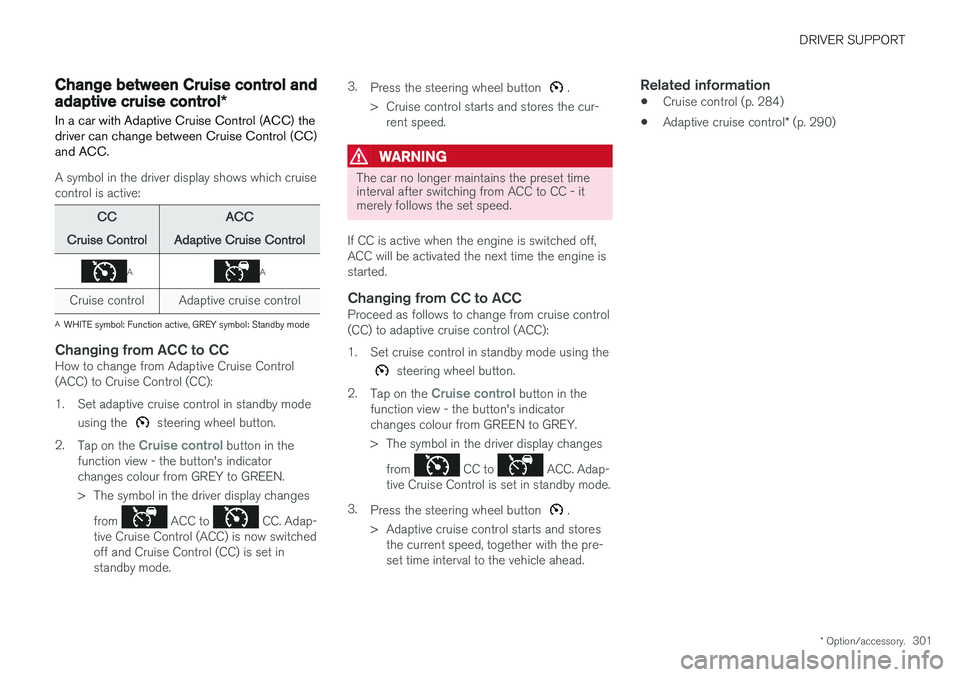
A symbol in the driver display shows which cruise control is active:
CC
Cruise Control ACC
Adaptive Cruise Control
AA
Cruise control Adaptive cruise control
A WHITE symbol: Function active, GREY symbol: Standby mode
Changing from ACC to CCHow to change from Adaptive Cruise Control (ACC) to Cruise Control (CC):
1. Set adaptive cruise control in standby mode
using the
steering wheel button.
2. Tap on the
Cruise control button in the
function view - the button's indicator changes colour from GREY to GREEN.
> The symbol in the driver display changes
from
ACC to CC. Adap-
tive Cruise Control (ACC) is now switched off and Cruise Control (CC) is set instandby mode. 3.
Press the steering wheel button
.
> Cruise control starts and stores the cur- rent speed.
WARNING
The car no longer maintains the preset time interval after switching from ACC to CC - itmerely follows the set speed.
If CC is active when the engine is switched off, ACC will be activated the next time the engine isstarted.
Changing from CC to ACCProceed as follows to change from cruise control(CC) to adaptive cruise control (ACC):
1. Set cruise control in standby mode using the
steering wheel button.
2. Tap on the
Cruise control button in the
function view - the button's indicator changes colour from GREEN to GREY.
> The symbol in the driver display changes
from
CC to ACC. Adap-
tive Cruise Control is set in standby mode.
3. Press the steering wheel button
.
> Adaptive cruise control starts and stores the current speed, together with the pre- set time interval to the vehicle ahead.
Related information
• Cruise control (p. 284)
• Adaptive cruise control
* (p. 290)
Page 306 of 594
DRIVER SUPPORT
* Option/accessory.
304
Pilot Assist *
Pilot Assist helps the driver to drive the car between the lane's side markings using steeringassistance as well as to maintain an even speed,combined with a preselected time interval to thevehicle ahead.
The Pilot Assist function gives more comfortable driving and a more relaxed driving experienceduring, for example, long journeys on motorwaysin even traffic flows.
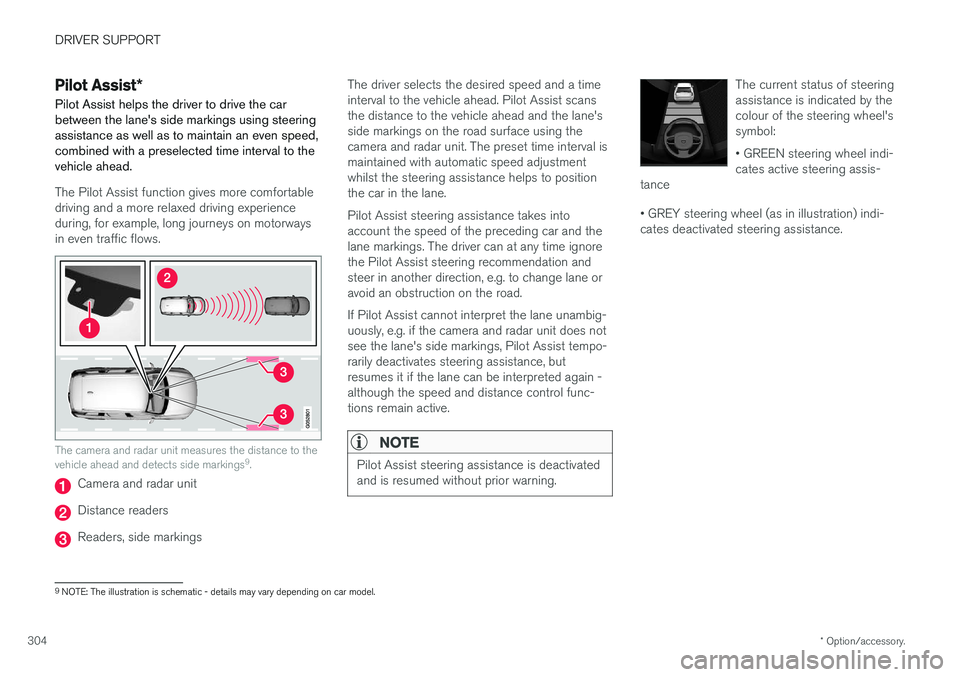
The camera and radar unit measures the distance to the vehicle ahead and detects side markings 9
.
Camera and radar unit
Distance readers
Readers, side markings The driver selects the desired speed and a time interval to the vehicle ahead. Pilot Assist scansthe distance to the vehicle ahead and the lane'sside markings on the road surface using thecamera and radar unit. The preset time interval ismaintained with automatic speed adjustmentwhilst the steering assistance helps to positionthe car in the lane. Pilot Assist steering assistance takes into account the speed of the preceding car and thelane markings. The driver can at any time ignorethe Pilot Assist steering recommendation andsteer in another direction, e.g. to change lane oravoid an obstruction on the road. If Pilot Assist cannot interpret the lane unambig- uously, e.g. if the camera and radar unit does notsee the lane's side markings, Pilot Assist tempo-rarily deactivates steering assistance, butresumes it if the lane can be interpreted again -although the speed and distance control func-tions remain active.
NOTE
Pilot Assist steering assistance is deactivated and is resumed without prior warning.
The current status of steering assistance is indicated by thecolour of the steering wheel'ssymbol: • GREEN steering wheel indi- cates active steering assis-
tance • GREY steering wheel (as in illustration) indi- cates deactivated steering assistance.
9 NOTE: The illustration is schematic - details may vary depending on car model.
Page 309 of 594
DRIVER SUPPORT
}}
* Option/accessory.307
WARNING
Pilot Assist only gives warning about vehicles whose camera and radar unit has beendetected - therefore a warning may not occuror be delayed. Do not wait for a warning with-out braking when so required.
Head-up display *
Symbol for collision warning on the windscreen 9
.
In cars equipped with a head-up display, the warning is shown on the windscreen by a flashingsymbol.
NOTE
Information on the windscreen may be diffi- cult to see in strong sunlight and when wear-ing sunglasses.
Related information
• Activating and starting the Pilot Assist
*
(p. 307)
• Managing the speed for Pilot Assist
*
(p. 309)
• Setting the time interval for Pilot Assist
*
(p. 310)
• Change of target and automatic braking with Pilot Assist
* (p. 313)
• Deactivating/activating the Pilot Assist
*
(p. 311)
• Overtaking assistance with the adaptivecruise control
* or Pilot Assist * (p. 298)
• Limitations of Pilot Assist
* (p. 314)
• Symbols and messages for Pilot Assist
*
(p. 316)
• Adaptive cruise control
* (p. 290)
• Distance Warning
* (p. 288)
• Head-up display
* (p. 112)
• Limitations of the radar unit (p. 319)
• Limitations of the camera unit (p. 327)
Activating and starting the Pilot Assist
*
Pilot Assist must first be activated and then started to be able to control speed and distanceand to give steering assistance.
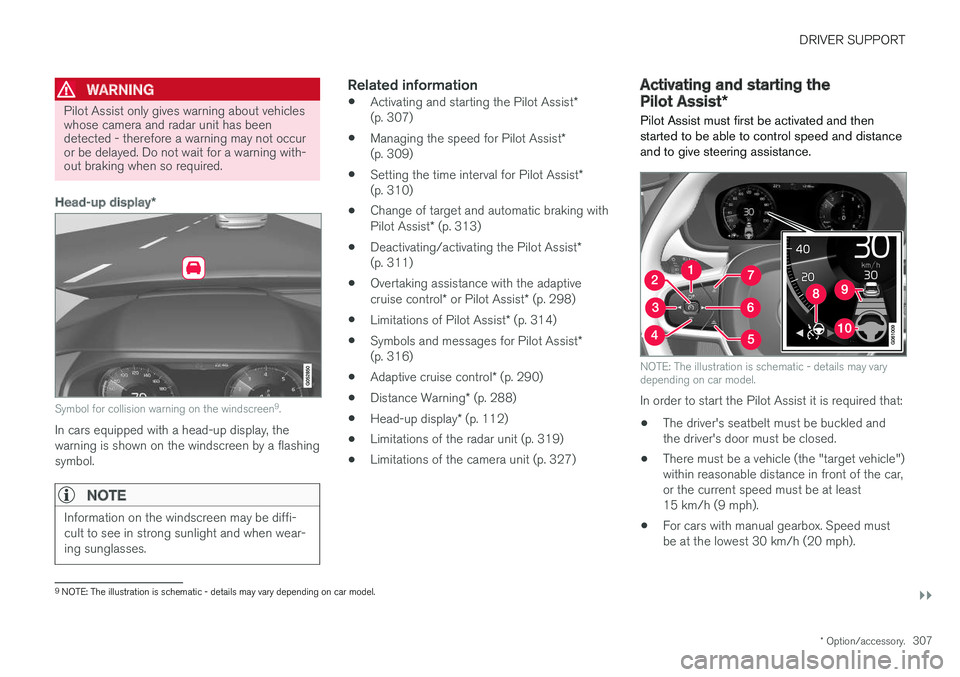
NOTE: The illustration is schematic - details may vary depending on car model.
In order to start the Pilot Assist it is required that:
• The driver's seatbelt must be buckled and the driver's door must be closed.
• There must be a vehicle (the "target vehicle")within reasonable distance in front of the car,or the current speed must be at least15 km/h (9 mph).
• For cars with manual gearbox. Speed mustbe at the lowest 30 km/h (20 mph).
9
NOTE: The illustration is schematic - details may vary depending on car model.
Page 310 of 594
||
DRIVER SUPPORT
* Option/accessory.
308 With the adaptive cruise control in the standby mode: 1.
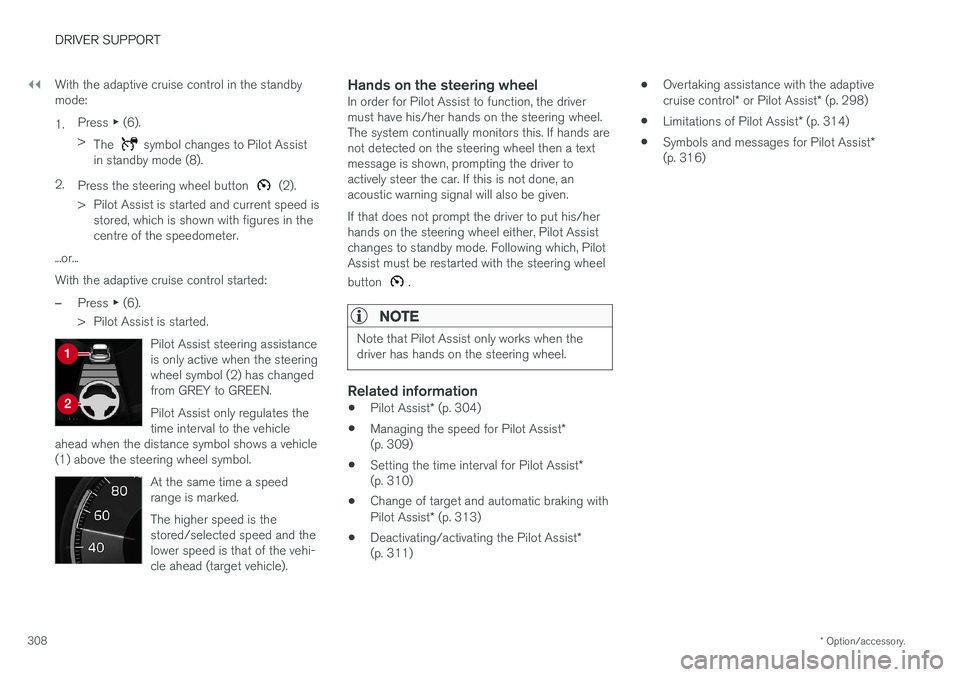
Press
▶ (6).
> The
symbol changes to Pilot Assist
in standby mode (8).
2. Press the steering wheel button
(2).
> Pilot Assist is started and current speed is stored, which is shown with figures in the centre of the speedometer.
...or... With the adaptive cruise control started:
–Press ▶ (6).
> Pilot Assist is started.
Pilot Assist steering assistance is only active when the steeringwheel symbol (2) has changedfrom GREY to GREEN. Pilot Assist only regulates the time interval to the vehicle
ahead when the distance symbol shows a vehicle(1) above the steering wheel symbol.
At the same time a speed range is marked. The higher speed is the stored/selected speed and thelower speed is that of the vehi-cle ahead (target vehicle).
Hands on the steering wheelIn order for Pilot Assist to function, the driver must have his/her hands on the steering wheel.The system continually monitors this. If hands arenot detected on the steering wheel then a textmessage is shown, prompting the driver toactively steer the car. If this is not done, anacoustic warning signal will also be given. If that does not prompt the driver to put his/her hands on the steering wheel either, Pilot Assistchanges to standby mode. Following which, PilotAssist must be restarted with the steering wheel button
.
NOTE
Note that Pilot Assist only works when the driver has hands on the steering wheel.
Related information
• Pilot Assist
* (p. 304)
• Managing the speed for Pilot Assist
*
(p. 309)
• Setting the time interval for Pilot Assist
*
(p. 310)
• Change of target and automatic braking with Pilot Assist
* (p. 313)
• Deactivating/activating the Pilot Assist
*
(p. 311) •
Overtaking assistance with the adaptivecruise control
* or Pilot Assist * (p. 298)
• Limitations of Pilot Assist
* (p. 314)
• Symbols and messages for Pilot Assist
*
(p. 316)
Page 312 of 594
DRIVER SUPPORT
* Option/accessory.
310
Setting the time interval for Pilot Assist *
Pilot Assist can be set with different time inter- vals.
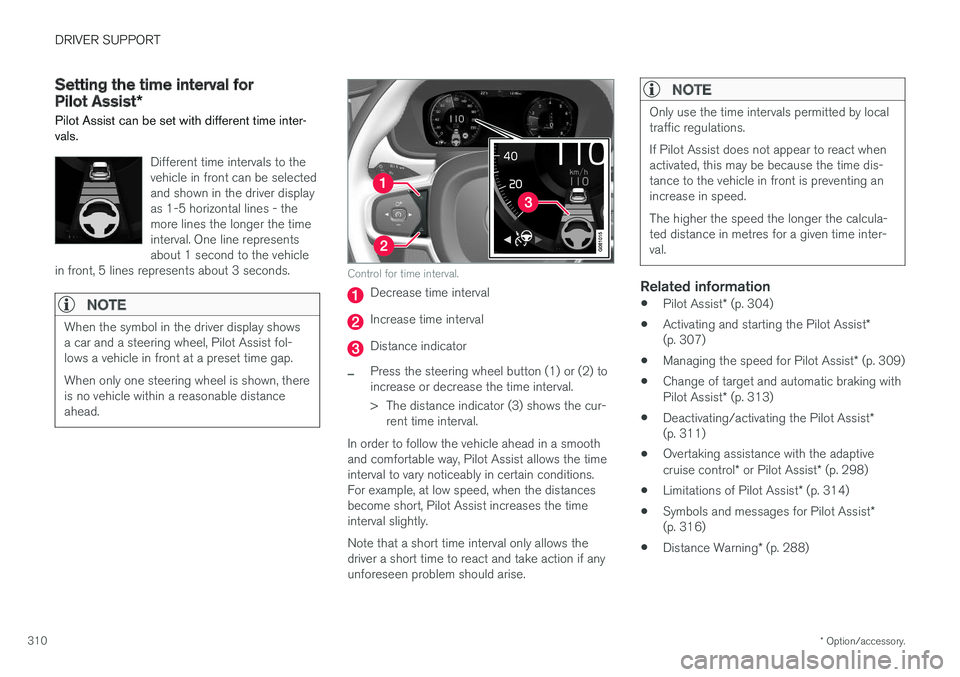
Different time intervals to the vehicle in front can be selectedand shown in the driver displayas 1-5 horizontal lines - themore lines the longer the timeinterval. One line representsabout 1 second to the vehicle
in front, 5 lines represents about 3 seconds.
NOTE
When the symbol in the driver display shows a car and a steering wheel, Pilot Assist fol-lows a vehicle in front at a preset time gap. When only one steering wheel is shown, there is no vehicle within a reasonable distanceahead.
Control for time interval.
Decrease time interval
Increase time interval
Distance indicator
–Press the steering wheel button (1) or (2) to increase or decrease the time interval.
> The distance indicator (3) shows the cur- rent time interval.
In order to follow the vehicle ahead in a smooth and comfortable way, Pilot Assist allows the timeinterval to vary noticeably in certain conditions.For example, at low speed, when the distancesbecome short, Pilot Assist increases the timeinterval slightly. Note that a short time interval only allows the driver a short time to react and take action if anyunforeseen problem should arise.
NOTE
Only use the time intervals permitted by local traffic regulations. If Pilot Assist does not appear to react when activated, this may be because the time dis-tance to the vehicle in front is preventing anincrease in speed. The higher the speed the longer the calcula- ted distance in metres for a given time inter-val.
Related information
• Pilot Assist
* (p. 304)
• Activating and starting the Pilot Assist
*
(p. 307)
• Managing the speed for Pilot Assist
* (p. 309)
• Change of target and automatic braking with Pilot Assist
* (p. 313)
• Deactivating/activating the Pilot Assist
*
(p. 311)
• Overtaking assistance with the adaptivecruise control
* or Pilot Assist * (p. 298)
• Limitations of Pilot Assist
* (p. 314)
• Symbols and messages for Pilot Assist
*
(p. 316)
• Distance Warning
* (p. 288)
Page 314 of 594
||
DRIVER SUPPORT
* Option/accessory.
312
Automatic standby mode
Pilot Assist is dependent on other systems, e.g. stability control/anti-skid ESC. If any of theseother systems stops working, Pilot Assist isswitched off automatically. In the event of automatic deactivation a signal will sound and a message is shown in the driver dis-play. The driver must then intervene and adaptthe speed and distance to the vehicle ahead. Automatic deactivation may occur if:
• the speed is below 5 km/h (3 mph) and Pilot Assist is uncertain whether the vehicle aheadis a stationary vehicle or an object, such as aspeed bump.
• the speed is below 5 km/h (3 mph) and thevehicle ahead turns off so that Pilot Assist nolonger has a vehicle to follow.
• speed is reduced to below 30 km/h(20 mph) - only applies to cars with manualgearbox.
• the driver's hands are not on the steeringwheel
• the driver opens the door
• the driver takes off the seatbelt
• engine speed is too low/high
• wheels lose traction
• brake temperature is high
• the parking brake is applied •
the camera and radar unit is covered by e.g.snow or heavy rainfall (camera lens/radiowaves are blocked).
Reactivating Pilot Assist from the
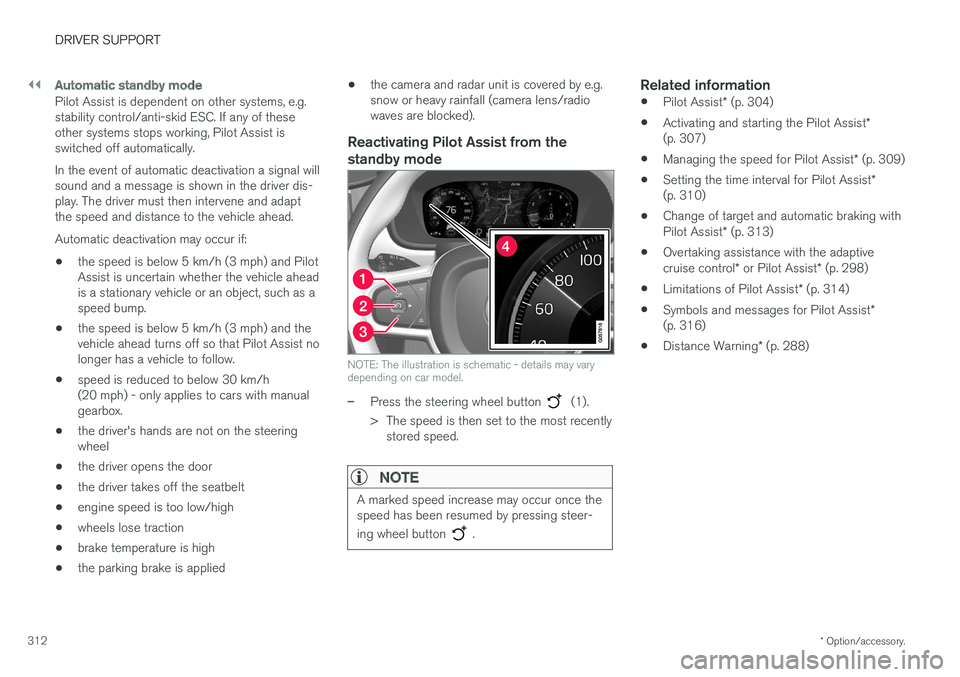
standby mode
NOTE: The illustration is schematic - details may vary depending on car model.
–Press the steering wheel button (1).
> The speed is then set to the most recently stored speed.
NOTE
A marked speed increase may occur once the speed has been resumed by pressing steer- ing wheel button
.
Related information
• Pilot Assist
* (p. 304)
• Activating and starting the Pilot Assist
*
(p. 307)
• Managing the speed for Pilot Assist
* (p. 309)
• Setting the time interval for Pilot Assist
*
(p. 310)
• Change of target and automatic braking with Pilot Assist
* (p. 313)
• Overtaking assistance with the adaptivecruise control
* or Pilot Assist * (p. 298)
• Limitations of Pilot Assist
* (p. 314)
• Symbols and messages for Pilot Assist
*
(p. 316)
• Distance Warning
* (p. 288)
Page 317 of 594
DRIVER SUPPORT
}}
* Option/accessory.315
IMPORTANT
In certain situations, Pilot Assist steering assistance may have difficulty helping thedriver in the right way or it may be automati-cally deactivated - in which case, the use ofPilot Assist is not recommended. Examples ofsuch situations may be that: •the lane markings are worn, missing or cross each other.
• lane division is unclear, for example, whenthe lanes divide or merge or at exits or inthe event of multiple sets of markings.
• edges or other lines than lane markingsare present on or near the road, e.g.curbs, joints or repairs to the road sur-face, edges of barriers, roadside edges orstrong shadows.
• the lane is narrow or winding.
• the lane contains ridges or holes.
• weather conditions are poor, e.g. rain,snow or fog or slush or impaired viewwith poor light conditions, back-lighting,wet road surface etc.
The driver should also note that Pilot Assisthas the following limitations: • High kerbs, roadside barriers, temporary obstacles (traffic cones, safety barriers,etc.) are not detected. Alternatively, theymay be detected incorrectly as lane
markings, with a subsequent risk of con- tact between the car and such obstacles.The driver must ensure him/herself thatthe car is at a suitable distance from suchobstacles.
• The camera and radar sensor does nothave the capacity to detect all oncomingobjects and obstacles in traffic environ-ments, e.g. potholes, stationary obstaclesor objects which completely or partiallyblock the route.
• Pilot Assist does not "see" pedestrians,animals, etc.
• The recommended steering input is forcelimited, which means that it cannotalways help the driver to steer and keepthe car within the lane.
The driver always has the possibility of correcting or adjusting a steering intervention imposed byPilot Assist and can turn the steering wheel tothe desired position.
Steep roads and/or heavy loadBear in mind that Pilot Assist is primarilyintended for use when driving on level road surfa-ces. The function may have difficulty in keepingthe correct distance from the vehicle ahead whendriving on steep downhill slopes - in which case,be extra attentive and ready to brake. Do not usePilot Assist with a heavy load or with a trailer con-nected to the car.
Miscellaneous
•Off Road drive mode cannot be selected
when Pilot Assist is activated.
NOTE
The function uses the car's camera unit, which has some general limitations, see the"Limitations for camera unit" section.
NOTE
The function uses the car's radar unit, which has some general limitations, see the "Limita-tions for radar unit" section.
Related information
• Pilot Assist
* (p. 304)
• Activating and starting the Pilot Assist
*
(p. 307)
• Managing the speed for Pilot Assist
* (p. 309)
• Setting the time interval for Pilot Assist
*
(p. 310)
• Change of target and automatic braking with Pilot Assist
* (p. 313)
• Deactivating/activating the Pilot Assist
*
(p. 311)
• Overtaking assistance with the adaptivecruise control
* or Pilot Assist * (p. 298)
Page 319 of 594
DRIVER SUPPORT
* Option/accessory.317
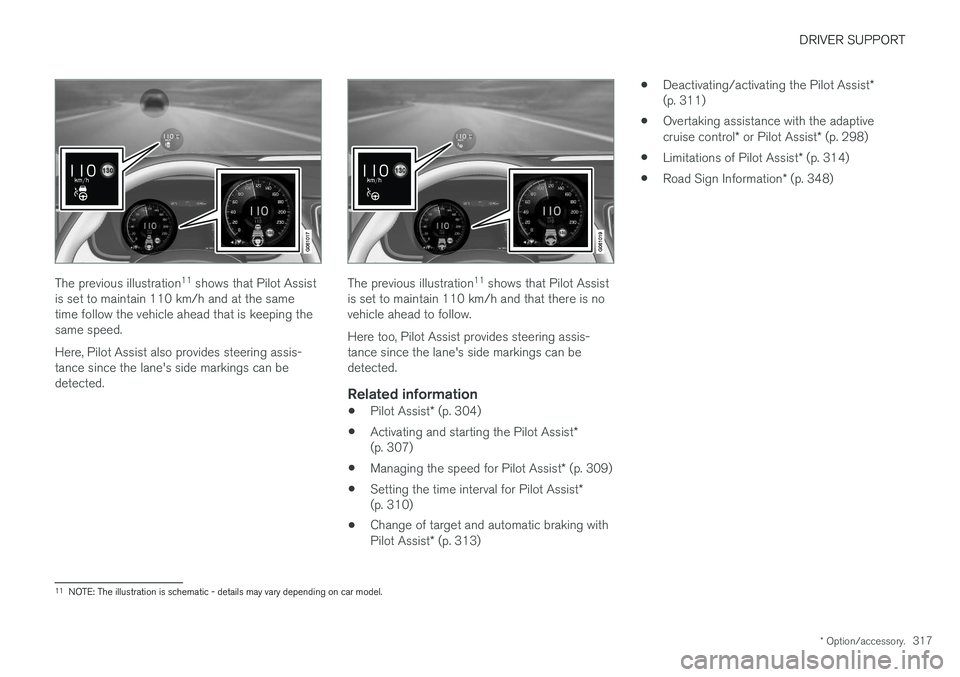
The previous illustration 11
shows that Pilot Assist
is set to maintain 110 km/h and at the same time follow the vehicle ahead that is keeping thesame speed. Here, Pilot Assist also provides steering assis- tance since the lane's side markings can bedetected.The previous illustration 11
shows that Pilot Assist
is set to maintain 110 km/h and that there is no vehicle ahead to follow. Here too, Pilot Assist provides steering assis- tance since the lane's side markings can bedetected.
Related information
• Pilot Assist
* (p. 304)
• Activating and starting the Pilot Assist
*
(p. 307)
• Managing the speed for Pilot Assist
* (p. 309)
• Setting the time interval for Pilot Assist
*
(p. 310)
• Change of target and automatic braking with Pilot Assist
* (p. 313) •
Deactivating/activating the Pilot Assist
*
(p. 311)
• Overtaking assistance with the adaptivecruise control
* or Pilot Assist * (p. 298)
• Limitations of Pilot Assist
* (p. 314)
• Road Sign Information
* (p. 348)
11
NOTE: The illustration is schematic - details may vary depending on car model.
Page 332 of 594
DRIVER SUPPORT
330
City Safety
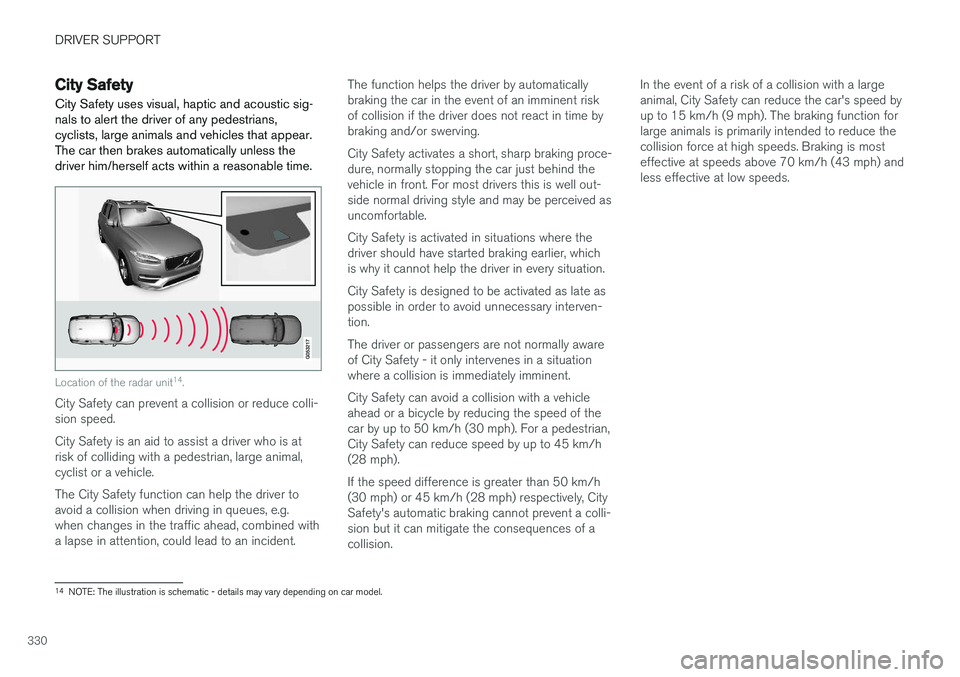
City Safety uses visual, haptic and acoustic sig- nals to alert the driver of any pedestrians,cyclists, large animals and vehicles that appear.The car then brakes automatically unless thedriver him/herself acts within a reasonable time.
Location of the radar unit 14
.
City Safety can prevent a collision or reduce colli- sion speed. City Safety is an aid to assist a driver who is at risk of colliding with a pedestrian, large animal,cyclist or a vehicle. The City Safety function can help the driver to avoid a collision when driving in queues, e.g.when changes in the traffic ahead, combined witha lapse in attention, could lead to an incident. The function helps the driver by automaticallybraking the car in the event of an imminent riskof collision if the driver does not react in time bybraking and/or swerving. City Safety activates a short, sharp braking proce- dure, normally stopping the car just behind thevehicle in front. For most drivers this is well out-side normal driving style and may be perceived asuncomfortable. City Safety is activated in situations where the driver should have started braking earlier, whichis why it cannot help the driver in every situation. City Safety is designed to be activated as late as possible in order to avoid unnecessary interven-tion. The driver or passengers are not normally aware of City Safety - it only intervenes in a situationwhere a collision is immediately imminent. City Safety can avoid a collision with a vehicle ahead or a bicycle by reducing the speed of thecar by up to 50 km/h (30 mph). For a pedestrian,City Safety can reduce speed by up to 45 km/h(28 mph). If the speed difference is greater than 50 km/h (30 mph) or 45 km/h (28 mph) respectively, CitySafety's automatic braking cannot prevent a colli-sion but it can mitigate the consequences of acollision.In the event of a risk of a collision with a largeanimal, City Safety can reduce the car's speed byup to 15 km/h (9 mph). The braking function forlarge animals is primarily intended to reduce thecollision force at high speeds. Braking is mosteffective at speeds above 70 km/h (43 mph) andless effective at low speeds.
14
NOTE: The illustration is schematic - details may vary depending on car model.
Page 342 of 594
DRIVER SUPPORT
* Option/accessory.
340
Rear Collision Warning
The Rear Collision Warning (RCW) function can help the driver to avoid being hit by a vehicleapproaching from behind.
RCW is activated automatically each time the engine is started. The RCW can warn the driver in a vehicle approaching from behind that a collision is immi-nent by rapidly flashing the direction indicators. If, at a vehicle speed below 30 km/h (20 mph), the RCW function detects that the car is in dan-ger of being hit from behind, the seatbelt ten-sioners may tension the front seatbelts and theWhiplash Protection System safety system isactivated. Immediately before the collision, RCW may also activate the foot brake in order to reduce the for-ward acceleration of the car during the collision.However, the foot brake is only activated if thecar is stationary. The foot brake releases immedi-ately if the accelerator pedal is depressed.
LimitationsIn certain cases the RCW may have difficultyhelping the driver in the event of a collision risk.This can be for example:
• if the vehicle approaching from the rear isdetected too late
• if the vehicle approaching from the rearchanges lane at the last moment •
if the vehicle approaching from the rear has aspeed exceeding 80 km/h (50 mph).
NOTE
In certain markets, RCW does
not give a
warning with the direction indicators due to local traffic regulations - in such cases, thispart of the function is deactivated.
NOTE
The warning with direction indicators for Rear Collision Warning is deactivated if the warn-ing distance for collision warning in the CitySafety function is set at the lowest level "
Late".
The seat belt pre-tensioning and braking functions are, however, still active.
Related information
• City Safety (p. 330)
• Setting the warning distance for City Safety (p. 332)
• Seatbelt tensioner (p. 59)
• Whiplash Protection System (p. 57)
Blind Spot Information
*
The Blind Spot Information (BLIS) function is designed to give a warning of vehicles diago-nally behind and to the side of your car so as togive assistance in heavy traffic on roads withseveral lanes in the same direction.
BLIS is a driver aid intended to give a warning of: • vehicles in the car's blind spot
• quickly approaching vehicles in the left and right lanes closest to the car.