change time VOLVO V90 2017 Service Manual
[x] Cancel search | Manufacturer: VOLVO, Model Year: 2017, Model line: V90, Model: VOLVO V90 2017Pages: 594, PDF Size: 15.07 MB
Page 484 of 594
WHEELS AND TYRES
482
TyresAmongst other things, the function of the tyres is to carry load, provide grip on the road surface,dampen vibration and protect the wheel fromwear.
The tyres greatly affect the car's driving characte- ristics. The type of tyre, dimensions, tyre pressureand speed rating are important for how the carperforms.
Recommended tyresOn delivery, the car is equipped with Volvo origi- nal tyres that have the VOL 1
marking on the side
of the tyres. These tyres are carefully adapted to the car. In the event of changing tyres, it is there-fore important that the new tyres also have thismarking in order for the car's driving characteris-tics, comfort and fuel consumption to be main-tained.
New tyres
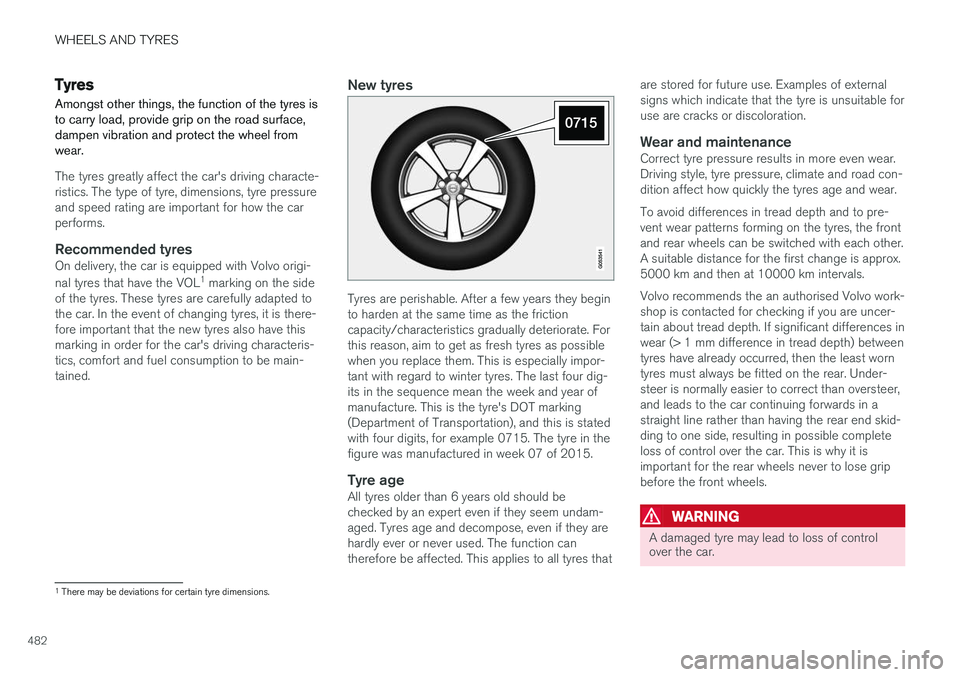
Tyres are perishable. After a few years they begin to harden at the same time as the frictioncapacity/characteristics gradually deteriorate. Forthis reason, aim to get as fresh tyres as possiblewhen you replace them. This is especially impor-tant with regard to winter tyres. The last four dig-its in the sequence mean the week and year ofmanufacture. This is the tyre's DOT marking(Department of Transportation), and this is statedwith four digits, for example 0715. The tyre in thefigure was manufactured in week 07 of 2015.
Tyre ageAll tyres older than 6 years old should bechecked by an expert even if they seem undam-aged. Tyres age and decompose, even if they arehardly ever or never used. The function cantherefore be affected. This applies to all tyres that are stored for future use. Examples of externalsigns which indicate that the tyre is unsuitable foruse are cracks or discoloration.
Wear and maintenanceCorrect tyre pressure results in more even wear.Driving style, tyre pressure, climate and road con-dition affect how quickly the tyres age and wear. To avoid differences in tread depth and to pre- vent wear patterns forming on the tyres, the frontand rear wheels can be switched with each other.A suitable distance for the first change is approx.5000 km and then at 10000 km intervals. Volvo recommends the an authorised Volvo work- shop is contacted for checking if you are uncer-tain about tread depth. If significant differences inwear (> 1 mm difference in tread depth) betweentyres have already occurred, then the least worntyres must always be fitted on the rear. Under-steer is normally easier to correct than oversteer,and leads to the car continuing forwards in astraight line rather than having the rear end skid-ding to one side, resulting in possible completeloss of control over the car. This is why it isimportant for the rear wheels never to lose gripbefore the front wheels.
WARNING
A damaged tyre may lead to loss of control over the car.
1
There may be deviations for certain tyre dimensions.
Page 486 of 594
WHEELS AND TYRES
484
Tread wear indicators on the tyres Tread wear indicators show the status of the tyre's tread depth.
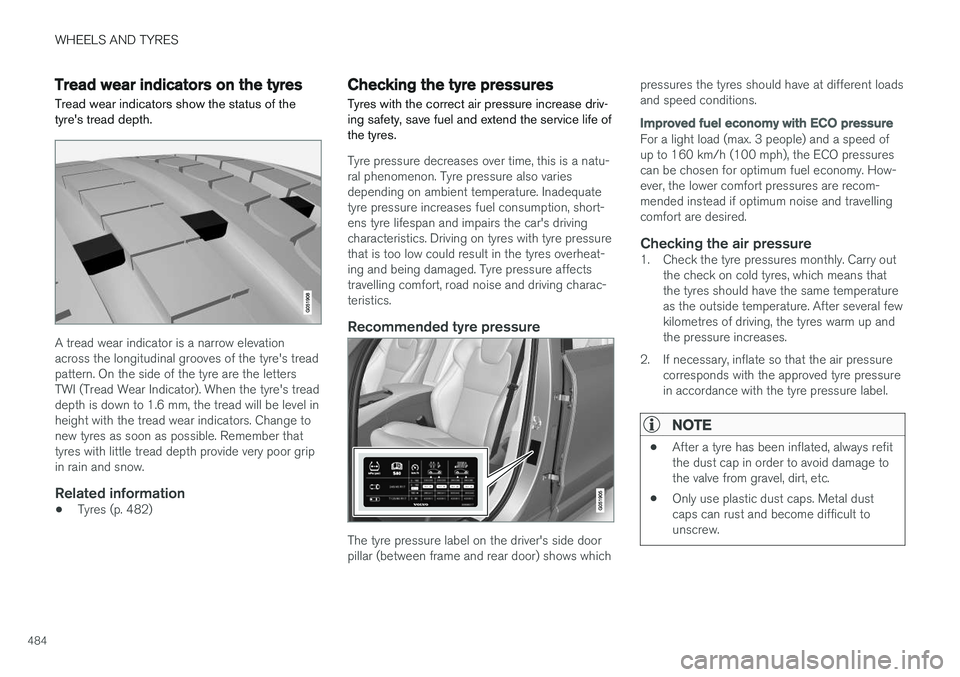
A tread wear indicator is a narrow elevation across the longitudinal grooves of the tyre's treadpattern. On the side of the tyre are the lettersTWI (Tread Wear Indicator). When the tyre's treaddepth is down to 1.6 mm, the tread will be level inheight with the tread wear indicators. Change tonew tyres as soon as possible. Remember thattyres with little tread depth provide very poor gripin rain and snow.
Related information
•Tyres (p. 482)
Checking the tyre pressures Tyres with the correct air pressure increase driv- ing safety, save fuel and extend the service life ofthe tyres.
Tyre pressure decreases over time, this is a natu- ral phenomenon. Tyre pressure also variesdepending on ambient temperature. Inadequatetyre pressure increases fuel consumption, short-ens tyre lifespan and impairs the car's drivingcharacteristics. Driving on tyres with tyre pressurethat is too low could result in the tyres overheat-ing and being damaged. Tyre pressure affectstravelling comfort, road noise and driving charac-teristics.
Recommended tyre pressure
The tyre pressure label on the driver's side door pillar (between frame and rear door) shows which pressures the tyres should have at different loadsand speed conditions.
Improved fuel economy with ECO pressure
For a light load (max. 3 people) and a speed of up to 160 km/h (100 mph), the ECO pressurescan be chosen for optimum fuel economy. How-ever, the lower comfort pressures are recom-mended instead if optimum noise and travellingcomfort are desired.
Checking the air pressure1. Check the tyre pressures monthly. Carry out
the check on cold tyres, which means thatthe tyres should have the same temperatureas the outside temperature. After several fewkilometres of driving, the tyres warm up andthe pressure increases.
2. If necessary, inflate so that the air pressure corresponds with the approved tyre pressurein accordance with the tyre pressure label.
NOTE
• After a tyre has been inflated, always refit the dust cap in order to avoid damage tothe valve from gravel, dirt, etc.
• Only use plastic dust caps. Metal dustcaps can rust and become difficult tounscrew.
Page 491 of 594
WHEELS AND TYRES
* Option/accessory.489
Calibrating tyre monitoring *
In order for the Indirect Tyre Pressure Monitoring System (ITPMS) to work correctly, a referencevalue for the tyre pressure must be determined.This must be performed each time the tyres arechanged or the tyre pressure is changed.
For example, when driving with a heavy load or at high speed above 160 km/h (100 mph), the tyrepressure should be adjusted in accordance withVolvo's recommended tyre pressure values. Fol-lowing which, the system must be recalibrated.
1. Stop the engine.
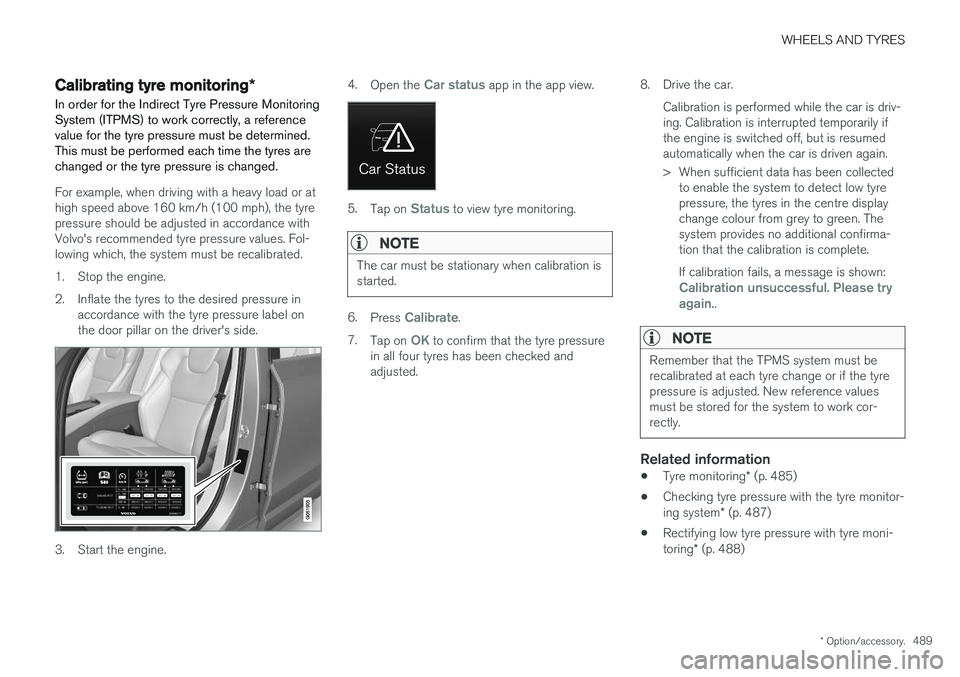
2. Inflate the tyres to the desired pressure in accordance with the tyre pressure label on the door pillar on the driver's side.
3. Start the engine. 4.
Open the
Car status app in the app view.
5.Tap on Status to view tyre monitoring.
NOTE
The car must be stationary when calibration is started.
6.Press Calibrate.
7. Tap on
OK to confirm that the tyre pressure
in all four tyres has been checked and adjusted. 8. Drive the car.
Calibration is performed while the car is driv-ing. Calibration is interrupted temporarily ifthe engine is switched off, but is resumedautomatically when the car is driven again.
> When sufficient data has been collectedto enable the system to detect low tyre pressure, the tyres in the centre displaychange colour from grey to green. Thesystem provides no additional confirma-tion that the calibration is complete. If calibration fails, a message is shown:
Calibration unsuccessful. Please try again..
NOTE
Remember that the TPMS system must be recalibrated at each tyre change or if the tyrepressure is adjusted. New reference valuesmust be stored for the system to work cor-rectly.
Related information
• Tyre monitoring
* (p. 485)
• Checking tyre pressure with the tyre monitor- ing system
* (p. 487)
• Rectifying low tyre pressure with tyre moni-toring
* (p. 488)
Page 498 of 594
||
WHEELS AND TYRES
* Option/accessory.
496
WARNING
Check that the jack is not damaged, that the threads are thoroughly lubricated and that it isfree from dirt.
3. Take out the jack *, wheel wrench * and tools
for the wheel bolts' plastic caps that are fitted in the foam block.
Tool for removing the plastic caps on the wheel bolts.
NOTE
The normal car jack is only designed for occa- sional, short-term use, such as when chang-ing a wheel after a puncture, changing to win-ter/summer wheels, etc. Only the jack for thespecific car model may be used to raise thecar. If the car is to be jacked up more often, orfor a longer time than is required just tochange a wheel, use of a garage jack is rec-ommended. In this instance, follow theinstructions for use that come with the equip-ment.
4. Place chocks in front of and behind the wheels which will remain on the ground to prevent them from rolling. Use heavy woodenblocks or large stones for example.
5. Screw together the towing eye with the wheel wrench * to the stop position.
IMPORTANT
The towing eye must be screwed all the way into the wheel bolt wrench.
6. Remove the plastic caps from the wheel
bolts with the intended tool.
7. Loosen the wheel bolts ½-1 turn anticlock- wise with the wheel wrench *.
WARNING
Never position anything between the ground and the jack, nor between the jack and thecar's jacking point.
IMPORTANT
The ground must be firm, smooth and level.
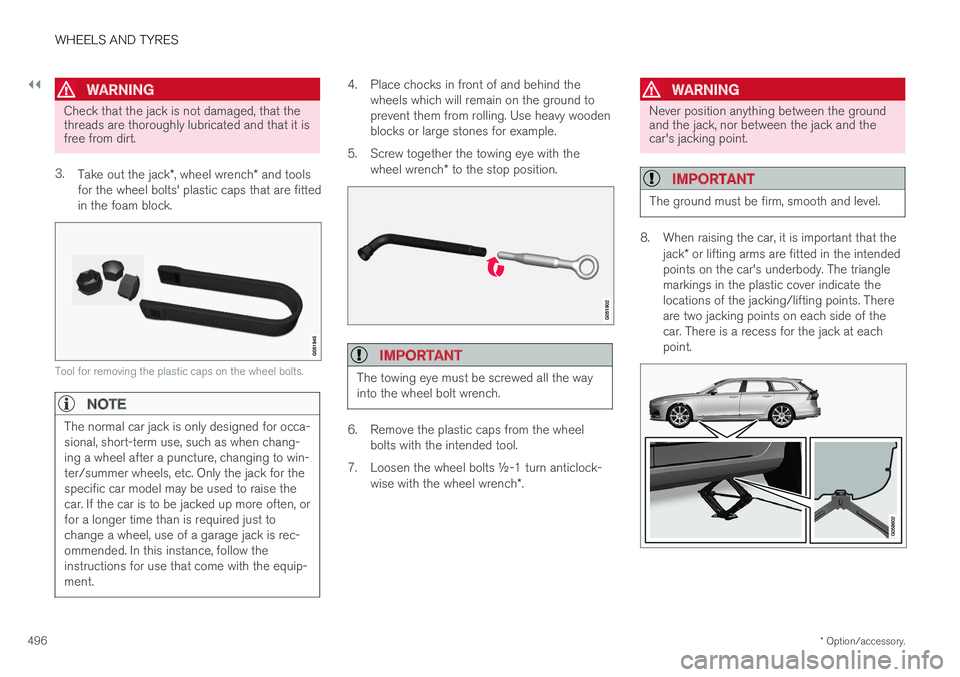
8. When raising the car, it is important that the
jack* or lifting arms are fitted in the intended
points on the car's underbody. The triangle markings in the plastic cover indicate thelocations of the jacking/lifting points. Thereare two jacking points on each side of thecar. There is a recess for the jack at eachpoint.
Page 503 of 594
WHEELS AND TYRES
* Option/accessory.501
Jack*
Use the jack to raise the car when changing a wheel.
Only use the original jack when fitting a spare wheel or when changing between summer andwinter wheels. The jack's thread must always bewell greased.
IMPORTANT
The tools and jack * must be stored in the
intended location in the car's cargo area when not in use.
The jack needs to be cranked together to the correct position in order to have space.
NOTE
The normal car jack is only designed for occa- sional, short-term use, such as when chang-ing a wheel after a puncture, changing to win-ter/summer wheels, etc. Only the jack for thespecific car model may be used to raise thecar. If the car is to be jacked up more often, orfor a longer time than is required just tochange a wheel, use of a garage jack is rec-ommended. In this instance, follow theinstructions for use that come with the equip-ment.
Applies to cars with level control *
If the car is equipped with air suspension then this must be deactivated before the car is raisedwith the jack. Switch off the function via the centre display:1.
Press on
Settings in the top view:
2. Press
My CarSuspension .
3. Select
Disable Leveling Control.
Related information
• Tool kit (p. 500)
• Raise the car (p. 512)
First aid kit The first aid kit contains first aid equipment.
Store the first aid kit in the space on the right- hand side in the cargo area.
Related information
•
Tool kit (p. 500)
Page 509 of 594
MAINTENANCE AND SERVICE
}}
507
Changing contact address
If you would like to change to another e-mail address, you can contact a Volvo dealer.
Selecting a Volvo dealer
Select the Volvo dealer you would like to contact for service and repairs by going towww.volvocars.com and navigating to My Volvo.
Prerequisite for booking from car
For the car to send and receive booking informa- tion, it must be connected to the Internet, seesection "Online car".
Using the serviceWhen it is time for service, and in some caseswhen the car is in need of repair, a message willappear in the driver display and at the top of thecentre display. The service date is determined byhow much time has passed, hours that theengine has been running, or distance drivensince the last service. You can also book a workshop visit later via the My Volvo owner's portal. To ensure that yourdealer has the latest information on your car youcan send vehicle data, see section "SendingVehicle Data" below.
Book service or repair
Fill in the appointment request when desired or when a message stating that service or repairsare needed is shown in the driver display and atthe top of the centre display.
Filling in and sending an appointment request.
1.Open the Car status app from the app view
in the centre display.
2. Press the
Appointments button.
3. Press the
Request appointment button.
4. Make sure that the correct
Volvo ID is filled
in.
5. Make sure that the desired
Workshop is
filled in. 6. Fill in information for the workshop in the
field
Tap to write information to the
workshop, e.g. if there is anything you would
like done during the workshop visit or any other important information to your work-shop.
Or press the button and speak the informa- tion. The information is then entered in theinformation field in your appointment request.
7. Press the
Send appointment request but-
ton.
> You will receive an appointment sugges-
tion to your car within a couple of days. 3
.
You will also receive the same communi- cation via e-mail and when you visit MyVolvo. In certain markets, once you have sent the appointment request, the message thatthe car needs service is extinguished inthe driver display.
8. Press the
Cancel request button to cancel
your request.
3 This time frame may vary depending on market.
Page 513 of 594

MAINTENANCE AND SERVICE
* Option/accessory.511
Data transmission between car and workshop6
The time required for a booked visit to a Volvo workshop can be shortened by transmitting trou-bleshooting data as soon as the car stops at theworkshop. The data can be transmitted most conveniently by selecting the option
Automatically connect
when I arrive in settings view in the centre dis-
play.
Each time the car slows to a slow enough speed it starts searching for a Wi-Fi network. If anauthorised Volvo network (at a workshop) isfound, a message is displayed or a pop-up win-dow opens in the centre display. (This does notapply when you connect manually, see the sec-tion "Connecting to a workshop manually"below).
Connecting to a workshop automatically
NOTE
To avoid the driver being disturbed by unwan- ted connection inquiries (for example, if thecar is often parked in the neighbourhood of aworkshop with an authorised Volvo network),the connection mode will change to manual ifthe driver declines connection twice within aperiod of 5 days.
Without driver confirmation
This option provides the most convenient way of transmitting troubleshooting data. The car con-nects without the need for the driver to confirm. If the car stops at the workshop and is switched off with the start knob, a message is shown atthe top in the centre display. The car will connectautomatically when the driver
Page 554 of 594
MAINTENANCE AND SERVICE
* Option/accessory.
552
Rustproofing
The car has effective protection against corro- sion.
Anti-corrosion protection for the body consists of modern metallic protective coatings on the sheetmetal, a high-quality painting process, corrosion-protected and minimised metal overlap, andshielding plastic components, abrasion protectionand supplemental rust inhibitor in exposed areas.This combination guarantees that the body willremain free from corrosion problems over time. Inthe chassis, exposed components of the wheelsuspension are made of corrosion-resistant castaluminium.
Inspection and maintenanceThe car's anti-corrosion protection normallyrequires no maintenance, but a good way to fur-ther reduce the risk of corrosion is to keep thecar clean. Strong alkaline or acidic cleaning solu-tions must always be avoided on glossy trim com-ponents. Any stone chips should be rectified assoon as they are discovered.
Related information
• Cleaning the exterior (p. 549)
• Paint damage (p. 554)
Cleaning the interior
Only use cleaning agents and car care products recommended by Volvo. Clean regularly andtreat stains at once for best results. Vacuumingis important prior to using cleaning agents.
IMPORTANT
• Certain items of coloured clothing (e.g. dark jeans and suede garments) maystain the upholstery. If this occurs, it isimportant to clean and treat these partsof the upholstery as soon as possible.
• Never use strong solvents such aswasher fluid, pure petrol or white spirit toclean the interior, since this may damagethe upholstery as well as other interiormaterials.
• Never spray the cleaning agent directlyonto components that have electrical but-tons and controls. Wipe them insteadusing a moistened cloth containing thecleaning agent.
• Sharp objects and Velcro may damagethe fabric upholstery.
Fabric upholstery and ceiling upholsteryNever scrape or rub a stain since this risks destroying the upholstery. Never use strong stainremovers since this risks destroying the colour ofthe upholstery.
Leather upholstery
*Volvo's leather upholstery is treated to preserveits original appearance. Leather upholstery is a natural product that changes and acquires a beautiful patina overtime. Regular cleaning and treatment arerequired in order that the properties and coloursof the leather shall be preserved. Volvo offers acomprehensive product, Volvo Leather Care Kit/Wipes, for the cleaning and treatment of leatherupholstery which, when used in accordance withthe instructions, preserves the leather's protectivecoating. To achieve best results, Volvo recommends the cleaning and application of the protective creamonce to four times per year (or more if required).The Volvo Leather Care Kit/Wipes is availablefrom Volvo dealers.
Leather steering wheelLeather needs to breathe. Never cover theleather steering wheel with protective plastic.Volvo Leather Care Kit/Wipes is recommendedfor cleaning the leather steering wheel.
Leather panel*Leather needs to breathe. Never cover theleather on the top of the instrument panel or atthe door panel. Volvo Leather Care Kit/Wipes isrecommended for cleaning the leather panels.
Page 579 of 594
ALPHABETICAL INDEX
577
1, 2, 3 ...
4WD 405
A
A/C (Air conditioning) 190 ABSanti-lock brakes 406
ACC – Adaptive cruise control 290, 299
Accessories and extra equipment 23
Active bending lights 141
Active main beam 138
Active Park Assist 374 function 374
Limitations 379
operation 376
Symbols and messages 381
Active Yaw Control 273
Adaptation of headlamp beam 141
Adapting driving characteristics 272, 400
Adaptive Cruise Control 290, 299 change cruise control functionality 301
fault tracing 300
function 290
managing speed 294, 295
overtaking 298
radar sensor 318
setting the time interval 296
standby mode 297
temporary deactivation 297
Additional heater (Auxiliary heater) 215
Adjusting the steering wheel 132Aerial location 240
Airbag 63 Activating/deactivating 66
driver's side 64
passenger side 64, 66
Airbag, see Airbag 63
Air conditioning 190Air conditioning, fluid volume and grade 571
Air conditioning system 182, 186 repair 520
Air distribution 197 Air vents 197, 199
change 198
defrosting 194
Recirculation 196
table of options 201
Air quality 184, 185 allergies and asthma 185
passenger compartment filter 185Air recirculation 196
Alarm 262automatic re-arming 264
deactivation 264
reduced alarm level 262
Alcohol lock 384
Allergy and asthma inducing substances. 185
All Wheel Drive, (AWD) 405
All Wheel Drive (AWD) 405
Android Auto 453
Apple CarPlay 450, 451Applications settings 178
Approach lighting 148
Apps 434 download, update and uninstall 468
Ashtray 224
Audio and media 434
Audio settings 435, 463 media 448
phone 462
play media 443
Text message 461
Auto climate control 189
Automatic brake 412 after collision 408
ALPHABETICAL INDEX
Page 581 of 594
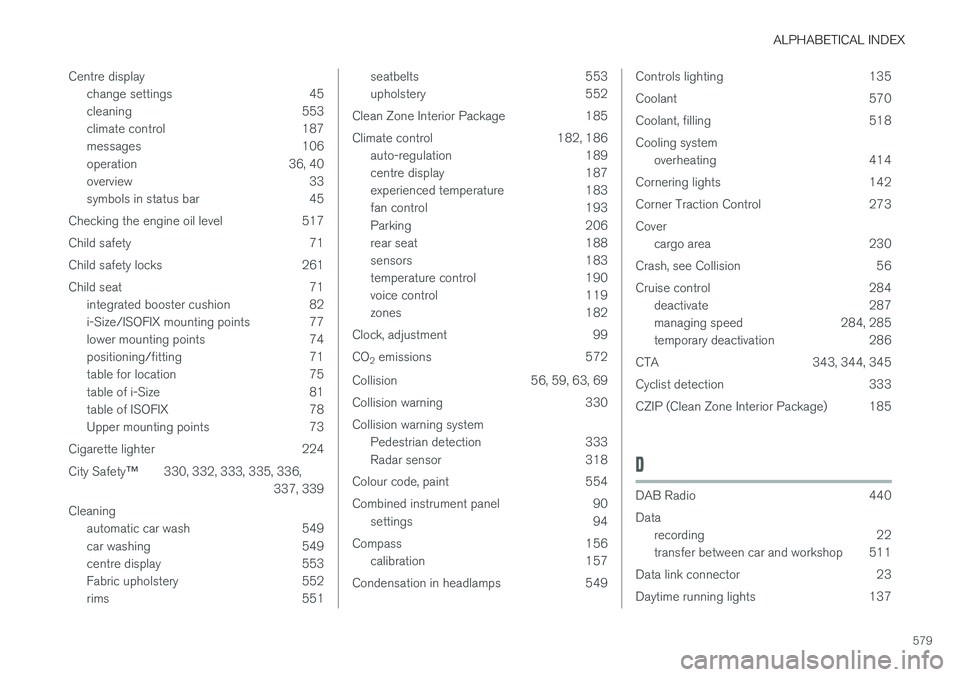
ALPHABETICAL INDEX
579
Centre display
change settings 45
cleaning 553
climate control 187
messages 106
operation 36, 40
overview 33
symbols in status bar 45
Checking the engine oil level 517
Child safety 71
Child safety locks 261
Child seat 71 integrated booster cushion 82
i-Size/ISOFIX mounting points 77
lower mounting points 74
positioning/fitting 71
table for location 75
table of i-Size 81
table of ISOFIX 78
Upper mounting points 73
Cigarette lighter 224 City Safety ™330, 332, 333, 335, 336,
337, 339
Cleaning automatic car wash 549
car washing 549
centre display 553
Fabric upholstery 552
rims 551
seatbelts 553
upholstery 552
Clean Zone Interior Package 185
Climate control 182, 186 auto-regulation 189
centre display 187
experienced temperature 183
fan control 193
Parking 206
rear seat 188
sensors 183
temperature control 190
voice control 119
zones 182
Clock, adjustment 99 CO 2 emissions 572
Collision 56, 59, 63, 69
Collision warning 330Collision warning system Pedestrian detection 333
Radar sensor 318
Colour code, paint 554
Combined instrument panel 90 settings 94
Compass 156 calibration 157
Condensation in headlamps 549Controls lighting 135
Coolant 570
Coolant, filling 518Cooling system overheating 414
Cornering lights 142
Corner Traction Control 273Cover cargo area 230
Crash, see Collision 56
Cruise control 284 deactivate 287
managing speed 284, 285
temporary deactivation 286
CTA 343, 344, 345
Cyclist detection 333
CZIP (Clean Zone Interior Package) 185
D
DAB Radio 440 Data recording 22
transfer between car and workshop 511
Data link connector 23
Daytime running lights 137