park assist VOLVO V90 2017 Owner's Manual
[x] Cancel search | Manufacturer: VOLVO, Model Year: 2017, Model line: V90, Model: VOLVO V90 2017Pages: 594, PDF Size: 15.07 MB
Page 374 of 594
||
DRIVER SUPPORT
* Option/accessory.
372
Sensor field to the sides
The side fields are only shown in orange.
Colour of side fields Distance (metres)
Orange 0–0.3
Related information
• Park Assist Camera
* (p. 368)
• Starting the Park Assist Camera
* (p. 372)
• Limitations of the Park Assist Camera
*
(p. 373)
Starting the Park Assist Camera *
The Park Assist Camera can be made to start automatically when reverse gear is selected ormanually via the centre display.
Starting the Park Assist CameraTo start the park assist camera manually:
–Press the Camera button in the centre dis-
play's function view.
> The Park Assist Camera is started.
Camera start in different situations
When the button is tapped, the vehicle
Page 375 of 594
DRIVER SUPPORT
}}
* Option/accessory.373
2.
Press
My CarPark Assist.
3. Select
Rear View Instead of 360° to acti-
vate/deactivate the rear camera view as basic view.
Related information
• Park assist lines and fields for the Park Assist Camera
* (p. 370)
• Limitations of the Park Assist Camera
*
(p. 373)
• Ignition positions (p. 385)
Limitations of the Park Assist Camera
*
The Park Assist Camera function may have limi- tations in certain situations.
The Park Assist Camera cannot see all objects in every situation - a driver should be aware of thefollowing limitations:
NOTE
A bike carrier or other accessory mounted on the rear of the car could obscure the cam-era's view.
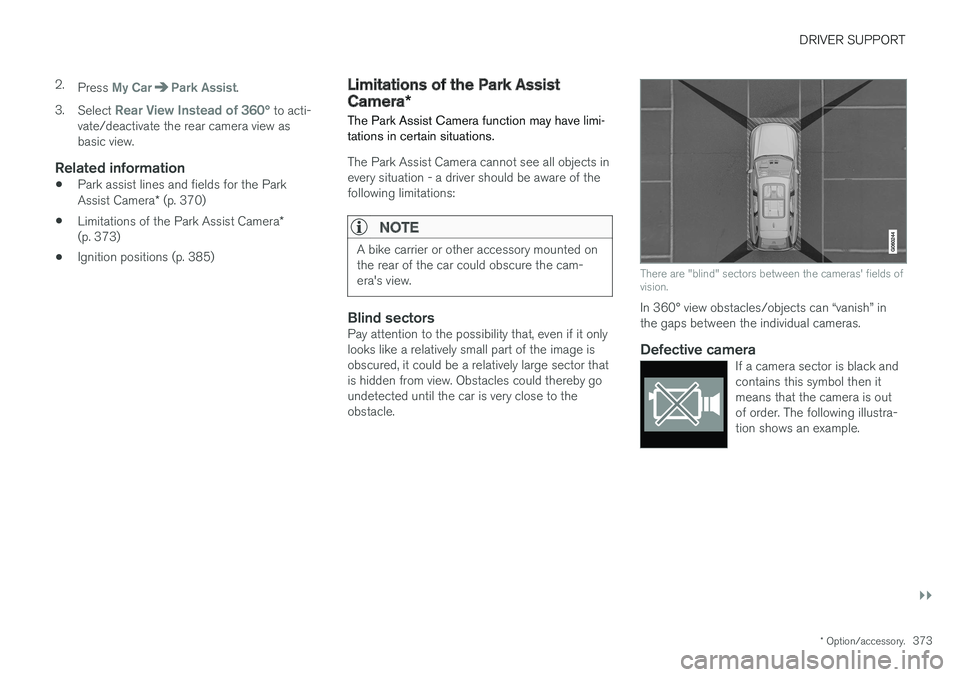
Blind sectorsPay attention to the possibility that, even if it only looks like a relatively small part of the image isobscured, it could be a relatively large sector thatis hidden from view. Obstacles could thereby goundetected until the car is very close to theobstacle.
There are "blind" sectors between the cameras' fields of vision.
In 360° view obstacles/objects can “vanish” in the gaps between the individual cameras.
Defective cameraIf a camera sector is black andcontains this symbol then itmeans that the camera is outof order. The following illustra-tion shows an example.
Page 376 of 594

||
DRIVER SUPPORT
* Option/accessory.
374
The car's left-hand camera is out of order.
Black camera sector
A black camera sector is also shown in the fol- lowing instances, but then without the symbol for
defective camera:
• open door
• open tailgate
• folded-in door mirror.
Light conditionsThe camera image is adjusted automatically according to prevailing light conditions. Becauseof this, the image may vary slightly in brightnessand quality. Poor light conditions can result inreduced image quality.
MaintenanceClean camera lenses regularly with lukewarmwater and car shampoo - be careful not toscratch the lenses.
NOTE
Keep the camera lens clear of dirt, snow and ice to ensure optimum function. This is partic-ularly important in poor light.
Related information
•
Park Assist Camera
* (p. 368)
• Starting the Park Assist Camera
* (p. 372)
• Park assist lines and fields for the Park Assist Camera
* (p. 370)
Park Assist Pilot *
Active parking assistance (Park Assist Pilot - PAP) helps the driver to park in or leave a park-ing space.
PAP checks first if a space is sufficiently big and thereafter helps the driver to turn the steeringwheel and manoeuvre the car into the space. The centre display indicates with symbols, graph- ics and text the various operations to be carriedout and when to do so.
NOTE
The PAP function measures the space and steers the car - the driver's task is to:
• keep a close watch around the car
• follow the instructions in the centre dis-play
• change gear (reverse/forward)
• control and maintain a safe speed
• brake and stop.
Page 377 of 594
DRIVER SUPPORT
* Option/accessory.375
WARNING
PAP does not work in all situations but is designed merely as a supplementary aid. The driver always has the final responsibility for driving the car in a safe manner and forpaying attention to the surroundings andother road users approaching or passingwhile parking.
Types of parking situationsPAP can be used for the following different park- ing situations.
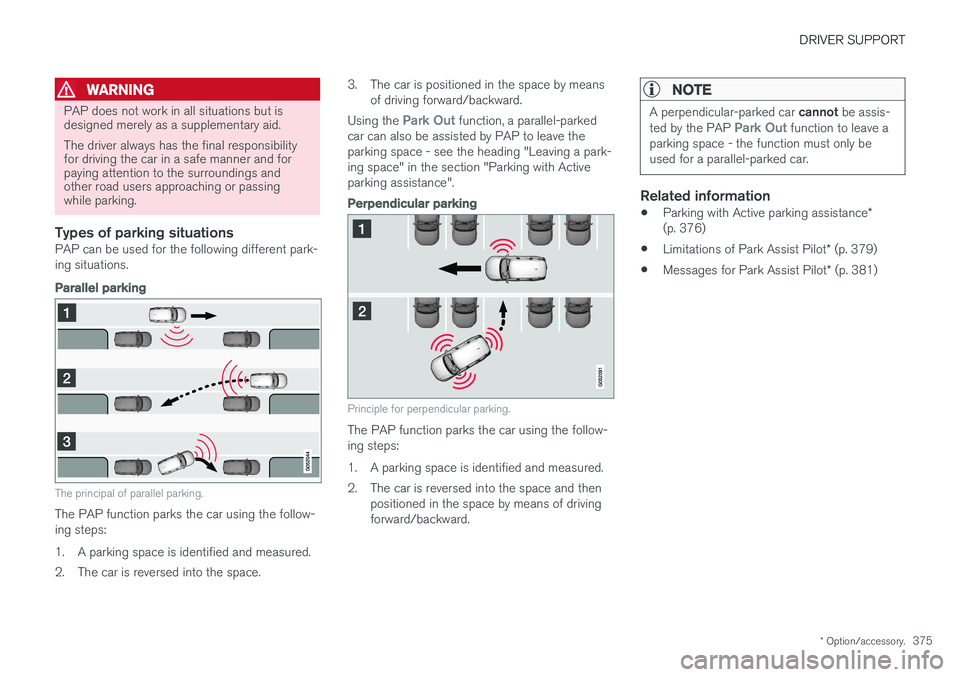
Parallel parking
The principal of parallel parking.
The PAP function parks the car using the follow- ing steps:
1. A parking space is identified and measured.
2. The car is reversed into the space. 3. The car is positioned in the space by means
of driving forward/backward.
Using the
Park Out function, a parallel-parked
car can also be assisted by PAP to leave the parking space - see the heading "Leaving a park-ing space" in the section "Parking with Activeparking assistance".
Perpendicular parking
Principle for perpendicular parking.
The PAP function parks the car using the follow- ing steps:
1. A parking space is identified and measured.
2. The car is reversed into the space and then positioned in the space by means of driving forward/backward.
NOTE
A perpendicular-parked car cannot be assis-
ted by the PAP Park Out function to leave a
parking space - the function must only be used for a parallel-parked car.
Related information
• Parking with Active parking assistance
*
(p. 376)
• Limitations of Park Assist Pilot
* (p. 379)
• Messages for Park Assist Pilot
* (p. 381)
Page 378 of 594
DRIVER SUPPORT
* Option/accessory.
376
Parking with Active parking assistance *
The Active parking assistance (Park Assist Pilot - PAP) helps the driver park in three steps. Thefunction can also help the driver to leave a park-ing space.
NOTE
The PAP function measures the space and steers the car - the driver's task is to:
• keep a close watch around the car
• follow the instructions in the centre dis-play
• change gear (reverse/forward)
• control and maintain a safe speed
• brake and stop.
PAP can be activated if the following criteria are met once the engine has been started:
• No trailer is attached to the car.
• Speed must be lower than 30 km/h(20 mph).
NOTE
The distance between the car and parking spaces should be 0.5-1.5 metres while PAPis searching for a parking space.
ParkingThe PAP function parks the car using the follow- ing steps:
1. A parking space is identified and measured.
2. The car is reversed into the space.
3. The car is positioned into the space - the
system may then request that the driver changes gear.
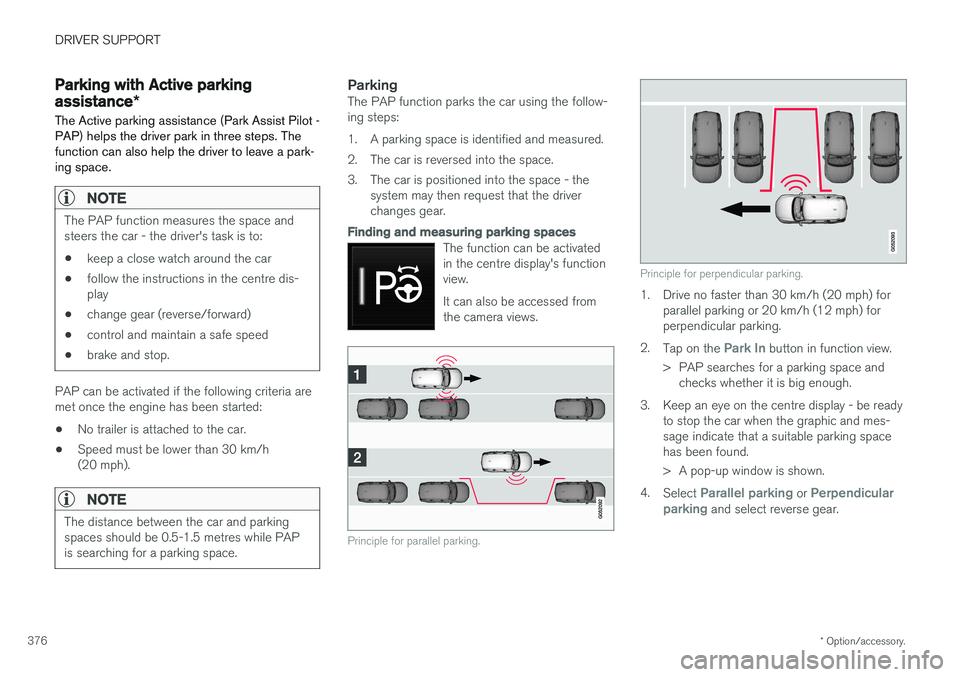
Finding and measuring parking spaces
The function can be activated in the centre display's functionview. It can also be accessed from the camera views.
Principle for parallel parking.
Principle for perpendicular parking.
1. Drive no faster than 30 km/h (20 mph) forparallel parking or 20 km/h (12 mph) for perpendicular parking.
2. Tap on the
Park In button in function view.
> PAP searches for a parking space and checks whether it is big enough.
3. Keep an eye on the centre display - be ready to stop the car when the graphic and mes- sage indicate that a suitable parking spacehas been found.
> A pop-up window is shown.
4. Select
Parallel parking or Perpendicular
parking and select reverse gear.
Page 381 of 594
DRIVER SUPPORT
}}
* Option/accessory.379
Limitations of Park Assist Pilot *
The Active parking assistance (Park Assist Pilot – PAP) function may have limitations in certainsituations.
Parking is discontinuedA parking sequence will be discontinued:
• if the driver moves the steering wheel
• if the car is driven too quickly - above 7 km/h (4 mph)
• if the driver presses
Cancel in the centre
display
• when the anti-lock brakes or the Electronic stability control are engaged - e.g. when awheel loses grip on a slippery road.
Where applicable, a message in the centre dis-play states the reason for a parking sequencebeing discontinued.
NOTE
Dirt, ice and snow covering the sensors will reduce their function and may prevent meas-urement.
IMPORTANT
Under certain circumstances, PAP is unable to find parking spaces - one reason for thismay be the fact that there is interference withthe sensors from external sound sourceswhich emit the same ultrasound frequenciesas those with which the system works. Examples of such sources include horns, wet tyres on asphalt, pneumatic brakes andexhaust noises from motorcycles etc.
Driver responsibilityThe driver should bear in mind that the PAP is an aid – not an infallible, fully-automatic function.The driver must therefore be prepared to inter-rupt a parking step. There are also a few details to bear in mind while parking, e.g.:
• PAP bases itself on the locations of vehiclesalready parked nearby - if they are inap-propriately parked, your own car's tyres andwheel rims may be damaged by contact withthe kerb.
• PAP is designed for parking on straightstreets - not sharp curves or bends. For thisreason, make sure the car is parallel to theparking space when PAP measures thespace. •
Parking spaces on narrow streets are notalways feasible, since the space required formanoeuvring may not be sufficient.
• Bear in mind that the front of the car mayswing out towards oncoming traffic whilebeing parked.
• Objects situated higher than the detectionareas of the sensors are not taken intoaccount when calculating the parkingmanoeuvre. This may cause PAP to turn intothe parking space too early, and hence suchparking spaces should be avoided.
• The driver is responsible for determiningwhether the space selected by PAP is suita-ble for parking.
• Use approved tyres 28
with the correct tyre
pressure - this affects the ability of PAP topark the car.
• Heavy rain or snow may cause the system tomeasure the parking space incorrectly.
• Do not use PAP if snow chains or a sparewheel are fitted.
• Do not use PAP if cargo items are protrudingfrom the car.
• Perpendicular parking spaces may be missedor offered unnecessarily if one parked car isprotruding more than other parked cars.
28
"Approved tyres" refers to tyres of the same type and make as those fitted new on delivery from the factory.
Page 382 of 594
||
DRIVER SUPPORT
* Option/accessory.
380
IMPORTANT
Changing to another approved wheel rim and/or tyre dimension may involve a changedtyre circumference, which means that thePAP system's parameters may then need tobe updated. Consult a workshop - an author-ised Volvo workshop is recommended.
Maintenance
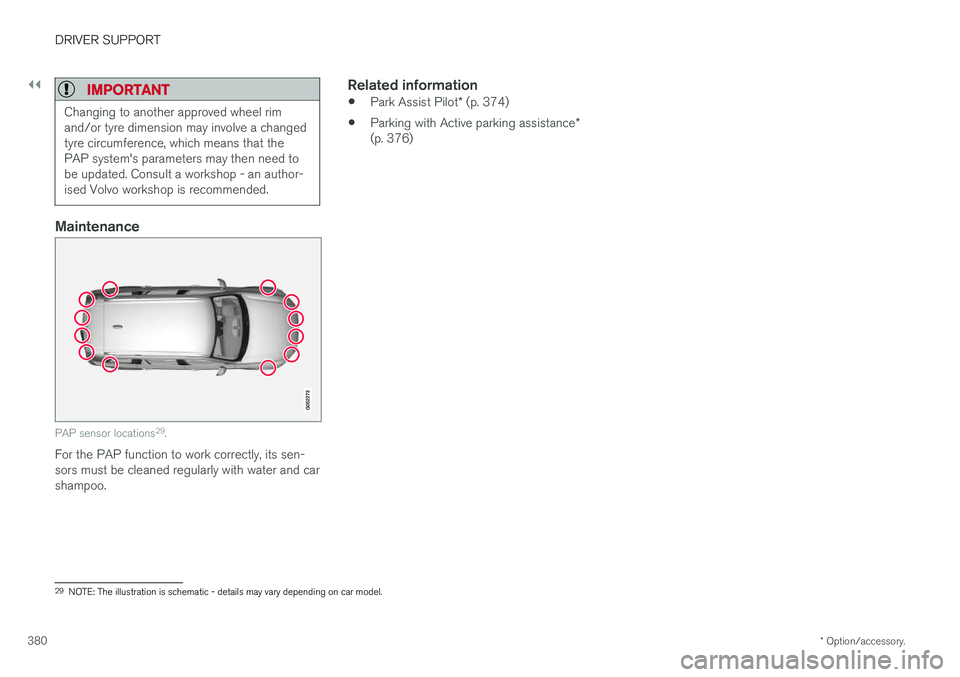
PAP sensor locations 29
.
For the PAP function to work correctly, its sen- sors must be cleaned regularly with water and carshampoo.
Related information
• Park Assist Pilot
* (p. 374)
• Parking with Active parking assistance
*
(p. 376)
29 NOTE: The illustration is schematic - details may vary depending on car model.
Page 383 of 594
DRIVER SUPPORT
* Option/accessory.381
Messages for Park Assist Pilot *
A number of messages regarding Park Assist Pilot – PAP can be shown in the driver display.The following table shows some examples.
Message Specification
Park Assist System Sensors blocked, cleaning neededOne or more of the systems' sensors are blocked - check and correct as soon as possible.
Park Assist System Unavailable Service requiredThe system does not function as it should. A workshop should be contacted - an authorised Volvo workshop is recommended.
Related information
•Park Assist Pilot
* (p. 374)
• Parking with Active parking assistance
*
(p. 376)
• Limitations of Park Assist Pilot
* (p. 379)
Page 408 of 594
STARTING AND DRIVING
406
Brake functions
The car's brakes are used to reduce the speed or prevent the car from rolling.
Besides the foot brake and parking brake, the car is equipped with several automatic brake assistfunctions. These can assist the driver by notneeding to keep his/her foot on the brake pedalwhen stationary at a traffic light, when starting onan uphill gradient or when driving on a downhillgradient. Depending on the car's equipment, the following auto braking functions are available:
• Automatic braking when stationary (AutoHold)
• Hill start assist (Hill Start Assist)
• Auto braking after a collision
• City Safety
Related information
•
Foot brake (p. 406)
• Parking brake (p. 409)
• Hill start assist (p. 412)
• Automatic braking when stationary (p. 412)
• Auto braking after a collision (p. 408)
Foot brake
The foot brake is used to reduce the car's speed while driving.
Foot brake systemThe car is equipped with two brake circuits. If a brake circuit is damaged, the brake pedal willengage deeper. Higher pressure on the pedal willtherefore be needed to produce the normal brak-ing effect. The driver's brake pedal pressure is assisted by a brake servo.
WARNING
The brake servo only works when the engine is running.
If the foot brake is used when the engine is switched off then the pedal will feel stiff and ahigher pedal pressure must be used to brake thecar. In very hilly terrain or when driving with a heavy load the brakes can be relieved by using enginebraking in manual gearshift mode. Engine brakingis most efficiently used if the same gear is useddownhill as up.
Anti-lock braking systemThe car has anti-lock brakes, Anti-lock BrakingSystem (ABS), which prevent the wheels fromlocking while braking and allows maintained steering control. Vibration may be felt in thebrake pedal when this is engaged and this is nor-mal. A short test of the ABS system is made automat- ically after the engine has been started when thedriver releases the brake pedal. A further auto-matic test of the system may be made at lowspeed. The test may be experienced as pulses inthe brake pedal.
Braking on wet roadsWhen driving for a prolonged period of time inheavy rain without braking, the braking effect maybe delayed slightly when next using the brakes.This may also be the case after a car wash. It isthen necessary to depress the brake pedal moreforcefully. You should therefore maintain agreater distance to the vehicles in front. Brake the car firmly after driving on wet roads or using a car wash. This warms up the brake discs,enabling them to dry faster and protecting themagainst corrosion. Bear in mind the current trafficsituation when braking.
Braking on salted roadsWhen driving on salted roads, a layer of salt mayform on the brake discs and brake linings. Thismay extend braking distance. You should there-fore maintain an extra large safety distance tovehicles in front. In addition, make sure you dothe following:
Page 410 of 594
STARTING AND DRIVING
408
Emergency brake lightsEmergency brake lights are activated to alert vehicles behind about heavy braking. The func-tion means that the brake light flashes instead of- as in normal braking - shining with a constantglow.
The emergency brake lights are activated during heavy braking or if the ABS system is activated athigh speeds. After emergency braking to a lowspeed, the brake lights return from flashing to thenormal constant glow. The car's hazard warningflashers are activated at the same time. Theseflash until the driver accelerates the car to ahigher speed again or switches off the hazardwarning flashers.
Related information
• Foot brake (p. 406)
• Hazard warning flashers (p. 143)
• Brake lights (p. 143)
Brake assistance
The brake assist system, BAS (Brake Assist System), helps to increase brake force duringbraking, thereby shortening the braking distance.
The system detects the way in which the driver brakes and increases brake force where neces-sary. The brake force can be boosted up to thelevel when the ABS system is engaged. Thefunction is suspended when the pressure on thebrake pedal decreases.
NOTE
When BAS is activated the brake pedal low- ers slightly more than usual, depress (hold)the brake pedal as long as necessary. When the brake pedal is released, all braking ceases.
Related information
• Foot brake (p. 406)
Auto braking after a collision In the event of a collision in which the activation level is reached for the pyrotechnic seatbelt ten-sioners or airbags, or if a collision with a largeanimal is detected, the car's brakes are automat-ically applied. This function is to prevent orreduce the effects of any subsequent collision.
After a serious collision there is a risk that it is no longer possible to control and steer the car. Inorder to avoid or mitigate a possible further colli-sion with a vehicle or an object in the vehicle'spath, the auto braking system is activated auto-matically and brakes the car in a safe manner. Brake lights and hazard warning lights are acti- vated during braking. When the car has stopped,the hazard warning lights continue to flash andthe parking brake is applied. If braking is not appropriate, e.g. if there is a risk of being hit by following traffic, the system can beoverridden by the driver depressing the accelera-tor pedal. The function assumes that the brake system is intact after the collision. See also the sections "Rear Collision Warning" and "Blind Spot Information".
Related information
• Brake functions (p. 406)
• Seatbelt tensioner (p. 59)
• Airbags (p. 63)