park assist VOLVO V90 2017 Owner's Guide
[x] Cancel search | Manufacturer: VOLVO, Model Year: 2017, Model line: V90, Model: VOLVO V90 2017Pages: 594, PDF Size: 15.07 MB
Page 414 of 594
||
STARTING AND DRIVING
412
Symbols in the driver display
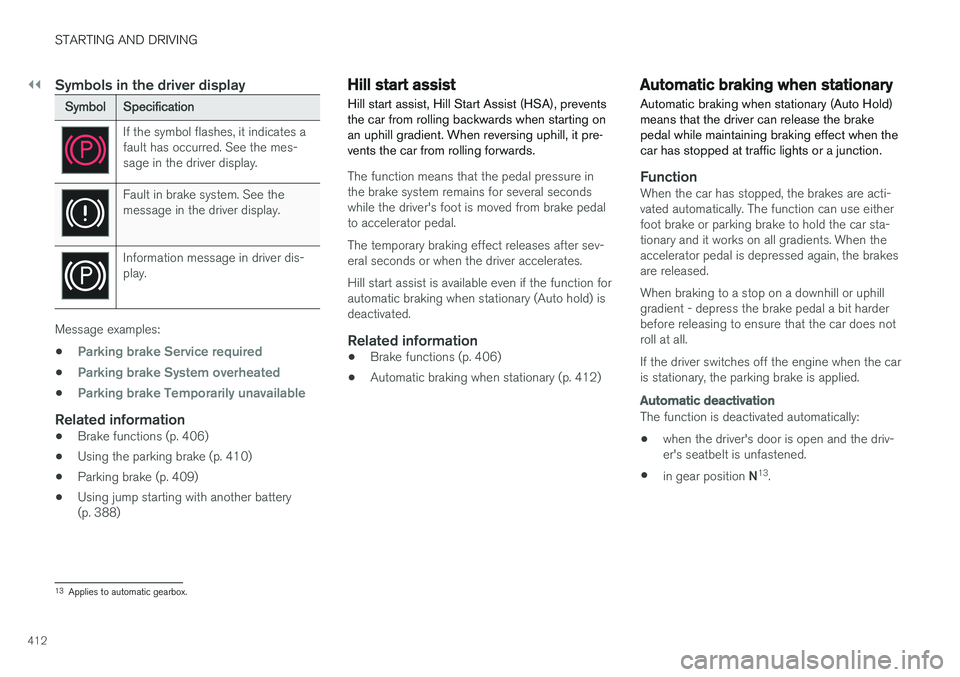
SymbolSpecification
If the symbol flashes, it indicates a fault has occurred. See the mes-sage in the driver display.
Fault in brake system. See the message in the driver display.
Information message in driver dis- play.
Message examples:
•
Parking brake Service required
•Parking brake System overheated
•Parking brake Temporarily unavailable
Related information
• Brake functions (p. 406)
• Using the parking brake (p. 410)
• Parking brake (p. 409)
• Using jump starting with another battery (p. 388)
Hill start assist
Hill start assist, Hill Start Assist (HSA), prevents the car from rolling backwards when starting onan uphill gradient. When reversing uphill, it pre-vents the car from rolling forwards.
The function means that the pedal pressure in the brake system remains for several secondswhile the driver's foot is moved from brake pedalto accelerator pedal. The temporary braking effect releases after sev- eral seconds or when the driver accelerates. Hill start assist is available even if the function for automatic braking when stationary (Auto hold) isdeactivated.
Related information
• Brake functions (p. 406)
• Automatic braking when stationary (p. 412)
Automatic braking when stationary
Automatic braking when stationary (Auto Hold) means that the driver can release the brakepedal while maintaining braking effect when thecar has stopped at traffic lights or a junction.
FunctionWhen the car has stopped, the brakes are acti- vated automatically. The function can use eitherfoot brake or parking brake to hold the car sta-tionary and it works on all gradients. When theaccelerator pedal is depressed again, the brakesare released. When braking to a stop on a downhill or uphill gradient - depress the brake pedal a bit harderbefore releasing to ensure that the car does notroll at all. If the driver switches off the engine when the car is stationary, the parking brake is applied.
Automatic deactivation
The function is deactivated automatically: • when the driver's door is open and the driv- er's seatbelt is unfastened.
• in gear position
N13
.
13 Applies to automatic gearbox.
Page 415 of 594
STARTING AND DRIVING
}}
413
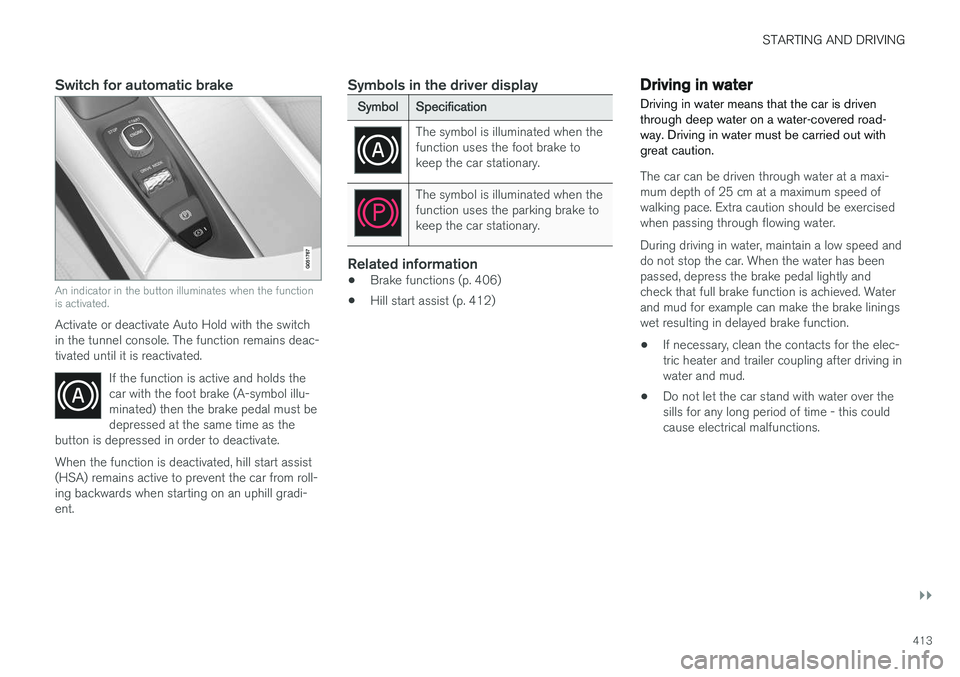
Switch for automatic brake
An indicator in the button illuminates when the function is activated.
Activate or deactivate Auto Hold with the switch in the tunnel console. The function remains deac-tivated until it is reactivated.If the function is active and holds thecar with the foot brake (A-symbol illu-minated) then the brake pedal must bedepressed at the same time as the
button is depressed in order to deactivate.
When the function is deactivated, hill start assist (HSA) remains active to prevent the car from roll-ing backwards when starting on an uphill gradi-ent.
Symbols in the driver display
Symbol Specification
The symbol is illuminated when the function uses the foot brake tokeep the car stationary.
The symbol is illuminated when the function uses the parking brake tokeep the car stationary.
Related information
•Brake functions (p. 406)
• Hill start assist (p. 412)
Driving in water Driving in water means that the car is driven through deep water on a water-covered road-way. Driving in water must be carried out withgreat caution.
The car can be driven through water at a maxi- mum depth of 25 cm at a maximum speed ofwalking pace. Extra caution should be exercisedwhen passing through flowing water. During driving in water, maintain a low speed and do not stop the car. When the water has beenpassed, depress the brake pedal lightly andcheck that full brake function is achieved. Waterand mud for example can make the brake liningswet resulting in delayed brake function.
• If necessary, clean the contacts for the elec-tric heater and trailer coupling after driving inwater and mud.
• Do not let the car stand with water over thesills for any long period of time - this couldcause electrical malfunctions.
Page 430 of 594
STARTING AND DRIVING
* Option/accessory.
428
Driving with a trailer under special conditions
When driving with a trailer in hilly terrain in a hot climate there may be a risk of overheating.
In the event of overheating, a warning symbol illu- minates in the driver display together with a mes-sage, see section "Overheating in the engine anddrive system". The following only applies to cars with automatic gearbox. The automatic gearbox selects the optimum gear related to load and engine speed.
Steep inclinesDo not lock the automatic gearbox in a highergear than the engine "can cope with" - it is notalways a good idea to drive at a high gear withlow engine speed.
Parking on a hill1. Depress the brake pedal fully.
2. Activate the parking brake.3. Select gear position P.
4. Release the brake pedal.Block the wheels with chocks when parking a car with hitched trailer on a hill.
Starting on a hill1. Depress the brake pedal fully. 2.
Select gear position D.
3. Releasing the parking brake.
4. Release the brake pedal and start driving off.
Related information
• Driving with a trailer (p. 426)
• Overheating in the engine and drive system (p. 414)
• Using the parking brake (p. 410)
Trailer Stability Assist
*
The function of the trailer stability assist Trailer Stability Assist (TSA) is to stabilise cars withattached trailers in situations where they begin
Page 433 of 594
STARTING AND DRIVING
}}
431
The towing eye may be used to pull the car up onto a recovery vehicle with a flatbed platform.The car's position and ground clearance deter-mine whether it is possible. If the slope of the recovery vehicle's ramp is too steep, or if the ground clearance under the car isinadequate, then the car may be damaged if youtry to pull it up using the towing eye. If necessary, raise the car by using the recovery vehicle's lifting device. Do not use the towing eye.
WARNING
No one/nothing is allowed to remain behind the recovery vehicle while the car pulled uponto the flatbed platform.
IMPORTANT
The towing eye is only designed for towing on roads -
not for pulling the car unstuck or out
of a ditch. Call a recovery service for recovery assistance.
Related information
• Towing (p. 431)
• Recovering the car (p. 432)
Towing
During towing, one vehicle pulls another vehicle along behind it by means of a towline.
Find out the statutory maximum speed limit for towing before the towing begins.
Preparations and towing1. Activate the car's hazard warning flashers.
2. Secure the towline in the towing eye.
3. Deactivate the steering lock by unlocking the car.
NOTE
In ignition position II the steering lock is
deactivated if the car has been unlocked. See section “Ignition position” for more informa-tion.
4. Set the car in ignition position II by turning
the ignition dial to START and holding the
ignition dial in the START position for
approx. 4 seconds. Then release the knob, which automatically returns to its startingposition.
5. Move the gear selector to neutral position N
and release the parking brake.
> The towing vehicle can now start towing. 6. Keep the towline taut when the towing vehi-
cle reduces speed by holding your foot gen- tly pressed on the brake pedal - therebyavoiding unnecessary jerking.
7. Be prepared to brake to stop.
IMPORTANT
Note that the car must always be towed with the wheels rolling forward. • Do not tow cars with automatic transmis- sion at speeds higher than 80 km/h(50 mph) or for distances in excess of 80km.
WARNING
•Check that the steering lock is unlocked before towing.
• Ignition position
II must be active - in
ignition position I all airbags are deacti-
vated.
• Always keep the remote control key in thecar when it is being towed.
WARNING
The brake servo and power steering do not work when the engine is switched off - thebrake pedal needs to be depressedabout 5 times more heavily and the steering isconsiderably heavier than normal.
Page 579 of 594
ALPHABETICAL INDEX
577
1, 2, 3 ...
4WD 405
A
A/C (Air conditioning) 190 ABSanti-lock brakes 406
ACC – Adaptive cruise control 290, 299
Accessories and extra equipment 23
Active bending lights 141
Active main beam 138
Active Park Assist 374 function 374
Limitations 379
operation 376
Symbols and messages 381
Active Yaw Control 273
Adaptation of headlamp beam 141
Adapting driving characteristics 272, 400
Adaptive Cruise Control 290, 299 change cruise control functionality 301
fault tracing 300
function 290
managing speed 294, 295
overtaking 298
radar sensor 318
setting the time interval 296
standby mode 297
temporary deactivation 297
Additional heater (Auxiliary heater) 215
Adjusting the steering wheel 132Aerial location 240
Airbag 63 Activating/deactivating 66
driver's side 64
passenger side 64, 66
Airbag, see Airbag 63
Air conditioning 190Air conditioning, fluid volume and grade 571
Air conditioning system 182, 186 repair 520
Air distribution 197 Air vents 197, 199
change 198
defrosting 194
Recirculation 196
table of options 201
Air quality 184, 185 allergies and asthma 185
passenger compartment filter 185Air recirculation 196
Alarm 262automatic re-arming 264
deactivation 264
reduced alarm level 262
Alcohol lock 384
Allergy and asthma inducing substances. 185
All Wheel Drive, (AWD) 405
All Wheel Drive (AWD) 405
Android Auto 453
Apple CarPlay 450, 451Applications settings 178
Approach lighting 148
Apps 434 download, update and uninstall 468
Ashtray 224
Audio and media 434
Audio settings 435, 463 media 448
phone 462
play media 443
Text message 461
Auto climate control 189
Automatic brake 412 after collision 408
ALPHABETICAL INDEX
Page 584 of 594
ALPHABETICAL INDEX
582
H
Handbrake 409, 410Hazard warning flashers 143 Headlamp beam adaptation 141
height adjustment 135
Headlamp control 134
Headlamp levelling of headlamps 135
Headlamp pattern, adjusting 141
Headlamp pattern adjustment 141
head restraint 128
Heated washer nozzles 150
Heater 213 auxiliary heater 215
parking heater 214
Heating seats 203
steering wheel 205
Windows 194
High engine temperature 414 Hill start assist Hill Start Assist (HSA) 412
Hill Start Assist 412 HomeLink ®
162
Home safe light duration 148
Horn 131
I
IAQS (Interior Air Quality System) 185
IC (Inflatable Curtain) 69
Ignition position 385
Immobiliser 260
Indicator symbols 95
Individual drive mode 400
Inflatable curtain 69
Inflatable Curtain 69
Information display 90, 94
Infotainment system (Audio and media) 434
Instrument lighting 135Instrument overview left-hand drive car 86
right-hand drive car 87
Instruments and controls 86, 87
Integrated booster cushion 82 lowering 84
raising 82
IntelliSafe Driver support 28
Interior Air Quality System 185
Interior lighting 145
Interior rearview mirror 155 automatic dimming 155
Intermittent wiping 148
Internet, see Internet-connected car 463Internet-connected car book service and repair 506
system updates 510
iPod ®
, connection 447
ITPMS - Indirect Tyre Pressure Monitoring
System 485, 487, 488, 489
J
Jack 501
Journey statistics 168
Jump starting 388
K
Kerb weight 563
Key 176, 236, 239, 243
Keyboard 49, 53
Keypad in the steering wheel 131
Key tag 236
Page 589 of 594
ALPHABETICAL INDEX
587
Steering wheel 131, 132
heating 205
keypad 131
paddle 131
steering wheel adjustment 132
Steering wheel paddles 395
Stone chips and scratches 554, 555
Stop/start function 396
Storage spaces 218 glovebox 225
tunnel console 219
Sun blind panorama roof 158
Rear door 153
Sun visor 226
Support 19
Support battery 533
Switching off the engine 387
Switch off engine 387Symbols indicator symbols 95
Symbols and messages Adaptive Cruise Control 302
centre display status field 45
Collision Warning with Auto Brake 339
parking climate 212
Systemupdates 510
T
TailgateLocking/unlocking 247, 249
power 253, 256
Temperature Control 190
experienced 183
Temporary spare spare wheel 498
Through-load hatch 229
Tools 430, 500
Top speed 575Towbar foldable 423
Towing 431, 432
Towing bracket 422, 423 specifications 425
Towing capacity and towball load 564
Towing eye 430
Traction control 273
Traffic information 441
Trailer 428 cable 426
driving with a trailer 426, 428
snaking 428
Trailer stability assist 273, 428
Transmission 389Transmission oil grade 570
Tread 484
Tread depth 484, 499
Tread wear indicators 484
Trip computer 165, 166, 168
Trip meter 165
Trip meter, resetting 166Troubleshooting Adaptive Cruise Control 300
TSA - trailer stability assist 273, 428
Tunnel console 219
Tunnel detection 137TV 449
Type approval radar system 323
remote control key system 265
Type designations 558
Tyre dimension 495, 502
Tyre load index 502