speed camera VOLVO V90 2017 Owner's Manual
[x] Cancel search | Manufacturer: VOLVO, Model Year: 2017, Model line: V90, Model: VOLVO V90 2017Pages: 594, PDF Size: 15.07 MB
Page 354 of 594
DRIVER SUPPORT
* Option/accessory.
352
Limitations of Road Sign Information *
The Road Sign Information Road Sign Information - RSI function may have limitations incertain situations.
Examples of things that can reduce the RSI func- tion are as follows:
• Faded signs
• Signs positioned on bends
• Rotated or damaged signs
• Signs positioned high above the roadway
• Fully/partially obscured or poorly positionedsigns
• signs completely or partly covered with frost,snow and/or dirt
• digital road maps 21
are out-of-date, inaccu-
rate or have no speed information 22
.
NOTE
The RSI function can interpret some types of bicycle rack (connected to the electricalsocket for trailers) as a connected trailer. Insuch cases the driver may be shown incorrectspeed information.
NOTE
The function uses the car's camera unit, which has some general limitations, see the"Limitations for camera unit" section.
Related information
• Road Sign Information
* (p. 348)
• Activating/deactivating Road Sign Informa- tion (p. 351)
• Sign display with Road Sign Information(p. 348)
• Limitations of the camera unit (p. 327)
Driver Alert Control
The Driver Alert Control function is intended to attract the driver's attention when he/she startsto drive less consistently, e.g. if he/she becomesdistracted or starts to fall asleep.
The objective for DAC is to detect slowly deterio- rating driving ability and it is primarily intended formajor roads. The function is not intended for citytraffic. The function is activated when speed exceeds 65 km/h (40 mph) and remains active as long asthe speed is over 60 km/h (37 mph).
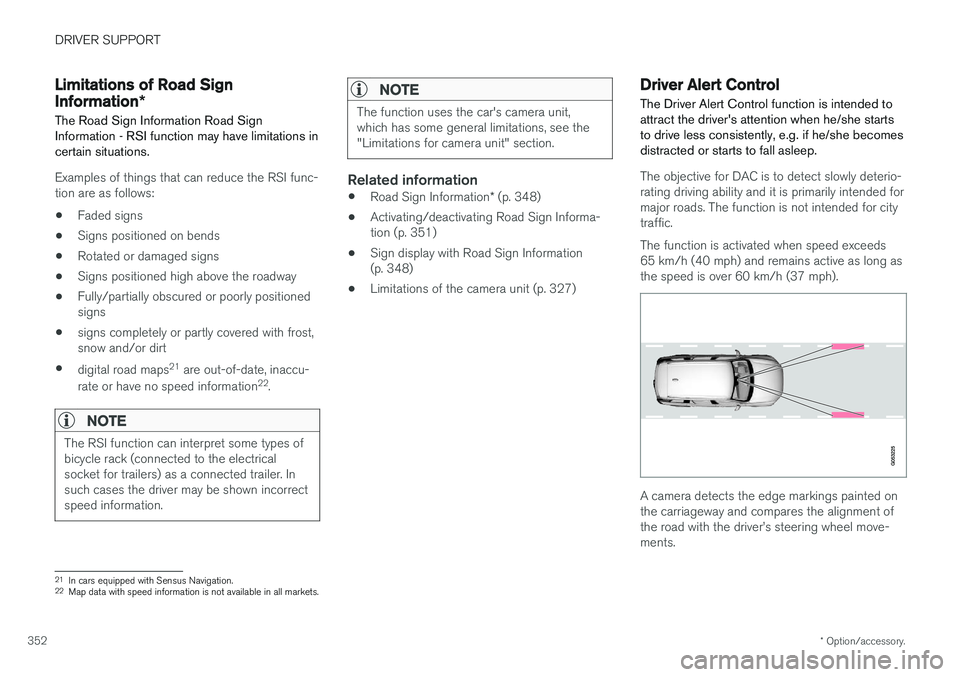
A camera detects the edge markings painted on the carriageway and compares the alignment ofthe road with the driver
Page 356 of 594
||
DRIVER SUPPORT
* Option/accessory.
354 2.
Press
My CarIntelliSafeDriver Alert
Control.
3. Select
Rest Stop Guidance to activate/
deactivate the rest place guide.
Related information
• Driver Alert Control (p. 352)
• Limitations of Driver Alert Control (p. 354)
Limitations of Driver Alert Control
The Driver Alert Control (DAC) function may have limitations in certain situations.
In some cases, driving behaviour may not be affected, despite the driver being tired - e.g. whenusing the Pilot Assist function - with the resultthat the driver is then not given a warning fromDAC. For this reason, it is always very importantto stop and take a break in the event of theslightest sign of driver fatigue, regardless ofwhether DAC has given a warning. In some cases the system may issue a warning despite driving ability not deteriorating, for exam-ple:
• in strong side winds
• on rutted road surfaces.
NOTE
The function uses the car's camera unit, which has some general limitations, see the"Limitations for camera unit" section.
Related information
•
Driver Alert Control (p. 352)
• Activate/deactivate Driver Alert Control (p. 353)
• Limitations of the camera unit (p. 327)
• Pilot Assist
* (p. 304)
Lane Keeping Aid
The function of lane assistance is to help the driver to reduce the risk of the car accidentallyleaving its own lane on motorways and similarmajor routes.
Lane assistance steers the car back into its lane and/or warns the driver with an acoustic signal orsteering wheel vibration. Lane Keeping Aid is active within the speed range 65-200 km/h (40-125 mph) on roads withclearly visible side lines. On narrow roads the function may be unavailable, in which case it goes into standby mode. Thefunction becomes available again when the roadis wide enough.
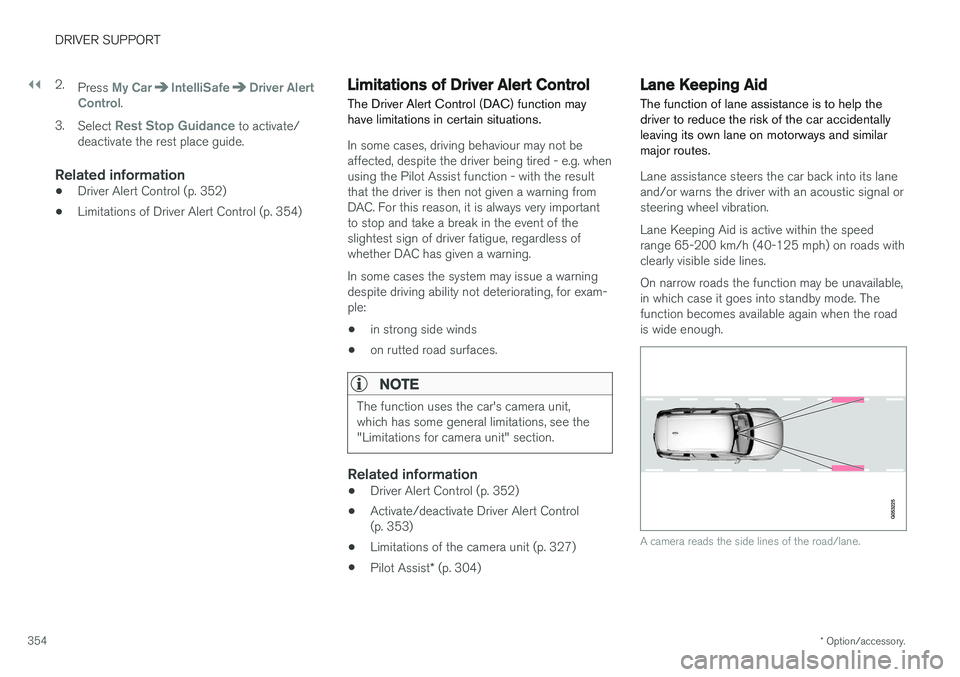
A camera reads the side lines of the road/lane.
Page 362 of 594
DRIVER SUPPORT
360
Run-off Mitigation
The function of Run-off Mitigation is to assist the driver to reduce the risk of the car accidentallyleaving the road by means of actively steeringthe car back onto the road.
The function is active within the speed range 65-140 km/h (40-87 mph) on roads with clearlyvisible side markings/lane lines. A camera scans the edges of the road and the painted side markings. If the car is about to crossthe edge of the road, Run-off Mitigation willactively steer the car back onto the road. In addi-tion, if steering intervention is considered insuffi-cient to avoid run-off, brake intervention may alsobe activated. Run-off Mitigation does not intervene with either steering assistance or brake intervention if thedirection indicators are used. If the functiondetects that the driver is driving the car in anactive way, activation of Run-off Mitigation will besuppressed for a short time. The function has two activation levels: • Steering assistance only
• Steering assistance with brake intervention
Run-off Mitigation with steering assistance
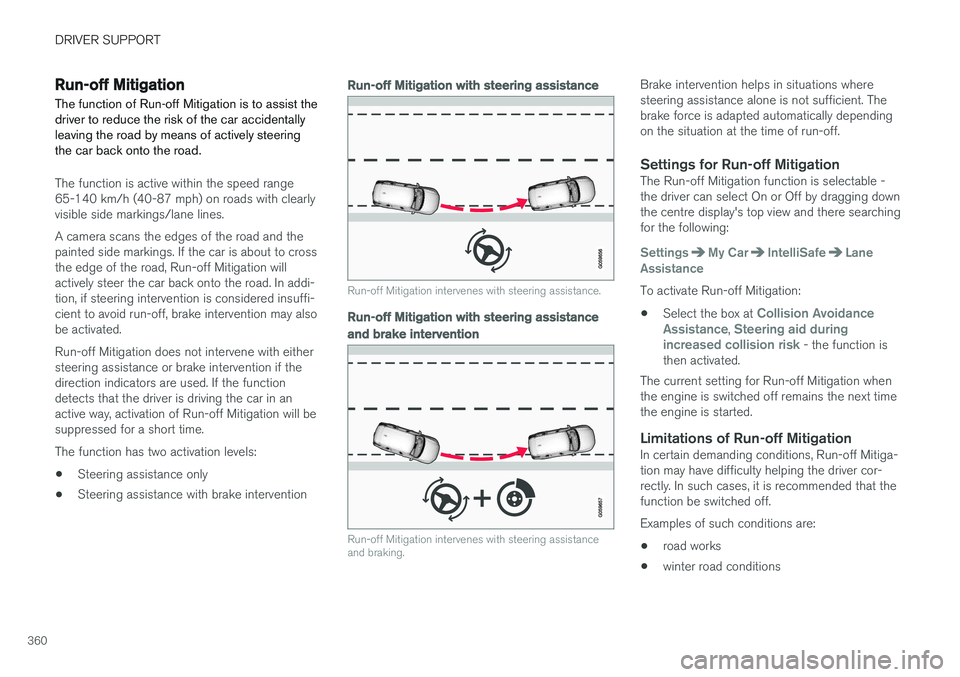
Run-off Mitigation intervenes with steering assistance.
Run-off Mitigation with steering assistance
and brake intervention
Run-off Mitigation intervenes with steering assistance and braking.
Brake intervention helps in situations where steering assistance alone is not sufficient. Thebrake force is adapted automatically dependingon the situation at the time of run-off.
Settings for Run-off MitigationThe Run-off Mitigation function is selectable -the driver can select On or Off by dragging downthe centre display's top view and there searchingfor the following:
SettingsMy CarIntelliSafeLane
Assistance
To activate Run-off Mitigation:
• Select the box at
Collision Avoidance
Assistance, Steering aid during
increased collision risk - the function is
then activated.
The current setting for Run-off Mitigation when the engine is switched off remains the next timethe engine is started.
Limitations of Run-off MitigationIn certain demanding conditions, Run-off Mitiga-tion may have difficulty helping the driver cor-rectly. In such cases, it is recommended that thefunction be switched off. Examples of such conditions are:
• road works
• winter road conditions
Page 366 of 594
||
DRIVER SUPPORT
* Option/accessory.
364
Along the sides
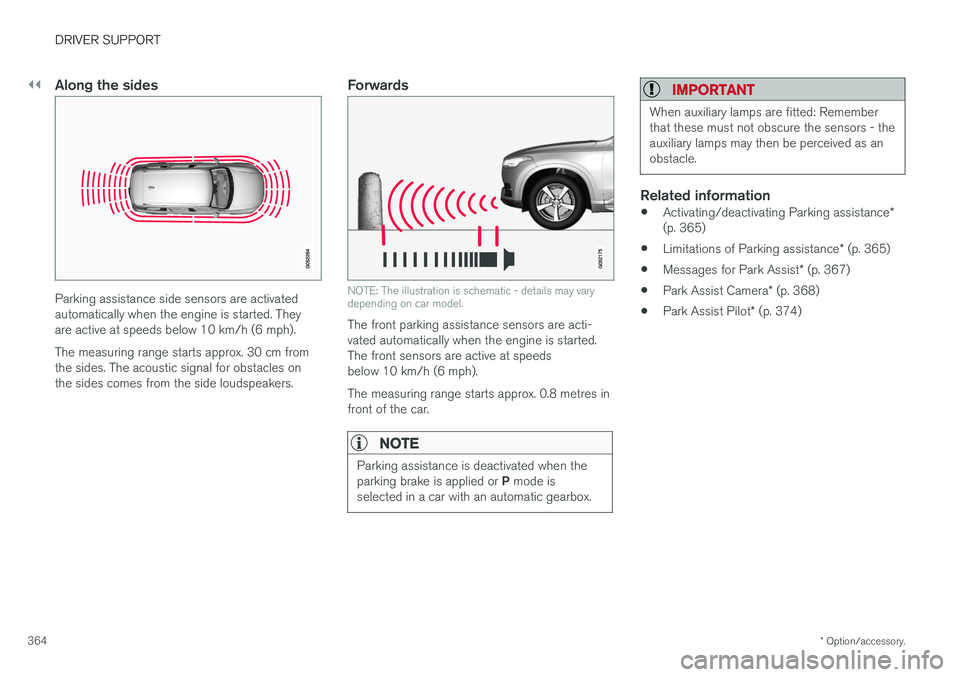
Parking assistance side sensors are activated automatically when the engine is started. Theyare active at speeds below 10 km/h (6 mph). The measuring range starts approx. 30 cm from the sides. The acoustic signal for obstacles onthe sides comes from the side loudspeakers.
Forwards
NOTE: The illustration is schematic - details may vary depending on car model.
The front parking assistance sensors are acti- vated automatically when the engine is started.The front sensors are active at speedsbelow 10 km/h (6 mph). The measuring range starts approx. 0.8 metres in front of the car.
NOTE
Parking assistance is deactivated when the parking brake is applied or P mode is
selected in a car with an automatic gearbox.
IMPORTANT
When auxiliary lamps are fitted: Remember that these must not obscure the sensors - theauxiliary lamps may then be perceived as anobstacle.
Related information
• Activating/deactivating Parking assistance
*
(p. 365)
• Limitations of Parking assistance
* (p. 365)
• Messages for Park Assist
* (p. 367)
• Park Assist Camera
* (p. 368)
• Park Assist Pilot
* (p. 374)
Page 370 of 594
DRIVER SUPPORT
* Option/accessory.
368
Park Assist Camera *
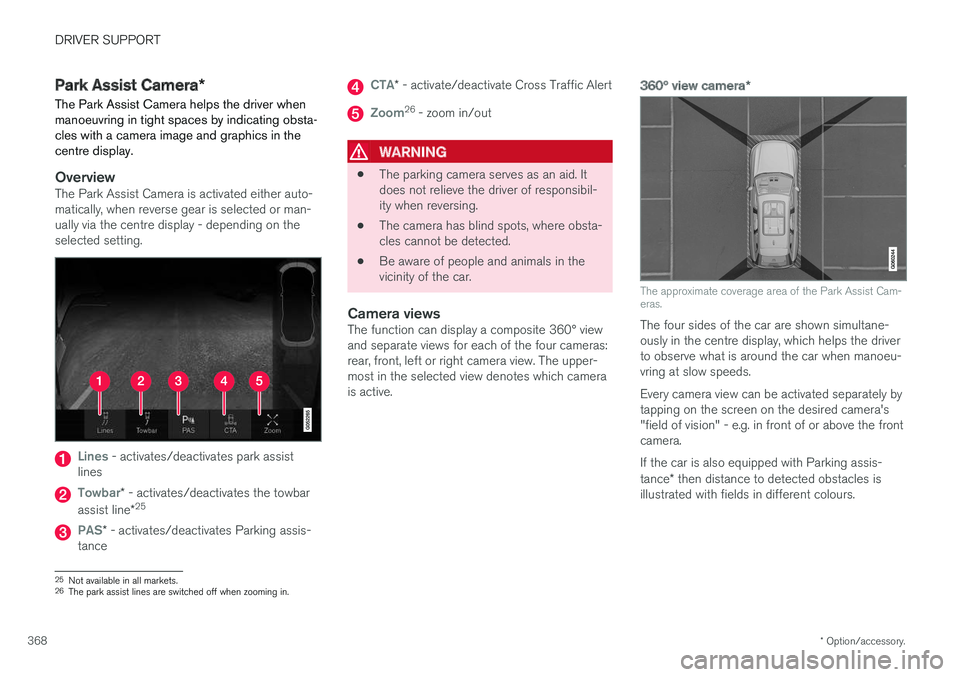
The Park Assist Camera helps the driver when manoeuvring in tight spaces by indicating obsta-cles with a camera image and graphics in thecentre display.
OverviewThe Park Assist Camera is activated either auto- matically, when reverse gear is selected or man-ually via the centre display - depending on theselected setting.
Lines - activates/deactivates park assist
lines
Towbar* - activates/deactivates the towbar
assist line *25
PAS*
- activates/deactivates Parking assis-
tance
CTA* - activate/deactivate Cross Traffic Alert
Zoom26
- zoom in/out
WARNING
• The parking camera serves as an aid. It does not relieve the driver of responsibil-ity when reversing.
• The camera has blind spots, where obsta-cles cannot be detected.
• Be aware of people and animals in thevicinity of the car.
Camera viewsThe function can display a composite 360° viewand separate views for each of the four cameras:rear, front, left or right camera view. The upper-most in the selected view denotes which camerais active.
360° view camera
*
The approximate coverage area of the Park Assist Cam- eras.
The four sides of the car are shown simultane- ously in the centre display, which helps the driverto observe what is around the car when manoeu-vring at slow speeds. Every camera view can be activated separately by tapping on the screen on the desired camera's"field of vision" - e.g. in front of or above the frontcamera. If the car is also equipped with Parking assis- tance* then distance to detected obstacles is
illustrated with fields in different colours.
25 Not available in all markets.
26 The park assist lines are switched off when zooming in.
Page 371 of 594
DRIVER SUPPORT
* Option/accessory.369
Backwards
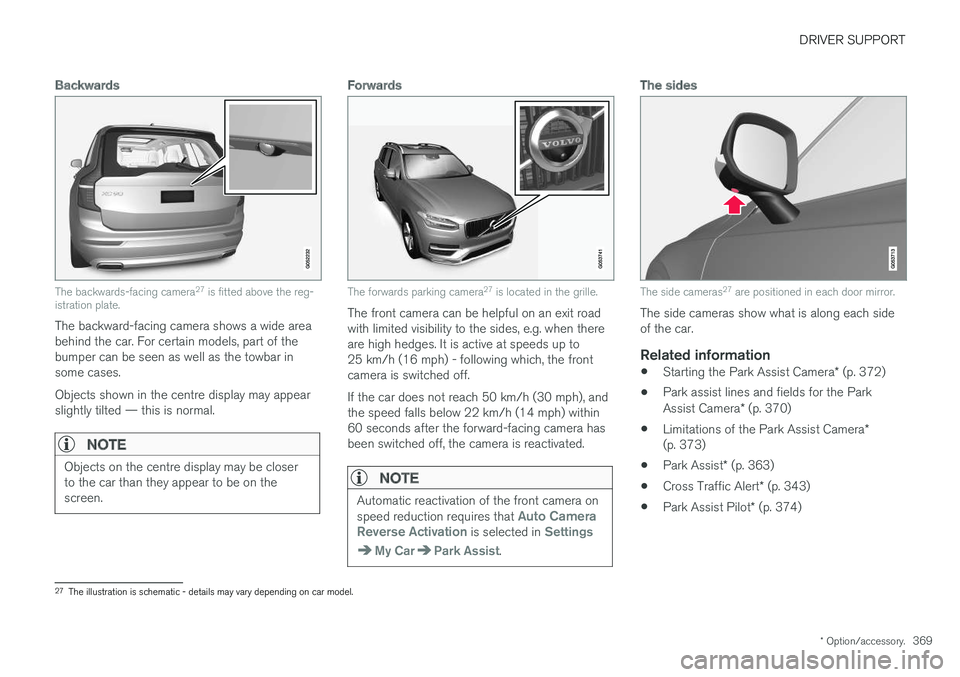
The backwards-facing camera 27
is fitted above the reg-
istration plate.
The backward-facing camera shows a wide area behind the car. For certain models, part of thebumper can be seen as well as the towbar insome cases. Objects shown in the centre display may appear slightly tilted — this is normal.
NOTE
Objects on the centre display may be closer to the car than they appear to be on thescreen.
Forwards
The forwards parking camera 27
is located in the grille.
The front camera can be helpful on an exit road with limited visibility to the sides, e.g. when thereare high hedges. It is active at speeds up to25 km/h (16 mph) - following which, the frontcamera is switched off. If the car does not reach 50 km/h (30 mph), and the speed falls below 22 km/h (14 mph) within60 seconds after the forward-facing camera hasbeen switched off, the camera is reactivated.
NOTE
Automatic reactivation of the front camera on speed reduction requires that Auto Camera
Reverse Activation is selected in Settings
My CarPark Assist.
The sides
The side cameras 27
are positioned in each door mirror.
The side cameras show what is along each side of the car.
Related information
• Starting the Park Assist Camera
* (p. 372)
• Park assist lines and fields for the Park Assist Camera
* (p. 370)
• Limitations of the Park Assist Camera
*
(p. 373)
• Park Assist
* (p. 363)
• Cross Traffic Alert
* (p. 343)
• Park Assist Pilot
* (p. 374)
27
The illustration is schematic - details may vary depending on car model.
Page 376 of 594

||
DRIVER SUPPORT
* Option/accessory.
374
The car's left-hand camera is out of order.
Black camera sector
A black camera sector is also shown in the fol- lowing instances, but then without the symbol for
defective camera:
• open door
• open tailgate
• folded-in door mirror.
Light conditionsThe camera image is adjusted automatically according to prevailing light conditions. Becauseof this, the image may vary slightly in brightnessand quality. Poor light conditions can result inreduced image quality.
MaintenanceClean camera lenses regularly with lukewarmwater and car shampoo - be careful not toscratch the lenses.
NOTE
Keep the camera lens clear of dirt, snow and ice to ensure optimum function. This is partic-ularly important in poor light.
Related information
•
Park Assist Camera
* (p. 368)
• Starting the Park Assist Camera
* (p. 372)
• Park assist lines and fields for the Park Assist Camera
* (p. 370)
Park Assist Pilot *
Active parking assistance (Park Assist Pilot - PAP) helps the driver to park in or leave a park-ing space.
PAP checks first if a space is sufficiently big and thereafter helps the driver to turn the steeringwheel and manoeuvre the car into the space. The centre display indicates with symbols, graph- ics and text the various operations to be carriedout and when to do so.
NOTE
The PAP function measures the space and steers the car - the driver's task is to:
• keep a close watch around the car
• follow the instructions in the centre dis-play
• change gear (reverse/forward)
• control and maintain a safe speed
• brake and stop.
Page 378 of 594
DRIVER SUPPORT
* Option/accessory.
376
Parking with Active parking assistance *
The Active parking assistance (Park Assist Pilot - PAP) helps the driver park in three steps. Thefunction can also help the driver to leave a park-ing space.
NOTE
The PAP function measures the space and steers the car - the driver's task is to:
• keep a close watch around the car
• follow the instructions in the centre dis-play
• change gear (reverse/forward)
• control and maintain a safe speed
• brake and stop.
PAP can be activated if the following criteria are met once the engine has been started:
• No trailer is attached to the car.
• Speed must be lower than 30 km/h(20 mph).
NOTE
The distance between the car and parking spaces should be 0.5-1.5 metres while PAPis searching for a parking space.
ParkingThe PAP function parks the car using the follow- ing steps:
1. A parking space is identified and measured.
2. The car is reversed into the space.
3. The car is positioned into the space - the
system may then request that the driver changes gear.
Finding and measuring parking spaces
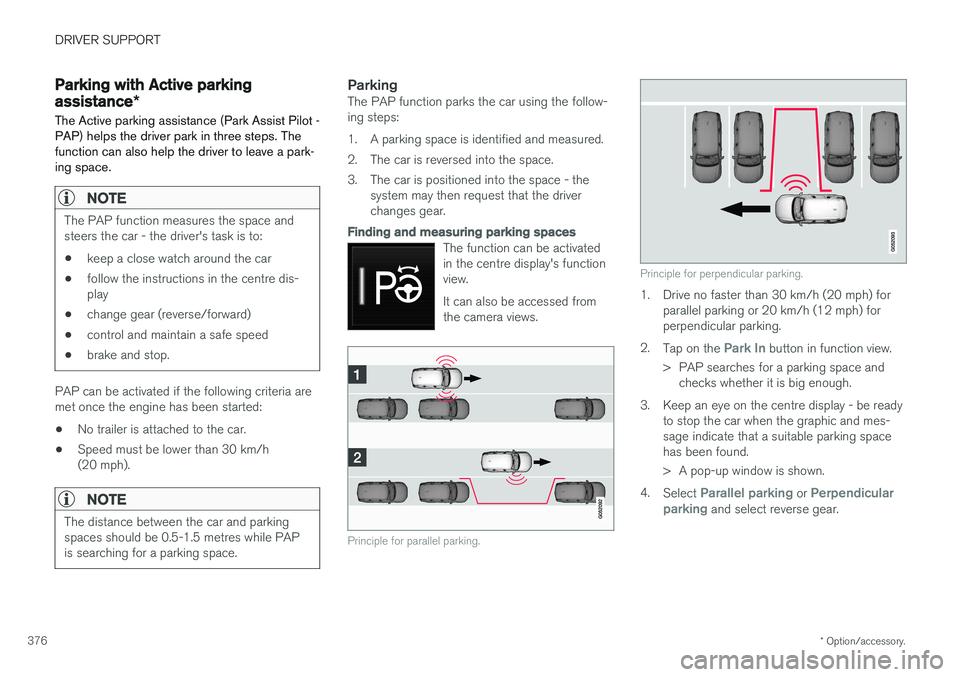
The function can be activated in the centre display's functionview. It can also be accessed from the camera views.
Principle for parallel parking.
Principle for perpendicular parking.
1. Drive no faster than 30 km/h (20 mph) forparallel parking or 20 km/h (12 mph) for perpendicular parking.
2. Tap on the
Park In button in function view.
> PAP searches for a parking space and checks whether it is big enough.
3. Keep an eye on the centre display - be ready to stop the car when the graphic and mes- sage indicate that a suitable parking spacehas been found.
> A pop-up window is shown.
4. Select
Parallel parking or Perpendicular
parking and select reverse gear.
Page 418 of 594
STARTING AND DRIVING
* Option/accessory.
416 •
Speed camera information
* (p. 350)
• Driving with a trailer (p. 426)
• Driving in water (p. 413)
• Alarm
* (p. 262)
• Level control
* and shock absorption (p. 405)
• Warning triangle (p. 500)
• Emergency puncture repair kit (p. 490)
• Spare wheel
* (p. 498)
Winter driving
For winter driving it is important to perform cer- tain checks of the car in order to ensure that itcan be driven safely.
Check the following in particular before the cold season:
• The engine coolant must contain 50% glycol.This mixture protects the engine againstfrost erosion down to approximately –35 °C.To avoid health risks, different types of glycolmust not be mixed.
• The fuel tank must be kept filled to preventcondensation.
• Engine oil viscosity is important. Oils withlower viscosity (thinner oils) facilitate startingin cold weather and also reduce fuel con-sumption while the engine is cold. Readmore about suitable oils in the section"Adverse driving conditions for engine oil".
IMPORTANT
Low viscosity oil must not be used for hard driving or in hot weather.
• The condition of the starter battery and charge level must be inspected. Coldweather places great demands on the starter battery and its capacity is reduced by thecold.
• Use washer fluid with antifreeze to avoid iceforming in the washer fluid reservoir.
Slippery driving conditionsTo achieve optimum roadholding Volvo recom-mends using winter tyres on all wheels if there isa risk of snow or ice.
NOTE
The use of winter tyres is a legal requirement in certain countries. Studded tyres are notpermitted in all countries.
Practise driving on slippery surfaces under con- trolled conditions to learn how the car reacts.
Related information
•Topping up coolant (p. 518)
• Adverse driving conditions for engine oil(p. 569)
• Starter battery (p. 530)
• Winter wheels (p. 499)
• Filling washer fluid (p. 529)
• Replacing a wiper blade (p. 528)
• Parking climate
* (p. 206)
• Activating/deactivating defrost of windowsand door mirrors (p. 194)
Page 580 of 594
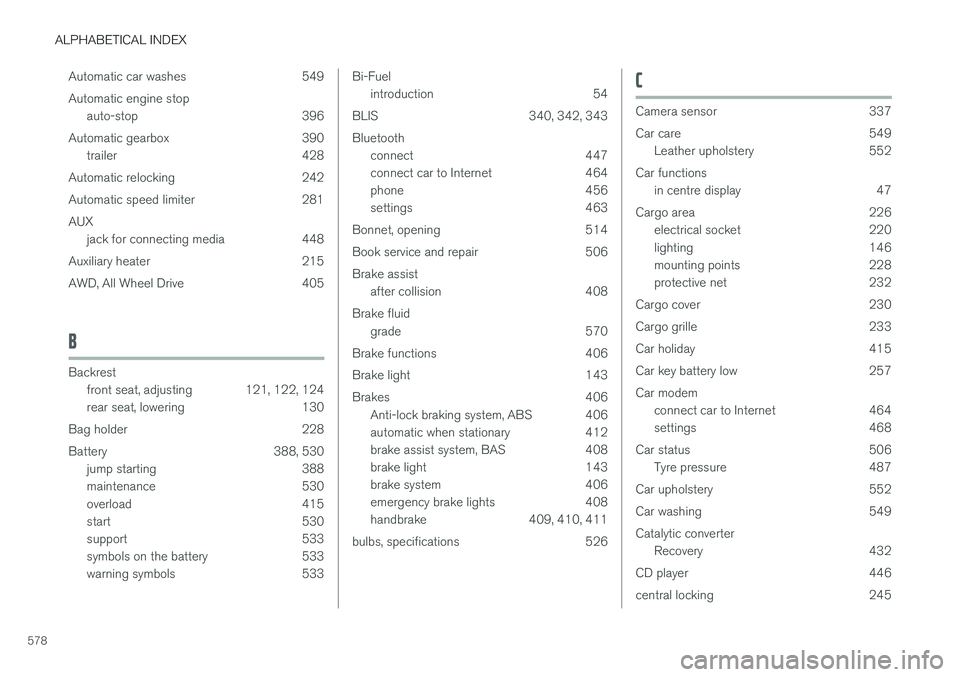
ALPHABETICAL INDEX
578Automatic car washes 549 Automatic engine stop
auto-stop 396
Automatic gearbox 390 trailer 428
Automatic relocking 242
Automatic speed limiter 281AUX jack for connecting media 448
Auxiliary heater 215
AWD, All Wheel Drive 405
B
Backrest front seat, adjusting 121, 122, 124
rear seat, lowering 130
Bag holder 228
Battery 388, 530 jump starting 388
maintenance 530
overload 415
start 530
support 533
symbols on the battery 533
warning symbols 533
Bi-Fuel introduction 54
BLIS 340, 342, 343 Bluetooth connect 447
connect car to Internet 464
phone 456
settings 463
Bonnet, opening 514
Book service and repair 506Brake assist after collision 408
Brake fluid grade 570
Brake functions 406
Brake light 143
Brakes 406 Anti-lock braking system, ABS 406
automatic when stationary 412
brake assist system, BAS 408
brake light 143
brake system 406
emergency brake lights 408
handbrake 409, 410, 411
bulbs, specifications 526C
Camera sensor 337
Car care 549 Leather upholstery 552
Car functions in centre display 47
Cargo area 226 electrical socket 220
lighting 146
mounting points 228
protective net 232
Cargo cover 230
Cargo grille 233
Car holiday 415
Car key battery low 257Car modem connect car to Internet 464
settings 468
Car status 506 Tyre pressure 487
Car upholstery 552
Car washing 549Catalytic converter Recovery 432
CD player 446
central locking 245