belt VOLVO V90 2017 Service Manual
[x] Cancel search | Manufacturer: VOLVO, Model Year: 2017, Model line: V90, Model: VOLVO V90 2017Pages: 594, PDF Size: 15.07 MB
Page 410 of 594
STARTING AND DRIVING
408
Emergency brake lightsEmergency brake lights are activated to alert vehicles behind about heavy braking. The func-tion means that the brake light flashes instead of- as in normal braking - shining with a constantglow.
The emergency brake lights are activated during heavy braking or if the ABS system is activated athigh speeds. After emergency braking to a lowspeed, the brake lights return from flashing to thenormal constant glow. The car's hazard warningflashers are activated at the same time. Theseflash until the driver accelerates the car to ahigher speed again or switches off the hazardwarning flashers.
Related information
• Foot brake (p. 406)
• Hazard warning flashers (p. 143)
• Brake lights (p. 143)
Brake assistance
The brake assist system, BAS (Brake Assist System), helps to increase brake force duringbraking, thereby shortening the braking distance.
The system detects the way in which the driver brakes and increases brake force where neces-sary. The brake force can be boosted up to thelevel when the ABS system is engaged. Thefunction is suspended when the pressure on thebrake pedal decreases.
NOTE
When BAS is activated the brake pedal low- ers slightly more than usual, depress (hold)the brake pedal as long as necessary. When the brake pedal is released, all braking ceases.
Related information
• Foot brake (p. 406)
Auto braking after a collision In the event of a collision in which the activation level is reached for the pyrotechnic seatbelt ten-sioners or airbags, or if a collision with a largeanimal is detected, the car's brakes are automat-ically applied. This function is to prevent orreduce the effects of any subsequent collision.
After a serious collision there is a risk that it is no longer possible to control and steer the car. Inorder to avoid or mitigate a possible further colli-sion with a vehicle or an object in the vehicle'spath, the auto braking system is activated auto-matically and brakes the car in a safe manner. Brake lights and hazard warning lights are acti- vated during braking. When the car has stopped,the hazard warning lights continue to flash andthe parking brake is applied. If braking is not appropriate, e.g. if there is a risk of being hit by following traffic, the system can beoverridden by the driver depressing the accelera-tor pedal. The function assumes that the brake system is intact after the collision. See also the sections "Rear Collision Warning" and "Blind Spot Information".
Related information
• Brake functions (p. 406)
• Seatbelt tensioner (p. 59)
• Airbags (p. 63)
Page 413 of 594
STARTING AND DRIVING
}}
411
Releasing automatically
1. Put the seatbelt on.
2. Start the car.
3. With automatic gearbox:Select gear position D or R and depress the
accelerator pedal.With manual gearbox:Engage a suitable gear, release the clutch and depress the accelerator pedal.
> The parking brake releases and the sym- bol in the driver display extinguishes.
Parking on a hill
WARNING
Always use the parking brake when parking on an inclined surface. Engaging a gear or the automatic transmission's P position is not suf-
ficient to hold the car stationary in all situa- tions.
If the car is parked facing uphill: • Turn the wheels
away from the kerb.
If the car is parked facing downhill:
• Turn the wheels
towards the kerb.
Heavy load uphill
A heavy load, such as a trailer, can cause the car to roll backward when the parking brake isreleased automatically on a steep incline. Avoid this by pulling the control upwards while drivingthe car away. Release the control when theengine achieves traction.
Settings for parking brake
Automatic activation of the parking brake isselected via the centre display. Automatic activation when the car is switched off:1.
Press
Settings in the top view.
2. Press
My CarParking Brake and
Suspension and deselect/select the func-
tion Auto Activate Parking Brake.
Related information
• Parking brake (p. 409)
• In the event of a fault in the parking brake (p. 411)
• Automatic braking when stationary (p. 412)
In the event of a fault in the parking brake
Contact an authorised Volvo workshop if it is not possible to release or apply the parking brakeafter several attempts.
An acoustic warning signal sounds when driving with the parking brake applied. If the car has to be parked before a possible fault is rectified then the wheels must be turned as ifparking on a hill and the gear selector must be in position P, or engage first gear if the car has a
manual gearbox.
Low battery voltageIf the battery voltage is too low then the parking brake can neither be released nor applied. Con-nect a donor battery if the battery voltage is toolow.
Replacing the brake liningsThe rear brake linings must be replaced at aworkshop due to the design of the electrically-operated parking brake - an authorised Volvoworkshop is recommended.
Page 414 of 594
||
STARTING AND DRIVING
412
Symbols in the driver display
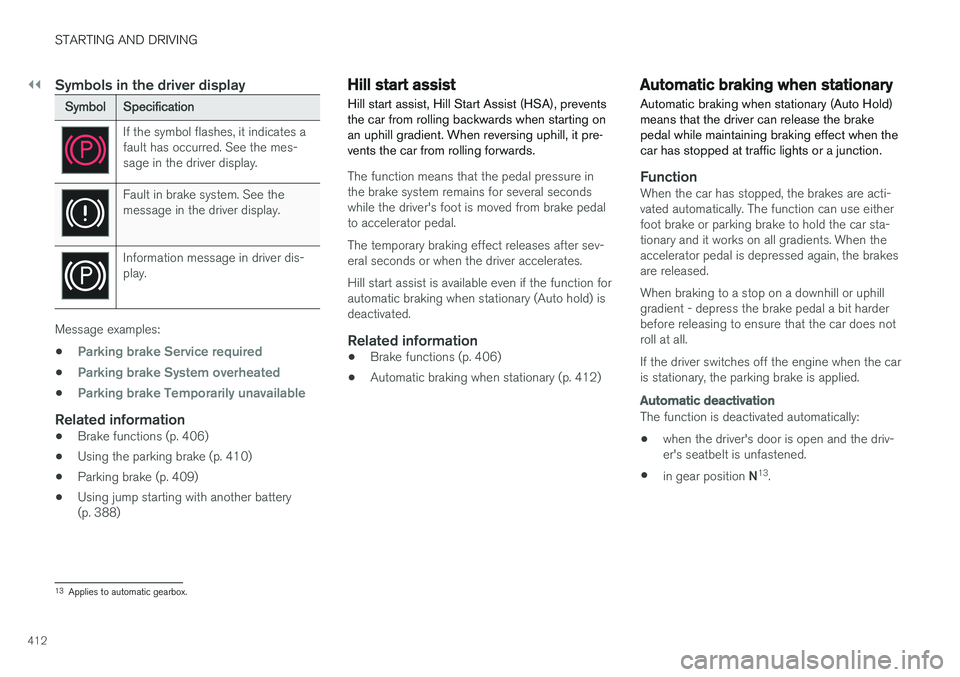
SymbolSpecification
If the symbol flashes, it indicates a fault has occurred. See the mes-sage in the driver display.
Fault in brake system. See the message in the driver display.
Information message in driver dis- play.
Message examples:
•
Parking brake Service required
•Parking brake System overheated
•Parking brake Temporarily unavailable
Related information
• Brake functions (p. 406)
• Using the parking brake (p. 410)
• Parking brake (p. 409)
• Using jump starting with another battery (p. 388)
Hill start assist
Hill start assist, Hill Start Assist (HSA), prevents the car from rolling backwards when starting onan uphill gradient. When reversing uphill, it pre-vents the car from rolling forwards.
The function means that the pedal pressure in the brake system remains for several secondswhile the driver's foot is moved from brake pedalto accelerator pedal. The temporary braking effect releases after sev- eral seconds or when the driver accelerates. Hill start assist is available even if the function for automatic braking when stationary (Auto hold) isdeactivated.
Related information
• Brake functions (p. 406)
• Automatic braking when stationary (p. 412)
Automatic braking when stationary
Automatic braking when stationary (Auto Hold) means that the driver can release the brakepedal while maintaining braking effect when thecar has stopped at traffic lights or a junction.
FunctionWhen the car has stopped, the brakes are acti- vated automatically. The function can use eitherfoot brake or parking brake to hold the car sta-tionary and it works on all gradients. When theaccelerator pedal is depressed again, the brakesare released. When braking to a stop on a downhill or uphill gradient - depress the brake pedal a bit harderbefore releasing to ensure that the car does notroll at all. If the driver switches off the engine when the car is stationary, the parking brake is applied.
Automatic deactivation
The function is deactivated automatically: • when the driver's door is open and the driv- er's seatbelt is unfastened.
• in gear position
N13
.
13 Applies to automatic gearbox.
Page 516 of 594
MAINTENANCE AND SERVICE
514
Opening and closing the bonnet
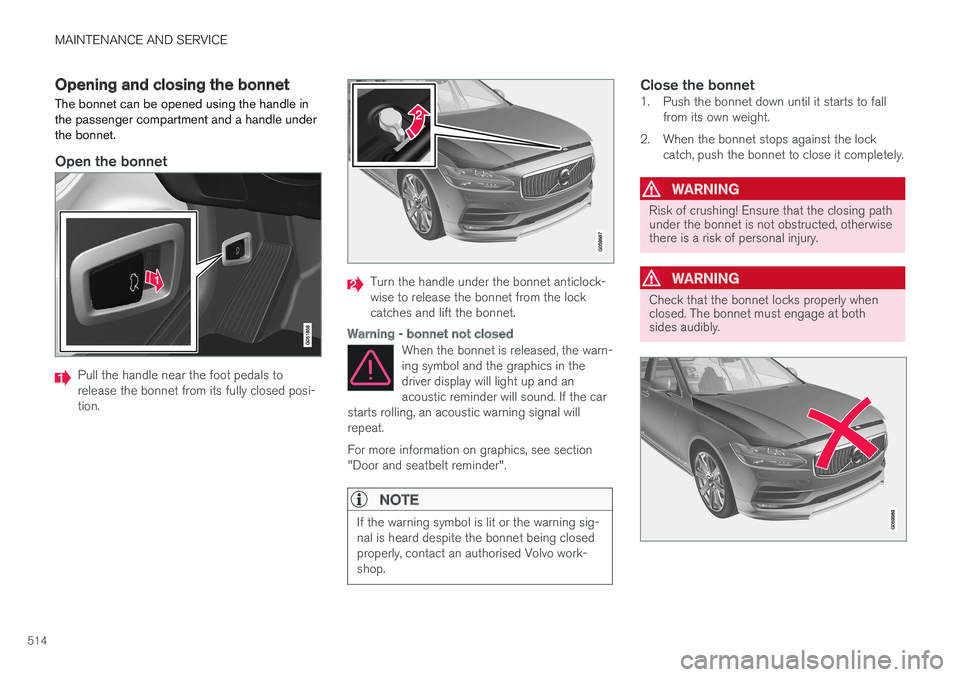
The bonnet can be opened using the handle in the passenger compartment and a handle underthe bonnet.
Open the bonnet
Pull the handle near the foot pedals to release the bonnet from its fully closed posi-tion.
Turn the handle under the bonnet anticlock- wise to release the bonnet from the lockcatches and lift the bonnet.
Warning - bonnet not closed
When the bonnet is released, the warn- ing symbol and the graphics in thedriver display will light up and anacoustic reminder will sound. If the car
starts rolling, an acoustic warning signal willrepeat. For more information on graphics, see section "Door and seatbelt reminder".
NOTE
If the warning symbol is lit or the warning sig- nal is heard despite the bonnet being closedproperly, contact an authorised Volvo work-shop.
Close the bonnet1. Push the bonnet down until it starts to fall from its own weight.
2. When the bonnet stops against the lock catch, push the bonnet to close it completely.
WARNING
Risk of crushing! Ensure that the closing path under the bonnet is not obstructed, otherwisethere is a risk of personal injury.
WARNING
Check that the bonnet locks properly when closed. The bonnet must engage at bothsides audibly.
Page 517 of 594
MAINTENANCE AND SERVICE
515
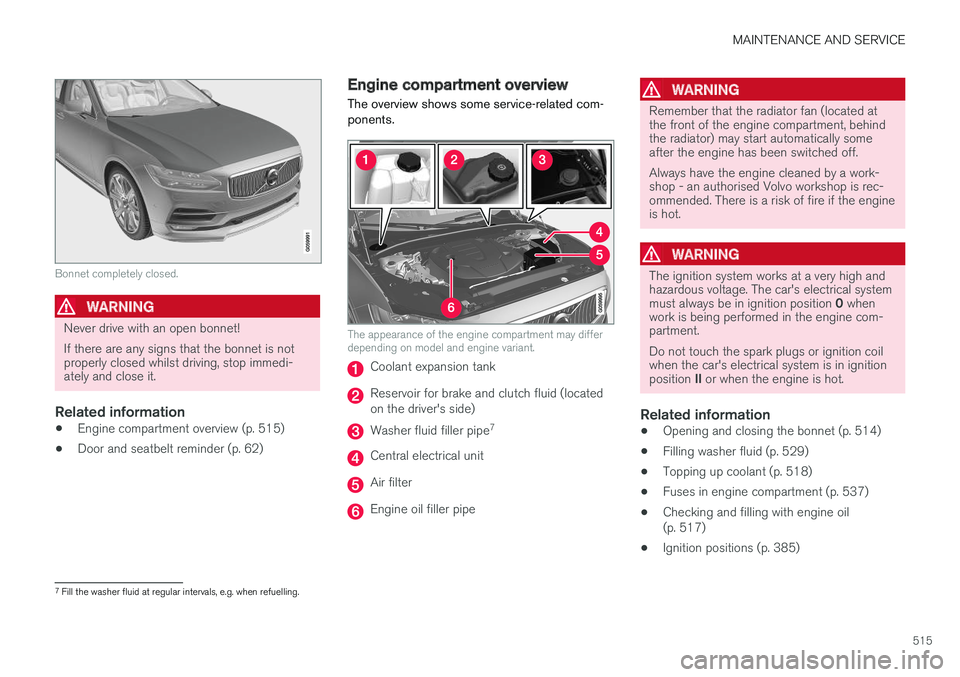
Bonnet completely closed.
WARNING
Never drive with an open bonnet! If there are any signs that the bonnet is not properly closed whilst driving, stop immedi-ately and close it.
Related information
•Engine compartment overview (p. 515)
• Door and seatbelt reminder (p. 62)
Engine compartment overview
The overview shows some service-related com- ponents.
The appearance of the engine compartment may differ depending on model and engine variant.
Coolant expansion tank
Reservoir for brake and clutch fluid (located on the driver's side)
Washer fluid filler pipe 7
Central electrical unit
Air filter
Engine oil filler pipe
WARNING
Remember that the radiator fan (located at the front of the engine compartment, behindthe radiator) may start automatically someafter the engine has been switched off. Always have the engine cleaned by a work- shop - an authorised Volvo workshop is rec-ommended. There is a risk of fire if the engineis hot.
WARNING
The ignition system works at a very high and hazardous voltage. The car's electrical system must always be in ignition position
0 when
work is being performed in the engine com- partment. Do not touch the spark plugs or ignition coil when the car's electrical system is in ignition position II or when the engine is hot.
Related information
• Opening and closing the bonnet (p. 514)
• Filling washer fluid (p. 529)
• Topping up coolant (p. 518)
• Fuses in engine compartment (p. 537)
• Checking and filling with engine oil (p. 517)
• Ignition positions (p. 385)
7
Fill the washer fluid at regular intervals, e.g. when refuelling.
Page 546 of 594
||
MAINTENANCE AND SERVICE
* Option/accessory.
544
Positions
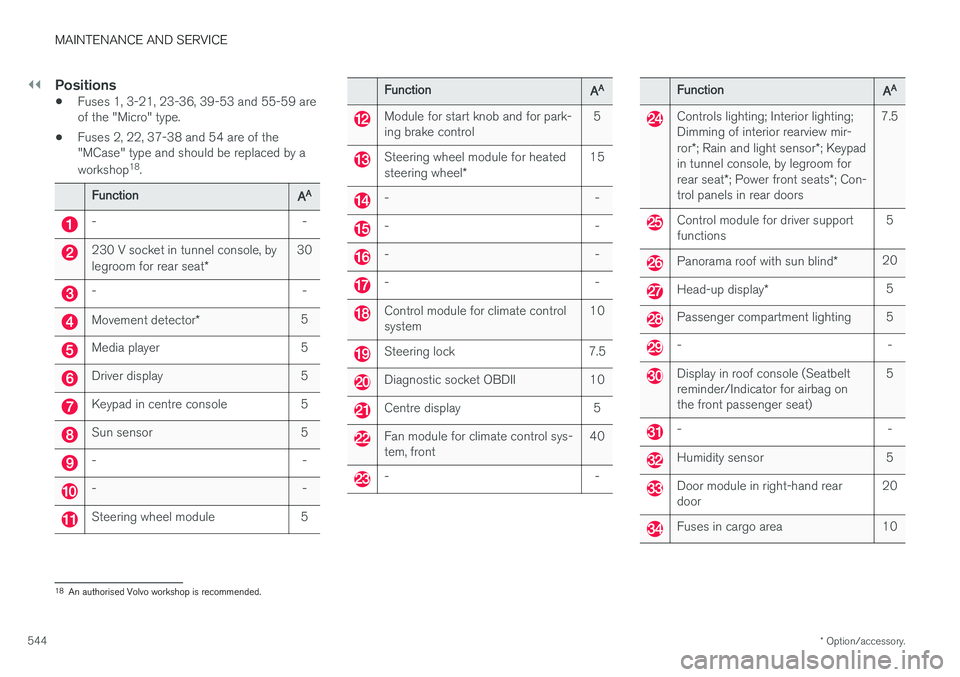
• Fuses 1, 3-21, 23-36, 39-53 and 55-59 are of the "Micro" type.
• Fuses 2, 22, 37-38 and 54 are of the"MCase" type and should be replaced by a workshop 18
.
Function AA
- -
230 V socket in tunnel console, by legroom for rear seat
*30
- -
Movement detector
* 5
Media player 5
Driver display 5
Keypad in centre console 5
Sun sensor 5
- -
- -
Steering wheel module 5
Function
AA
Module for start knob and for park- ing brake control 5
Steering wheel module for heated steering wheel
* 15
- -
- -
- -
- -
Control module for climate control system
10
Steering lock 7.5
Diagnostic socket OBDII 10
Centre display 5
Fan module for climate control sys- tem, front40
- -
Function
AA
Controls lighting; Interior lighting; Dimming of interior rearview mir- ror
*; Rain and light sensor *; Keypad
in tunnel console, by legroom forrear seat *; Power front seats *; Con-
trol panels in rear doors 7.5
Control module for driver support functions
5
Panorama roof with sun blind
*20
Head-up display
* 5
Passenger compartment lighting 5
- -
Display in roof console (Seatbelt reminder/Indicator for airbag onthe front passenger seat) 5
- -
Humidity sensor 5
Door module in right-hand rear door
20
Fuses in cargo area 10
18
An authorised Volvo workshop is recommended.
Page 548 of 594
MAINTENANCE AND SERVICE
* Option/accessory.
546
Fuses in cargo area
Fuses in the cargo area protect, amongst other things, power seats *, airbags and seatbelt ten-
sioners.
Page 550 of 594
||
MAINTENANCE AND SERVICE
* Option/accessory.
548
Positions
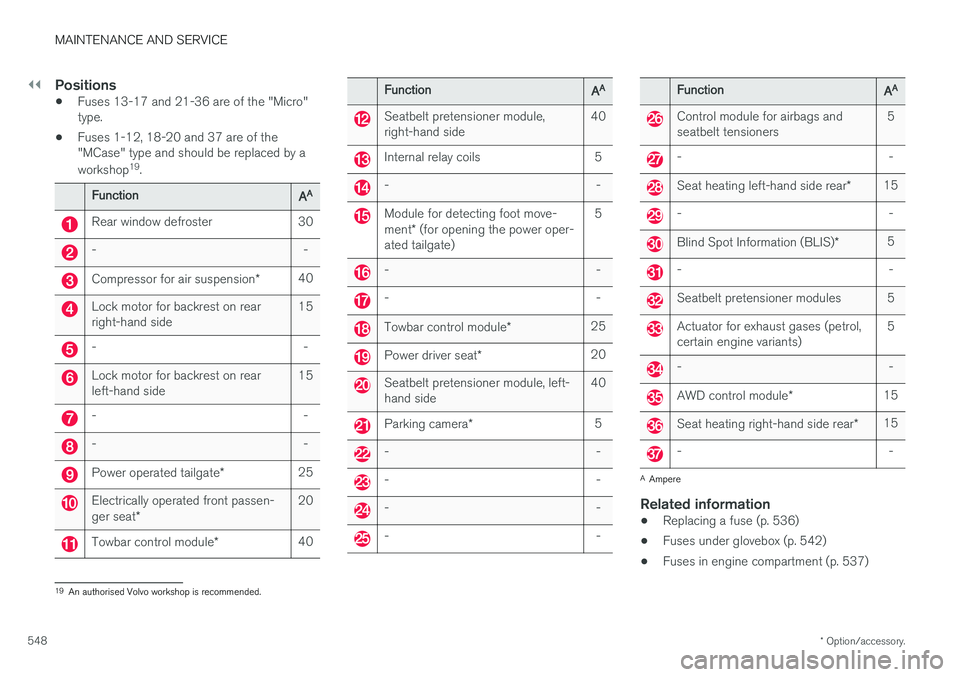
• Fuses 13-17 and 21-36 are of the "Micro" type.
• Fuses 1-12, 18-20 and 37 are of the"MCase" type and should be replaced by a workshop 19
.
Function AA
Rear window defroster 30
- -
Compressor for air suspension
*40
Lock motor for backrest on rear right-hand side 15
- -
Lock motor for backrest on rear left-hand side15
- -
- -
Power operated tailgate
*25
Electrically operated front passen- ger seat
* 20
Towbar control module
*40
Function
AA
Seatbelt pretensioner module, right-hand side 40
Internal relay coils 5
- -
Module for detecting foot move- ment
* (for opening the power oper-
ated tailgate) 5
- -
- -
Towbar control module
*25
Power driver seat
* 20
Seatbelt pretensioner module, left- hand side 40
Parking camera
* 5
- -
- -
- -
- -
Function
AA
Control module for airbags and seatbelt tensioners 5
- -
Seat heating left-hand side rear
*15
- -
Blind Spot Information (BLIS)
*5
- -
Seatbelt pretensioner modules 5
Actuator for exhaust gases (petrol, certain engine variants) 5
- -
AWD control module
*15
Seat heating right-hand side rear
*15
- -
A
Ampere
Related information
• Replacing a fuse (p. 536)
• Fuses under glovebox (p. 542)
• Fuses in engine compartment (p. 537)
19
An authorised Volvo workshop is recommended.
Page 555 of 594
MAINTENANCE AND SERVICE
}}
553
Interior plastic, metal and wood partsA fibrillated fibre or microfibre cloth, lightly mois- tened with water, available from Volvo dealers, isrecommended for cleaning interior parts and sur-faces. Do not scrape or rub stains. Never use strong stain removers.
SeatbeltsUse water and a synthetic detergent. A specialtextile cleaning agent is available from Volvodealers. Ensure that the seatbelt is dry beforeallowing it to retract.
Inlay mats and floor matRemove inlaid carpets for separate cleaning ofthe floor carpet and the inlaid carpets. Use a vac-uum cleaner to remove dust and dirt. Each inlaymat is secured with pins. Remove the inlay mat by taking hold of the inlay mat at each pin and lifting the mat straight up. Fit the inlay mat in place by pressing it in at each pin.
WARNING
Only use one inlaid mat at each seat, and check before setting off that the mat by thedriver's seat is firmly affixed and secured inthe pins so that it does not get caught adja-cent to and under the pedals.A special textile cleaner is recommended for stains on the floor mat after vacuuming. Floormats should be cleaned with agents recom-mended by Volvo dealers.
Related information
•
Cleaning the centre display (p. 553)
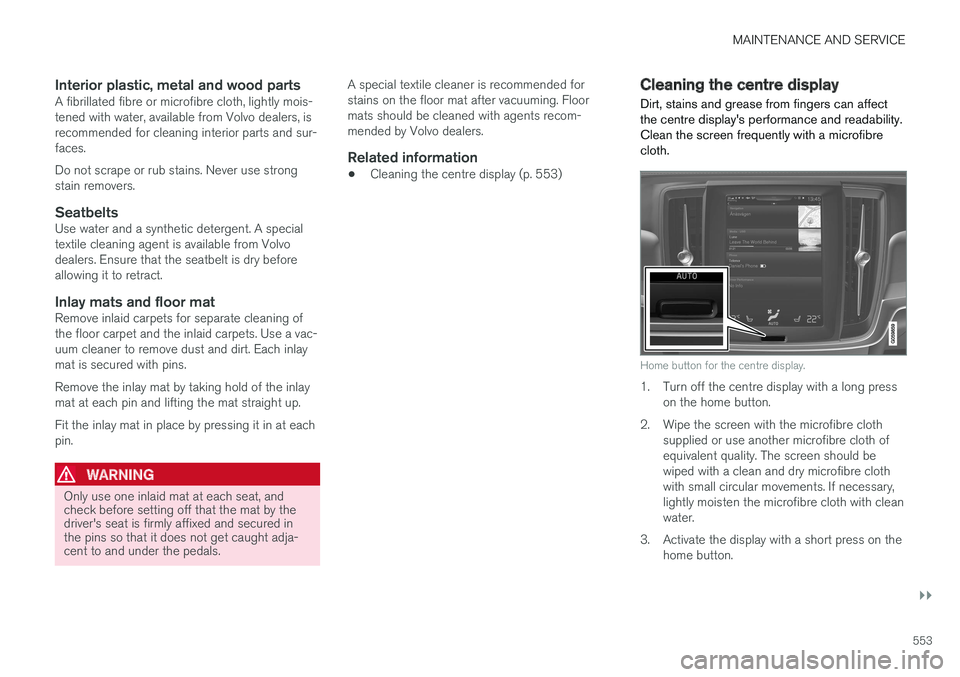
Cleaning the centre display
Dirt, stains and grease from fingers can affect the centre display's performance and readability.Clean the screen frequently with a microfibrecloth.
Home button for the centre display.
1. Turn off the centre display with a long press on the home button.
2. Wipe the screen with the microfibre cloth supplied or use another microfibre cloth of equivalent quality. The screen should bewiped with a clean and dry microfibre clothwith small circular movements. If necessary,lightly moisten the microfibre cloth with cleanwater.
3. Activate the display with a short press on the home button.
Page 581 of 594
ALPHABETICAL INDEX
579
Centre display
change settings 45
cleaning 553
climate control 187
messages 106
operation 36, 40
overview 33
symbols in status bar 45
Checking the engine oil level 517
Child safety 71
Child safety locks 261
Child seat 71 integrated booster cushion 82
i-Size/ISOFIX mounting points 77
lower mounting points 74
positioning/fitting 71
table for location 75
table of i-Size 81
table of ISOFIX 78
Upper mounting points 73
Cigarette lighter 224 City Safety ™330, 332, 333, 335, 336,
337, 339
Cleaning automatic car wash 549
car washing 549
centre display 553
Fabric upholstery 552
rims 551
seatbelts 553
upholstery 552
Clean Zone Interior Package 185
Climate control 182, 186 auto-regulation 189
centre display 187
experienced temperature 183
fan control 193
Parking 206
rear seat 188
sensors 183
temperature control 190
voice control 119
zones 182
Clock, adjustment 99 CO 2 emissions 572
Collision 56, 59, 63, 69
Collision warning 330Collision warning system Pedestrian detection 333
Radar sensor 318
Colour code, paint 554
Combined instrument panel 90 settings 94
Compass 156 calibration 157
Condensation in headlamps 549Controls lighting 135
Coolant 570
Coolant, filling 518Cooling system overheating 414
Cornering lights 142
Corner Traction Control 273Cover cargo area 230
Crash, see Collision 56
Cruise control 284 deactivate 287
managing speed 284, 285
temporary deactivation 286
CTA 343, 344, 345
Cyclist detection 333
CZIP (Clean Zone Interior Package) 185
D
DAB Radio 440 Data recording 22
transfer between car and workshop 511
Data link connector 23
Daytime running lights 137