ESP VOLVO V90 2017 Manual PDF
[x] Cancel search | Manufacturer: VOLVO, Model Year: 2017, Model line: V90, Model: VOLVO V90 2017Pages: 594, PDF Size: 15.07 MB
Page 396 of 594
STARTING AND DRIVING
394
Gear selector inhibitorThe gear selector inhibitor prevents accidental changing between different gear positions in anautomatic gearbox.
There are two different types of gear selector inhibitor - mechanical and automatic.
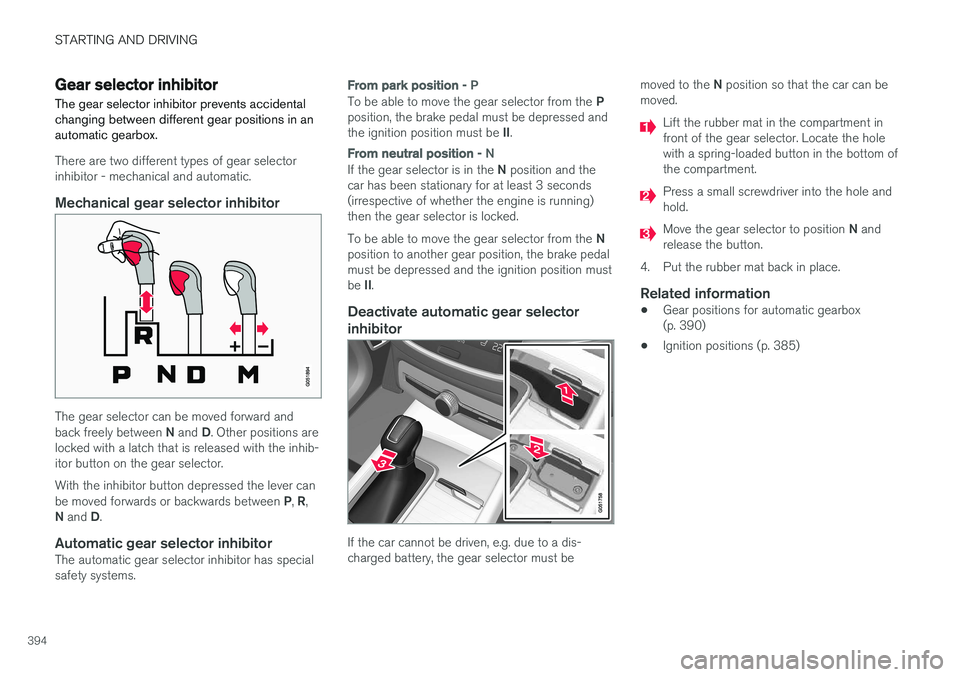
Mechanical gear selector inhibitor
The gear selector can be moved forward and back freely between N and D. Other positions are
locked with a latch that is released with the inhib- itor button on the gear selector. With the inhibitor button depressed the lever can be moved forwards or backwards between P, R ,
N and D.
Automatic gear selector inhibitorThe automatic gear selector inhibitor has special safety systems.
From park position - P
To be able to move the gear selector from the P
position, the brake pedal must be depressed and the ignition position must be II.
From neutral position - N
If the gear selector is in the N position and the
car has been stationary for at least 3 seconds (irrespective of whether the engine is running)then the gear selector is locked. To be able to move the gear selector from the N
position to another gear position, the brake pedal must be depressed and the ignition position must be II.
Deactivate automatic gear selector
inhibitor
If the car cannot be driven, e.g. due to a dis- charged battery, the gear selector must be moved to the
N position so that the car can be
moved.
Lift the rubber mat in the compartment in front of the gear selector. Locate the holewith a spring-loaded button in the bottom ofthe compartment.
Press a small screwdriver into the hole and hold.
Move the gear selector to position N and
release the button.
4. Put the rubber mat back in place.
Related information
• Gear positions for automatic gearbox (p. 390)
• Ignition positions (p. 385)
Page 402 of 594
||
STARTING AND DRIVING
* Option/accessory.
400
Related information
• Start/Stop (p. 396)
• Using the Start/Stop function (p. 396)
• Support battery (p. 533)
Drive modes
*
Selection of drive mode affects the car's driving characteristics in order to enhance the drivingexperience and facilitate driving in special situa-tions.
Using the drive modes it is possible to quickly have access to the car's numerous functions andsettings for different driving needs. The followingsystems are adapted to obtain the best possibledriving characteristics in each respective drivemode: • Steering
• Engine/gearbox 5
/all-wheel drive *
• Brakes
• Shock absorption
• Driver display
• Start/Stop function
• Climate settings
Select the drive mode that best suits the current driving conditions. Remember that not all drivemodes can be selected in all situations.
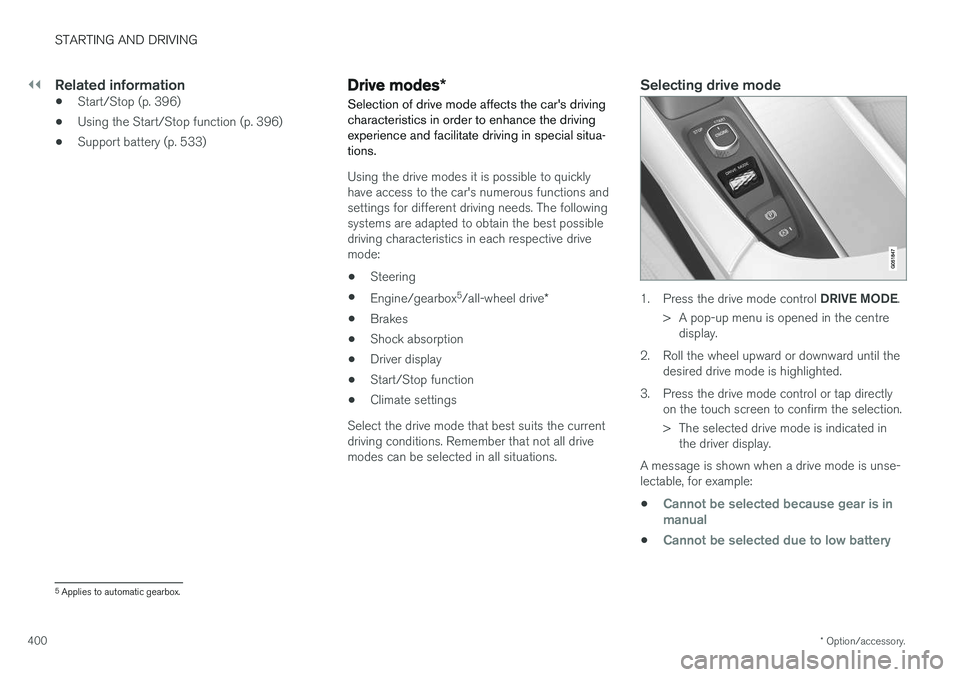
Selecting drive mode
1. Press the drive mode control DRIVE MODE.
> A pop-up menu is opened in the centre display.
2. Roll the wheel upward or downward until the desired drive mode is highlighted.
3. Press the drive mode control or tap directly on the touch screen to confirm the selection.
> The selected drive mode is indicated inthe driver display.
A message is shown when a drive mode is unse- lectable, for example:
•
Cannot be selected because gear is in manual
•Cannot be selected due to low battery
5 Applies to automatic gearbox.
Page 403 of 594
STARTING AND DRIVING
}}
401
•
Cannot be selected due to low temperature
•Cannot be selected due to limitations
•Cannot be selected because speed is too high.
Selectable drive modes
COMFORT
•
This is the car's normal mode.
When the car starts, it is in
Comfort mode and
the Start/Stop function is activated. These set- tings mean that the car feels comfortable, thesteering is light, the shock absorption is soft andbody's movement is smooth. This drive mode is the certification mode for car- bon dioxide emissions.
ECO
• Adapt the car for more energy-efficient and environmentally-conscious driving with the
Eco mode.
The drive mode means, for example, that the Start/Stop function is activated and the output ofcertain climate settings is reduced. The driver display has an ECO gauge that facili- tates fuel-efficient driving. More information on this drive mode is found in the section "Drive mode ECO".
DYNAMIC
•Dynamic mode means that the car has
sportier characteristics and faster response to accelerating.
The gear changes become faster and more dis-tinct, and the gearbox prioritises a gear withgreater traction. Steering response is faster and shock absorption is harder 6
which means that the body follows the
roadway in order to reduce roll during cornering. Start/Stop function is deactivated.
INDIVIDUAL
• Adapting a drive mode according to individ- ual preferences.
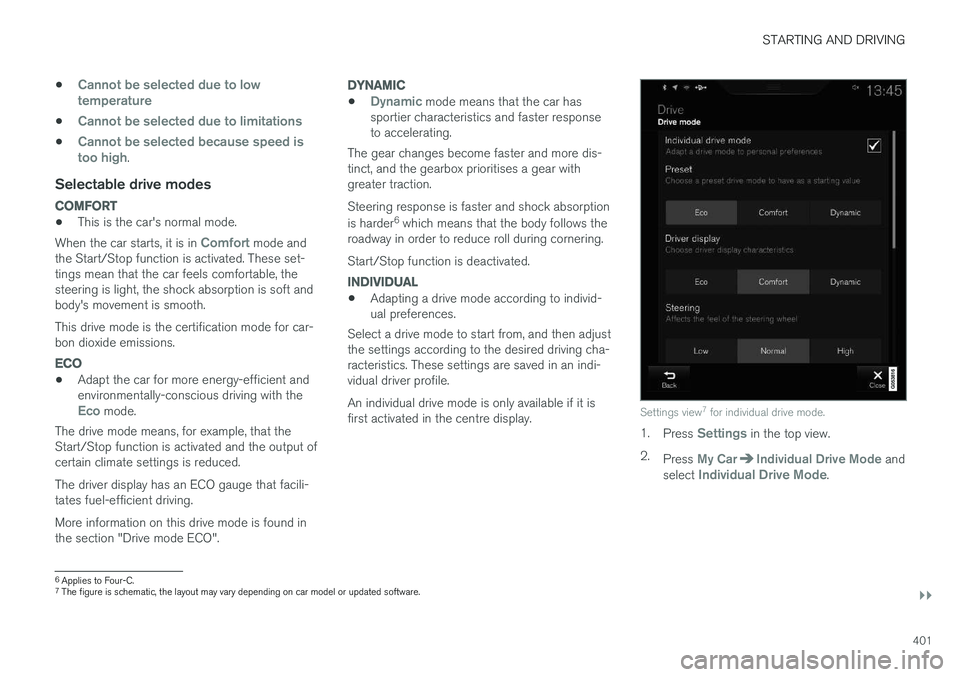
Select a drive mode to start from, and then adjustthe settings according to the desired driving cha-racteristics. These settings are saved in an indi-vidual driver profile. An individual drive mode is only available if it is first activated in the centre display.
Settings view 7
for individual drive mode.
1. Press Settings in the top view.
2. Press
My CarIndividual Drive Mode and
select Individual Drive Mode.
6 Applies to Four-C.
7 The figure is schematic, the layout may vary depending on car model or updated software.
Page 404 of 594
||
STARTING AND DRIVING
* Option/accessory.
402 3.
In
Presets, select a drive mode to start from:Eco, Comfort or Dynamic.
Possible adjustments apply to settings for:
•
Driver Display
•Steering force
•Powertrain Characteristics
•Brake Characteristics
•Suspension Control
•ECO Climate
•Start/Stop.
Related information
• Speed-dependent steering force (p. 272)
• Level control
* and shock absorption (p. 405)
• Start/Stop (p. 396)
• Drive mode ECO (p. 402)
• All-wheel drive
* (p. 405)
Drive mode ECO
Driving mode ECO mode optimises the car's
driving characteristics for more fuel efficient and environmentally-conscious driving.
Use this drive mode to save fuel and the environ- ment. The following properties are adapted for Eco driv- ing:
• Gearbox gearshift points 8
.
• Engine management and response from theaccelerator pedal.
• The Eco Coast 9
freewheel function is acti-
vated and engine braking is deactivatedwhen the accelerator pedal is released atspeeds between 65 and 140 km/h(40 and 87 mph).
• Some of the climate control system's set-tings work at reduced power or are deacti-vated.
• The driver display shows information in anECO gauge which facilitates environmentally-conscious and fuel-efficient driving.
Selecting ECO modeThe Eco mode is deactivated when the engine isswitched off, and it must therefore be activatedafter each time the engine is started. The driver display shows ECO when the function is acti-vated.
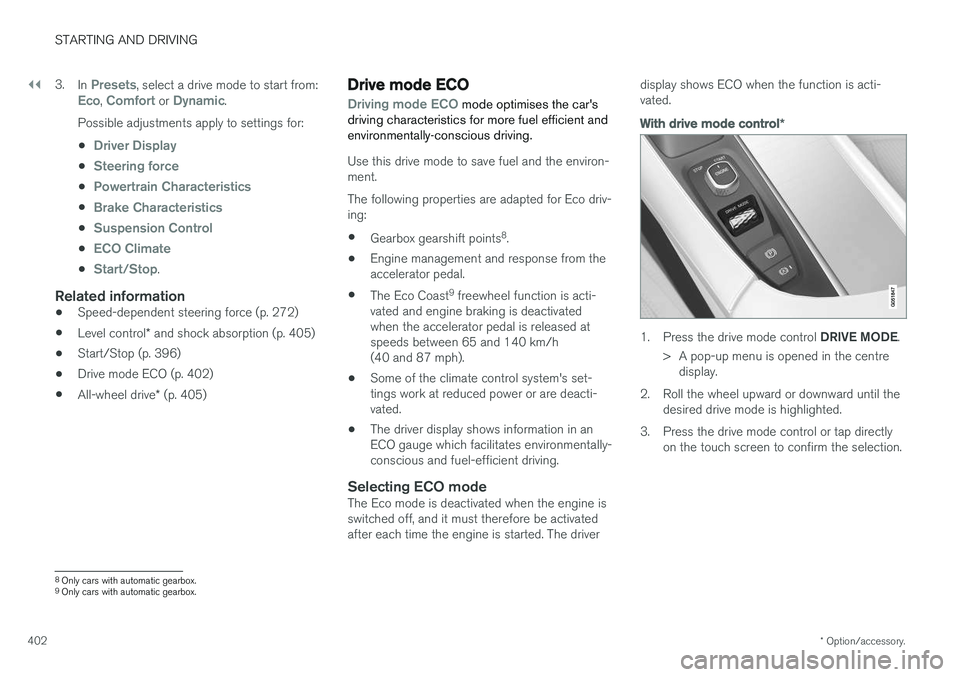
With drive mode control
*
1.
Press the drive mode control DRIVE MODE.
> A pop-up menu is opened in the centre display.
2. Roll the wheel upward or downward until the desired drive mode is highlighted.
3. Press the drive mode control or tap directly on the touch screen to confirm the selection.
8Only cars with automatic gearbox.
9 Only cars with automatic gearbox.
Page 405 of 594
STARTING AND DRIVING
}}
* Option/accessory.403
In the centre display's function view
A car without drive mode con- trol has a function button for
Driving mode ECO in the
centre display's function view.
–Press the button in order to activate the function.
> An indicator in the button illuminates when the function is activated.
Freewheel function Eco Coast 10The freewheel function Eco Coast means in prac- tice that engine braking ceases, meaning in turnthat the car's kinetic energy is used to freewheelfor longer distances. When the driver releasesthe accelerator pedal the gearbox is automaticallydisengaged from the engine whose speed isreduced to idling speed with reduced consump-tion. The function is best used where it is possible to freewheel a long way, e.g. roads with a slightdownhill gradient or when there is a predictablespeed reduction to freewheel into a zone with alower speed limit.
Activating the freewheel function
The function is activated when the accelerator pedal is fully released, in combination with thefollowing parameters:
• Drive mode
Eco is activated.
• The gear selector is in
D position.
• Speed within the range of approx. 65-140 km/h (40-87 mph).
• The road's downhill gradient is not steeperthan approx. 6%.
The driver display shows
COASTING when the
freewheel function is being used.
Limitations
The freewheel function is not available if:
• Engine and/or gearbox are not at normal operating temperature.
• The cruise control is activated.
• The gear selector is moved from the
D posi-
tion and the manual position.
• The speed is outside the range ofapprox. 65-140 km/h (40-87 mph).
• The road's downhill gradient is steeper thanapprox. 6%.
• Manual gear changing is performed with the steering wheel paddles
*.
Deactivating and switching off the freewheel function
In certain situations it may be desirable to deacti- vate or switch off the function in order to useengine braking. Examples of such situations maybe on steep downhill gradients or before animminent overtaking manoeuvre - in order to beable to do it in the safest way possible. Deactivate the freewheel function as follows:
• Actuate the accelerator or brake pedal.
• Move the gear selector to manual position.
• Changing gear with steering wheel paddles
*.
Switch off the freewheel function as follows:
• Change drive mode
*, or switch off the
Driving mode ECO in the function view.
Even without the freewheel function, it is possible to freewheel for short distances. This, in turn,reduces consumption. However, for the best fueleconomy it is better to have the freewheel func-tion activated and be able to freewheel for longerdistances.
ECO gauge in the driver displayThe ECO gauge indicates how fuel-efficient thedriving is:
10 Only cars with automatic gearbox.
Page 419 of 594
STARTING AND DRIVING
}}
* Option/accessory.417
•
Drive modes
* (p. 400)
• Foot brake (p. 406)
• All-wheel drive
* (p. 405)
• Electronic stability control (p. 273)
Opening/closing the fuel filler flap and refuelling
The fuel tank is fitted with a coverless fuel filler system.
Opening/closing the fuel filler flapThe car must be unlocked for the fuel filler flap to be opened.
In the driver display, the arrownext to the tank symbol indi-cates which side of the car thefuel filler flap is located.
1. Open the fuel filler flap with a gentle presson the rear of the flap.
2. After refuelling is finished - close the flap with a gentle press.
Refuelling at a petrol station
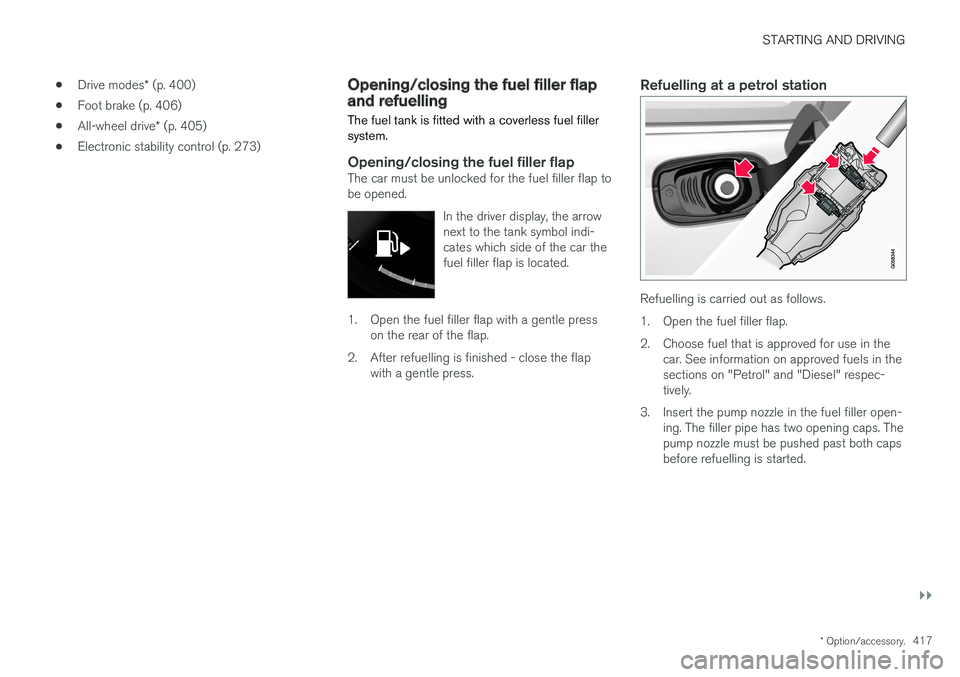
Refuelling is carried out as follows.
1. Open the fuel filler flap.
2. Choose fuel that is approved for use in the car. See information on approved fuels in the sections on "Petrol" and "Diesel" respec-tively.
3. Insert the pump nozzle in the fuel filler open- ing. The filler pipe has two opening caps. Thepump nozzle must be pushed past both capsbefore refuelling is started.
Page 428 of 594
STARTING AND DRIVING
426
Driving with a trailer
When driving with a trailer, there are a number of points that are important to think about regar-ding the towing bracket, the trailer and how theload is positioned in the trailer.
Payload depends on the car's kerb weight. The total of the weight of the passengers and allaccessories, e.g. towbar, reduces the car's pay-load by a corresponding weight. The car is supplied with the necessary equipment for towing a trailer.
• The car's towing bracket must be of anapproved type.
• Distribute the load on the trailer so that theweight on the towing bracket complies withthe specified maximum towball load. Towballload is calculated as part of the car's payload.
• Increase the tyre pressure to the recom-mended pressure for a full load. For moreinformation on tyre pressure, see the section"Approved tyre pressures".
• The engine is loaded more heavily than usualwhen driving with a trailer.
• Do not tow a heavy trailer when the car isbrand new. Wait until it has been driven atleast 1000 km.
• The brakes are loaded much more than usualon long and steep downhill slopes. Downshiftto a lower gear and adjust your speed. •
Follow the regulations in force for the permit-ted speeds and weights.
• Maintain a low speed when driving with atrailer up long, steep ascents.
• The maximum trailer weights given only applyto altitudes up to 1000 metres above sealevel. At higher altitudes, engine power andthus the car's climbing ability is decreaseddue to the reduced air density, and the maxi-mum trailer weight must therefore bereduced. The weight of the car and trailermust be decreased by 10 % for each addi-tional 1000 m (or part thereof).
• Avoid driving with a trailer on inclines of morethan 12%.
NOTE
Extreme weather conditions, driving with a trailer or driving at high altitudes in combina-tion with fuel quality are factors that consider-ably increase the car's fuel consumption.
Trailer connectorAn adapter is required if the car's towing bracket has a 13 pin connector and the trailer has a 7 pinconnector. Use an adapter approved by Volvo.Make sure the cable does not drag on theground.
IMPORTANT
When the engine is switched off, the constant battery voltage to the trailer connector can beswitched off automatically so as not to drainthe starter battery.
Trailer weightsInformation about Volvo's permitted trailer weights is available in the article "Towingcapacity and towball load".
WARNING
Follow the stated recommendations for trailer weights. Otherwise, the car and trailer may bedifficult to control in the event of suddenmovement and braking.
NOTE
The stated maximum permitted trailer weights are those permitted by Volvo. National vehicleregulations can further limit trailer weightsand speeds. Towbars can be certified forhigher towing weights than the car canactually tow.
Direction indicators and brake lights on the trailer
If one or more of the trailer's direction indicators or brake light bulbs is broken, the driver display
Page 437 of 594
AUDIO AND MEDIA
* Option/accessory.435
–Tap on an app in the app view to launch it.
Related information
•Online car
* (p. 463)
• Downloading, updating and uninstalling apps (p. 468)
• Changing settings for apps (p. 178)
Audio settings
The audio system is preset for optimal sound reproduction, but can be adapted according toneeds.
The volume is normally adjusted with the volume control below the centre display or with the right-hand steering wheel keypad.
Setting for optimal sound reproductionThe audio system is pre-calibrated for optimumsound reproduction by means of digital signalprocessing. This calibration takes into accountloudspeakers, amplifiers, passenger compartmentacoustics, listener position, etc., for each combi-nation of car model and audio system. There isalso a dynamic calibration that takes into accountthe setting of the volume control and vehiclespeed. Audio settings are described in the correspond- ing section in the owner information. To accessthe settings, open the top view and tap on
SettingsSound.
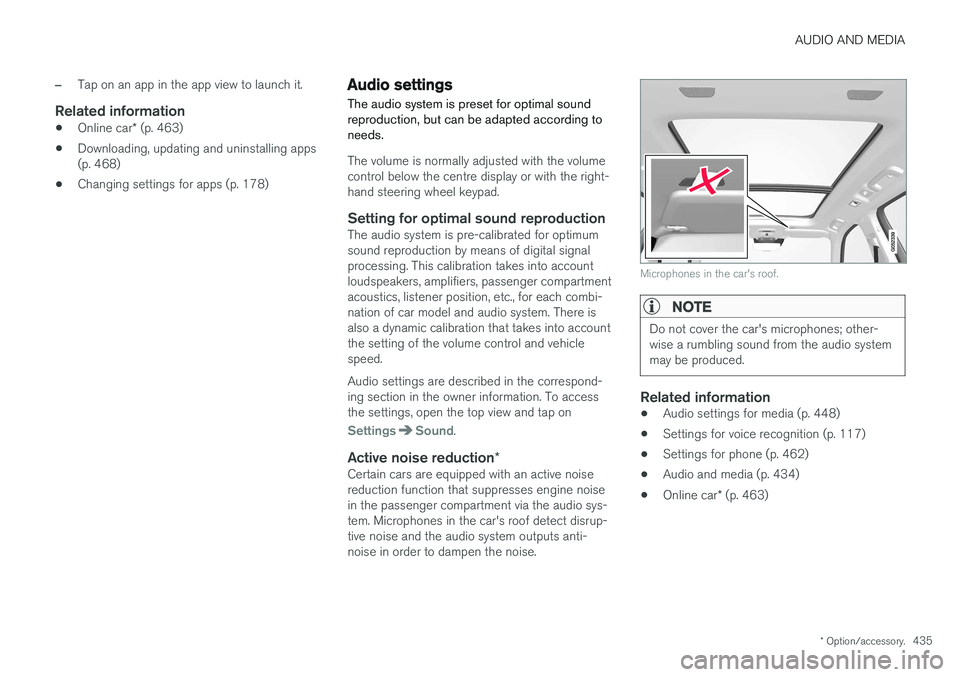
Active noise reduction *Certain cars are equipped with an active noise reduction function that suppresses engine noisein the passenger compartment via the audio sys-tem. Microphones in the car's roof detect disrup-tive noise and the audio system outputs anti-noise in order to dampen the noise.
Microphones in the car's roof.
NOTE
Do not cover the car's microphones; other- wise a rumbling sound from the audio systemmay be produced.
Related information
•Audio settings for media (p. 448)
• Settings for voice recognition (p. 117)
• Settings for phone (p. 462)
• Audio and media (p. 434)
• Online car
* (p. 463)
Page 442 of 594
AUDIO AND MEDIA
440
Digital radio
Digital radio (Digital Audio Broadcasting, DAB) is a digital broadcasting system for radio. The
radio supports DAB, DAB+ and DMB (DigitalMultimedia Broadcasting).
The radio can be operated using voice recognition, thesteering wheel keypad or thecentre display.
The digital radio app is launched from app view in thecentre display.
Digital radio plays back in the same way as FM and AM, see section "Changing and searchingfor radio stations". Besides the options to select playback from
Stations, Favourites andGenres, there is also the option to select play-
back from subchannels and Ensembles. An
ensemble is a set of radio channels (a channel group) broadcasting on the same frequency. In the cases where the radio channel transmits its logotype, it is downloaded and shown besidethe station name (download time varies).
DAB subchannel
Secondary components are usually named sub- channels. These are temporary and can containe.g. translations of the main programme intoother languages. Subchannels are indicated withan arrow symbol in the channel list.
Related information
• Changing and searching radio stations(p. 436)
• Linking between different radio bands FMand DAB (p. 440)
• Voice recognition control of radio and media(p. 118)
• Radio (p. 436)
• Settings for radio (p. 441)
• Resetting settings in the settings view(p. 173)
Linking between different radio bands FM and DAB
The function enables the digital radio to switch from a channel with poor or no reception to thesame channel in another channel group (ensem-ble) with better reception, within DAB and/orbetween DAB and FM.
DAB to DAB and DAB to FM linking1. Press Settings in top view.
2. Press
MediaDAB.
3. Tick/untick
DAB To DAB Handover and/orDAB To FM Handover in order to activate/
deactivate the respective functions.
Related information
• Digital radio (p. 440)
• Radio (p. 436)
• Settings for radio (p. 441)
Page 452 of 594
||
AUDIO AND MEDIA
* Option/accessory.
450
TV guide
A programme guide is available with information about TV programmes for up to 48 hours.
–Tap on Guide to show information about TV
programmes.
NOTE
If the car is moved within the country, e.g. from city to city, it is not certain that
Favourites are available since the frequency
may have changed.
Change the format of the TV picture
Tapping on Picture format enables you to
choose which format the TV picture should be shown in. 1.
Auto - The TV picture is shown in the image
format being transmitted.
2.
Auto fill - The TV picture is maximised with-
out cropping.
Settings for TVThe option to make certain settings is available, both in the top view or when TV-viewing takesplace in full screen mode. With the video player in full screen mode, or by opening the top view and pressing
Settings
MediaTV, the following can be adjusted: •
Subtitle Language
•Audio Language
Related information
•
TV
* (p. 449)
• Voice recognition control of radio and media (p. 118)
• Media playback (p. 443)
• Navigating in the centre display's views(p. 40)
• License agreement for audio and media(p. 470)
Apple CarPlay
*
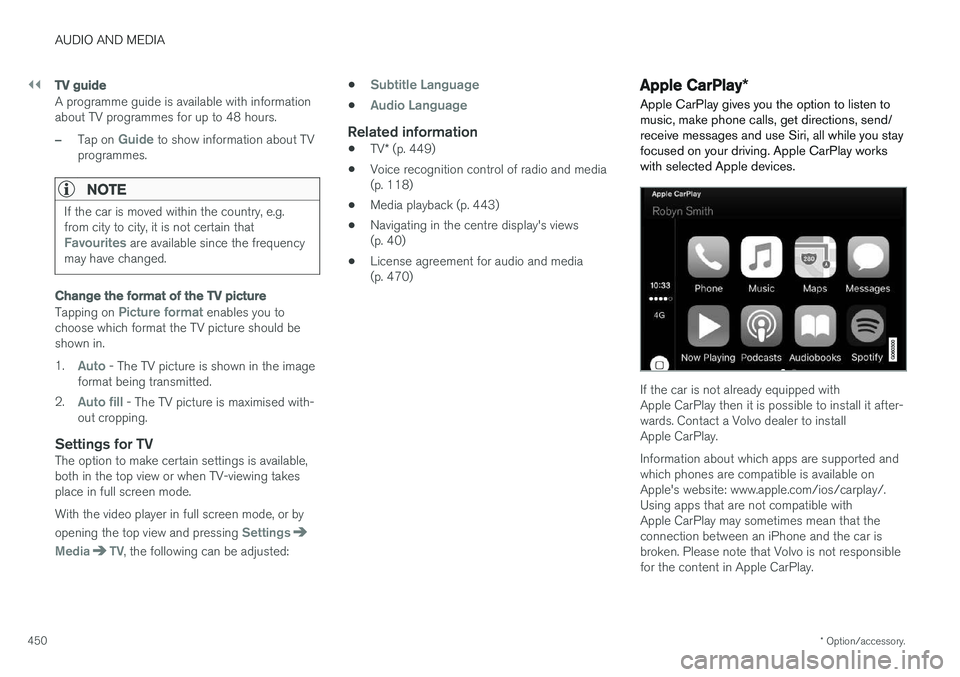
Apple CarPlay gives you the option to listen to music, make phone calls, get directions, send/receive messages and use Siri, all while you stayfocused on your driving. Apple CarPlay workswith selected Apple devices.
If the car is not already equipped with Apple CarPlay then it is possible to install it after-wards. Contact a Volvo dealer to installApple CarPlay. Information about which apps are supported and which phones are compatible is available onApple's website: www.apple.com/ios/carplay/.Using apps that are not compatible withApple CarPlay may sometimes mean that theconnection between an iPhone and the car isbroken. Please note that Volvo is not responsiblefor the content in Apple CarPlay.