ESP VOLVO V90 2017 Repair Manual
[x] Cancel search | Manufacturer: VOLVO, Model Year: 2017, Model line: V90, Model: VOLVO V90 2017Pages: 594, PDF Size: 15.07 MB
Page 357 of 594
DRIVER SUPPORT
}}
355
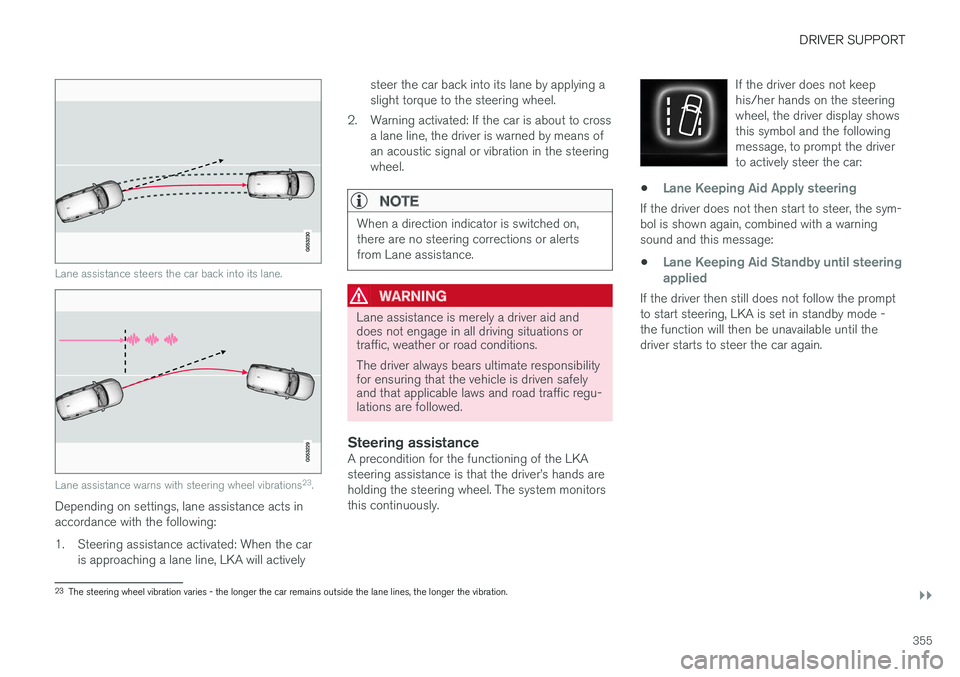
Lane assistance steers the car back into its lane.
Lane assistance warns with steering wheel vibrations23
.
Depending on settings, lane assistance acts in accordance with the following:
1. Steering assistance activated: When the car
is approaching a lane line, LKA will actively steer the car back into its lane by applying a slight torque to the steering wheel.
2. Warning activated: If the car is about to cross a lane line, the driver is warned by means ofan acoustic signal or vibration in the steeringwheel.
NOTE
When a direction indicator is switched on, there are no steering corrections or alertsfrom Lane assistance.
WARNING
Lane assistance is merely a driver aid and does not engage in all driving situations ortraffic, weather or road conditions. The driver always bears ultimate responsibility for ensuring that the vehicle is driven safelyand that applicable laws and road traffic regu-lations are followed.
Steering assistanceA precondition for the functioning of the LKA steering assistance is that the driver
Page 363 of 594
DRIVER SUPPORT
361
•
narrow roads
• poor road surface
• a very “sporty” driving style
• poor weather with reduced visibility
• roads with unclear or non-existent side mark- ings
• sharp edges or lines other than the lane'sside markings.
WARNING
The road run-off protection function is only a driver aid and does not work in all driving sit-uations, traffic, weather and road conditions. The function cannot detect barriers, rails or similar obstacles at the side of the road. The driver always bears ultimate responsibility for ensuring that the vehicle is driven safelyand that applicable laws and road traffic regu-lations are followed.
NOTE
The function uses the car's camera unit, which has some general limitations, see the"Limitations for camera unit" section.
Related information
•
Symbols and messages for Run-off Mitiga- tion (p. 362)
• Lane Keeping Aid (p. 354) •
Limitations of the camera unit (p. 327)
Page 365 of 594
DRIVER SUPPORT
}}
* Option/accessory.363
Park Assist*
Parking assistance assists the driver when manoeuvring in tight spaces by indicating thedistance to obstacles by acoustic signals com-bined with graphics on the centre display.
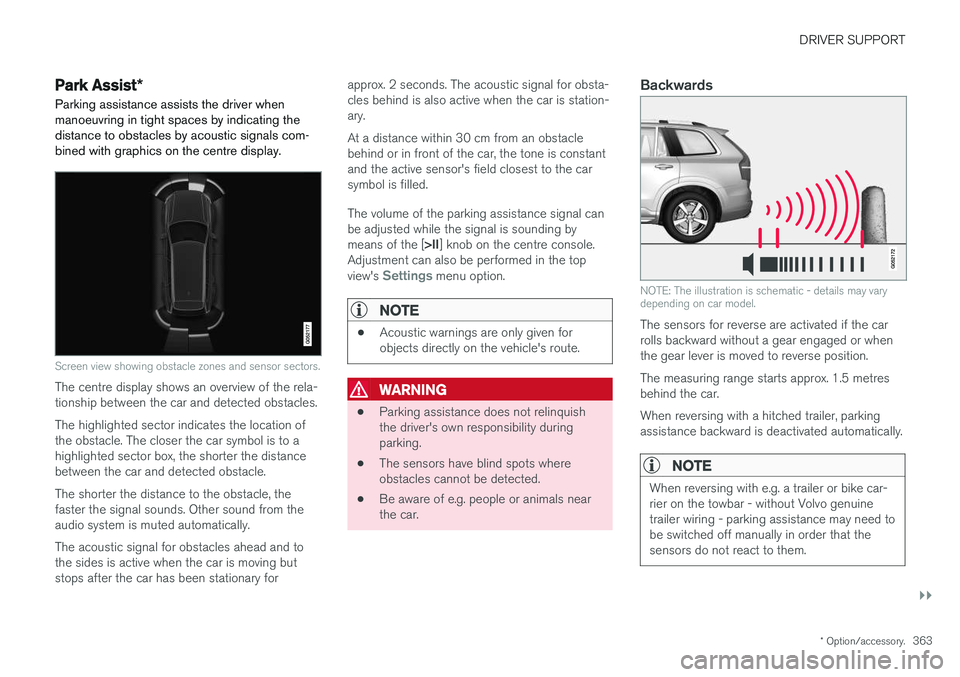
Screen view showing obstacle zones and sensor sectors.
The centre display shows an overview of the rela- tionship between the car and detected obstacles. The highlighted sector indicates the location of the obstacle. The closer the car symbol is to ahighlighted sector box, the shorter the distancebetween the car and detected obstacle. The shorter the distance to the obstacle, the faster the signal sounds. Other sound from theaudio system is muted automatically. The acoustic signal for obstacles ahead and to the sides is active when the car is moving butstops after the car has been stationary for approx. 2 seconds. The acoustic signal for obsta-cles behind is also active when the car is station-ary. At a distance within 30 cm from an obstacle behind or in front of the car, the tone is constantand the active sensor's field closest to the carsymbol is filled. The volume of the parking assistance signal can be adjusted while the signal is sounding by means of the [
>II] knob on the centre console.
Adjustment can also be performed in the top view's
Settings menu option.
NOTE
• Acoustic warnings are only given for objects directly on the vehicle's route.
WARNING
•Parking assistance does not relinquish the driver's own responsibility duringparking.
• The sensors have blind spots whereobstacles cannot be detected.
• Be aware of e.g. people or animals nearthe car.
Backwards
NOTE: The illustration is schematic - details may vary depending on car model.
The sensors for reverse are activated if the car rolls backward without a gear engaged or whenthe gear lever is moved to reverse position. The measuring range starts approx. 1.5 metres behind the car. When reversing with a hitched trailer, parking assistance backward is deactivated automatically.
NOTE
When reversing with e.g. a trailer or bike car- rier on the towbar - without Volvo genuinetrailer wiring - parking assistance may need tobe switched off manually in order that thesensors do not react to them.
Page 370 of 594
DRIVER SUPPORT
* Option/accessory.
368
Park Assist Camera *
The Park Assist Camera helps the driver when manoeuvring in tight spaces by indicating obsta-cles with a camera image and graphics in thecentre display.
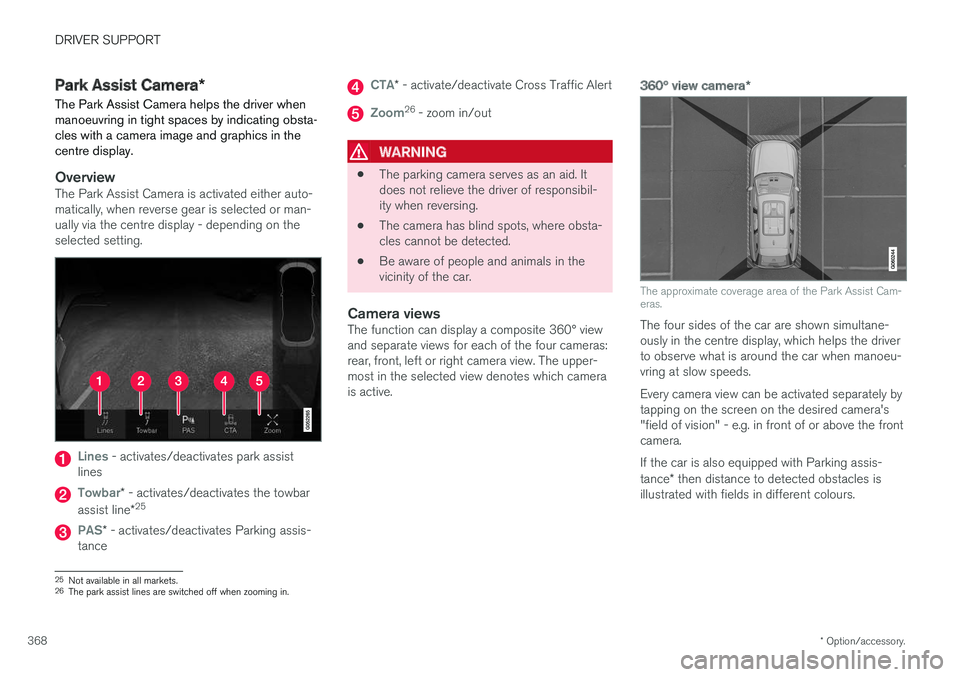
OverviewThe Park Assist Camera is activated either auto- matically, when reverse gear is selected or man-ually via the centre display - depending on theselected setting.
Lines - activates/deactivates park assist
lines
Towbar* - activates/deactivates the towbar
assist line *25
PAS*
- activates/deactivates Parking assis-
tance
CTA* - activate/deactivate Cross Traffic Alert
Zoom26
- zoom in/out
WARNING
• The parking camera serves as an aid. It does not relieve the driver of responsibil-ity when reversing.
• The camera has blind spots, where obsta-cles cannot be detected.
• Be aware of people and animals in thevicinity of the car.
Camera viewsThe function can display a composite 360° viewand separate views for each of the four cameras:rear, front, left or right camera view. The upper-most in the selected view denotes which camerais active.
360° view camera
*
The approximate coverage area of the Park Assist Cam- eras.
The four sides of the car are shown simultane- ously in the centre display, which helps the driverto observe what is around the car when manoeu-vring at slow speeds. Every camera view can be activated separately by tapping on the screen on the desired camera's"field of vision" - e.g. in front of or above the frontcamera. If the car is also equipped with Parking assis- tance* then distance to detected obstacles is
illustrated with fields in different colours.
25 Not available in all markets.
26 The park assist lines are switched off when zooming in.
Page 372 of 594
DRIVER SUPPORT
* Option/accessory.
370
Park assist lines and fields for the Park Assist Camera *
The Park Assist Camera indicates the position of the car in relation to its surroundings by display-ing lines on the camera image.
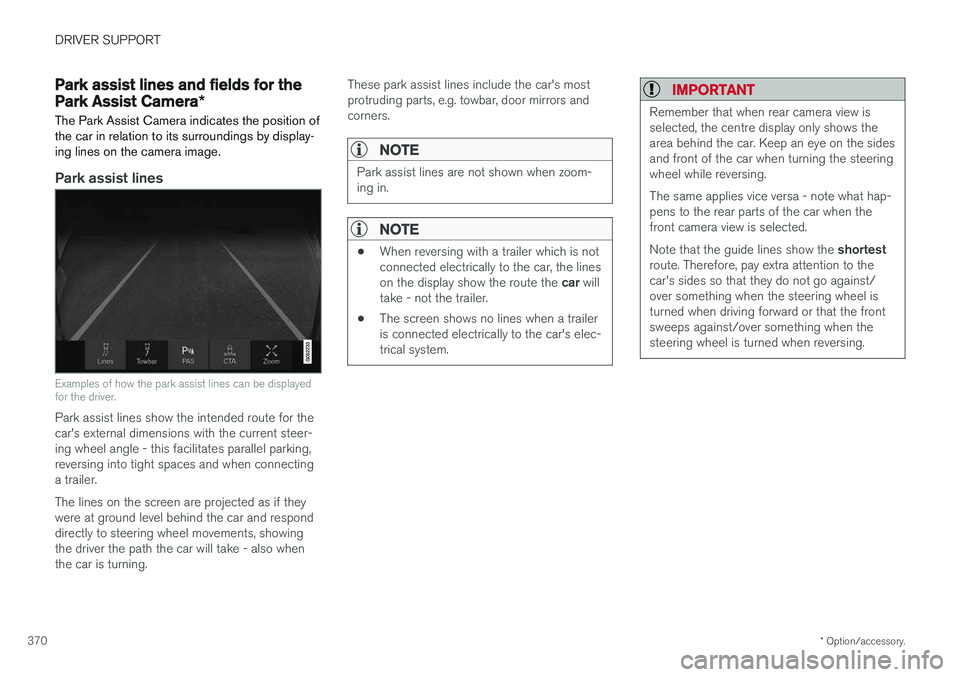
Park assist lines
Examples of how the park assist lines can be displayed for the driver.
Park assist lines show the intended route for the car's external dimensions with the current steer-ing wheel angle - this facilitates parallel parking,reversing into tight spaces and when connectinga trailer. The lines on the screen are projected as if they were at ground level behind the car and responddirectly to steering wheel movements, showingthe driver the path the car will take - also whenthe car is turning. These park assist lines include the car's mostprotruding parts, e.g. towbar, door mirrors andcorners.
NOTE
Park assist lines are not shown when zoom- ing in.
NOTE
•
When reversing with a trailer which is not connected electrically to the car, the lines on the display show the route the
car will
take - not the trailer.
• The screen shows no lines when a trailer is connected electrically to the car's elec-trical system.
IMPORTANT
Remember that when rear camera view is selected, the centre display only shows thearea behind the car. Keep an eye on the sidesand front of the car when turning the steeringwheel while reversing. The same applies vice versa - note what hap- pens to the rear parts of the car when thefront camera view is selected. Note that the guide lines show the
shortest
route. Therefore, pay extra attention to the car's sides so that they do not go against/over something when the steering wheel isturned when driving forward or that the frontsweeps against/over something when thesteering wheel is turned when reversing.
Page 377 of 594
DRIVER SUPPORT
* Option/accessory.375
WARNING
PAP does not work in all situations but is designed merely as a supplementary aid. The driver always has the final responsibility for driving the car in a safe manner and forpaying attention to the surroundings andother road users approaching or passingwhile parking.
Types of parking situationsPAP can be used for the following different park- ing situations.
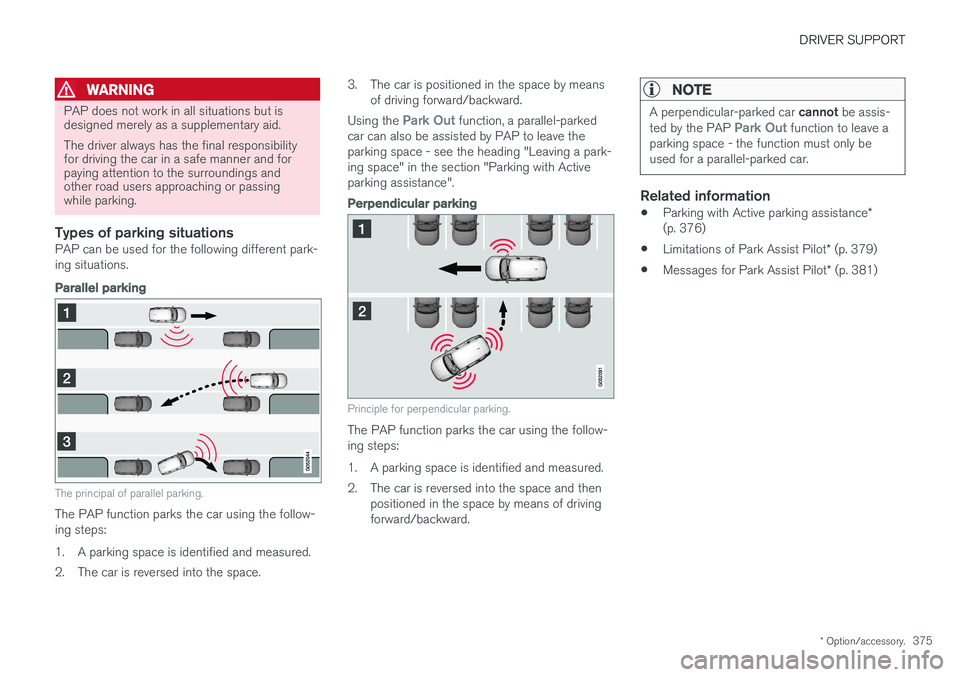
Parallel parking
The principal of parallel parking.
The PAP function parks the car using the follow- ing steps:
1. A parking space is identified and measured.
2. The car is reversed into the space. 3. The car is positioned in the space by means
of driving forward/backward.
Using the
Park Out function, a parallel-parked
car can also be assisted by PAP to leave the parking space - see the heading "Leaving a park-ing space" in the section "Parking with Activeparking assistance".
Perpendicular parking
Principle for perpendicular parking.
The PAP function parks the car using the follow- ing steps:
1. A parking space is identified and measured.
2. The car is reversed into the space and then positioned in the space by means of driving forward/backward.
NOTE
A perpendicular-parked car cannot be assis-
ted by the PAP Park Out function to leave a
parking space - the function must only be used for a parallel-parked car.
Related information
• Parking with Active parking assistance
*
(p. 376)
• Limitations of Park Assist Pilot
* (p. 379)
• Messages for Park Assist Pilot
* (p. 381)
Page 381 of 594
DRIVER SUPPORT
}}
* Option/accessory.379
Limitations of Park Assist Pilot *
The Active parking assistance (Park Assist Pilot – PAP) function may have limitations in certainsituations.
Parking is discontinuedA parking sequence will be discontinued:
• if the driver moves the steering wheel
• if the car is driven too quickly - above 7 km/h (4 mph)
• if the driver presses
Cancel in the centre
display
• when the anti-lock brakes or the Electronic stability control are engaged - e.g. when awheel loses grip on a slippery road.
Where applicable, a message in the centre dis-play states the reason for a parking sequencebeing discontinued.
NOTE
Dirt, ice and snow covering the sensors will reduce their function and may prevent meas-urement.
IMPORTANT
Under certain circumstances, PAP is unable to find parking spaces - one reason for thismay be the fact that there is interference withthe sensors from external sound sourceswhich emit the same ultrasound frequenciesas those with which the system works. Examples of such sources include horns, wet tyres on asphalt, pneumatic brakes andexhaust noises from motorcycles etc.
Driver responsibilityThe driver should bear in mind that the PAP is an aid – not an infallible, fully-automatic function.The driver must therefore be prepared to inter-rupt a parking step. There are also a few details to bear in mind while parking, e.g.:
• PAP bases itself on the locations of vehiclesalready parked nearby - if they are inap-propriately parked, your own car's tyres andwheel rims may be damaged by contact withthe kerb.
• PAP is designed for parking on straightstreets - not sharp curves or bends. For thisreason, make sure the car is parallel to theparking space when PAP measures thespace. •
Parking spaces on narrow streets are notalways feasible, since the space required formanoeuvring may not be sufficient.
• Bear in mind that the front of the car mayswing out towards oncoming traffic whilebeing parked.
• Objects situated higher than the detectionareas of the sensors are not taken intoaccount when calculating the parkingmanoeuvre. This may cause PAP to turn intothe parking space too early, and hence suchparking spaces should be avoided.
• The driver is responsible for determiningwhether the space selected by PAP is suita-ble for parking.
• Use approved tyres 28
with the correct tyre
pressure - this affects the ability of PAP topark the car.
• Heavy rain or snow may cause the system tomeasure the parking space incorrectly.
• Do not use PAP if snow chains or a sparewheel are fitted.
• Do not use PAP if cargo items are protrudingfrom the car.
• Perpendicular parking spaces may be missedor offered unnecessarily if one parked car isprotruding more than other parked cars.
28
"Approved tyres" refers to tyres of the same type and make as those fitted new on delivery from the factory.
Page 386 of 594
STARTING AND DRIVING
* Option/accessory.
384
Alcohol lock *
The function of the alcohol lock is to prevent the car from being driven by individuals under theinfluence of alcohol. Before the engine can bestarted the driver must take a breath test thatverifies that he/she is not under the influence ofalcohol. Alcohol lock calibration takes place inaccordance with each market's limit value inforce for driving legally.
The car has an interface for the electrical con- nection of the different makes and models ofalcohol lock recommended by Volvo. The inter-face facilitates alcohol lock connection, and givesthe option of an integrated function includingmessages related to the alcohol lock in the car'smain display. For information about a specificalcohol lock, please refer to its owner's manual.
WARNING
The alcohol lock is an aid and does not exempt the driver from responsibility. It isalways the responsibility of the driver to besober and to drive the car safely.
Bypass of the alcohol lock *
In the event of an emergency situation or the alcohol lock is out of order, it is possible tobypass the alcohol lock in order to drive the car.
For deactivation via the alcohol lock, see the sep- arate instructions for that specific lock. Activating the bypass function (Bypass)
NOTE
All bypass activation is logged and saved in the memory in the alcohol lock's control unit.It is not possible to undo a bypass.
The message, Blow into alcolock Bypass
instead?, is shown in the screen:
–Select Bypass by pressing once on the O
button on the steering wheel's right-hand keypad.
> The alcohol lock is now bypassed and the car can be started.
The number of bypasses possible before service is required is selected during alcohol lock instal-lation.
Related information
• Before starting the engine with the alcohollock (p. 384)
• Starting the car (p. 386)
Before starting the engine with the alcohol lock
The alcohol lock is activated automatically and is then ready for use when the car is opened.
To bear in mindIn order to obtain correct function and as accu- rate a measurement result as possible: • Avoid eating or drinking approx. 5 minutes before the breath test.
• Avoid excess windscreen washing - the alco-hol in the washer fluid may result in an incor-rect measurement result.
NOTE
After a completed period of driving, the engine can be restarted within 30 minuteswithout a new breath test.
Related information
•
Bypass of the alcohol lock
* (p. 384)
• Starting the car (p. 386)
Page 389 of 594
STARTING AND DRIVING
387
If the message
Car key not found is shown in
the driver display when starting, place the remote control key on the backup reader in the cupholder. Then try to start again.
NOTE
When the remote control key is placed in the cup holder, make sure that no other car keys,metal objects or electronic apparatus (e.g.mobile phones, tablets, laptops or chargers)are in the cup holder. Several car keys closeto each other in the cup holder can causeinterference with each other.
IMPORTANT
If the engine fails to start after 3 attempts - wait for 3 minutes before making a furtherattempt. Starting capacity increases if the bat-tery is allowed to recover.
WARNING
Never remove the remote control key from
the car while driving or during towing.
WARNING
Always take the remote control key out from the car when leaving the car and make surethe car's electrical system is in ignition posi- tion 0 - especially if there are children in the
car.
NOTE
The idling speed can be noticeably higher than normal for certain engine types duringcold starting. This is done in order that theemissions system can reach normal operatingtemperature as quickly as possible, whichminimises exhaust emissions and protects theenvironment.
Related information
• Ignition positions (p. 385)
• Switching off the car (p. 387)
• Remote control key (p. 236)
• Replacing the battery in the remote control key (p. 257)
Switching off the car
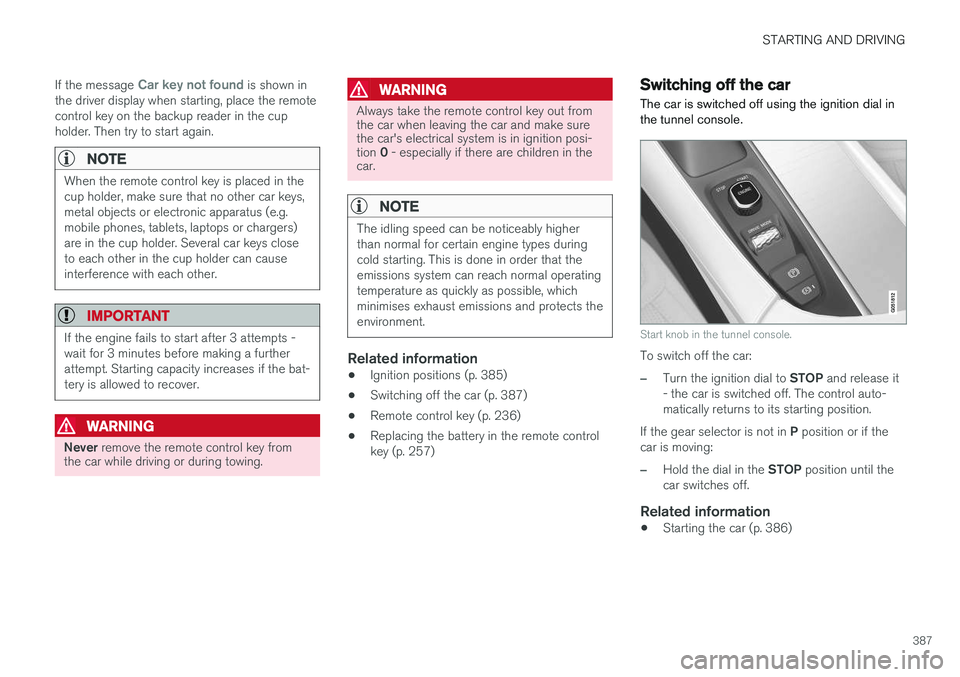
The car is switched off using the ignition dial in the tunnel console.
Start knob in the tunnel console.
To switch off the car:
–Turn the ignition dial to STOP and release it
- the car is switched off. The control auto- matically returns to its starting position.
If the gear selector is not in P position or if the
car is moving:
–Hold the dial in the STOP position until the
car switches off.
Related information
• Starting the car (p. 386)
Page 391 of 594
STARTING AND DRIVING
}}
389
11. Start the engine in the car with the dis-
charged battery.
IMPORTANT
Do not touch the connections between cable and car during the starting attempt. There is arisk of sparks forming.
12. Remove the jump leads in reverse order -first the black and then the red. Make sure that none of the black jump lead's clamps comes into contact with the car'spositive jump-starting point/donor battery'spositive terminal or the clamp connected tothe red jump lead.
WARNING
• The battery can generate oxyhydrogen gas, which is highly explosive. A spark canbe formed if a jump lead is connectedincorrectly, and this can be enough forthe battery to explode.
• The battery contains sulphuric acid, whichcan cause serious burns.
• If sulphuric acid comes into contact witheyes, skin or clothing, flush with largequantities of water. If acid splashes intothe eyes - seek medical attention imme-diately.
Related information
•Starter battery (p. 530)
• Ignition positions (p. 385)
• Starting the car (p. 386)
• Opening and closing the bonnet (p. 514)
Gearbox
The gearbox is part of the car's driveline (power transmission) between engine and drive wheels.The function of the gearbox is to change thegear ratio depending on speed and powerrequirements.
There are two main types of gearbox, manual and automatic. The manual gearbox has six gears. The automatic gearbox can have either eight gears or six gearsdepending on which engine the car is equippedwith. The number of gear changes means thatthe engine's torque and power range can beused effectively. It is also possible to select gears manually with the automatic gearbox. The driver display respec-tively shows which gear or gear position is cur-rently in use.
IMPORTANT
To prevent damage to any drive system com- ponents, the working temperature of thegearbox is checked. If there is a risk of over-heating, a warning symbol illuminates in thedriver display and a text message is shown -follow the recommendation given.
Symbols in the driver displayIf a fault should occur in the gearbox, the driver display shows a symbol and a message.