light VOLVO V90 2017 Manual PDF
[x] Cancel search | Manufacturer: VOLVO, Model Year: 2017, Model line: V90, Model: VOLVO V90 2017Pages: 594, PDF Size: 15.07 MB
Page 317 of 594
DRIVER SUPPORT
}}
* Option/accessory.315
IMPORTANT
In certain situations, Pilot Assist steering assistance may have difficulty helping thedriver in the right way or it may be automati-cally deactivated - in which case, the use ofPilot Assist is not recommended. Examples ofsuch situations may be that: •the lane markings are worn, missing or cross each other.
• lane division is unclear, for example, whenthe lanes divide or merge or at exits or inthe event of multiple sets of markings.
• edges or other lines than lane markingsare present on or near the road, e.g.curbs, joints or repairs to the road sur-face, edges of barriers, roadside edges orstrong shadows.
• the lane is narrow or winding.
• the lane contains ridges or holes.
• weather conditions are poor, e.g. rain,snow or fog or slush or impaired viewwith poor light conditions, back-lighting,wet road surface etc.
The driver should also note that Pilot Assisthas the following limitations: • High kerbs, roadside barriers, temporary obstacles (traffic cones, safety barriers,etc.) are not detected. Alternatively, theymay be detected incorrectly as lane
markings, with a subsequent risk of con- tact between the car and such obstacles.The driver must ensure him/herself thatthe car is at a suitable distance from suchobstacles.
• The camera and radar sensor does nothave the capacity to detect all oncomingobjects and obstacles in traffic environ-ments, e.g. potholes, stationary obstaclesor objects which completely or partiallyblock the route.
• Pilot Assist does not "see" pedestrians,animals, etc.
• The recommended steering input is forcelimited, which means that it cannotalways help the driver to steer and keepthe car within the lane.
The driver always has the possibility of correcting or adjusting a steering intervention imposed byPilot Assist and can turn the steering wheel tothe desired position.
Steep roads and/or heavy loadBear in mind that Pilot Assist is primarilyintended for use when driving on level road surfa-ces. The function may have difficulty in keepingthe correct distance from the vehicle ahead whendriving on steep downhill slopes - in which case,be extra attentive and ready to brake. Do not usePilot Assist with a heavy load or with a trailer con-nected to the car.
Miscellaneous
•Off Road drive mode cannot be selected
when Pilot Assist is activated.
NOTE
The function uses the car's camera unit, which has some general limitations, see the"Limitations for camera unit" section.
NOTE
The function uses the car's radar unit, which has some general limitations, see the "Limita-tions for radar unit" section.
Related information
• Pilot Assist
* (p. 304)
• Activating and starting the Pilot Assist
*
(p. 307)
• Managing the speed for Pilot Assist
* (p. 309)
• Setting the time interval for Pilot Assist
*
(p. 310)
• Change of target and automatic braking with Pilot Assist
* (p. 313)
• Deactivating/activating the Pilot Assist
*
(p. 311)
• Overtaking assistance with the adaptivecruise control
* or Pilot Assist * (p. 298)
Page 329 of 594
DRIVER SUPPORT
}}
327
Limitations of the camera unit
The camera unit has certain limitations - which in turn also limits those functions that use the unit.
Impaired visionThe camera has limitations similar to the human eye, i.e. it can "see" worse in for example intensesnowfall or rain, dense fog, heavy dust stormsand snow flurries. Under such conditions, thefunctions of camera-dependent systems could besignificantly reduced or temporarily disengaged. Strong oncoming light, reflections in the carriage- way, snow or ice on the road surface, dirty roadsurfaces or unclear lane markings can also sig-nificantly reduce camera function when it is usedto scan the carriageway to detect pedestrians,cyclists, large animals and other vehicles.
Blocked unit
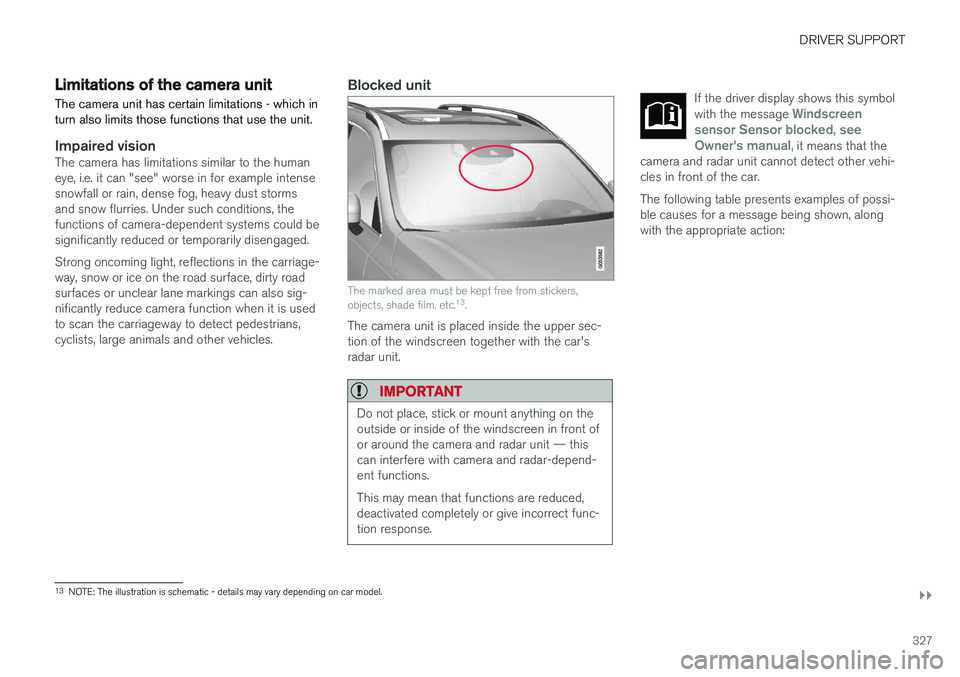
The marked area must be kept free from stickers, objects, shade film, etc. 13
.
The camera unit is placed inside the upper sec- tion of the windscreen together with the car'sradar unit.
IMPORTANT
Do not place, stick or mount anything on the outside or inside of the windscreen in front ofor around the camera and radar unit — thiscan interfere with camera and radar-depend-ent functions. This may mean that functions are reduced, deactivated completely or give incorrect func-tion response.
If the driver display shows this symbol with the message Windscreen
sensor Sensor blocked, see
Owner's manual, it means that the
camera and radar unit cannot detect other vehi- cles in front of the car.
The following table presents examples of possi- ble causes for a message being shown, alongwith the appropriate action:
13 NOTE: The illustration is schematic - details may vary depending on car model.
Page 330 of 594
||
DRIVER SUPPORT
328
CauseAction
The windscreen surface in front of the camera and radar unit is dirty or covered with ice or snow. Clean dirt, ice and snow from the windscreen surface in front of the camera andradar unit.
Thick fog and heavy rain or snow block the radar signals or the cameraview. No action. Sometimes the unit does not work during heavy rain or snowfall.
Water or snow from the road surface swirls up and blocks the radarsignals or camera view. No action. Sometimes the unit does not work on a very wet or snow-covered roadsurface.
Dirt has appeared between the inside of the windscreen and the cam-era and radar unit. Visit a workshop to have the windscreen inside the unit's cover cleaned - anauthorised Volvo workshop is recommended.
Strong oncoming light No action. The camera unit is reset automatically in more favourable light condi-tions.
NOTE
Keep the windscreen clean in front of the camera and radar unit.
High temperatureAt very high temperatures the camera and radar unit can temporarily be switched off forabout 15 minutes after the engine is started soas to protect the unit's electronics. The cameraand radar unit restarts automatically when thetemperature has fallen sufficiently.
Damaged windscreen
IMPORTANT
If a crack, scratch or stone chip in the wind- screen in front of one of the camera andradar unit “windows” covers an area ofapprox. 0.5 x 3.0 mm or larger, a workshopmust be contacted to have the windscreenreplaced. An authorised Volvo workshop isrecommended. If not rectified it can lead to reduced perform- ance for the driver support systems that usethe camera and radar unit.
This may mean that functions are reduced, deactivated completely or give incorrect func-tion response. To avoid the risk of failed, deficient or reduced operation of driver support systemsthat use the radar unit, the following alsoapplies:
• Volvo recommends
against repairing
cracks, scratches or stone chips in thearea in front of the camera and radar unit.Instead, the whole windscreen should bereplaced.
• Before replacing a windscreen, contactan authorised Volvo workshop to verify
Page 334 of 594
||
DRIVER SUPPORT
332
Auto Brake
The automatic brake function is activated last. If in this situation the driver has not yet started to take evasive action and the risk of collision isimminent then the automatic braking function isdeployed - this takes place irrespective ofwhether or not the driver brakes. Braking thentakes place with full brake force in order toreduce collision speed, or with limited brake forceif it is sufficient to avoid a collision. In connection with automatic braking the seatbelt tensioner may also be activated. For more infor-mation see the "Seatbelt tensioner" section. In some situations, the action of Auto-brake may begin with light braking and then progress to fullbrake action. When City Safety has prevented a collision with a stationary object, the car remains stationary inanticipation of positive action by the driver. If thecar has been braked to avoid collision with aslower vehicle in front, its speed is reduced tomatch that of the vehicle in front.
NOTE
On cars with manual gearbox, the engine stops when the Auto-brake function has stop-ped the car, unless the driver has managed todepress the clutch pedal beforehand.
The driver can always interrupt a braking inter- vention by firmly depressing the acceleratorpedal.
NOTE
When City Safety™ brakes, the brake lights
come on.
When City Safety is activated and brakes the vehicle, the driver display shows a text messageto the effect that the function is/has been active.
WARNING
City Safety must not be used as an excuse for the driver to change his/her driving style. Ifthe driver relies solely on City Safety to do thebraking, there might be a risk of a collisionsooner or later.
Related information
• Setting the warning distance for City Safety (p. 332)
• Detection of obstacles with City Safety
™
(p. 333)
• City Safety when evasive manoeuvres areprevented (p. 336)
• City Safety in cross traffic (p. 335)
• Limitations of City Safety (p. 337)
• Messages for City Safety (p. 339)
• Seatbelt tensioner (p. 59)
Setting the warning distance for City Safety
City Safety is always activated, but it is possible to select the warning distance for the function.
NOTE
The City Safety function cannot be deacti- vated. It is activated automatically when theengine/electric operation is started andremains switched on until the engine/electricoperation is switched off.
The warning distance determines the sensitivity of the system and regulates the distance atwhich the visual, acoustic and haptic warningsshall be triggered. 1. Tap on
Settings in top view in the centre
display.
2. Press
My CarIntelliSafe.
3. Under
City Safety Warning, select Late,Normal or Early to set the desired warning
distance.
If the
Early setting produces too many warnings,
which could be perceived as irritating in certain situations, then use the
Normal or Late warning
distance. If warnings are perceived as being too frequent or disturbing then the warning distance can bereduced. This would lead to the system warning
Page 339 of 594
DRIVER SUPPORT
}}
337
has the opportunity to avoid a collision via a steering manoeuvre. However, if City Safety anticipates that an evasive manoeuvre is not possible due to traffic in anadjacent lane, the function can assist the driverby automatically starting to brake at an earlierstage.
WARNING
City Safety's ability to anticipate a certain sit- uation is an aid, and does not work in all driv-ing situations or traffic, weather and road con-ditions. The driver always bears ultimate responsibility for ensuring that the vehicle is driven safelyand that applicable laws and road traffic regu-lations are followed.
Related information
•
City Safety (p. 330)
• Limitations of City Safety (p. 337)
Limitations of City Safety
The City Safety function may have limitations in certain situations.
Surroundings
Low objects
Low-hanging objects, e.g. a flag/pennant for pro- jecting load, or accessories such as auxiliarylamps and bull bars that are higher than the bon-net limit the function.
Skidding
On slippery road surfaces the braking distance is extended, which may reduce the capacity of CitySafety to avoid a collision. In such situations, theanti-lock brakes and the stability control ESC willgive the best possible braking force with main-tained stability.
Oncoming light
The visual warning signal in the windscreen may be difficult to notice in the event of strong sun-light, reflections, when sunglasses are beingworn or if the driver is not looking straight ahead.
Heat
In the event of high passenger compartment temperature caused by e.g. strong sunlight, thevisual warning signal in the windscreen may betemporarily disengaged.
The camera and radar unit's field of view
The camera's field of vision is limited, which is why pedestrians, large animals, cyclists and vehi- cles in some situations cannot be detected, orthey are detected later than anticipated. Dirty vehicles may be detected later than others and if it is dark, motorcycles may be detected lateor not at all. If a text message in the driver display indicates that the camera and radar unit is obstructed, CitySafety may be unable to detect pedestrians, largeanimals, cyclists, vehicles or road lines ahead ofthe car. This means that the functionality of CitySafety may be reduced. However, an error message is not shown in all situations where the windscreen sensors areobstructed. The driver must therefore take care tokeep the area of windscreen in front of the cam-era and radar unit clear.
IMPORTANT
Maintenance and replacement of City Safety components must only be performed by aworkshop - an authorised Volvo workshop isrecommended.
Driver intervention
Reversing
When your own car is reversing, City Safety is temporarily deactivated.
Page 343 of 594
DRIVER SUPPORT
}}
341
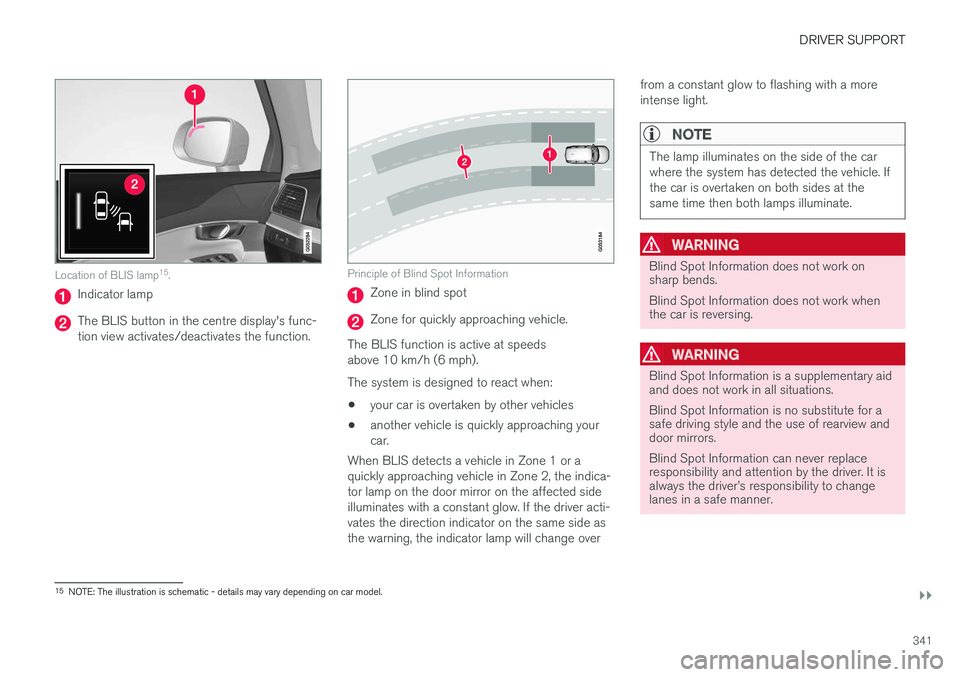
Location of BLIS lamp15
.
Indicator lamp
The BLIS button in the centre display's func- tion view activates/deactivates the function.
Principle of Blind Spot Information
Zone in blind spot
Zone for quickly approaching vehicle.
The BLIS function is active at speeds above 10 km/h (6 mph). The system is designed to react when: • your car is overtaken by other vehicles
• another vehicle is quickly approaching your car.
When BLIS detects a vehicle in Zone 1 or aquickly approaching vehicle in Zone 2, the indica-tor lamp on the door mirror on the affected sideilluminates with a constant glow. If the driver acti-vates the direction indicator on the same side asthe warning, the indicator lamp will change over from a constant glow to flashing with a moreintense light.
NOTE
The lamp illuminates on the side of the car where the system has detected the vehicle. Ifthe car is overtaken on both sides at thesame time then both lamps illuminate.
WARNING
Blind Spot Information does not work on sharp bends. Blind Spot Information does not work when the car is reversing.
WARNING
Blind Spot Information is a supplementary aid and does not work in all situations. Blind Spot Information is no substitute for a safe driving style and the use of rearview anddoor mirrors. Blind Spot Information can never replace responsibility and attention by the driver. It isalways the driver
Page 344 of 594
||
DRIVER SUPPORT
* Option/accessory.
342
WARNING
The system is a supplement to, not a replace- ment for, a safe driving style and use of therearview mirrors. It can never replace the driv-er's attention and responsibility. The responsi-bility for changing lanes safely always restswith the driver.
Related information
• Activate/deactivate Blind Spot Information
*
(p. 342)
• Limitations of Blind Spot Information
*
(p. 343)
• Messages for Blind Spot Information
* and
Cross Traffic Alert * (p. 347)
• Cross Traffic Alert
* (p. 343)
Activate/deactivate Blind Spot Information *
The Blind Spot Information (BLIS) function can be activated/deactivated.
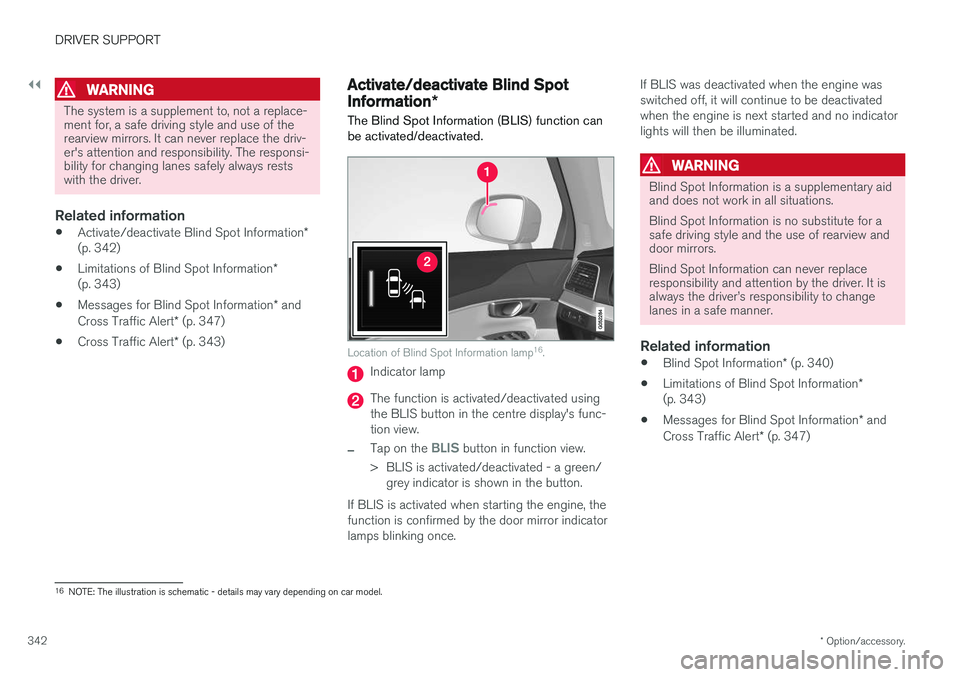
Location of Blind Spot Information lamp 16
.
Indicator lamp
The function is activated/deactivated using the BLIS button in the centre display's func-tion view.
–Tap on the BLIS button in function view.
> BLIS is activated/deactivated - a green/ grey indicator is shown in the button.
If BLIS is activated when starting the engine, the function is confirmed by the door mirror indicatorlamps blinking once. If BLIS was deactivated when the engine wasswitched off, it will continue to be deactivatedwhen the engine is next started and no indicatorlights will then be illuminated.
WARNING
Blind Spot Information is a supplementary aid and does not work in all situations. Blind Spot Information is no substitute for a safe driving style and the use of rearview anddoor mirrors. Blind Spot Information can never replace responsibility and attention by the driver. It isalways the driver
Page 356 of 594
||
DRIVER SUPPORT
* Option/accessory.
354 2.
Press
My CarIntelliSafeDriver Alert
Control.
3. Select
Rest Stop Guidance to activate/
deactivate the rest place guide.
Related information
• Driver Alert Control (p. 352)
• Limitations of Driver Alert Control (p. 354)
Limitations of Driver Alert Control
The Driver Alert Control (DAC) function may have limitations in certain situations.
In some cases, driving behaviour may not be affected, despite the driver being tired - e.g. whenusing the Pilot Assist function - with the resultthat the driver is then not given a warning fromDAC. For this reason, it is always very importantto stop and take a break in the event of theslightest sign of driver fatigue, regardless ofwhether DAC has given a warning. In some cases the system may issue a warning despite driving ability not deteriorating, for exam-ple:
• in strong side winds
• on rutted road surfaces.
NOTE
The function uses the car's camera unit, which has some general limitations, see the"Limitations for camera unit" section.
Related information
•
Driver Alert Control (p. 352)
• Activate/deactivate Driver Alert Control (p. 353)
• Limitations of the camera unit (p. 327)
• Pilot Assist
* (p. 304)
Lane Keeping Aid
The function of lane assistance is to help the driver to reduce the risk of the car accidentallyleaving its own lane on motorways and similarmajor routes.
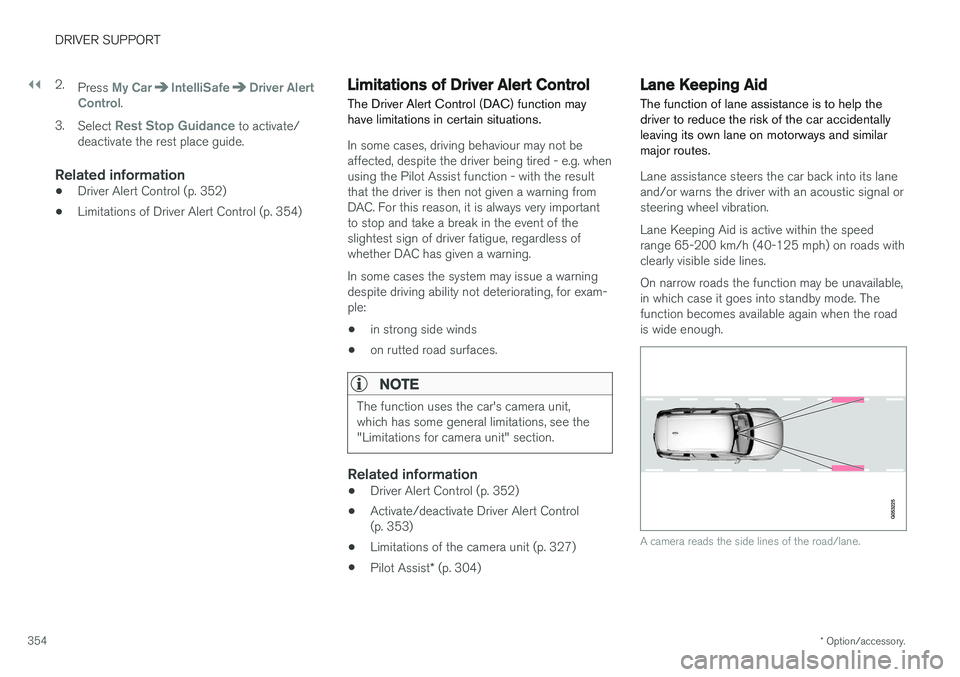
Lane assistance steers the car back into its lane and/or warns the driver with an acoustic signal orsteering wheel vibration. Lane Keeping Aid is active within the speed range 65-200 km/h (40-125 mph) on roads withclearly visible side lines. On narrow roads the function may be unavailable, in which case it goes into standby mode. Thefunction becomes available again when the roadis wide enough.
A camera reads the side lines of the road/lane.
Page 357 of 594
DRIVER SUPPORT
}}
355
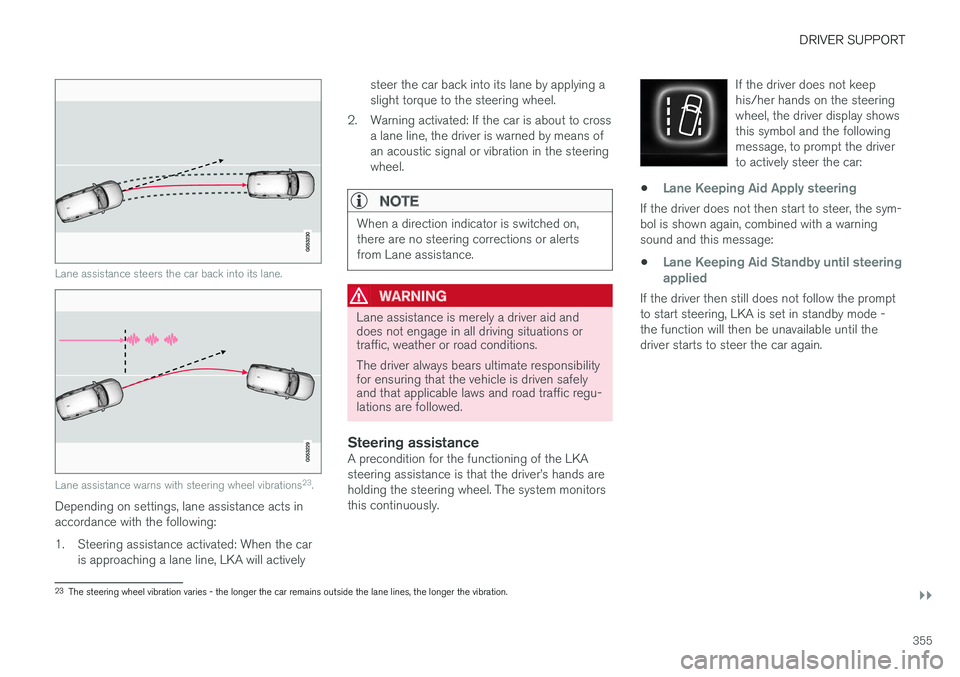
Lane assistance steers the car back into its lane.
Lane assistance warns with steering wheel vibrations23
.
Depending on settings, lane assistance acts in accordance with the following:
1. Steering assistance activated: When the car
is approaching a lane line, LKA will actively steer the car back into its lane by applying a slight torque to the steering wheel.
2. Warning activated: If the car is about to cross a lane line, the driver is warned by means ofan acoustic signal or vibration in the steeringwheel.
NOTE
When a direction indicator is switched on, there are no steering corrections or alertsfrom Lane assistance.
WARNING
Lane assistance is merely a driver aid and does not engage in all driving situations ortraffic, weather or road conditions. The driver always bears ultimate responsibility for ensuring that the vehicle is driven safelyand that applicable laws and road traffic regu-lations are followed.
Steering assistanceA precondition for the functioning of the LKA steering assistance is that the driver
Page 365 of 594
DRIVER SUPPORT
}}
* Option/accessory.363
Park Assist*
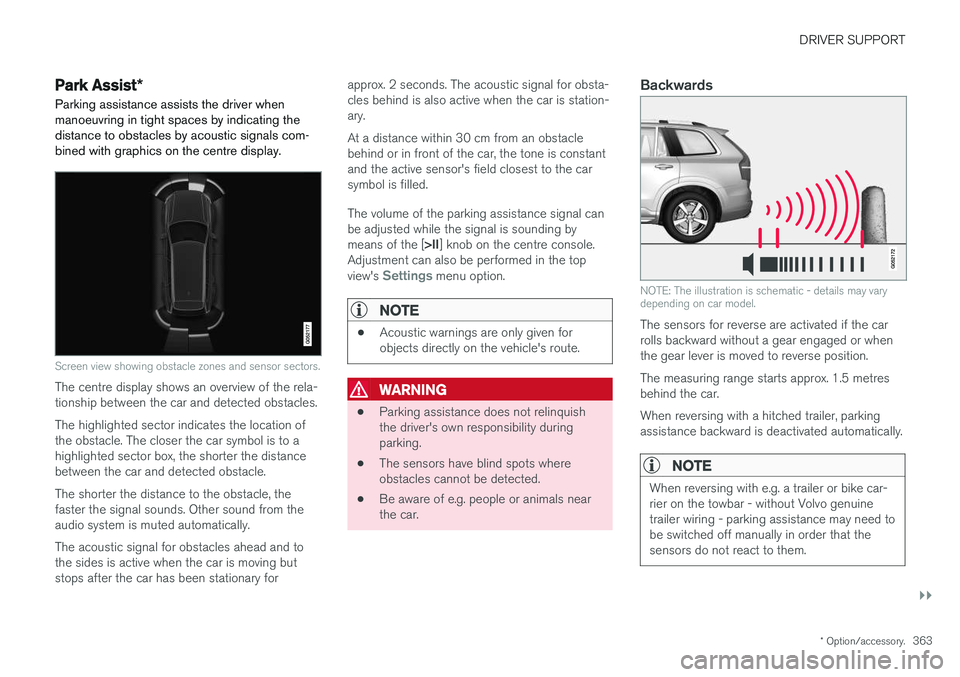
Parking assistance assists the driver when manoeuvring in tight spaces by indicating thedistance to obstacles by acoustic signals com-bined with graphics on the centre display.
Screen view showing obstacle zones and sensor sectors.
The centre display shows an overview of the rela- tionship between the car and detected obstacles. The highlighted sector indicates the location of the obstacle. The closer the car symbol is to ahighlighted sector box, the shorter the distancebetween the car and detected obstacle. The shorter the distance to the obstacle, the faster the signal sounds. Other sound from theaudio system is muted automatically. The acoustic signal for obstacles ahead and to the sides is active when the car is moving butstops after the car has been stationary for approx. 2 seconds. The acoustic signal for obsta-cles behind is also active when the car is station-ary. At a distance within 30 cm from an obstacle behind or in front of the car, the tone is constantand the active sensor's field closest to the carsymbol is filled. The volume of the parking assistance signal can be adjusted while the signal is sounding by means of the [
>II] knob on the centre console.
Adjustment can also be performed in the top view's
Settings menu option.
NOTE
• Acoustic warnings are only given for objects directly on the vehicle's route.
WARNING
•Parking assistance does not relinquish the driver's own responsibility duringparking.
• The sensors have blind spots whereobstacles cannot be detected.
• Be aware of e.g. people or animals nearthe car.
Backwards
NOTE: The illustration is schematic - details may vary depending on car model.
The sensors for reverse are activated if the car rolls backward without a gear engaged or whenthe gear lever is moved to reverse position. The measuring range starts approx. 1.5 metres behind the car. When reversing with a hitched trailer, parking assistance backward is deactivated automatically.
NOTE
When reversing with e.g. a trailer or bike car- rier on the towbar - without Volvo genuinetrailer wiring - parking assistance may need tobe switched off manually in order that thesensors do not react to them.