battery VOLVO XC60 2009 Owner´s Manual
[x] Cancel search | Manufacturer: VOLVO, Model Year: 2009, Model line: XC60, Model: VOLVO XC60 2009Pages: 297, PDF Size: 21.16 MB
Page 227 of 297
06 Maintenance and specifications
Maintaining your car06
}}
225
Owner maintenance
Periodic maintenance requirements and inter-
vals are described in your vehicle\fs Warranty
and Service Records Information booklet.
The following points can be carried out
between the normally scheduled maintenance
services.
Each time the car is refueled:
\b
Check the engine oil level.
\b Clean the windshield, windshield wipers,
headlights, and tail lights.
Monthly:
\bCheck cold tire pressure in all tires. Inspect
the tires for wear.
\b Check that engine coolant and other fluid
levels are between the indicated "min" and
"max" markings.
\b Clean interior glass surfaces with a glass
cleaner and soft paper towels.
\b Wipe driver information displays with a soft
cloth.
\b Visually inspect battery terminals for cor-
rosion. Corrosion may indicate a loose ter-
minal connector, or a battery near the end
of its useful service life. Consult your Volvo
retailer for additional information.
As needed:Wash the car, including the undercarriage, to
reduce wear that can be caused by a buildup
of dirt, and corrosion that can be caused by salt
residues.
Clean leaves and twigs from air intake vents at
the base of the windshield, and from other pla-
ces where they may collect.
NOTE Complete service information for qualified
technicians is available online for purchase
or subscription at www.volvotechinfo.com.
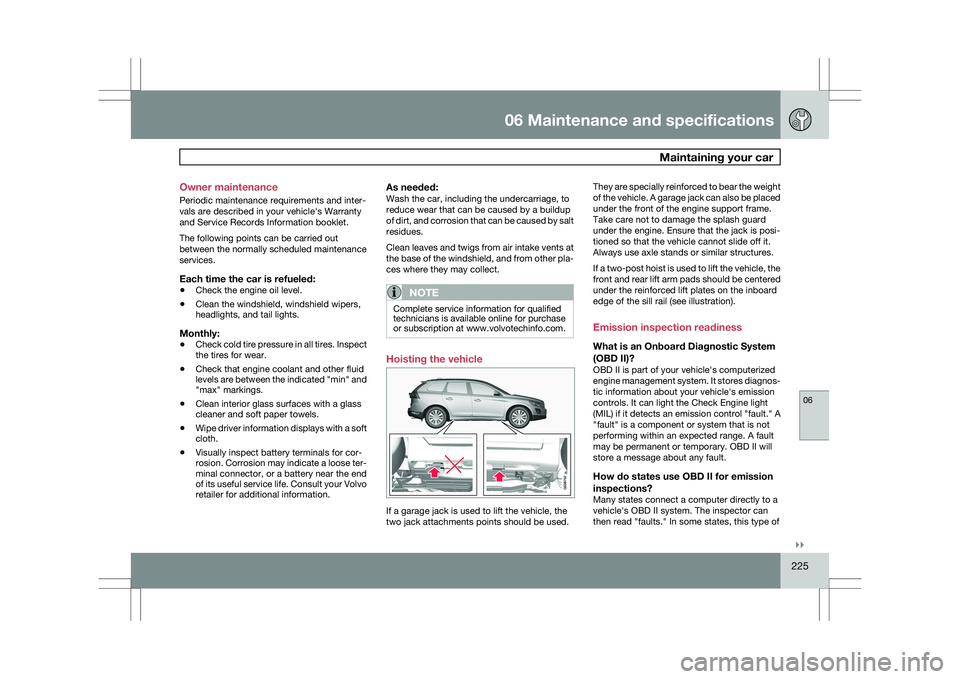
Hoisting the vehicle
If a garage jack is used to lift the vehicle, the
two jack attachments points should be used.They are specially reinforced to bear the weight
of the vehicle. A garage jack can also be placed
under the front of the engine support frame.
Take care not to damage the splash guard
under the engine. Ensure that the jack is posi-
tioned so that the vehicle cannot slide off it.
Always use axle stands or similar structures.
If a two-post hoist is used to lift the vehicle, the
front and rear lift arm pads should be centered
under the reinforced lift plates on the inboard
edge of the sill rail (see illustration).
Emission inspection readiness
What is an Onboard Diagnostic System
(OBD II)?
OBD II is part of your vehicle\fs computerized
engine management system. It stores diagnos-
tic information about your vehicle\fs emission
controls. It can light the Check Engine light
(MIL) if it detects an emission control "fault." A
"fault" is a component or system that is not
performing within an expected range. A fault
may be permanent or temporary. OBD II will
store a message about any fault.
How do states use OBD II for emission
inspections?
Many states connect a computer directly to a
vehicle\fs OBD II system. The inspector can
then read "faults." In some states, this type of
Page 228 of 297
06 Maintenance and specificationsMaintaining your car 06
226 inspection has replaced the tailpipe emission
test.
How can my vehicle fail OBD II emission
inspection?
Your vehicle can fail OBD II emission inspec-
tion for any of the following reasons.
\b
If your Check Engine (MIL) light is lit, your
vehicle may fail inspection.
\b If your vehicle\fs Check Engine light was lit,
but went out without any action on your
part, OBD II will still have a recorded fault.
Your vehicle may pass or fail, depending
on the inspection practices in your area.
\b If you had recent service that required dis-
connecting the battery, OBD II diagnostic
information may be incomplete and "not
ready" for inspection. A vehicle that is not
ready may fail inspection.
How can I prepare for my next OBD II
emission inspection?
\bIf your Check Engine (MIL) light is lit – or
was lit but went out without service, have
your vehicle diagnosed and, if necessary,
serviced by a qualified Volvo technician.
\b If you recently had service for a lit Check
Engine light, or if you had service that
required disconnecting the battery, a
period of driving is necessary to bring the
OBD II system to "ready" for inspection. A
half-hour trip of mixed stop-and-go/high- way driving is typically needed to allow
OBD II to reach readiness. Your Volvo
retailer can provide you with more infor-
mation on planning a trip.
\b Maintain your vehicle in accordance with
your vehicle\fs maintenance schedule.
Page 229 of 297
06 Maintenance and specifications
Hood and engine compartment06
227
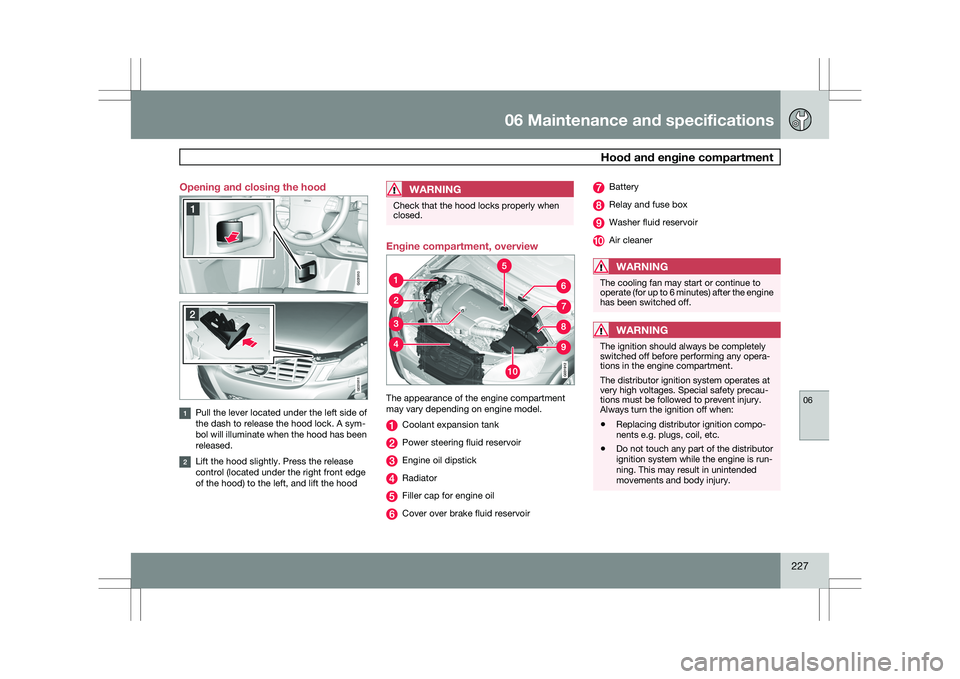
Opening and closing the hood
Pull the lever located under the left side of
the dash to release the hood lock. A sym-
bol will illuminate when the hood has been
released.
Lift the hood slightly. Press the release
control (located under the right front edge
of the hood) to the left, and lift the hood
WARNING Check that the hood locks properly when
closed.
Engine compartment, overview
The appearance of the engine compartment
may vary depending on engine model.
Coolant expansion tank
Power steering fluid reservoir
Engine oil dipstick
Radiator
Filler cap for engine oil
Cover over brake fluid reservoir Battery
Relay and fuse box
Washer fluid reservoir
Air cleaner
WARNING
The cooling fan may start or continue to
operate (for up to 6 minutes) after the engine
has been switched off.
WARNING
The ignition should always be completely
switched off before performing any opera-
tions in the engine compartment.
The distributor ignition system operates at
very high voltages. Special safety precau-
tions must be followed to prevent injury.
Always turn the ignition off when:
\b
Replacing distributor ignition compo-
nents e.g. plugs, coil, etc.
\b Do not touch any part of the distributor
ignition system while the engine is run-
ning. This may result in unintended
movements and body injury. G031910 G031911
Page 244 of 297
06 Maintenance and specificationsBattery 06
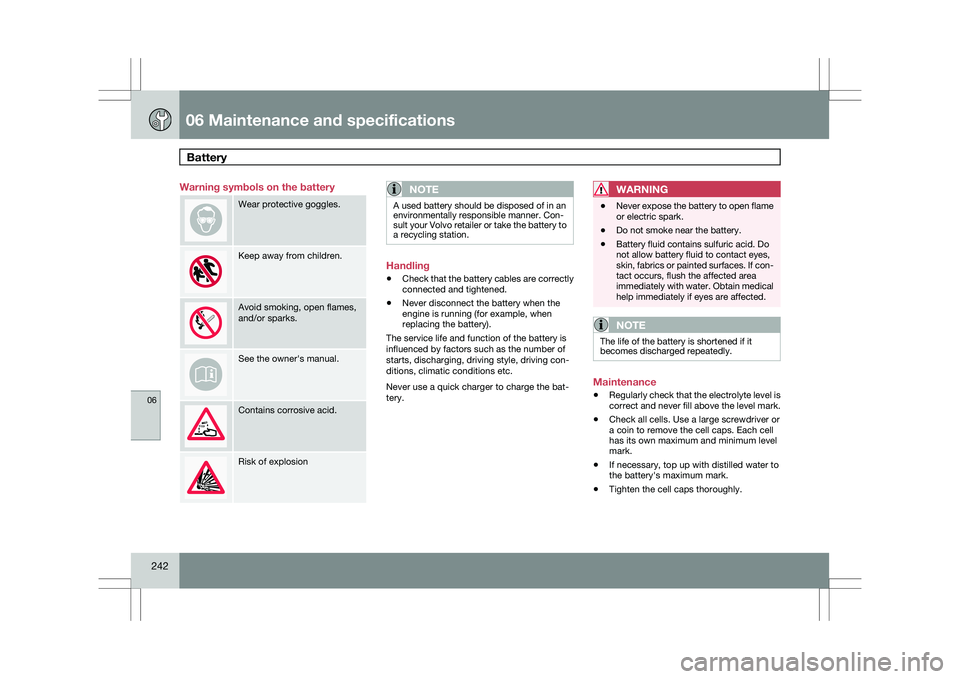
242 Warning symbols on the battery
Wear protective goggles.
Keep away from children.
Avoid smoking, open flames,
and/or sparks.
See the owner\fs manual.
Contains corrosive acid.
Risk of explosion
NOTE A used battery should be disposed of in an
environmentally responsible manner. Con-
sult your Volvo retailer or take the battery to
a recycling station.
Handling
\b
Check that the battery cables are correctly
connected and tightened.
\b Never disconnect the battery when the
engine is running (for example, when
replacing the battery).
The service life and function of the battery is
influenced by factors such as the number of
starts, discharging, driving style, driving con-
ditions, climatic conditions etc.
Never use a quick charger to charge the bat-
tery.WARNING \b
Never expose the battery to open flame
or electric spark.
\b Do not smoke near the battery.
\b Battery fluid contains sulfuric acid. Do
not allow battery fluid to contact eyes,
skin, fabrics or painted surfaces. If con-
tact occurs, flush the affected area
immediately with water. Obtain medical
help immediately if eyes are affected.
NOTE The life of the battery is shortened if it
becomes discharged repeatedly.
Maintenance
\b
Regularly check that the electrolyte level is
correct and never fill above the level mark.
\b Check all cells. Use a large screwdriver or
a coin to remove the cell caps. Each cell
has its own maximum and minimum level
mark.
\b If necessary, top up with distilled water to
the battery\fs maximum mark.
\b Tighten the cell caps thoroughly.
Page 245 of 297
06 Maintenance and specifications
Battery06
}}
243
CAUTION\b
Always use distilled or deionized water
(battery water).
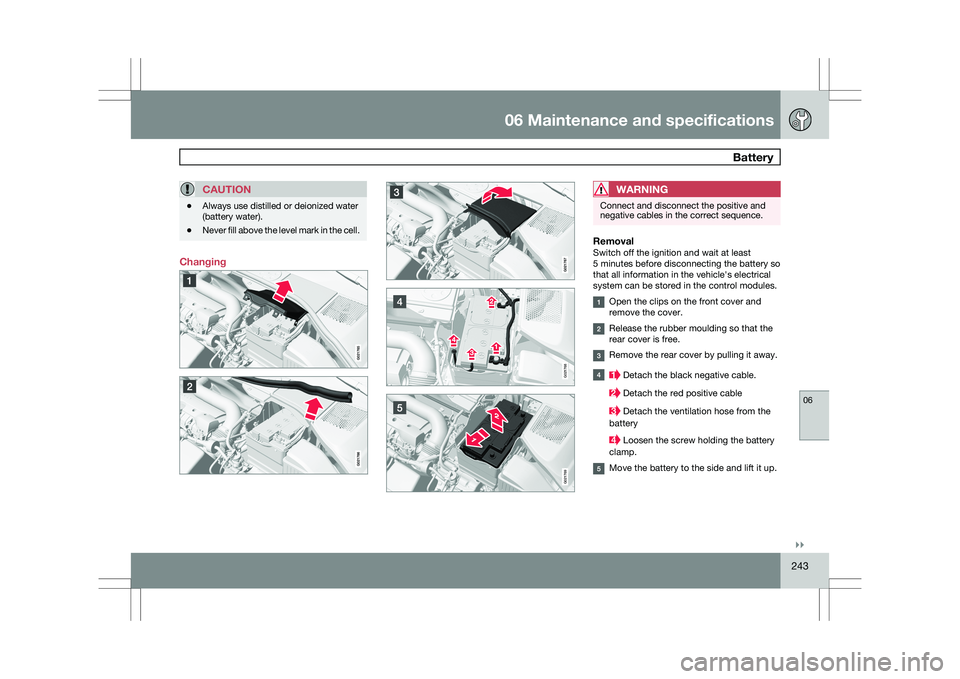
\b Never fill above the level mark in the cell. ChangingWARNING Connect and disconnect the positive and
negative cables in the correct sequence.
RemovalSwitch off the ignition and wait at least
5 minutes before disconnecting the battery so
that all information in the vehicle\fs electrical
system can be stored in the control modules.
Open the clips on the front cover and
remove the cover.
Release the rubber moulding so that the
rear cover is free.
Remove the rear cover by pulling it away.
Detach the black negative cable.
Detach the red positive cable
Detach the ventilation hose from the
battery Loosen the screw holding the battery
clamp. Move the battery to the side and lift it up. G021768 G021769
Page 246 of 297
06 Maintenance and specificationsBattery 06
244
WARNING PROPOSITION 65 WARNING!
Battery posts, terminals, and related acces-
sories contain lead and lead compounds,
chemicals known to the state of California
to cause cancer and reproductive harm.
Wash hands after handling.
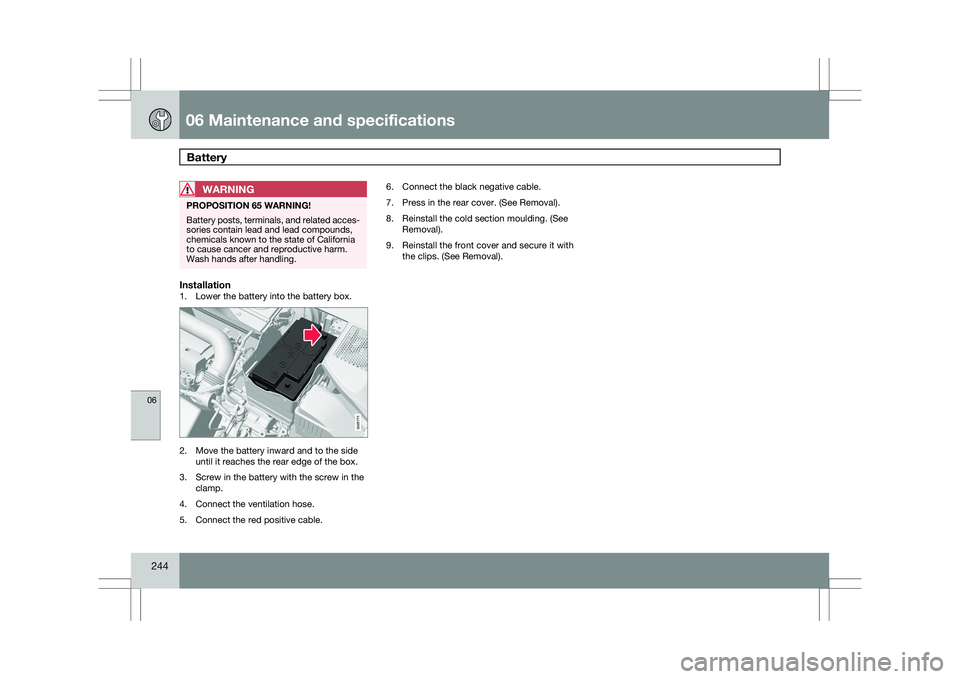
Installation1. Lower the battery into the battery box.
2. Move the battery inward and to the side
until it reaches the rear edge of the box.
3. Screw in the battery with the screw in the clamp.
4. Connect the ventilation hose.
5. Connect the red positive cable. 6. Connect the black negative cable.
7. Press in the rear cover. (See Removal).
8. Reinstall the cold section moulding. (See
Removal).
9. Reinstall the front cover and secure it with the clips. (See Removal). G021771
Page 271 of 297
06 Maintenance and specifications
Wheels and tires06
}}
269
3. Ensure that the on/off switch is in posi-
tion 0 (the 0 side of the switch should be
pressed down).
WARNING Contact with the sealing compound may
cause skin irritation. If contact occurs, wash
the affected area immediately with soap and
water.
4. Unscrew the orange cover over the bottle
holder and unscrew the cap on the bottle
of sealing compound.
NOTE Do not break the seal on the bottle. This
occurs automatically when the bottle is
screwed into the holder.
5. Screw the bottle into the bottle holder.
WARNING
The bottle is equipped with a catch to keep
it securely in place and help prevent sealing
compound leakage. Once in place, the bot-
tle cannot be unscrewed. This must be done
by a trained and qualified Volvo service
technician. 6.
Remove the valve cap from the tire’s infla-
tion valve and screw the tire sealing sys-
tem’s hose connector onto the valve as
tightly as possible by hand.
7. Connect the electrical wire to the nearest 12-volt socket in the vehicle.
8. Start the vehicle’s engine.
WARNING The vehicle´s engine should be running
when the tire sealing system is used to avoid
battery drain. Therefore, be sure the vehicle
is parked in a well ventilated place, or out-
doors, before using the system.
9.
Start the tire sealing system’s compressor
by pressing the on/off switch to position I.
WARNING \b
Never stand next to the tire being inflated
when the compressor is in operation.
\b If cracks, bubbles, etc. form on the tire,
switch off the compressor immediately.
\b If there is visible damage to the sidewall
or the rim, the tire cannot be repaired.
The vehicle should not be driven if this
occurs. Contact a towing service or
Volvo On Call Roadside Assistance if
applicable.
NOTE The air pressure gauge will temporarily
show an increase in pressure to approxi-
mately 88 psi (6 bar) while the sealing com-
pound is being pumped into the tire. The
pressure should return to a normal level
after approximately 30 seconds.
10. Within seven minutes, inflate the tire to
between
22—44 psi (1.8—3.0 bar). Switch
off the compressor briefly to get a clear
reading from the pressure gauge. The
compressor should not be used for more
than 10 minutes at a time to avoid over-
heating.
Page 273 of 297
06 Maintenance and specifications
Wheels and tires06
}}
271
NOTE\b
After use, the sealing compound bottle,
the hose, and certain other system
components must be replaced. Please
consult your Volvo retailer for replace-
ment parts.
\b If the sealing compound bottle’s expi-
ration date has passed, please take it to
a Volvo retailer or a recycling station
that can properly dispose of harmful
substances. Inflating tires
The tire sealing system can be used to inflate
the tires. To do so:
1. Park the car in a safe place.
2. The compressor should be switched off.
Ensure that the on/off switch is in position
0 (the 0 side of the switch should be
pressed down).
3. Take out the electrical wire and hose.
4. Remove the valve cap from the tire’s infla-
tion valve and screw the hose connector
onto the valve as tightly as possible by
hand.
5. Connect the electrical wire to the nearest 12-volt socket in the vehicle. 6. Start the vehicle’s engine.
WARNING \b
The vehicle’s engine should be running
when the tire sealing system is used to
avoid battery drain. Therefore, be sure
the vehicle is parked in a well ventilated
place, or outdoors, before using the sys-
tem.
\b Children should never be left unattended
in the vehicle when the engine is running. 7. Check the tire’s inflation pressure on the
gauge. Switch off the compressor briefly to
get a clear reading from the pressure
gauge.
8. Refer to the tire inflation tables for the cor-
rect inflation pressure. If the tire needs to
be inflated, start the tire sealing system’s
compressor (press the on/off switch to
position I). If necessary, release air from the
tire by turning the air release knob coun-
terclockwise.
CAUTION The compressor should not be used for
more than 10 minutes at a time to avoid
overheating. 9. Turn off the compressor (press the on/off
switch to position 0) when the correct infla-
tion pressure has been reached.
10. Unscrew the hose from the tire’s inflation valve and reinstall the valve cap.
11. Disconnect the electrical wire from the 12-volt socket.
Tire Pressure Monitoring System
(TPMS)–U.S models only
NOTE USA – FCC ID: KR5S122780002
This device complies with part 15 of the
FCC rules. Operation is subject to the fol-
lowing conditions: (1) This device may not
cause harmful interference, and (2) this
device must accept any interference
received, including interference that may
cause undesired operation.
The tire pressure monitoring system uses sen-
sors mounted in the tire valves to check infla-
tion pressure levels. When the vehicle is mov-
ing at a speed of approximately 20 mph
(30 km/h) or faster, these sensors transmit
inflation pressure data to a receiver located in
the vehicle.
Page 288 of 297
06 Maintenance and specificationsSpecifications 06
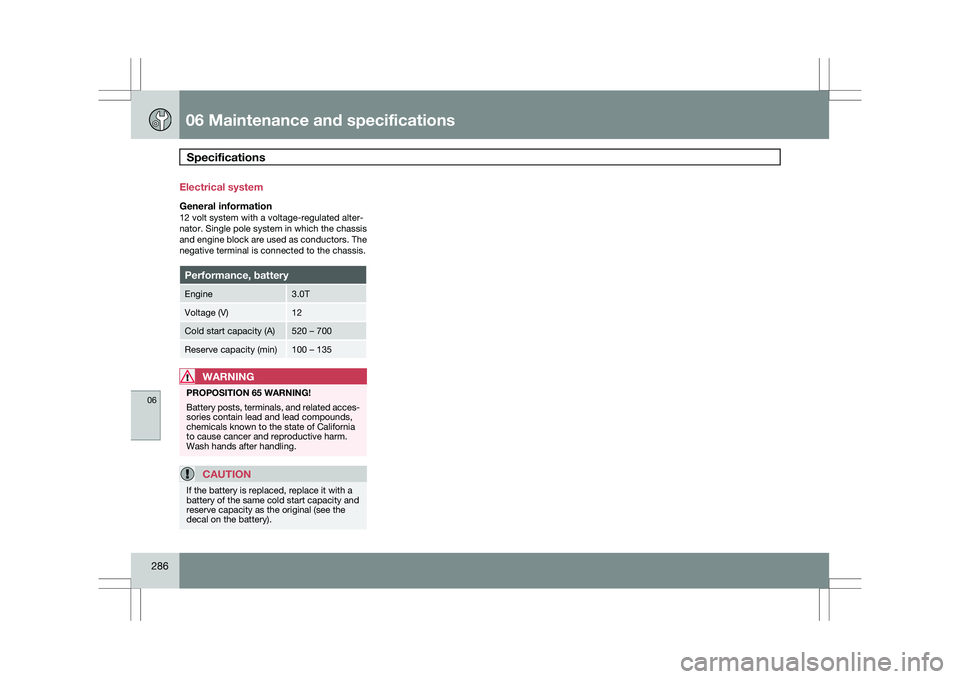
286 Electrical system
General information12 volt system with a voltage-regulated alter-
nator. Single pole system in which the chassis
and engine block are used as conductors. The
negative terminal is connected to the chassis.
Performance, battery
Engine 3.0T
Voltage (V) 12
Cold start capacity (A) 520 – 700
Reserve capacity (min) 100 – 135
WARNING
PROPOSITION 65 WARNING!
Battery posts, terminals, and related acces-
sories contain lead and lead compounds,
chemicals known to the state of California
to cause cancer and reproductive harm.
Wash hands after handling.
CAUTION
If the battery is replaced, replace it with a
battery of the same cold start capacity and
reserve capacity as the original (see the
decal on the battery).
Page 290 of 297
07 Index07
288 1, 2, 3 ...
12-volt sockets
........................................ 199
A Accessory installation warning
.................... 8
Active chassis system .............................157
Active yaw control ................................... 155
Adaptive cruise control ....172, 173, 174, 175
Airbags disconnecting the front passenger’s
side................................................. 22, 23
front.......................................... 18, 19, 20
inflatable curtain ................................... 28
side impact........................................... 26
Air conditioning ........................................ 129
Air distribution..........................................
127
Air distribution table................................. 131
Air vents................................................... 127
All Wheel Drive ......................................... 111
Anti-freeze ....................................... 204, 230
Anti-lock brake system ............................112
warning light ......................................... 74Approach lighting................................. 52, 92
Audio system
audio functions ................................... 136
CD player/changer
...................... 144, 145
Digital Audio Broadcasting (DAB) .......140
HD digital radio ................................... 139
menu control....................................... 135
overview.............................................. 133
radio functions .................................... 138
Sirius satellite radio ............141, 143, 144
sound settings .................................... 136
steering wheel keypad ........................133
USB/iPod® connector ........................134
Auto-dim rearview mirror ...........................99
Automatic locking retractor .......................34
Automatic transmission Geartronic ................................... 109, 110
general description .....................109, 110
oil ........................................................ 285
shiftlock override ................................ 110
Axle weight .............................................. 261B Battery
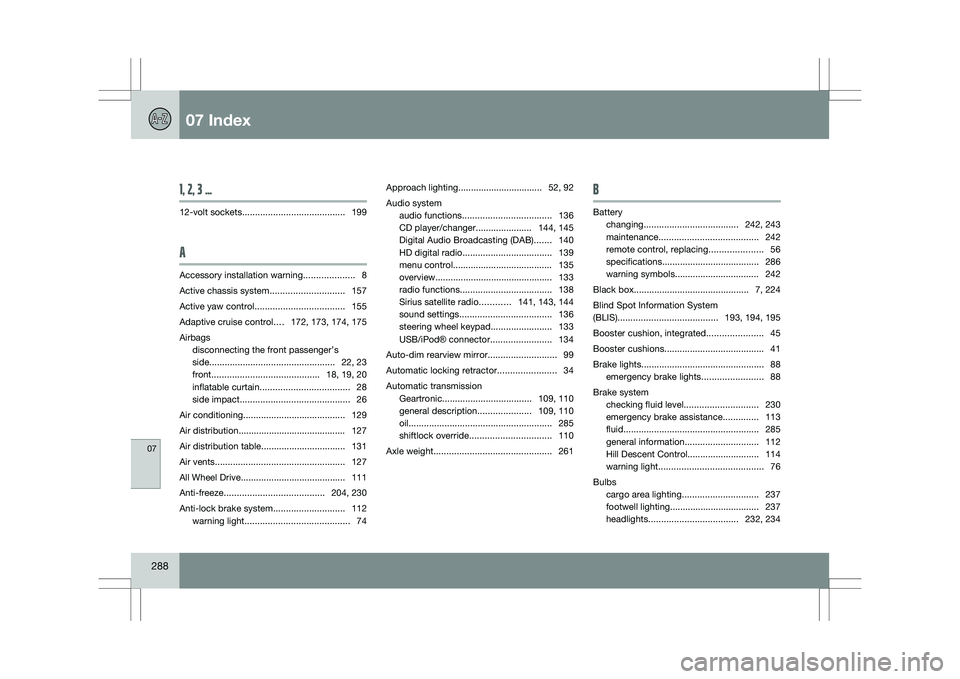
changing ..................................... 242, 243
maintenance ....................................... 242
remote control, replacing .....................56
specifications ...................................... 286
warning symbols.................................
242
Black box............................................. 7, 224
Blind Spot Information System
(BLIS)....................................... 193, 194, 195
Booster cushion, integrated ......................45
Booster cushions ....................................... 41
Brake lights ................................................ 88
emergency brake lights ........................88
Brake system checking fluid level ............................. 230
emergency brake assistance ..............113
fluid..................................................... 285
general information ............................. 112
Hill Descent Control ............................114
warning light ......................................... 76
Bulbs cargo area lighting .............................. 237
footwell lighting................................... 237
headlights ................................... 232, 234