tow VOLVO XC60 2009 Owner´s Manual
[x] Cancel search | Manufacturer: VOLVO, Model Year: 2009, Model line: XC60, Model: VOLVO XC60 2009Pages: 297, PDF Size: 21.16 MB
Page 118 of 297
03 Your driving environmentParking brake 03
116 Electric parking brake
An electric parking brake has the same func-
tion as a manual parking brake.
NOTE
\b
A faint sound from the parking brake\fs
electric motor can be heard when the
parking brake is being applied. This
sound can also be heard during the
automatic function check of the parking
brake.
\b The brake pedal will move slightly when
the electric parking brake is applied or
released.
Low battery voltageIf the battery voltage is too low, the parking
brake cannot be applied or released. Connect
an auxiliary battery if the battery voltage is too
low, see page 107.
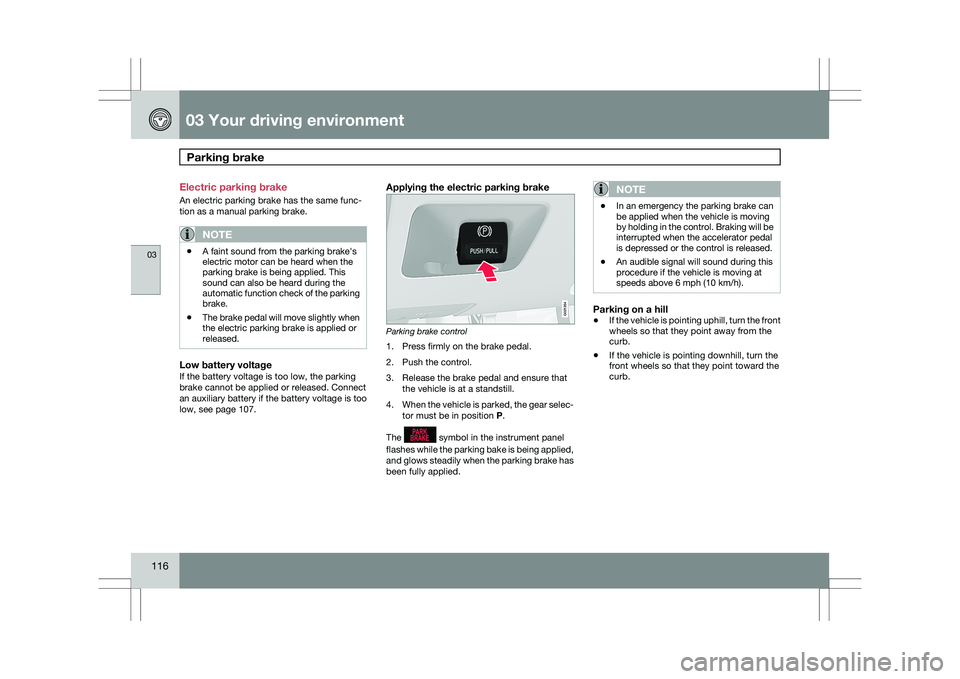
Applying the electric parking brake Parking brake control
1. Press firmly on the brake pedal.
2. Push the control.
3. Release the brake pedal and ensure that
the vehicle is at a standstill.
4. When the vehicle is parked, the gear selec-
tor must be in position P.
The symbol in the instrument panel
flashes while the parking bake is being applied,
and glows steadily when the parking brake has
been fully applied.NOTE \b
In an emergency the parking brake can
be applied when the vehicle is moving
by holding in the control. Braking will be
interrupted when the accelerator pedal
is depressed or the control is released.
\b An audible signal will sound during this
procedure if the vehicle is moving at
speeds above 6 mph (10 km/h).
Parking on a hill
\b
If the vehicle is pointing uphill, turn the front
wheels so that they point away from the
curb.
\b If the vehicle is pointing downhill, turn the
front wheels so that they point toward the
curb. G021354
Page 120 of 297
03 Your driving environmentParking brake 03
118 shop. If you drive off with this error message
showing, a warning signal sounds.
Parking brake not applied – A fault is pre-
venting the parking brake from being applied.
Try to apply and release. Contact a Volvo work-
shop if the message remains.
Parking brake Service required – A fault has
arisen. Contact a Volvo workshop if the fault
remains.
WARNING
If the vehicle must be parked before the fault
has been corrected, always put the gear
selector in
P and turn the wheels so that
they point away from the curb if the vehicle
is pointing uphill or toward the curb if it is
pointing downhill.
Page 129 of 297
04 Comfort and driving pleasure
Climate system04
}}
127
your Warranty and Service Records Informa-
tion booklet, or consult a trained and qualified
Volvo service technician for these intervals.
The filter should be replaced more often when
driving under dirty and dusty conditions. The
filter cannot be cleaned and therefore should
always be replaced with a new one.
NOTE
There are different types of cabin air filters.
Ensure that the correct type is installed.
Interior Air Quality System (IAQS)A multifilter helps reduce gases and particles
in the incoming air, thereby reducing the levels
of odors and contaminants entering the vehi-
cle. The air quality sensor detects increased
levels of contaminants in the outside air. When
the air quality sensor detects contaminated
outside air, the air intake closes and the air
inside the passenger compartment is recircu-
lated, i.e. no outside air enters the vehicle. The
filter also cleans recirculated passenger com-
partment air.
NOTE
Contact your Volvo retailer for IAQS air filter
replacement intervals.
Menu settingsThe default settings for three of the climate
system\fs functions can be changed in the
menu system, see page 122:
\b
Blower speed in automatic mode.
\b Recirculation timer for passenger com-
partment air.
\b Automatic rear window defrosting.
The functions can also be returned to factory
settings in the menu system.
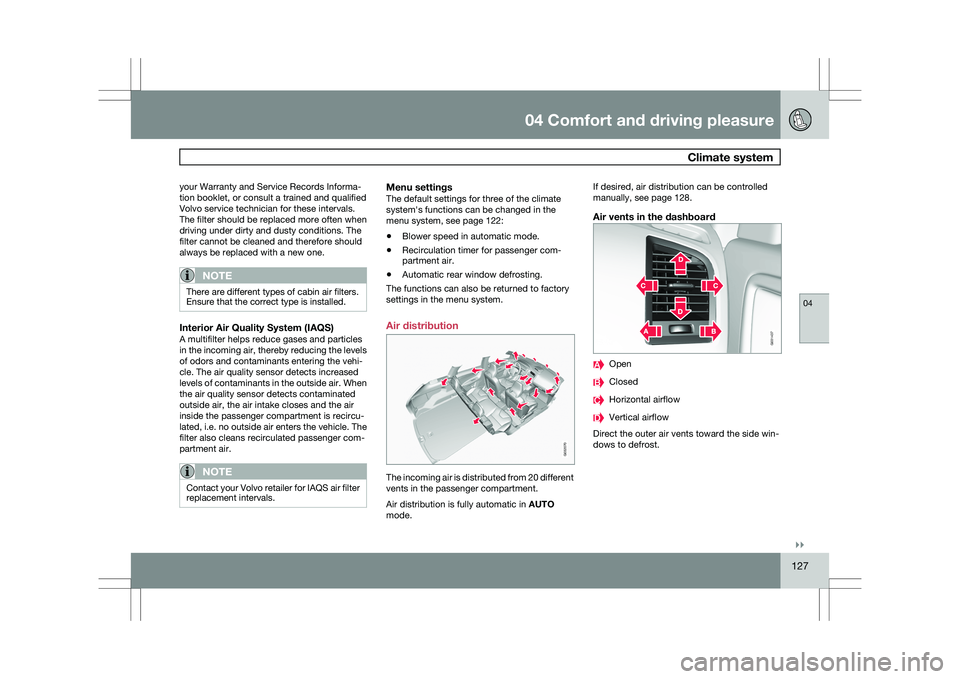
Air distribution The incoming air is distributed from 20 different
vents in the passenger compartment.
Air distribution is fully automatic in
AUTO
mode. If desired, air distribution can be controlled
manually, see page 128.
Air vents in the dashboard
Open
Closed
Horizontal airflow
Vertical airflow
Direct the outer air vents toward the side win-
dows to defrost. G032070 G031437
Page 130 of 297
04 Comfort and driving pleasureClimate system 04
128
* Option/accessory, for more information, see Introduction.
Air vents in the door pillars Closed
Open
Horizontal airflow
Vertical airflow
Direct the outer air vents toward the side win-
dows to defrost.
Direct the vents into the passenger compart-
ment to maintain a comfortable climate in the
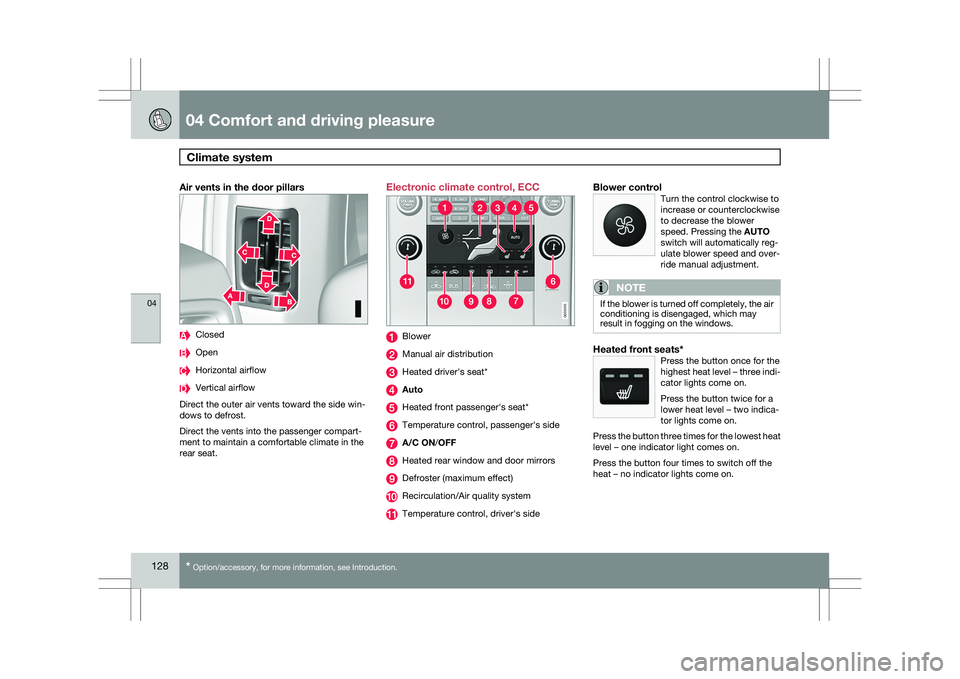
rear seat. Electronic climate control, ECC
Blower
Manual air distribution
Heated driver\fs seat*
Auto
Heated front passenger\fs seat*
Temperature control, passenger\fs side
A/C ON/OFF
Heated rear window and door mirrors
Defroster (maximum effect)
Recirculation/Air quality system
Temperature control, driver\fs sideBlower controlTurn the control clockwise to
increase or counterclockwise
to decrease the blower
speed. Pressing the AUTO
switch will automatically reg-
ulate blower speed and over-
ride manual adjustment.
NOTE If the blower is turned off completely, the air
conditioning is disengaged, which may
result in fogging on the windows.
Heated front seats*Press the button once for the
highest heat level – three indi-
cator lights come on.
Press the button twice for a
lower heat level – two indica-
tor lights come on.
Press the button three times for the lowest heat
level – one indicator light comes on.
Press the button four times to switch off the
heat – no indicator lights come on. G033202 G033203
Page 181 of 297
04 Comfort and driving pleasure
Distance alert04
}}
179
Introduction
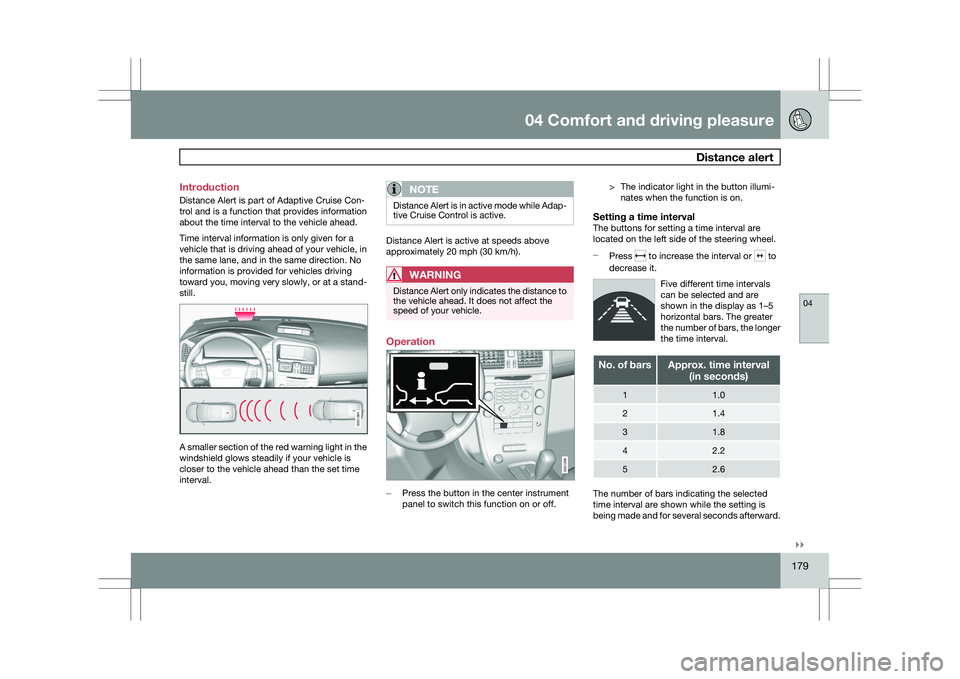
Distance Alert is part of Adaptive Cruise Con-
trol and is a function that provides information
about the time interval to the vehicle ahead.
Time interval information is only given for a
vehicle that is driving ahead of your vehicle, in
the same lane, and in the same direction. No
information is provided for vehicles driving
toward you, moving very slowly, or at a stand-
still.
A smaller section of the red warning light in the
windshield glows steadily if your vehicle is
closer to the vehicle ahead than the set time
interval.
NOTE Distance Alert is in active mode while Adap-
tive Cruise Control is active.
Distance Alert is active at speeds above
approximately 20 mph (30 km/h).
WARNING
Distance Alert only indicates the distance to
the vehicle ahead. It does not affect the
speed of your vehicle.
Operation
–
Press the button in the center instrument
panel to switch this function on or off. > The indicator light in the button illumi-
nates when the function is on.
Setting a time intervalThe buttons for setting a time interval are
located on the left side of the steering wheel.
– Press to increase the interval or to
decrease it.
Five different time intervals
can be selected and are
shown in the display as 1–5
horizontal bars. The greater
the number of bars, the longer
the time interval. No. of bars Approx. time interval
(in seconds) 1 1.0
2 1.4
3 1.8
4 2.2
5 2.6
The number of bars indicating the selected
time interval are shown while the setting is
being made and for several seconds afterward. G031394 G031396
Page 190 of 297
04 Comfort and driving pleasurePark assist* 04
188
* Option/accessory, for more information, see Introduction.
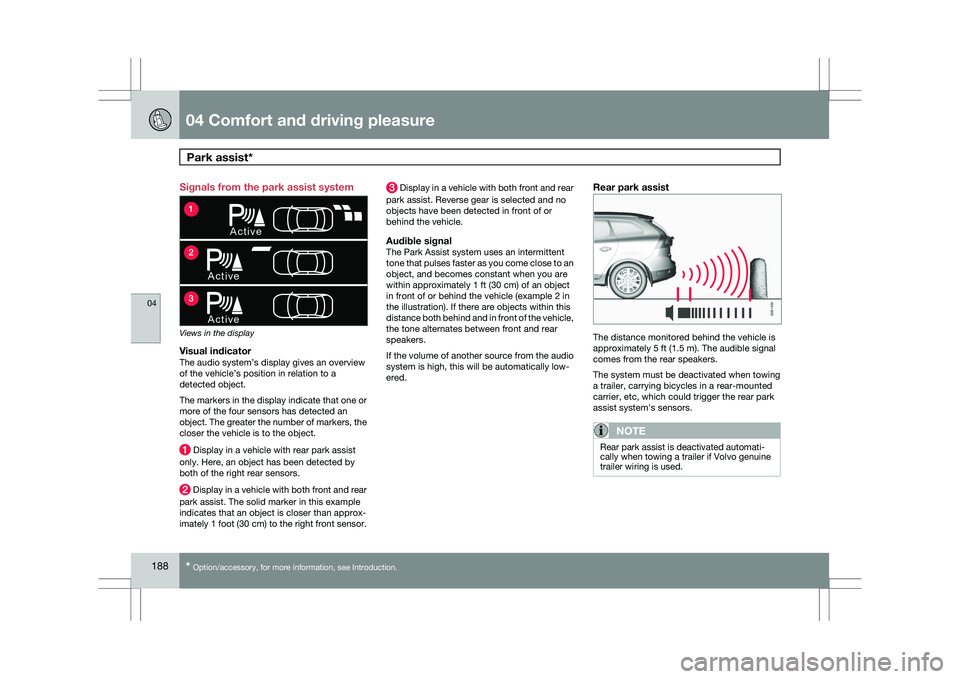
Signals from the park assist system
Views in the display
Visual indicatorThe audio system’s display gives an overview
of the vehicle’s position in relation to a
detected object.
The markers in the display indicate that one or
more of the four sensors has detected an
object. The greater the number of markers, the
closer the vehicle is to the object.
Display in a vehicle with rear park assist
only. Here, an object has been detected by
both of the right rear sensors. Display in a vehicle with both front and rear
park assist. The solid marker in this example
indicates that an object is closer than approx-
imately 1 foot (30 cm) to the right front sensor. Display in a vehicle with both front and rear
park assist. Reverse gear is selected and no
objects have been detected in front of or
behind the vehicle.
Audible signalThe Park Assist system uses an intermittent
tone that pulses faster as you come close to an
object, and becomes constant when you are
within approximately 1 ft (30 cm) of an object
in front of or behind the vehicle (example 2 in
the illustration). If there are objects within this
distance both behind and in front of the vehicle,
the tone alternates between front and rear
speakers.
If the volume of another source from the audio
system is high, this will be automatically low-
ered.
Rear park assist The distance monitored behind the vehicle is
approximately 5 ft (1.5 m). The audible signal
comes from the rear speakers.
The system must be deactivated when towing
a trailer, carrying bicycles in a rear-mounted
carrier, etc, which could trigger the rear park
assist system\fs sensors.
NOTE
Rear park assist is deactivated automati-
cally when towing a trailer if Volvo genuine
trailer wiring is used.
A c t i ve
A c t i v e
A c t i v e
1
2
3 G031400
Page 196 of 297
04 Comfort and driving pleasureBlind Spot Information System* 04
194
* Option/accessory, for more information, see Introduction.
When does BLIS function
The system functions when your vehicle is
moving at speeds above 6 mph (10 km/h).
When you pass another vehicle:The system reacts when you pass another
vehicle at a speed of up to 6 mph (10 km/h)
faster than that vehicle.
When you are passed by another vehicle:The system reacts if your vehicle is passed by
another vehicle at a speed of up to 43 mph
(70 km/h) faster than your vehicle.
WARNING
\b
BLIS does not function in sharp curves.
\b BLIS does not function when your vehi-
cle is backing up.
\b If you are towing a wide trailer, this may
prevent the BLIS cameras from detect-
ing other vehicles in adjacent lanes.
How BLIS functions in daylight and
darkness
Daylight
BLIS reacts to the shape of surrounding vehi-
cles. The system is designed to help detect
motor vehicles such as cars, trucks, buses,
motorcycles, etc.
DarknessBLIS reacts to the headlights of surrounding
vehicles. In order to be detected by BLIS, a
vehicle in the blind area must have its head-
lights on. This means, for example, that the
system will not detect a trailer without head-
lights that is being towed behind a car or truck.WARNING \b
BLIS does not react to cyclists or
mopeds.
\b BLIS does not react to vehicles that are
standing still.
\b The function of the BLIS cameras may
be affected by intense light, or when
driving at night in areas where there are
no external sources of light (e.g., street
lights, other vehicles, etc.). In such
cases, the system may react as if the
cameras were obscured.
\b In both of the above mentioned condi-
tions, a message will appear in the infor-
mation display.
\b When driving in such conditions, the
system\fs function will be limited or it
may be temporarily switched off, see
page 195 for instructions.
\b When the message is no longer dis-
played, BLIS will return to normal func-
tion.
\b The BLIS cameras have the same limi-
tation as the human eye. In other words,
their "vision is impaired" by adverse
weather conditions such as heavy
snowfall, dense fog, etc.
Page 202 of 297

200 Driving recommendations
..................................................................... 202
Refueling ........................................................................\
....................... 206
Loading ........................................................................\
......................... 210
Cargo area ........................................................................\
.................... 213
Towing a trailer
........................................................................\
.............. 217
Emergency towing ........................................................................\
........ 220
Page 205 of 297
05 During your trip
Driving recommendations05
}}
203
Driving through water
\b
The vehicle can be driven through water up
to a depth of approximately 10 in. (25 cm),
at a maximum speed of 6 mph (10 km/h).
\b Take particular care when driving through
flowing water.
\b Clean the electrical connections for trailer
wiring after driving in mud or water.
\b When driving through water, maintain low
speed and do not stop in the water.
WARNING After driving through water, press lightly on
the brake pedal to ensure that the brakes
are functioning normally. Water or mud can
make the brake linings slippery, resulting in
delayed braking effect.
CAUTION \b
Engine damage will occur if water is
drawn into the air cleaner.
\b If the vehicle is driven through water
deeper than 10 in (25 cm), water may
enter the differential and the transmis-
sion. This reduces the oil\fs lubricating
capacity and may shorten the service
life of these components.
\b Do not allow the vehicle to stand in
water up to the door sills longer than
absolutely necessary. This could result
in electrical malfunctions.
\b If the engine has been stopped while the
vehicle is in water, do not attempt to
restart it. Have the vehicle towed out of
the water.
Engine and cooling systemUnder special conditions, for example when
driving in hilly terrain, extreme heat or with
heavy loads, there is a risk that the engine and
cooling system will overheat. Proceed as fol-
lows to avoid overheating the engine.
\b
Maintain a low speed when driving with a
trailer up long, steep hills.
\b Do not turn the engine off immediately
when stopping after a hard drive.
WARNING The cooling fan may start or continue to
operate (for up to 6 minutes) after the engine
has been switched off.
\b
Remove any auxiliary lights from in front of
the grille when driving in hot weather con-
ditions.
\b Do not exceed engine speeds of 4500 rpm
if driving with a trailer in hilly terrain. The oil
temperature could become too high.
Conserving electrical currentKeep the following in mind to help minimize
battery drain:
\bWhen the engine is not running, avoid
using ignition mode
II. Many electrical sys-
tems (the audio system, the optional navi-
gation system, power windows, etc) will
function in ignition modes 0 and I. These
modes reduce drain on the battery.
\b Please keep in mind that using systems,
accessories, etc., that consume a great
deal of current when the engine is not run-
ning could result in the battery being com-
pletely drained.
\b The optional 12 volt socket in the cargo
area provides electrical current even with
the ignition switched off, which drains the
battery.
Page 209 of 297
05 During your trip
Refueling05
}}
207
Octane rating
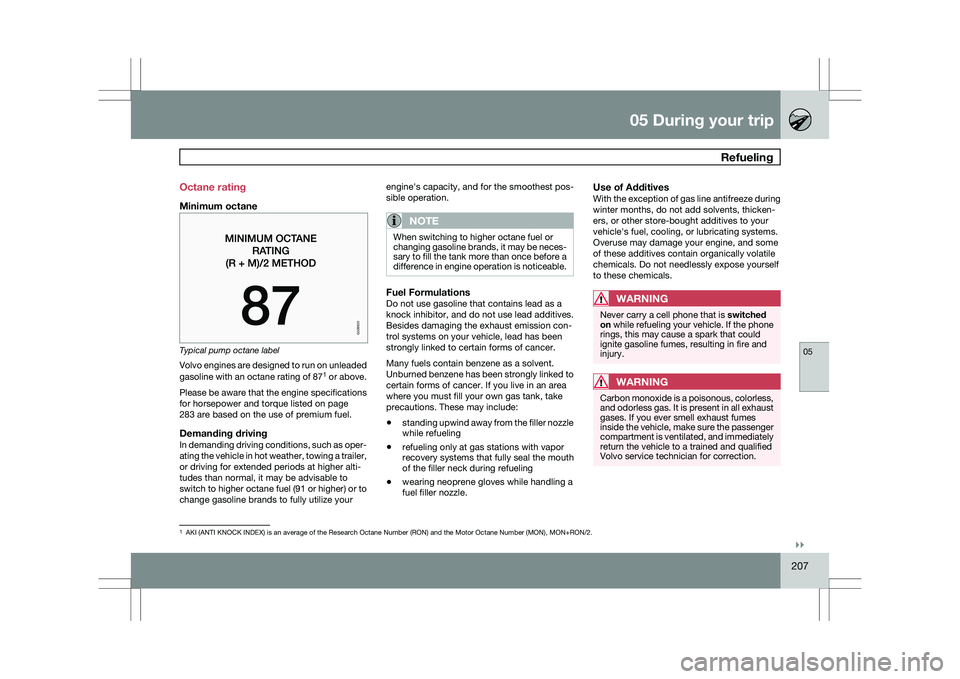
Minimum octane
Typical pump octane label
Volvo engines are designed to run on unleaded
gasoline with an octane rating of 87
1
or above.
Please be aware that the engine specifications
for horsepower and torque listed on page
283 are based on the use of premium fuel.
Demanding drivingIn demanding driving conditions, such as oper-
ating the vehicle in hot weather, towing a trailer,
or driving for extended periods at higher alti-
tudes than normal, it may be advisable to
switch to higher octane fuel (91 or higher) or to
change gasoline brands to fully utilize your engine\fs capacity, and for the smoothest pos-
sible operation.
NOTE When switching to higher octane fuel or
changing gasoline brands, it may be neces-
sary to fill the tank more than once before a
difference in engine operation is noticeable.
Fuel FormulationsDo not use gasoline that contains lead as a
knock inhibitor, and do not use lead additives.
Besides damaging the exhaust emission con-
trol systems on your vehicle, lead has been
strongly linked to certain forms of cancer.
Many fuels contain benzene as a solvent.
Unburned benzene has been strongly linked to
certain forms of cancer. If you live in an area
where you must fill your own gas tank, take
precautions. These may include:
\b
standing upwind away from the filler nozzle
while refueling
\b refueling only at gas stations with vapor
recovery systems that fully seal the mouth
of the filler neck during refueling
\b wearing neoprene gloves while handling a
fuel filler nozzle.
Use of AdditivesWith the exception of gas line antifreeze during
winter months, do not add solvents, thicken-
ers, or other store-bought additives to your
vehicle\fs fuel, cooling, or lubricating systems.
Overuse may damage your engine, and some
of these additives contain organically volatile
chemicals. Do not needlessly expose yourself
to these chemicals.
WARNING Never carry a cell phone that is
switched
on while refueling your vehicle. If the phone
rings, this may cause a spark that could
ignite gasoline fumes, resulting in fire and
injury.
WARNING Carbon monoxide is a poisonous, colorless,
and odorless gas. It is present in all exhaust
gases. If you ever smell exhaust fumes
inside the vehicle, make sure the passenger
compartment is ventilated, and immediately
return the vehicle to a trained and qualified
Volvo service technician for correction.
1
AKI (ANTI KNOCK INDEX) is an average of the Research Octane Number (R\
ON) and the Motor Octane Number (MON), MON+RON/2.
G028920