mirror VOLVO XC60 2009 Owner´s Manual
[x] Cancel search | Manufacturer: VOLVO, Model Year: 2009, Model line: XC60, Model: VOLVO XC60 2009Pages: 297, PDF Size: 21.16 MB
Page 5 of 297
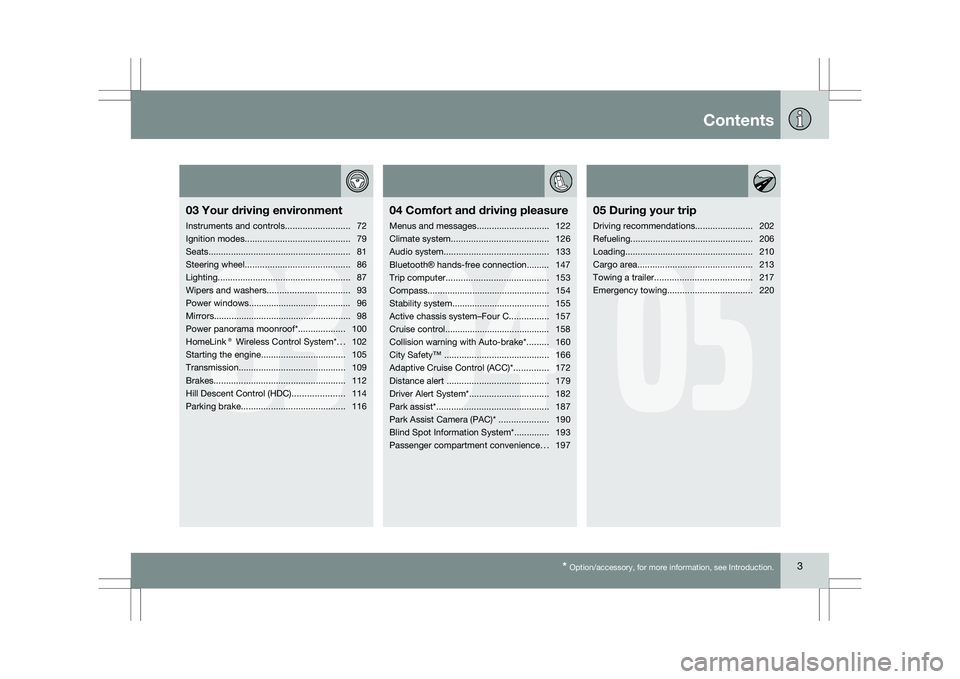
Contents* Option/accessory, for more information, see Introduction. 3
03
03
Your driving environment
Instruments and controls ..........................72
Ignition modes .......................................... 79
Seats......................................................... 81
Steering wheel .......................................... 86
Lighting ..................................................... 87
Wipers and washers................................. 93
Power windows......................................... 96
Mirrors....................................................... 98
Power panorama moonroof*................... 100
HomeLink® Wireless Control System* ...102
Starting the engine .................................. 105
Transmission ........................................... 109
Brakes..................................................... 112
Hill Descent Control (HDC) .....................114
Parking brake .......................................... 116
04
04Comfort and driving pleasure
Menus and messages .............................122
Climate system ....................................... 126
Audio system.......................................... 133
Bluetooth ® hands-free connection......... 147
Trip computer......................................... 153
Compass................................................. 154
Stability system....................................... 155
Active chassis system–Four C ................157
Cruise control.......................................... 158
Collision warning with Auto-brake*......... 160
City Safety™ .......................................... 166
Adaptive Cruise Control (ACC)* ..............172
Distance alert ......................................... 179
Driver Alert System*................................ 182
Park assist*............................................. 187
Park Assist Camera (PAC)* .................... 190
Blind Spot Information System*.............. 193
Passenger compartment convenience ...197
05
05 During your trip
Driving recommendations .......................202
Refueling ................................................. 206
Loading ................................................... 210
Cargo area .............................................. 213
Towing a trailer ....................................... 217
Emergency towing .................................. 220
Page 24 of 297
01 SafetyOccupant Weight Sensor 01
22 General information
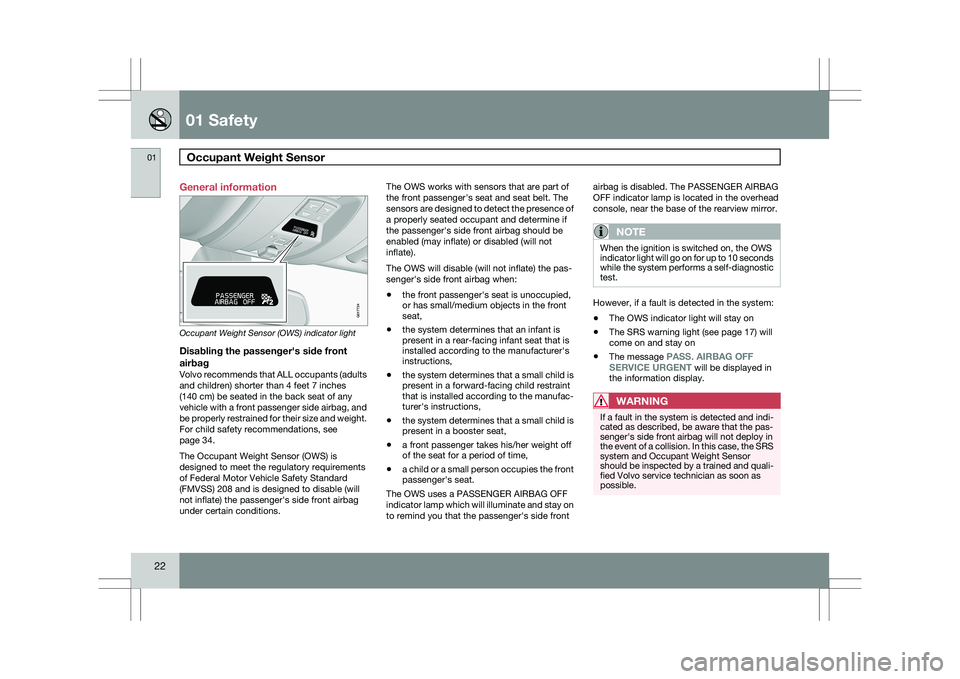
Occupant Weight Sensor (OWS) indicator light
Disabling the passenger\fs side front
airbag
Volvo recommends that ALL occupants (adults
and children) shorter than 4 feet 7 inches
(140 cm) be seated in the back seat of any
vehicle with a front passenger side airbag, and
be properly restrained for their size and weight.
For child safety recommendations, see
page 34.
The Occupant Weight Sensor (OWS) is
designed to meet the regulatory requirements
of Federal Motor Vehicle Safety Standard
(FMVSS) 208 and is designed to disable (will
not inflate) the passenger\fs side front airbag
under certain conditions. The OWS works with sensors that are part of
the front passenger\fs seat and seat belt. The
sensors are designed to detect the presence of
a properly seated occupant and determine if
the passenger\fs side front airbag should be
enabled (may inflate) or disabled (will not
inflate).
The OWS will disable (will not inflate) the pas-
senger\fs side front airbag when:
\b
the front passenger\fs seat is unoccupied,
or has small/medium objects in the front
seat,
\b the system determines that an infant is
present in a rear-facing infant seat that is
installed according to the manufacturer\fs
instructions,
\b the system determines that a small child is
present in a forward-facing child restraint
that is installed according to the manufac-
turer\fs instructions,
\b the system determines that a small child is
present in a booster seat,
\b a front passenger takes his/her weight off
of the seat for a period of time,
\b a child or a small person occupies the front
passenger\fs seat.
The OWS uses a PASSENGER AIRBAG OFF
indicator lamp which will illuminate and stay on
to remind you that the passenger\fs side front airbag is disabled. The PASSENGER AIRBAG
OFF indicator lamp is located in the overhead
console, near the base of the rearview mirror.
NOTE
When the ignition is switched on, the OWS
indicator light will go on for up to 10 seconds
while the system performs a self-diagnostic
test.
However, if a fault is detected in the system:
\b
The OWS indicator light will stay on
\b The SRS warning light (see page 17) will
come on and stay on
\b The message
PASS. AIRBAG OFF
SERVICE URGENT will be displayed in
the information display.
WARNING If a fault in the system is detected and indi-
cated as described, be aware that the pas-
senger\fs side front airbag will not deploy in
the event of a collision. In this case, the SRS
system and Occupant Weight Sensor
should be inspected by a trained and quali-
fied Volvo service technician as soon as
possible. 2
2
G017724
Page 37 of 297
01 Safety
Child restraint systems01
}}
35
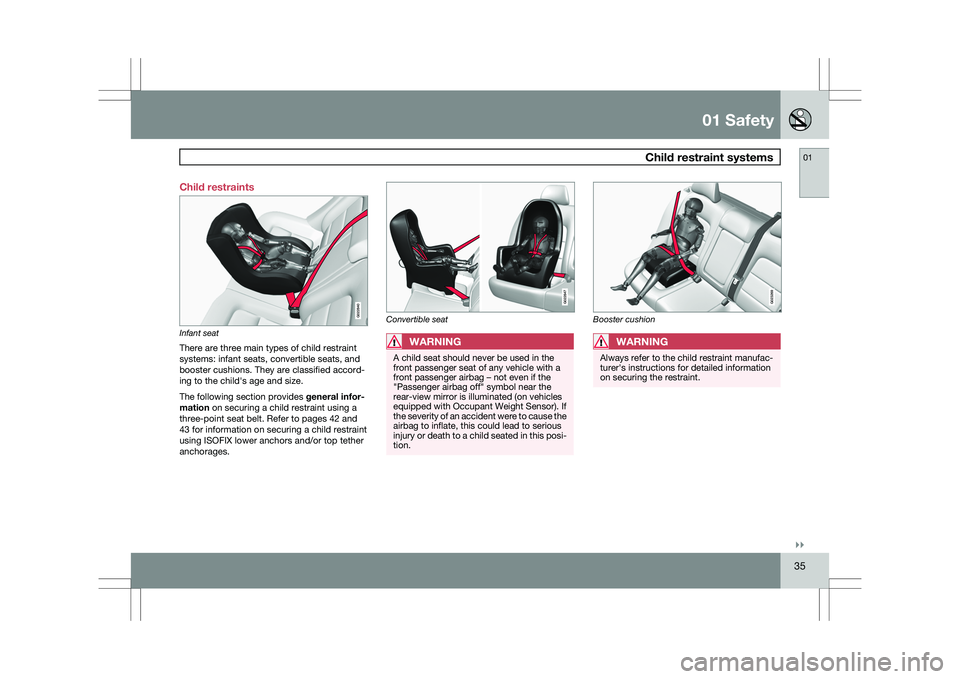
Child restraints
Infant seat
There are three main types of child restraint
systems: infant seats, convertible seats, and
booster cushions. They are classified accord-
ing to the child\fs age and size.
The following section provides
general infor-
mation on securing a child restraint using a
three-point seat belt. Refer to pages 42 and
43 for information on securing a child restraint
using ISOFIX lower anchors and/or top tether
anchorages. Convertible seat
WARNING
A child seat should never be used in the
front passenger seat of any vehicle with a
front passenger airbag – not even if the
"Passenger airbag off" symbol near the
rear-view mirror is illuminated (on vehicles
equipped with Occupant Weight Sensor). If
the severity of an accident were to cause the
airbag to inflate, this could lead to serious
injury or death to a child seated in this posi-
tion. Booster cushionWARNING
Always refer to the child restraint manufac-
turer\fs instructions for detailed information
on securing the restraint. G022840 G022847 G023269
Page 39 of 297
01 Safety
Infant seats01
}}
37
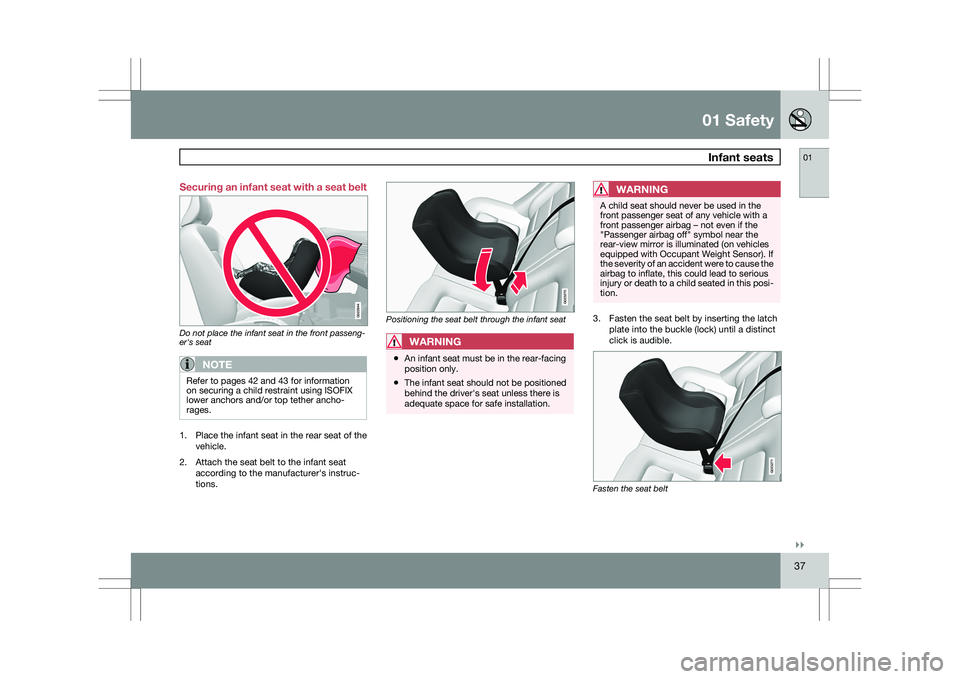
Securing an infant seat with a seat belt
Do not place the infant seat in the front passeng-
er's seat
NOTE
Refer to pages 42 and 43 for information
on securing a child restraint using ISOFIX
lower anchors and/or top tether ancho-
rages.
1.
Place the infant seat in the rear seat of the
vehicle.
2. Attach the seat belt to the infant seat according to the manufacturer\fs instruc-
tions. Positioning the seat belt through the infant seat
WARNING
\b
An infant seat must be in the rear-facing
position only.
\b The infant seat should not be positioned
behind the driver\fs seat unless there is
adequate space for safe installation.
WARNING A child seat should never be used in the
front passenger seat of any vehicle with a
front passenger airbag – not even if the
"Passenger airbag off" symbol near the
rear-view mirror is illuminated (on vehicles
equipped with Occupant Weight Sensor). If
the severity of an accident were to cause the
airbag to inflate, this could lead to serious
injury or death to a child seated in this posi-
tion.
3. Fasten the seat belt by inserting the latch
plate into the buckle (lock) until a distinct
click is audible. Fasten the seat belt G022844 G023270 G023271
Page 42 of 297
01 SafetyConvertible seats 01
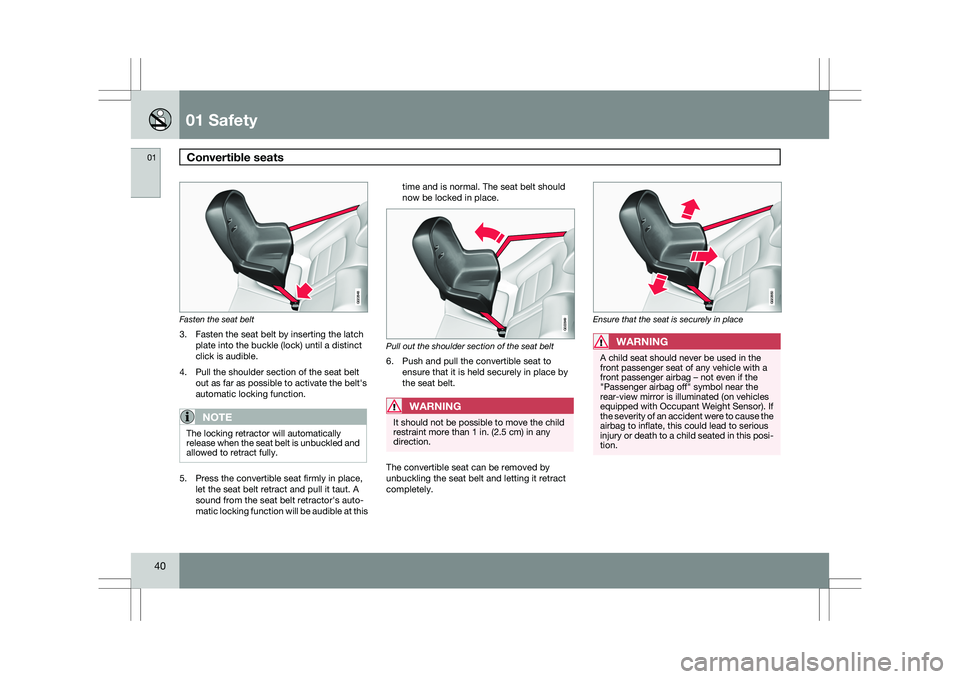
40 Fasten the seat belt
3. Fasten the seat belt by inserting the latch
plate into the buckle (lock) until a distinct
click is audible.
4. Pull the shoulder section of the seat belt out as far as possible to activate the belt\fs
automatic locking function.
NOTE The locking retractor will automatically
release when the seat belt is unbuckled and
allowed to retract fully.
5. Press the convertible seat firmly in place,
let the seat belt retract and pull it taut. A
sound from the seat belt retractor\fs auto-
matic locking function will be audible at this time and is normal. The seat belt should
now be locked in place.
Pull out the shoulder section of the seat belt
6. Push and pull the convertible seat to
ensure that it is held securely in place by
the seat belt.WARNING It should not be possible to move the child
restraint more than 1 in. (2.5 cm) in any
direction.
The convertible seat can be removed by
unbuckling the seat belt and letting it retract
completely. Ensure that the seat is securely in place
WARNING
A child seat should never be used in the
front passenger seat of any vehicle with a
front passenger airbag – not even if the
"Passenger airbag off" symbol near the
rear-view mirror is illuminated (on vehicles
equipped with Occupant Weight Sensor). If
the severity of an accident were to cause the
airbag to inflate, this could lead to serious
injury or death to a child seated in this posi-
tion. G022848 G022849 G022850
Page 52 of 297
02 Locks and alarmRemote key and key blade 02
50 Introduction
Two remote keys or optional Personal Car
Communicators (PCC) are provided with your
vehicle. They enable you to unlock the doors
and tailgate, and also function as ignition keys
to start the vehicle or operate electrical com-
ponents. The remote keys contain detachable
metal key blades for manually locking or
unlocking the driver\fs door and the glove com-
partment. Up to six remotes can be pro-
grammed for use on the same vehicle.
The PCCs have enhanced functionality com-
pared with the standard remote control.
NOTE
In the remainder of this chapter, all referen-
ces to the remote key also pertain to the
PCC unless otherwise stated.
WARNING
Never leave the remote key in the ignition if
children are to remain in the vehicle.
Detachable key bladeEach remote key or PCC contains a detachable
metal key blade for mechanically locking or
unlocking the driver\fs door and the glove com-
partment. The key blades have a unique code,
which is used if new ones need to be produced. This code is available at an authorized Volvo
retailer.
Loss of a remote keyIf a remote key is lost, the other one must be
taken with the vehicle to a trained and qualified
Volvo service technician. As an anti-theft
measure, the code of the lost remote must be
erased from the system.
The number of registered keys for the vehicle
can be found in the vehicle\fs menu under
Car
settings Car key memory Number of
keys. See page 122 for a description of the
menu system.
USA-5WK49264
FCC ID:KR55WK49264 + Siemens VDO
5WK49236
FCC ID:KR55WK49236, 5WK49266
FCC ID:KR55WK49266 + Siemens VDO
5WK49233
FCC ID:KR55WK49233
This device complies with part 15 of the FCC
rules and RSS-210. Operation is subject to the
following conditions: (1) This device may not
cause harmful interference, and (2) this device
must accept any interference received, includ-
ing interference that may cause undesired
operation. Canada-5WK49264
IC:267T-5WK49264 + Siemens VDO
5WK49236
IC:267T-5WK49236, 5WK49266
IC:267T-5WK49266 + Siemens VDO
5WK49233
IC:267T-5WK49233
Operation is subject to the following condi-
tions: (1) this device may not cause interfer-
ence, and (2) this device must accept any inter-
ference, including interference that may cause
undesired operation of the device.
Key memory – door mirrors and driver\fs
seat
The position of the side door mirrors and
optional power driver\fs seat are stored in the
remote keys when the vehicle is locked. The
next time the driver\fs door is unlocked with the
same remote key and the door is opened within
2 minutes, the power driver\fs seat and side
door mirrors will automatically move to the
position that they were in when the doors were
most recently locked with the same remote
key. See page 82 for more information.
This feature can be activated or deactivated in
the vehicle\fs menu under
Car settings Car
key memory Seat & mirror positions
.
See
Page 55 of 297
02 Locks and alarm
Remote key and key blade02
}}
* Option/accessory, for more information, see Introduction. 53
Approach lighting – As you approach the
vehicle, press the button on the remote control
to light the interior lighting, parking lights,
license plate lighting and the lights in the door
mirrors*.
These lights will switch off automatically after
30, 60 or 90 seconds.
Unlock tailgate – Press the button once to
disarm the alarm system and optional move-
ment sensor (the alarm indicator light on the
dashboard will go out), and unlock only the
tailgate.
NOTE
\b
This function also opens the tailgate on
models equipped with the optional
power tailgate.
\b As an added safety precaution, the
parking lights will come on automati-
cally for a short period when the tailgate
has been opened. After closing, the tailgate will not automatically
relock. Press Lock to relock it and rearm the
alarm.
See page 63 for information on unlocking the
tailgate from the passenger compartment. Panic alarm – This button can be used to
attract attention during emergency situations.
To activate the panic alarm, press and hold this
button for at least 3 seconds or press it twice
within 3 seconds. The turn signals and horn will
be activated. The panic alarm will stop auto-
matically after 2 minutes and 45 seconds.
To deactivate, wait approximately 5 seconds
and press the button again.
These lights will switch off automatically after
30, 60 or 90 seconds.
The Panic alarm button will not unlock the vehi-
cle.
RangeThe remote key has a range of approximately
60 ft. (20 m) from the vehicle.
NOTE
Buildings or other obstacles may interfere
with the function of the remote key. The
vehicle can also be locked or unlocked with
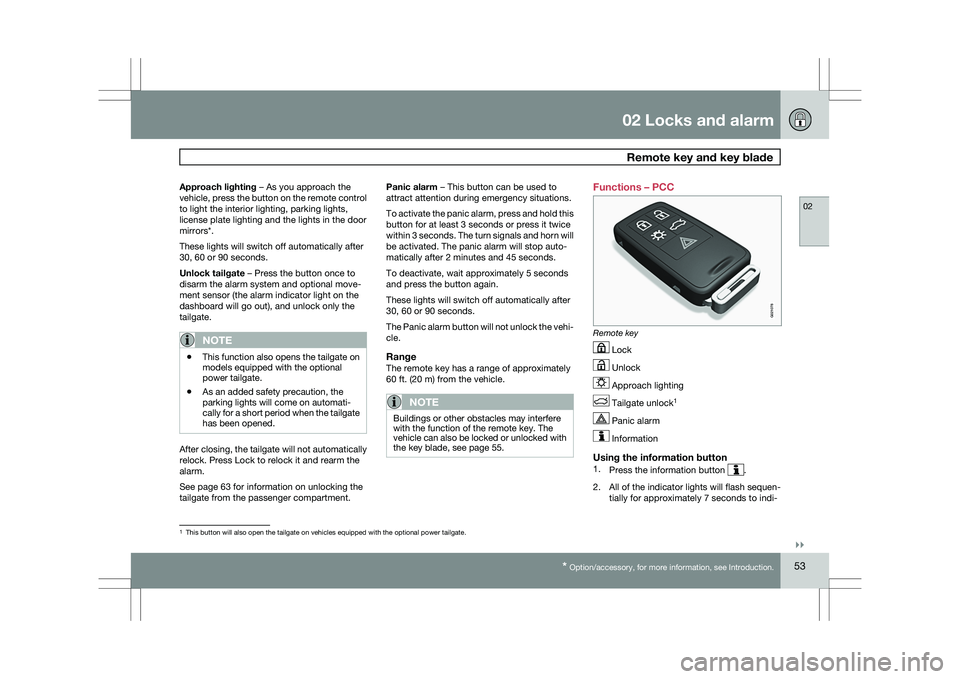
the key blade, see page 55. Functions – PCC
Remote key
Lock
Unlock
Approach lighting
Tailgate unlock
1 Panic alarm
Information
Using the information button1.
Press the information button .
2. All of the indicator lights will flash sequen- tially for approximately 7 seconds to indi- 1
This button will also open the tailgate on vehicles equipped with the op\
tional power tailgate. G021078
Page 60 of 297
02 Locks and alarmKeyless drive 02
58 Keyless drive (models with Personal
Car Communicator only)
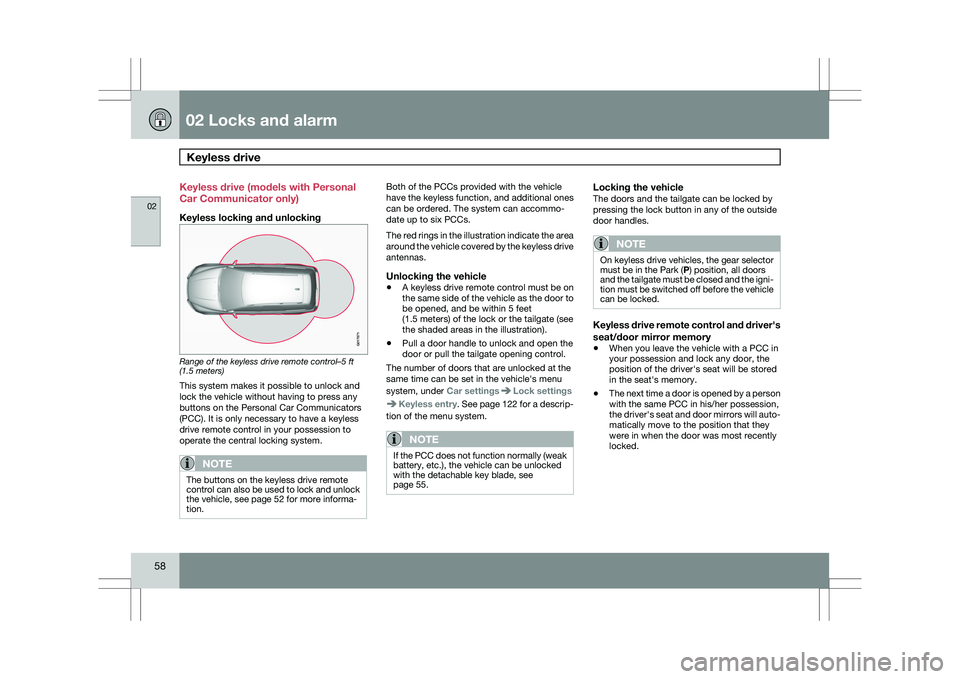
Keyless locking and unlocking
Range of the keyless drive remote control–5 ft
(1.5 meters)
This system makes it possible to unlock and
lock the vehicle without having to press any
buttons on the Personal Car Communicators
(PCC). It is only necessary to have a keyless
drive remote control in your possession to
operate the central locking system.
NOTE
The buttons on the keyless drive remote
control can also be used to lock and unlock
the vehicle, see page 52 for more informa-
tion. Both of the PCCs provided with the vehicle
have the keyless function, and additional ones
can be ordered. The system can accommo-
date up to six PCCs.
The red rings in the illustration indicate the area
around the vehicle covered by the keyless drive
antennas.
Unlocking the vehicle
\b
A keyless drive remote control must be on
the same side of the vehicle as the door to
be opened, and be within 5 feet
(1.5 meters) of the lock or the tailgate (see
the shaded areas in the illustration).
\b Pull a door handle to unlock and open the
door or pull the tailgate opening control.
The number of doors that are unlocked at the
same time can be set in the vehicle\fs menu
system, under Car settings Lock settings
Keyless entry. See page 122 for a descrip-
tion of the menu system.
NOTE If the PCC does not function normally (weak
battery, etc.), the vehicle can be unlocked
with the detachable key blade, see
page 55.
Locking the vehicleThe doors and the tailgate can be locked by
pressing the lock button in any of the outside
door handles.
NOTE On keyless drive vehicles, the gear selector
must be in the Park (P) position, all doors
and the tailgate must be closed and the igni-
tion must be switched off before the vehicle
can be locked.
Keyless drive remote control and driver\fs
seat/door mirror memory
\b
When you leave the vehicle with a PCC in
your possession and lock any door, the
position of the driver\fs seat will be stored
in the seat\fs memory.
\b The next time a door is opened by a person
with the same PCC in his/her possession,
the driver\fs seat and door mirrors will auto-
matically move to the position that they
were in when the door was most recently
locked. G017871
Page 61 of 297
02 Locks and alarm
Keyless drive02
}}
59
NOTEIf several people carrying PCCs approach
the vehicle at the same time, the driver\fs
seat and door mirrors will assume the posi-
tions they were in for the person who opens
the driver\fs door.
See page 82 for information on adjusting and
storing the seat\fs position in the seat memory.
Keyless drive information messagesIf all of the PCCs are removed from the vehicle
while the engine is running or if the ignition is
in mode II and all of the doors are closed, a
message will appear in the instrument panel
display and an audible signal will sound.
When at least one PCC has been returned to
the car, the message will be erased in the dis-
play and the audible signal will stop when:
\b
A door has been opened and closed
\b The PCC has been inserted in the ignition
slot
\b The READ button (See page 123 for the
location of this button) has been pressed.
CAUTION \b
Keyless drive remote controls should
never be left in the vehicle. In the event
of a break-in, a remote found in the
vehicle could make it possible to start
the engine.
\b Electromagnetic fields or metal
obstructions can interfere with the key-
less drive system. Avoid placing the
remote control near cellular phones,
metallic objects or e.g., in a metal brief-
case. USA – FCC ID:KR55WK48952, KR55WK48964
NOTE
This device complies with part 15 of the FCC
Rules. Operation is subject to the following two
conditions: (1) This device may not cause
harmful interference, and (2) this device must
accept interference received, including inter-
ference that may cause undesired operation.
CAUTION
Changes or modifications not expressly
approved by the manufacturer could void the
user\fs authority to operate the equipment.
Siemens VDO
5WK48891Tested To Comply With FCC Standards
For Automobile Use
Canada – IC:267T-5WK48952,
267T-5WK48964, 267T-5WK48891
NOTE
This device complies with RSS -210 of Industry
Canada. Operation is subject to the following
two conditions: (1) This device may not cause
harmful interference, and (2) this device must
accept interference received, including inter-
ference that may cause undesired operation.
CAUTION
Changes or modifications not expressly
approved by the manufacturer could void the
user\fs authority to operate the equipment.
Page 72 of 297

70
* Option/accessory, for more information, see Introduction. Instruments and controls
........................................................................\
72
Ignition modes ........................................................................\
................ 79
Seats........................................................................\
............................... 81
Steering wheel ........................................................................\
................ 86
Lighting ........................................................................\
........................... 87
Wipers and washers......................................................\
..........................
93
Power windows........................................................................\
............... 96
Mirrors........................................................................\
............................. 98
Power panorama moonroof*................................................................. 100
HomeLink® Wireless Control System* .................................................102
Starting the engine ........................................................................\
........ 105
Transmission ........................................................................\
................. 109
Brakes........................................................................\
........................... 112
Hill Descent Control (HDC).................................................................... 114
Parking brake ........................................................................\
................ 116
G02091
2