turn signal VOLVO XC60 2009 Owner´s Manual
[x] Cancel search | Manufacturer: VOLVO, Model Year: 2009, Model line: XC60, Model: VOLVO XC60 2009Pages: 297, PDF Size: 21.16 MB
Page 169 of 297
04 Comfort and driving pleasure
City Safety™ 04
}}
167driver is always responsible for main-
taining a safe distance to the vehicle
ahead.
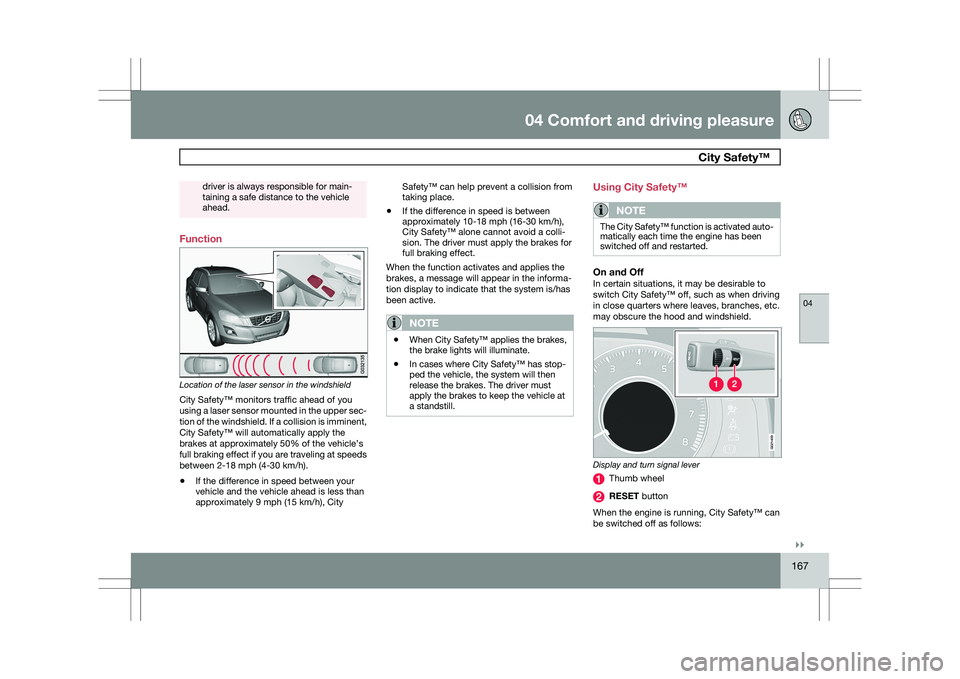
Function
Location of the laser sensor in the windshield
City Safety™ monitors traffic ahead of you
using a laser sensor mounted in the upper sec-
tion of the windshield. If a collision is imminent,
City Safety™ will automatically apply the
brakes at approximately 50% of the vehicle’s
full braking effect if you are traveling at speeds
between 2-18 mph (4-30 km/h).
\b
If the difference in speed between your
vehicle and the vehicle ahead is less than
approximately 9 mph (15 km/h), City Safety™ can help prevent a collision from
taking place.
\b If the difference in speed is between
approximately 10-18 mph (16-30 km/h),
City Safety™ alone cannot avoid a colli-
sion. The driver must apply the brakes for
full braking effect.
When the function activates and applies the
brakes, a message will appear in the informa-
tion display to indicate that the system is/has
been active.
NOTE \b
When City Safety™ applies the brakes,
the brake lights will illuminate.
\b In cases where City Safety™ has stop-
ped the vehicle, the system will then
release the brakes. The driver must
apply the brakes to keep the vehicle at
a standstill. Using City Safety™
NOTE
The City Safety™ function is activated auto-
matically each time the engine has been
switched off and restarted.
On and OffIn certain situations, it may be desirable to
switch City Safety™ off, such as when driving
in close quarters where leaves, branches, etc.
may obscure the hood and windshield.
Display and turn signal lever
Thumb wheel
RESET button
When the engine is running, City Safety™ can
be switched off as follows: G02140
9
Page 172 of 297
04 Comfort and driving pleasureCity Safety™ 04
170 Maximum pulse energy 2.64 μJ
Maximum average output 45 mW
Pulse length 33 ns
Divergence (horizontal × verti-
cal) 28° × 12°
NOTE
The function of aftermarket laser detectors
may be affected by City Safety\fs laser sen-
sor.
WARNING
The laser sensor emits light when the igni-
tion is in mode II or higher, even if City
Safety™ has been switched off.
WARNING Eye injury may occur if any of the following
points are not followed:
\b
It is essential that all pertinent instruc-
tions be followed when handling laser
instruments. Testing, repairing, remov-
ing, adjusting and/or replacing any
components in the laser sensor may
only be done by a trained and qualified
Volvo service technician.
\b Do not remove the laser sensor (includ-
ing removal of the lenses). A laser sen-
sor that has been removed belongs to
laser class 3B according to standard
IEC 60825-1. Devices in laser class 3B
present a risk of injury to the eyes.
\b The laser sensor’s connector must be
disconnected before the sensor is
removed from the windshield.
\b The laser sensor must be mounted in
place on the windshield before con-
necting the sensor’s connector.
\b Do not view the laser sensor (which
emits spreading, invisible laser beams)
with optical instruments from a distance
of less than 4 inches (100 mm). Symbols and messages in the display
When City Safety™ automatically applies the
brakes, one or more of the symbols in the main
instrument panel may illuminate and its asso-
ciated message will be displayed.
A text message can be erased by pressing
briefly on the READ button on the turn signal
lever.
Page 178 of 297
04 Comfort and driving pleasureAdaptive Cruise Control (ACC)* 04
176
* Option/accessory, for more information, see Introduction.
\b
if the radar sensor is obstructed and can-
not detect other vehicles, for example in
heavy rain, or if snow or other objects are
obscuring the radar sensor.
NOTE Keep the area in front of the radar sensor
clean.
\b
if the speed of vehicles ahead is signifi-
cantly different from your own speed.
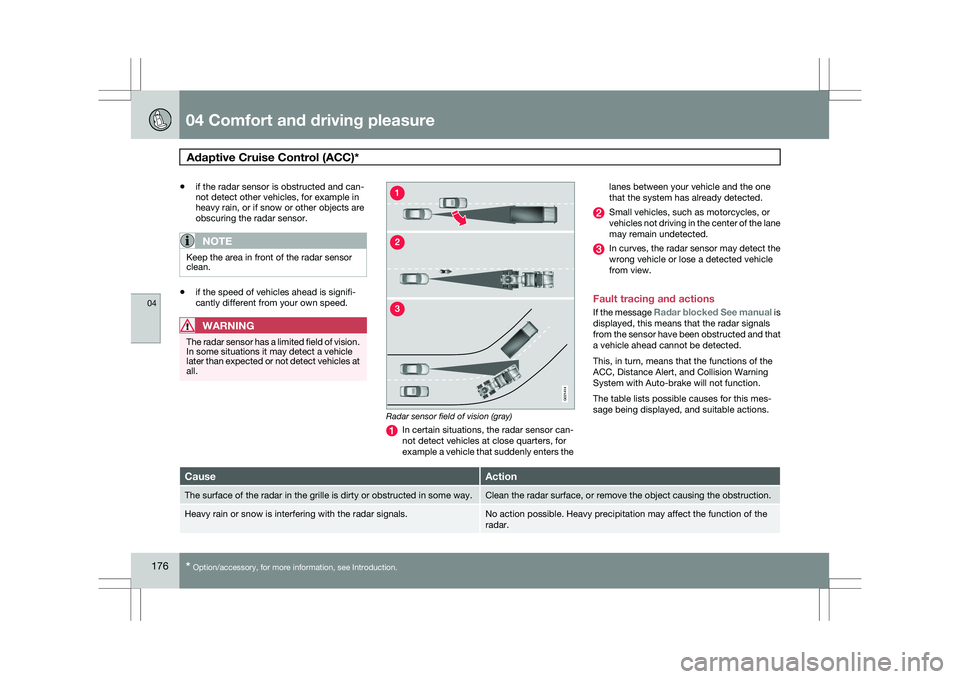
WARNING The radar sensor has a limited field of vision.
In some situations it may detect a vehicle
later than expected or not detect vehicles at
all.
Radar sensor field of vision (gray)
In certain situations, the radar sensor can-
not detect vehicles at close quarters, for
example a vehicle that suddenly enters thelanes between your vehicle and the one
that the system has already detected. Small vehicles, such as motorcycles, or
vehicles not driving in the center of the lane
may remain undetected.
In curves, the radar sensor may detect the
wrong vehicle or lose a detected vehicle
from view.
Fault tracing and actions
If the message Radar blocked See manual is
displayed, this means that the radar signals
from the sensor have been obstructed and that
a vehicle ahead cannot be detected.
This, in turn, means that the functions of the
ACC, Distance Alert, and Collision Warning
System with Auto-brake will not function.
The table lists possible causes for this mes-
sage being displayed, and suitable actions. Cause Action
The surface of the radar in the grille is dirty or obstructed in some wa\
y. Clean the radar surface, or remove the object causing the obstruction.
Heavy rain or snow is interfering with the radar signals. No action possible. Heavy precipitation may affect the function of the
radar. G02141
4
Page 179 of 297
04 Comfort and driving pleasure
Adaptive Cruise Control (ACC)*04
}}
* Option/accessory, for more information, see Introduction. 177Cause Action
Swirling water or snow from the surface of the road may interfere with
the radar signals. No action possible. A very wet or snow-covered road surface may affect
the function of the radar.
The surface of the radar is clean but the message remains in the display\
. Wait a short time. It may take several minutes for the radar to detect t\
hat
it is no longer obstructed.
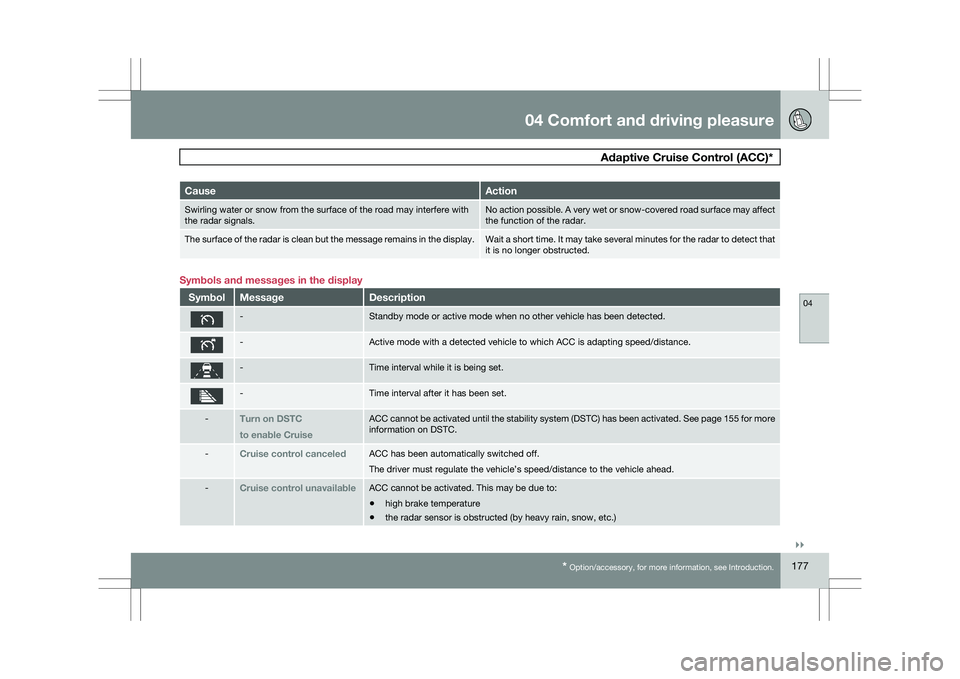
Symbols and messages in the display
Symbol Message Description
- Standby mode or active mode when no other vehicle has been detected.
- Active mode with a detected vehicle to which ACC is adapting speed/dista\
nce.
- Time interval while it is being set.
- Time interval after it has been set.
-
Turn on DSTC
to enable Cruise ACC cannot be activated until the stability system (DSTC) has been act\
ivated. See page
155 for more
information on DSTC. -
Cruise control canceled ACC has been automatically switched off.
The driver must regulate the vehicle’s speed/distance to the vehicle \
ahead.
-
Cruise control unavailable ACC cannot be activated. This may be due to:
\b
high brake temperature
\b the radar sensor is obstructed (by heavy rain, snow, etc.)
Page 185 of 297
04 Comfort and driving pleasure
Driver Alert System*04
}}
* Option/accessory, for more information, see Introduction. 183
Operating DAC
Certain settings can be made from the menu
system controlled from the center instrument
panel, see page 122 for more information on
the menu system.
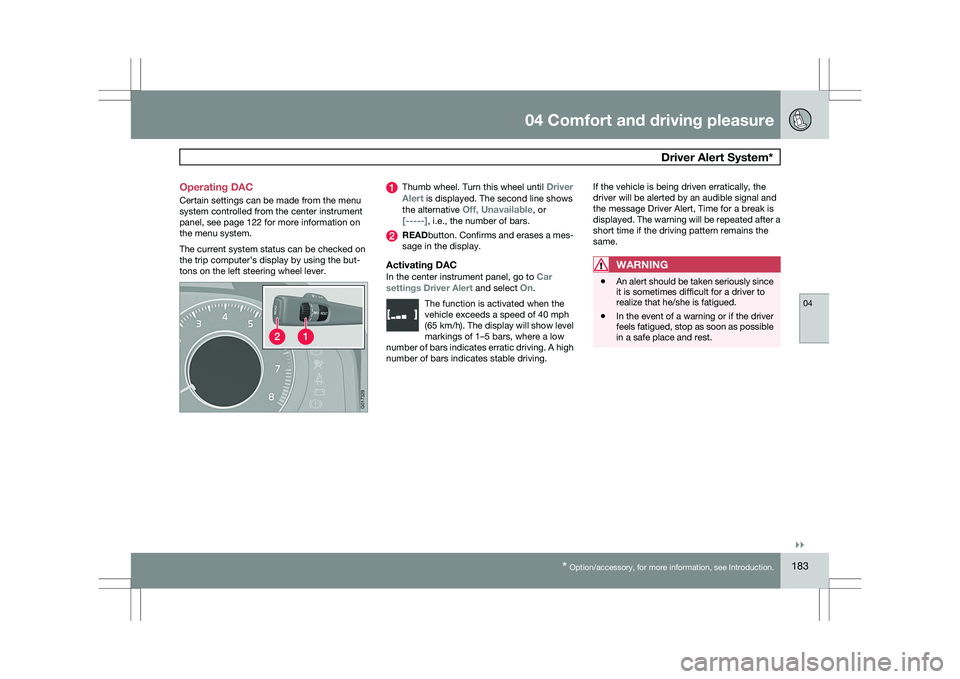
The current system status can be checked on
the trip computer’s display by using the but-
tons on the left steering wheel lever. Thumb wheel. Turn this wheel until
Driver
Alert is displayed. The second line shows
the alternative Off, Unavailable, or
[-----], i.e., the number of bars. READbutton. Confirms and erases a mes-
sage in the display.
Activating DACIn the center instrument panel, go to
Car
settings Driver Alert and select On.
The function is activated when the
vehicle exceeds a speed of 40 mph
(65 km/h). The display will show level
markings of 1–5 bars, where a low
number of bars indicates erratic driving. A high
number of bars indicates stable driving. If the vehicle is being driven erratically, the
driver will be alerted by an audible signal and
the message Driver Alert, Time for a break is
displayed. The warning will be repeated after a
short time if the driving pattern remains the
same.WARNING
\b
An alert should be taken seriously since
it is sometimes difficult for a driver to
realize that he/she is fatigued.
\b In the event of a warning or if the driver
feels fatigued, stop as soon as possible
in a safe place and rest. G01732
9
Page 187 of 297
04 Comfort and driving pleasure
Driver Alert System*04
}}
* Option/accessory, for more information, see Introduction. 185
Lane Departure Warning (LDW)–
general information
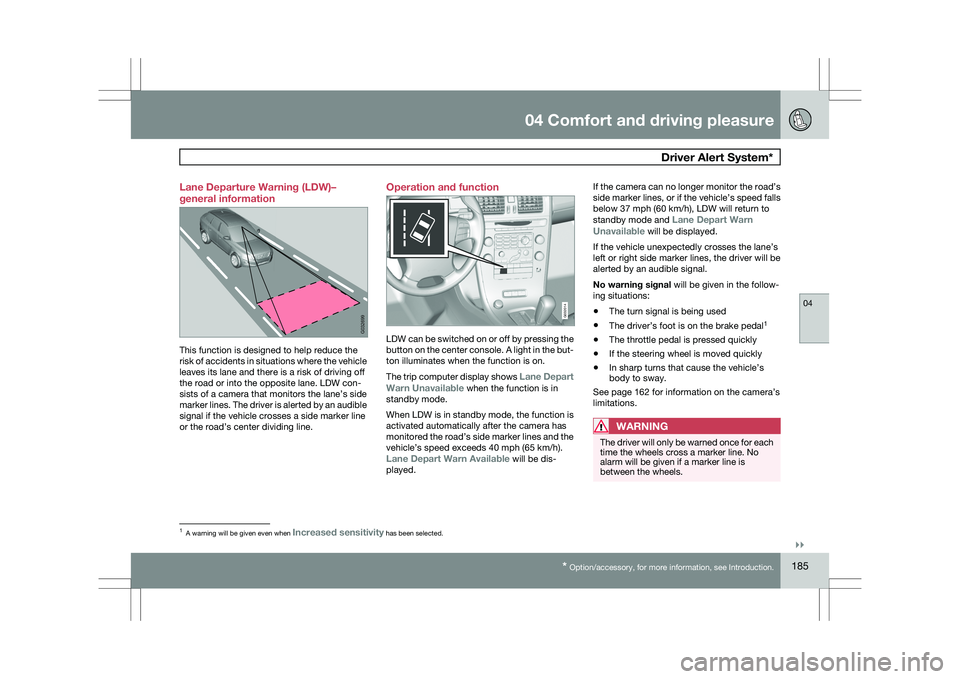
This function is designed to help reduce the
risk of accidents in situations where the vehicle
leaves its lane and there is a risk of driving off
the road or into the opposite lane. LDW con-
sists of a camera that monitors the lane’s side
marker lines. The driver is alerted by an audible
signal if the vehicle crosses a side marker line
or the road’s center dividing line. Operation and function
LDW can be switched on or off by pressing the
button on the center console. A light in the but-
ton illuminates when the function is on.
The trip computer display shows Lane Depart
Warn Unavailable when the function is in
standby mode.
When LDW is in standby mode, the function is
activated automatically after the camera has
monitored the road’s side marker lines and the
vehicle’s speed exceeds 40 mph (65 km/h).
Lane Depart Warn Available will be dis-
played.If the camera can no longer monitor the road’s
side marker lines, or if the vehicle’s speed falls
below 37 mph (60 km/h), LDW will return to
standby mode and
Lane Depart Warn
Unavailable will be displayed.
If the vehicle unexpectedly crosses the lane’s
left or right side marker lines, the driver will be
alerted by an audible signal.
No warning signal will be given in the follow-
ing situations:
\b The turn signal is being used
\b The driver’s foot is on the brake pedal 1
\b The throttle pedal is pressed quickly
\b If the steering wheel is moved quickly
\b In sharp turns that cause the vehicle’s
body to sway.
See page 162 for information on the camera’s
limitations.
WARNING The driver will only be warned once for each
time the wheels cross a marker line. No
alarm will be given if a marker line is
between the wheels.
1
A warning will be given even when Increased sensitivity has been selected. G032699 G032014
Page 234 of 297
06 Maintenance and specificationsReplacing bulbs 06
232
* Option/accessory, for more information, see Introduction.
Introduction
All bulb specifications are listed on page 238.
The following bulbs should only be replaced by
a trained and qualified Volvo service techni-
cian:
\b
Dome lighting
\b Reading lights
\b Glove compartment lighting
\b Turn signals in the door mirrors
\b Approach lighting in the door mirror
\b Parking lights
\b Rear side parking lights
\b Active Dual Xenon and LED bulbs
NOTE For information regarding any other bulbs
not mentioned in this section, please con-
tact your Volvo retailer or a trained and
authorized Volvo service technician.
WARNING \b
Active Dual Xenon headlights* – due to
the high voltage used by these head-
lights, these bulbs should only be
replaced by a trained and qualified
Volvo service technician.
\b Turn off the lights and remove the
remote key from the ignition before
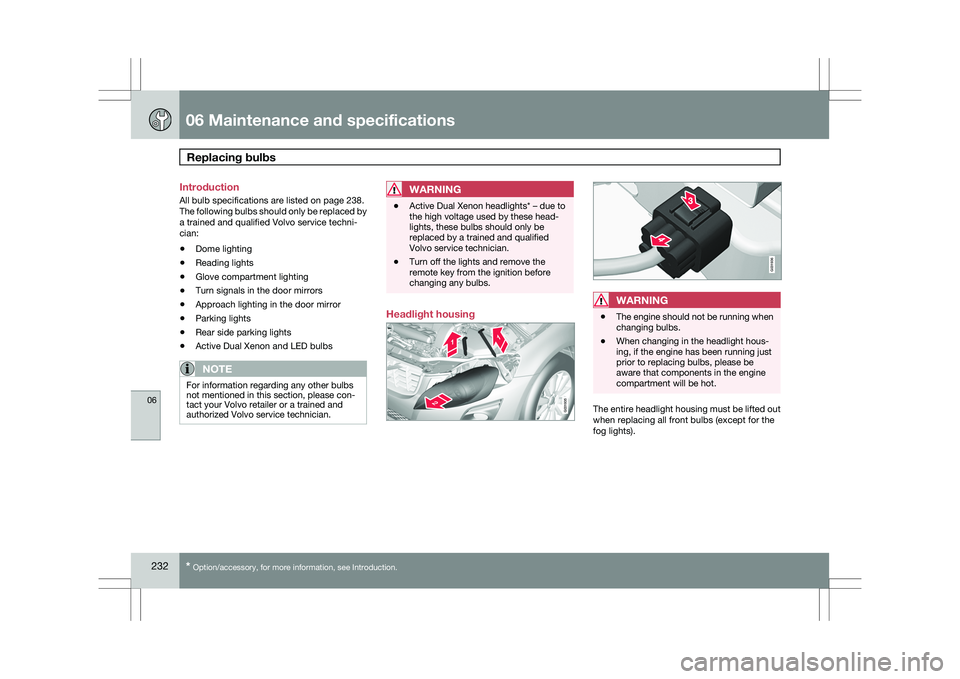
changing any bulbs. Headlight housing
WARNING
\b
The engine should not be running when
changing bulbs.
\b When changing in the headlight hous-
ing, if the engine has been running just
prior to replacing bulbs, please be
aware that components in the engine
compartment will be hot. The entire headlight housing must be lifted out
when replacing all front bulbs (except for the
fog lights). G031935 G031936
Page 237 of 297
06 Maintenance and specifications
Replacing bulbs06
}}
235
8.
Reconnect the wiring connector to the bulb
holder.
9. Put the cover back into position and rein- stall the headlight housing.
Extra high beam 21. Remove the headlight housing from the
vehicle (see page 233).
2. Remove the cover over the bulbs (see page 234).
3. Disconnect the wiring connector from the bulb holder.
4. Remove the bulb holder from the headlight
housing by pulling it straight out. 5.
Insert a new bulb in the holder until it snaps
in place. It can only be inserted in one way.
6. Press the bulb holder into position in the headlight housing.
7. Reconnect the wiring connector to the bulb
holder.
8. Put the cover back into position and rein- stall the headlight housing.
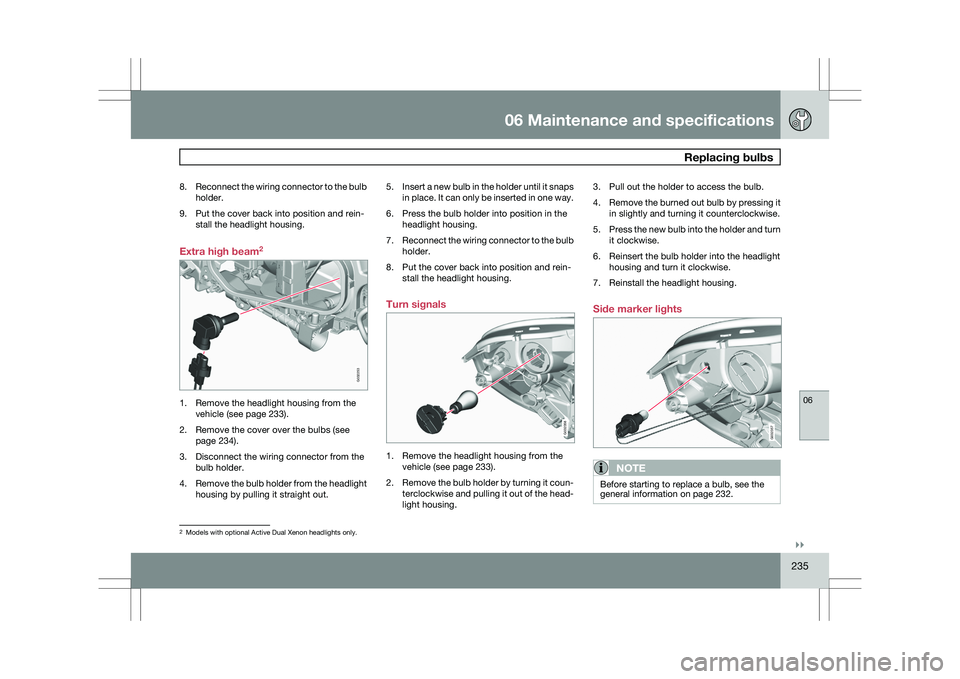
Turn signals 1. Remove the headlight housing from the
vehicle (see page 233).
2. Remove the bulb holder by turning it coun-
terclockwise and pulling it out of the head-
light housing. 3. Pull out the holder to access the bulb.
4.
Remove the burned out bulb by pressing it
in slightly and turning it counterclockwise.
5. Press the new bulb into the holder and turn
it clockwise.
6. Reinsert the bulb holder into the headlight housing and turn it clockwise.
7. Reinstall the headlight housing.
Side marker lights
NOTE Before starting to replace a bulb, see the
general information on page 232.
2
Models with optional Active Dual Xenon headlights only. G032253 G032358 G032357
Page 239 of 297

06 Maintenance and specifications
Replacing bulbs06
}}
237Brake light
Backup light
Turn signal
Brake lights (LED)
NOTE
If an error message remains in the display
after a faulty bulb has been replaced, con-
tact an authorized Volvo workshop.
Brake lights and Taillights
The brake lights and taillights are replaced from
inside the cargo area.
NOTE Before starting to replace a bulb, see the
general information on page 232.
1. Open the panel.
2.
Remove the bulb holder by turning it coun-
terclockwise.
3. Remove the burned out bulb by pressing it
in and turning it counterclockwise.
4. Insert a new bulb, press it in and turn it clockwise.
5. Reinsert the bulb holder and turn it clock- wise.
License plate lighting 1. Remove the screws with a screwdriver.2. Carefully detach the entire bulb housing
and pull it out.
3. Replace the bulb.
4. Reinsert the entire bulb housing and screw
it into place.
Footwell lighting 1.
Insert a screwdriver at the short end of the
lens closest to the tunnel console (the cen-
ter of the vehicle) and turn gently so that
the lens comes loose. (Applies to both
lights).
2. Turn carefully until the lens comes loose.
3. Replace the bulb.
4. Press the lens back into place. G032485 G031940 G031941
Page 297 of 297
07 Index07
295
Turn signals
............................................... 90
changing bulbs ................................... 235
indicator lights ...................................... 75
Two-stage booster cushion .......................45
U Uniform Tire Quality Grading
...................262
Unlocking the vehicle
................................. 52
Upholstery care ....................................... 276
V Vanity mirror............................................. 199
changing bulbs ................................... 238
Vehicle dimensions .................................. 281
Vehicle Event Data ............................... 7, 224
Vehicle loading
................................. 210, 261
roof loads............................................ 211
Vehicle maintenance ................................ 224
performed by the owner..................... 225
Vehicle weights ........................................ 282
Volvo and the environment .......................... 9Volvo Inflatable Curtain
..............................28
Volvo maintenance .................................. 224
Volvo On Call Roadside Assistance ........287
Volvo programs........................................
287
W Warning flashers, hazard
...........................89
Warning lights ................................ 73, 74, 75
Warning symbol ......................................... 77
Warning system, collision ........................160
Warranties................................................ 224
Washer fluid..................................... 241, 285
Washers headlight ............................................... 94
windshield............................................. 93
Water, driving through .............................203
Waxing..................................................... 276
Weights.................................................... 282
Wheels..................................................... 253
changing ..................................... 264, 265
storing ................................................. 254
Whiplash Protection System .....................29Windows
power.............................................. 96, 97
Windshield rain sensor ............................................ 93
washers................................................ 94
wipers/washers..................................... 93
Windshield washer fluid................... 241, 285
Windshield wipers....................................
240
Wiper blades replacing tailgate wiper ......................241
replacing windshield wipers ...............240