warning VOLVO XC60 2016 Owner´s Manual
[x] Cancel search | Manufacturer: VOLVO, Model Year: 2016, Model line: XC60, Model: VOLVO XC60 2016Pages: 398, PDF Size: 9.98 MB
Page 201 of 398
07 Driver support
07
}}
199
Setting a time interval
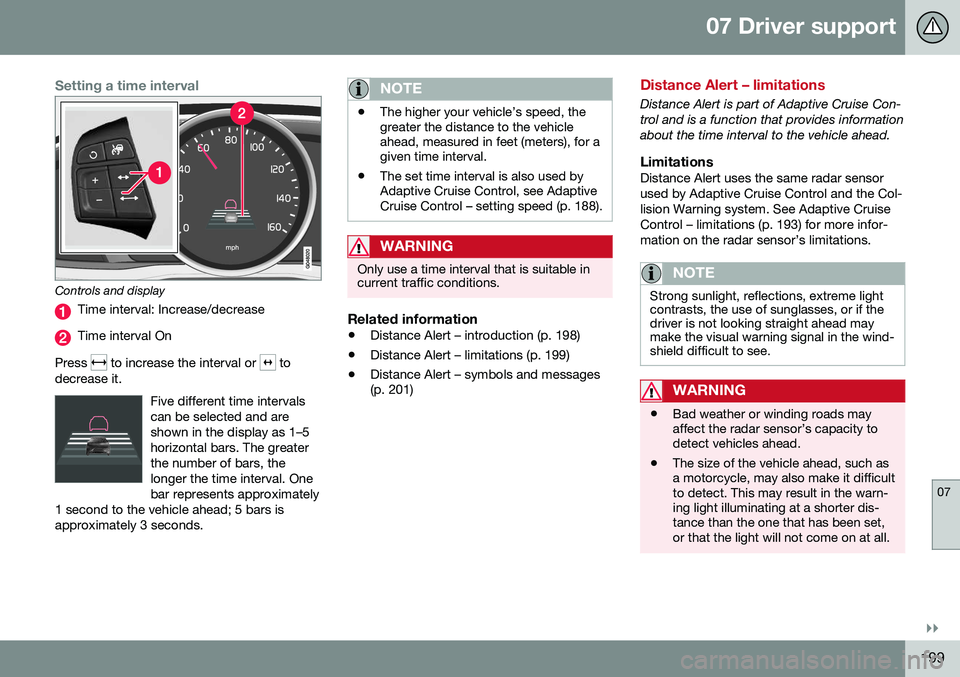
Controls and display
Time interval: Increase/decrease
Time interval On
Press
to increase the interval or to
decrease it.
Five different time intervals can be selected and areshown in the display as 1–5horizontal bars. The greaterthe number of bars, thelonger the time interval. Onebar represents approximately
1 second to the vehicle ahead; 5 bars isapproximately 3 seconds.
NOTE
• The higher your vehicle’s speed, the greater the distance to the vehicleahead, measured in feet (meters), for agiven time interval.
• The set time interval is also used byAdaptive Cruise Control, see AdaptiveCruise Control – setting speed (p. 188).
WARNING
Only use a time interval that is suitable in current traffic conditions.
Related information
•
Distance Alert – introduction (p. 198)
• Distance Alert – limitations (p. 199)
• Distance Alert – symbols and messages (p. 201)
Distance Alert – limitations
Distance Alert is part of Adaptive Cruise Con- trol and is a function that provides informationabout the time interval to the vehicle ahead.
LimitationsDistance Alert uses the same radar sensorused by Adaptive Cruise Control and the Col-lision Warning system. See Adaptive CruiseControl – limitations (p. 193) for more infor-mation on the radar sensor’s limitations.
NOTE
Strong sunlight, reflections, extreme light contrasts, the use of sunglasses, or if thedriver is not looking straight ahead maymake the visual warning signal in the wind-shield difficult to see.
WARNING
•Bad weather or winding roads may affect the radar sensor’s capacity todetect vehicles ahead.
• The size of the vehicle ahead, such asa motorcycle, may also make it difficultto detect. This may result in the warn-ing light illuminating at a shorter dis-tance than the one that has been set,or that the light will not come on at all.
Page 203 of 398
07 Driver support
07
201
Distance Alert – symbols and messages
Distance Alert is part of Adaptive Cruise Con- trol and is a function that provides informationabout the time interval to the vehicle ahead.
Symbols and text messagesA text message can be erased by pressingbriefly on the OK button on the turn signal
lever.
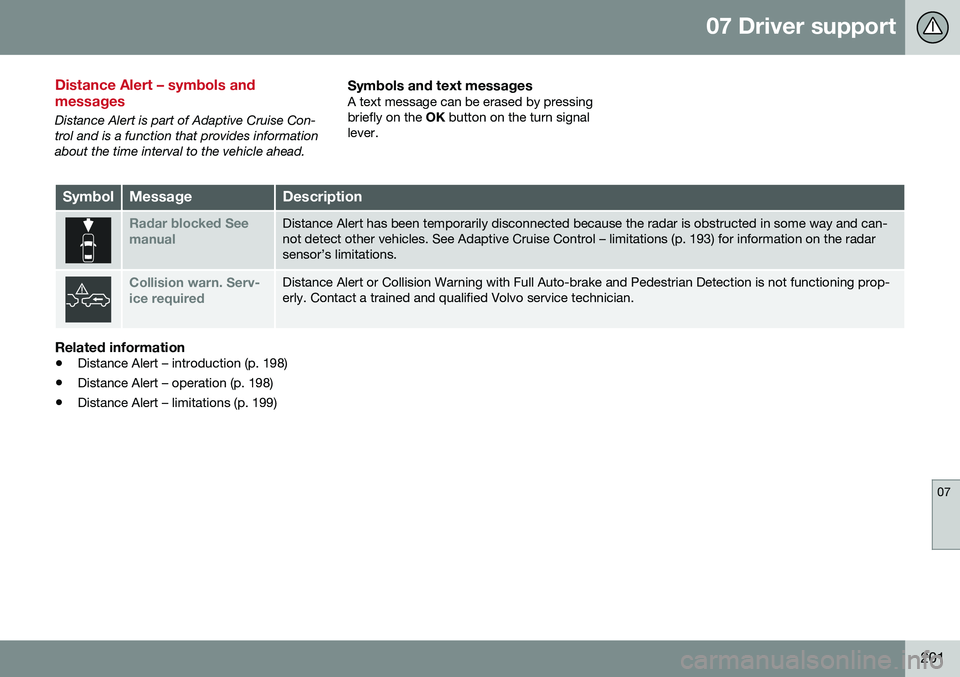
SymbolMessageDescription
Radar blocked See manualDistance Alert has been temporarily disconnected because the radar is obstructed in some way and can- not detect other vehicles. See Adaptive Cruise Control – limitations (p. 193) for information on the radarsensor’s limitations.
Collision warn. Serv- ice requiredDistance Alert or Collision Warning with Full Auto-brake and Pedestrian Detection is not functioning prop- erly. Contact a trained and qualified Volvo service technician.
Related information
• Distance Alert – introduction (p. 198)
• Distance Alert – operation (p. 198)
• Distance Alert – limitations (p. 199)
Page 204 of 398
07 Driver support
07
202
City Safety – introduction
City Safety™5
is a support system designed
to help the driver avoid low speed collisions when driving in slow-moving, stop-and-gotraffic. City Safety™ is not active if your vehicle’s speed is below approximately 2 mph(4 km/h). This means that City Safety™ willnot react if your vehicle approaches anothervehicle at very low speed, for example, whenparking. The function is active at speeds up to approximately 30 mph (50 km/h) and assiststhe driver by applying the brakes automati-cally, thereby avoiding or helping to reducethe effects of a collision. City Safety™ is designed to intervene as late as possible to help avoid unnecessary activa-tion. City Safety™ triggers brief, forceful braking if a low-speed collision is imminent. However,the system will not intervene in situationswhere the driver actively steers the vehicle orapplies the brakes, even if a collision cannotbe avoided. This is done in order to alwaysgive the driver’s actions highest priority. City Safety™ activates in situations where the driver has not applied the brakes in time, which means that the system cannot help thedriver in all situations. City Safety™ should not be used to alter the way in which the driver operates the vehicle.The driver should never rely solely on thissystem to safely stop the vehicle. Normally, the occupants of the vehicle will not be aware of City Safety™ except whenthe system intervenes when a low-speed col-lision is imminent. If the vehicle is also equipped with the optional Collision Warning with Full Auto-brake and Pedestrian Detection system, thetwo systems interact. For more informationabout the Collision Warning with Auto-brakesystem, see Collision warning – introduction(p. 209) .
WARNING
•
City Safety™ is a supplemental aid to the driver. It can never replace thedriver’s attention to traffic conditionsor his/her responsibility for operatingthe vehicle in a safe manner.
• City Safety™ does not function in alldriving situations or in all traffic,weather or road conditions.
WARNING
•
City Safety™ only reacts to vehicles traveling in the same direction as yourvehicle and does not react to smallvehicles or motorcycles or to people oranimals.
• City Safety™ is not activated whenyour vehicle is backing up.
• City Safety™ functions at speeds upto 30 mph (50 km/h). This system canhelp prevent a collision if the
differ-
ence in speed between your vehicle
and the vehicle ahead is less than9 mph (15 km/h). If the difference inspeed is greater, a collision cannot beavoided but the speed at which thecollision occurs can be reduced. Thedriver must apply the vehicle’s brakesfor full braking effect.
• City Safety™ will not intervene in apotential collision situation if the vehi-cle is being driven actively. The driveris always responsible for maintaining asafe distance to a vehicle or objectahead.
Related information
•
City Safety – function (p. 203)
• City Safety – operation (p. 204)
• City Safety – limitations (p. 204)
5
City Safety is a registered trademark of the Volvo Car Corporation
Page 206 of 398
07 Driver support
07
204
City Safety – operation
Using City Safety™
NOTE
The City Safety™ function is activated automatically each time the engine hasbeen switched off and restarted.
On and OffIn certain situations, it may be desirable to switch City Safety™ off, such as when drivingin close quarters where leaves, branches, etc.may obscure the hood and windshield. When the engine is running, City Safety™ can be switched off as follows: Press My Car in the center console control
panel and go to
SettingsCar settings
Driver support systemsCity Safety.
Select
Off.
If the engine is switched off, City Safety™ will reactivate when the engine is restarted.
WARNING
The laser sensor emits light when the igni- tion is in mode II or higher, even if City
Safety™ has been switched off.
To switch City Safety™ on again:
• Follow the same procedure as for switch- ing City Safety™ off but select
On.
Related information
•City Safety – introduction (p. 202)
• City Safety – function (p. 203)
• City Safety – limitations (p. 204)
• City Safety – troubleshooting (p. 205)
• City Safety – symbols and messages (p. 207)
• City Safety – Laser sensor (p. 208)
• My Car – introduction (p. 76)
City Safety – limitations
Limitations
WARNING
The laser sensor has certain limitations and its function may be reduced (or it maynot function at all) in conditions such asheavy rain or snowfall, or by dense fog orthick, blowing dust or snow. Condensa-tion, dirt, ice or snow on the windshieldmay also interfere with the sensor’s func-tion.
The sensor used by City Safety™ is designed to detect cars and other larger motor vehiclesahead of your vehicle in both daylight anddarkness. Objects such as warning flags hanging from long objects on the roof or accessories suchas auxiliary lights or protective arches on thefront of the vehicle that are higher than thehood may also impede the sensor’s function. Braking distance to the vehicle ahead increa- ses on slippery road surfaces, which mayreduce City Safety’s capacity to avoid a colli-sion. In situations like this, the stability sys-tem (see Stability system – introduction(p. 174)) will help provide the best possiblebraking capacity and stability. City Safety™ emits a laser beam and meas- ures the way in which the light is reflected.
Page 210 of 398
07 Driver support
07
208
City Safety – Laser sensor
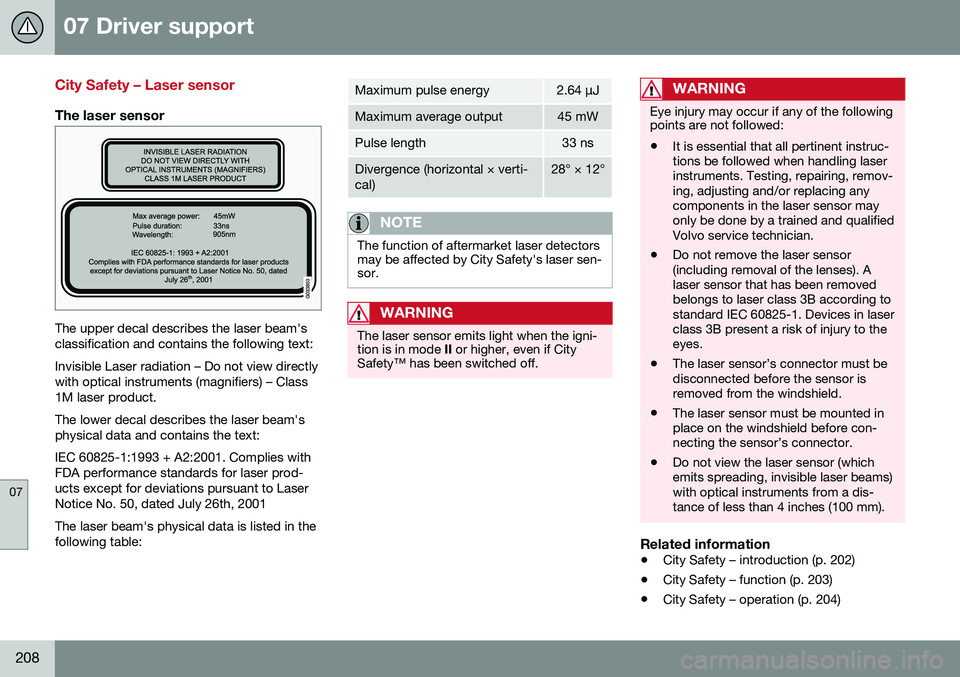
The laser sensor
The upper decal describes the laser beam's classification and contains the following text: Invisible Laser radiation – Do not view directly with optical instruments (magnifiers) – Class1M laser product. The lower decal describes the laser beam's physical data and contains the text: IEC 60825-1:1993 + A2:2001. Complies with FDA performance standards for laser prod-ucts except for deviations pursuant to LaserNotice No. 50, dated July 26th, 2001 The laser beam's physical data is listed in the following table:
Maximum pulse energy2.64 μJ
Maximum average output45 mW
Pulse length33 ns
Divergence (horizontal × verti- cal)28° × 12°
NOTE
The function of aftermarket laser detectors may be affected by City Safety's laser sen-sor.
WARNING
The laser sensor emits light when the igni- tion is in mode II or higher, even if City
Safety™ has been switched off.
WARNING
Eye injury may occur if any of the following points are not followed: • It is essential that all pertinent instruc- tions be followed when handling laserinstruments. Testing, repairing, remov-ing, adjusting and/or replacing anycomponents in the laser sensor mayonly be done by a trained and qualifiedVolvo service technician.
• Do not remove the laser sensor(including removal of the lenses). Alaser sensor that has been removedbelongs to laser class 3B according tostandard IEC 60825-1. Devices in laserclass 3B present a risk of injury to theeyes.
• The laser sensor’s connector must bedisconnected before the sensor isremoved from the windshield.
• The laser sensor must be mounted inplace on the windshield before con-necting the sensor’s connector.
• Do not view the laser sensor (whichemits spreading, invisible laser beams)with optical instruments from a dis-tance of less than 4 inches (100 mm).
Related information
•
City Safety – introduction (p. 202)
• City Safety – function (p. 203)
• City Safety – operation (p. 204)
Page 211 of 398
07 Driver support
07
}}
209
•
City Safety – limitations (p. 204)
• City Safety – troubleshooting (p. 205)
• City Safety – symbols and messages (p. 207)
Collision warning – introduction
Pedestrian and Cyclist Detection with Full Auto Brake is designed to assist the driver ifthere is a risk of a collision with a pedestrian,a cyclist, a vehicle ahead that is at a standstillor one that is moving in the same direction asyour vehicle. This system consists of the following three functions: • Collision Warning
warns the driver of a
potential collision situation.
• Brake Support
helps the driver brake
efficiently in a critical situation.
• Auto-brake
brakes the vehicle automati-
cally if a collision with a pedestrian, a cyclist or another vehicle cannot be avoi-ded and the driver does not apply thebrakes in time or steer around the per-son/vehicle. Auto-brake can help preventa collision or reduce the speed at which acollision occurs.
Since Pedestrian and Cyclist Detection with Full Auto Brake is activated in circumstanceswhere the driver should have begun brakingmuch sooner, the system will not be able toassist the driver in all situations. This system is designed to activate as late as possible to help avoid unnecessary interven-tion. The system should not be used in such a way that the driver changes his/her way of operat- ing the vehicle. If the driver relies entirely onthe system, the chances of an accident even-tually occurring increase considerably. The Pedestrian and Cyclist Detection with Full Auto Brake and City Safety™ systems sup-plement each other. See City Safety – intro-duction (p. 202) for detailed information aboutCity Safety™.
WARNING
No automatic system can be guaranteed to function 100% correctly in all situations.For that reason, never test the Auto-brakesystem by driving toward a person orobject. This could result in serious injury ordeath.
Page 212 of 398
||
07 Driver support
07
210* Option/accessory, for more information, see Introduction.
WARNING
• Pedestrian and Cyclist Detection with Full Auto Brake does not work in alldriving, traffic, weather and road con-ditions. It does not react to vehiclesnot traveling in the same direction asyour vehicle.
• Pedestrian and Cyclist Detection withFull Auto Brake does not react to ani-mals.
• Warnings are only provided when therisk of collision is high. The "Function"section provides information aboutlimitations that the driver must beaware of before using Collision Warn-ing.
• Pedestrian and Cyclist Detection withFull Auto Brake will not provide awarning or brake the vehicle forpedestrians or cyclists at speedsabove 50 mph (80 km/h).
WARNING
•
Pedestrian and Cyclist Detection with Full Auto Brake will not provide awarning or brake the vehicle forpedestrians in darkness or in tunnels,even if there is street lighting in thearea.
• The auto-brake function can help pre-vent a collision or reduce the speed atimpact but the driver should alwaysapply the brakes for the best possiblebraking effect, even if auto-brake isactively applying the brakes.
• Never wait for a collision warning. Thissystem is designed to be a supple-mentary driving aid. It is not, however,intended to replace the driver's atten-tion and judgement. The driver isresponsible for maintaining a safe dis-tance and speed, even when the colli-sion warning system is in use.
• Maintenance of the Pedestrian andCyclist Detection with Full Auto Brakesystem's components must only beperformed by a trained and qualifiedVolvo technician.
Related information
•
Collision warning* – function (p. 211)
• Collision warning* – operation (p. 212)
• Collision warning* – Pedestrian detection (p. 214) •
Collision warning* – Cyclist detection(p. 213)
• Collision warning* – limitations (p. 215)
• The camera’s limitations (p. 217)
• The camera’s limitations (p. 217)
• Collision warning – troubleshooting(p. 218)
• Collision warning – symbols and mes-sages (p. 220)
Page 213 of 398
07 Driver support
07
* Option/accessory, for more information, see Introduction.211
Collision warning* – function
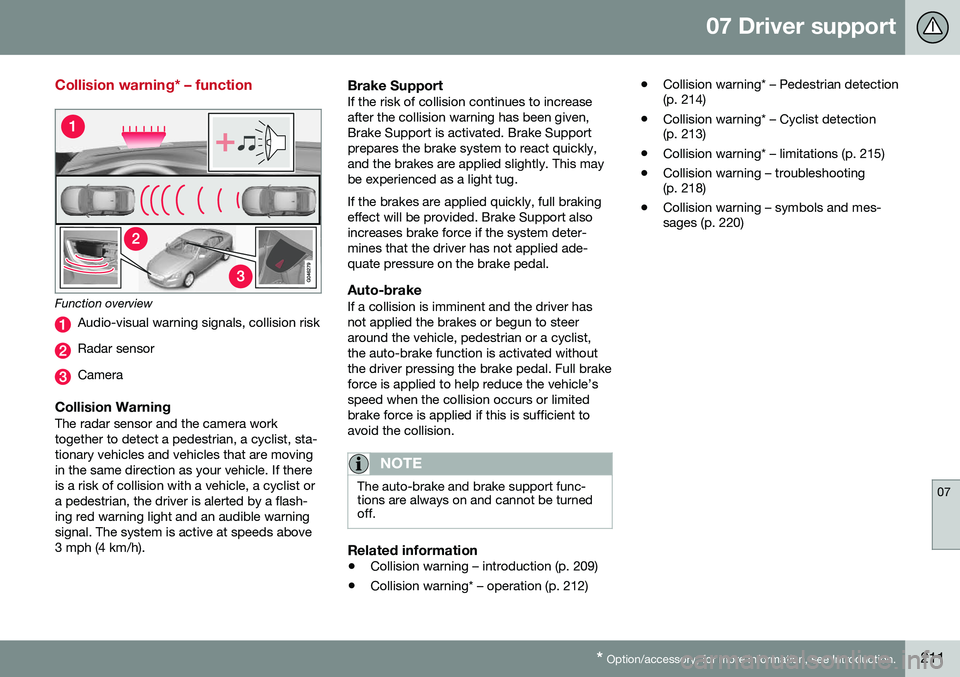
Function overview
Audio-visual warning signals, collision risk
Radar sensor
Camera
Collision WarningThe radar sensor and the camera work together to detect a pedestrian, a cyclist, sta-tionary vehicles and vehicles that are movingin the same direction as your vehicle. If thereis a risk of collision with a vehicle, a cyclist ora pedestrian, the driver is alerted by a flash-ing red warning light and an audible warningsignal. The system is active at speeds above3 mph (4 km/h).
Brake SupportIf the risk of collision continues to increaseafter the collision warning has been given,Brake Support is activated. Brake Supportprepares the brake system to react quickly,and the brakes are applied slightly. This maybe experienced as a light tug. If the brakes are applied quickly, full braking effect will be provided. Brake Support alsoincreases brake force if the system deter-mines that the driver has not applied ade-quate pressure on the brake pedal.
Auto-brakeIf a collision is imminent and the driver hasnot applied the brakes or begun to steeraround the vehicle, pedestrian or a cyclist,the auto-brake function is activated withoutthe driver pressing the brake pedal. Full brakeforce is applied to help reduce the vehicle’sspeed when the collision occurs or limitedbrake force is applied if this is sufficient toavoid the collision.
NOTE
The auto-brake and brake support func- tions are always on and cannot be turnedoff.
Related information
• Collision warning – introduction (p. 209)
• Collision warning* – operation (p. 212) •
Collision warning* – Pedestrian detection (p. 214)
• Collision warning* – Cyclist detection(p. 213)
• Collision warning* – limitations (p. 215)
• Collision warning – troubleshooting(p. 218)
• Collision warning – symbols and mes-sages (p. 220)
Page 214 of 398
07 Driver support
07
212* Option/accessory, for more information, see Introduction.
Collision warning* – operation
Settings are made by pressing MY CAR on
the center console control panel and using the menus displayed.
Activating/deactivating both warning
signals
To switch the system's audible and visual
signals on or off at the same time, press MY
CAR on the center console control panel and
go to
SettingsCar settingsDriver
support systems
Collision Warning. If
Pedestrian and Cyclist Detection with Full Auto Brake is on, the system will perform aself-test each time the engine is started bybriefly illuminating the warning light. See MyCar – introduction (p. 76) for a description ofthe menu system. When the engine is switched on, the system setting that was being used when it wasswitched off will be the default setting.
NOTE
The auto-brake and pedestrian/cyclist detection features are always on, even ifthe audible and visual warning signalshave been deactivated.
Activating/deactivating the audible warning signal only
The audible warning signal can be activated/ deactivated by pressing MY CAR on the cen- ter console control panel and going to
SettingsCar settingsDriver support
systems
Warning sound if risk of
collision.
Setting a warning distanceThis setting determines the distance at which the visual and audible warnings are triggered. Select
Long, Normal or Short by pressing
MY CAR on the center console control panel
and going to
SettingsCar settings
Driver support systemsCollision
Warning
Warning distance.
The warning distance determines the level of sensitivity used by the system. The warning distance
Long provides an earlier warning.
Begin by using Long and if the system gives
too many warnings, try changing to Normal.
WARNING
• The setting Short should only be used
in situations where traffic is light and moving at low speeds.
• Pedestrian and Cyclist Detection withFull Auto Brake alerts the driver to therisk of a collision but this function can-not reduce the driver’s reaction time.
• For the system to be as effective aspossible, it is recommended that Dis-tance Alert be set to 4 or 5, see Dis-tance Alert – operation (p. 198).
NOTE
•When Adaptive Cruise Control is used, the warning light and signal will beused by that function, even if thewarnings provided by Pedestrian andCyclist Detection with Full Auto Brakehave been deactivated by the driver.
• In situations where traffic is moving atconsiderably different speeds, or if thevehicle ahead brakes suddenly, warn-ings may be considered to be late, even if the setting
Long has been
selected.
Checking settingsThe current system settings can be checked by pressing MY CAR on the center console
control panel and going to
SettingsCar
settings
Driver support systemsCollision Warning.
Related information
• Collision warning – introduction (p. 209)
• Collision warning* – function (p. 211)
• Collision warning* – Pedestrian detection (p. 214)
• Collision warning* – Cyclist detection(p. 213)
• Collision warning* – limitations (p. 215)
• The camera’s limitations (p. 217)
Page 215 of 398
07 Driver support
07
}}
* Option/accessory, for more information, see Introduction.213
•
Collision warning – symbols and mes- sages (p. 220)
• Collision warning – troubleshooting(p. 218)
Collision warning* – Cyclist detection
The system can detect a cyclist and auto- brake if certain parameters are fulfilled.
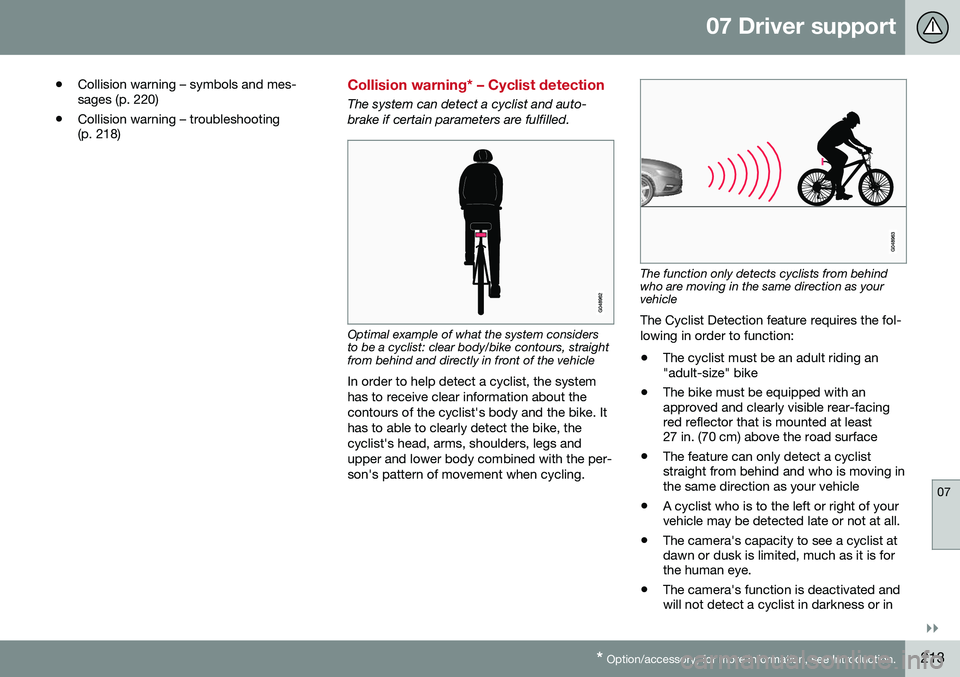
Optimal example of what the system considers to be a cyclist: clear body/bike contours, straightfrom behind and directly in front of the vehicle
In order to help detect a cyclist, the system has to receive clear information about thecontours of the cyclist's body and the bike. Ithas to able to clearly detect the bike, thecyclist's head, arms, shoulders, legs andupper and lower body combined with the per-son's pattern of movement when cycling.
The function only detects cyclists from behind who are moving in the same direction as yourvehicle
The Cyclist Detection feature requires the fol- lowing in order to function: • The cyclist must be an adult riding an "adult-size" bike
• The bike must be equipped with anapproved and clearly visible rear-facingred reflector that is mounted at least27 in. (70 cm) above the road surface
• The feature can only detect a cycliststraight from behind and who is moving inthe same direction as your vehicle
• A cyclist who is to the left or right of yourvehicle may be detected late or not at all.
• The camera's capacity to see a cyclist atdawn or dusk is limited, much as it is forthe human eye.
• The camera's function is deactivated andwill not detect a cyclist in darkness or in