warning VOLVO XC60 2016 Owner´s Manual
[x] Cancel search | Manufacturer: VOLVO, Model Year: 2016, Model line: XC60, Model: VOLVO XC60 2016Pages: 398, PDF Size: 9.98 MB
Page 226 of 398
07 Driver support
07
224
•Driver Alert Control (DAC) – symbols and messages (p. 225)
• Driver Alert System (p. 222)
• Lane Departure Warning (LDW) – intro-duction (p. 227)Driver Alert Control (DAC) – limitations
LimitationsIn certain situations, DAC may provide warn- ings even if the driver’s driving pattern hasnot become erratic:
• in strong crosswinds
• on grooved road surfaces.
• if the driver is testing the LDW function, see Lane Departure Warning (LDW) –introduction (p. 227)
Related information
•Driver Alert Control (DAC) – introduction(p. 222)
• Driver Alert Control (DAC) – function(p. 223)
• Driver Alert Control (DAC) – operation(p. 223)
• Driver Alert Control (DAC) – symbols andmessages (p. 225)
• Driver Alert System (p. 222)
• Lane Departure Warning (LDW) – intro-duction (p. 227)
Page 228 of 398
||
07 Driver support
07
226
Center console display
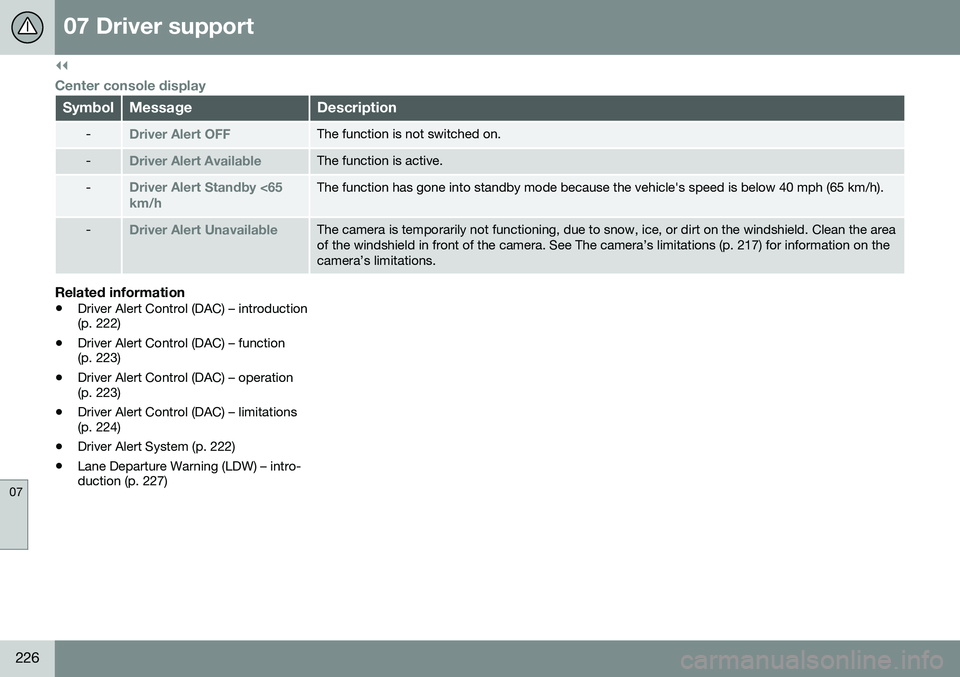
SymbolMessageDescription
-Driver Alert OFFThe function is not switched on.
-Driver Alert AvailableThe function is active.
-Driver Alert Standby <65 km/hThe function has gone into standby mode because the vehicle's speed is below 40 mph (65 km/h).
-Driver Alert UnavailableThe camera is temporarily not functioning, due to snow, ice, or dirt on the windshield. Clean the area of the windshield in front of the camera. See The camera’s limitations (p. 217) for information on thecamera’s limitations.
Related information
•Driver Alert Control (DAC) – introduction (p. 222)
• Driver Alert Control (DAC) – function(p. 223)
• Driver Alert Control (DAC) – operation(p. 223)
• Driver Alert Control (DAC) – limitations(p. 224)
• Driver Alert System (p. 222)
• Lane Departure Warning (LDW) – intro-duction (p. 227)
Page 229 of 398
07 Driver support
07
}}
227
Lane Departure Warning (LDW) – introduction
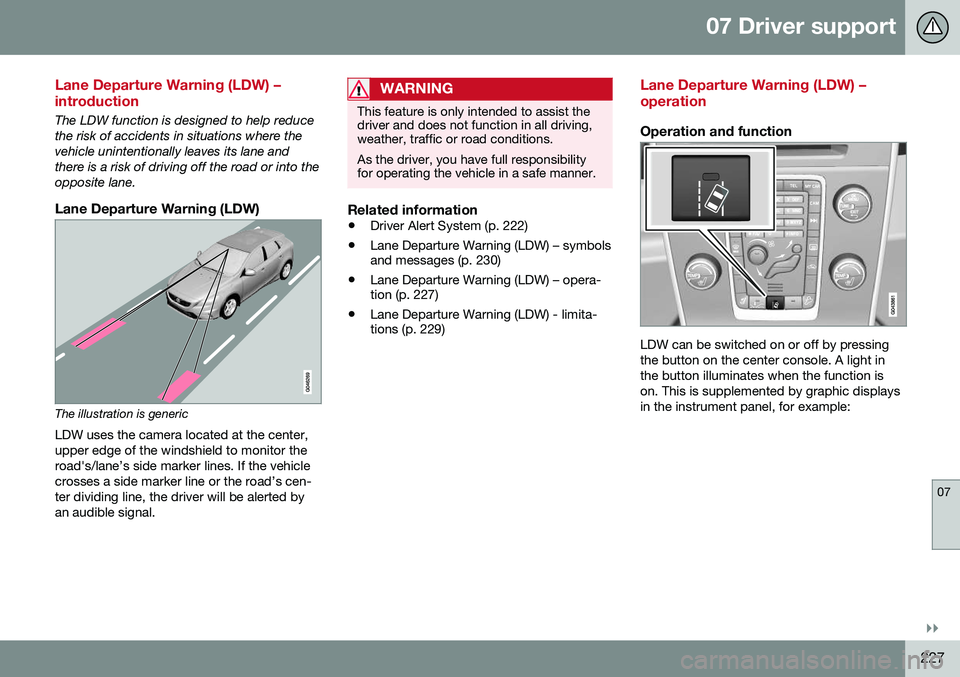
The LDW function is designed to help reduce the risk of accidents in situations where thevehicle unintentionally leaves its lane andthere is a risk of driving off the road or into theopposite lane.
Lane Departure Warning (LDW)
The illustration is genericLDW uses the camera located at the center, upper edge of the windshield to monitor theroad's/lane’s side marker lines. If the vehiclecrosses a side marker line or the road’s cen-ter dividing line, the driver will be alerted byan audible signal.
WARNING
This feature is only intended to assist the driver and does not function in all driving,weather, traffic or road conditions. As the driver, you have full responsibility for operating the vehicle in a safe manner.
Related information
• Driver Alert System (p. 222)
• Lane Departure Warning (LDW) – symbols and messages (p. 230)
• Lane Departure Warning (LDW) – opera-tion (p. 227)
• Lane Departure Warning (LDW) - limita-tions (p. 229)
Lane Departure Warning (LDW) – operation
Operation and function
LDW can be switched on or off by pressing the button on the center console. A light inthe button illuminates when the function ison. This is supplemented by graphic displaysin the instrument panel, for example:
Page 230 of 398
||
07 Driver support
07
228
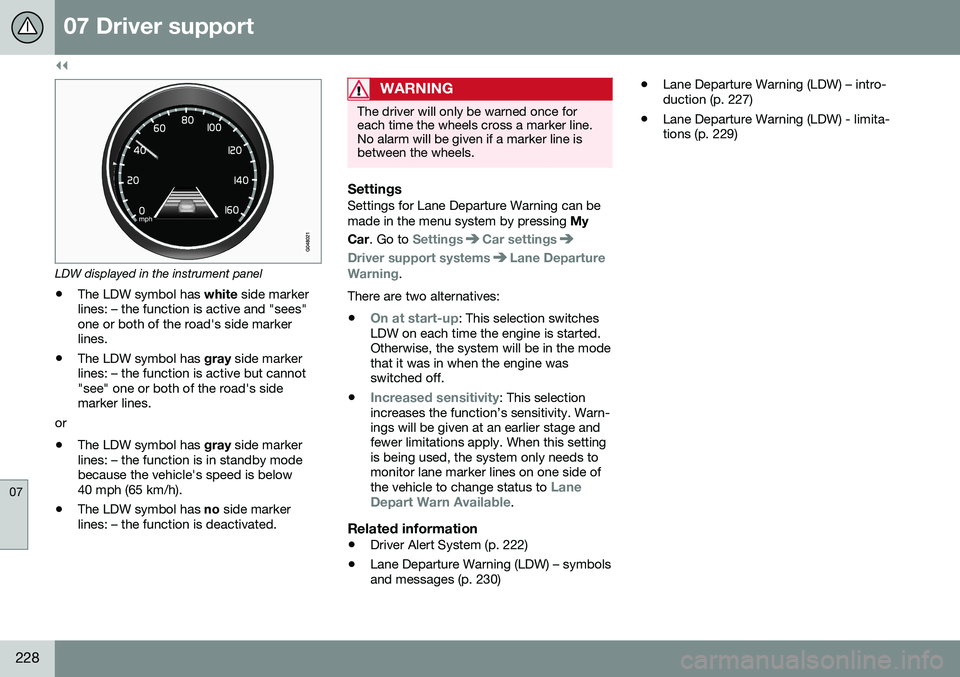
LDW displayed in the instrument panel
• The LDW symbol has
white side marker
lines: – the function is active and "sees" one or both of the road's side markerlines.
• The LDW symbol has
gray side marker
lines: – the function is active but cannot"see" one or both of the road's sidemarker lines.
or
• The LDW symbol has
gray side marker
lines: – the function is in standby modebecause the vehicle's speed is below40 mph (65 km/h).
• The LDW symbol has
no side marker
lines: – the function is deactivated.
WARNING
The driver will only be warned once for each time the wheels cross a marker line.No alarm will be given if a marker line isbetween the wheels.
SettingsSettings for Lane Departure Warning can be made in the menu system by pressing My
Car . Go to
SettingsCar settings
Driver support systemsLane Departure
Warning.
There are two alternatives:
•
On at start-up: This selection switches
LDW on each time the engine is started. Otherwise, the system will be in the modethat it was in when the engine wasswitched off.
•
Increased sensitivity: This selection
increases the function’s sensitivity. Warn- ings will be given at an earlier stage andfewer limitations apply. When this settingis being used, the system only needs tomonitor lane marker lines on one side of the vehicle to change status to
Lane
Depart Warn Available.
Related information
• Driver Alert System (p. 222)
• Lane Departure Warning (LDW) – symbols and messages (p. 230) •
Lane Departure Warning (LDW) – intro-duction (p. 227)
• Lane Departure Warning (LDW) - limita-tions (p. 229)
Page 231 of 398
07 Driver support
07
229
Lane Departure Warning (LDW) - limitations
LimitationsThe camera used by LDW has the same limi- tations as the human eye. See The camera’slimitations (p. 217) for more information aboutthe camera's limitations.
NOTE
No warning signal will be given in the cer-
tain situations, such as:
• If the turn signal is being used
• The driver’s foot is on the brake pedal 8
• The accelerator pedal is pressed quickly 8
• If the steering wheel is moved quickly 8
• In sharp turns that cause the vehicle’s body to sway
Related information
•
Driver Alert System (p. 222)
• Lane Departure Warning (LDW) – symbols and messages (p. 230)
• Lane Departure Warning (LDW) – opera-tion (p. 227)
• Lane Departure Warning (LDW) – intro-duction (p. 227)
8
When Increased sensitivity has been selected, a warning will be issued if a side marker line is crossed in this situation.
Page 232 of 398
07 Driver support
07
230
Lane Departure Warning (LDW) – symbols and messages
Symbols and messagesA text message can be erased by pressing briefly on the OK button on the turn signal
lever.
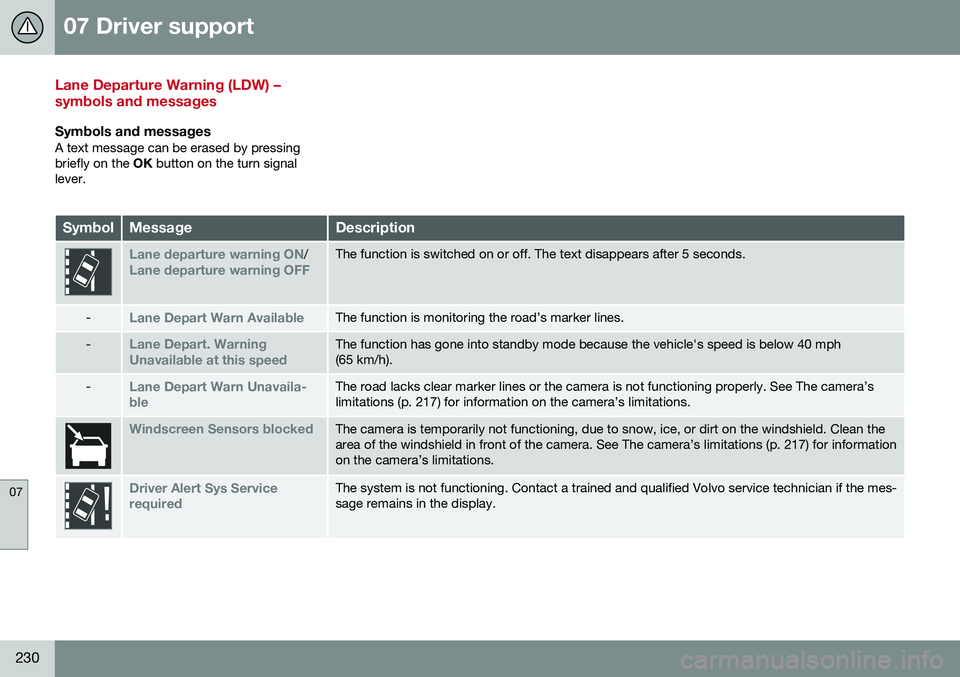
SymbolMessageDescription
Lane departure warning ON/Lane departure warning OFFThe function is switched on or off. The text disappears after 5 seconds.
-Lane Depart Warn AvailableThe function is monitoring the road’s marker lines.
-Lane Depart. Warning Unavailable at this speedThe function has gone into standby mode because the vehicle's speed is below 40 mph (65 km/h).
-Lane Depart Warn Unavaila- bleThe road lacks clear marker lines or the camera is not functioning properly. See The camera’s limitations (p. 217) for information on the camera’s limitations.
Windscreen Sensors blockedThe camera is temporarily not functioning, due to snow, ice, or dirt on the windshield. Clean the area of the windshield in front of the camera. See The camera’s limitations (p. 217) for informationon the camera’s limitations.
Driver Alert Sys Service requiredThe system is not functioning. Contact a trained and qualified Volvo service technician if the mes- sage remains in the display.
Page 233 of 398
07 Driver support
07
231
Related information
•Lane Departure Warning (LDW) – opera- tion (p. 227)
• Driver Alert System (p. 222)
• Lane Departure Warning (LDW) – intro-duction (p. 227)
• Lane Departure Warning (LDW) - limita-tions (p. 229)
Page 234 of 398
07 Driver support
07
232
Park assist – introduction
The park assist system is designed to assist you when driving into parking spaces,garages, etc. An audible signal and symbolsin the audio system’s display indicate the dis-tance to the object. The park assist system utilizes ultrasound sensors in the front bumper and rearbumper(s) to measure the distance to a vehi-cle or an object that may be close to the frontor rear of your vehicle.
NOTE
A trailer hitch whose wiring is integrated with the vehicle's electrical system will beincluded in the measurement of the availa-ble space behind the vehicle.
WARNING
Park Assist is an information system, NOT a safety system. This system is designedto be a supplementary aid when parkingthe vehicle. It is not, however, intended toreplace the driver's attention and judge-ment.
Related information
•Park assist – limitations (p. 235)
• Park assist – function (p. 232)
• Park assist – operation (p. 234)
• Park assist – troubleshooting (p. 236) •
Rear Park Assist Camera (PAC) – function (p. 237)
Park assist – function
Signals from the park assist system
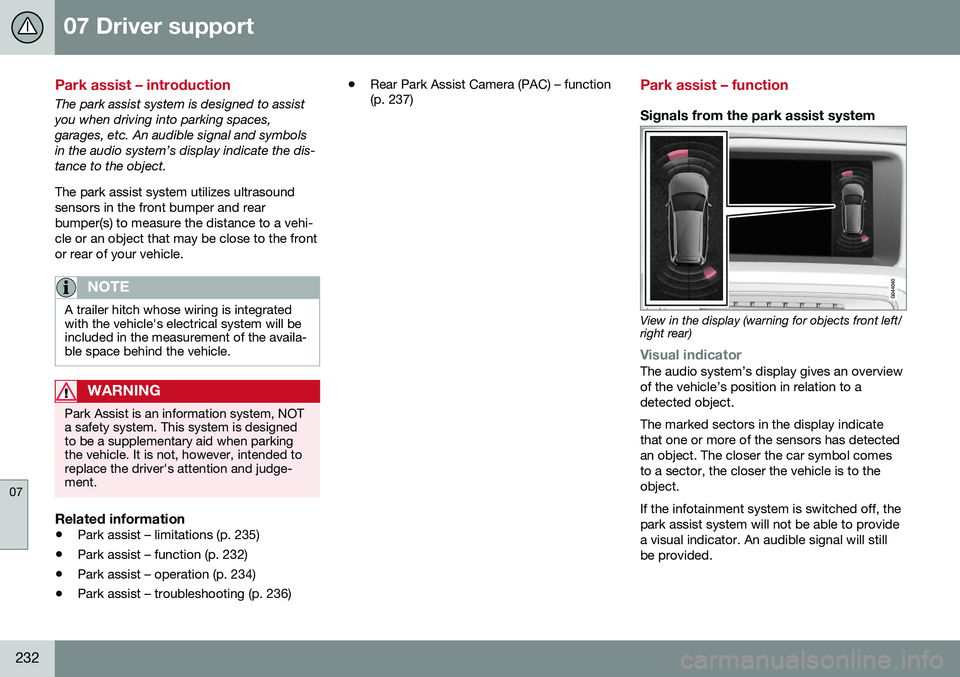
View in the display (warning for objects front left/ right rear)
Visual indicatorThe audio system’s display gives an overview of the vehicle’s position in relation to adetected object. The marked sectors in the display indicate that one or more of the sensors has detectedan object. The closer the car symbol comesto a sector, the closer the vehicle is to theobject. If the infotainment system is switched off, the park assist system will not be able to providea visual indicator. An audible signal will stillbe provided.
Page 237 of 398
07 Driver support
07
235
Activating/deactivatingThe system is activated automatically when the vehicle is started.
–Press the Park assist button on the center console to temporarily deactivate the sys-tem(s).
> The indicator light in the button will goout when the system has been deacti- vated.
Park assist will be automatically reactivatedthe next time the engine is started, or if thebutton is pressed (the indicator light in thebutton will illuminate).
NOTE
Park assist is disengaged automatically when the parking brake is applied.
Related information
• Park assist – introduction (p. 232)
• Park assist – limitations (p. 235)
• Park assist – function (p. 232)
• Park assist – troubleshooting (p. 236)
• Rear Park Assist Camera (PAC) – function (p. 237)
Park assist – limitations
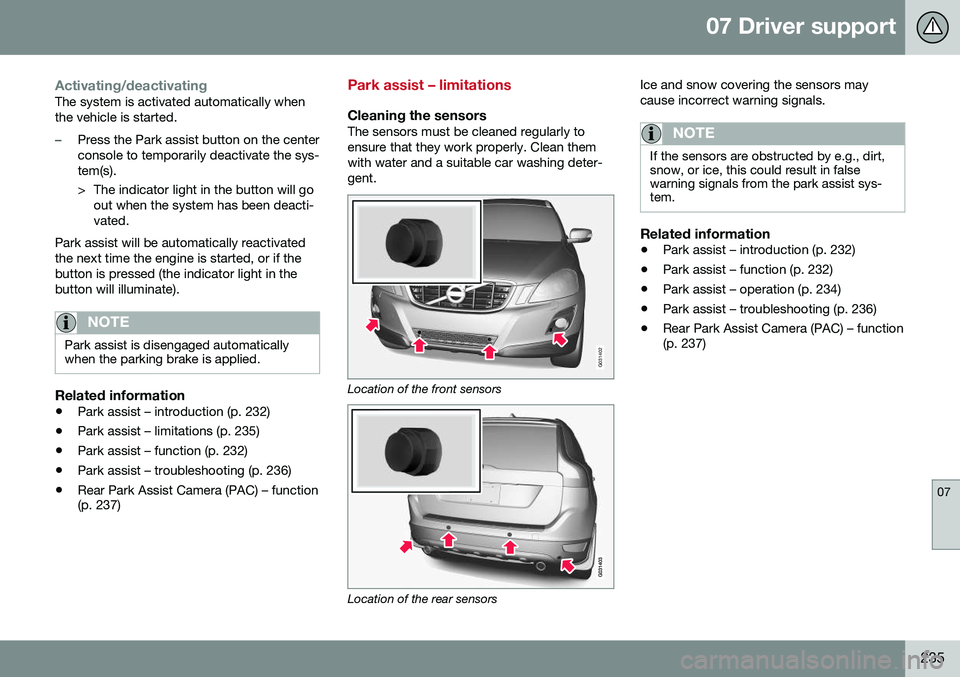
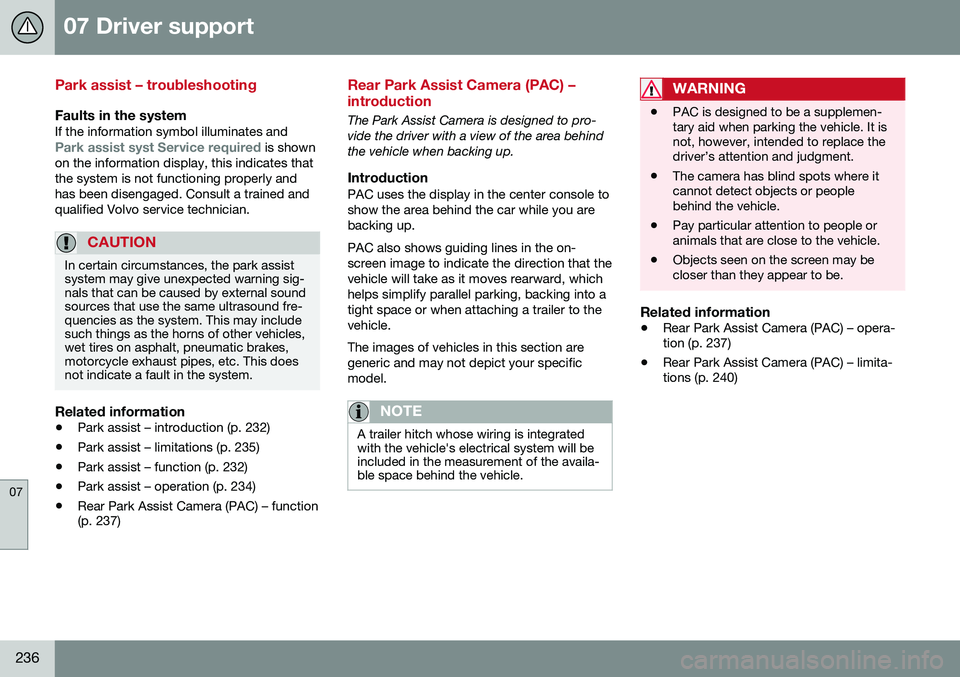
Cleaning the sensorsThe sensors must be cleaned regularly to ensure that they work properly. Clean themwith water and a suitable car washing deter-gent.
G031402
Location of the front sensors
Location of the rear sensors Ice and snow covering the sensors may cause incorrect warning signals.
NOTE
If the sensors are obstructed by e.g., dirt, snow, or ice, this could result in falsewarning signals from the park assist sys-tem.
Related information
•
Park assist – introduction (p. 232)
• Park assist – function (p. 232)
• Park assist – operation (p. 234)
• Park assist – troubleshooting (p. 236)
• Rear Park Assist Camera (PAC) – function (p. 237)
Page 238 of 398
07 Driver support
07
236
Park assist – troubleshooting
Faults in the systemIf the information symbol illuminates andPark assist syst Service required is shown
on the information display, this indicates that the system is not functioning properly andhas been disengaged. Consult a trained andqualified Volvo service technician.
CAUTION
In certain circumstances, the park assist system may give unexpected warning sig-nals that can be caused by external soundsources that use the same ultrasound fre-quencies as the system. This may includesuch things as the horns of other vehicles,wet tires on asphalt, pneumatic brakes,motorcycle exhaust pipes, etc. This doesnot indicate a fault in the system.
Related information
• Park assist – introduction (p. 232)
• Park assist – limitations (p. 235)
• Park assist – function (p. 232)
• Park assist – operation (p. 234)
• Rear Park Assist Camera (PAC) – function (p. 237)
Rear Park Assist Camera (PAC) – introduction
The Park Assist Camera is designed to pro- vide the driver with a view of the area behindthe vehicle when backing up.
IntroductionPAC uses the display in the center console toshow the area behind the car while you arebacking up. PAC also shows guiding lines in the on- screen image to indicate the direction that thevehicle will take as it moves rearward, whichhelps simplify parallel parking, backing into atight space or when attaching a trailer to thevehicle. The images of vehicles in this section are generic and may not depict your specificmodel.
NOTE
A trailer hitch whose wiring is integrated with the vehicle's electrical system will beincluded in the measurement of the availa-ble space behind the vehicle.
WARNING
• PAC is designed to be a supplemen- tary aid when parking the vehicle. It isnot, however, intended to replace thedriver’s attention and judgment.
• The camera has blind spots where itcannot detect objects or peoplebehind the vehicle.
• Pay particular attention to people oranimals that are close to the vehicle.
• Objects seen on the screen may becloser than they appear to be.
Related information
•
Rear Park Assist Camera (PAC) – opera- tion (p. 237)
• Rear Park Assist Camera (PAC) – limita-tions (p. 240)