warning VOLVO XC60 2016 Owner´s Manual
[x] Cancel search | Manufacturer: VOLVO, Model Year: 2016, Model line: XC60, Model: VOLVO XC60 2016Pages: 398, PDF Size: 9.98 MB
Page 241 of 398
07 Driver support
07
}}
239
Rear Park Assist Camera (PAC) – guiding and marker lines
Guiding lines
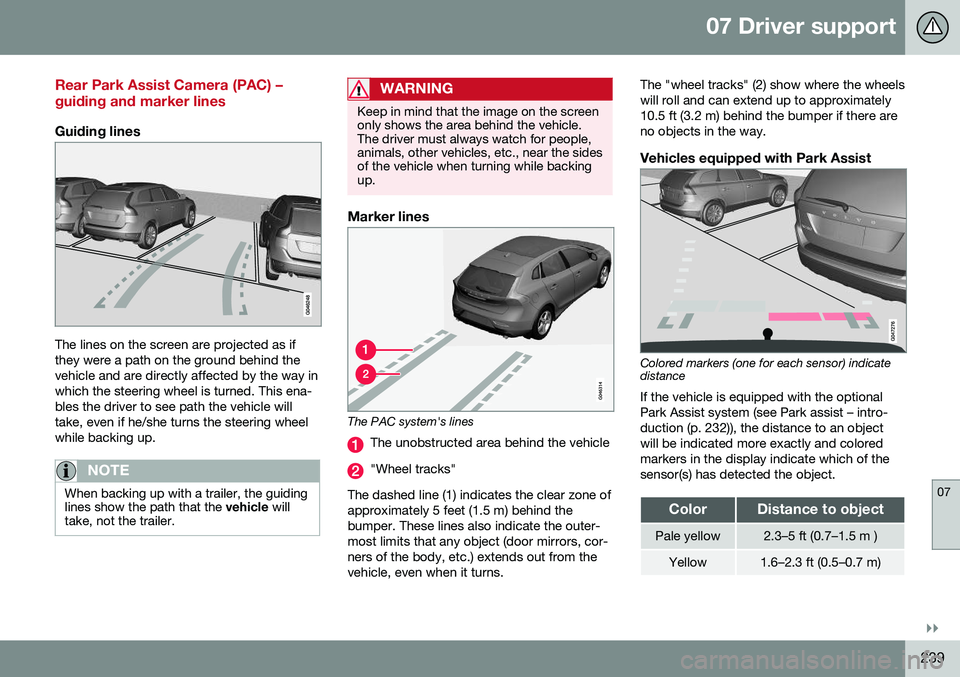
The lines on the screen are projected as if they were a path on the ground behind thevehicle and are directly affected by the way inwhich the steering wheel is turned. This ena-bles the driver to see path the vehicle willtake, even if he/she turns the steering wheelwhile backing up.
NOTE
When backing up with a trailer, the guiding lines show the path that the vehicle will
take, not the trailer.
WARNING
Keep in mind that the image on the screen only shows the area behind the vehicle.The driver must always watch for people,animals, other vehicles, etc., near the sidesof the vehicle when turning while backingup.
Marker lines
The PAC system's lines
The unobstructed area behind the vehicle
"Wheel tracks"
The dashed line (1) indicates the clear zone of approximately 5 feet (1.5 m) behind thebumper. These lines also indicate the outer-most limits that any object (door mirrors, cor-ners of the body, etc.) extends out from thevehicle, even when it turns. The "wheel tracks" (2) show where the wheelswill roll and can extend up to approximately10.5 ft (3.2 m) behind the bumper if there areno objects in the way.
Vehicles equipped with Park Assist
Colored markers (one for each sensor) indicate distance If the vehicle is equipped with the optional Park Assist system (see Park assist – intro-duction (p. 232)), the distance to an objectwill be indicated more exactly and coloredmarkers in the display indicate which of thesensor(s) has detected the object.
ColorDistance to object
Pale yellow2.3–5 ft (0.7–1.5 m )
Yellow1.6–2.3 ft (0.5–0.7 m)
Page 243 of 398
07 Driver support
07
}}
* Option/accessory, for more information, see Introduction.241
NOTE
The door panel indicator light illuminates on the side of the vehicle where the sys-tem has detected another vehicle. If yourvehicle is passed on both sides at thesame time, both lights will illuminate.
The system helps provide information about:
• Other vehicles in your door mirrors' "blind area"
• Vehicles that are about to pass your vehi-cle in the left and/or right lanes
• Cross Traffic Alert (CTA) is a supple- mentary BLIS function
intended to
detect vehicles crossing behind your vehicle while you are backing up.
WARNING
• BLIS and CTA are information sys- tems, NOT warning or safety systemsand do not function in all situations.
• BLIS and CTA do not eliminate theneed for you to visually confirm theconditions around you, and the needfor you to turn your head and should-ers to make sure that you can safelychange lanes or back up.
• As the driver, you have full responsibil-ity for changing lanes/backing up in asafe manner.
Related information
•
BLIS* – function (p. 241)
• BLIS* – operation (p. 242)
• BLIS* – Cross Traffic Alert (CTA) (p. 243)
• BLIS* – limitations (p. 244)
• BLIS* – messages (p. 245)
BLIS* – function
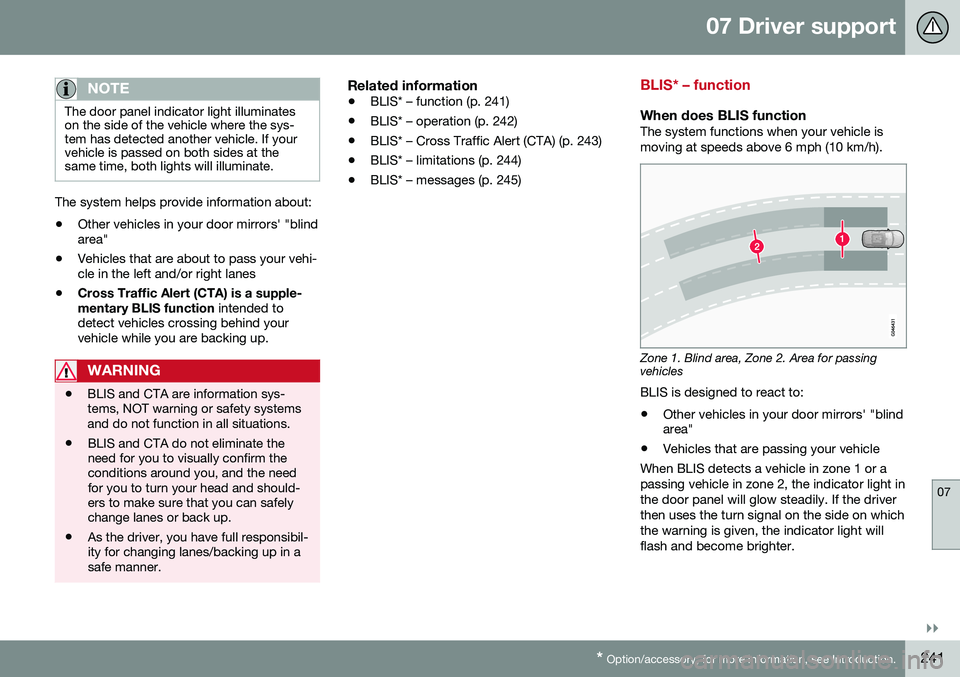
When does BLIS functionThe system functions when your vehicle is moving at speeds above 6 mph (10 km/h).
Zone 1. Blind area, Zone 2. Area for passing vehicles
BLIS is designed to react to:
• Other vehicles in your door mirrors' "blind area"
• Vehicles that are passing your vehicle
When BLIS detects a vehicle in zone 1 or a passing vehicle in zone 2, the indicator light inthe door panel will glow steadily. If the driverthen uses the turn signal on the side on whichthe warning is given, the indicator light willflash and become brighter.
Page 244 of 398
||
07 Driver support
07
242* Option/accessory, for more information, see Introduction.
WARNING
• BLIS does not function in sharp curves.
• BLIS does not function when yourvehicle is backing up.
Related information
•
BLIS* – introduction (p. 240)
• BLIS* – operation (p. 242)
• BLIS* – Cross Traffic Alert (CTA) (p. 243)
• BLIS* – limitations (p. 244)
• BLIS* – messages (p. 245)
BLIS* – operation
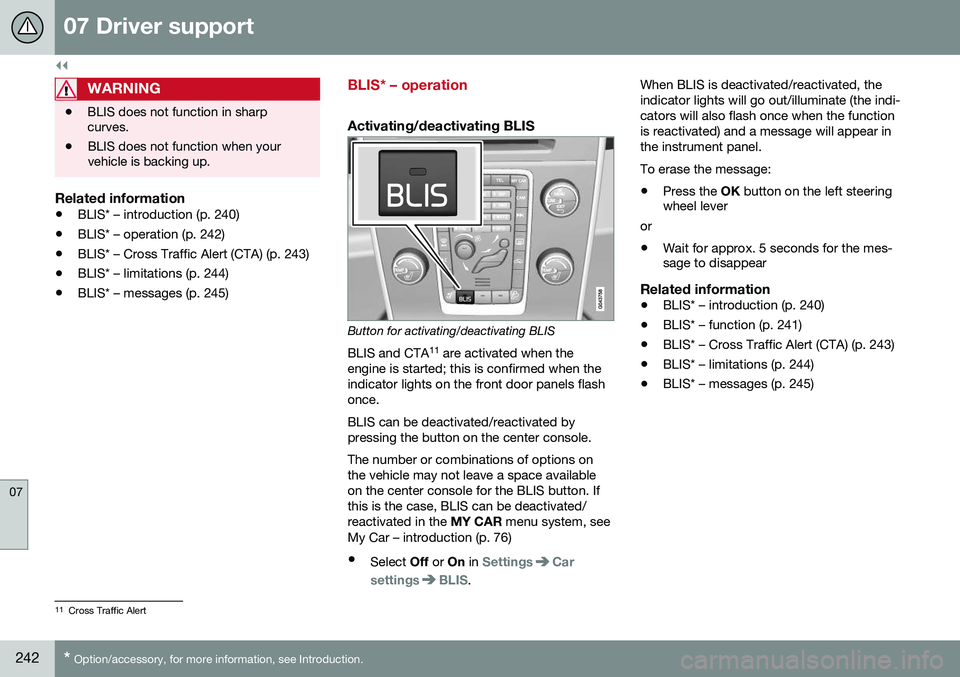
Activating/deactivating BLIS
Button for activating/deactivating BLIS
BLIS and CTA 11
are activated when the
engine is started; this is confirmed when the indicator lights on the front door panels flashonce. BLIS can be deactivated/reactivated by pressing the button on the center console. The number or combinations of options on the vehicle may not leave a space availableon the center console for the BLIS button. Ifthis is the case, BLIS can be deactivated/reactivated in the MY CAR menu system, see
My Car – introduction (p. 76)
• Select Off or On in
SettingsCar
settings
BLIS. When BLIS is deactivated/reactivated, the indicator lights will go out/illuminate (the indi-cators will also flash once when the functionis reactivated) and a message will appear inthe instrument panel. To erase the message: •
Press the
OK button on the left steering
wheel lever
or
• Wait for approx. 5 seconds for the mes- sage to disappear
Related information
• BLIS* – introduction (p. 240)
• BLIS* – function (p. 241)
• BLIS* – Cross Traffic Alert (CTA) (p. 243)
• BLIS* – limitations (p. 244)
• BLIS* – messages (p. 245)
11
Cross Traffic Alert
Page 245 of 398
07 Driver support
07
}}
* Option/accessory, for more information, see Introduction.243
BLIS* – Cross Traffic Alert (CTA)
Cross Traffic Alert (CTA) is a supplementary BLIS 12
function intended to detect vehicles
crossing behind your vehicle while you are backing up.
Park assist/CTA button On vehicles equipped with the optional Park assist system (p. 232), Cross Traffic Alert(CTA) can be deactivated/reactivated bypressing the Park assist button on the centerconsole. The BLIS indicator lights on the frontdoors will flash when CTA is reactivated bypressing the button.
WARNING
• BLIS and CTA are information sys- tems, NOT warning or safety systemsand do not function in all situations.
• BLIS and CTA do not eliminate theneed for you to visually confirm theconditions around you, and the needfor you to turn your head and should-ers to make sure that you can safelychange lanes or back up.
• As the driver, you have full responsibil-ity for changing lanes/backing up in asafe manner.
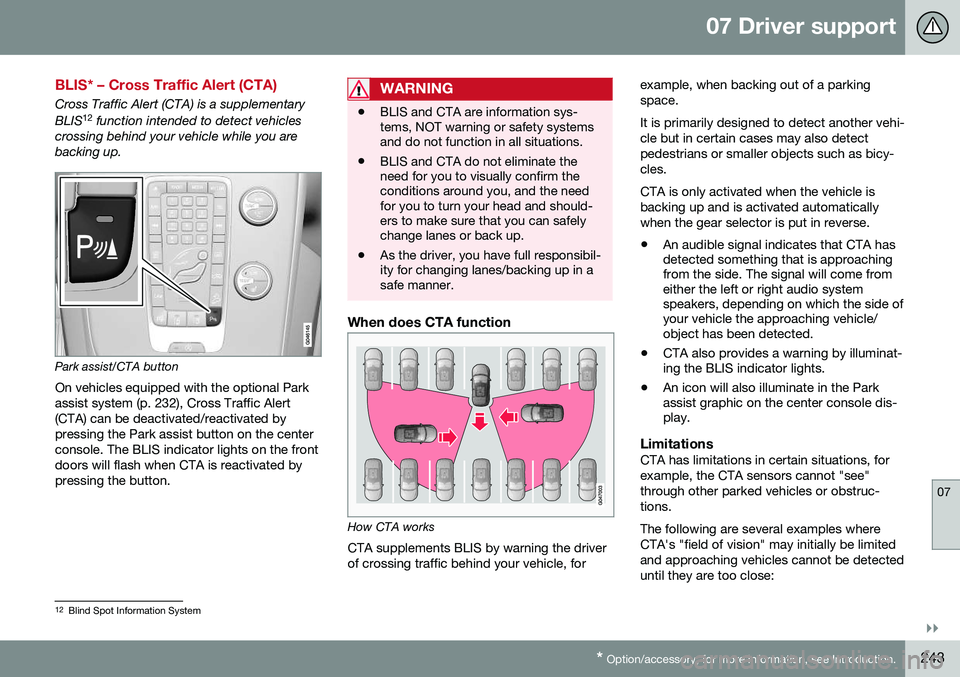
When does CTA function
How CTA works
CTA supplements BLIS by warning the driver of crossing traffic behind your vehicle, for example, when backing out of a parkingspace. It is primarily designed to detect another vehi- cle but in certain cases may also detectpedestrians or smaller objects such as bicy-cles. CTA is only activated when the vehicle is backing up and is activated automaticallywhen the gear selector is put in reverse.
• An audible signal indicates that CTA has detected something that is approachingfrom the side. The signal will come fromeither the left or right audio systemspeakers, depending on which the side ofyour vehicle the approaching vehicle/object has been detected.
• CTA also provides a warning by illuminat-ing the BLIS indicator lights.
• An icon will also illuminate in the Parkassist graphic on the center console dis-play.
LimitationsCTA has limitations in certain situations, for example, the CTA sensors cannot "see"through other parked vehicles or obstruc-tions. The following are several examples where CTA's "field of vision" may initially be limitedand approaching vehicles cannot be detecteduntil they are too close:
12
Blind Spot Information System
Page 249 of 398
08 Starting and driving
08
}}
* Option/accessory, for more information, see Introduction.247
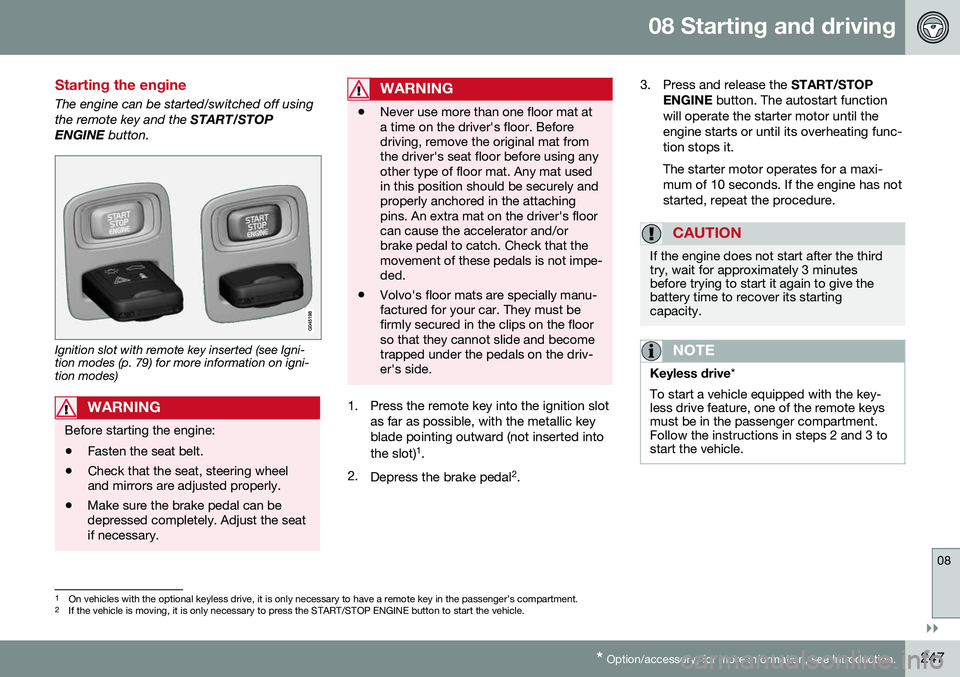
Starting the engine
The engine can be started/switched off using the remote key and the START/STOP
ENGINE button.
Ignition slot with remote key inserted (see Igni- tion modes (p. 79) for more information on igni-tion modes)
WARNING
Before starting the engine:
• Fasten the seat belt.
• Check that the seat, steering wheel and mirrors are adjusted properly.
• Make sure the brake pedal can bedepressed completely. Adjust the seatif necessary.
WARNING
•Never use more than one floor mat at a time on the driver's floor. Beforedriving, remove the original mat fromthe driver's seat floor before using anyother type of floor mat. Any mat usedin this position should be securely andproperly anchored in the attachingpins. An extra mat on the driver's floorcan cause the accelerator and/orbrake pedal to catch. Check that themovement of these pedals is not impe-ded.
• Volvo's floor mats are specially manu-factured for your car. They must befirmly secured in the clips on the floorso that they cannot slide and becometrapped under the pedals on the driv-er's side.
1. Press the remote key into the ignition slot
as far as possible, with the metallic key blade pointing outward (not inserted into the slot) 1
.
2. Depress the brake pedal 2
. 3. Press and release the
START/STOP
ENGINE button. The autostart function
will operate the starter motor until the engine starts or until its overheating func-tion stops it. The starter motor operates for a maxi- mum of 10 seconds. If the engine has notstarted, repeat the procedure.
CAUTION
If the engine does not start after the third try, wait for approximately 3 minutesbefore trying to start it again to give thebattery time to recover its startingcapacity.
NOTE
Keyless drive *
To start a vehicle equipped with the key- less drive feature, one of the remote keysmust be in the passenger compartment.Follow the instructions in steps 2 and 3 tostart the vehicle.
1 On vehicles with the optional keyless drive, it is only necessary to have a remote key in the passenger’s compartment.
2 If the vehicle is moving, it is only necessary to press the START/STOP ENGINE button to start the vehicle.
Page 250 of 398
||
08 Starting and driving
08
248
WARNING
•Always remove the remote key from the ignition slot when leaving the vehi-cle and ensure that the ignition inmode
0 (see Ignition modes (p. 79) for
information about the ignition modes).
• On vehicles with the optional keylessdrive, never remove the remote keyfrom the vehicle while it is being drivenor towed.
• Always place the gear selector in Parkand apply the parking brake beforeleaving the vehicle. Never leave thevehicle unattended with the enginerunning.
• Always open garage doors fully beforestarting the engine inside a garage toensure adequate ventilation. Theexhaust gases contain carbon monox-ide, which is invisible and odorless butvery poisonous.
NOTE
•
After a cold start, idle speed may be noticeably higher than normal for ashort period. This is done to help bringcomponents in the emission controlsystem to their normal operating tem-perature as quickly as possible, whichenables them to control emissions andhelp reduce the vehicle's impact on the environment 3
.
CAUTION
• When starting in cold weather, the automatic transmission may shift up atslightly higher engine speeds than nor-mal until the automatic transmissionfluid reaches normal operating tem-perature.
• Do not race a cold engine immediatelyafter starting. Oil flow may not reachsome lubrication points fast enough toprevent engine damage.
• The engine should be idling when youmove the gear selector. Never acceler-ate until after you feel the transmissionengage. Accelerating immediately afterselecting a gear will cause harshengagement and premature transmis-sion wear.
• Selecting
P or N when idling at a
standstill for prolonged periods of timewill help prevent overheating of theautomatic transmission fluid.
Related information
• Switching off the engine (p. 249)
3
If the gear selector is in the D or R positions and the car is not moving, engine speed (rpm) will be lower and it will take longer for the engine to reach normal operating temperature.
Page 251 of 398
08 Starting and driving
08
* Option/accessory, for more information, see Introduction.249
Switching off the engine
Switch off the engine by pressing the START/
STOP ENGINE button.
If the gear selector is not in the P position or
if the vehicle is moving, press the START/
STOP ENGINE button twice or press and
hold it in until the engine switches off.
Related information
• Ignition modes (p. 79)
Engine Remote Start (ERS)* – introduction
ERS is a feature that makes it possible to remotely start the engine using the remotekey to cool or heat the passenger compart-ment before driving. The climate/ and infotainment systems will start using the same settings as when theengine was switched off. When the engine is started using ERS, it will run for a maximum of 15 minutes beforeautomatically switching off again. After 2 ERSstarts, the engine must be started in the nor-mal way before ERS can be used again.
NOTE
•Always adhere to applicable State, Province and/or Local laws regardingengine idling when using ERS.
• The service life of the remote key'sbattery is affected by ERS use. If thisfeature is used frequently, the batteryshould be replaced once a year, seeRemote key – replacing the battery(p. 157).
WARNING
Keep the following in mind before using ERS:
• The vehicle should be in view.
• The vehicle should be unoccupied.
• The vehicle must not be parked indoors or in an enclosed area.Exhaust fumes are harmful to thehealth.
Related information
•
Engine Remote Start (ERS)* – starting the engine (p. 250)
• Engine Remote Start (ERS)* – switchingoff the engine (p. 250)
Page 253 of 398
08 Starting and driving
08
251
Jump starting
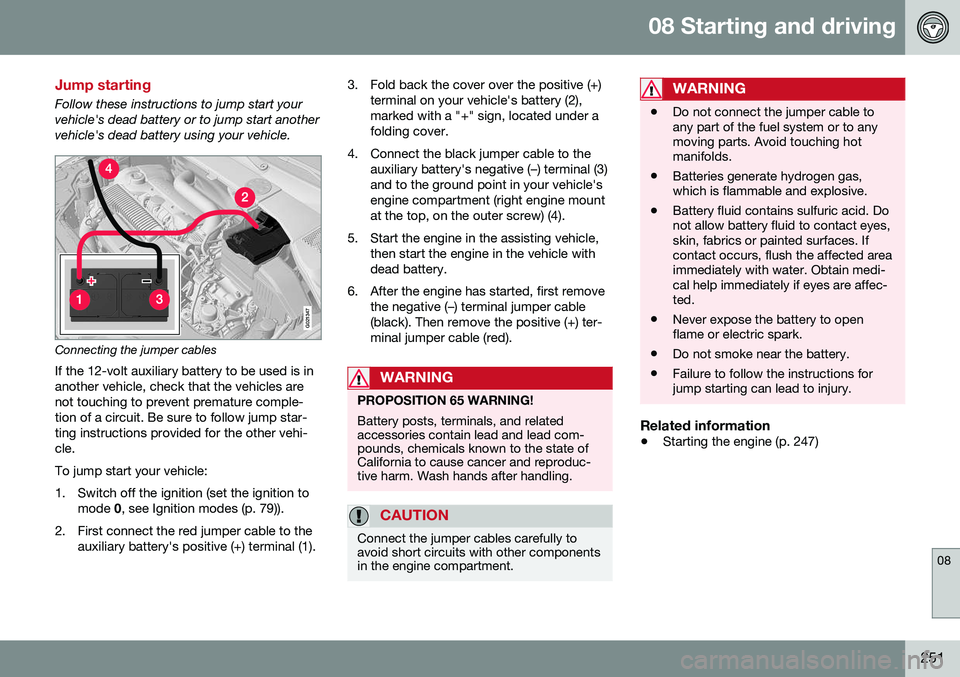
Follow these instructions to jump start your vehicle's dead battery or to jump start anothervehicle's dead battery using your vehicle.
G021347
Connecting the jumper cablesIf the 12-volt auxiliary battery to be used is in another vehicle, check that the vehicles arenot touching to prevent premature comple-tion of a circuit. Be sure to follow jump star-ting instructions provided for the other vehi-cle. To jump start your vehicle:
1. Switch off the ignition (set the ignition to mode 0, see Ignition modes (p. 79)).
2. First connect the red jumper cable to the auxiliary battery's positive (+) terminal (1). 3. Fold back the cover over the positive (+)
terminal on your vehicle's battery (2), marked with a "+" sign, located under afolding cover.
4. Connect the black jumper cable to the auxiliary battery's negative (–) terminal (3)and to the ground point in your vehicle'sengine compartment (right engine mountat the top, on the outer screw) (4).
5. Start the engine in the assisting vehicle, then start the engine in the vehicle withdead battery.
6. After the engine has started, first remove the negative (–) terminal jumper cable(black). Then remove the positive (+) ter-minal jumper cable (red).
WARNING
PROPOSITION 65 WARNING! Battery posts, terminals, and related accessories contain lead and lead com-pounds, chemicals known to the state ofCalifornia to cause cancer and reproduc-tive harm. Wash hands after handling.
CAUTION
Connect the jumper cables carefully to avoid short circuits with other componentsin the engine compartment.
WARNING
•Do not connect the jumper cable to any part of the fuel system or to anymoving parts. Avoid touching hotmanifolds.
• Batteries generate hydrogen gas,which is flammable and explosive.
• Battery fluid contains sulfuric acid. Donot allow battery fluid to contact eyes,skin, fabrics or painted surfaces. Ifcontact occurs, flush the affected areaimmediately with water. Obtain medi-cal help immediately if eyes are affec-ted.
• Never expose the battery to openflame or electric spark.
• Do not smoke near the battery.
• Failure to follow the instructions forjump starting can lead to injury.
Related information
•
Starting the engine (p. 247)
Page 254 of 398
08 Starting and driving
08
252
Transmission – general information
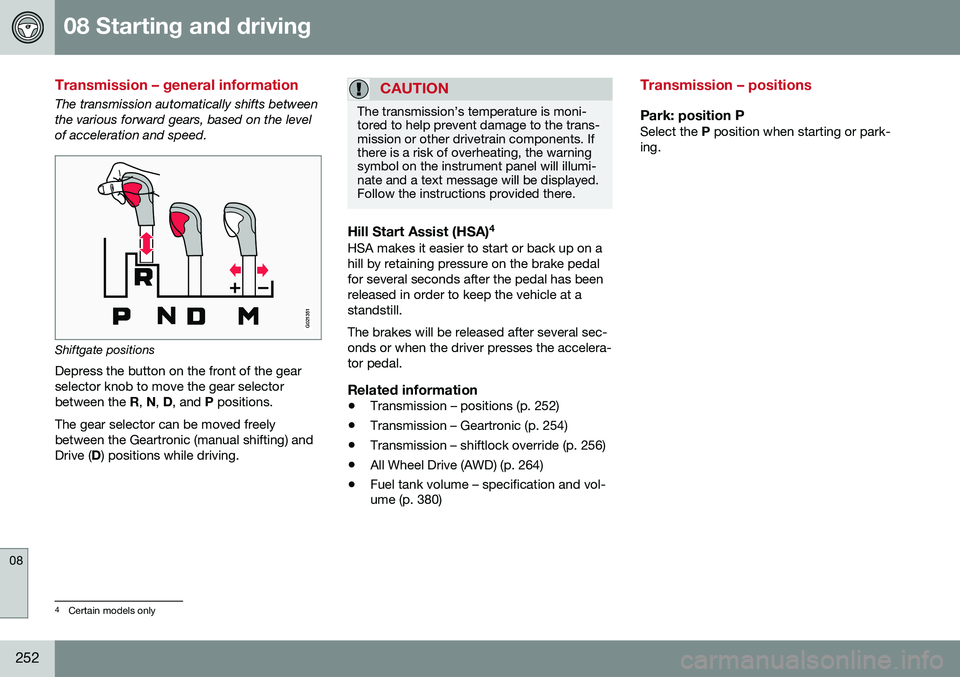
The transmission automatically shifts between the various forward gears, based on the levelof acceleration and speed.
G021351
Shiftgate positions
Depress the button on the front of the gear selector knob to move the gear selectorbetween the R, N , D , and P positions.
The gear selector can be moved freelybetween the Geartronic (manual shifting) andDrive ( D) positions while driving.
CAUTION
The transmission’s temperature is moni- tored to help prevent damage to the trans-mission or other drivetrain components. Ifthere is a risk of overheating, the warningsymbol on the instrument panel will illumi-nate and a text message will be displayed.Follow the instructions provided there.
Hill Start Assist (HSA) 4HSA makes it easier to start or back up on a hill by retaining pressure on the brake pedalfor several seconds after the pedal has beenreleased in order to keep the vehicle at astandstill. The brakes will be released after several sec- onds or when the driver presses the accelera-tor pedal.
Related information
•
Transmission – positions (p. 252)
• Transmission – Geartronic (p. 254)
• Transmission – shiftlock override (p. 256)
• All Wheel Drive (AWD) (p. 264)
• Fuel tank volume – specification and vol- ume (p. 380)
Transmission – positions
Park: position PSelect the
P position when starting or park-
ing.
4 Certain models only
Page 255 of 398
08 Starting and driving
08
253
ShiftlockWhen P has been selected, the transmission
is mechanically blocked in this position. The brake pedal must be depressed and the igni-tion must be in at least mode II (see Ignition
modes (p. 79)) before the gear lever can bemoved from the P position.
WARNING
Always apply the parking brake when the vehicle is parked, particularly when park-ing on a hill. The transmission's P mode
may not be able to keep the vehicle sta-tionary if it is parked on an incline.
Press the control to apply the parking brake, see Parking brake – general information(p. 269).
CAUTION
The vehicle must be stationary when posi- tion P is selected.
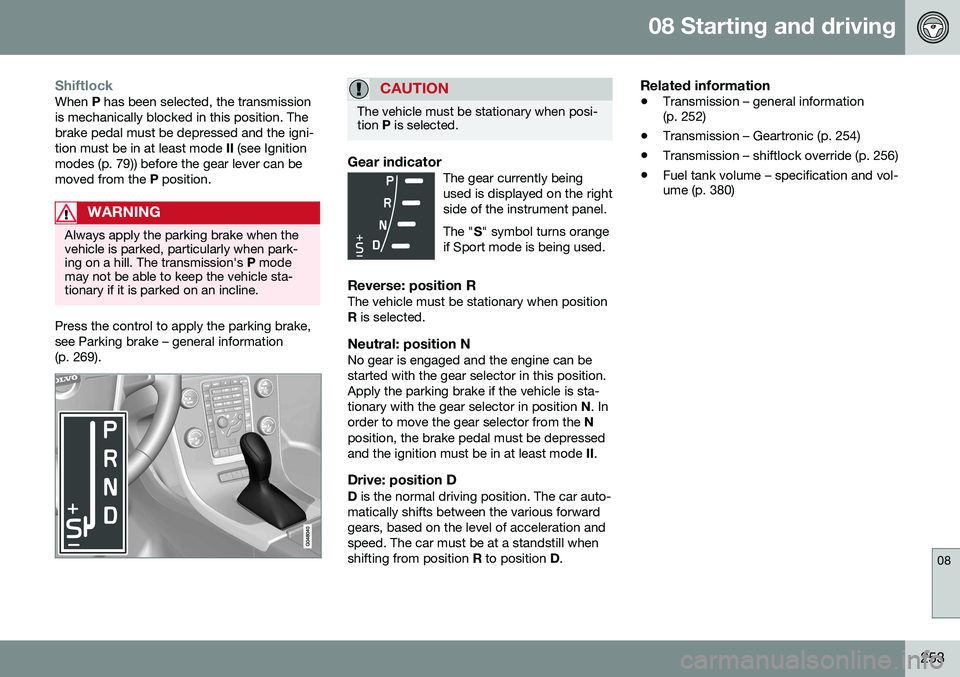
Gear indicatorThe gear currently being used is displayed on the rightside of the instrument panel. The " S" symbol turns orange
if Sport mode is being used.
Reverse: position RThe vehicle must be stationary when position R is selected.
Neutral: position NNo gear is engaged and the engine can bestarted with the gear selector in this position.Apply the parking brake if the vehicle is sta-tionary with the gear selector in position N. In
order to move the gear selector from the N
position, the brake pedal must be depressedand the ignition must be in at least mode II.
Drive: position DD is the normal driving position. The car auto-
matically shifts between the various forwardgears, based on the level of acceleration andspeed. The car must be at a standstill whenshifting from position R to position D.
Related information
• Transmission – general information (p. 252)
• Transmission – Geartronic (p. 254)
• Transmission – shiftlock override (p. 256)
• Fuel tank volume – specification and vol-ume (p. 380)