service VOLVO XC60 2017 Owner´s Manual
[x] Cancel search | Manufacturer: VOLVO, Model Year: 2017, Model line: XC60, Model: VOLVO XC60 2017Pages: 398, PDF Size: 9.17 MB
Page 76 of 398

||
INSTRUMENTS AND CONTROLS
* Option/accessory, for more information, see Introduction.
74
Malfunction Indicator Light
As you drive, a computer called On-Board Diag- nostics II (OBDII) monitors your vehicle's engine,transmission, electrical and emission systems. The malfunction indicator light will illuminate if the computer senses a condition that potentiallymay need correcting. When this happens, pleasehave your vehicle checked by a trained and quali-fied Volvo service technician as soon as possible. A malfunction indicator light may have many cau- ses. Sometimes, you may not notice a change inyour car's behavior. Even so, an uncorrected con-dition could hurt fuel economy, emission controls,and drivability. Extended driving without correct-ing the cause could even damage other compo-nents in your vehicle. This light may illuminate if the fuel filler cap is not closed tightly or if the engine was running whilethe vehicle was refueled.
Anti-lock Brake System (ABS)
If the warning light comes on, there may be a malfunction in the ABS system (the standardbraking system will still function). Check the sys-tem by:
1. Stopping in a safe place and switching off
the ignition.
2. Restart the engine.
3. If the warning light goes off, no further action is required. If the indicator light remains on, the vehicle should be driven to a trained and qualified Volvoservice technician for inspection, see Brakes –general (p. 264) for additional information.
Rear fog lights
This symbol indicates that the rear fog lights are on.
Stability system
This indicator symbol flashes when the stability system is actively working to stabilize the vehicle,see Stability system – introduction (p. 174) formore detailed information.
Stability system - Sport mode
This symbol illuminates to indicate that the stabil- ity system's
Sport mode has been activated to
help provide maximum tractive force, for example when driving with snow chains, or driving in deepsnow or loose sand.
Low fuel level
When this light comes on, the vehicle should be refueled as soon as possible. See Refueling –fuel requirements (p. 273) for information aboutfuel and refueling.
Information symbol
The information symbol lights up and a text mes- sage is displayed to provide the driver with nec-essary information about one of the vehicle's sys-tems. The message can be erased and the sym- bol can be turned off by pressing the OK button
(see Information display – menu controls (p. 115) for information) or this will take place automatically after a short time (the length oftime varies, depending on the function affected). The information symbol may also illuminate together with other symbols.
High beam indicator
This symbol illuminates when the high beam headlights are on, or if the high beam flash func-tion is used.
Left turn signal indicator Right turn signal indicator
NOTE
•
Both turn signal indicators will flash when the hazard warning flashers are used.
• If either of these indicators flash fasterthan normal, the direction indicators arenot functioning properly.
Tire pressure monitoring system (TPMS)
*
This symbol illuminates to indicate that tire pres- sure in one or more tires is low, see Tire PressureMonitoring System (TPMS) – general information(p. 308) for detailed information.
Start/stop*
The symbol illuminates when the engine has auto-stopped.
Page 77 of 398
INSTRUMENTS AND CONTROLS
}}
75
Related information
•Information displays – introduction (p. 69)
• Information displays – warning symbols (p. 75)
Information displays – warning symbols
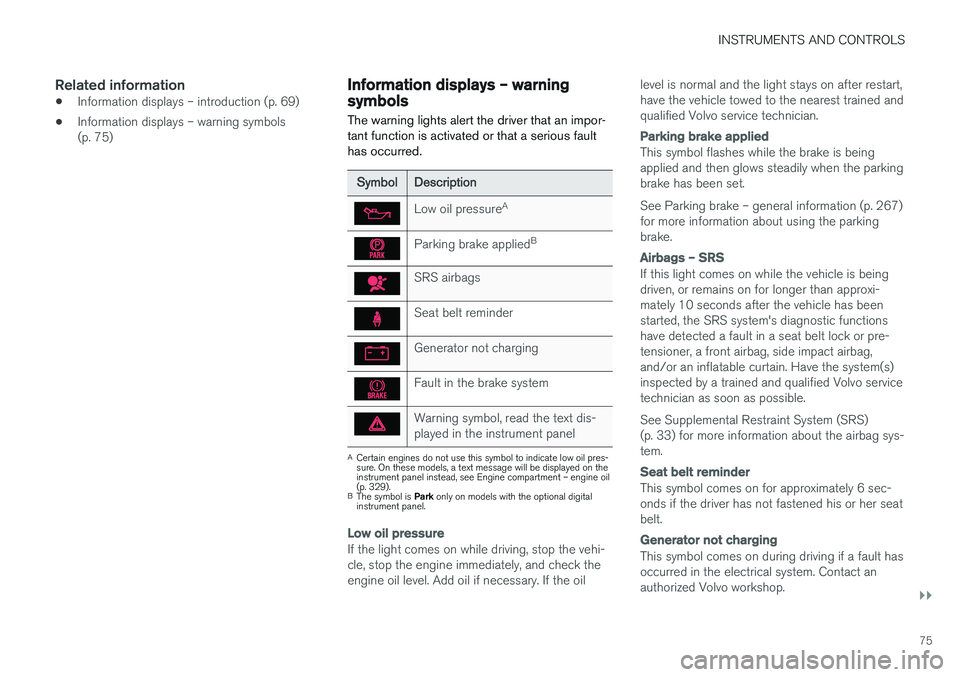
The warning lights alert the driver that an impor- tant function is activated or that a serious faulthas occurred.
SymbolDescription
Low oil pressure A
Parking brake applied B
SRS airbags
Seat belt reminder
Generator not charging
Fault in the brake system
Warning symbol, read the text dis- played in the instrument panel
A
Certain engines do not use this symbol to indicate low oil pres- sure. On these models, a text message will be displayed on theinstrument panel instead, see Engine compartment – engine oil(p. 329).
B The symbol is Park only on models with the optional digital
instrument panel.
Low oil pressure
If the light comes on while driving, stop the vehi- cle, stop the engine immediately, and check theengine oil level. Add oil if necessary. If the oil level is normal and the light stays on after restart,have the vehicle towed to the nearest trained andqualified Volvo service technician.
Parking brake applied
This symbol flashes while the brake is being applied and then glows steadily when the parkingbrake has been set. See Parking brake – general information (p. 267) for more information about using the parkingbrake.
Airbags – SRS
If this light comes on while the vehicle is being driven, or remains on for longer than approxi-mately 10 seconds after the vehicle has beenstarted, the SRS system's diagnostic functionshave detected a fault in a seat belt lock or pre-tensioner, a front airbag, side impact airbag,and/or an inflatable curtain. Have the system(s)inspected by a trained and qualified Volvo servicetechnician as soon as possible. See Supplemental Restraint System (SRS) (p. 33) for more information about the airbag sys-tem.
Seat belt reminder
This symbol comes on for approximately 6 sec- onds if the driver has not fastened his or her seatbelt.
Generator not charging
This symbol comes on during driving if a fault has occurred in the electrical system. Contact anauthorized Volvo workshop.
Page 78 of 398
||
INSTRUMENTS AND CONTROLS
76
Engine temperature
Engine overheating can result from low oil or coolant levels, towing or hard driving at high heatand altitude, or mechanical malfunction. Engineoverheating will be signaled with text and a redwarning triangle in the middle of the instrumentdisplay. The exact text will depend on the degree of overheating. It may range from
High engine
temp Reduce speed to High engine temp
Stop engine. If appropriate, other messages,
such as Coolant level low, Stop safely will
also be displayed. If your engine does overheat so that you must stop the engine, always allowthe engine to cool before attempting to check oiland coolant levels. See Engine compartment – coolant (p. 331) for more information.
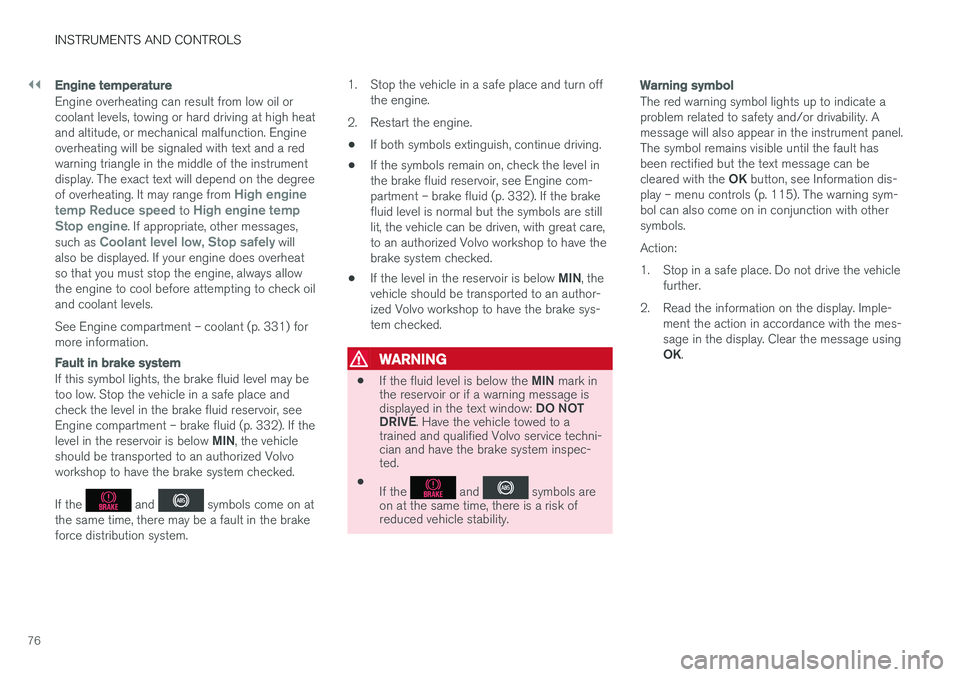
Fault in brake system
If this symbol lights, the brake fluid level may be too low. Stop the vehicle in a safe place andcheck the level in the brake fluid reservoir, seeEngine compartment – brake fluid (p. 332). If the level in the reservoir is below MIN, the vehicle
should be transported to an authorized Volvo workshop to have the brake system checked. If the
and symbols come on at
the same time, there may be a fault in the brake force distribution system. 1. Stop the vehicle in a safe place and turn off
the engine.
2. Restart the engine.
• If both symbols extinguish, continue driving.
• If the symbols remain on, check the level inthe brake fluid reservoir, see Engine com-partment – brake fluid (p. 332). If the brakefluid level is normal but the symbols are stilllit, the vehicle can be driven, with great care,to an authorized Volvo workshop to have thebrake system checked.
• If the level in the reservoir is below
MIN, the
vehicle should be transported to an author-ized Volvo workshop to have the brake sys-tem checked.
WARNING
• If the fluid level is below the
MIN mark in
the reservoir or if a warning message is displayed in the text window: DO NOT
DRIVE . Have the vehicle towed to a
trained and qualified Volvo service techni- cian and have the brake system inspec-ted.
• If the
and symbols are
on at the same time, there is a risk of reduced vehicle stability.
Warning symbol
The red warning symbol lights up to indicate a problem related to safety and/or drivability. Amessage will also appear in the instrument panel.The symbol remains visible until the fault hasbeen rectified but the text message can be cleared with the OK button, see Information dis-
play – menu controls (p. 115). The warning sym- bol can also come on in conjunction with othersymbols. Action:
1. Stop in a safe place. Do not drive the vehicle further.
2. Read the information on the display. Imple- ment the action in accordance with the mes- sage in the display. Clear the message using OK.
Page 96 of 398
||
INSTRUMENTS AND CONTROLS
* Option/accessory, for more information, see Introduction.
94
NOTE
This function is only active in twilight or dark conditions, and only when the vehicle is inmotion.
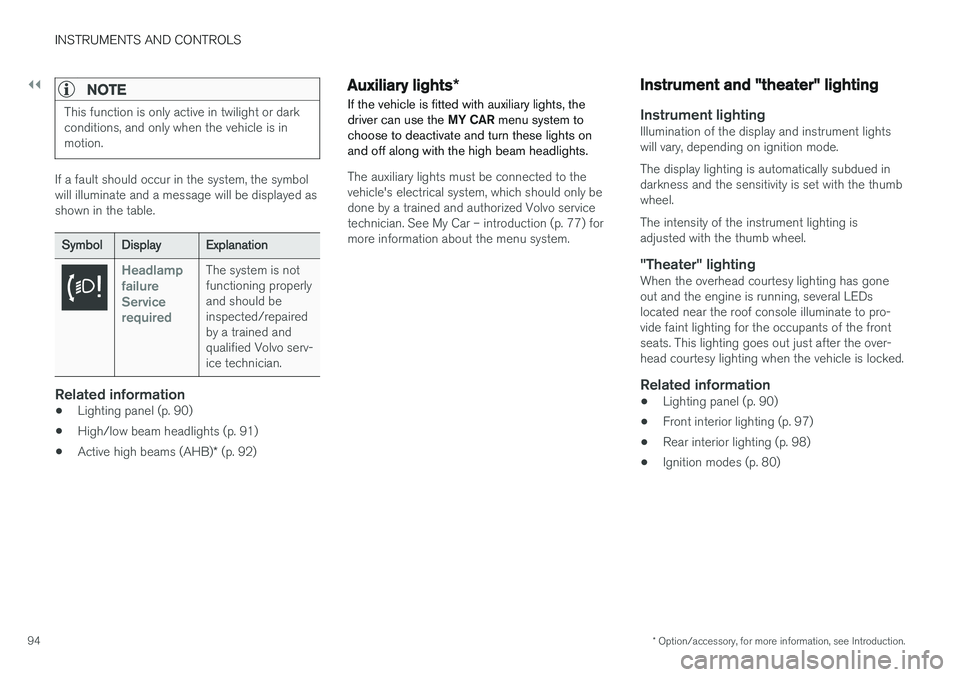
If a fault should occur in the system, the symbol will illuminate and a message will be displayed asshown in the table.
SymbolDisplayExplanation
Headlamp failureServicerequiredThe system is not functioning properlyand should beinspected/repairedby a trained andqualified Volvo serv-ice technician.
Related information
• Lighting panel (p. 90)
• High/low beam headlights (p. 91)
• Active high beams (AHB)
* (p. 92)
Auxiliary lights *
If the vehicle is fitted with auxiliary lights, the driver can use the MY CAR menu system to
choose to deactivate and turn these lights onand off along with the high beam headlights.
The auxiliary lights must be connected to the vehicle's electrical system, which should only bedone by a trained and authorized Volvo servicetechnician. See My Car – introduction (p. 77) formore information about the menu system.
Instrument and "theater" lighting
Instrument lightingIllumination of the display and instrument lights will vary, depending on ignition mode. The display lighting is automatically subdued in darkness and the sensitivity is set with the thumbwheel. The intensity of the instrument lighting is adjusted with the thumb wheel.
"Theater" lightingWhen the overhead courtesy lighting has goneout and the engine is running, several LEDslocated near the roof console illuminate to pro-vide faint lighting for the occupants of the frontseats. This lighting goes out just after the over-head courtesy lighting when the vehicle is locked.
Related information
• Lighting panel (p. 90)
• Front interior lighting (p. 97)
• Rear interior lighting (p. 98)
• Ignition modes (p. 80)
Page 102 of 398
||
INSTRUMENTS AND CONTROLS
* Option/accessory, for more information, see Introduction.
100
CAUTION
• Use ample washer fluid when washing the windshield. The windshield should bethoroughly wet when the wipers are inoperation.
• Before using the wipers, ice and snowshould be removed from the windshield/rear window. Be sure the wiper bladesare not frozen in place.
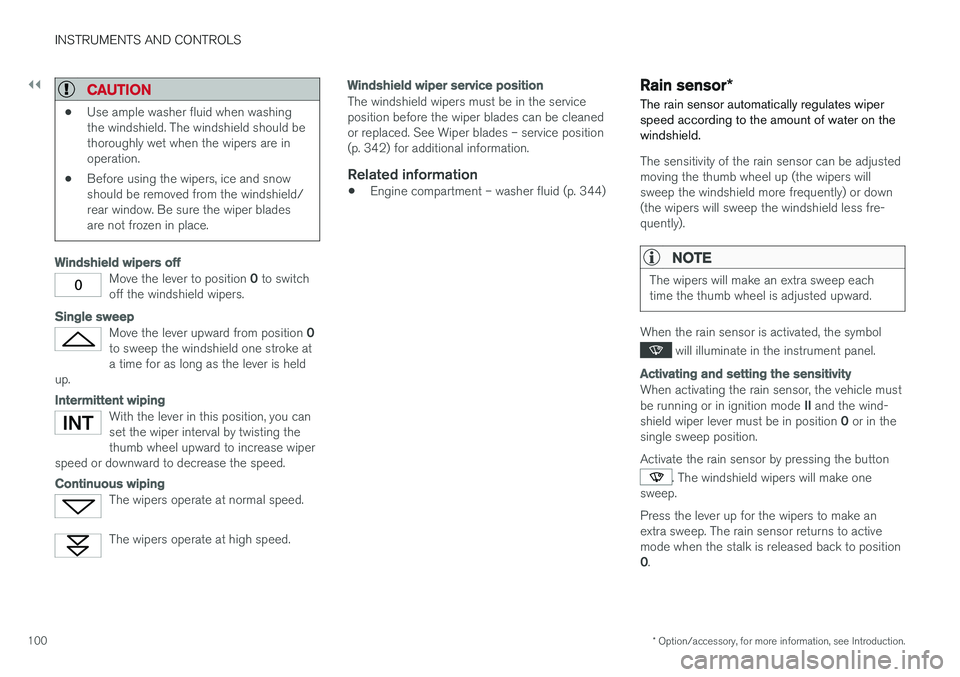
Windshield wipers off
Move the lever to position
0 to switch
off the windshield wipers.
Single sweep
Move the lever upward from position 0
to sweep the windshield one stroke at a time for as long as the lever is held
up.
Intermittent wiping
With the lever in this position, you can set the wiper interval by twisting thethumb wheel upward to increase wiper
speed or downward to decrease the speed.
Continuous wiping
The wipers operate at normal speed.
The wipers operate at high speed.
Windshield wiper service position
The windshield wipers must be in the service position before the wiper blades can be cleanedor replaced. See Wiper blades – service position(p. 342) for additional information.
Related information
• Engine compartment – washer fluid (p. 344)
Rain sensor
*
The rain sensor automatically regulates wiper speed according to the amount of water on thewindshield.
The sensitivity of the rain sensor can be adjusted moving the thumb wheel up (the wipers willsweep the windshield more frequently) or down(the wipers will sweep the windshield less fre-quently).
NOTE
The wipers will make an extra sweep each time the thumb wheel is adjusted upward.
When the rain sensor is activated, the symbol
will illuminate in the instrument panel.
Activating and setting the sensitivity
When activating the rain sensor, the vehicle must be running or in ignition mode II and the wind-
shield wiper lever must be in position 0 or in the
single sweep position. Activate the rain sensor by pressing the button
. The windshield wipers will make one
sweep. Press the lever up for the wipers to make an extra sweep. The rain sensor returns to activemode when the stalk is released back to position 0 .
Page 117 of 398
INSTRUMENTS AND CONTROLS
* Option/accessory, for more information, see Introduction.115
Information display – menu controls
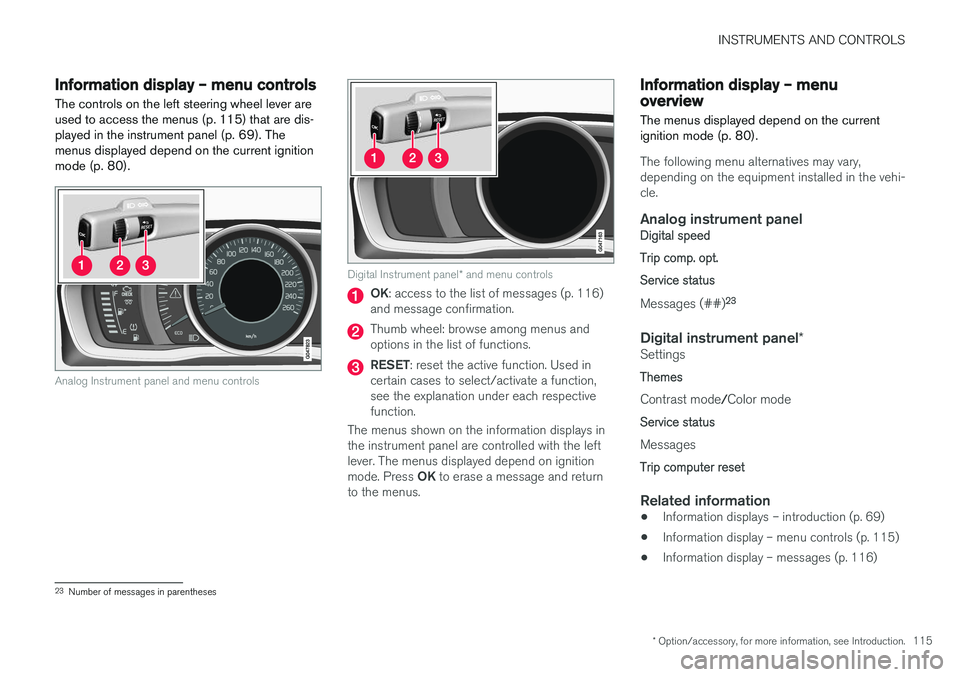
The controls on the left steering wheel lever are used to access the menus (p. 115) that are dis-played in the instrument panel (p. 69). Themenus displayed depend on the current ignitionmode (p. 80).
Analog Instrument panel and menu controls
Digital Instrument panel * and menu controls
OK : access to the list of messages (p. 116)
and message confirmation.
Thumb wheel: browse among menus and options in the list of functions.
RESET : reset the active function. Used in
certain cases to select/activate a function, see the explanation under each respectivefunction.
The menus shown on the information displays inthe instrument panel are controlled with the leftlever. The menus displayed depend on ignition mode. Press OK to erase a message and return
to the menus.
Information display – menu overview
The menus displayed depend on the current ignition mode (p. 80).
The following menu alternatives may vary, depending on the equipment installed in the vehi-cle.
Analog instrument panelDigital speed Trip comp. opt.Service status
Messages (##) 23
Digital instrument panel
*Settings
Themes
Contrast mode /Color mode
Service status
Messages
Trip computer reset
Related information
• Information displays – introduction (p. 69)
• Information display – menu controls (p. 115)
• Information display – messages (p. 116)
23
Number of messages in parentheses
Page 118 of 398
INSTRUMENTS AND CONTROLS
116
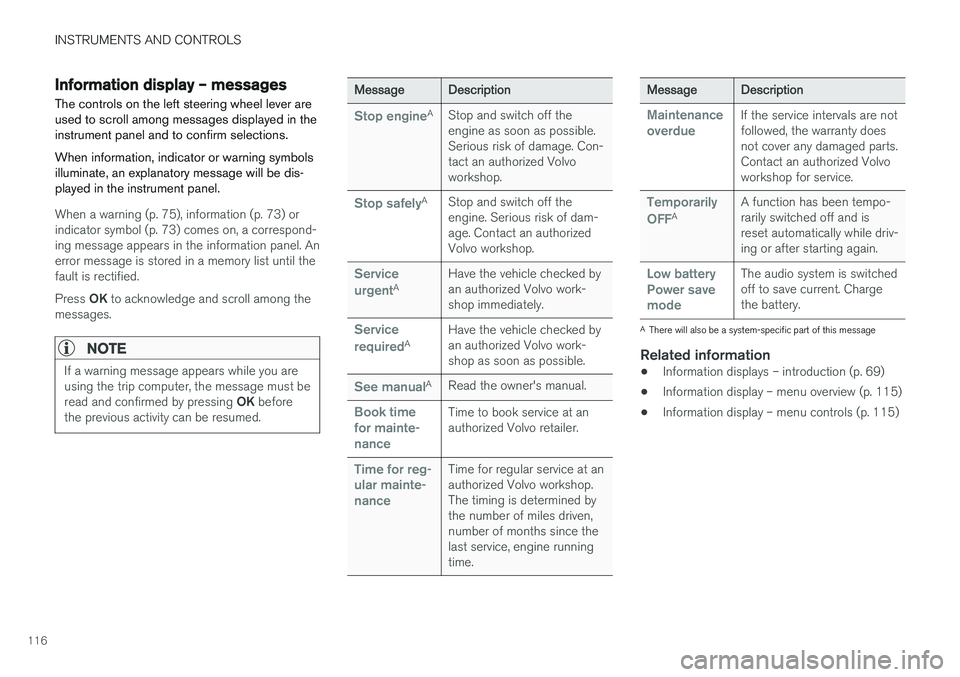
Information display – messagesThe controls on the left steering wheel lever are used to scroll among messages displayed in theinstrument panel and to confirm selections. When information, indicator or warning symbols illuminate, an explanatory message will be dis-played in the instrument panel.
When a warning (p. 75), information (p. 73) or indicator symbol (p. 73) comes on, a correspond-ing message appears in the information panel. Anerror message is stored in a memory list until thefault is rectified. Press OK to acknowledge and scroll among the
messages.
NOTE
If a warning message appears while you are using the trip computer, the message must be read and confirmed by pressing OK before
the previous activity can be resumed.
MessageDescription
Stop engineAStop and switch off the engine as soon as possible.Serious risk of damage. Con-tact an authorized Volvoworkshop.
Stop safelyAStop and switch off the engine. Serious risk of dam-age. Contact an authorizedVolvo workshop.
Service urgentAHave the vehicle checked by an authorized Volvo work-shop immediately.
Service requiredAHave the vehicle checked by an authorized Volvo work-shop as soon as possible.
See manualARead the owner's manual.
Book time for mainte-nanceTime to book service at an authorized Volvo retailer.
Time for reg- ular mainte-nanceTime for regular service at an authorized Volvo workshop.The timing is determined bythe number of miles driven,number of months since thelast service, engine runningtime.
MessageDescription
Maintenance overdueIf the service intervals are not followed, the warranty doesnot cover any damaged parts.Contact an authorized Volvoworkshop for service.
Temporarily OFFAA function has been tempo- rarily switched off and isreset automatically while driv-ing or after starting again.
Low battery Power savemodeThe audio system is switched off to save current. Chargethe battery.
A There will also be a system-specific part of this message
Related information
• Information displays – introduction (p. 69)
• Information display – menu overview (p. 115)
• Information display – menu controls (p. 115)
Page 121 of 398
INSTRUMENTS AND CONTROLS
}}
119
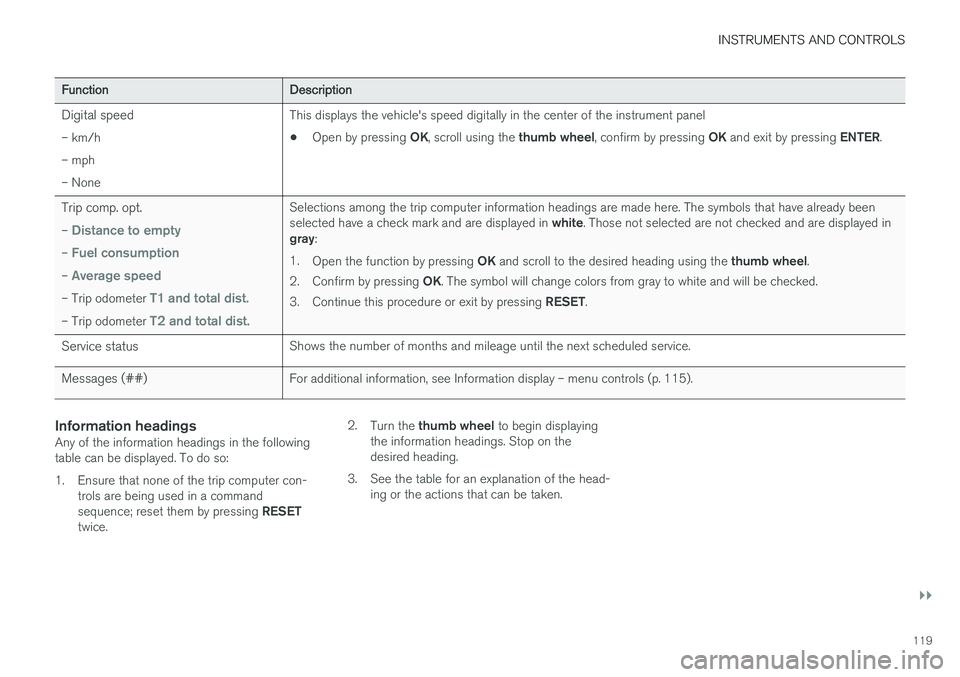
FunctionDescription
Digital speed– km/h – mph– NoneThis displays the vehicle's speed digitally in the center of the instrument panel • Open by pressing
OK, scroll using the thumb wheel, confirm by pressing OK and exit by pressing ENTER.
Trip comp. opt.
–
Distance to empty
– Fuel consumption
– Average speed
– Trip odometer T1 and total dist.
– Trip odometer T2 and total dist.
Selections among the trip computer information headings are made here. The symbols that have already been selected have a check mark and are displayed in white. Those not selected are not checked and are displayed in
gray :
1. Open the function by pressing OK and scroll to the desired heading using the thumb wheel.
2. Confirm by pressing OK. The symbol will change colors from gray to white and will be checked.
3. Continue this procedure or exit by pressing RESET.
Service statusShows the number of months and mileage until the next scheduled service.
Messages (##)For additional information, see Information display – menu controls (p. 115).
Information headingsAny of the information headings in the following table can be displayed. To do so:
1. Ensure that none of the trip computer con-
trols are being used in a command sequence; reset them by pressing RESET
twice. 2.
Turn the thumb wheel to begin displaying
the information headings. Stop on the desired heading.
3. See the table for an explanation of the head- ing or the actions that can be taken.
Page 124 of 398
||
INSTRUMENTS AND CONTROLS
122
FunctionDescription
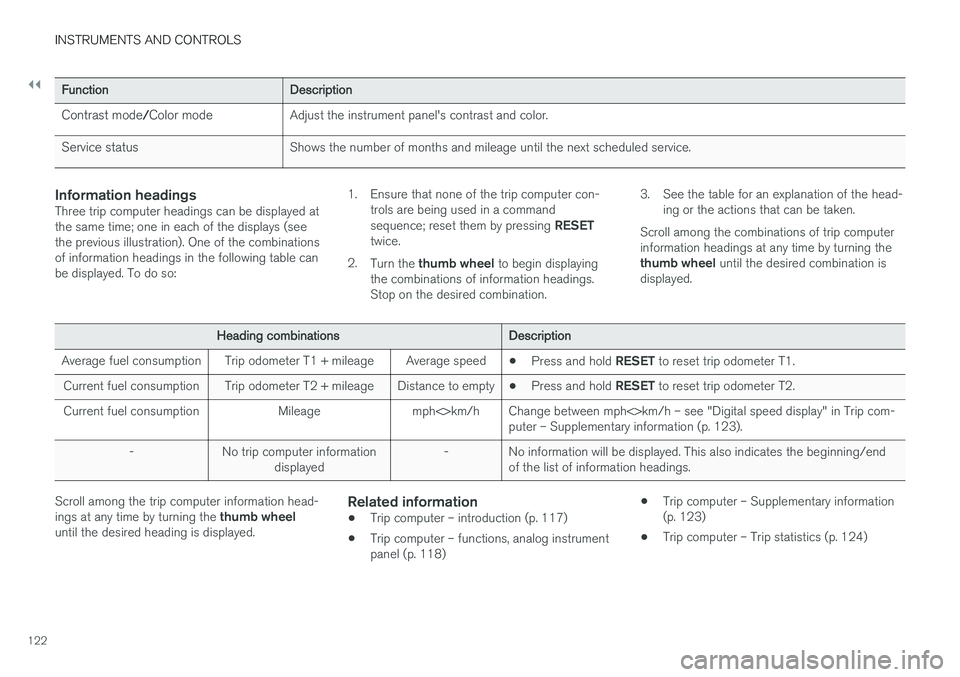
Contrast mode/Color modeAdjust the instrument panel's contrast and color.
Service statusShows the number of months and mileage until the next scheduled service.
Information headingsThree trip computer headings can be displayed at the same time; one in each of the displays (seethe previous illustration). One of the combinationsof information headings in the following table canbe displayed. To do so: 1. Ensure that none of the trip computer con-
trols are being used in a command sequence; reset them by pressing RESET
twice.
2. Turn the thumb wheel to begin displaying
the combinations of information headings. Stop on the desired combination. 3. See the table for an explanation of the head-
ing or the actions that can be taken.
Scroll among the combinations of trip computerinformation headings at any time by turning the thumb wheel until the desired combination is
displayed.
Heading combinationsDescription
Average fuel consumptionTrip odometer T1 + mileageAverage speed• Press and hold
RESET to reset trip odometer T1.
Current fuel consumptionTrip odometer T2 + mileageDistance to empty•Press and hold
RESET to reset trip odometer T2.
Current fuel consumptionMileagemph<>km/hChange between mph<>km/h – see "Digital speed display" in Trip com- puter – Supplementary information (p. 123).
-No trip computer information
displayed-No information will be displayed. This also indicates the beginning/end of the list of information headings.
Scroll among the trip computer information head- ings at any time by turning the thumb wheel
until the desired heading is displayed.Related information
• Trip computer – introduction (p. 117)
• Trip computer – functions, analog instrument panel (p. 118) •
Trip computer – Supplementary information(p. 123)
• Trip computer – Trip statistics (p. 124)
Page 128 of 398
CLIMATE
* Option/accessory, for more information, see Introduction.
126
Climate – general information
The vehicle is equipped with Electronic Climate
Control (ECC) (p. 130) that cools, heats ordehumidifies the air in the passenger compart-ment.
Air conditioning
NOTE
• The air conditioning can be switched off, but to ensure the best possible climatecomfort in the passenger compartmentand to prevent the windows from misting,it should always be on.
• In warm weather, a small amount of watermay accumulate under the car when ithas been parked. This water is condensa-tion from the A/C system and is normal.
Side windows and laminated panoramic roof
To ensure that the air conditioning works opti- mally, the side windows, and the laminated panor-amic roof should be closed.
Fog on the inside of the windowsThe defroster function (p. 133) should be usedto remove fog or mist from the inside of the win-dows. Keeping the windows clean with a com-mercially available window washing spray will alsohelp prevent fogging or misting.
Temporary shut-off of the air conditioning
The air conditioning (p. 133) is momentarily dis- engaged during full acceleration or when drivinguphill with a trailer. This may result in a temporaryincrease in cabin temperature.
Ice and snowAlways keep the air intake grille at the base ofthe windshield free of snow.
Climate system maintenanceSpecial tools and equipment are required tomaintain and carry out repairs on the climate sys-tem. Work of this type should only be done by atrained and qualified Volvo service technician.
RefrigerantVolvo cares about the environment. The air condi-tioning system in your car contains a CFC-freerefrigerant – R134a. This substance will notdeplete the ozone layer. The air conditioning sys-tem contains 1.76 lbs (800 g) of R134a. Thesystems uses PAG oil.
Related information
• Climate – sensors (p. 126)
• Climate – menu settings (p. 128)
Climate – sensors
The climate system utilizes a number of sensors to help regulate the temperature and humiditylevel in the passenger compartment.
Sensor location
• The sunlight sensor is located on the top side of the dashboard.
NOTE
The sunlight sensor monitors which side of the car that is most exposed to sunlight. Thiscan mean that the temperature may differbetween the right and left-side air vents, evenif the temperatures set for both sides of thepassenger compartment are the same.
•
The temperature sensor for the passenger compartment is located below the climatecontrol panel.
• The outside (ambient) temperature sensor islocated on the door mirror.
• The humidity sensor
* is located in the interior
rearview mirror.
NOTE
Do not cover or block the sensors with cloth- ing or other objects.