service VOLVO XC60 2017 Owner´s Manual
[x] Cancel search | Manufacturer: VOLVO, Model Year: 2017, Model line: XC60, Model: VOLVO XC60 2017Pages: 398, PDF Size: 9.17 MB
Page 239 of 398
DRIVER SUPPORT
237
Park assist – troubleshooting
Faults in the systemIf the information symbol illuminates and Park
assist syst Service required is shown on the
information display, this indicates that the system is not functioning properly and has been disen-gaged. Consult a trained and qualified Volvo serv-ice technician.
CAUTION
In certain circumstances, the park assist sys- tem may give unexpected warning signalsthat can be caused by external sound sourcesthat use the same ultrasound frequencies asthe system. This may include such things asthe horns of other vehicles, wet tires onasphalt, pneumatic brakes, motorcycleexhaust pipes, etc. This does not indicate afault in the system.
Related information
• Park assist – introduction (p. 233)
• Park assist – limitations (p. 236)
• Park assist – function (p. 233)
• Park assist – operation (p. 235)
• Rear Park Assist Camera (PAC) – function (p. 238)
Rear Park Assist Camera (PAC) – introduction
The Park Assist Camera is designed to provide the driver with a view of the area behind the vehi-cle when backing up.
IntroductionPAC uses the display in the center console to show the area behind the car while you are back-ing up. PAC also shows guiding lines in the on-screen image to indicate the direction that the vehiclewill take as it moves rearward, which helps sim-plify parallel parking, backing into a tight space orwhen attaching a trailer to the vehicle. The images of vehicles in this section are generic and may not depict your specific model.
NOTE
A trailer hitch whose wiring is integrated with the vehicle's electrical system will be takeninto account when measuring the availablespace behind the vehicle.
WARNING
• PAC is designed to be a supplementary aid when parking the vehicle. It is not,however, intended to replace the driver
Page 248 of 398
||
DRIVER SUPPORT
* Option/accessory, for more information, see Introduction.
246 The BLIS/CTA
13
sensors are located on the
inside of the rear fenders/bumper. The surfaces in front of the sensors must be kept clean for the system to function optimally.
CAUTION
Repairs to the BLIS/CTA systems and/or repainting the rear bumper should only bedone by a trained and qualified Volvo servicetechnician.
Related information
• BLIS
* – introduction (p. 241)
• BLIS
* – function (p. 242)
• BLIS
* – operation (p. 243)
• BLIS
* – Cross Traffic Alert (CTA) (p. 244)
• BLIS
* – messages (p. 246)
BLIS * – messages
If BLIS/CTA 14
are not functioning normally, a
symbol will illuminate in the instrument panel and a text message will be displayed. Follow anyinstructions that may be provided. These messages include:
MessageSystem status
CTA OFFCTA has been switched off manually. BLIS remains active.
BLIS and CTA OFFTrailerattachedBLIS and CTA are temporarily deactivated because a trailer'swiring has been connected tothe vehicle's electrical system.
BLIS and CTA ServicerequiredBLIS and CTA are not func- tioning normally.
• If this message recurs,the systems should beinspected by a trainedand qualified Volvo serv-ice technician.
Messages can be erased by pressing the
OK
button on the left steering wheel lever.
Related information
• BLIS
* – introduction (p. 241)
• BLIS
* – function (p. 242)
• BLIS
* – operation (p. 243)
• BLIS
* – Cross Traffic Alert (CTA) (p. 244)
• BLIS
* – limitations (p. 245)
13
Cross Traffic Alert
14 Cross Traffic Alert
Page 252 of 398
STARTING AND DRIVING
* Option/accessory, for more information, see Introduction.
250
Engine Remote Start (ERS) * –
introduction
ERS is a feature that makes it possible to remotely start the engine using the remote key tocool or heat the passenger compartment beforedriving.
The climate system will start using automatic set- tings. When the engine is started using ERS, it will run for a maximum of 15 minutes before automati-cally switching off again. After 2 ERS starts, theengine must be started in the normal way beforeERS can be used again.
NOTE
• Always adhere to applicable State, Prov- ince and/or Local laws regarding engineidling when using ERS.
• The service life of the remote key's bat-tery is affected by ERS use. If this featureis used frequently, the battery should bereplaced once a year, see Remote key –replacing the battery (p. 157).
WARNING
Keep the following in mind before using ERS:
• The vehicle should be in view.
• The vehicle should be unoccupied.
• The vehicle must not be parked indoors or in an enclosed area. Exhaust fumes areharmful to the health.
Related information
•
Engine Remote Start (ERS)
* – starting the
engine (p. 250)
• Engine Remote Start (ERS)
* – switching off
the engine (p. 251)
Engine Remote Start (ERS) * –
starting the engine
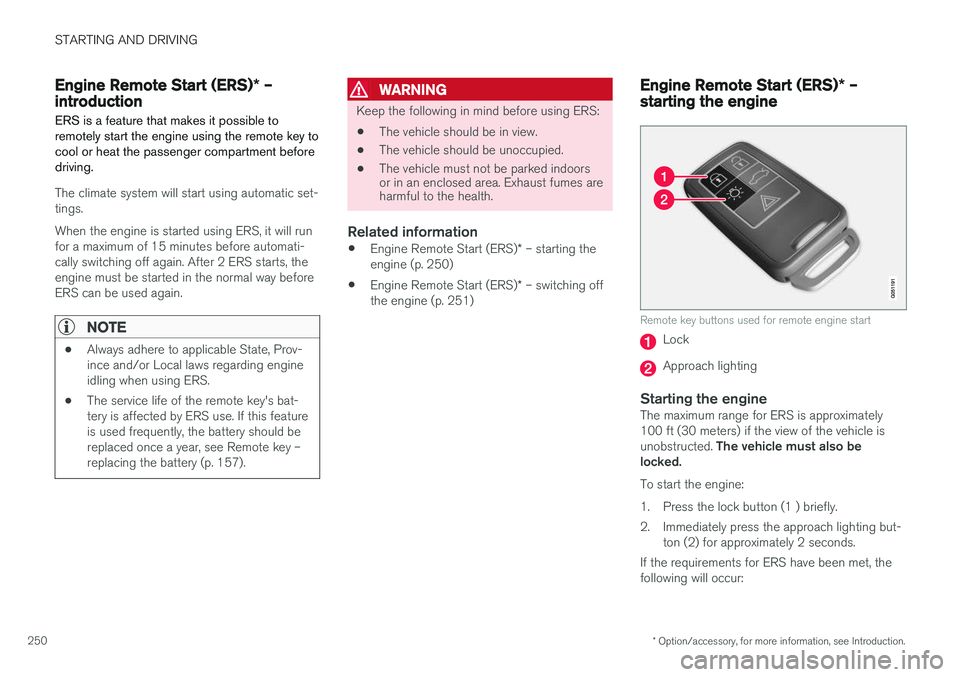
Remote key buttons used for remote engine start
Lock
Approach lighting
Starting the engineThe maximum range for ERS is approximately 100 ft (30 meters) if the view of the vehicle is unobstructed. The vehicle must also be
locked. To start the engine:
1. Press the lock button (1 ) briefly.
2. Immediately press the approach lighting but- ton (2) for approximately 2 seconds.
If the requirements for ERS have been met, the following will occur:
Page 263 of 398
STARTING AND DRIVING
261
Start/Stop – symbols and messages
Text messagesCombined with the information symbol in the instrument panel, the Start/Stopfunction may also display messages in
certain situations. Follow the instructions provi- ded in the message. The following table givesseveral examples.
SymbolMessageInformation/action
Auto Start/Stop Service requiredStart/Stop is not functioning properly. Contact a Volvo retailer or a trained and qualified Volvo service tech- nician.
Autostart Engine running + an
audible signalThis is triggered if the driver's door is opened while the engine is auto-stopped.
-Press Start buttonThe engine will not auto-start. Start the engine normally by pressing the START/STOP ENGINE button.
-Select P or N to startStart/Stop has been deactivated. Move the gear selector to N or P and start the engine normally be press-
ing the START/STOP ENGINE button.
-Press Start buttonThe engine will not auto-start. Move the gear selector to N or P and start the engine normally be pressing
the START/STOP ENGINE button.
If the message does not disappear after the sug- gested action has been taken, contact a Volvoretailer or a trained and qualified Volvo servicetechnician.Related information
•Start/Stop – introduction (p. 258)
• Start/Stop – function (p. 258)
• Start/Stop – settings (p. 260)
• Start/Stop – Auto-stop exceptions (p. 259) •
Start/Stop – Auto-start exceptions (p. 260)
• Start/Stop – Hill Start Assist (HSA) (p. 257)
Page 264 of 398
STARTING AND DRIVING
262
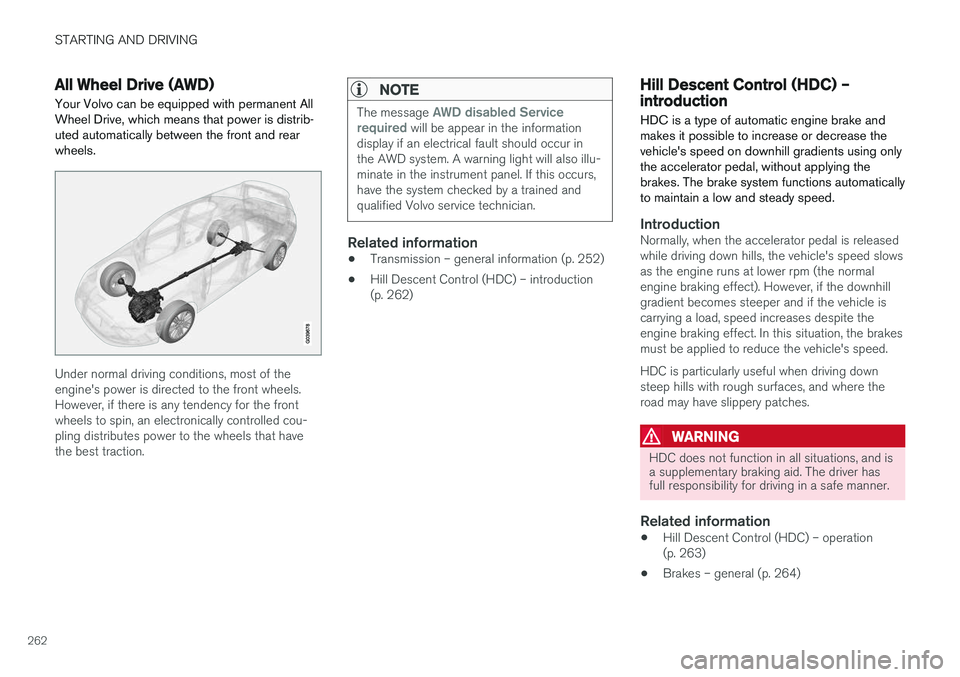
All Wheel Drive (AWD)Your Volvo can be equipped with permanent All Wheel Drive, which means that power is distrib-uted automatically between the front and rearwheels.
Under normal driving conditions, most of the engine's power is directed to the front wheels.However, if there is any tendency for the frontwheels to spin, an electronically controlled cou-pling distributes power to the wheels that havethe best traction.
NOTE
The message AWD disabled Service
required will be appear in the information
display if an electrical fault should occur in the AWD system. A warning light will also illu-minate in the instrument panel. If this occurs,have the system checked by a trained andqualified Volvo service technician.
Related information
• Transmission – general information (p. 252)
• Hill Descent Control (HDC) – introduction (p. 262)
Hill Descent Control (HDC) – introduction
HDC is a type of automatic engine brake and makes it possible to increase or decrease thevehicle's speed on downhill gradients using onlythe accelerator pedal, without applying thebrakes. The brake system functions automaticallyto maintain a low and steady speed.
IntroductionNormally, when the accelerator pedal is released while driving down hills, the vehicle's speed slowsas the engine runs at lower rpm (the normalengine braking effect). However, if the downhillgradient becomes steeper and if the vehicle iscarrying a load, speed increases despite theengine braking effect. In this situation, the brakesmust be applied to reduce the vehicle's speed. HDC is particularly useful when driving down steep hills with rough surfaces, and where theroad may have slippery patches.
WARNING
HDC does not function in all situations, and is a supplementary braking aid. The driver hasfull responsibility for driving in a safe manner.
Related information
• Hill Descent Control (HDC) – operation (p. 263)
• Brakes – general (p. 264)
Page 266 of 398
STARTING AND DRIVING
* Option/accessory, for more information, see Introduction.
264
Brakes – general The brake system is a hydraulic system consist- ing of two separate brake circuits. If a problemshould occur in one of these circuits, it is stillpossible to stop the vehicle with the other brakecircuit.
If the brake pedal must be depressed farther than normal and requires greater foot pressure,the stopping distance will be longer. A warning light in the instrument panel will light up to warn the driver that a fault has occurred. If this light comes on while driving or braking, stop immediately and check the brake fluid levelin the reservoir.
NOTE
Press the brake pedal hard and maintain pressure on the pedal – do not pump thebrakes.
WARNING
If the fluid level is below the MIN mark in the
reservoir or if a brake system message is shown in the information display: DO NOT
DRIVE . Have the vehicle towed to a trained
and qualified Volvo service technician and have the brake system inspected.
Brake pad inspection
On vehicles equipped with a jack *, the condition
of the brake pads can be checked by raising the vehicle (see Changing a wheel – removing wheel(p. 291) for information about using the jack andremoving a wheel) and performing a visualinspection of the brake pads.
WARNING
• If the vehicle has been driven immediately prior to a brake pad inspection, the wheelhub, brake components, etc., will be veryhot. Allow time for these components tocool before carrying out the inspection.
• Apply the parking brake and put the gear selector in the Park (
P) position.
• Block the wheels standing on the ground, use rigid wooden blocks or large stones.
WARNING
• Use the jack intended for the vehicle when changing a tire. For any other job,use stands to support the vehicle.
• The jack should be kept well-greased andclean, and should not be damaged.
• Be sure the jack is on a firm, level, non-slippery surface.
• No objects should be placed between thebase of jack and the ground, or betweenthe jack and the attachment bar on thevehicle.
• The jack must correctly engage the jackattachment.
• Never allow any part of your body to beextended under a vehicle supported by ajack.
Power brakes function only when the engine is running
The power brakes utilize vacuum pressure which is only created when the engine is running. Neverlet the vehicle roll to a stop with the engineswitched off. If the power brakes are not working, considerably higher pressure will be required on the brakepedal to compensate for the lack of power assis-tance. This can happen for example when towingyour vehicle or if the engine is switched off whenthe vehicle is rolling. The brake pedal feels harderthan usual.
Page 267 of 398
STARTING AND DRIVING
265
Water on brake discs and brake pads affects braking
Driving in rain and slush or passing through an automatic car wash can cause water to collect onthe brake discs and pads. This will cause a delayin braking effect when the pedal is depressed. Toavoid such a delay when the brakes are needed,depress the pedal occasionally when drivingthrough rain, slush, etc. This will remove the waterfrom the brakes. Check that brake applicationfeels normal. This should also be done afterwashing or starting in very damp or cold weather.
Severe strain on the brake systemThe brakes will be subject to severe strain whendriving in mountains or hilly areas, or when towinga trailer. Vehicle speed is usually slower, whichmeans that the cooling of the brakes is less effi-cient than when driving on level roads. To reducethe strain on the brakes, shift into a lower gearand let the engine help with the braking. Do notforget that if you are towing a trailer, the brakeswill be subjected to a greater than normal load.
Cleaning the brake discsCoatings of dirt and water on the brake discsmay result in delayed brake function. This delay isminimized by cleaning the brake linings. Cleaning the brake pads is advisable in wet weather, prior to long-term parking, and after thevehicle has been washed. Do this by braking gen-tly for a short period while the vehicle is moving.
Related information
•Parking brake – general information (p. 267)
• Emergency Brake Assistance (EBA) (p. 266)
• Brakes – general (p. 264)
• Anti-lock braking system (ABS) (p. 266)
• Hill Descent Control (HDC) – introduction(p. 262)
Brakes – symbols
Symbols in the instrument panel
SymbolSpecification
Steady glow – Check the brake fluid level. If the level is low, fill withbrake fluid and check for the causeof the brake fluid loss.
Automatic function check: steady glow for two seconds when theengine is started.
WARNING
If and come on at the same
time and the brake level is below the MIN
mark in the reservoir or if a brake system-rela- ted message is shown in the information dis- play: DO NOT DRIVE . Have the vehicle towed
to a trained and qualified Volvo service techni- cian and have the brake system inspected.
Related information
• Brakes – general (p. 264)
• Parking brake – general information (p. 267)
Page 272 of 398
STARTING AND DRIVING
270
Parking brake – symbols and messages
A text message can be erased by pressing briefly on the OK button on the turn signal lever.
Symbol and messages in the instrument panel
SymbolMessageDescription/action
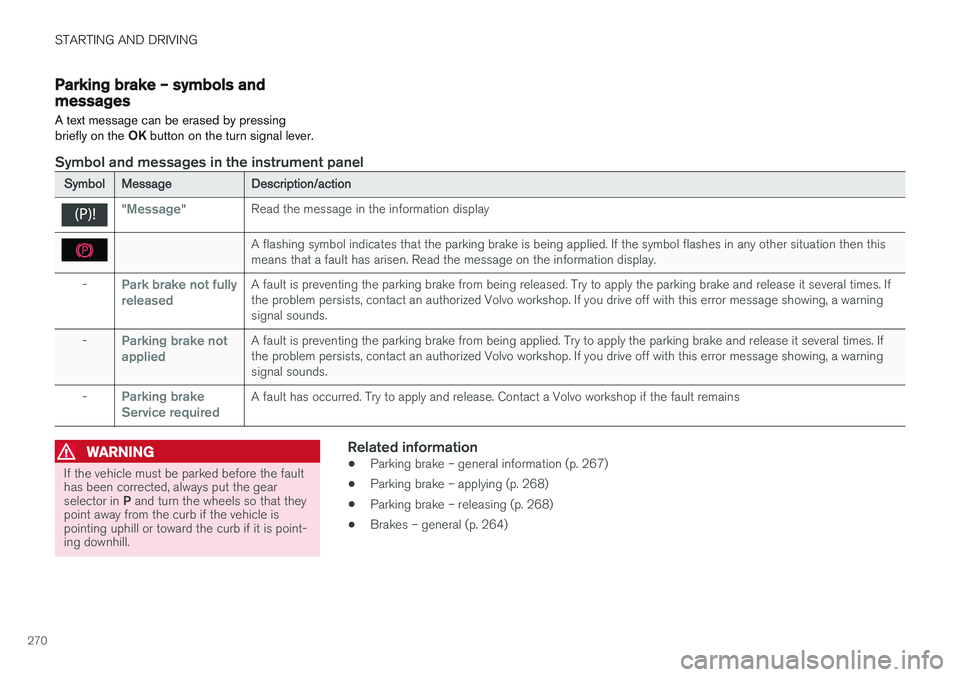
"Message"Read the message in the information display
A flashing symbol indicates that the parking brake is being applied. If the symbol flashes in any other situation then this means that a fault has arisen. Read the message on the information display.
-Park brake not fully releasedA fault is preventing the parking brake from being released. Try to apply the parking brake and release it several times. If the problem persists, contact an authorized Volvo workshop. If you drive off with this error message showing, a warningsignal sounds.
-Parking brake not appliedA fault is preventing the parking brake from being applied. Try to apply the parking brake and release it several times. If the problem persists, contact an authorized Volvo workshop. If you drive off with this error message showing, a warningsignal sounds.
-Parking brake Service requiredA fault has occurred. Try to apply and release. Contact a Volvo workshop if the fault remains
WARNING
If the vehicle must be parked before the fault has been corrected, always put the gear selector in P and turn the wheels so that they
point away from the curb if the vehicle is pointing uphill or toward the curb if it is point-ing downhill.
Related information
• Parking brake – general information (p. 267)
• Parking brake – applying (p. 268)
• Parking brake – releasing (p. 268)
• Brakes – general (p. 264)
Page 273 of 398
STARTING AND DRIVING
271
Driving through water
The vehicle should be driven with extreme cau- tion if it is necessary to drive through standingwater.
The vehicle can be driven through water up to a depth of approximately 13 in. (35 cm) at walkingspeed to help prevent water from entering thedifferential and the transmission. Water reducesthe oil's lubricating capacity and may shorten theservice life of these components.
• Take particular care when driving throughflowing water.
• Clean the electrical connections for trailerwiring after driving in mud or water.
• When driving through water, maintain lowspeed and do not stop in the water.
WARNING
•Avoid driving through standing or rushing water. Doing so can be dangerous and itmay also be difficult to determine theactual depth of the water.
• If water cannot be avoided, after drivingthrough the water, press lightly on thebrake pedal to ensure that the brakes arefunctioning normally. Water or mud canmake the brake linings slippery, resultingin delayed braking effect.
CAUTION
•Engine damage will occur if water is drawn into the air cleaner.
• If the vehicle is driven through waterdeeper than approximately 13 in.(35 cm), water may enter the differentialand the transmission. This reduces theoil's lubricating capacity and may shortenthe service life of these components.
• Damage to any components, the engine,transmission, turbo-charger, differential orits internal components caused by flood-ing, vapor lock or insufficient oil is notcovered under warranty.
• Do not allow the vehicle to stand in waterup to the door sills longer than absolutelynecessary. This could result in electricalmalfunctions.
• If the engine has been stopped while thevehicle is in water, do not attempt torestart it. Have the vehicle towed out ofthe water.
Related information
•Towing the vehicle (p. 282)
• Towing by tow truck (p. 284)
Engine and cooling system
Under special conditions, for example when driv- ing in hilly terrain, extreme heat or with heavyloads, there is a risk that the engine and coolingsystem will overheat.
Proceed as follows to avoid overheating the engine.
• Maintain a low speed when driving with atrailer up long, steep hills. For information,see Towing a trailer (p. 279)
• Do not turn the engine off immediately whenstopping after a hard drive.
WARNING
The cooling fan may start or continue to oper- ate (for up to 6 minutes) after the engine hasbeen switched off.
• Remove any auxiliary lights from in front of the grille when driving in hot weather condi-tions.
• Do not exceed engine speeds of 4500 rpm ifdriving with a trailer in hilly terrain. The oiltemperature could become too high.
Page 274 of 398
STARTING AND DRIVING
272
Conserving electrical current
Keep the following in mind to help minimize bat- tery drain:
• When the engine is not running, avoid using ignition mode
II. Many electrical systems (the
audio system, the optional navigation system, power windows, etc) will function in ignition modes 0 and I. These modes reduce drain
on the battery.
• Please keep in mind that using systems, accessories, etc., that consume a great dealof current when the engine is not runningcould result in the battery being completelydrained. Driving or having the engine runningfor approximately 15 minutes will help keepthe battery charged.
• The optional 12-volt socket in the cargoarea (p. 143) area provides electrical currenteven with the ignition switched off, whichdrains the battery.
Before a long distance trip
It is always worthwhile to have your vehicle checked by a trained and qualified Volvo servicetechnician before driving long distances. Yourretailer will also be able to supply you with bulbs,fuses, spark plugs and wiper blades for your usein the event that problems occur.
As a minimum, the following items should be checked before any long trip:
• Check that engine runs smoothly and thatfuel consumption is normal.
• Check for fuel, oil, and fluid leakage.
• Have the transmission oil level checked.
• Check condition of drive belts.
• Check state of the battery's charge.
• Examine tires carefully (the spare tire aswell), and replace those that areworn (p. 290). Check tire pressure (p. 297).
• The brakes, front wheel alignment, and steer-ing gear should be checked by a trained andqualified Volvo service technician only.
• Check all lights, including high beams.
• Reflective warning triangles are legallyrequired in some states/provinces.
• Have a word with a trained and qualifiedVolvo service technician if you intend to drivein countries where it may be difficult toobtain the correct fuel. •
Consider your destination. If you will be driv-ing through an area where snow or ice arelikely to occur, consider snow tires (p. 303).
Related information
•
Changing a wheel – removing wheel (p. 291)
• Bulbs – introduction (p. 334)