wheel VOLVO XC60 T8 2018 Owner´s Manual
[x] Cancel search | Manufacturer: VOLVO, Model Year: 2018, Model line: XC60 T8, Model: VOLVO XC60 T8 2018Pages: 674, PDF Size: 11.93 MB
Page 439 of 674
STARTING AND DRIVING
}}
437
OFF ROAD
•Maximizes the vehicle's ability to traverse dif- ficult terrain or poor roads.
In this mode, ground clearance 4
is high, steering
is light, and all-wheel drive and Hill DescentControl are activated. This drive mode is only available at low speeds, up to 40 km/h (25 mph). If this speed is excee-ded, Off road mode will be cancelled and AWDmode will be activated instead. All-wheel drive requires both the combustion and electric motor to be in continuous operation,which results in higher fuel consumption. In Off road mode, a compass will be displayed between the speedometer and the tachometer inthe instrument panel. The permissible speedrange will be shown in the speedometer. This drive mode is optimized for maximum control when driving at low speeds on very poor roads or difficult terrain. It raises the chassis 4
, reduces
driveline throttle response, and locks the vehicle in all-wheel drive. The Hill Descent Control func-tion facilitates controlled driving on steep down-grades.NOTE
This drive mode is not designed to be used for normal street driving.
NOTE
Due to the increased ground clearance, if the OFF ROAD mode was selected when theengine was switched off, the suspension willlower when the engine is restarted.
CAUTION
Do not use the OFF ROAD drive mode when towing a trailer without an electrical connec-tion. This could result in damage to the pneu-matic suspension system's bellows.
AWD
• Improves the vehicle's traction and handling by increasing all-wheel drive.
This drive mode locks the vehicle in all-wheeldrive. An optimal distribution between front andrear axle torque helps provide the best possiblecontrol, stability and traction, e.g. on slipperyroads or when towing a heavy trailer or anothervehicle. The AWD drive mode is always availableregardless of the hybrid battery's charge status. Both the combustion engine and the electricmotor are engaged to enable all-wheel drive,which results in higher fuel consumption. In the other drive modes, the vehicle automati- cally adapts the need for all-wheel drive accord-ing to the road surface, and can activate the elec-tric motor or start the combustion engine as nee-ded.
POWER
•
Power mode is designed to provide sportier driving characteristics and a faster accelera-tion response.
This drive mode maximizes the combined powerfrom the combustion engine and the electricmotor by providing power to both the front andrear wheels. Gear shifting will be faster and moredistinct and the transmission will prioritize gearswith a higher traction force. Steering response isfaster, suspension is stiffer and ground clearance is lower 4
to help reduce body roll when cornering.
Both the combustion engine and the electric motor are engaged to enable all-wheel drive,which results in higher fuel consumption. This drive mode is optimized for maximum per- formance and throttle response. It changes thethrottle response, gear shifting program andturbo boost system. Chassis settings and steer-ing and brake response are also optimized. ThePower drive mode is always available regardlessof the hybrid battery's charge status.
4 For vehicles with pneumatic suspension.
Page 441 of 674
STARTING AND DRIVING
439
Related information
•Changing drive mode (p. 439)
• Economical driving (p. 446)
• Hybrid gauge (p. 83)
• General information about Twin Engine (p. 396)
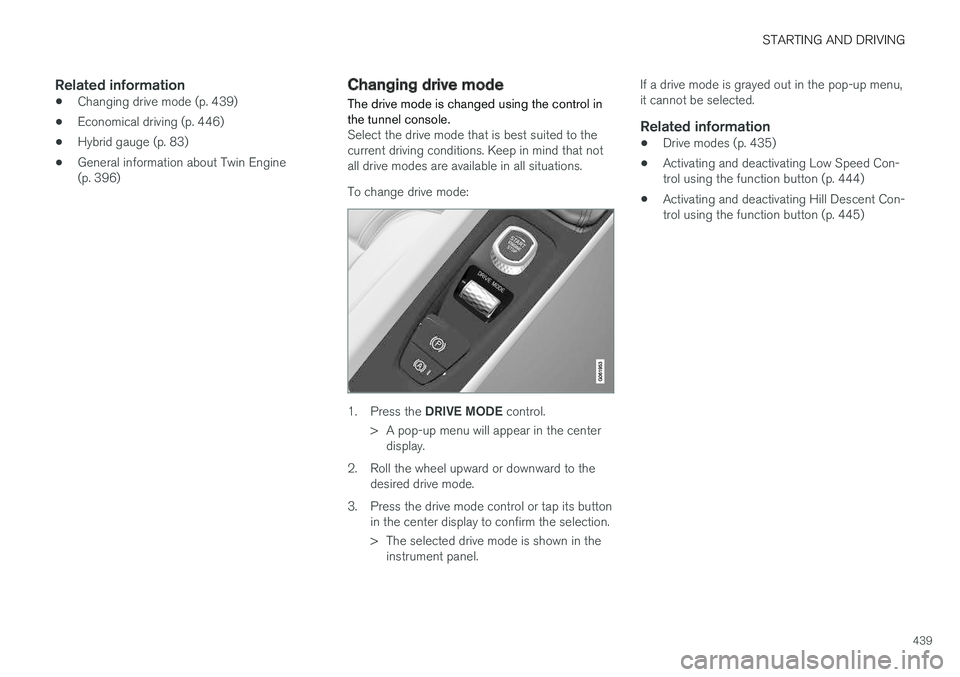
Changing drive mode The drive mode is changed using the control in the tunnel console.
Select the drive mode that is best suited to the current driving conditions. Keep in mind that notall drive modes are available in all situations. To change drive mode:
1.
Press the DRIVE MODE control.
> A pop-up menu will appear in the center display.
2. Roll the wheel upward or downward to the desired drive mode.
3. Press the drive mode control or tap its button in the center display to confirm the selection.
> The selected drive mode is shown in theinstrument panel. If a drive mode is grayed out in the pop-up menu, it cannot be selected.
Related information
•
Drive modes (p. 435)
• Activating and deactivating Low Speed Con-trol using the function button (p. 444)
• Activating and deactivating Hill Descent Con-trol using the function button (p. 445)
Page 443 of 674
STARTING AND DRIVING
}}
441
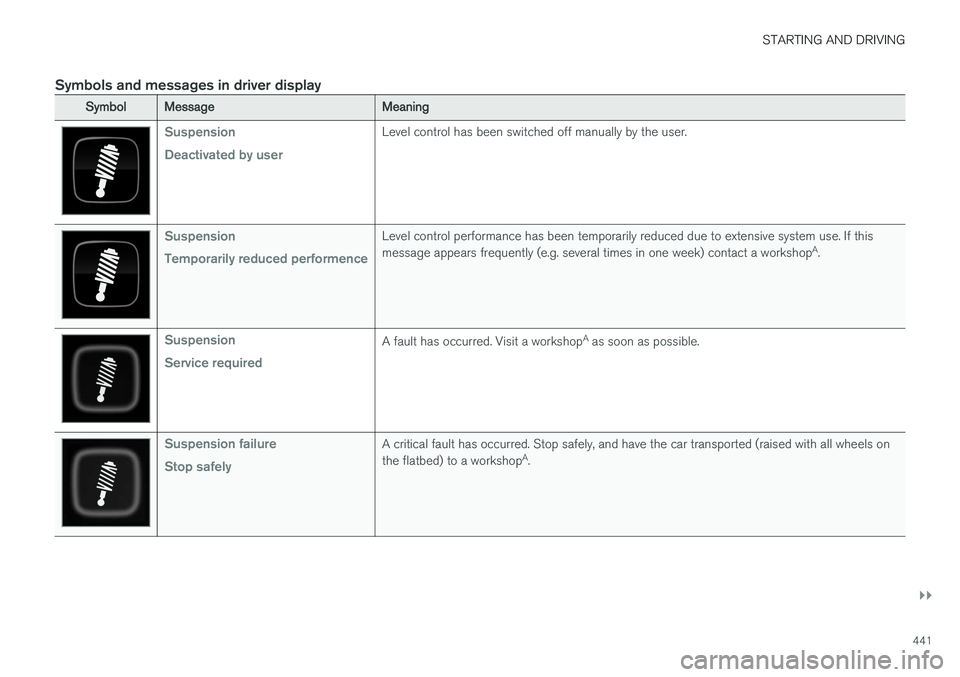
Symbols and messages in driver display
SymbolMessageMeaning
Suspension Deactivated by userLevel control has been switched off manually by the user.
Suspension Temporarily reduced performenceLevel control performance has been temporarily reduced due to extensive system use. If this message appears frequently (e.g. several times in one week) contact a workshopA
.
Suspension Service requiredA fault has occurred. Visit a workshop A
as soon as possible.
Suspension failure Stop safelyA critical fault has occurred. Stop safely, and have the car transported (raised with all wheels on the flatbed) to a workshop A
.
Page 445 of 674
STARTING AND DRIVING
}}
* Option/accessory.443
Leveling control settings *
The vehicle can be lowered or raised to make it easier to load or for passengers to get in andout. Turn off leveling control before lifting the vehicle with a jack to help avoid problems with thepneumatic suspension.
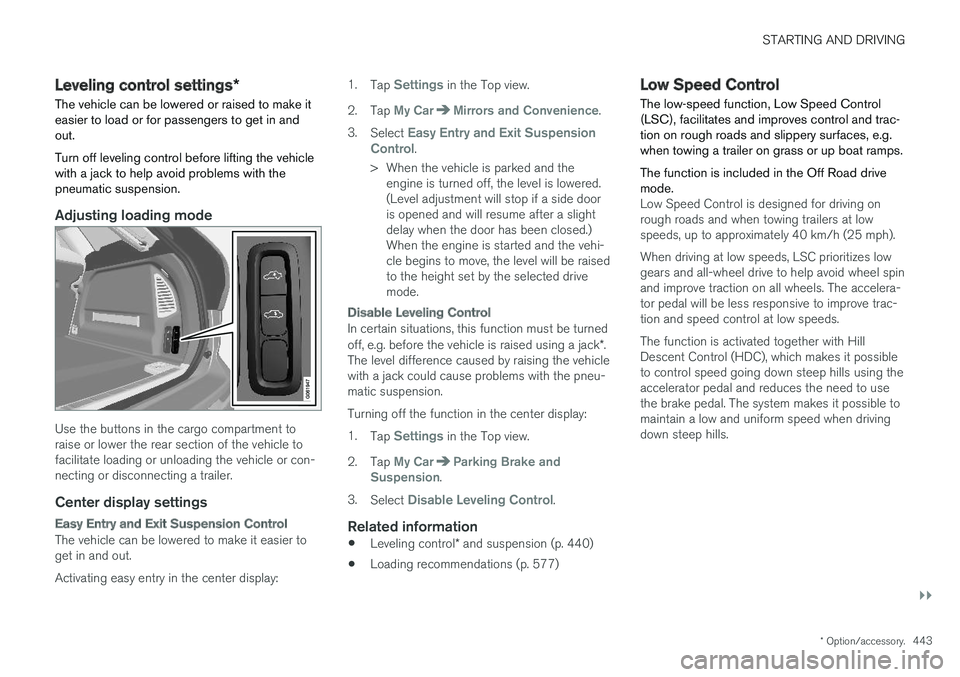
Adjusting loading mode
Use the buttons in the cargo compartment to raise or lower the rear section of the vehicle tofacilitate loading or unloading the vehicle or con-necting or disconnecting a trailer.
Center display settings
Easy Entry and Exit Suspension Control
The vehicle can be lowered to make it easier to get in and out. Activating easy entry in the center display: 1.
Tap
Settings in the Top view.
2. Tap
My CarMirrors and Convenience.
3. Select
Easy Entry and Exit Suspension
Control.
> When the vehicle is parked and the engine is turned off, the level is lowered. (Level adjustment will stop if a side dooris opened and will resume after a slightdelay when the door has been closed.)When the engine is started and the vehi-cle begins to move, the level will be raisedto the height set by the selected drivemode.
Disable Leveling Control
In certain situations, this function must be turned off, e.g. before the vehicle is raised using a jack *.
The level difference caused by raising the vehicle with a jack could cause problems with the pneu-matic suspension. Turning off the function in the center display:1. Tap
Settings in the Top view.
2. Tap
My CarParking Brake and
Suspension.
3. Select
Disable Leveling Control.
Related information
• Leveling control
* and suspension (p. 440)
• Loading recommendations (p. 577)
Low Speed Control The low-speed function, Low Speed Control (LSC), facilitates and improves control and trac-tion on rough roads and slippery surfaces, e.g.when towing a trailer on grass or up boat ramps. The function is included in the Off Road drive mode.
Low Speed Control is designed for driving on rough roads and when towing trailers at lowspeeds, up to approximately 40 km/h (25 mph). When driving at low speeds, LSC prioritizes low gears and all-wheel drive to help avoid wheel spinand improve traction on all wheels. The accelera-tor pedal will be less responsive to improve trac-tion and speed control at low speeds. The function is activated together with Hill Descent Control (HDC), which makes it possibleto control speed going down steep hills using theaccelerator pedal and reduces the need to usethe brake pedal. The system makes it possible tomaintain a low and uniform speed when drivingdown steep hills.
Page 446 of 674
||
STARTING AND DRIVING
444
NOTE
When LSC with HDC is activated in the OFF ROAD drive mode, the feel of the acceleratorpedal and engine response will change.
NOTE
This drive mode is not designed to be used for normal street driving.
NOTE
The function is deactivated when driving at high speeds and must be reactivated at lowerspeeds if so desired.
Related information
•Activating and deactivating Low Speed Con- trol using the function button (p. 444)
• Changing drive mode (p. 439)
• Hill Descent Control (p. 444)
• All Wheel Drive (AWD) (p. 433)
Activating and deactivating LowSpeed Control using the functionbutton
Vehicles that are not equipped with drive mode controls in the tunnel console have a function button for Low Speed Control with
Hill Descent
Control in the center display's Function view.
Selecting Low Speed Control in the center display's Function view
–Tap the Hill Descent Control button to
activate or deactivate the function.
> An indicator light in the button will illumi- nate when the function is activated.
When the engine is switched off, the function will be automatically deactivated.
NOTE
The function is deactivated when driving at high speeds and must be reactivated at lowerspeeds if so desired.
Related information
• Low Speed Control (p. 443)
• Changing drive mode (p. 439)
Hill Descent Control The function for assisting when driving downhill, Hill Descent Control (HDC), is a low-speedfunction with increased engine braking. Thefunction makes it possible to increase ordecrease the vehicle's speed on steep downhillgradients by only using the accelerator pedal,without applying the brakes. The function is included in the Off Road drive mode.
HDC is designed for driving on rough roads at low speeds and downhill gradients with slipperyor otherwise difficult road surfaces. The driverdoes not need to use the brake pedal but caninstead focus on steering.
WARNING
HDC is only intended to be a supplementary braking aid and it does not function in all sit-uations. The driver is always ultimately responsible for operating the vehicle in a safe manner.
FunctionHill Descent Control allows the vehicle to move forward or backward at very low speeds assistedby the brake system. The driver can increase thespeed by pressing the accelerator pedal. Whenthe accelerator pedal is released, the vehicle willreturn to very low speed regardless of how steep
Page 447 of 674
STARTING AND DRIVING
}}
445
the hill is and without the brakes needing to be applied. The brake lights will illuminate when thefunction is activated. The driver can brake to stop or slow the vehicle at any time by depressing the brake pedal. HDC is activated along with Low Speed Control (LSC), which facilitates and improves traction andcontrol on rough and slippery surfaces. The sys-tem is intended to be used at low speeds, up toapproximately 40 km/h (25 mph).
To keep in mind when using HDC
•
If the function is switched off while driving ona steep downhill gradient, braking effect willbe gradually reduced.
• HDC can be used in gear positions
D and R,
and in manual gears 1 or 2.
• It is not possible to manually shift to thirdgear or higher when HDC is active.
NOTE
When LSC with HDC is activated in the OFF ROAD drive mode, the feel of the acceleratorpedal and engine response will change.
NOTE
This drive mode is not designed to be used for normal street driving.
NOTE
The function is deactivated when driving at high speeds and must be reactivated at lowerspeeds if so desired.
Related information
• Activating and deactivating Hill Descent Con- trol using the function button (p. 445)
• Changing drive mode (p. 439)
• Low Speed Control (p. 443)
• All Wheel Drive (AWD) (p. 433)
Activating and deactivating HillDescent Control using the functionbutton
Vehicles that are not equipped with drive mode controls in the tunnel console have a function button for Hill Descent Control with
Hill
Descent Control in the center display's Func-
tion view.
Selecting Hill Descent Control in the center display's Function view
HDC only works at low speeds.
–Tap the Hill Descent Control button to
activate or deactivate the function.
> An indicator light in the button will illumi- nate when the function is activated.
When the engine is switched off, the function will be automatically deactivated.
NOTE
The function is deactivated when driving at high speeds and must be reactivated at lowerspeeds if so desired.
Page 448 of 674
||
STARTING AND DRIVING
446
Related information
•Hill Descent Control (p. 444)
• Changing drive mode (p. 439)
Economical driving
Drive economically and environmentally con- scious by thinking ahead, avoiding rapid startsand stops and adapting driving style and speedto the current traffic conditions.
Planning for electric drivingIt is important to plan electric motor use carefully to achieve the best possible mileage:
Charge
• Charge the vehicle regularly by plugging it into an electrical outlet. Make it a habit to always begin trips with the hybrid battery fully charged.
• Locate charging stations along your route.
• If possible, choose parking spots with charg-ing stations.
NOTE
Charge the vehicle from the electricity grid as often as possible!
Preconditioning
•
Whenever possible, precondition the vehicle before driving by connecting the chargingcable to an electrical outlet.
• Avoid parking the vehicle somewhere wherethe interior will become too hot or too coldwhile the vehicle is parked. If possible, parkthe vehicle in a climate-controlled garage. •
During a short drive after passenger com-partment preconditioning, turn off the pas-senger compartment fan or the air condition-ing in a hot climate.
• If preconditioning is not possible when it iscold outside, use seat and steering wheelheating first. Avoid heating the entire pas-senger compartment to reduce the amountof current being taken from the hybrid bat-tery.
Page 449 of 674
STARTING AND DRIVING
}}
447
Driving
•Choose the Pure drive mode to help mini- mize electric power consumption.
• Maintain a steady speed and a generous fol-lowing distance to traffic ahead to minimizebraking. This drive mode has the lowestpower consumption.
• Balance energy requirements using theaccelerator pedal. Use the indicator on theinstrument panel to see available electricpower and avoid starting the combustionengine unnecessarily. The electric motor ismore effective than the combustion engine,especially at low speeds.
• When braking is necessary, brake gentlyusing the brake pedal. This will recharge thehybrid battery. A regenerative function isintegrated in the brake pedal and can beaugmented by the electric motor's brakingcapacity when the gear selector is in mode B
.
• Higher speeds increase energy consumption - air resistance increases with speed.
• Activate the
Hold function in the Function
view at high speeds when traveling farther than is possible using the hybrid battery'scapacity.
• Whenever possible, avoid using the
Chargefunction to charge the hybrid battery. Charg- ing the battery using the combustion engine increases fuel consumption and carbon diox-ide emissions.
• In a cold climate, reduce heating of the wind-shield/rear window, mirrors, seats and thesteering wheel.
• Maintain the correct pressure in the tires andcheck pressure regularly.
• The type of tires used could affect energyconsumption - consult a retailer for advice onsuitable tires.
• Remove unnecessary items from the vehicle- the heavier the load, the higher the fuelconsumption.
• Roof loads increase air resistance andincrease fuel consumption. Remove roofboxes, ski racks, etc. that are not in use.
• Avoid driving with the windows open.
• Do not keep the vehicle still on an upwardgradient by using the accelerator pedal. Usethe brakes instead.
Related information
•
Drive-E
‒
purer driving pleasure (p. 27)
• Factors affecting electric motor range(p. 448)
• Using the electric motor only (p. 447)
• Hybrid gauge (p. 83)
• Checking tire pressure (p. 547)
Using the electric motor only
When using the electric motor, Volvo Twin Engine provides a combination of good fueleconomy, low emissions and high performance.
For energy-efficient driving:
• Select the Pure drive mode to help maximize driving range using only the electric motor.
• Balance energy requirements using theaccelerator pedal. Use the indicator on theinstrument panel's hybrid gauge to see avail-able electric power and avoid starting thecombustion engine unnecessarily.
• When braking is necessary, brake gentlyusing the brake pedal. This will recharge thehybrid battery.
• Activate the
Hold function in the Function
view at high speeds when traveling farther than is possible using the hybrid battery'scapacity.
• Reduce current consumption in the passen-ger compartment by reducing e.g. fan speed,electric heating, or air conditioning use.
Also follow the general economical driving adviceregarding speed, tires and load to maximizerange.
Related information
• General information about Twin Engine(p. 396)
• Economical driving (p. 446)
Page 453 of 674
STARTING AND DRIVING
451
•
Speed limiter (p. 268)
• Tire sealing system (p. 562)
Winter driving
It is important to check the vehicle before driving in cold/snowy conditions to make sure it can bedriven safely.
Before the cold season arrives:
• Make sure the engine coolant contains 50% antifreeze. This mixture helps protect theengine from frost erosion down toapprox. -35 °C (-31 °F). Do not mix differenttypes of antifreeze as this could pose ahealth risk.
• Keep the fuel tank well filled to prevent con-densation from forming.
• Check the viscosity of the engine oil. Oil withlow viscosity (thinner oil) improves cold-weather starting and reduces fuel consump-tion when driving with a cold engine.
CAUTION
Low-viscosity oil should not be used with hard driving or in hot weather.
•
Check the condition and charge level of the start battery. Cold weather places greaterdemands on the start battery and reduces itscapacity.
• Use washer fluid containing antifreeze tohelp prevent ice from forming in the washerfluid reservoir.
Slippery driving conditionsFor optimal traction and roadholding, Volvo rec-ommends using snow tires on all wheels when-ever there is a risk of snow or ice on the road.
NOTE
Certain countries require use of winter tires by law. Not all countries permit the use ofstudded tires.
Practice driving on slippery surfaces under con- trolled conditions to learn how the vehicle reacts.
Related information
•Snow tires (p. 561)
• Snow chains (p. 561)
• Braking on salted roads (p. 421)
• Braking on wet roads (p. 421)
• Filling washer fluid (p. 640)
• Start battery (p. 605)
• Replacing windshield wiper blades (p. 638)
• Changing rear window wipers (p. 637)
• Refilling coolant (p. 602)
Page 463 of 674
STARTING AND DRIVING
}}
* Option/accessory.461
•If contact occurs, flush the affected area immediately with water. Obtain medicalhelp immediately if eyes are affected.
• Never expose the battery to open flameor electric spark. Do not smoke near thebattery. Failure to follow the instructionsfor jump starting can lead to injury.
NOTE
The vehicle cannot be started if the hybrid battery is discharged.
Related information
• Starting the vehicle (p. 414)
• Ignition modes (p. 417)
• Adjusting the steering wheel (p. 193)
• Selecting ignition mode (p. 418)
Detachable towbar
*
Volvo recommends the use of Volvo towbars that are specially designed for the vehicle.
NOTE
The optional detachable trailer hitch may not be available in all markets or on all models.Consult your Volvo retailer.
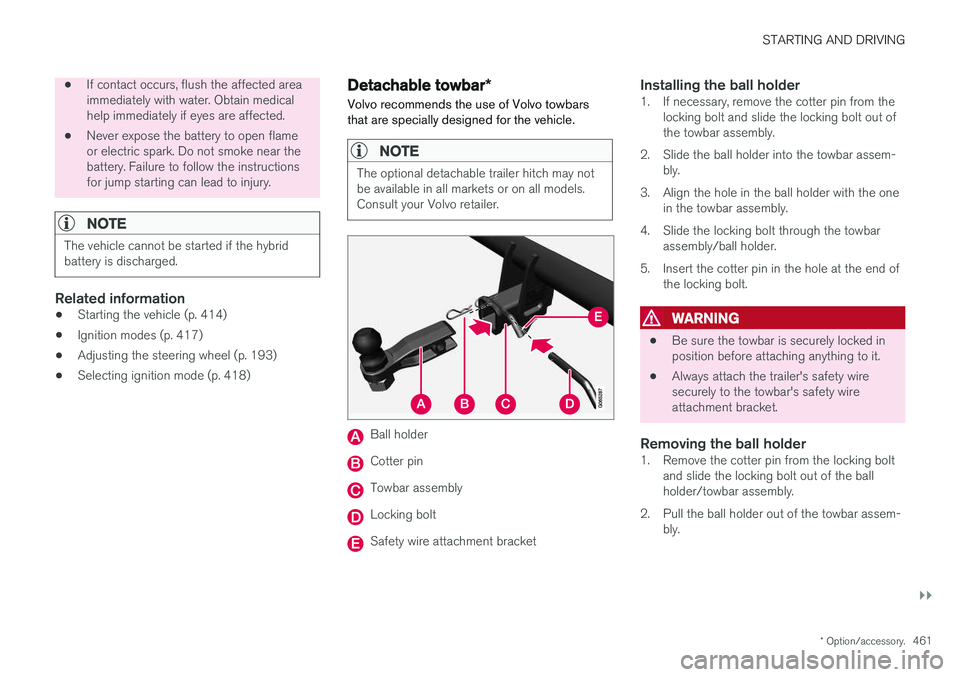
Ball holder
Cotter pin
Towbar assembly
Locking bolt
Safety wire attachment bracket
Installing the ball holder1. If necessary, remove the cotter pin from the locking bolt and slide the locking bolt out of the towbar assembly.
2. Slide the ball holder into the towbar assem- bly.
3. Align the hole in the ball holder with the one in the towbar assembly.
4. Slide the locking bolt through the towbar assembly/ball holder.
5. Insert the cotter pin in the hole at the end of the locking bolt.
WARNING
• Be sure the towbar is securely locked in position before attaching anything to it.
• Always attach the trailer's safety wiresecurely to the towbar's safety wireattachment bracket.
Removing the ball holder1. Remove the cotter pin from the locking bolt
and slide the locking bolt out of the ballholder/towbar assembly.
2. Pull the ball holder out of the towbar assem- bly.