reset VOLVO XC60 T8 2018 Owner´s Manual
[x] Cancel search | Manufacturer: VOLVO, Model Year: 2018, Model line: XC60 T8, Model: VOLVO XC60 T8 2018Pages: 674, PDF Size: 11.93 MB
Page 88 of 674
||
DISPLAYS AND VOICE CONTROL
86
NOTE
This may vary if your driving style changes.
An economical driving style will generally increase how far you can drive on a certainamount of fuel.
Starting values for fully charged hybrid
battery
Because it is difficult to predict driving style and other factors that affect the range of electricmotors, Volvo uses a starting value when thevehicle is fully charged. This starting value pro-vides an "up to" amount instead of a predictionon the range of the electric current in the motor. The difference in starting value between
Hybridand Pure is because the vehicle is permitted to
use more current from the hybrid battery in Puremode, and because the vehicle switches to ECO Climate.
Mileage when using electric motor
To achieve the longest possible mileage when using the electric motor, the driver of an electricvehicle also needs to think about conservingelectricity. The more electricity consumers(stereo, heated windows/mirrors/seats, very coldair from climate control system, etc.) that areactive, the shorter the potential mileage.
NOTE
In addition to high electrical consumption in the passenger compartment, rapid accelera-tion, sudden braking, high speeds, heavyloads, low ambient temperatures and drivingup hills can reduce possible driving distance.
Tourist - alternative speedometerThe alternative digital speedometer makes it eas- ier to drive in countries where speed limit signsare shown in a different measurement unit thanthe one shown in the vehicle's gauges. When used, the digital speed is displayed in the opposite unit to that shown in the analog speed- ometer. If mph is used in the analog speedome-
ter, the equivalent speed in km/h will be shown
in the digital speedometer.
Related information
• Displaying trip data in the instrument panel (p. 86)
• Resetting the trip odometer (p. 87)
• Displaying trip statistics in the center display (p. 88)
• Instrument panel (p. 80)
Displaying trip data in theinstrument panel
Data recorded and calculated by the trip com- puter can be displayed on the instrument panel.
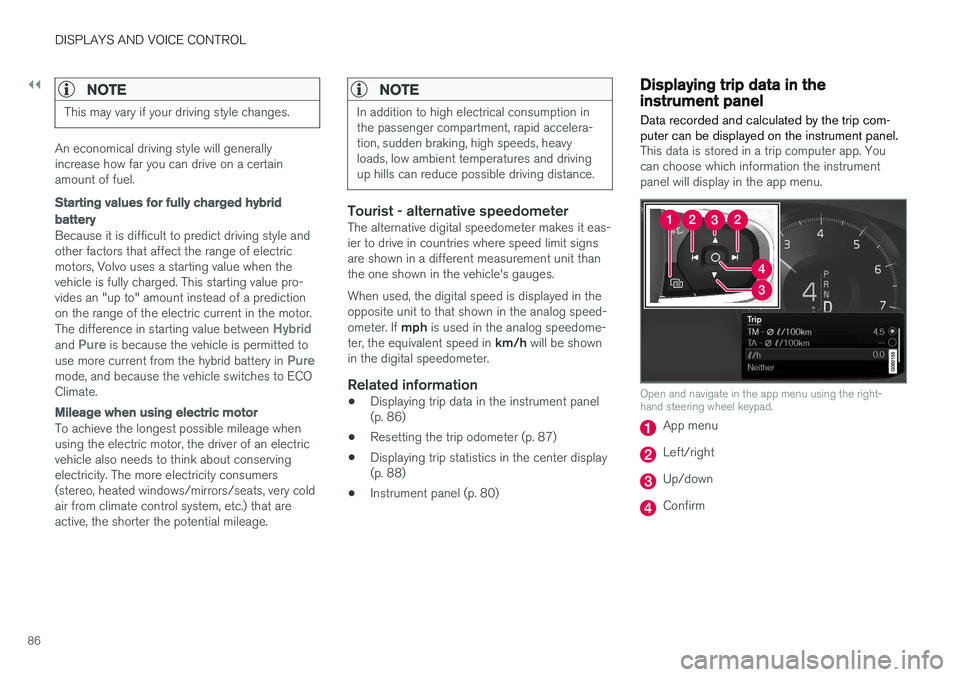
This data is stored in a trip computer app. You can choose which information the instrumentpanel will display in the app menu.
Open and navigate in the app menu using the right- hand steering wheel keypad.
App menu
Left/right
Up/down
Confirm
Page 89 of 674
DISPLAYS AND VOICE CONTROL
87
1. Open the app menu in the instrument panel
by pressing (1). (The App menu cannot be opened while there is an unacknowledged message in theinstrument panel. The message must be con-firmed before the App menu can be opened.)
2. Navigate to the trip computer app by moving left or right using (2).
> The top four menu rows show measuredvalues for trip odometer TM. The next four menu rows show measured values for tripodometer TA. Scroll up or down in the listusing (3).
3. Scroll down to the option buttons to choose which information to show in the instrumentpanel:
• Distance to empty tank
• Odometer
• Mileage for trip odometer TM, TA or nodisplay of mileage
• Current fuel consumption, average fuelconsumption for TM or TA, or no displayof fuel consumption
• Tourist (alternative speedometer).
• Distance to discharged battery
Select or clear a selection using the O but-
ton (4). The change will apply immediately.
Related information
• Trip computer (p. 85)
• Resetting the trip odometer (p. 87)
Resetting the trip odometer
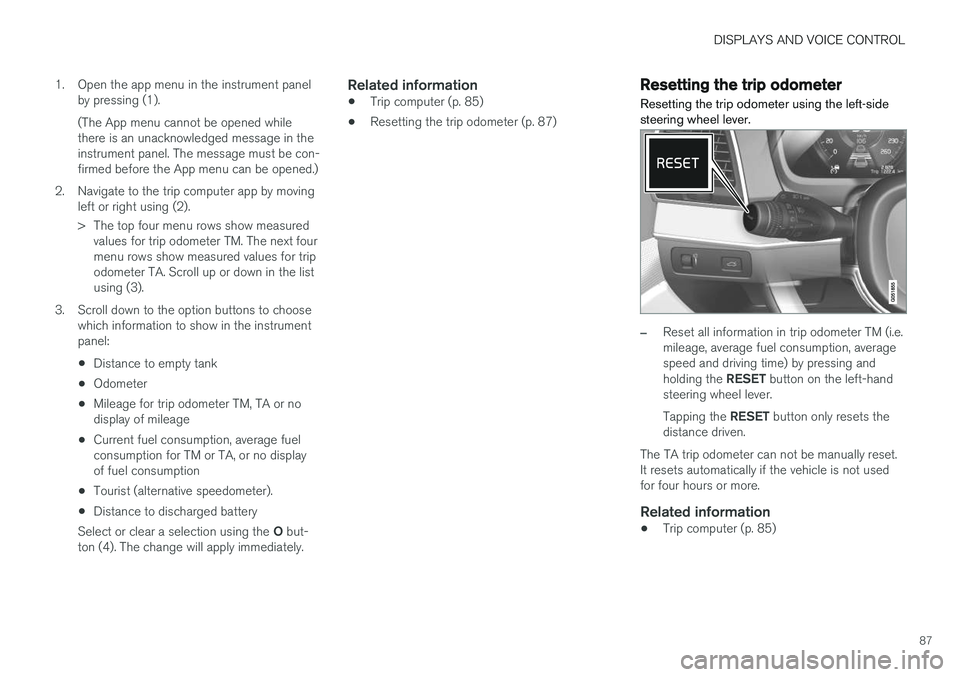
Resetting the trip odometer using the left-side steering wheel lever.
–Reset all information in trip odometer TM (i.e. mileage, average fuel consumption, averagespeed and driving time) by pressing and holding the RESET button on the left-hand
steering wheel lever. Tapping the RESET button only resets the
distance driven.
The TA trip odometer can not be manually reset. It resets automatically if the vehicle is not usedfor four hours or more.
Related information
• Trip computer (p. 85)
Page 90 of 674
DISPLAYS AND VOICE CONTROL
88
Displaying trip statistics in thecenter display
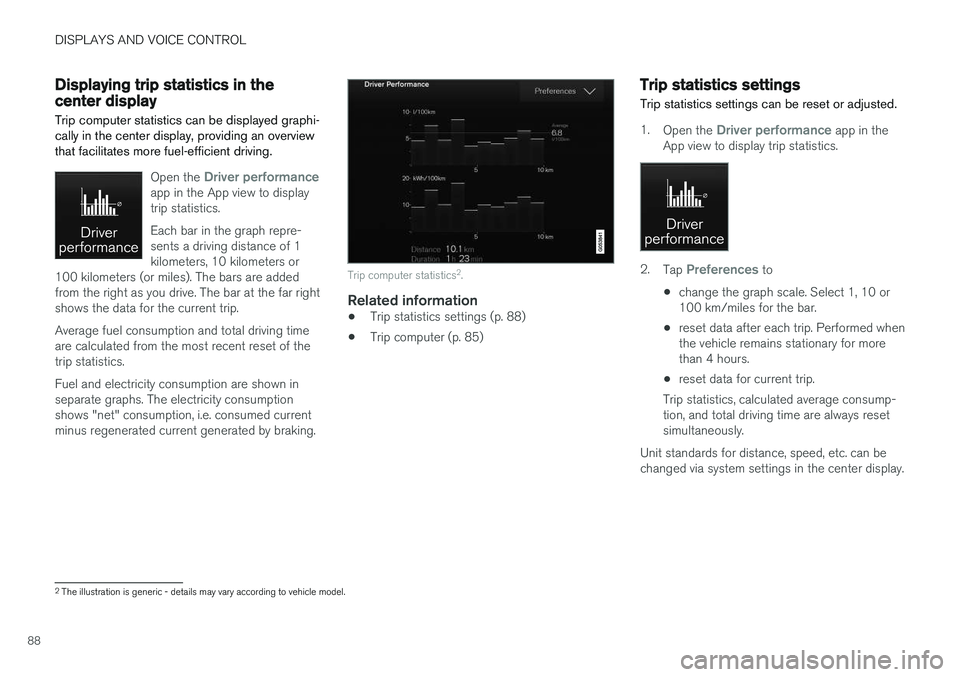
Trip computer statistics can be displayed graphi- cally in the center display, providing an overviewthat facilitates more fuel-efficient driving.
Open the Driver performanceapp in the App view to display trip statistics. Each bar in the graph repre- sents a driving distance of 1kilometers, 10 kilometers or
100 kilometers (or miles). The bars are addedfrom the right as you drive. The bar at the far rightshows the data for the current trip. Average fuel consumption and total driving time are calculated from the most recent reset of thetrip statistics. Fuel and electricity consumption are shown in separate graphs. The electricity consumptionshows "net" consumption, i.e. consumed currentminus regenerated current generated by braking.
Trip computer statistics 2
.
Related information
• Trip statistics settings (p. 88)
• Trip computer (p. 85)
Trip statistics settings
Trip statistics settings can be reset or adjusted.
1. Open the Driver performance app in the
App view to display trip statistics.
2. Tap Preferences to
• change the graph scale. Select 1, 10 or 100 km/miles for the bar.
• reset data after each trip. Performed whenthe vehicle remains stationary for morethan 4 hours.
• reset data for current trip.
Trip statistics, calculated average consump-tion, and total driving time are always resetsimultaneously.
Unit standards for distance, speed, etc. can bechanged via system settings in the center display.
2 The illustration is generic - details may vary according to vehicle model.
Page 91 of 674
DISPLAYS AND VOICE CONTROL
89
Related information
•Displaying trip statistics in the center display (p. 88)
• Trip computer (p. 85)
• Resetting the trip odometer (p. 87)
Date and time
The clock is displayed in both the instrument panel and the center display.
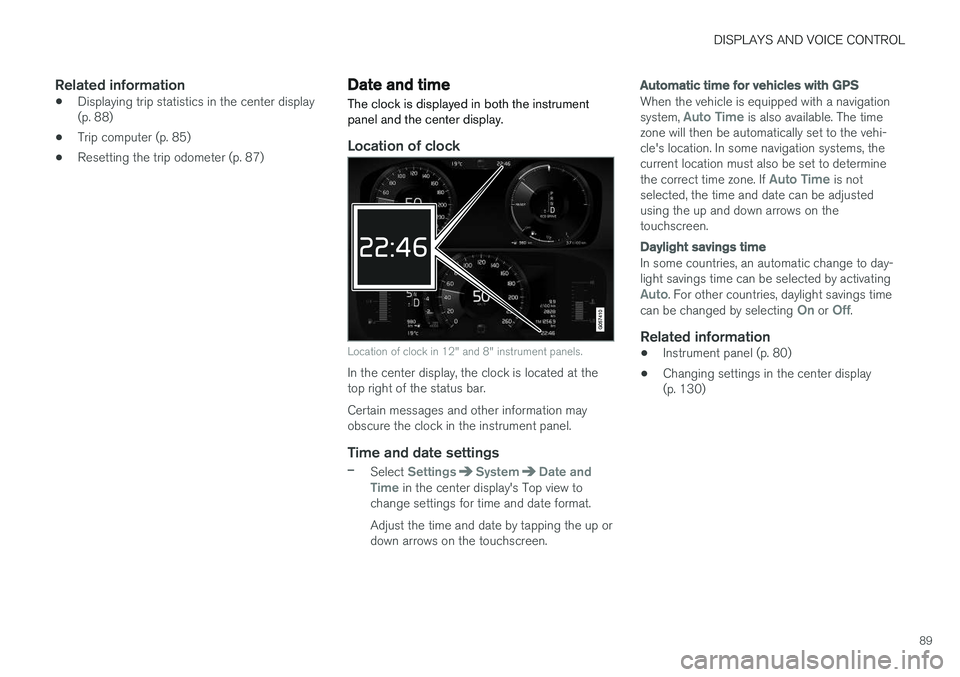
Location of clock
Location of clock in 12" and 8" instrument panels.
In the center display, the clock is located at the top right of the status bar. Certain messages and other information may obscure the clock in the instrument panel.
Time and date settings
–Select SettingsSystemDate and
Time in the center display's Top view to
change settings for time and date format. Adjust the time and date by tapping the up or down arrows on the touchscreen.
Automatic time for vehicles with GPS
When the vehicle is equipped with a navigation system, Auto Time is also available. The time
zone will then be automatically set to the vehi- cle's location. In some navigation systems, thecurrent location must also be set to determine the correct time zone. If
Auto Time is not
selected, the time and date can be adjusted using the up and down arrows on thetouchscreen.
Daylight savings time
In some countries, an automatic change to day- light savings time can be selected by activating
Auto. For other countries, daylight savings time
can be changed by selecting On or Off.
Related information
• Instrument panel (p. 80)
• Changing settings in the center display (p. 130)
Page 131 of 674
DISPLAYS AND VOICE CONTROL
129
Related information
•Center display overview (p. 105)
• Changing settings in the center display (p. 130)
• Setting types in the center display (p. 131)
• Table of settings in the center display(p. 132)
Opening contextual setting in thecenter display
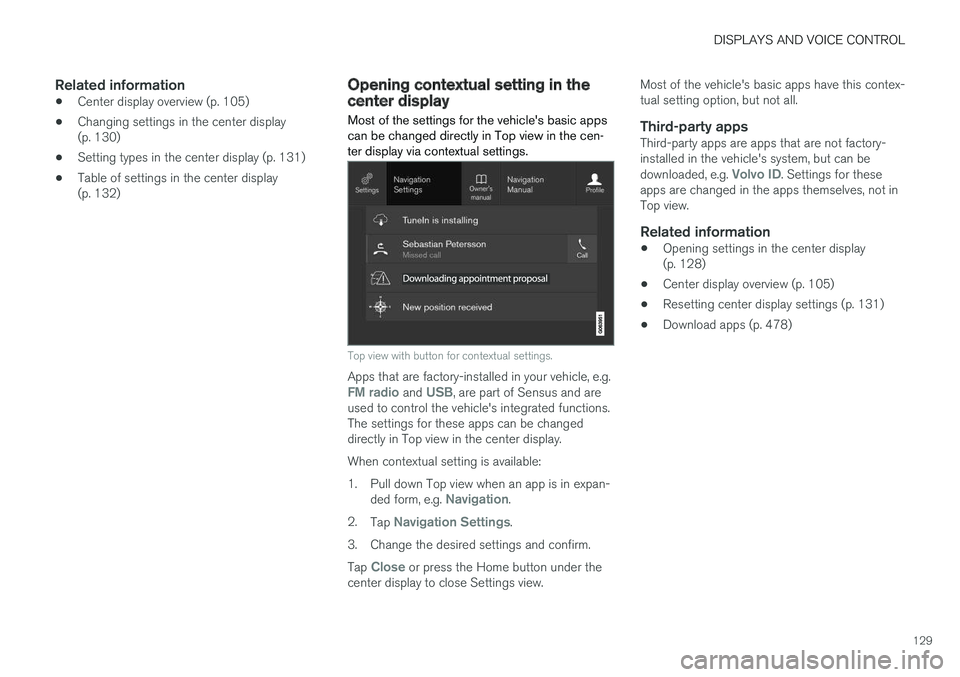
Most of the settings for the vehicle's basic apps can be changed directly in Top view in the cen-ter display via contextual settings.
Top view with button for contextual settings.
Apps that are factory-installed in your vehicle, e.g.FM radio and USB, are part of Sensus and are
used to control the vehicle's integrated functions. The settings for these apps can be changeddirectly in Top view in the center display. When contextual setting is available:
1. Pull down Top view when an app is in expan-
ded form, e.g.
Navigation.
2. Tap
Navigation Settings.
3. Change the desired settings and confirm. Tap
Close or press the Home button under the
center display to close Settings view. Most of the vehicle's basic apps have this contex- tual setting option, but not all.
Third-party appsThird-party apps are apps that are not factory-installed in the vehicle's system, but can be downloaded, e.g.
Volvo ID. Settings for these
apps are changed in the apps themselves, not in Top view.
Related information
• Opening settings in the center display(p. 128)
• Center display overview (p. 105)
• Resetting center display settings (p. 131)
• Download apps (p. 478)
Page 132 of 674
DISPLAYS AND VOICE CONTROL
130
Changing settings in the centerdisplay You can change
Settings and information for
many of the vehicle's functions via the center display.
1. Open Top view by tapping the tab or by drag- ging/swiping from the top of the screen downward.
2. Tap
Settings to open the Settings menu.
3. Tap one of the categories and sub-catego- ries to navigate to the desired setting.
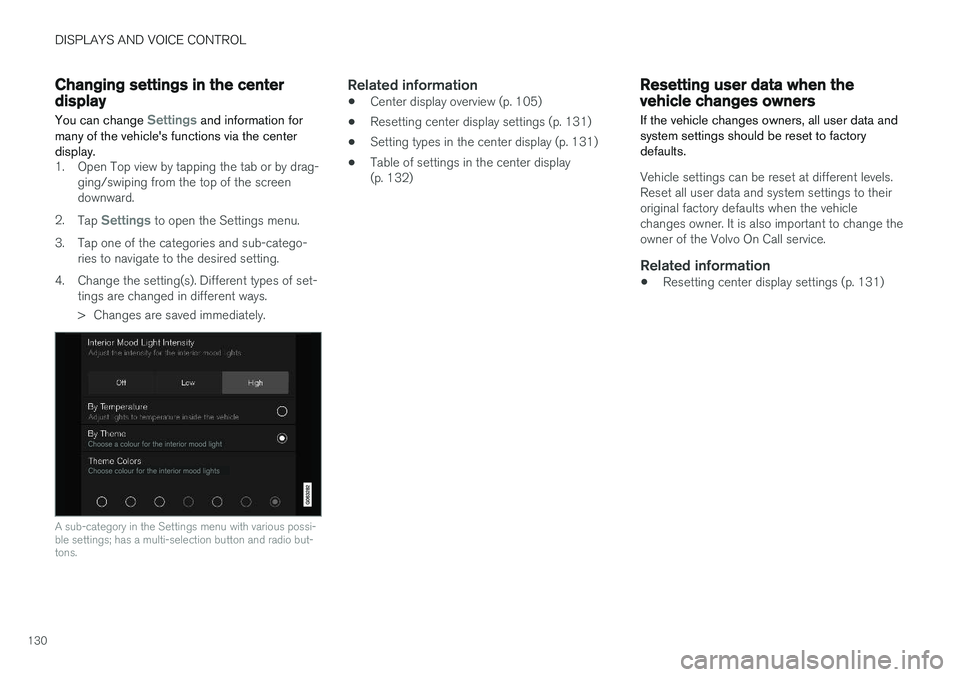
4. Change the setting(s). Different types of set- tings are changed in different ways.
> Changes are saved immediately.
A sub-category in the Settings menu with various possi- ble settings; has a multi-selection button and radio but-tons.
Related information
• Center display overview (p. 105)
• Resetting center display settings (p. 131)
• Setting types in the center display (p. 131)
• Table of settings in the center display (p. 132)
Resetting user data when thevehicle changes owners
If the vehicle changes owners, all user data and system settings should be reset to factorydefaults.
Vehicle settings can be reset at different levels. Reset all user data and system settings to theiroriginal factory defaults when the vehiclechanges owner. It is also important to change theowner of the Volvo On Call service.
Related information
• Resetting center display settings (p. 131)
Page 133 of 674
DISPLAYS AND VOICE CONTROL
}}
131
Resetting center display settingsAll settings made in the center display's Settings menu can be reset to default values.
Two types of resetThere are two ways to reset the settings in the Settings menu:
•
Factory Reset- erases all data and files and
resets all settings to factory default.
•
Reset Personal Settings- erases personal
data and resets personalized settings to fac- tory default.
Resetting settingsFollow these instructions to reset the settings.
NOTE
Factory Reset is only possible when the
vehicle is stationary.
1. Tap Settings in the Top view in the center
display.
2. Proceed to
SystemFactory Reset.
3. Select the type of reset you would like to do. > A pop-up window will appear. 4.
Tap
OK to confirm the reset.
For
Reset Personal Settings, confirm the
reset by tapping Reset for the active
profile or Reset for all profiles.
> The selected settings will be reset.
Related information
• Center display overview (p. 105)
• Opening settings in the center display (p. 128)
• Changing settings in the center display(p. 130)
• Table of settings in the center display(p. 132)
Setting types in the center display
Different types of settings are changed in differ- ent ways. Refer to the table below for a descrip-tion of the different types of settings.
Types of settings
Type ofsettingDescription
Trigger function Starts an app or a separate viewfor more advanced settings. Tapthe text to e.g. connect a Bluetooth
®
device.
Radio but- ton Select one of the possible set-tings by tapping the desired radiobutton to e.g. change the systemlanguage.
Multi-selectionbutton Select a level for a particular set-ting by pressing the desired partof the button, e.g. to select sensi-tivity level for City Safety.
Checkbox Tap the checkbox to activate/ deactivate a function, e.g. toselect automatic start for heatedseats.
Page 135 of 674
DISPLAYS AND VOICE CONTROL
}}
* Option/accessory.133
Sub-categories
Gracenote®
Video
Communication
Sub-categories
Phone Text Messages Android Auto
*
Apple CarPlay*
Bluetooth Devices Wi-FiVehicle Wi-Fi HotspotVehicle Modem Internet Volvo On Call Volvo Service Networks
ClimateThe Climate main category does not have any
sub-categories.
System
Sub-categories
Driver Profile Date and TimeSystem Languages and UnitsPrivacy and dataKeyboard Layouts Voice Control
*
Factory Reset System Information
Related information
• Center display overview (p. 105)
• Changing settings in the center display (p. 130)
• Resetting center display settings (p. 131)
Driver profiles
Many of the vehicle's settings can be custom- ized to the driver's personal preferences andsaved in one or more driver profiles.
These personal settings are automatically saved in the active driver profile. Each key can be linkedto one driver profile. When the linked key is used,the vehicle is customized to the specific settingsof that driver profile.
Which settings are saved in driver profiles?
The vehicle has settings that can be made eitherpersonal or global. The personal settings aresaved in driver profiles. Settings that can be saved in a driver profile include, among other things, screens, mirrors, front seats, navigation *, audio and media system,
language and voice control. Some settings are global settings. These settings can be changed but are not saved to a specificdriver profile. Changes to global settings affect allprofiles.
Page 136 of 674
||
DISPLAYS AND VOICE CONTROL
134
Global settings
Global settings and parameters do not change when driver profiles are changed. They remainthe same regardless of which driver profile is cur-rently active. Keyboard layout is an example of a global setting. If driver profile X is used to add additional key-board languages, these languages will also beavailable for driver profile Y. The settings for key-board layout are not saved to a specific driverprofile - the settings are global.
Personal settings
If driver profile X has been used to e.g., set the brightness for the center display, driver profile Ywill not be affected by this setting. It will only besaved to driver profile X because brightness set-ting is a personal setting.
Related information
•Selecting a driver profile (p. 134)
• Changing a driver profile's name (p. 135)
• Resetting driver profile settings (p. 135)
• Linking a remote key to a driver profile(p. 135)
• Table of settings in the center display(p. 132)
Selecting a driver profile When the center display starts up, the selected driver profile will be shown at the top of thescreen. The most recently used driver profile willbe active the next time the vehicle is unlocked. Adifferent driver profile can be selected once thevehicle has been unlocked. However, if theremote key has been linked to a driver profile,this profile will be used instead.
There are two options for switching between driver profiles. Option 1:
1. Tap the name of the driver profile shown at
the top of the center display when the dis- play starts up.
> A list will appear, showing driver profilesthat can be selected.
2. Select desired driver profile. 3. Tap
Confirm.
> The driver profile has now been selected and the system will load the settings stored in that profile.
Option 2:
1. Pull down Top view in the center display.2. Tap
Profile.
> The same list as in option 1 will be dis- played.
3. Select desired driver profile. 4.
Tap
Confirm.
> The driver profile has now been selected and the system will load the settings stored in that profile.
Related information
• Driver profiles (p. 133)
• Navigating in the center display's views(p. 111)
• Changing a driver profile's name (p. 135)
• Linking a remote key to a driver profile(p. 135)
Page 137 of 674
DISPLAYS AND VOICE CONTROL
}}
135
Changing a driver profile's name
It is possible to change the names of the differ- ent driver profiles used in the vehicle.
1. Tap Settings in the Top view in the center
display.
2. Tap
SystemDriver Profiles.
3. Select
Edit Profile.
> A menu will open in which the driver pro- file can be changed.
4. Tap the
Profile Name box.
> A keyboard will be displayed and can be used to change the name. Tap
to
close the keyboard.
5. Save the name change by pressing
Back orClose.
> The name has now been changed.
NOTE
Profile names may not begin with a space. If a space is entered first, the profile name will notbe saved.
Related information
• Selecting a driver profile (p. 134)
• Using the center display keyboard (p. 122)
Resetting driver profile settings
Settings that have been saved for one or more driver profiles can be reset when the vehicle isstationary.
NOTE
Factory Reset is only possible when the
vehicle is stationary.
1. Tap Settings in the Top view.
2. Tap
SystemFactory ResetReset
Personal Settings.
3. Select option
Reset for the active profile,Reset for all profiles or Cancel.
Related information
• Driver profiles (p. 133)
• Resetting center display settings (p. 131)
Linking a remote key to a driverprofile A remote key can be linked to a driver profile. This driver profile and all of its settings will thenautomatically be selected every time the vehicleis used with that particular remote key.
The first time the remote key is used, it is not linked to any specific driver profile. The Guestprofile is automatically activated when the ignition is switched on. A driver profile can also be selected manually without linking it to any key. When the vehicle isunlocked, the last active driver profile will be acti-vated. If the key has ever been linked to a driverprofile, it is not necessary to manually select adriver profile when using that particular key.
Linking a remote key to a specific driver
profile
First select the profile you would like to link tothe key (if that profile is not already active). Theactive profile can then be linked to the key. 1. Tap
Settings in the Top view in the center
display.
2. Tap
SystemDriver Profiles.
3. Mark the desired profile. The display will return to Home view. The
Guest profile can-
not be linked to a remote key.