reset VOLVO XC60 T8 2018 Owner´s Manual
[x] Cancel search | Manufacturer: VOLVO, Model Year: 2018, Model line: XC60 T8, Model: VOLVO XC60 T8 2018Pages: 674, PDF Size: 11.93 MB
Page 270 of 674
DRIVER SUPPORT
268
Speed limiterA Speed Limiter (SL 11
) could be described as a
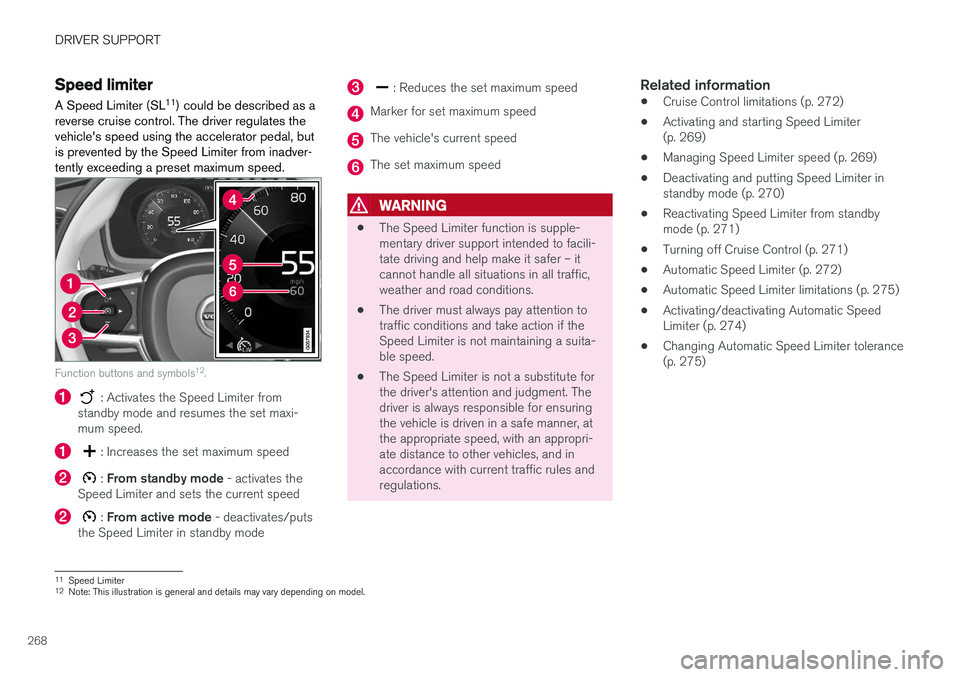
reverse cruise control. The driver regulates the vehicle's speed using the accelerator pedal, butis prevented by the Speed Limiter from inadver-tently exceeding a preset maximum speed.
Function buttons and symbols 12
.
: Activates the Speed Limiter from
standby mode and resumes the set maxi- mum speed.
: Increases the set maximum speed
: From standby mode - activates the
Speed Limiter and sets the current speed
: From active mode - deactivates/puts
the Speed Limiter in standby mode
: Reduces the set maximum speed
Marker for set maximum speed
The vehicle's current speed
The set maximum speed
WARNING
• The Speed Limiter function is supple- mentary driver support intended to facili-tate driving and help make it safer – itcannot handle all situations in all traffic,weather and road conditions.
• The driver must always pay attention totraffic conditions and take action if theSpeed Limiter is not maintaining a suita-ble speed.
• The Speed Limiter is not a substitute forthe driver's attention and judgment. Thedriver is always responsible for ensuringthe vehicle is driven in a safe manner, atthe appropriate speed, with an appropri-ate distance to other vehicles, and inaccordance with current traffic rules andregulations.
Related information
•Cruise Control limitations (p. 272)
• Activating and starting Speed Limiter(p. 269)
• Managing Speed Limiter speed (p. 269)
• Deactivating and putting Speed Limiter instandby mode (p. 270)
• Reactivating Speed Limiter from standbymode (p. 271)
• Turning off Cruise Control (p. 271)
• Automatic Speed Limiter (p. 272)
• Automatic Speed Limiter limitations (p. 275)
• Activating/deactivating Automatic SpeedLimiter (p. 274)
• Changing Automatic Speed Limiter tolerance(p. 275)
11
Speed Limiter
12 Note: This illustration is general and details may vary depending on model.
Page 284 of 674
||
DRIVER SUPPORT
* Option/accessory.
282
WARNING
Distance Alert only reacts of the time interval to the vehicle ahead is shorter than the presetvalue – vehicle speed is not affected.
NOTE
Depending on market, this function may be either Standard or Optional.
Related information
• Head-up display for Distance Alert (p. 282)
• Activating/deactivating Distance Alert (p. 283)
• Setting a time interval for Distance Alert(p. 283)
• Distance Alert limitations (p. 284)
Head-up display for Distance Alert35
In vehicles equipped with a head-up display *, a
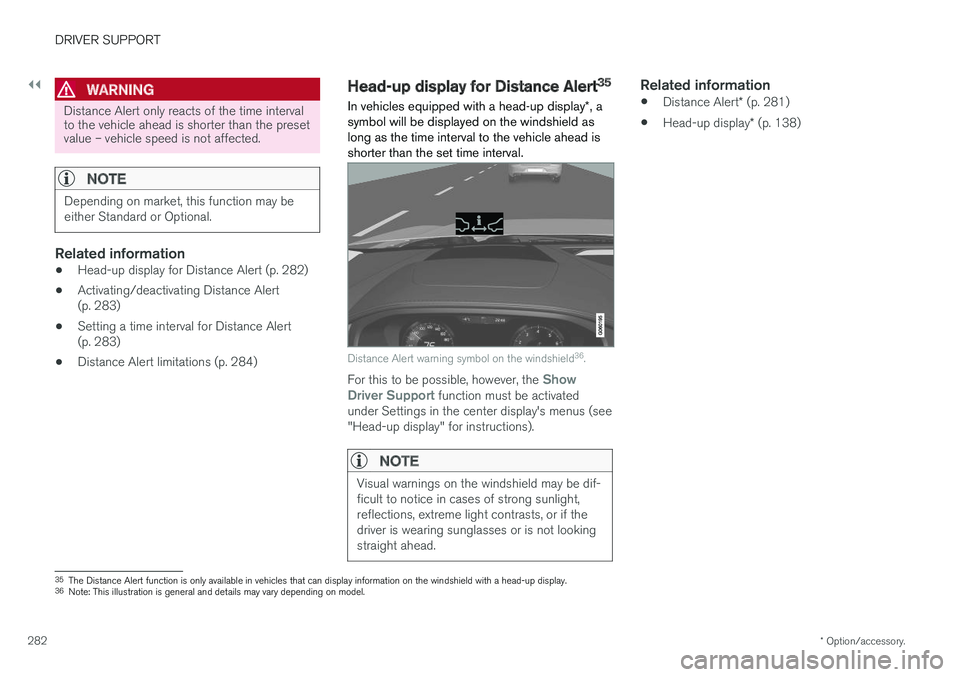
symbol will be displayed on the windshield as long as the time interval to the vehicle ahead isshorter than the set time interval.
Distance Alert warning symbol on the windshield 36
.
For this to be possible, however, the Show
Driver Support function must be activated
under Settings in the center display's menus (see "Head-up display" for instructions).
NOTE
Visual warnings on the windshield may be dif- ficult to notice in cases of strong sunlight,reflections, extreme light contrasts, or if thedriver is wearing sunglasses or is not lookingstraight ahead.
Related information
• Distance Alert
* (p. 281)
• Head-up display
* (p. 138)
35
The Distance Alert function is only available in vehicles that can display information on the windshield with a head-up display.
36 Note: This illustration is general and details may vary depending on model.
Page 293 of 674
DRIVER SUPPORT
}}
* Option/accessory.291
Setting Adaptive Cruise Controltime intervals Adaptive Cruise Control (ACC 46
) can be set to
various time intervals to the vehicle ahead.
Different time intervals to the vehicle ahead can be selectedand are shown in the instru-ment panel as 1–5 horizontalbars. The more bars, the longerthe time interval. One bar rep-resents an interval of
approx. 1 second to the vehicle ahead. 5 barsrepresents approx. 3 seconds. The same symbol appears when the Distance Alert function is activated.
NOTE
When the symbol in the instrument panel shows two vehicles, ACC is following the vehi-cle ahead at a preset time interval. When only one vehicle is shown, there is no vehicle ahead within a reasonable distance.
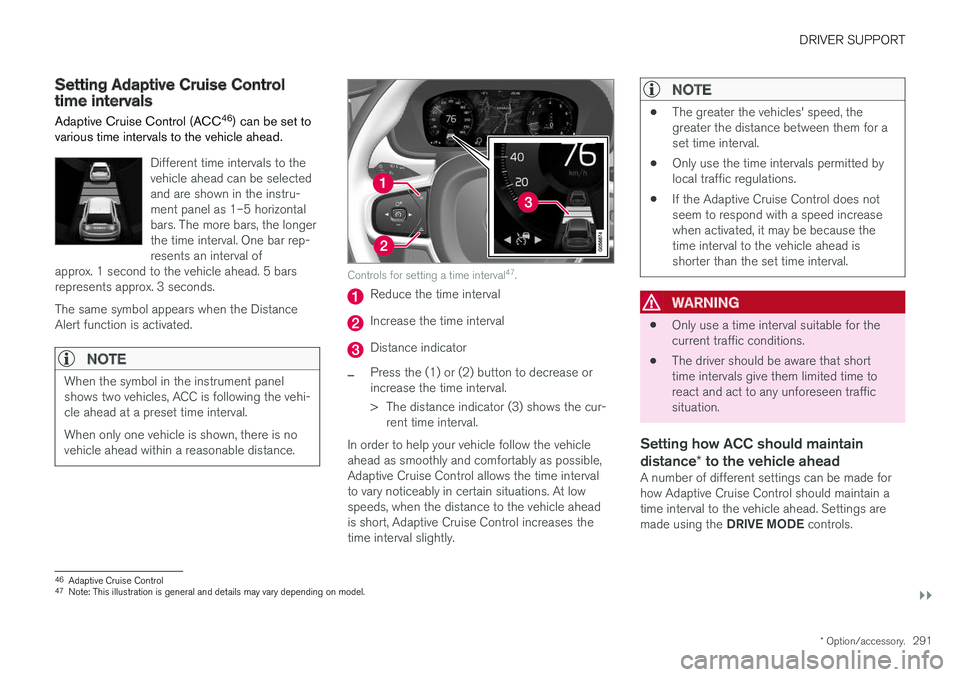
Controls for setting a time interval 47
.
Reduce the time interval
Increase the time interval
Distance indicator
–Press the (1) or (2) button to decrease or increase the time interval.
> The distance indicator (3) shows the cur-
rent time interval.
In order to help your vehicle follow the vehicle ahead as smoothly and comfortably as possible,Adaptive Cruise Control allows the time intervalto vary noticeably in certain situations. At lowspeeds, when the distance to the vehicle aheadis short, Adaptive Cruise Control increases thetime interval slightly.
NOTE
• The greater the vehicles' speed, the greater the distance between them for aset time interval.
• Only use the time intervals permitted bylocal traffic regulations.
• If the Adaptive Cruise Control does notseem to respond with a speed increasewhen activated, it may be because thetime interval to the vehicle ahead isshorter than the set time interval.
WARNING
•Only use a time interval suitable for the current traffic conditions.
• The driver should be aware that shorttime intervals give them limited time toreact and act to any unforeseen trafficsituation.
Setting how ACC should maintain distance
* to the vehicle ahead
A number of different settings can be made for how Adaptive Cruise Control should maintain atime interval to the vehicle ahead. Settings are made using the DRIVE MODE controls.
46
Adaptive Cruise Control
47 Note: This illustration is general and details may vary depending on model.
Page 299 of 674
DRIVER SUPPORT
}}
* Option/accessory.297
Related information
•Adaptive Cruise Control
* (p. 285)
Switching between Cruise Controland Adaptive Cruise Control
In vehicles equipped with Adaptive Cruise Con- trol (ACC 56
), the driver can switch between
Cruise Control (CC 57
) and ACC.
A symbol in the instrument panel indicates which cruise control system is active
CCACC
AA
Cruise control Adaptive Cruise Control
A WHITE symbol: The function is active. GRAY symbol: Standby mode
Switching from ACC to CCTo do so: 1. Press the
button on the steering wheel
keypad to put Adaptive Cruise Control in standby mode. 2.
Tap the
Cruise Control button in the center
display's Function view. The button's indica- tor will change from GRAY to GREEN.
> The symbol in the instrument panel will
change from
ACC to CC, indicating that Adaptive Cruise Con- trol is off and Cruise Control is in standbymode.
3. Pressing the
button on the steering
wheel keypad.
> Cruise Control will start and the vehicle's current speed will be set.
WARNING
Switching from ACC to CC means that the vehicle:
• will no longer maintain a preset time interval to the vehicle ahead.
• will only follow the stored speed and thedriver must therefore apply the brakeswhen necessary.
If CC is active when the engine is turned off, ACC
will be automatically activated the next time theengine is started.
56 Adaptive Cruise Control
57 Cruise Control
Page 309 of 674
DRIVER SUPPORT
}}
307
–Change a set speed by pressing the (1)
or
(2) buttons briefly or by pressing and
holding them:
• Press briefly
: Press briefly: each press
changes the speed in +/- 5 mph (+/- 5 km/h) increments.
• Press
and hold: Release the button when
the set speed indicator (3) has moved tothe desired speed.
• The most recently set speed will be stored.
If speed is increased by depressing the accelera- tor pedal while pressing the
button on the
steering wheel, the vehicle's speed when the but- ton is pressed will be stored as the set speed. Temporarily increasing speed using the accelera- tor pedal, e.g. when passing another vehicle, willnot affect the setting. The vehicle will return tothe set speed when the accelerator pedal isreleased.
Automatic transmission
Pilot Assist can follow another vehicle at speeds from a standstill up to 200 km/h (125 mph). The lowest speed that can be set for Pilot Assist is 30 km/h (20 mph). When following anothervehicle, ACC can monitor that vehicle's speedand slow your own vehicle down to a standstill,but it is not possible to set speeds lower than30 km/h (20 mph). The highest possible speed that can be set is200 km/h (125 mph).
Related information
•
Pilot Assist (p. 301)
Setting a time interval for PilotAssist
Pilot Assist can be set to different time intervals.
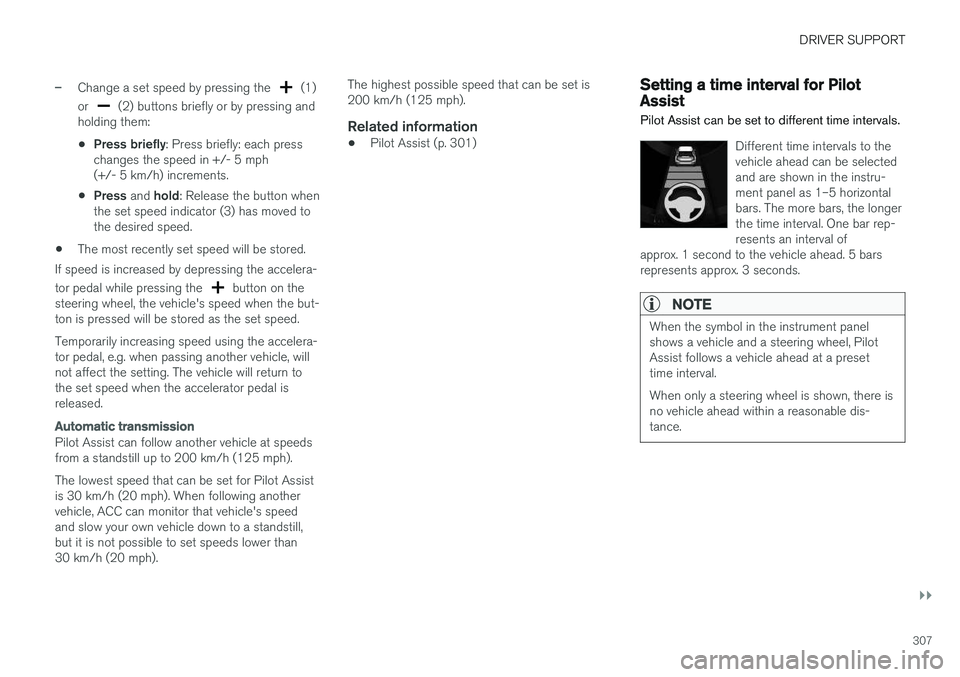
Different time intervals to the vehicle ahead can be selectedand are shown in the instru-ment panel as 1–5 horizontalbars. The more bars, the longerthe time interval. One bar rep-resents an interval of
approx. 1 second to the vehicle ahead. 5 barsrepresents approx. 3 seconds.
NOTE
When the symbol in the instrument panel shows a vehicle and a steering wheel, PilotAssist follows a vehicle ahead at a presettime interval. When only a steering wheel is shown, there is no vehicle ahead within a reasonable dis-tance.
Page 325 of 674
DRIVER SUPPORT
}}}}
323
CauseAction
The area of the windshield in front of the camera/radar sensor is dirty or covered by ice or snow. Clean the windshield in front of the camera/radar sensor and remove dirt, ice andsnow.
Thick fog, heavy rain or snow is blocking the radar signals or thecamera's range of visibility. No action. Heavy precipitation may sometimes prevent the camera/radar sensor fromfunctioning.
Water or snow is spraying/swirling up and blocking the radar signalsor the camera's range of visibility. No action. Very wet or snow-covered roads may sometimes prevent the camera/radar sensor from functioning.
There is dirt between the inside of the windshield and the camera/radar sensor. Consult a workshop to have the area of the windshield on the inside of the camera'scasing cleaned. An authorized Volvo workshop is recommended.
Bright sunlight No action. The camera/radar sensor will reset automatically when lighting conditionsimprove.
NOTE
Keep the windshield in front of the camera and radar unit clean.
High temperaturesIf the temperature in the passenger compartment is very high, the camera/radar sensor will switchoff temporarily for approx. 15 minutes after theengine is started to protect its electronic compo-nents. When the temperature has cooled suffi-ciently, the camera/radar sensor will automati-cally restart.
Damaged windshield
CAUTION
If there are cracks, scratches or stone chips on the windshield in front of any of the cam-era and radar unit "windows" and this coversan area of about 0.5 × 3.0 mm(0.02 × 0.12 in.) or more, contact a workshopto have the windshield replaced – an author-ized Volvo workshop is recommended. Failure to take action could result in reduced performance for the driver support systemsthat use the camera and radar unit.
It could cause functions to be reduced, deac- tivated completely or produce an incorrectfunction response. To avoid the risk of loss of function, malfunc- tion or reduced function of the driver supportsystems that use the radar unit, the followingalso apply:
• Volvo advises
against repairing cracks,
scratches or stone chips in the area infront of the camera and radar unit – theentire windshield should instead bereplaced.
• Before replacing the windshield, contactan authorized Volvo workshop to verify
Page 352 of 674
||
DRIVER SUPPORT
* Option/accessory.
350
Signs for "School" and "Children playing"
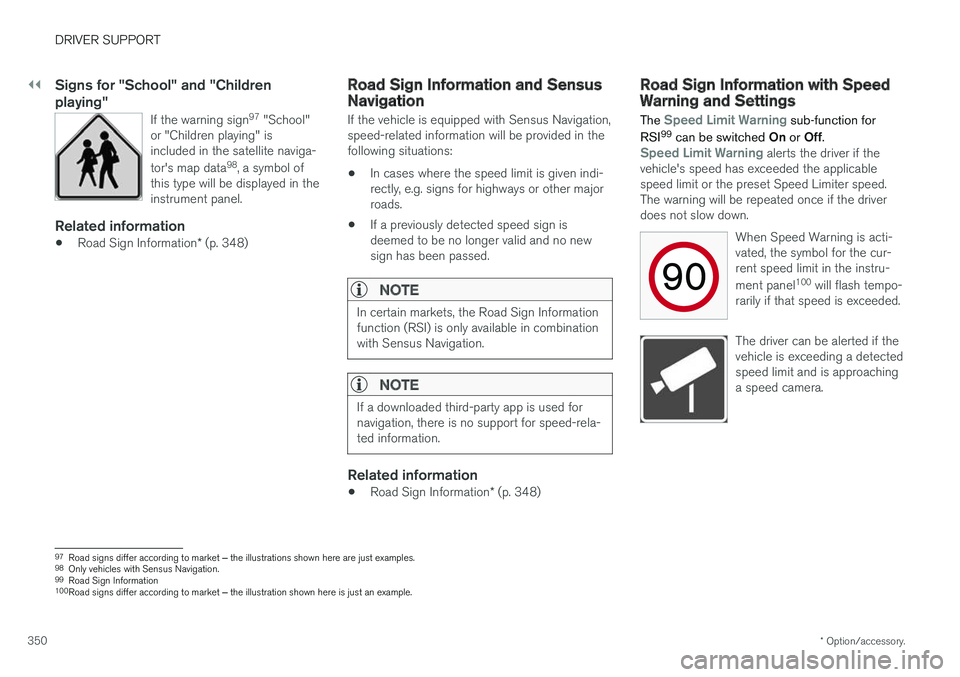
If the warning sign 97
"School"
or "Children playing" is included in the satellite naviga- tor's map data 98
, a symbol of
this type will be displayed in the instrument panel.
Related information
• Road Sign Information
* (p. 348)
Road Sign Information and SensusNavigation
If the vehicle is equipped with Sensus Navigation, speed-related information will be provided in thefollowing situations:
• In cases where the speed limit is given indi-rectly, e.g. signs for highways or other majorroads.
• If a previously detected speed sign isdeemed to be no longer valid and no newsign has been passed.
NOTE
In certain markets, the Road Sign Information function (RSI) is only available in combinationwith Sensus Navigation.
NOTE
If a downloaded third-party app is used for navigation, there is no support for speed-rela-ted information.
Related information
•
Road Sign Information
* (p. 348)
Road Sign Information with SpeedWarning and Settings
The
Speed Limit Warning sub-function for
RSI 99
can be switched On or Off.
Speed Limit Warning alerts the driver if the
vehicle's speed has exceeded the applicable speed limit or the preset Speed Limiter speed.The warning will be repeated once if the driverdoes not slow down.
When Speed Warning is acti-vated, the symbol for the cur-rent speed limit in the instru- ment panel100
will flash tempo-
rarily if that speed is exceeded.
The driver can be alerted if the vehicle is exceeding a detectedspeed limit and is approachinga speed camera.
97 Road signs differ according to market ‒ the illustrations shown here are just examples.
98 Only vehicles with Sensus Navigation.
99 Road Sign Information
100 Road signs differ according to market ‒ the illustration shown here is just an example.
Page 437 of 674
STARTING AND DRIVING
}}
* Option/accessory.435
Drive modes
Drive modes affect the vehicle's driving charac- teristics in different ways to enhance and sim-plify the driving experience in certain types of sit-uations.
Drive modes enable easy access to the vehicle's many functions and settings in different drivingsituations. The following systems are adapted tohelp optimize driving characteristics in each drivemode: • Steering
• Engine/transmission/all-wheel drive
• Brakes
• Pneumatic suspension
* and shock absorbers
• Instrument panel
• Climate control settings
Select the drive mode that is best suited to the current driving conditions. Keep in mind that notall drive modes are available in all situations.
Available drive modes
WARNING
Keep in mind that the vehicle does not emit any engine noise when using the electricmotor and may therefore be difficult to detectfor children, pedestrians, cyclists or animals.This is particularly true at low speeds, e.g. inparking lots.
WARNING
Do not leave the vehicle in an unventilated area with a drive mode activated and the com-bustion engine switched off. The engine willstart automatically if the charge level in thehybrid battery is low and the resulting exhaustgases can be very harmful to people and ani-mals.
HYBRID
• This is the default mode in which the electric motor and combustion engine work together.
The vehicle starts in Hybrid mode. The control system uses both the electric motor and the gas-oline engine - separately or in tandem - and cal-culates optimal utilization with regard to perform-ance, fuel consumption and comfort. At highspeeds, ground clearance is automatically low- ered 4
to reduce air resistance. Driving capacity on
the electric motor alone is determined by factors such as the hybrid battery's charge level, the need for heat/cooling in the passenger compart-ment, etc. If there is sufficient charge in the battery, it is possible to drive solely on electric power. Whenthe accelerator pedal is pressed, only the electricmotor will be activated until the battery reaches acertain charge level. Above this level, the currentin the battery cannot supply the power requestedby the accelerator pedal and the combustionengine will start. When the hybrid battery's charge level is low, the combustion engine will start more frequently tosave the remaining current in the battery. Chargethe hybrid battery from a 120-240 volt outlet using a charging cable, or activate
Charge in
Function view to reset the option of only using the electric motor. This drive mode is designed for low energy con- sumption with an optimized mix between theelectric motor and gasoline engine, without com-promising on climate comfort or driving experi-ence. When faster acceleration is requested bythe driver, the electric driveline will be utilized tohelp provide maximum additional power. Thevehicle also monitors the driving conditions andautomatically engages all-wheel drive if neces-sary. All-wheel drive and extra electric power arealways available regardless of the battery'scharging status.
4 For vehicles with pneumatic suspension.
Page 438 of 674
||
STARTING AND DRIVING
436
Information in the instrument panel
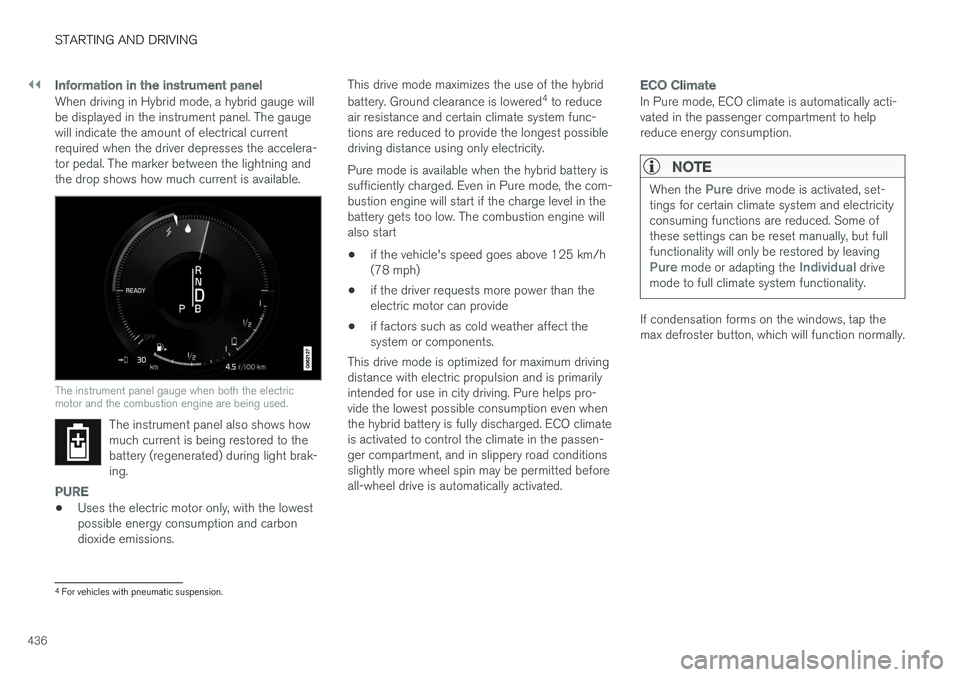
When driving in Hybrid mode, a hybrid gauge will be displayed in the instrument panel. The gaugewill indicate the amount of electrical currentrequired when the driver depresses the accelera-tor pedal. The marker between the lightning andthe drop shows how much current is available.
The instrument panel gauge when both the electric motor and the combustion engine are being used.
The instrument panel also shows how much current is being restored to thebattery (regenerated) during light brak-ing.
PURE
•Uses the electric motor only, with the lowest possible energy consumption and carbon dioxide emissions. This drive mode maximizes the use of the hybrid battery. Ground clearance is lowered
4
to reduce
air resistance and certain climate system func- tions are reduced to provide the longest possibledriving distance using only electricity. Pure mode is available when the hybrid battery is sufficiently charged. Even in Pure mode, the com-bustion engine will start if the charge level in thebattery gets too low. The combustion engine willalso start
• if the vehicle's speed goes above 125 km/h(78 mph)
• if the driver requests more power than theelectric motor can provide
• if factors such as cold weather affect thesystem or components.
This drive mode is optimized for maximum drivingdistance with electric propulsion and is primarilyintended for use in city driving. Pure helps pro-vide the lowest possible consumption even whenthe hybrid battery is fully discharged. ECO climateis activated to control the climate in the passen-ger compartment, and in slippery road conditionsslightly more wheel spin may be permitted beforeall-wheel drive is automatically activated.
ECO Climate
In Pure mode, ECO climate is automatically acti- vated in the passenger compartment to helpreduce energy consumption.
NOTE
When the Pure drive mode is activated, set-
tings for certain climate system and electricity consuming functions are reduced. Some ofthese settings can be reset manually, but fullfunctionality will only be restored by leaving
Pure mode or adapting the Individual drive
mode to full climate system functionality.
If condensation forms on the windows, tap the max defroster button, which will function normally.
4 For vehicles with pneumatic suspension.
Page 440 of 674
||
STARTING AND DRIVING
438
INDIVIDUAL
•Customizes drive mode to personal preferen- ces.
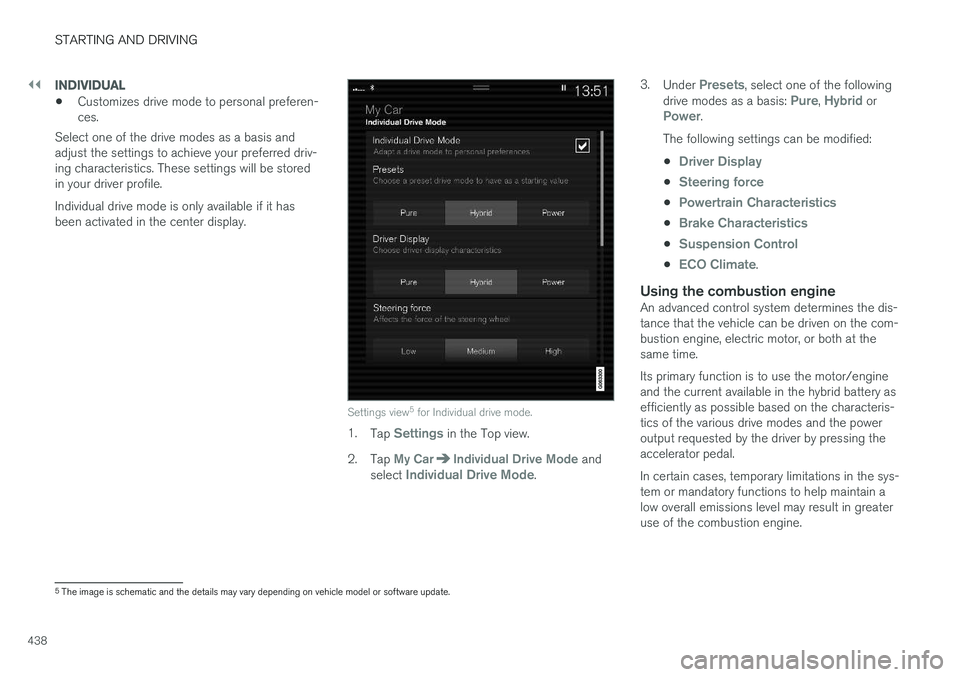
Select one of the drive modes as a basis andadjust the settings to achieve your preferred driv-ing characteristics. These settings will be storedin your driver profile. Individual drive mode is only available if it has been activated in the center display.
Settings view 5
for Individual drive mode.
1. Tap Settings in the Top view.
2. Tap
My CarIndividual Drive Mode and
select Individual Drive Mode. 3.
Under
Presets, select one of the following
drive modes as a basis: Pure, Hybrid orPower.
The following settings can be modified: •
Driver Display
•Steering force
•Powertrain Characteristics
•Brake Characteristics
•Suspension Control
•ECO Climate.
Using the combustion engineAn advanced control system determines the dis- tance that the vehicle can be driven on the com- bustion engine, electric motor, or both at the same time. Its primary function is to use the motor/engine and the current available in the hybrid battery asefficiently as possible based on the characteris-tics of the various drive modes and the poweroutput requested by the driver by pressing theaccelerator pedal. In certain cases, temporary limitations in the sys- tem or mandatory functions to help maintain alow overall emissions level may result in greateruse of the combustion engine.
5 The image is schematic and the details may vary depending on vehicle model or software update.