lock VOLVO XC60 TWIN ENGINE 2019 Owners Manual
[x] Cancel search | Manufacturer: VOLVO, Model Year: 2019, Model line: XC60 TWIN ENGINE, Model: VOLVO XC60 TWIN ENGINE 2019Pages: 695, PDF Size: 14.96 MB
Page 304 of 695
||
DRIVER SUPPORT
302
To temporarily deactivate Adaptive Cruise Controland put it in standby mode:
–Press the button on the steering wheel(2).
>The symbol in the instrument panelchanges color from WHITE to GRAY andthe set speed in the center of the speed-ometer will change from BEIGE to GRAY.
WARNING
If Adaptive Cruise Control is in standbymode, the driver must intervene and regu-late both speed and distance to the vehicleahead.
If the vehicle comes too close to a vehicleahead when Adaptive Cruise Control is instandby mode, the driver is instead warnedof the short distance by the Distance Alertfunction.
Standby mode due to action by the driver
Adaptive Cruise Control will be temporarily deac-tivated and put in standby mode if:
the brakes are applied
the gear selector is moved to N
the vehicle is driven faster than the setspeed for more than 1 minute
Temporarily increasing speed using the accelera-tor pedal, e.g. when passing another vehicle, willnot affect the setting. The vehicle will return tothe set speed when the accelerator pedal isreleased.
Automatic standby mode
Adaptive Cruise Control is dependent on othersystems, such as Electronic Stability Control
(ESC46). If any of these other systems stopsworking, Adaptive Cruise Control will automati-cally switch off.
WARNING
With automatic standby mode, the driver iswarned by an acoustic signal and a messageon the instrument panel.
The driver must then regulate vehiclespeed, apply the brakes if necessary, andmaintain a safe distance to other vehicles.
Adaptive Cruise Control may go into standbymode if:
your vehicle's speed goes below 5 km/h(3 mph) and ACC cannot determine if thevehicle ahead is stationary or if it is anotherobject, e.g. a speed bump.
your vehicle's speed goes under 5 km/h(3 mph) and the vehicle ahead turns so thatACC no longer has a vehicle to follow.
the driver opens the door.
the driver unbuckles the seat belt.
the engine speed (rpm) is too low/high.
one or more of the wheels lose traction.
the brake temperature is high.
the parking brake is applied.
the camera/radar sensor is covered by snowor heavy rain (the camera lens/radar wavesare blocked)
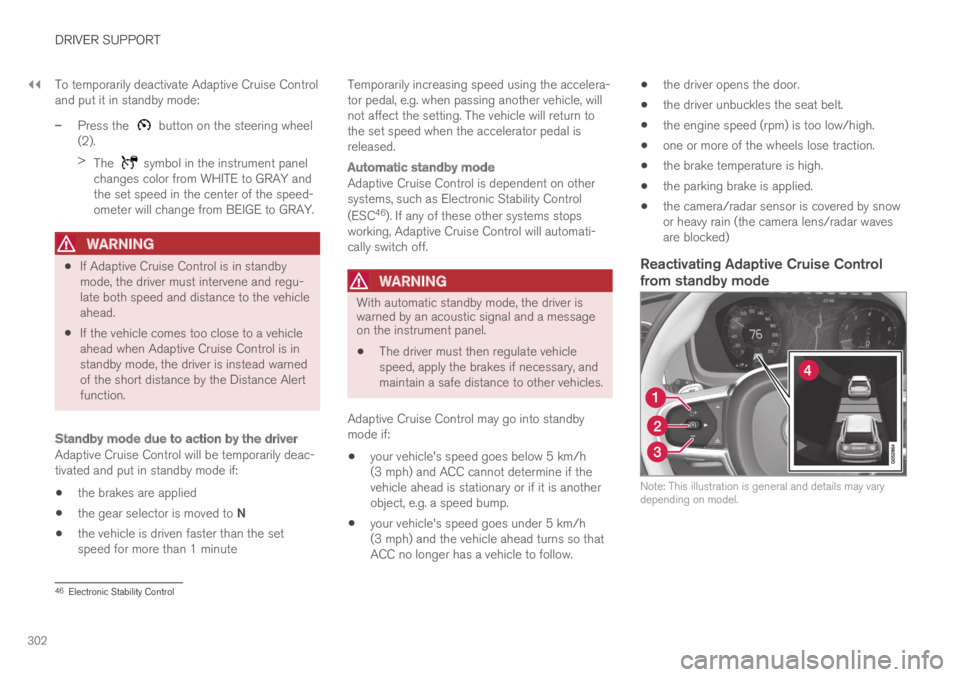
Reactivating Adaptive Cruise Control
from standby mode
Note: This illustration is general and details may varydepending on model.
46Electronic Stability Control
Page 311 of 695
DRIVER SUPPORT
* Option/accessory.309
SymbolMessageMeaning
The symbol is WHITE.The vehicle is maintaining the set speed.
Adaptive Cruise Contr.
Unavailable
The symbol is GRAY.
Adaptive Cruise Control is in standby mode.
Adaptive Cruise Contr.
Service required
The symbol is GRAY.
The system is not functioning as intended. Contact a workshop ‒ an authorized Volvo workshop isrecommended.
Windscreen sensor
Sensor blocked, see Owner's manual
Clean the windshield in front of the camera and radar sensors.
A text message can be erased by briefly pressing
the button in the center of the right-sidesteering wheel keypad.
If the message persists: Contact a workshop ‒ anauthorized Volvo workshop is recommended.
Related information
Adaptive Cruise Control* (p. 294)
Page 321 of 695
DRIVER SUPPORT
}}
319
Standby mode due to action by the driver
Pilot Assist will be temporarily deactivated andput in standby mode if:
the brakes are applied.
the gear selector is moved to N
a turn signal is used for more than 1 minute.
the vehicle is driven faster than the setspeed for more than 1 minute
Temporarily increasing speed using the accelera-tor pedal, e.g. when passing another vehicle, willnot affect the setting. The vehicle will return tothe set speed when the accelerator pedal isreleased.
When the turn signals are used, Pilot Assist'ssteering assistance will be temporarily deacti-vated. When the turn signal is switched off, steer-ing assistance will be automatically reactivated ifthe traffic lane's side markings can still bedetected.
Automatic standby mode
Pilot Assist is dependent on other systems, such
as Electronic Stability Control (ESC60). If any ofthese other systems stops working, Pilot Assistwill automatically switch off.
WARNING
With automatic standby mode, the driver iswarned by an acoustic signal and a messageon the instrument panel.
The driver must then regulate vehiclespeed, apply the brakes if necessary, andmaintain a safe distance to other vehicles.
Adaptive Cruise Control may go into standbymode if, e.g.:
the driver opens the door.
the brake temperature is high.
the driver's hands are not on the steeringwheel.
the parking brake is applied.
the engine speed (rpm) is too low/high.
the driver unbuckles the seat belt.
one or more of the wheels lose traction.
the camera/radar sensor is covered by snowor heavy rain (the camera lens/radar wavesare blocked)
your vehicle's speed goes below 5 km/h(3 mph) and Pilot Assist cannot determine ifthe vehicle ahead is stationary or if it isanother object, e.g. a speed bump.
your vehicle's speed goes under 5 km/h(3 mph) and the vehicle ahead turns so thatPilot Assist no longer has a vehicle to follow.
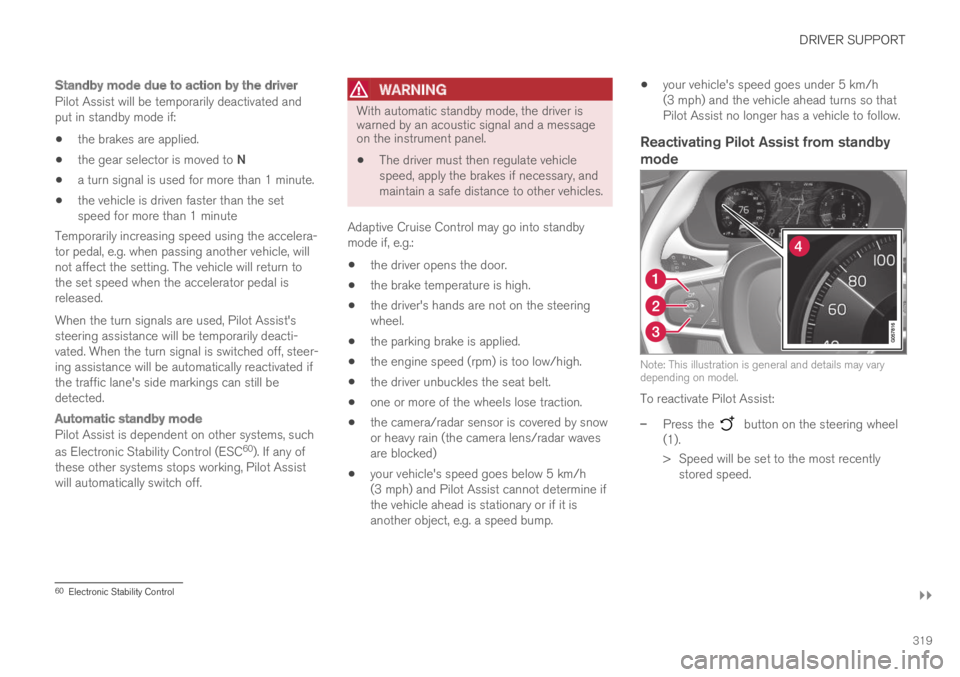
Reactivating Pilot Assist from standby
mode
Note: This illustration is general and details may varydepending on model.
To reactivate Pilot Assist:
–Press the button on the steering wheel(1).
>Speed will be set to the most recentlystored speed.
60Electronic Stability Control
Page 325 of 695
DRIVER SUPPORT
}}
* Option/accessory.323
Pilot Assist limitations
Pilot Assist functionality may be reduced in cer-tain situations.
Pilot Assist is a driver support function designedto simplify driving and assist the driver in manysituations. However, the driver is always responsi-ble for maintaining a suitable distance to vehiclesor objects around it and ensuring that the vehicleis correctly positioned in the traffic lane.
WARNING
In some situations, Pilot Assist may have trou-ble helping the driver properly or may bedeactivated automatically – we advise againstusing Pilot Assist in such cases. Examples ofsuch situations include:
the lane markings are worn, missing orcross each other.
lane division is unclear, for example, whenthe lanes divide or merge or at exits orwhen there are multiple sets of markings.
edges or other lines than lane markingsare present on or near the road, e.g.curbs, joints or repairs to the road sur-face, edges of barriers, roadside edges orstrong shadows.
the lane is narrow or winding.
the lane contains ridges or holes.
weather conditions are poor, e.g. rain,snow or fog or slush or reduced visibilitywith poor light conditions, backlighting,wet road surface, etc.
The driver should also note that Pilot Assisthas the following limitations:
High curbs, roadside barriers, temporaryobstacles (traffic cones, safety barriers,etc.) are not detected. Alternatively, theymay be detected incorrectly as lane mark-ings, with a subsequent risk of contactbetween the vehicle and such obstacles.
The driver is responsible for ensuring thatthe vehicle maintains a suitable distancefrom such obstacles.
The camera and radar sensors do nothave the capacity to detect all oncomingobjects and obstacles in traffic environ-ments, e.g. potholes, stationary obstaclesor objects that completely or partiallyblock the route.
Pilot Assist does not "see" pedestrians,animals, etc.
The recommended steering input is lim-ited in force, which means that it cannotalways help the driver to steer and keepthe vehicle within the lane.
In vehicles equipped with SensusNavigation*, the function is able to useinformation from map data, which couldcause variations in performance.
Pilot Assist is switched off if the powersteering is working with reduced power -e.g. during cooling due to overheating(see section "Speed-dependent steeringforce").
The driver can always correct or adjust steeringassistance provided by Pilot Assist by turning thesteering wheel to the desired position.
Page 329 of 695
DRIVER SUPPORT
}}
327
Radar sensor limitations
The radar sensor used by several of the driversupport functions has certain limitations, whichalso affect the functions using the radar sensor.
Obstructed camera
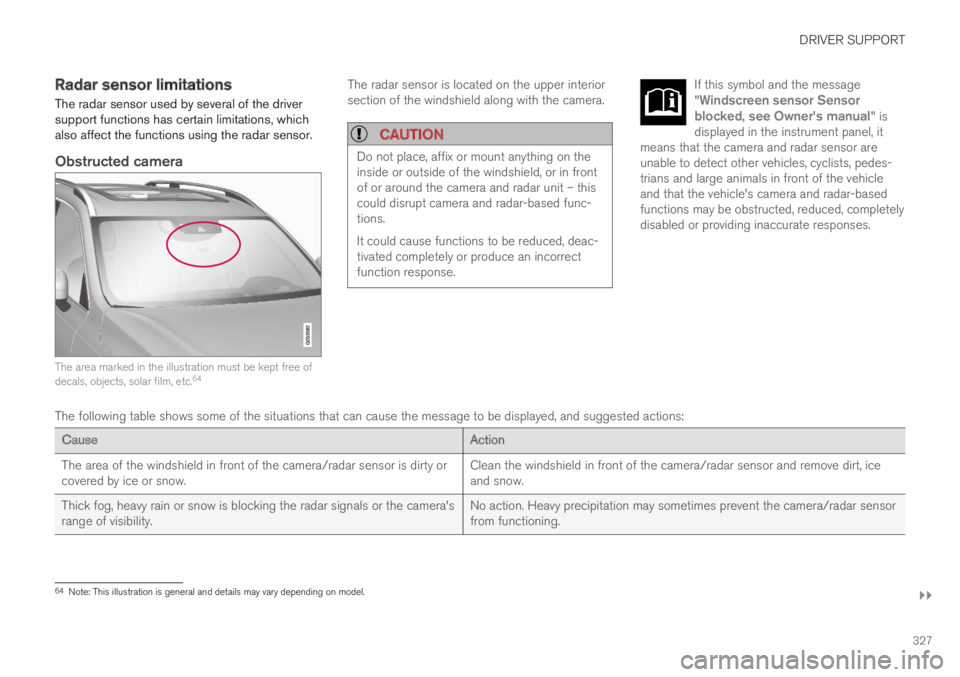
The area marked in the illustration must be kept free ofdecals, objects, solar film, etc.64
The radar sensor is located on the upper interiorsection of the windshield along with the camera.
CAUTION
Do not place, affix or mount anything on theinside or outside of the windshield, or in frontof or around the camera and radar unit – thiscould disrupt camera and radar-based func-tions.
It could cause functions to be reduced, deac-tivated completely or produce an incorrectfunction response.
If this symbol and the message"Windscreen sensor Sensorblocked, see Owner's manual" isdisplayed in the instrument panel, itmeans that the camera and radar sensor areunable to detect other vehicles, cyclists, pedes-trians and large animals in front of the vehicleand that the vehicle's camera and radar-basedfunctions may be obstructed, reduced, completelydisabled or providing inaccurate responses.
The following table shows some of the situations that can cause the message to be displayed, and suggested actions:
CauseAction
The area of the windshield in front of the camera/radar sensor is dirty orcovered by ice or snow.Clean the windshield in front of the camera/radar sensor and remove dirt, iceand snow.
Thick fog, heavy rain or snow is blocking the radar signals or the camera'srange of visibility.No action. Heavy precipitation may sometimes prevent the camera/radar sensorfrom functioning.
64Note: This illustration is general and details may vary depending on model.
Page 330 of 695
||
DRIVER SUPPORT
328
CauseAction
Water or snow is spraying/swirling up and blocking the radar signals orthe camera's range of visibility.No action. Very wet or snow-covered roads may sometimes prevent the cam-era/radar sensor from functioning.
There is dirt between the inside of the windshield and the camera/radarsensor.Consult a workshop to have the area of the windshield on the inside of the cam-era's casing cleaned. An authorized Volvo workshop is recommended.
NOTE
Keep the windshield in front of the cameraand radar unit clean.
Vehicle speed
The radar sensor's ability to detect a vehicleahead is significantly reduced if:
the speed of the vehicle ahead differs greatlyfrom your vehicle's speed
Limited field of vision
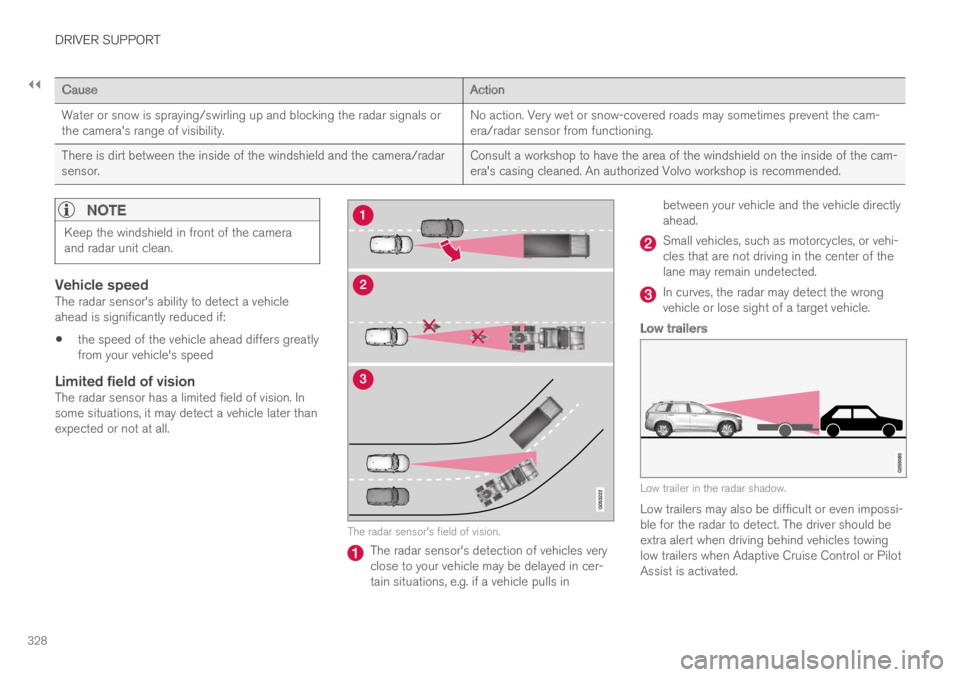
The radar sensor has a limited field of vision. Insome situations, it may detect a vehicle later thanexpected or not at all.
The radar sensor's field of vision.
The radar sensor's detection of vehicles veryclose to your vehicle may be delayed in cer-tain situations, e.g. if a vehicle pulls in
between your vehicle and the vehicle directlyahead.
Small vehicles, such as motorcycles, or vehi-cles that are not driving in the center of thelane may remain undetected.
In curves, the radar may detect the wrongvehicle or lose sight of a target vehicle.
Low trailers
Low trailer in the radar shadow.
Low trailers may also be difficult or even impossi-ble for the radar to detect. The driver should beextra alert when driving behind vehicles towinglow trailers when Adaptive Cruise Control or PilotAssist is activated.
Page 335 of 695
DRIVER SUPPORT
}}}}
333
CauseAction
The area of the windshield in front of the camera/radar sensor isdirty or covered by ice or snow.Clean the windshield in front of the camera/radar sensor and remove dirt, ice andsnow.
Thick fog, heavy rain or snow is blocking the radar signals or thecamera's range of visibility.No action. Heavy precipitation may sometimes prevent the camera/radar sensor fromfunctioning.
Water or snow is spraying/swirling up and blocking the radar signalsor the camera's range of visibility.No action. Very wet or snow-covered roads may sometimes prevent the camera/radar sensor from functioning.
There is dirt between the inside of the windshield and the camera/radar sensor.Consult a workshop to have the area of the windshield on the inside of the camera'scasing cleaned. An authorized Volvo workshop is recommended.
Bright sunlight.No action. The camera/radar sensor will reset automatically when lighting conditionsimprove.
NOTE
Keep the windshield in front of the cameraand radar unit clean.
High temperatures
If the temperature in the passenger compartmentis very high, the camera/radar sensor will switchoff temporarily for approx. 15 minutes after theengine is started to protect its electronic compo-nents. When the temperature has cooled suffi-ciently, the camera/radar sensor will automati-cally restart.
Damaged windshield
CAUTION
If there are cracks, scratches or stone chipson the windshield in front of any of the cam-era and radar unit "windows" and this coversan area of about 0.5 × 3.0 mm(0.02 × 0.12 in.) or more, contact a workshopto have the windshield replaced – an author-ized Volvo workshop is recommended.
Failure to take action could result in reducedperformance for the driver support systemsthat use the camera and radar unit.
It could cause functions to be reduced, deac-tivated completely or produce an incorrectfunction response.
To avoid the risk of loss of function, malfunc-tion or reduced function of the driver supportsystems that use the radar unit, the followingalso apply:
Volvo advises against repairing cracks,scratches or stone chips in the area infront of the camera and radar unit – theentire windshield should instead bereplaced.
Before replacing the windshield, contactan authorized Volvo workshop to verify
Page 348 of 695
DRIVER SUPPORT
346
City Safety limitations
City Safety functionality may be reduced in cer-tain situations.
Surroundings
Low objects
Hanging objects, such as flags for overhangingloads or accessories such as auxiliary lights orfront protective grids that extend beyond theheight of the hood, may limit City Safety function-ality.
Slippery road conditions
The extended braking distance on slippery roadsmay reduce City Safety's capacity to help avoid acollision. In these types of situations, the Anti-lock Braking System and Electronic Stability Con-
trol (ESC72) will help provide optimal brakingpower with maintained stability.
Backlighting
The visual warning signal in the windshield maybe difficult to detect in bright sunlight, if there arereflections, or if the driver is wearing sunglassesor not looking straight ahead.
Heat
If the temperature in the passenger compartmentis high due to e.g. bright sunlight, the visual warn-ing signal in the windshield may be temporarilydisabled.
Camera and radar sensor's field of vision
The camera's field of vision is limited and in cer-tain situations, it may be unable to detect pedes-trians, large animals, cyclists or vehicles, or it maydetect them later than expected.
Vehicles that are dirty may be detected later thanclean vehicles, and in dark conditions, motorcy-cles may be detected late or not at all.
If a text message displayed in the instrumentpanel indicates that the camera/radar sensor isobstructed, it may be difficult for City Safety todetect pedestrians, large animals, cyclists, vehi-cles or lane markings in front of the vehicle. CitySafety functionality may therefore be reduced.
Text messages may not be displayed for all situa-tions in which the windshield sensors areblocked. The driver must therefore always keepthe windshield in front of the camera/radar sen-sor clean.
CAUTION
Maintenance and replacement of City Safetycomponents may only be performed by aworkshop – an authorized Volvo workshop isrecommended.
Driver intervention
Backing up
City Safety is temporarily deactivated when thevehicle is backing up.
Low speed
City Safety is not activated at very low speedsunder 4 km/h (3 mph). The system will thereforenot intervene in situations in which your vehicle isapproaching another vehicle very slowly, such aswhen parking.
Active driver
Action by the driver always has priority. CitySafety will therefore not react or will react at alater stage with a warning or intervention in situa-tions in which the driver is clearly steering andoperating the accelerator pedal, even if a collisionis unavoidable.
An active and aware driving style may thereforedelay collision warnings and intervention in orderto minimize unnecessary warnings.
72Electronic Stability Control
Page 358 of 695
DRIVER SUPPORT
* Option/accessory.356
Activating/deactivating Cross TrafficAlert
The driver can choose to deactivate the CTA85
function as follows:
Press the Cross Traffic Alertbutton in the center display'sFunction view.
GRAY button indicator light - CTA is deacti-vated.
GREEN button indicator light - CTA is acti-vated.
CTA is automatically activated each time theengine is started.
Related information
Cross Traffic Alert* (p. 355)
Cross Traffic Alert limitations
CTA86 functionality may be reduced in certainsituations.
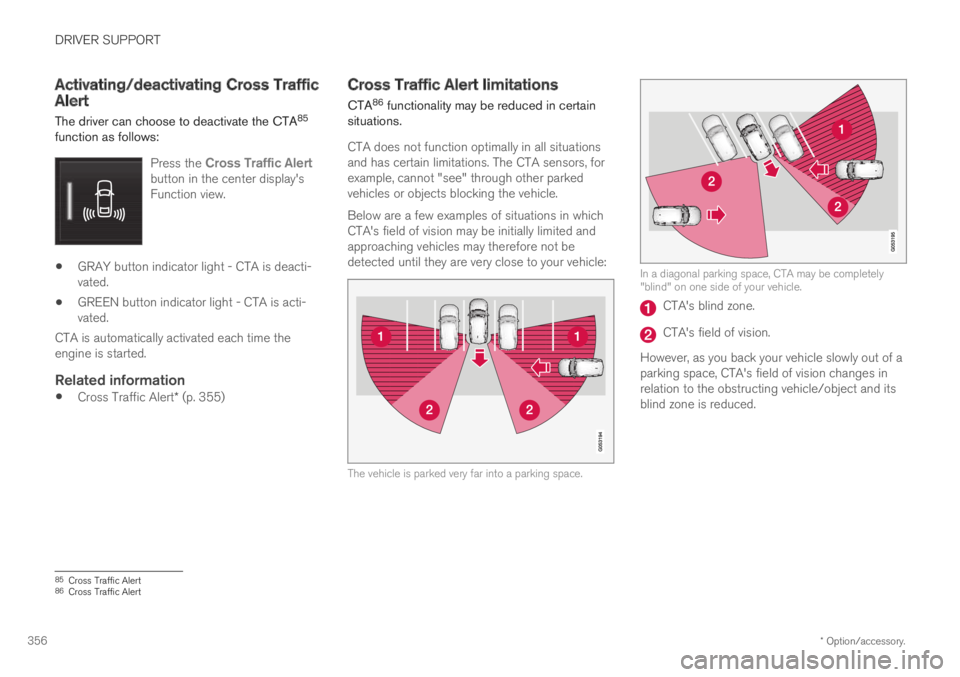
CTA does not function optimally in all situationsand has certain limitations. The CTA sensors, forexample, cannot "see" through other parkedvehicles or objects blocking the vehicle.
Below are a few examples of situations in whichCTA's field of vision may be initially limited andapproaching vehicles may therefore not bedetected until they are very close to your vehicle:
The vehicle is parked very far into a parking space.
In a diagonal parking space, CTA may be completely"blind" on one side of your vehicle.
CTA's blind zone.
CTA's field of vision.
However, as you back your vehicle slowly out of aparking space, CTA's field of vision changes inrelation to the obstructing vehicle/object and itsblind zone is reduced.
85Cross Traffic Alert86Cross Traffic Alert
Page 374 of 695
DRIVER SUPPORT
372
Lane Keeping Aid symbols andmessages
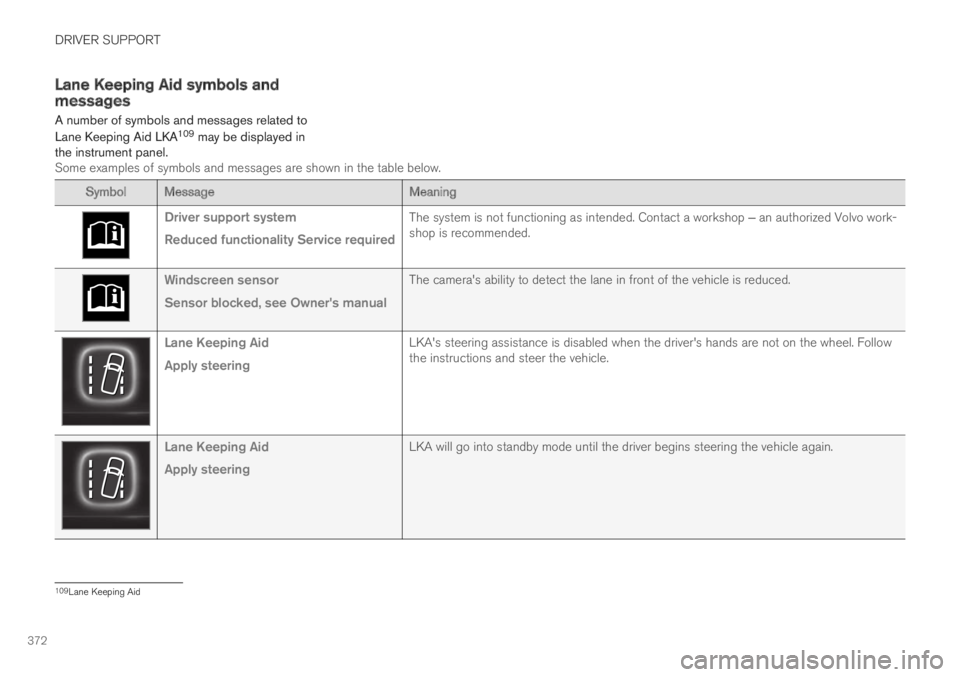
A number of symbols and messages related to
Lane Keeping Aid LKA109 may be displayed inthe instrument panel.Some examples of symbols and messages are shown in the table below.
SymbolMessageMeaning
Driver support system
Reduced functionality Service required
The system is not functioning as intended. Contact a workshop ‒ an authorized Volvo work-shop is recommended.
Windscreen sensor
Sensor blocked, see Owner's manual
The camera's ability to detect the lane in front of the vehicle is reduced.
Lane Keeping Aid
Apply steering
LKA's steering assistance is disabled when the driver's hands are not on the wheel. Followthe instructions and steer the vehicle.
Lane Keeping Aid
Apply steering
LKA will go into standby mode until the driver begins steering the vehicle again.
109Lane Keeping Aid