ECO mode VOLVO XC60 TWIN ENGINE 2019 Owner's Manual
[x] Cancel search | Manufacturer: VOLVO, Model Year: 2019, Model line: XC60 TWIN ENGINE, Model: VOLVO XC60 TWIN ENGINE 2019Pages: 695, PDF Size: 14.96 MB
Page 157 of 695
LIGHTING
}}
* Option/accessory.155
With the steering wheel lever's lighting ring in the
position, the daytime running lights (DRL1)will illuminate when the vehicle is driven in day-light conditions. The headlights will switch auto-matically from daytime running lights to lowbeams in weak daylight or dark conditions. Theheadlights will also switch to low beams if thefront fog lights* and/or rear fog light are acti-vated.
US models: When mode is selected, thedaytime running lights can be deactivated in thecenter display. The parking lights will also bedeactivated. In weak daylight or dark conditions,the parking lights and low beams will be illumi-nated.
US models: With the lighting ring in the
or position, the daytime running lights willbe off.
Canadian models: With the lighting ring in the
or position, the daytime runninglights will be on.
NOTE
Volvo recommends use of Daytime RunningLights in the US. Its use is mandatory in Can-ada.
WARNING
The system is an energy saving aid – it cannotin all situations determine when the daylight istoo weak or not strong enough, e.g. whenthere is fog or rain.
The driver is always responsible for driving thevehicle with lighting that is safe for the trafficconditions and as specified by applicable traf-fic regulations.
Related information
Lighting panel and controls (p. 152)
Ignition modes (p. 433)
Low beams (p. 155)
Low beams
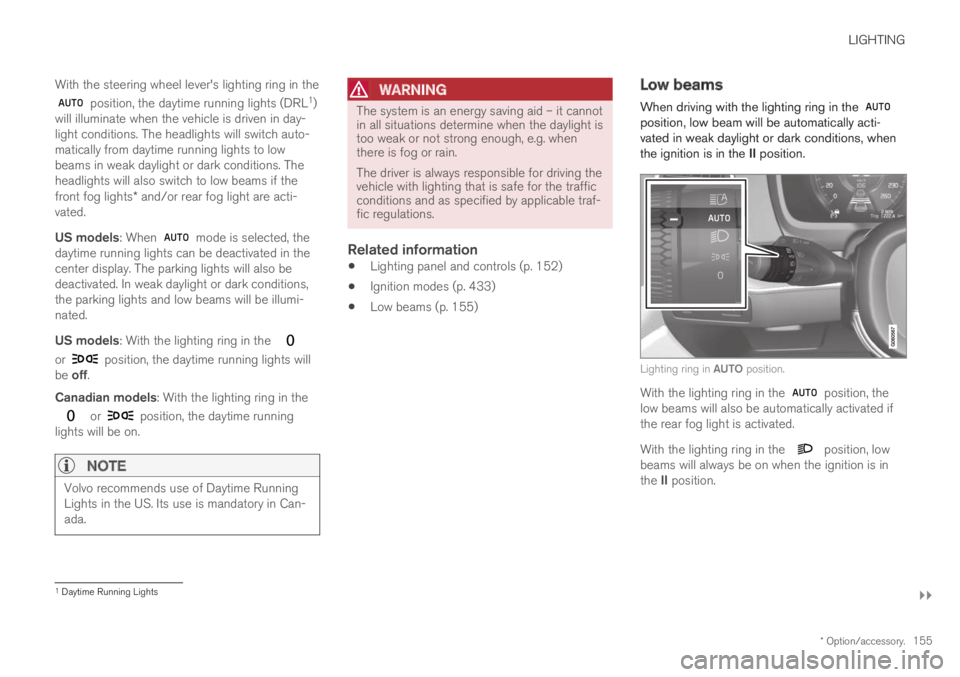
When driving with the lighting ring in the position, low beam will be automatically acti-vated in weak daylight or dark conditions, whenthe ignition is in the II position.
Lighting ring in AUTO position.
With the lighting ring in the position, thelow beams will also be automatically activated ifthe rear fog light is activated.
With the lighting ring in the position, lowbeams will always be on when the ignition is inthe II position.
1Daytime Running Lights
Page 164 of 695
LIGHTING
* Option/accessory.162
Interior Lighting
The interior is equipped with several differenttypes of lighting to improve the experience. Thisincludes reading lamps, glove box lighting andground lighting.
All lighting in the passenger compartment can beturned on and off manually within 5 minutesafter:
the engine has been switched off and theignition is in mode 0.
the vehicle is unlocked but the engine hasnot been started.
Front ceiling lighting
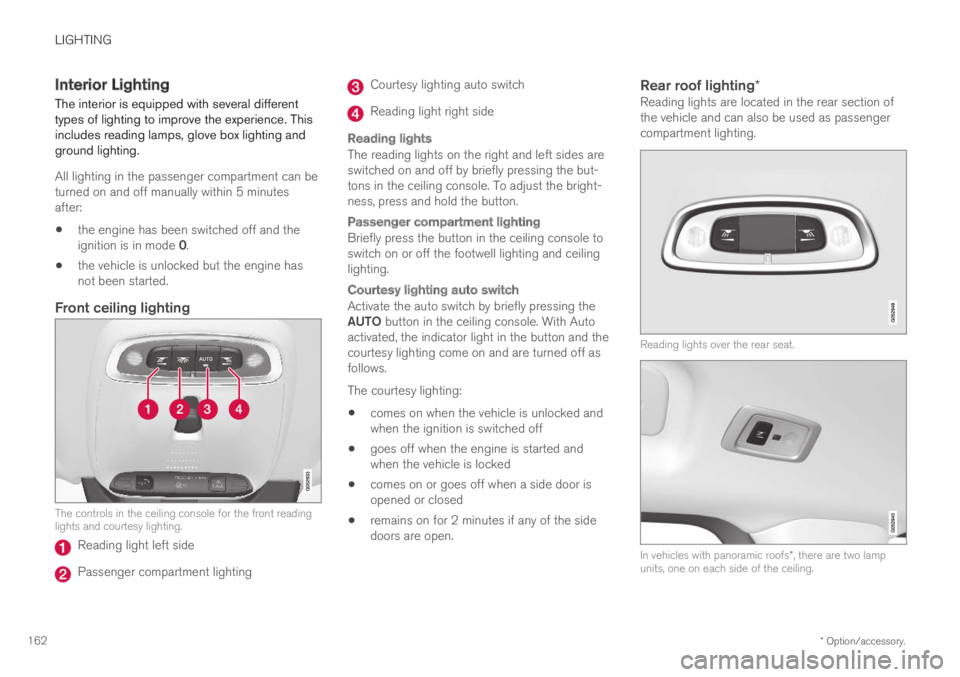
The controls in the ceiling console for the front readinglights and courtesy lighting.
Reading light left side
Passenger compartment lighting
Courtesy lighting auto switch
Reading light right side
Reading lights
The reading lights on the right and left sides areswitched on and off by briefly pressing the but-tons in the ceiling console. To adjust the bright-ness, press and hold the button.
Passenger compartment lighting
Briefly press the button in the ceiling console toswitch on or off the footwell lighting and ceilinglighting.
Courtesy lighting auto switch
Activate the auto switch by briefly pressing theAUTO button in the ceiling console. With Autoactivated, the indicator light in the button and thecourtesy lighting come on and are turned off asfollows.
The courtesy lighting:
comes on when the vehicle is unlocked andwhen the ignition is switched off
goes off when the engine is started andwhen the vehicle is locked
comes on or goes off when a side door isopened or closed
remains on for 2 minutes if any of the sidedoors are open.
Rear roof lighting *
Reading lights are located in the rear section ofthe vehicle and can also be used as passengercompartment lighting.
Reading lights over the rear seat.
In vehicles with panoramic roofs*, there are two lampunits, one on each side of the ceiling.
Page 165 of 695
LIGHTING
}}
* Option/accessory.163
Briefly press the button on the light to turn on oroff the reading lights. To adjust the brightness,press and hold the button.
Glove compartment lighting
The glove compartment lighting comes on orgoes off when the glove compartment is openedor closed.
Vanity mirror lighting *
The vanity mirror lighting comes on or goes offwhen the cover over the mirror is opened orclosed.
Ground lighting *
The ground lighting comes on or goes off when adoor is opened or closed.
Cargo compartment lighting
The cargo compartment lighting comes on orgoes off when the cargo compartment is openedor closed.
Ambient Lighting
The ambient lighting comes on when the doorsare opened and goes out when the vehicle islocked. Ambient lighting brightness can beadjusted in the center display and also fine-tunedusing the thumb wheel in the dashboard.
Mood lighting *
The vehicle is equipped with LEDs that providefaint lighting in various colors. This lighting is onwhen the engine is running. Mood lighting can be
adjusted in the center display and also fine-tunedusing the thumb wheel in the dashboard.
Lighting in the door storage
compartments
Lighting in the door storage compartmentscomes on when the doors are opened and goesout when the vehicle is locked. The brightnesscan be adjusted using the thumb wheel in thedashboard.
Lighting in the tunnel console's front
cup holder
The lighting in front console cup holdersswitches on when the vehicle is unlocked and offwhen the vehicle is locked. The brightness canbe adjusted using the thumb wheel in the dash-board.
Related information
Adjusting interior lighting (p. 163)
Lighting panel and controls (p. 152)
Ignition modes (p. 433)
Passenger compartment interior (p. 588)
Adjusting interior lighting
Illumination in the vehicle varies depending onignition mode. The interior lighting can beadjusted with a thumb wheel in the dashboardand certain light functions can also be adjustedvia the center display.
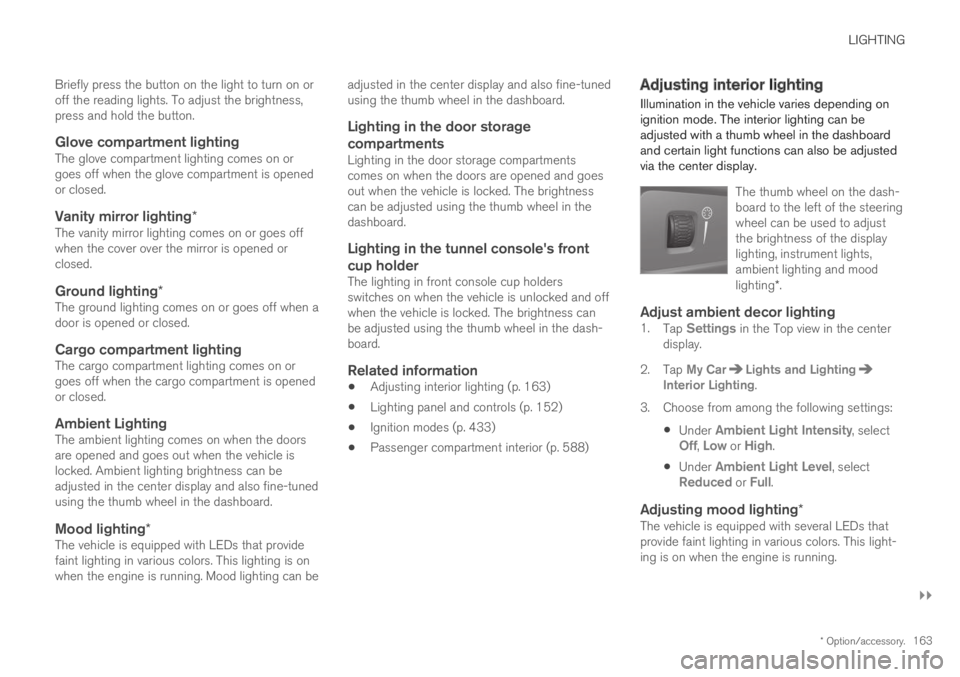
The thumb wheel on the dash-board to the left of the steeringwheel can be used to adjustthe brightness of the displaylighting, instrument lights,ambient lighting and moodlighting*.
Adjust ambient decor lighting
1.Tap Settings in the Top view in the centerdisplay.
2.Tap My CarLights and LightingInterior Lighting.
3. Choose from among the following settings:
Under Ambient Light Intensity, selectOff, Low or High.
Under Ambient Light Level, selectReduced or Full.
Adjusting mood lighting *
The vehicle is equipped with several LEDs thatprovide faint lighting in various colors. This light-ing is on when the engine is running.
Page 169 of 695
WINDOWS, GLASS AND MIRRORS
}}
* Option/accessory.167
Related information
Reset procedure for pinch protection(p. 167)
Operating the power windows (p. 168)
Panoramic roof* (p. 172)
Reset procedure for pinchprotection
If you experience any problems with the electri-cal functions for the power windows, you can tryto perform a reset.
WARNING
If the starter battery is disconnected, the func-tion for automatic opening and closing mustbe reset to function correctly. A reset isrequired in order for the pinch protection towork.
If the problem persists or if it affects the panor-
amic roof or sunroof, contact a workshop2.
Resetting a power window
1. Start with the window in the closed position.
2. Then operate the window in manual modethree times upward toward the closed posi-tion.
> The system will be automatically initiated.
Related information
Pinch protection for windows and sun cur-tains (p. 166)
Operating the power windows (p. 168)
Power windows
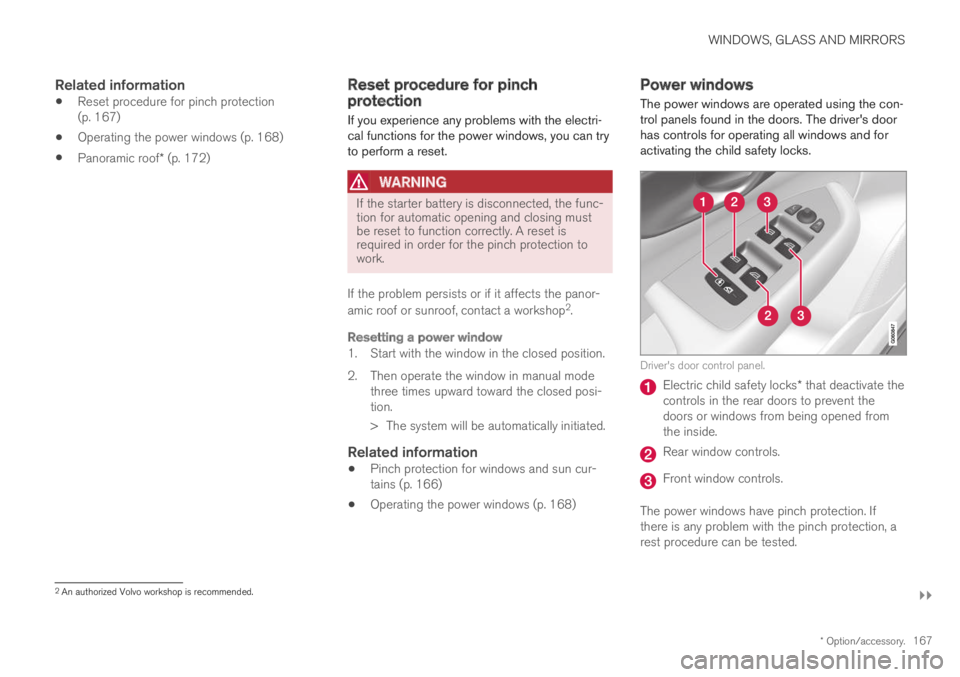
The power windows are operated using the con-trol panels found in the doors. The driver's doorhas controls for operating all windows and foractivating the child safety locks.
Driver's door control panel.
Electric child safety locks* that deactivate thecontrols in the rear doors to prevent thedoors or windows from being opened fromthe inside.
Rear window controls.
Front window controls.
The power windows have pinch protection. Ifthere is any problem with the pinch protection, arest procedure can be tested.
2An authorized Volvo workshop is recommended.
Page 170 of 695
||
WINDOWS, GLASS AND MIRRORS
* Option/accessory.168
WARNING
Children, other passengers or objects can betrapped by the moving parts.
Always operate the windows with caution.
Do not allow children to play with theoperating controls.
Never leave a child alone in the vehicle.
Remember to always cut the current tothe power windows by setting the vehi-cle's electrical system to ignition mode 0and then taking the remote key with youwhen leaving the vehicle.
Never stick objects or body parts outthrough the windows, even if the vehicleelectrical system is completely turned off.
Related information
Operating the power windows (p. 168)
Pinch protection for windows and sun cur-tains (p. 166)
Reset procedure for pinch protection(p. 167)
Operating the power windows
All power windows can be operated using thecontrol panel in the driver's door. The controlpanels in the other doors can be used to oper-ate that particular door.
The power windows have pinch protection. Ifthere is any problem with the pinch protection, arest procedure can be tested.
WARNING
Children, other passengers or objects can betrapped by the moving parts.
Always operate the windows with caution.
Do not allow children to play with theoperating controls.
Never leave a child alone in the vehicle.
Remember to always cut the current tothe power windows by setting the vehi-cle's electrical system to ignition mode 0and then taking the remote key with youwhen leaving the vehicle.
Never stick objects or body parts outthrough the windows, even if the vehicleelectrical system is completely turned off.
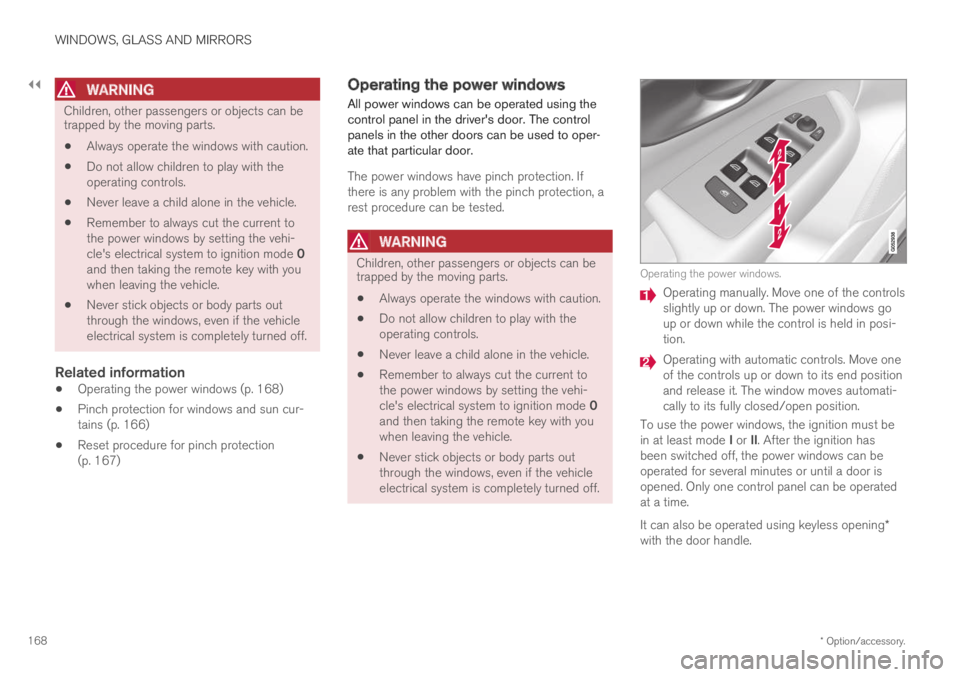
Operating the power windows.
Operating manually. Move one of the controlsslightly up or down. The power windows goup or down while the control is held in posi-tion.
Operating with automatic controls. Move oneof the controls up or down to its end positionand release it. The window moves automati-cally to its fully closed/open position.
To use the power windows, the ignition must bein at least mode I or II. After the ignition hasbeen switched off, the power windows can beoperated for several minutes or until a door isopened. Only one control panel can be operatedat a time.
It can also be operated using keyless opening*with the door handle.
Page 173 of 695
WINDOWS, GLASS AND MIRRORS
* Option/accessory.171
Automatically folding door mirrors *
The door mirrors can be automatically foldedwhen driving or parking in tight spaces.
1.Press the L and R buttons at the same time.
2. Release the buttons after about 1 second.The mirrors will automatically stop when theyare completely folded in.
Open the mirrors by pressing L and R at thesame time. The mirrors will automatically stopwhen they are completely open.
Resetting the mirrors' position
A mirror that has been moved out of positionmanually (e.g. hit or bumped into) must be electri-cally returned to its normal position for automaticfolding* to function properly.
1.Fold in the mirrors by pressing the L and Rbuttons at the same time.
2.Open them again by pressing the L and Rbuttons at the same time.
3. Repeat the above procedure as needed.
The mirrors are now reset to their original posi-tions.
Tilting when parking 3
The door mirrors can be tilted down to help givethe driver a better view along the sides of thevehicle, e.g. of the curb when parking.
–Select reverse gear and press the L or R mir-ror button.
Please note that the button may need to bepressed twice depending on settings. When thedoor mirror is tilted down, the light in the buttonwill flash. When reverse gear is engaged, thedoor mirrors will automatically start to move after3 seconds and will reach their original positionafter about 8 seconds.
Automatically tilting when parking 3
With this setting, the door mirrors will automati-cally tilt down when reverse gear is engaged. Thefolded position is preset and cannot be adjusted.To immediately return the door mirrors to theiroriginal position, press the L or R button twice.
1.Tap Settings in the center display's Topview.
2.Tap My CarMirrors and Convenience.
3.Under Exterior Mirror Tilt at Reverse,select Off, Driver, Passenger or Both toactivate/deactivate and to select which mir-ror to tilt.
Automatic folding when the vehicle is
locked *
The door mirrors can automatically fold in whenthe vehicle is locked and open when the vehicleis unlocked using the remote key.
1.Tap Settings in the center display's Topview.
2.Tap My CarMirrors and Convenience.
3.Select Fold Mirror When Locked to acti-vate/deactivate.
Related information
Rearview/door mirrors (p. 169)
Adjusting the rearview mirror dimming func-tion (p. 170)
Storing positions for seats, mirrors and head-up display* (p. 186)
Activating and deactivating the heated rearwindow and door mirrors (p. 221)
3
Only on models equipped with a power driver's seat with memory buttons * .
Page 175 of 695
WINDOWS, GLASS AND MIRRORS
}}
* Option/accessory.173
Operating the panoramic roof*
The panoramic roof and sun curtain are oper-ated using a control in the ceiling panel, andboth are equipped with pinch protection.
WARNING
Children, other passengers or objects can betrapped by the moving parts.
Always operate the windows with caution.
Do not allow children to play with theoperating controls.
Never leave a child alone in the vehicle.
Remember to always cut the current tothe power windows by setting the vehi-cle's electrical system to ignition mode 0and then taking the remote key with youwhen leaving the vehicle.
Never stick objects or body parts outthrough the windows, even if the vehicleelectrical system is completely turned off.
CAUTION
Do not open the panoramic roof whenload carriers are installed.
Never place heavy objects on the panor-amic roof.
CAUTION
Remove ice and snow before opening thepanoramic roof. Be careful not to scratchany surfaces or damage the trim.
Do not operate the panoramic roof if it isfrozen in place.
To operate the panoramic roof and sun curtain,the ignition must be in mode I or II.
It can also be operated using keyless opening*with the door handle.
WARNING
Make sure that no child or other passengercomes into contact with the windows as theyare closing with keyless closing*.
CAUTION
Check that the panoramic roof is properlyclosed when closing.
The movement of the roof will stop if the controlis released during manual operation or when the
glass has reached the comfort4 or fully open/closed position. The movement of both the pan-oramic roof and the sun curtain is also stopped ifthe control in the ceiling is operated again in the
direction opposite that of the current direction ofmovement.
The panoramic roof and sun curtain are alsoequipped with pinch protection. If there is anyproblem with the pinch protection, a rest proce-dure can be tested.
NOTE
For manual opening, the sun curtain must becompletely open before the panoramic roofcan be opened. For the reverse procedure,the panoramic roof must be completelyclosed before the sun curtain can be com-pletely closed.
4The comfort position is a position which helps keep wind and resonance sounds to a comfortably low level.
Page 176 of 695
||
WINDOWS, GLASS AND MIRRORS
* Option/accessory.174
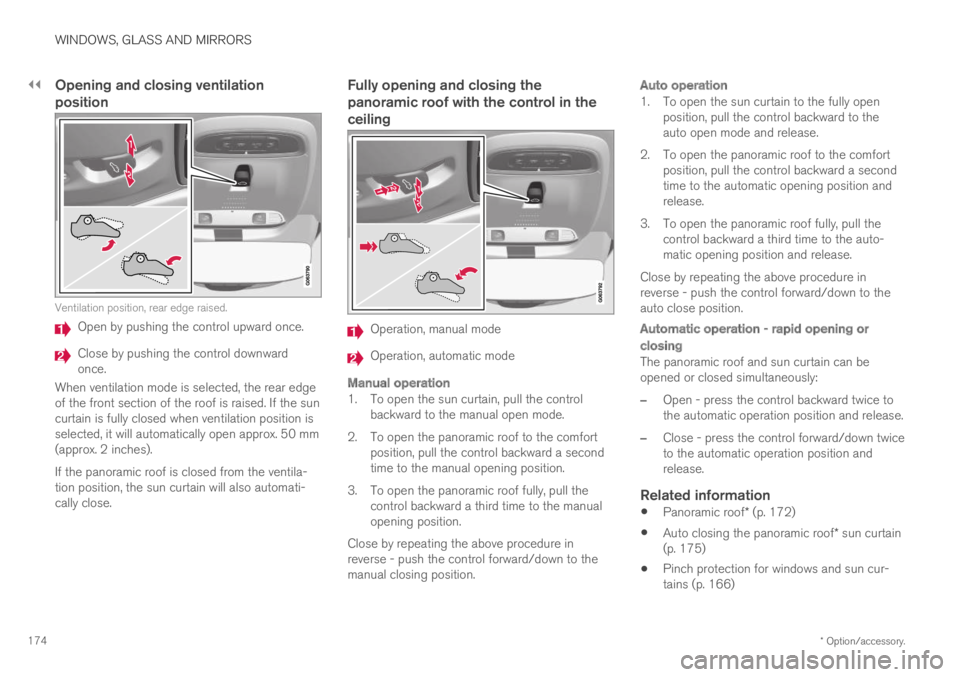
Opening and closing ventilation
position
Ventilation position, rear edge raised.
Open by pushing the control upward once.
Close by pushing the control downwardonce.
When ventilation mode is selected, the rear edgeof the front section of the roof is raised. If the suncurtain is fully closed when ventilation position isselected, it will automatically open approx. 50 mm(approx. 2 inches).
If the panoramic roof is closed from the ventila-tion position, the sun curtain will also automati-cally close.
Fully opening and closing the
panoramic roof with the control in the
ceiling
Operation, manual mode
Operation, automatic mode
Manual operation
1. To open the sun curtain, pull the controlbackward to the manual open mode.
2. To open the panoramic roof to the comfortposition, pull the control backward a secondtime to the manual opening position.
3. To open the panoramic roof fully, pull thecontrol backward a third time to the manualopening position.
Close by repeating the above procedure inreverse - push the control forward/down to themanual closing position.
Auto operation
1. To open the sun curtain to the fully openposition, pull the control backward to theauto open mode and release.
2. To open the panoramic roof to the comfortposition, pull the control backward a secondtime to the automatic opening position andrelease.
3. To open the panoramic roof fully, pull thecontrol backward a third time to the auto-matic opening position and release.
Close by repeating the above procedure inreverse - push the control forward/down to theauto close position.
Automatic operation - rapid opening or
closing
The panoramic roof and sun curtain can beopened or closed simultaneously:
–Open - press the control backward twice tothe automatic operation position and release.
–Close - press the control forward/down twiceto the automatic operation position andrelease.
Related information
Panoramic roof* (p. 172)
Auto closing the panoramic roof* sun curtain(p. 175)
Pinch protection for windows and sun cur-tains (p. 166)
Page 182 of 695
WINDOWS, GLASS AND MIRRORS
180
Using the rear window wiper/washer
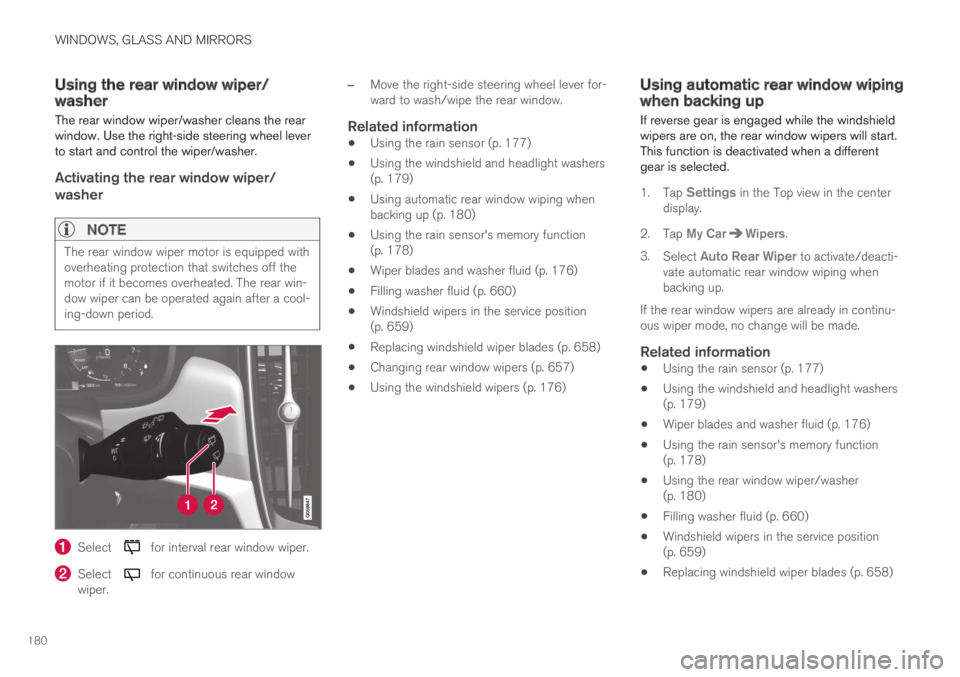
The rear window wiper/washer cleans the rearwindow. Use the right-side steering wheel leverto start and control the wiper/washer.
Activating the rear window wiper/
washer
NOTE
The rear window wiper motor is equipped withoverheating protection that switches off themotor if it becomes overheated. The rear win-dow wiper can be operated again after a cool-ing-down period.
Select for interval rear window wiper.
Select for continuous rear windowwiper.
–Move the right-side steering wheel lever for-ward to wash/wipe the rear window.
Related information
Using the rain sensor (p. 177)
Using the windshield and headlight washers(p. 179)
Using automatic rear window wiping whenbacking up (p. 180)
Using the rain sensor's memory function(p. 178)
Wiper blades and washer fluid (p. 176)
Filling washer fluid (p. 660)
Windshield wipers in the service position(p. 659)
Replacing windshield wiper blades (p. 658)
Changing rear window wipers (p. 657)
Using the windshield wipers (p. 176)
Using automatic rear window wipingwhen backing up
If reverse gear is engaged while the windshieldwipers are on, the rear window wipers will start.This function is deactivated when a differentgear is selected.
1.Tap Settings in the Top view in the centerdisplay.
2.Tap My CarWipers.
3.Select Auto Rear Wiper to activate/deacti-vate automatic rear window wiping whenbacking up.
If the rear window wipers are already in continu-ous wiper mode, no change will be made.
Related information
Using the rain sensor (p. 177)
Using the windshield and headlight washers(p. 179)
Wiper blades and washer fluid (p. 176)
Using the rain sensor's memory function(p. 178)
Using the rear window wiper/washer(p. 180)
Filling washer fluid (p. 660)
Windshield wipers in the service position(p. 659)
Replacing windshield wiper blades (p. 658)
Page 240 of 695
||
KEY, LOCKS AND ALARM
* Option/accessory.238
The keyless system for locking/unlocking thedoors and tailgate (Passive Entry*) is available asan option. This system has a range in a semicirclewith a radius of approximately 1.5 meter (5 feet)out from the driver's door and approx. 1 meter(3 feet) out from the tailgate.
With keyless start in combination with keylesslocking and unlocking, the remote key can belocated anywhere in the passenger compartmentor cargo compartment in order to start theengine.
Each remote key supplied with the vehicle can belinked to a driver profile with unique settings forthe vehicle. When a key with a specific profile isused, the vehicle settings are adjusted accordingto that profile.
Buttonless key, Key Tag
For vehicles equipped with keyless locking andunlocking*, a smaller, lighter and button-less key
(Key Tag4) is also provided. It works the sameway as the regular remote key as regard keylessstart and keyless locking and unlocking. The keyis waterproof up to a depth of approx. 10 meters(30 feet) for up to 60 minutes. It does not have adetachable key blade and its battery cannot bereplaced.
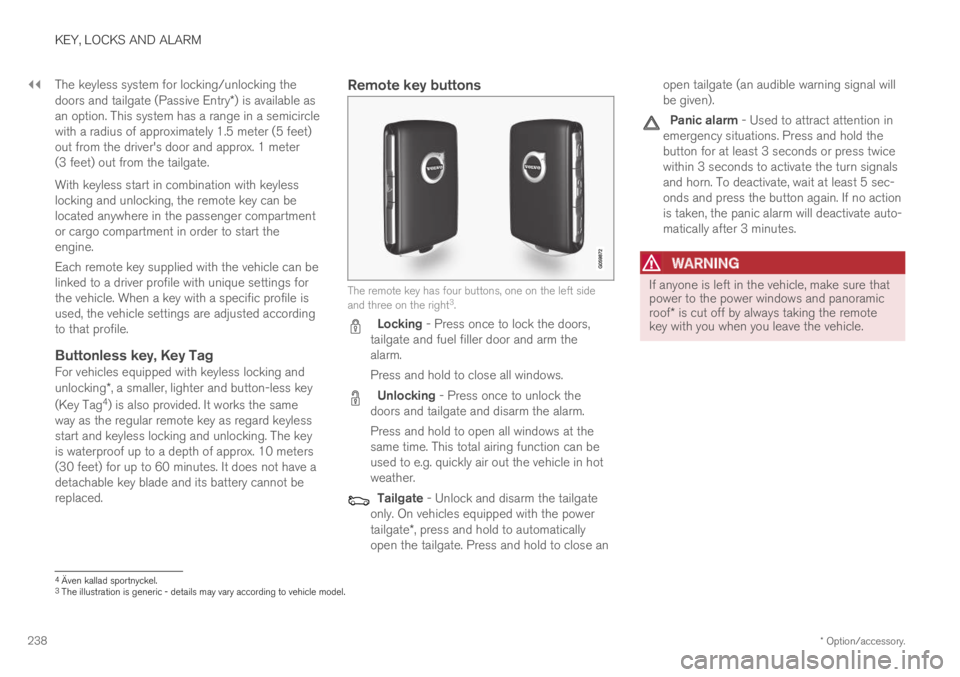
Remote key buttons
The remote key has four buttons, one on the left sideand three on the right3.
Locking - Press once to lock the doors,tailgate and fuel filler door and arm thealarm.
Press and hold to close all windows.
Unlocking - Press once to unlock thedoors and tailgate and disarm the alarm.
Press and hold to open all windows at thesame time. This total airing function can beused to e.g. quickly air out the vehicle in hotweather.
Tailgate - Unlock and disarm the tailgateonly. On vehicles equipped with the powertailgate*, press and hold to automaticallyopen the tailgate. Press and hold to close an
open tailgate (an audible warning signal willbe given).
Panic alarm - Used to attract attention inemergency situations. Press and hold thebutton for at least 3 seconds or press twicewithin 3 seconds to activate the turn signalsand horn. To deactivate, wait at least 5 sec-onds and press the button again. If no actionis taken, the panic alarm will deactivate auto-matically after 3 minutes.
WARNING
If anyone is left in the vehicle, make sure thatpower to the power windows and panoramicroof* is cut off by always taking the remotekey with you when you leave the vehicle.
4Även kallad sportnyckel.3The illustration is generic - details may vary according to vehicle model.