ECO mode VOLVO XC60 TWIN ENGINE 2019 Owner's Guide
[x] Cancel search | Manufacturer: VOLVO, Model Year: 2019, Model line: XC60 TWIN ENGINE, Model: VOLVO XC60 TWIN ENGINE 2019Pages: 695, PDF Size: 14.96 MB
Page 244 of 695
||
KEY, LOCKS AND ALARM
* Option/accessory.242
1.Press the button on the remote key.
>The lock and alarm indicator on the dash-board will go out to indicate that the vehi-cle is no longer fully armed.
The tailgate will be unlocked but remainclosed. However, the side doors willremain locked and armed.
Press lightly on the rubberized pressureplate under the tailgate handle to openthe tailgate.
If the tailgate is not opened within2 minutes, it will be relocked and thealarm armed.
2.With the optional power tailgate* -
Hold and press (about 1.5 seconds) the button on the remote key
>The tailgate will unlock and open. How-ever, the side doors will remain locked andarmed.
Related information
Locking and unlocking using the remote key(p. 240)
Opening and closing the power tailgate*(p. 260)
Remote key range
In order to function correctly, the remote keymust be within a certain distance from the vehi-cle.
Manual use
The remote key's functions for e.g. locking and
unlocking, which are activated by pressing or
, have a range of approx. 20 meters (65 feet)from the vehicle.
If the vehicle's locks do not react, move closerand try again.
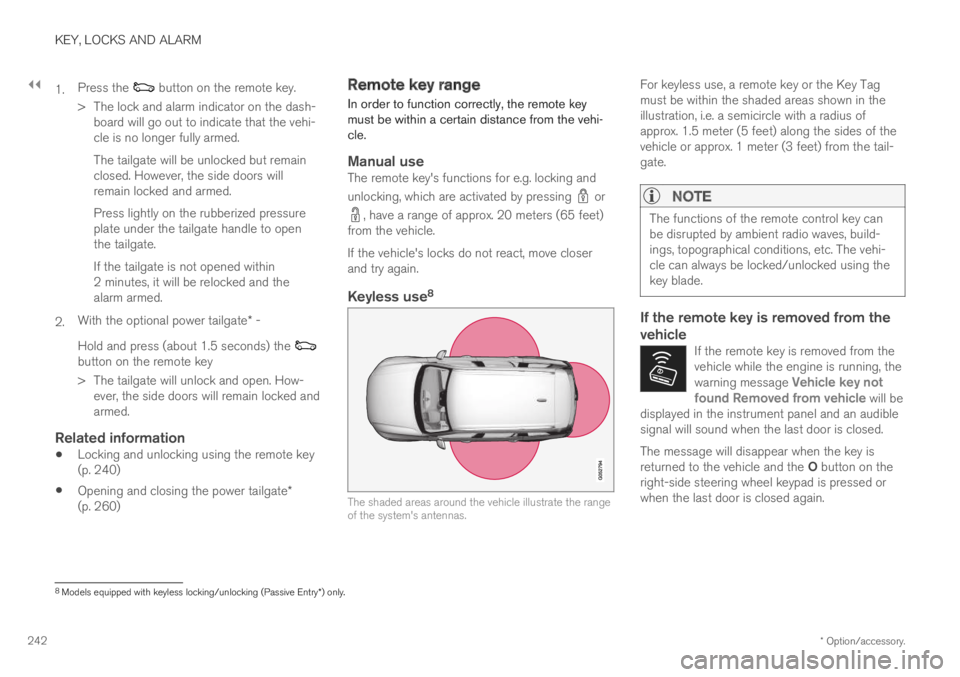
Keyless use 8
The shaded areas around the vehicle illustrate the rangeof the system's antennas.
For keyless use, a remote key or the Key Tagmust be within the shaded areas shown in theillustration, i.e. a semicircle with a radius ofapprox. 1.5 meter (5 feet) along the sides of thevehicle or approx. 1 meter (3 feet) from the tail-gate.
NOTE
The functions of the remote control key canbe disrupted by ambient radio waves, build-ings, topographical conditions, etc. The vehi-cle can always be locked/unlocked using thekey blade.
If the remote key is removed from the
vehicle
If the remote key is removed from thevehicle while the engine is running, thewarning message Vehicle key notfound Removed from vehicle will bedisplayed in the instrument panel and an audiblesignal will sound when the last door is closed.
The message will disappear when the key isreturned to the vehicle and the O button on theright-side steering wheel keypad is pressed orwhen the last door is closed again.
8
Models equipped with keyless locking/unlocking (Passive Entry * ) only.
Page 269 of 695
KEY, LOCKS AND ALARM
}}
267
Related information
Private Locking (p. 265)Alarm
The alarm emits sound and light signals if any-one without a valid remote key attempts to breakinto the vehicle or interferes with the start batteryor alarm siren.
When armed, the alarm will be triggered if:
the hood, tailgate or any door is opened.
a battery cable is disconnected.
the alarm siren is disconnected.
Alarm signals
The following occurs if the alarm is triggered:
A siren will sound for 30 seconds or until thealarm is turned off.
All turn signals will flash for 5 minutes oruntil the alarm is turned off.
If the reason the alarm was triggered is not recti-
fied, the alarm cycle will repeat up to 10 times20.
Alarm indicator
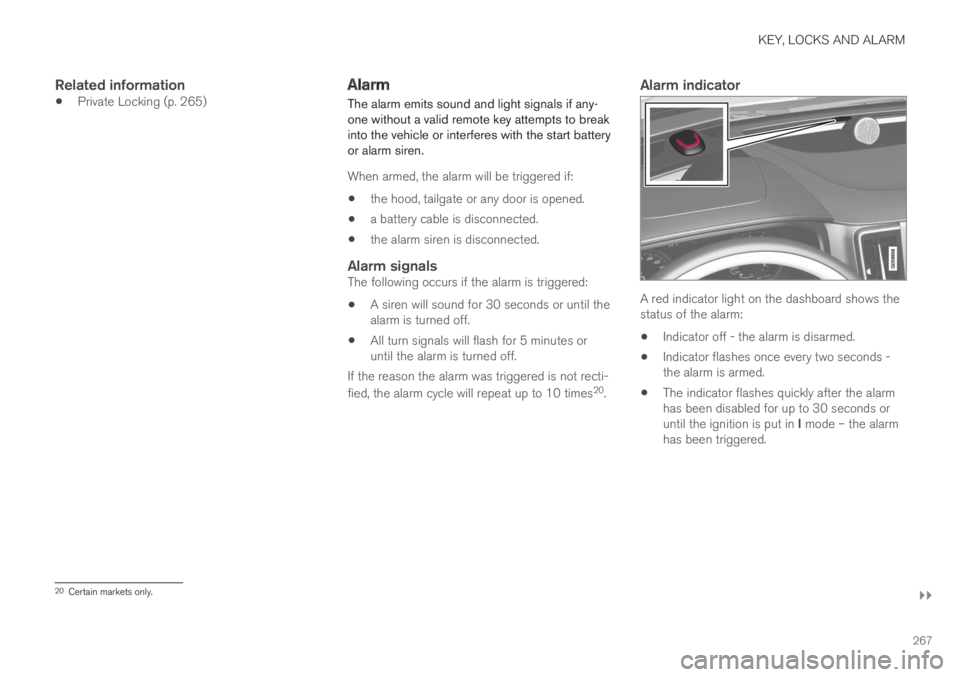
A red indicator light on the dashboard shows thestatus of the alarm:
Indicator off - the alarm is disarmed.
Indicator flashes once every two seconds -the alarm is armed.
The indicator flashes quickly after the alarmhas been disabled for up to 30 seconds oruntil the ignition is put in I mode – the alarmhas been triggered.
20Certain markets only.
Page 278 of 695
DRIVER SUPPORT
276
Electronic Stability Control symbolsand messages
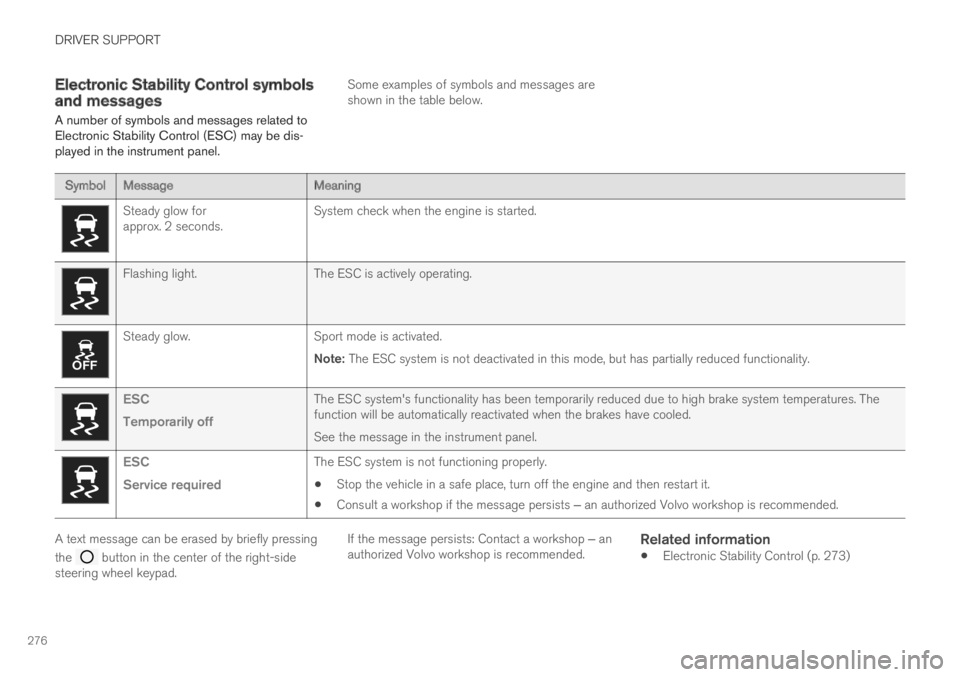
A number of symbols and messages related toElectronic Stability Control (ESC) may be dis-played in the instrument panel.
Some examples of symbols and messages areshown in the table below.
SymbolMessageMeaning
Steady glow forapprox. 2 seconds.System check when the engine is started.
Flashing light.The ESC is actively operating.
Steady glow.Sport mode is activated.
Note: The ESC system is not deactivated in this mode, but has partially reduced functionality.
ESC
Temporarily off
The ESC system's functionality has been temporarily reduced due to high brake system temperatures. Thefunction will be automatically reactivated when the brakes have cooled.
See the message in the instrument panel.
ESC
Service required
The ESC system is not functioning properly.
Stop the vehicle in a safe place, turn off the engine and then restart it.
Consult a workshop if the message persists ‒ an authorized Volvo workshop is recommended.
A text message can be erased by briefly pressing
the button in the center of the right-sidesteering wheel keypad.
If the message persists: Contact a workshop ‒ anauthorized Volvo workshop is recommended.
Related information
Electronic Stability Control (p. 273)
Page 287 of 695
DRIVER SUPPORT
}}
* Option/accessory.285
Automatic Speed Limiter limitations
Automatic Speed Limiter (ASL) utilizes the
speed limit information provided by the RSI22
function, not from the speed limit signs that thevehicle passes.
If RSI22 is unable to interpret and provide ASLwith speed information, ASL will go into standbymode and switch over to SL. The driver will thenhave to actively brake to bring the vehicle downto the appropriate speed.
ASL will be reactivated when RSI22 is once againable to interpret and provide speed information toASL.
See “Road Sign Information limitations” for moreinformation.
Related information
Speed limiter (p. 277)
Automatic Speed Limiter (p. 281)
Automatic Speed Limiter limitations (p. 285)
Activating/deactivating Road Sign Informa-tion (p. 360)
Cruise control
Cruise Control (CC) helps the driver maintain aneven speed to provide a more relaxing drivingexperience on highways and long, straight roadswith even traffic flows.
Overview
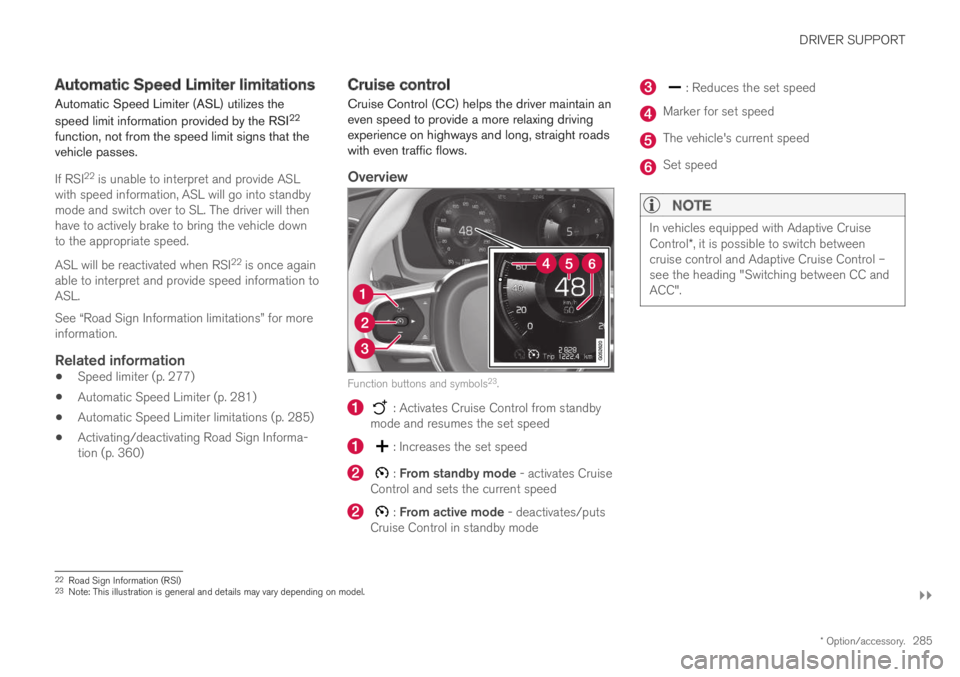
Function buttons and symbols23.
: Activates Cruise Control from standbymode and resumes the set speed
: Increases the set speed
: From standby mode - activates CruiseControl and sets the current speed
: From active mode - deactivates/putsCruise Control in standby mode
: Reduces the set speed
Marker for set speed
The vehicle's current speed
Set speed
NOTE
In vehicles equipped with Adaptive CruiseControl*, it is possible to switch betweencruise control and Adaptive Cruise Control –see the heading "Switching between CC andACC".
22Road Sign Information (RSI)23Note: This illustration is general and details may vary depending on model.
Page 288 of 695
||
DRIVER SUPPORT
286
WARNING
The cruise control function is supplemen-tary driver support intended to facilitatedriving and help make it safer – it cannothandle all situations in all traffic, weatherand road conditions.
The driver is advised to read all sectionsin the Owner's Manual about this functionto learn of its limitations, which the drivermust be aware of before using the func-tion (see the link list at the end of thisarticle).
Cruise control is not a substitute for thedriver's attention and judgment. The driveris always responsible for ensuring thevehicle is driven in a safe manner, at theappropriate speed, with an appropriatedistance to other vehicles, and in accord-ance with current traffic rules and regula-tions.
Related information
Activating and starting Cruise Control(p. 286)
Managing Cruise Control speed (p. 287)
Deactivating and putting Cruise Control instandby mode (p. 288)
Reactivating Cruise Control from standbymode (p. 289)
Switching off Cruise Control (p. 290)
Switching between Cruise Control and Adap-tive Cruise Control (p. 307)Activating and starting CruiseControl
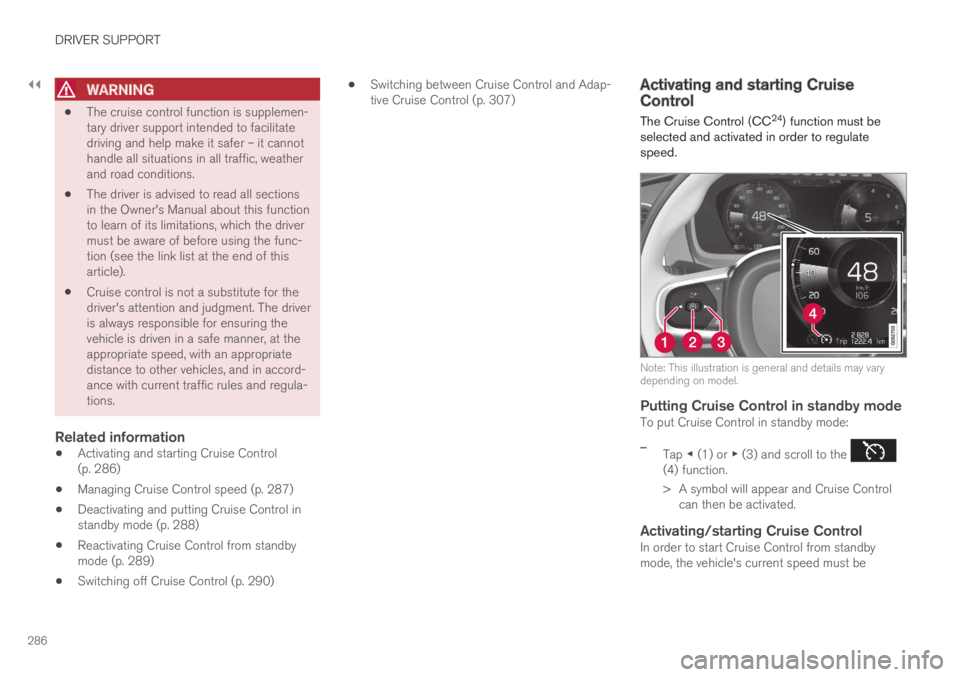
The Cruise Control (CC24) function must beselected and activated in order to regulatespeed.
Note: This illustration is general and details may varydepending on model.
Putting Cruise Control in standby mode
To put Cruise Control in standby mode:
–Tap ◀ (1) or ▶ (3) and scroll to the (4) function.
>A symbol will appear and Cruise Controlcan then be activated.
Activating/starting Cruise Control
In order to start Cruise Control from standbymode, the vehicle's current speed must be
Page 290 of 695
||
DRIVER SUPPORT
288
For vehicles with both CC and ACC
–Change a set speed by pressing the (1)
or (3) buttons briefly or by pressing andholding them:
Press briefly: Press briefly: each presschanges the speed in +/- 5 mph(+/- 5 km/h) increments.
Press and hold: release the button whenthe set speed indicator (4) has moved tothe desired speed.
The most recently set speed will be stored.
If speed is increased by depressing the accelera-
tor pedal while pressing the (1) button onthe steering wheel, the vehicle's speed when thebutton is pressed will be stored as the set speed.
Temporarily increasing speed using the accelera-tor pedal, e.g. when passing another vehicle, willnot affect the setting. The vehicle will return tothe set speed when the accelerator pedal isreleased.
Using engine braking instead of
applying the brakes
Cruise Control regulates speed by lightly applyingthe brakes. On downgrades, it can sometimes bedesirable to roll a bit faster and let speed bereduced instead by engine braking alone. Thedriver can temporarily disengage the Cruise Con-trol braking function.
To disengage CC:
–Press the accelerator pedal about halfwaydown and then release it.
>Cruise Control will automatically disen-gage the automatic brake function andspeed will only be reduced using theengine braking function.
How drive mode affects cruise control
The way the cruise control maintains the vehicle'sspeed can vary depending on the selected drive
mode26.
Cruise Control Eco Cruise with ECO drive
mode
In the ECO drive mode, cruise control's accelera-tion and deceleration will be smoother than inother drive modes to help provide optimal fuelefficiency and reduced environmental impact.Because of this, the vehicle's actual speed maybe slightly above or below the set speed.
Cruise Control Dynamic Cruise
With the Dynamic drive mode, cruise control'sacceleration and deceleration will be faster andmore immediate than in other drive modes.
Related information
Cruise control (p. 285)
Drive modes (p. 450)
Deactivating and putting CruiseControl in standby mode
Cruise Control (CC27) can be temporarily putinto standby mode and then reactivated.
Deactivating and putting Cruise Control
in standby mode
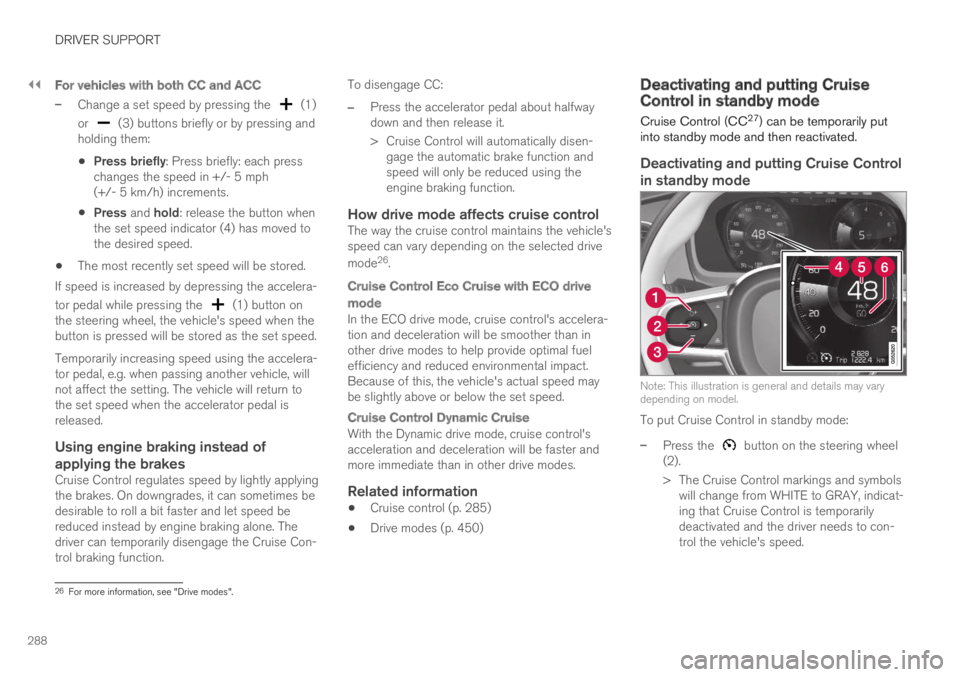
Note: This illustration is general and details may varydepending on model.
To put Cruise Control in standby mode:
–Press the button on the steering wheel(2).
>The Cruise Control markings and symbolswill change from WHITE to GRAY, indicat-ing that Cruise Control is temporarilydeactivated and the driver needs to con-trol the vehicle's speed.
26For more information, see "Drive modes".
Page 291 of 695
DRIVER SUPPORT
289
Standby mode due to action by the driver
Cruise Control will be temporarily deactivated andput in standby mode if:
the brakes are applied
the gear selector is moved to N
the vehicle is driven faster than the setspeed for more than 1 minute
The driver must then control the vehicle's speed.
Temporarily increasing speed using the accelera-tor pedal, e.g. when passing another vehicle, willnot affect the setting. The vehicle will return tothe set speed when the accelerator pedal isreleased.
Automatic standby mode
Cruise Control will be temporarily deactivated andput in standby mode if:
the wheels lose traction
the engine speed (rpm) is too low/high
the temperature in the brake systembecomes too high
the vehicle's speed goes below 30 km/h(20 mph).
The driver must then control the vehicle's speed.
Related information
Cruise control (p. 285)
Reactivating Cruise Control fromstandby mode
Cruise Control (CC28) can be temporarily putinto standby mode and then reactivated.
Reactivating Cruise Control from
standby mode
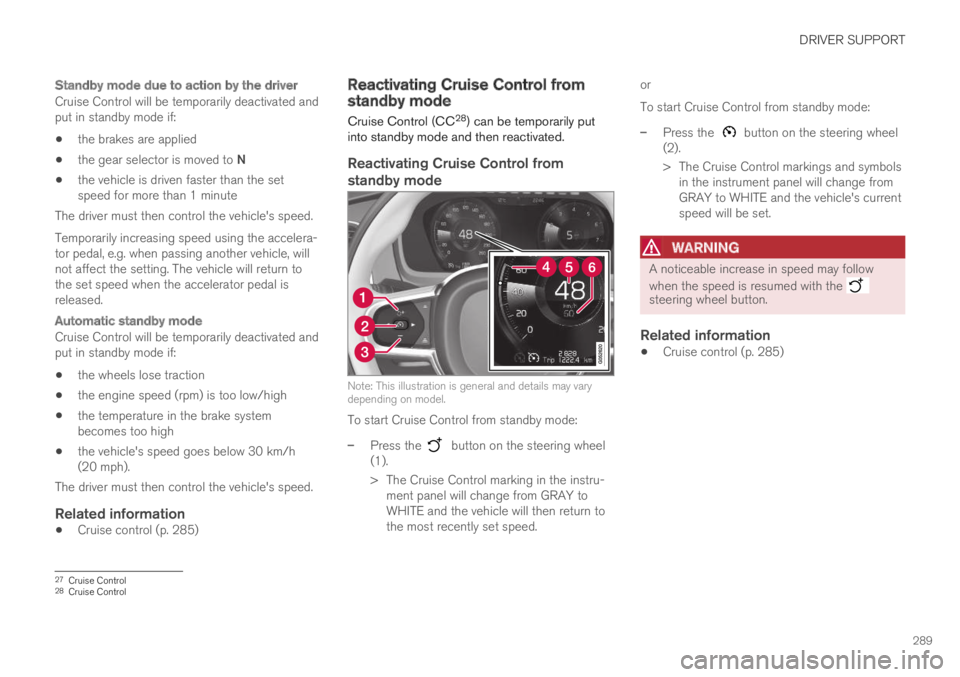
Note: This illustration is general and details may varydepending on model.
To start Cruise Control from standby mode:
–Press the button on the steering wheel(1).
>The Cruise Control marking in the instru-ment panel will change from GRAY toWHITE and the vehicle will then return tothe most recently set speed.
or
To start Cruise Control from standby mode:
–Press the button on the steering wheel(2).
>The Cruise Control markings and symbolsin the instrument panel will change fromGRAY to WHITE and the vehicle's currentspeed will be set.
WARNING
A noticeable increase in speed may follow
when the speed is resumed with the steering wheel button.
Related information
Cruise control (p. 285)
27Cruise Control28Cruise Control
Page 292 of 695
DRIVER SUPPORT
* Option/accessory.290
Switching off Cruise Control
Cruise control (Cruise Control - CC) can beturned off.
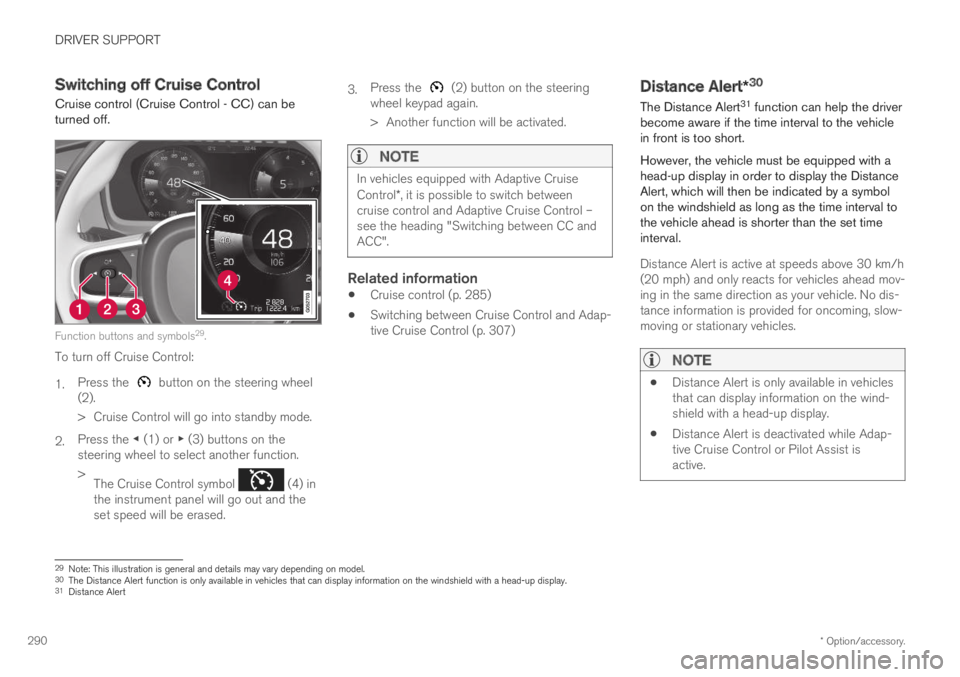
Function buttons and symbols29.
To turn off Cruise Control:
1.Press the button on the steering wheel(2).
>Cruise Control will go into standby mode.
2.Press the ◀ (1) or ▶ (3) buttons on thesteering wheel to select another function.
>The Cruise Control symbol (4) inthe instrument panel will go out and theset speed will be erased.
3.Press the (2) button on the steeringwheel keypad again.
>Another function will be activated.
NOTE
In vehicles equipped with Adaptive CruiseControl*, it is possible to switch betweencruise control and Adaptive Cruise Control –see the heading "Switching between CC andACC".
Related information
Cruise control (p. 285)
Switching between Cruise Control and Adap-tive Cruise Control (p. 307)
Distance Alert*30
The Distance Alert31 function can help the driverbecome aware if the time interval to the vehiclein front is too short.
However, the vehicle must be equipped with ahead-up display in order to display the DistanceAlert, which will then be indicated by a symbolon the windshield as long as the time interval tothe vehicle ahead is shorter than the set timeinterval.
Distance Alert is active at speeds above 30 km/h(20 mph) and only reacts for vehicles ahead mov-ing in the same direction as your vehicle. No dis-tance information is provided for oncoming, slow-moving or stationary vehicles.
NOTE
Distance Alert is only available in vehiclesthat can display information on the wind-shield with a head-up display.
Distance Alert is deactivated while Adap-tive Cruise Control or Pilot Assist isactive.
29Note: This illustration is general and details may vary depending on model.30The Distance Alert function is only available in vehicles that can display information on the windshield with a head-up display.31Distance Alert
Page 298 of 695
||
DRIVER SUPPORT
* Option/accessory.296
Reduces the time interval to the vehicleahead
Target vehicle indicator: ACC has detectedand is following a target vehicle using the settime interval
Symbol for time interval to the vehicle ahead
NOTE
In vehicles equipped with Adaptive CruiseControl*, it is possible to switch betweencruise control and Adaptive Cruise Control –see the heading "Switching between CC andACC".
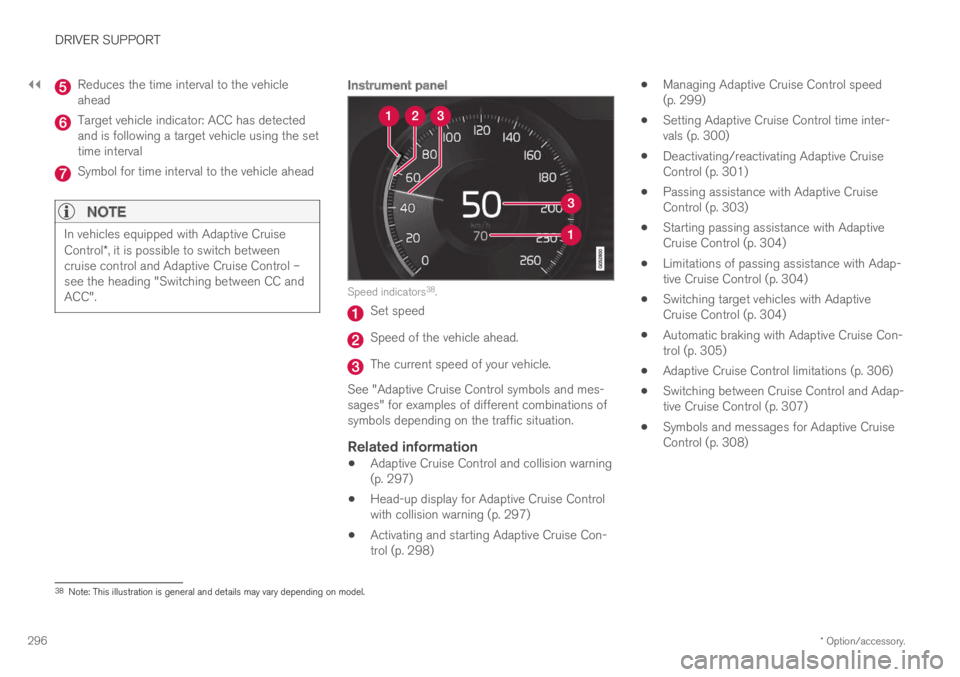
Instrument panel
Speed indicators38.
Set speed
Speed of the vehicle ahead.
The current speed of your vehicle.
See "Adaptive Cruise Control symbols and mes-sages" for examples of different combinations ofsymbols depending on the traffic situation.
Related information
Adaptive Cruise Control and collision warning(p. 297)
Head-up display for Adaptive Cruise Controlwith collision warning (p. 297)
Activating and starting Adaptive Cruise Con-trol (p. 298)
Managing Adaptive Cruise Control speed(p. 299)
Setting Adaptive Cruise Control time inter-vals (p. 300)
Deactivating/reactivating Adaptive CruiseControl (p. 301)
Passing assistance with Adaptive CruiseControl (p. 303)
Starting passing assistance with AdaptiveCruise Control (p. 304)
Limitations of passing assistance with Adap-tive Cruise Control (p. 304)
Switching target vehicles with AdaptiveCruise Control (p. 304)
Automatic braking with Adaptive Cruise Con-trol (p. 305)
Adaptive Cruise Control limitations (p. 306)
Switching between Cruise Control and Adap-tive Cruise Control (p. 307)
Symbols and messages for Adaptive CruiseControl (p. 308)
38Note: This illustration is general and details may vary depending on model.
Page 299 of 695
DRIVER SUPPORT
}}
* Option/accessory.297
Adaptive Cruise Control andcollision warning
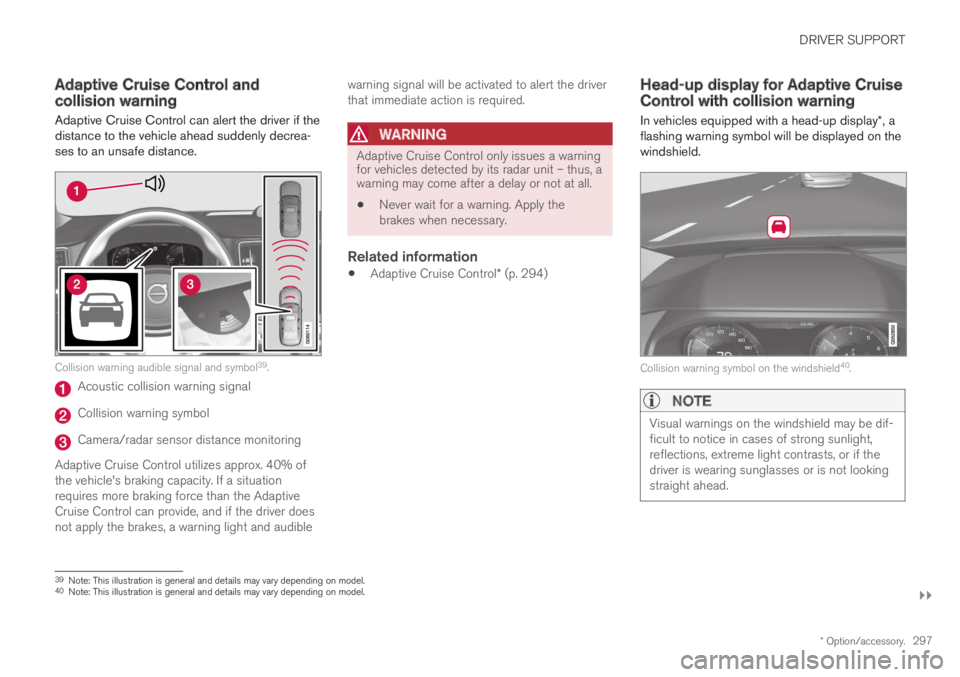
Adaptive Cruise Control can alert the driver if thedistance to the vehicle ahead suddenly decrea-ses to an unsafe distance.
Collision warning audible signal and symbol39.
Acoustic collision warning signal
Collision warning symbol
Camera/radar sensor distance monitoring
Adaptive Cruise Control utilizes approx. 40% ofthe vehicle's braking capacity. If a situationrequires more braking force than the AdaptiveCruise Control can provide, and if the driver doesnot apply the brakes, a warning light and audible
warning signal will be activated to alert the driverthat immediate action is required.
WARNING
Adaptive Cruise Control only issues a warningfor vehicles detected by its radar unit – thus, awarning may come after a delay or not at all.
Never wait for a warning. Apply thebrakes when necessary.
Related information
Adaptive Cruise Control* (p. 294)
Head-up display for Adaptive CruiseControl with collision warning
In vehicles equipped with a head-up display*, aflashing warning symbol will be displayed on thewindshield.
Collision warning symbol on the windshield40.
NOTE
Visual warnings on the windshield may be dif-ficult to notice in cases of strong sunlight,reflections, extreme light contrasts, or if thedriver is wearing sunglasses or is not lookingstraight ahead.
39Note: This illustration is general and details may vary depending on model.40Note: This illustration is general and details may vary depending on model.