Led VOLVO XC60 TWIN ENGINE 2020 Owners Manual
[x] Cancel search | Manufacturer: VOLVO, Model Year: 2020, Model line: XC60 TWIN ENGINE, Model: VOLVO XC60 TWIN ENGINE 2020Pages: 687, PDF Size: 14.65 MB
Page 519 of 687
AUDIO, MEDIA AND INTERNET
}}
* Option/accessory.517
Connecting the vehicle to the Internet via a Bluetooth-connectedphone
Establish an Internet connection using
Bluetooth and tethering from a phone andget access to multiple connected services inyour vehicle.
1. To connect the vehicle to the Internet via a Bluetooth-connected phone, the phone must first be paired with the vehicle viaBluetooth.
2. Make sure that the phone supports Inter- net sharing (tethering) and that the func-tion is activated. In an iPhone, the functionis called "personal hotspot". In Androidphones, the function can have differentnames, but is often called "hotspot". ForiPhone phones, the "personal hotspot"menu page must also be open until theInternet connection has been made.
3. If the phone has been connected via Blue- tooth previously, tap
Settings in the cen-
ter display's Top view.
4. Tap
CommunicationBluetooth
Devices.
5. Mark the window for
Bluetooth Internet
connection under the heading Internet
connection. 6. If a different connection is being used,
confirm the connection change.
> Your vehicle is now connected to theInternet via your Bluetooth-connected phone.
NOTE
The cellular phone and network operator must support tethering (sharing of Internetconnection) and the subscription mustinclude data traffic.
NOTE
When using Apple CarPlay, it is only possi- ble to connect the vehicle to the Internetusing Wi-Fi or the vehicle's modem.
Related information
Internet-connected vehicle
* (p. 516)
Connecting the vehicle to the Internet via vehicle modem (SIM card) (p. 518)
Connecting a phone to the car via Blue-tooth for the first time (p. 508)
Connecting the vehicle to the Internet viaa phone (Wi-Fi) (p. 517)
Apple ®
CarPlay ®
* (p. 500)
No or poor Internet connection (p. 521)
Settings for Bluetooth devices (p. 515)
Connecting the vehicle to the Internet via a phone (Wi-Fi) Establish an Internet connection using Wi-Fi through Internet sharing (tethering) from aphone and get access to the connected servi-ces in your vehicle.
1. Make sure that the phone supports Inter-
net sharing (tethering) and that the func- tion is activated. In an iPhone, the functionis called "personal hotspot". In Androidphones, the function can have differentnames, but is often called "hotspot". ForiPhone phones, the "personal hotspot"menu page must also be open until theInternet connection has been made.
2. Tap
Settings in the Top view.
3. Proceed to
CommunicationWi-Fi.
4. Activate/deactivate by tapping to check/ uncheck the Wi-Fi box.
5. If a different connection is being used, confirm the connection change.
6. Tap the name of the network you would like to connect.
7. Enter the network password. > The vehicle will connect to the network.
Please note that certain cellular phones will disable Internet sharing (tethering) when theconnection to the vehicle has been broken,e.g. when the phone has been removed from
Page 524 of 687
AUDIO, MEDIA AND INTERNET
* Option/accessory.
522
Wi-Fi technology and security
Networks must meet certain criteria in order for the vehicle to connect.
It is possible to connect to the following types of networks:
Frequency - 2.4 or 5 GHz 14
.
Standards - 802.11 a/b/g/n.
Security type - WPA2-AES-CCMP.
The vehicle's Wi-Fi system is designed to han-dle Wi-Fi devices inside the vehicle. Performance may be impaired if multiple devi- ces are using a frequency at the same time.
Related information
Internet-connected vehicle
* (p. 516)
Terms of use and data sharing The first time certain services and apps are started, a pop-up window with the heading
Terms and conditions and Data sharingmay open.The aim is to inform the user about Volvo's terms of use and data sharing policy. Byaccepting data sharing, the user accepts thatcertain information will be sent from the vehi-cle. This is required for certain services andapps to work with full functionality. The data sharing function for connected servi- ces and apps is disabled by default 15
. For cer-
tain connected services and apps in the vehi- cle to work, data sharing must be activated.Data sharing can be set from the center dis-play's settings menu or when the services orapps are started in the center display.
Privacy and data sharingThe software update that became available inNovember 2017 introduced privacy and datasharing settings for connected services anddownloaded apps. These settings can be found under
Privacy and data in the settings
menu in the vehicle's center display. There, you can choose which connected servi- ces will be allowed to share data. Data sharingfor downloaded apps can also be disabled there. Note that services and apps cannot beused as intended if data sharing is disabled. After a factory reset or e.g. a workshop visit or a software update, your data sharing preferen-ces may be reset to default settings. You willthen need to reactivate data sharing for con-nected services and downloaded apps.
NOTE
Settings for privacy and data sharing are unique for each driver profile.
Related information
Activating and deactivating data sharing (p. 523)
14
Selecting a frequency is not possible on all markets.
15 Does not apply to Volvo On Call.
Page 526 of 687
||
AUDIO, MEDIA AND INTERNET
5242. Accept data sharing for the service or can-
cel.
If you choose to accept, data sharing will be enabled and you can begin using the service.
Enabling data sharing when starting an app
To accept data sharing for an app that needsthe function, start the app and tap accept in
the pop-up window. You can disable data sharing for services and apps in the settings menu under
System
Privacy and dataData Sharing.
Hard disk storage space
It is possible to view how much space is remaining on the vehicle's hard disk.
Storage information for the vehicle's hard disk can be shown, including total capacity, availa-ble capacity and how much space is used forinstalled apps. The information is found under
SettingsSystemSystem Information
Storage.
Related information
Apps (p. 472)
Page 538 of 687

VOLVO ON CALL
536
Planning and scheduling vehicle charging with the Volvo On Callapp With the Volvo On Call app, you can plan and schedule charging for your vehicle.
You can schedule charging for the charging locations that you have saved in your app,which can be practical of you want to e.g. plana charging stop along a travel route or plancharging intervals for your vehicle at home orin your neighborhood. 1.From the
home tab, select Fuel range orBattery charge.
> In the view that appears, you can see your saved charging locations under
Saved locations. If you haven't saved
any charging locations yet or you want to add new locations, e.g. stationsalong a route or in your neighborhood, you can choose
Add location (you can
save up to eight charging locations).
2. Choose the location you want to schedule a charging at.
> A view for the saved location will open.
3. Select a start time for the charging.
4. Select an end time for the charging. 5. Go back to the view for fuel.
> A charging icon will appear next to thesaved location you scheduled charging at. When the icon disappears, thescheduled charging is saved and input.
Page 545 of 687
WHEELS AND TIRES
543
NOTE
The tire's load index and speed rating may not appear on the sidewall because theyare not required by law.
7.M+S or M/S = Mud and Snow, AT = All
Terrain, AS = All Season
8. U.S. DOT Tire Identification Number (TIN) : This begins with the letters "DOT"
and indicates that the tire meets all federalstandards. The next two numbers are thefactory code where the tire was manufac-tured, the next two are the tire size codeand the last four numbers represent theweek and year the tire was made. Forexample, 0717 means that the tire wasmanufactured during week 7 of 2017. Thenumbers in between are marketing codesused at the manufacturer's discretion. Thisinformation helps a tire manufactureridentify a tire for safety recall purposes.
9. Tire Ply Composition and Material Used :
Indicates the number of plies indicates orthe number of layers of rubber-coated fab-ric in the tire tread and sidewall. Tire man-ufacturers also must indicate the plymaterials in the tire and the sidewall,which include steel, nylon, polyester, andothers.
10. Maximum Load : Indicates the maximum
load in pounds and kilograms that can be carried by the tire. Refer to the vehicle'stire information placard located on the B-Pillar for the correct tire pressure for yourvehicle.
11. Treadwear, Traction, and Temperaturegrades .
12. Maximum permissible inflationpressure: the greatest amount of air pres-
sure that should ever be put in the tire.This limit is set by the tire manufacturer.
Speed SymbolA tire's Speed Symbol (SS) indicates the maxi-mum speed for which the tire has been certi-fied and should be at least equivalent to thevehicle's top speed. Winter tires, with or without studs, are excep- tions and may use a lower SS. When wintertires are installed, the vehicle may not bedriven faster than the tires' SS. The vehicle's speed should always be deter- mined by the posted speed limit and trafficand road conditions, not the tire's SS. The following table indicates the maximum permissible speed for each SS.
M 130 km/h (81 mph)
Q 160 km/h (100 mph)
T 190 km/h (118 mph)
H 210 km/h (130 mph)
V 240 km/h (149 mph)
W 270 km/h (168 mph)
Y 300 km/h (186 mph)
WARNING
The wheel and tire sizes for your Volvo are specified to meet stringent stabilityand handling requirements. Unap-proved wheel/tire size combinationscan negatively affect your vehicle's sta-bility and handling.
Any damage caused by installation ofunapproved wheel/tire size combina-tions will not be covered by your newvehicle warranty. Volvo assumes noresponsibility for death, injury, orexpenses that may result from suchinstallations.
Related information
Tires (p. 538)
Page 546 of 687

WHEELS AND TIRES
544
Uniform Tire Quality GradingALL PASSENGER VEHICLE TIRES MUST CONFORM TO FEDERAL SAFETYREQUIREMENTS IN ADDITION TO THESEGRADES .
Quality grades can be found, where applica- ble, on the tire sidewall between the treadshoulder and maximum section width. Forexample: Treadwear 200 Traction AA Temperature A
TREADWEARThe treadwear grade is a comparative rating based on the wear rate of the tire when testedunder controlled conditions on a specifiedgovernment test course. For example, a tiregraded 150 would wear one and one half (1 ½)times as well on the government course as atire graded 100. The relative performance oftires depends upon the actual conditions oftheir use, however, and many depart signifi-cantly from the norm due to variation in drivinghabits, maintenance practices and differencesin road characteristics and climate.
TRACTIONThe traction grades, from highest to lowest,are AA, A, B, and C, as measured under con-trolled conditions on specified governmenttest surfaces of asphalt and concrete. A tiremarked C may have poor traction perform-ance.
WARNING
The traction grade assigned to this tire is based on braking (straight-ahead) tractiontests and is not a measure of cornering(turning) traction.
TEMPERATUREThe temperature grades are A (the highest), B, and C, representing the tire's resistance to thegeneration of heat and its ability to dissipateheat when tested under controlled conditionson a specified indoor laboratory test wheel.Sustained high temperature can cause thematerial of the tire to degenerate and reducetire life, and excessive temperature can lead tosudden tire failure. The grade C correspondsto a minimum level of performance that allpassenger vehicle tires must meet under theFederal Motor Safety Standard No. 109.Grades B and A represent higher levels of per-formance on the laboratory test wheel thanthe minimum required by law.
WARNING
The temperature grade for this tire is estab- lished for a tire that is properly inflated andnot overloaded. Excessive speed, under-inflation, or excessive loading, either sepa-rately or in combination, can cause heatbuildup and tire failure.
Related information
Tires (p. 538)
Tire sidewall designations (p. 542)
Page 548 of 687
WHEELS AND TIRES
546
Adjusting tire pressureTire pressure decreases over time, which is normal. The tire pressure must therefore beadjusted to maintain the recommended tirepressure.
Use the recommended inflation pressure for cold tires to help maintain good tire perform-ance and even wear.
NOTE
To help prevent incorrect inflation pressure, pressure should be checked when the tiresare cold. The tires are considered to becold when they have reached the sametemperature as the ambient temperature(about 3 hours after the vehicle was lastdriven). After driving for a few kilometers,the tires will warm up and the pressure willincrease.
1. Remove the valve cap from the tire and press the air pressure gauge firmly onto the valve.
2. Inflate the tire to the correct inflation pres- sure; see the tire pressure placard on thedriver's side B pillar for recommendedpressures for factory-mounted tires. 3. Screw the valve cap back on.
NOTE
After inflating a tire, always replace the valve cap to help prevent valve damagecaused by gravel, dirt, etc.
Use plastic valve caps only. Metal capscould corrode and become difficult toremove.
4. Visually inspect the tire to make sure there
are no nails or other embedded objects that could puncture the tire and cause airleakage.
5. Check the sidewalls to make sure there are no gouges, cuts, bulges or other irreg-ularities.
6. Repeat this procedure for each tire, includ- ing the spare tire 5
.
NOTE
If you have overfilled the tire, release air by pushing on the metal stem in the center ofthe valve. Then recheck the pressure withyour tire gauge. Some spare tires require higher inflation pressure than the other tires. Consult thetire inflation pressure table or the inflationpressure decal.
Related information
Recommended tire pressure (p. 547)
Checking tire pressure (p. 545)
Inflate tires with the compressor included in the tire sealing system (p. 565)
Approved tire pressure (p. 665)
5
Not available on all models.
Page 560 of 687
||
WHEELS AND TIRES
558
WARNING
The vehicle must never be driven with more than one "Temporary Spare" tiremounted.
Driving with a spare wheel may alterthe driving characteristics of the vehi-cle. Replace the spare wheel with anormal wheel as soon as possible.
The spare wheel is smaller than thenormal wheel, which affects the vehi-cle's ground clearance. Watch for highcurbs and do not wash the vehicle inan automatic car wash when a sparewheel is mounted.
Follow the manufacturer's recom-mended tire inflation pressure for thespare wheel.
On all-wheel drive vehicles, the driveon the rear axle can be disconnected.
If the spare wheel is mounted on thefront axle, snow chains must not beused.
The spare wheel must not be repaired.
CAUTION
The vehicle must not be driven with wheels of different dimensions or with a spare tireother than the one that came with the vehi-cle. The use of different size wheels canseriously damage your vehicle's transmis-sion.
Related information
When changing wheels (p. 552)
Recommended tire pressure (p. 547)
Handling spare tires Follow these instructions regarding handling the spare wheel.
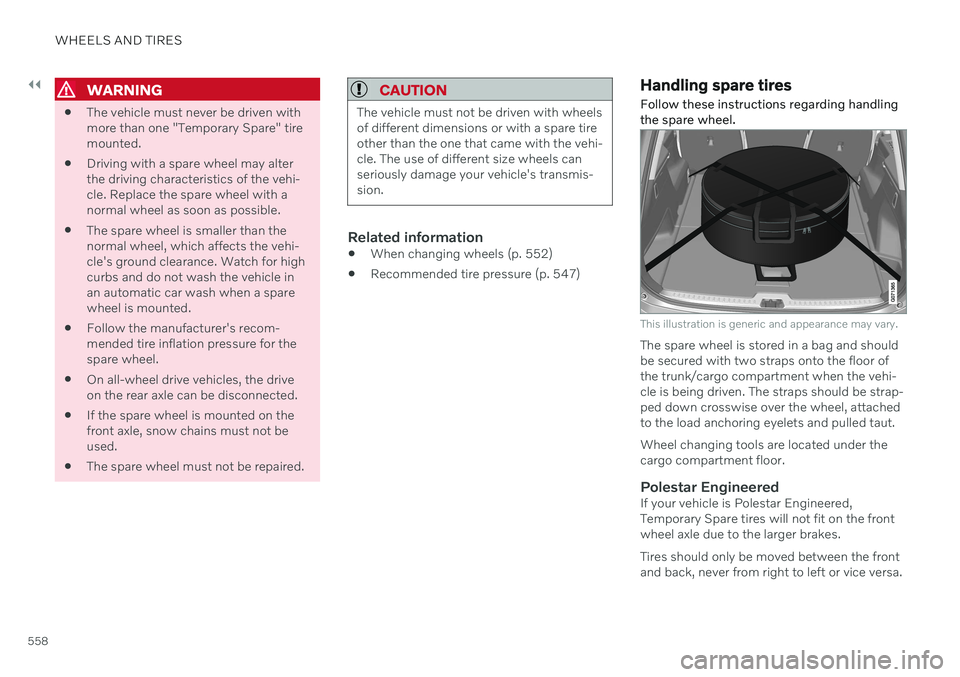
This illustration is generic and appearance may vary.
The spare wheel is stored in a bag and should be secured with two straps onto the floor ofthe trunk/cargo compartment when the vehi-cle is being driven. The straps should be strap-ped down crosswise over the wheel, attachedto the load anchoring eyelets and pulled taut. Wheel changing tools are located under the cargo compartment floor.
Polestar EngineeredIf your vehicle is Polestar Engineered,Temporary Spare tires will not fit on the frontwheel axle due to the larger brakes. Tires should only be moved between the front and back, never from right to left or vice versa.
Page 567 of 687
WHEELS AND TIRES
}}
565
16. Check the inflation pressure on the air
pressure gauge.
If the pressure is under 1.3 bar (19 psi), the tire is not sufficiently sealed. Thevehicle should not be driven. Call road-side assistance to have the vehicletowed.
If the inflation pressure is higher than1.3 bar (19 psi), the tire must be inflatedto the inflation pressure specified onthe tire pressure decal on the driver'sside door pillar (1 bar = 100 kPa =14.5 psi). If the inflation pressure is toohigh, use the air release valve to releaseair.
WARNING
Check inflation pressure regularly.
Volvo recommends driving to the nearest authorized Volvo workshop to have the tirereplaced/repaired. Inform the workshop thatthe tire contains sealing compound. The sealing compound bottle and the hose must be replaced after use. Volvo recom-mends contacting an authorized Volvo work-shop for replacement.
WARNING
After using the tire sealing system, the vehicle should not be driven farther thanapproximately 200 km (120 miles).
NOTE
The compressor is an electric device. Fol- low local regulations for disposal.
Related information
Recommended tire pressure (p. 547)
Tire sealing system (p. 561)
Inflate tires with the compressor included in the tire sealing system (p. 565)
Inflate tires with the compressor included in the tire sealing system
The vehicle's original tires can be inflated using the compressor in the tire sealing sys-tem.
1. The compressor must be switched off. Make sure that the switch is in the 0 (Off)
position and take out the electrical cable and the hose.
2. Unscrew the tire's valve cap and screw the hose's valve connector as far as possi-ble onto the valve. Be sure the air release valve on the com- pressor's hose is completely closed.
3. Connect the electrical cable to the nearest 12 V outlet and start the vehicle.
WARNING
Inhaling exhaust fumes could lead to seri- ous injury. Never leave the engine runningin an enclosed space or a space withoutsufficient ventilation.
WARNING
Never leave children unattended in the vehicle while the engine is running.
Page 574 of 687

LOADING, STORAGE AND PASSENGER COMPARTMENT
* Option/accessory.
572
Electrical outlets
There are two 12 V electrical outlets and one 120 V electrical outlet * in the tunnel console,
and one 12 V electrical outlet * in the trunk/
cargo compartment. If a problem occurs with an electrical socket, contact a workshop - an authorized Volvoworkshop is recommended.
12 V outlets
12 V outlet in the tunnel console, front seat.
The 12 V outlets can be used for devices intended for this such as MP3 players, coolersand cellular phones.
12 V outlet in the tunnel console, rear seat.
12 V outlet in the cargo compartment *.
Electrical outlets in the tunnel console - rear seat *
Electrical outlets in the tunnel console, rear seat.
The high-voltage outlet * can be used for devi-
ces intended for this, such as chargers, lap- tops, etc.
High-voltage outlet status indicator
light
An LED 1
light on the outlet indicates its status:
1 LED (Light Emitting Diode)