lock VOLVO XC70 2004 Repair Manual
[x] Cancel search | Manufacturer: VOLVO, Model Year: 2004, Model line: XC70, Model: VOLVO XC70 2004Pages: 241, PDF Size: 5.78 MB
Page 158 of 241
2004 VOLVO XC70
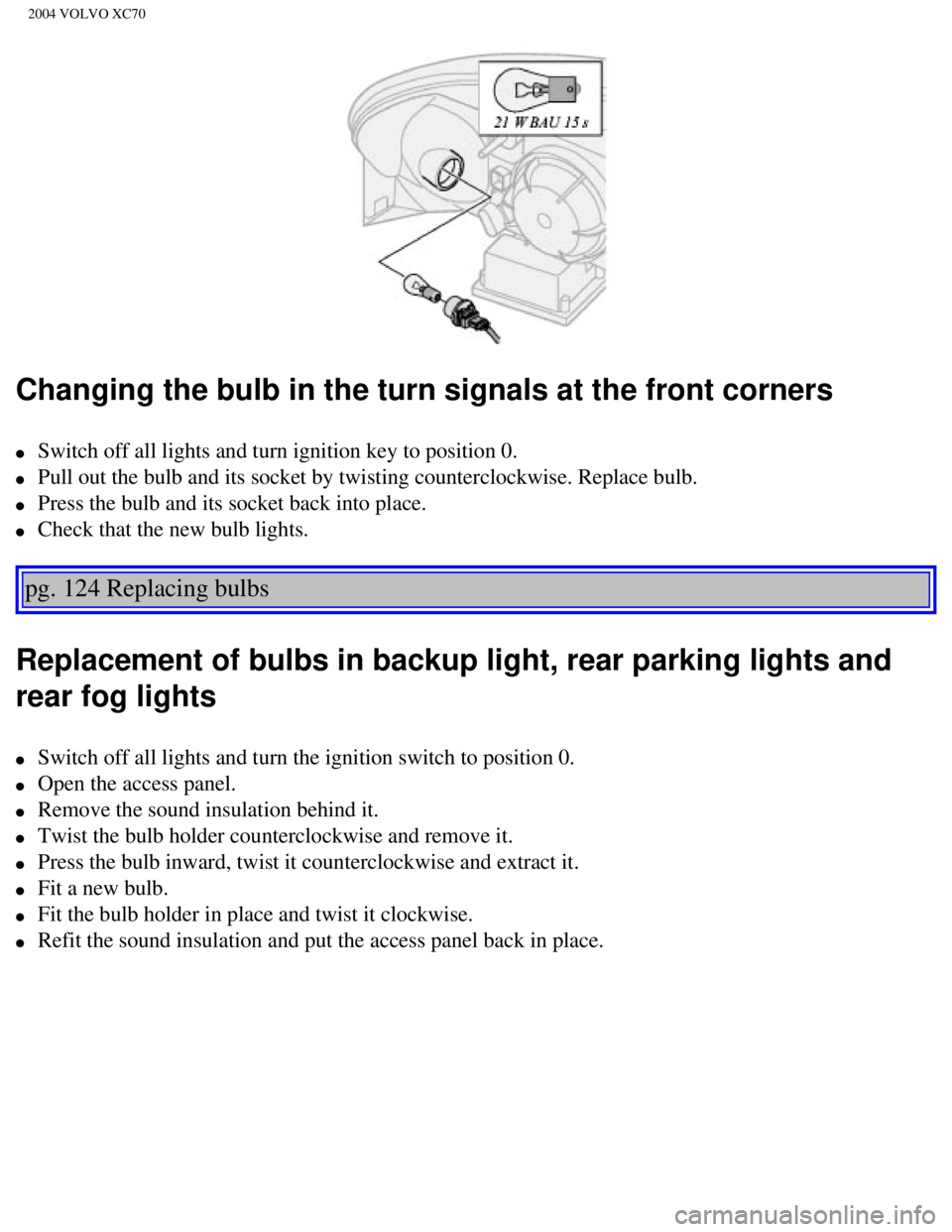
Changing the bulb in the turn signals at the front corners
l Switch off all lights and turn ignition key to position 0.
l Pull out the bulb and its socket by twisting counterclockwise. Replace b\
ulb.
l Press the bulb and its socket back into place.
l Check that the new bulb lights.
pg. 124 Replacing bulbs
Replacement of bulbs in backup light, rear parking lights and
rear fog lights
l Switch off all lights and turn the ignition switch to position 0.
l Open the access panel.
l Remove the sound insulation behind it.
l Twist the bulb holder counterclockwise and remove it.
l Press the bulb inward, twist it counterclockwise and extract it.
l Fit a new bulb.
l Fit the bulb holder in place and twist it clockwise.
l Refit the sound insulation and put the access panel back in place.
file:///K|/ownersdocs/2004/2004_XC70/04xc70_08a.htm (11 of 22)12/30/20\
06 4:33:05 PM
Page 159 of 241
2004 VOLVO XC70
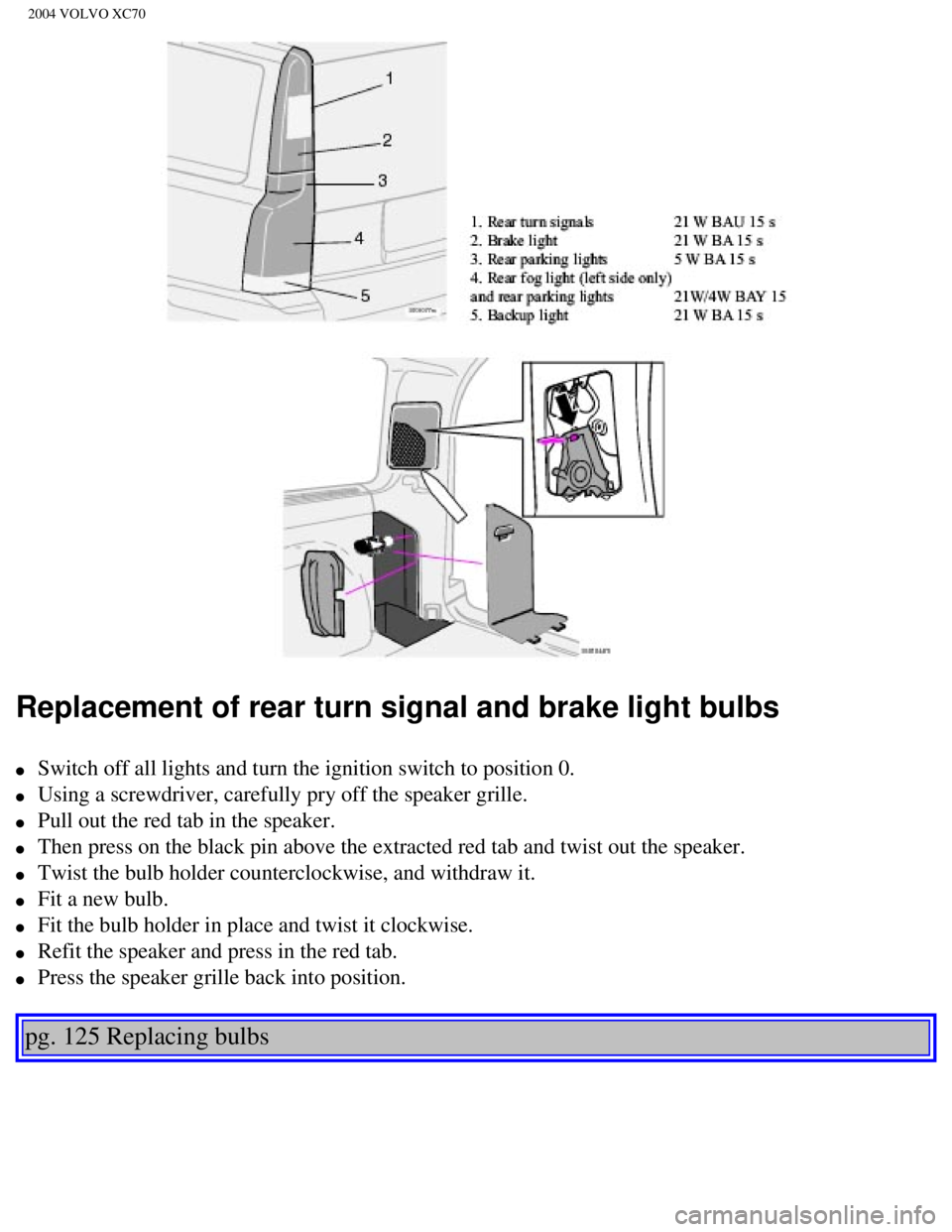
Replacement of rear turn signal and brake light bulbs
l Switch off all lights and turn the ignition switch to position 0.
l Using a screwdriver, carefully pry off the speaker grille.
l Pull out the red tab in the speaker.
l Then press on the black pin above the extracted red tab and twist out th\
e speaker.
l Twist the bulb holder counterclockwise, and withdraw it.
l Fit a new bulb.
l Fit the bulb holder in place and twist it clockwise.
l Refit the speaker and press in the red tab.
l Press the speaker grille back into position.
pg. 125 Replacing bulbs
file:///K|/ownersdocs/2004/2004_XC70/04xc70_08a.htm (12 of 22)12/30/20\
06 4:33:05 PM
Page 160 of 241
2004 VOLVO XC70
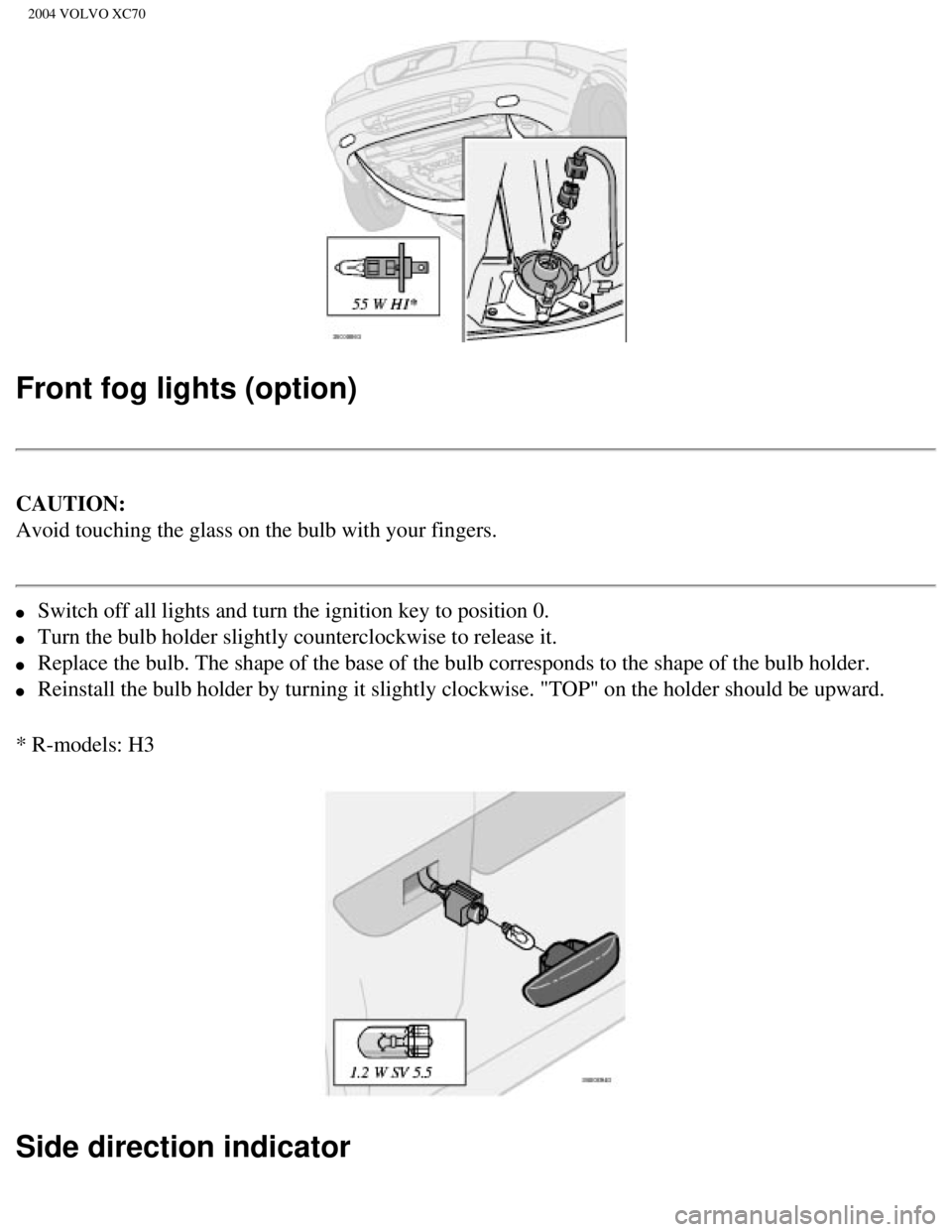
Front fog lights (option)
CAUTION:
Avoid touching the glass on the bulb with your fingers.
l Switch off all lights and turn the ignition key to position 0.
l Turn the bulb holder slightly counterclockwise to release it.
l Replace the bulb. The shape of the base of the bulb corresponds to the s\
hape of the bulb holder.
l Reinstall the bulb holder by turning it slightly clockwise. "TOP" on the\
holder should be upward.
* R-models: H3
Side direction indicator
file:///K|/ownersdocs/2004/2004_XC70/04xc70_08a.htm (13 of 22)12/30/20\
06 4:33:05 PM
Page 161 of 241

2004 VOLVO XC70
l Open the front door halfway.
l From the inside of the fender, push the lamp housing out.
l Turn the bulb holder 1/4 turn counterclockwise and pull it out from the \
lens.
l Remove the defective bulb by pulling it straight out.
l Insert a new bulb.
l Reinsert the bulb holder in the lens and press the entire unit back into\
place on the fender.
Door step courtesy lights
The door step courtesy lights are located under the dash on the driver's\
and passenger's sides.
To replace a bulb:
l Carefully insert a screwdriver and pry out the lens.
l Replace the defective bulb.
l Reinstall the lens.
pg. 126 Replacing bulbs
file:///K|/ownersdocs/2004/2004_XC70/04xc70_08a.htm (14 of 22)12/30/20\
06 4:33:05 PM
Page 162 of 241
2004 VOLVO XC70
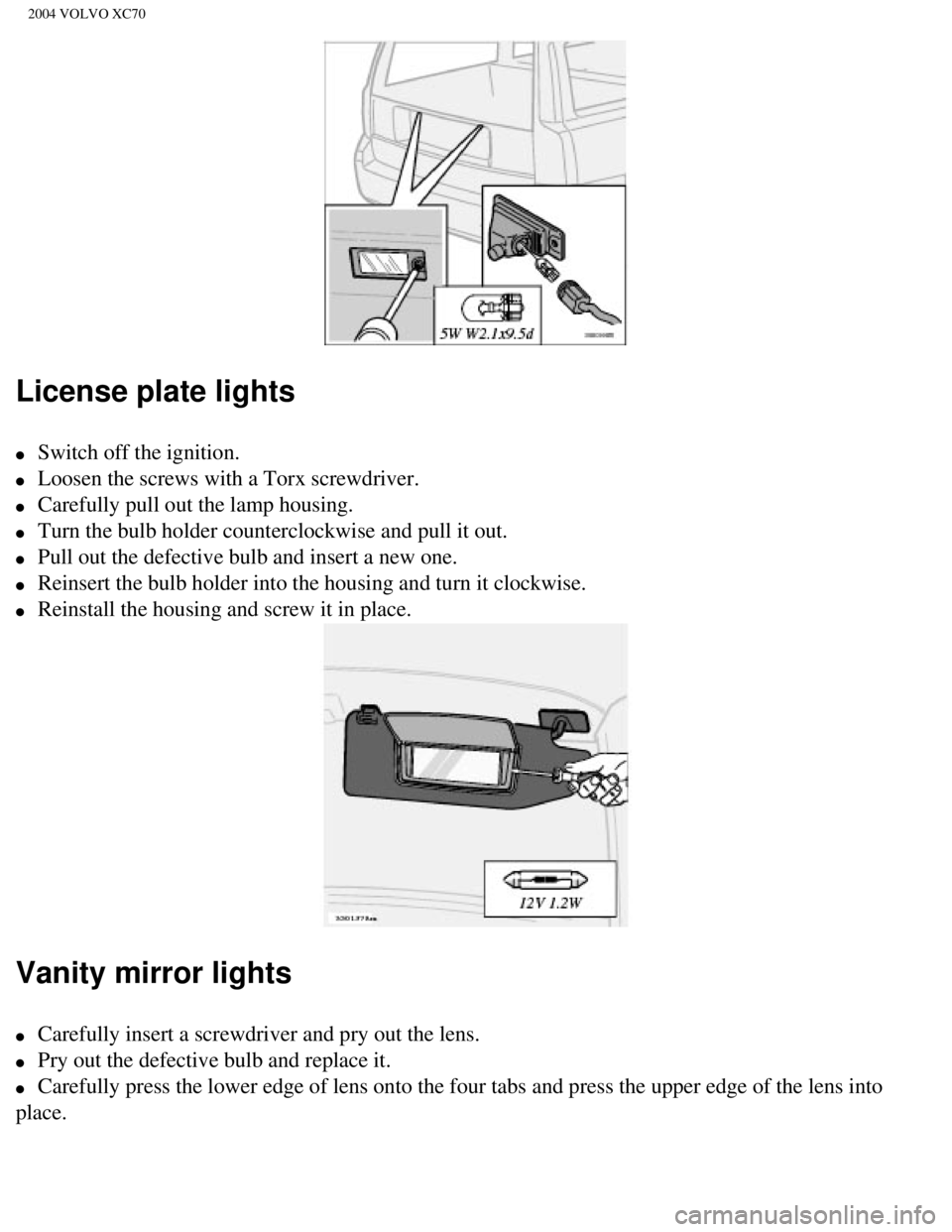
License plate lights
l Switch off the ignition.
l Loosen the screws with a Torx screwdriver.
l Carefully pull out the lamp housing.
l Turn the bulb holder counterclockwise and pull it out.
l Pull out the defective bulb and insert a new one.
l Reinsert the bulb holder into the housing and turn it clockwise.
l Reinstall the housing and screw it in place.
Vanity mirror lights
l Carefully insert a screwdriver and pry out the lens.
l Pry out the defective bulb and replace it.
l Carefully press the lower edge of lens onto the four tabs and press the \
upper edge of the lens into
place.
file:///K|/ownersdocs/2004/2004_XC70/04xc70_08a.htm (15 of 22)12/30/20\
06 4:33:05 PM
Page 166 of 241

2004 VOLVO XC70
l A stiff-bristle brush and lukewarm soapy water can be used to clean the \
wiper blades. Frequent
cleaning improves visibility considerably.
l Wash off the dirt from the underside (wheel housings, fenders, etc.). \
l In areas of high industrial fallout, more frequent washing is recommende\
d.
CAUTION:
During high pressure washing, the spray mouthpiece must never be closer \
to the vehicle than 13" (30
cm). Do not spray into the locks.
Special moonroof cautions:
- Always close the moonroof and sun shade before washing your vehicle. \
- Never use abrasive cleaning agents on the moonroof.
- Never use wax on the rubber seals around the moonroof.
l When washing or steam cleaning the engine, avoid spraying water or steam\
directly on the electrical
components or toward the rear side of the engine.
l After cleaning the engine, the spark plug wells should be inspected for \
water and blown dry if
necessary.
Suitable detergents: Special car washing detergents should be used. Mix according to manufac\
turer's
instructions.
Bumpers: The bumpers are painted. Wash the bumpers with the same cleaning agent u\
sed on the rest of
the car. Never clean the bumpers with gasoline or paint thinner. Difficu\
lt spots can be removed with
denatured alcohol. To avoid scratches, do not dry the bumpers with paper\
.
WARNING!
l When the car is driven immediately after being washed, apply the brakes \
several times in order to
remove any moisture from the brake linings.
l Engine cleaning agents should not be used when the engine is warm. This \
constitutes a fire risk.
pg. 130 Washing the car, Cleaning the upholstery
Automatic washing - simple and quick
l We do NOT recommend washing your car in an automatic wash during the fir\
st six months
file:///K|/ownersdocs/2004/2004_XC70/04xc70_08a.htm (19 of 22)12/30/20\
06 4:33:05 PM
Page 175 of 241

2004 VOLVO XC70
If a two-post hoist is used to lift the car, the front and rear lift arm\
pads should be centered under the
reinforced lift plates on the inboard edge of the sill rail (see illust\
ration above).
pg. 136 Opening the hood, Engine compartment
Opening the hood
l Pull the lever located under the left side of the dash to release the ho\
od lock.
l Lift the hood slightly.
l Press up the release control located under the front edge of the hood (\
at the center) and lift.
WARNING!
Check that the hood locks properly when
closed.
file:///K|/ownersdocs/2004/2004_XC70/04xc70_08b.htm (6 of 16)12/30/200\
6 4:33:06 PM
Page 183 of 241
2004 VOLVO XC70
Replacing the battery
l Switch off the ignition.
l Unscrew the cover over the battery. Wait at least 10 minutes after switching off the ignition before
disconnecting the battery so that all information in the car's electrica\
l system can be stored in the control
modules.
l Disconnect the negative (ground) cable first.
l Disconnect the positive cable and pull the ventilation hose* from the ba\
ttery.
l Lift out the old battery and put a new battery into place.
l Connect the positive cable first.
l Connect the negative (ground) cable.
l Be sure that the ventilation hose* is securely connected to the battery \
and that the other end of the
hose is properly routed through the ventilation opening in the floor of \
the battery compartment.
l Reinstall the cover and screw it securely in place.
WARNING!
l Never expose the battery to open flame or electric spark.
l Do not smoke near the battery.
l Battery fluid contains sulfuric acid. Do not allow battery fluid to cont\
act eyes, skin, fabrics or
painted surfaces. If contact occurs, flush the affected area immediately\
with water. Obtain medical
help immediately if eyes are affected.
NOTE: After the battery has been disconnected or replaced, lock and unlock th\
e car with the central
locking system's remote control to reactivate such features as the power\
windows, moonroof, courtesy
lighting, etc. WARNING!
* Ventilation hose: The battery generates hydrogen gas, which is flammab\
le and explosive. The
battery is fitted with a ventilation hose which vents hydrogen gas out o\
f the battery
compartment through a ventilation opening in the bottom of this compartm\
ent. If the battery
must be replaced, it is essential that the ventilation hose is properly \
connected to the battery
and that it is routed through the ventilation opening provided (see ill\
ustration).
Be sure the ventilation hose is free of debris.
Only use replacement batteries equipped with a ventilation hose. Consult\
your Volvo retailer.
file:///K|/ownersdocs/2004/2004_XC70/04xc70_08b.htm (14 of 16)12/30/20\
06 4:33:06 PM
Page 201 of 241

2004 VOLVO XC70
17. Traffic information
18. Automatic presetting of radio stations
19. Display
pg. 156 Audio systems HU-613/HU-803
Switch on/off
Press the knob to switch on or turn off the radio.
Volume control
Turn the knob clockwise to increase volume. Volume control is electronic\
and does not have an end
stop. If you have a key pad in the steering wheel, increase or decrease \
the volume with the + or -
buttons.
Bass
Adjust the bass by pressing the button to extend the control and turning\
it to the left (less bass) or to the
right (more bass). A "detent" indicates "equalized" bass. Press the bu\
tton back in when you have made
the adjustment.
file:///K|/ownersdocs/2004/2004_XC70/04xc70_10a.htm (4 of 10)12/30/200\
6 4:33:08 PM
Page 220 of 241

2004 VOLVO XC70
l Condensation may occur on discs/optical components of the changer in col\
d winter weather. The disc
can be dried with a clean, lint-free cloth. Optical components in the CD\
changer may, however, take up
to one hour to dry off.
l Never attempt to play a disc which is damaged in any way.
l When not in use, the discs should be stored in their covers. Avoid stori\
ng discs in excessive heat,
direct sunlight or dusty locations.
Volume control - Subwoofer
Turn the knob clockwise to increase volume. Turn the knob counterclockwi\
se to lower volume or switch
off the subwoofer.
Contents | Top of Page
file:///K|/ownersdocs/2004/2004_XC70/04xc70_10b.htm (13 of 13)12/30/20\
06 4:33:08 PM