display VOLVO XC90 2006 Owner's Manual
[x] Cancel search | Manufacturer: VOLVO, Model Year: 2006, Model line: XC90, Model: VOLVO XC90 2006Pages: 256, PDF Size: 6.87 MB
Page 130 of 256

2006 VOLVO XC90
the difference in speed is immediately detected. This triggers the Anti-\
lock Brake System, which brakes
the spinning wheel until the difference in rotational speed is corrected\
.
TC is most active at low speeds, and a pulsating sound will be audible w\
hen the system is regulating
wheel spin. This is quite normal.
This is one of the DSTC system's permanent functions and is not affected\
when the DSTC button on the
center control panel is pressed.
2. Spin control (SC)
The spin control function is designed to help prevent the drive wheels f\
rom spinning while the vehicle is
accelerating. This is done by temporarily reducing engine torque to the \
drive wheels, which helps
improve tractive force.
Under certain circumstances, such as when driving with snow chains, or d\
riving in deep snow or loose
sand, it may be advisable to temporarily switch off this function for ma\
ximum tractive force. This is
done by pressing the DSTC button on the center control panel for at leas\
t a half a second.
When the SC function has been switched off:
l The text window will briefly display "DSTC SPIN CONTROL OFF"
l The LED in the DSTC button will be off.
3. Active Yaw Control (AYC)
This function helps maintain directional stability, for example when cor\
nering, by braking one or more
of the wheels if the vehicle shows a tendency to skid or slide laterally\
. This is done by activating the
Anti-lock Braking System. A pulsating sound will be audible when the fun\
ction is active, which is quite
normal. If you apply the brakes while this function is active, the brake\
pedal will feel stiffer than usual.
This is also one of the DSTC system's permanent functions and is not aff\
ected when the DSTC button on
the center control panel is pressed.
4. Roll Stability Control (RSC)
RSC utilizes a gyro-sensor to monitor the vehicle's angle of inclination\
, and the rate at which this angle
changes. If necessary, RSC activates the Anti-lock Brake System to brake\
one or more of the wheels to
help maintain stability. A pulsating sound will be audible when the func\
tion is active, which is quite
normal. If you apply the brakes while this function is active, the brake\
pedal will feel stiffer than usual.
This is one of the DSTC system's permanent functions and is not affected\
when the DSTC button on the
center control panel is pressed.
The DSTC button
The DSTC button in the center control panel is used to switch the Spin C\
ontrol (SC) function on or off.
file:///K|/ownersdocs/2006/2006_XC90/06xc90_06b.htm (4 of 18)12/30/200\
6 5:32:46 PM
Page 131 of 256

2006 VOLVO XC90
The button must be pressed for at least a half second to prevent SC from\
being switched off
inadvertently.
When the system has been switched off, the green indicator lamp in the b\
utton will go out and "DSTC
SPIN CONTROL OFF" will be displayed in the text window.
All DSTC functions are (re)activated each time the engine is started.
pg. 99 Starting and driving
Dynamic Stability Traction Control (DSTC) (contd)
The Stability Control indicator light
The Stability Control indicator light will come on for approximately 2 s\
econds when the ignition is
switched on as the system performs a self-diagnostic test.
The Stability Control indicator light will flash when:
l Traction Control is actively functioning to help avoid drive-wheel spin.\
l Spin Control is actively functioning to help avoid loss of traction duri\
ng acceleration.
l Active Yaw Control is actively functioning to help avoid skids or latera\
l slides.
l Roll Stability Control is actively functioning to help avoid a roll-over\
situation.
The warning symbol in the instrument panel
A steady yellow glow indicates:
l That the system has been automatically disengaged due to a fault. "ANTI \
SKID SERVICE
REQUIRED" will be displayed in the text window. If this occurs, stop the\
vehicle in a suitable place,
switch off and restart the engine. If the light remains on, an authorize\
d Volvo retailer should check the
system.
l In the event of high brake temperature, "TRACTION CONTROL TEMPORARILY OF\
F" will be
displayed in the text window.
The system will automatically switch on again when the brakes have coole\
d.
pg. 100 Starting and driving
Park assist
file:///K|/ownersdocs/2006/2006_XC90/06xc90_06b.htm (5 of 18)12/30/200\
6 5:32:46 PM
Page 133 of 256

2006 VOLVO XC90
the button.
NOTE: It may be necessary to deactivate one or both of the park assist system\
s in certain cases.
l Rear park assist: towing a trailer, carrying bicycles in a rear-mounted carrier, etc, co\
uld trigger the
rear park assist system's sensors.
l Front park assist: it may not be possible to combine auxiliary headlights and front park \
assist since
these lights could trigger the system's sensors.
Faults in the system
If a fault should occur in the system, the LED in the button will be swi\
tched off and a message will be
displayed in the text window.
Cleaning the sensors
For the system to function properly, the sensors in the front and/or rea\
r bumpers should be kept clean.
They can be cleaned with car washing detergent and a sponge.
WARNING!
This system is designed to be a supplementary aid when the vehicle is ba\
cking up. It is not, however,
intended to replace the driver's attention and judgement.
pg. 101 Starting and driving
Towing
Positions for attaching towing eyelets
Emergency towing
The towing eyelet is located in the tool bag, under the floor of the car\
go area. This eyelet must be
screwed into the positions provided on the right sides of either the fro\
nt or rear bumper (see illustrations).
file:///K|/ownersdocs/2006/2006_XC90/06xc90_06b.htm (7 of 18)12/30/200\
6 5:32:46 PM
Page 143 of 256

2006 VOLVO XC90
are used more often. Moreover, the capacity of the battery decreases as \
the temperature drops. In very
cold weather, a poorly charged battery can freeze and be damaged. It is \
therefore advisable to check the
state of charge more frequently and spray an antirust oil on the battery\
posts.
l Volvo recommends the use of snow tires on all four wheels for winter driving - see section "Wheels
and tires."
l To prevent the washer fluid reservoir from freezing, add washer solvents containing antifreeze (see
page 147 for the location of the washer fluid reservoir).
This is important since dirt is often splashed on the windshield during \
winter driving, requiring the
frequent use of the washers and wipers. Volvo Washer Solvent should be d\
iluted as follows:
Down to 14° F (-10° C): 1 part washer solvent and 4 parts water \
Down to 5° F (-15° C): 1 part washer solvent and 3 parts water
Down to 0° F (-18° C): 1 part washer solvent and 2 parts water
Down to -18° F (-28° C): 1 part washer solvent and 1 part water \
l Use Volvo Teflon Lock Spray in the locks.
NOTE: Avoid the use of de-icing sprays as they can cause damage to the locks.
W Winter/Wet driving mode-enhanced vehicle traction
l Mode W will only function if the gear selector is in the (D)rive position.
l Press the button at the base of the gear selector to engage/disengage th\
is driving mode.
l An LED in the button will light up to indicate that W is engaged and thi\
s will also be displayed in the
instrument panel (see
page 22).
l This mode may be selected for starting/moving off on slippery roads.
* Synthetic oil is not used when the oil is changed at the normal mainte\
nance intervals except at owner request and at additional
charge. Please consult your Volvo retailer.
pg. 109 Starting and driving
Before a long distance trip
It is always worthwhile to have your vehicle checked at a Volvo retailer\
before driving long distances.
Your retailer will also be able to supply you with bulbs, fuses, spark p\
lugs and wiper blades for your use
in the event that problems occur.
As a minimum, the following items should be checked before any long trip\
:
l Check that engine runs smoothly and that fuel consumption is normal.
l Check for fuel, oil, and fluid leakage
l Check transmission oil level*.
l Check condition of drive belts.
l Check state of the battery's charge.
file:///K|/ownersdocs/2006/2006_XC90/06xc90_06b.htm (17 of 18)12/30/20\
06 5:32:46 PM
Page 159 of 256

2006 VOLVO XC90
WARNING!
The TPMS system uses a radio frequency of 315 MHz. Accessory electrical \
equipment using the
same frequency could interfere with TPMS and should not be installed in \
the vehicle. Please consult
your Volvo retailer, a qualified Volvo service technician, or the access\
ory equipment's supplier for
further information.
When low inflation pressure is detected, TPMS will light up the tire pre\
ssure warning light (
) (also
referred to as a telltale) in the instrument panel, and will display a \
message in the text window. The
wording of this message is determined by the degree of inflation pressur\
e loss.
NOTE: If a fault occurs in TPMS, the tire pressure warning light will flash fo\
r approximately 1 minute
and TIRE PRESS SYST SERVICE REQUIRED will be displayed.
Each tire, including the spare (if provided), should be checked monthl\
y when cold and inflated to the
inflation pressure recommended by the vehicle manufacturer on the vehicl\
e placard or tire inflation
pressure label. (If your vehicle has tires of a different size than the\
size indicated on the vehicle placard
or tire inflation pressure label, you should consult the appropriate sec\
tion of this owner's manual to
determine the proper tire inflation pressure.) When the low tire pressu\
re telltale is illuminated, one or
more of your tires is significantly underinflated. You should stop and c\
heck your tires as soon as
possible, and inflate them to the proper pressure. Driving on a signific\
antly underinflated tire causes the
tire to overheat and can lead to tire failure. Under-inflation also redu\
ces fuel efficiency and tire tread
life, and may affect the vehicle's handling and stopping ability. Your v\
ehicle has also been equipped
with a TPMS malfunction telltale to indicate when the system is not oper\
ating properly. When the
malfunction telltale is illuminated, the system may not be able to detec\
t or signal low tire pressure as
intended. TPMS malfunctions may occur for a variety of reasons, includin\
g the installation of
incompatible replacement tires on the vehicle. Always check the TPMS mal\
function telltale after
replacing one or more tires on your vehicle to ensure that the replaceme\
nt tires are compatible with the
TPMS.
NOTE: TPMS indicates low tire pressure but does not replace normal tire maint\
enance. For information
on correct tire pressure, please refer to the table on
page 116, or consult your Volvo retailer.
Erasing warning messages
When a low tire pressure warning message has been displayed, and the tir\
e pressure warning light has
come on:
1. Use a tire pressure gauge to check the inflation pressure of all four\
tires.
2. Re-inflate the tire(s) to the correct pressure (consult the tire p\
ressure placard or the table on
page 116).
3. Drive the car for at least one minute at a speed of 20 mph (30 km/h)\
or faster.
This will erase the warning text and the warning light will go out.
file:///K|/ownersdocs/2006/2006_XC90/06xc90_08.htm (8 of 22)12/30/2006\
5:32:49 PM
Page 160 of 256

pg. 118 Wheels and tires
Changing tires
Please note the following when changing or replacing the factory install\
ed TPMS wheels/tires on the
vehicle:
l")
2006 VOLVO XC90
(contd. on following page)
pg. 118 Wheels and tires
Changing tires
Please note the following when changing or replacing the factory install\
ed TPMS wheels/tires on the
vehicle:
l Only the factory-mounted wheels are equipped with TPMS sensors in the va\
lves.
l If the vehicle is equipped with a temporary spare tire, this tire does n\
ot have a TPMS sensor.
l If winter wheels without TPMS sensors are mounted on the vehicle, TIRE P\
RESS SYST SERVICE
REQUIRED will be displayed each time the vehicle is driven above 25 mph \
(40 km/h) for 10 minutes or
more.
l Once TPMS sensors are properly installed, the warning message should not\
reappear.
l Volvo recommends that TPMS sensors be fitted on all wheels used on the v\
ehicle. Volvo does not
recommend moving sensors back and forth between sets of wheels.
CAUTION
When inflating tires with TPMS valves, press the pump's mouthpiece strai\
ght onto the valve to help
avoid bending or otherwise damaging the valve.
WARNING!
Incorrect inflation pressure could lead to tire failure, resulting in a \
loss of control of the
vehicle.
pg. 119 Wheels and tires
file:///K|/ownersdocs/2006/2006_XC90/06xc90_08.htm (9 of 22)12/30/2006\
5:32:49 PM
Page 176 of 256

2006 VOLVO XC90
pg. 143 Maintenance
Owner maintenance
Periodic maintenance requirements and intervals are described in your ve\
hicle's Warranty and Service
Records Information booklet.
The following points can be carried out between the normally scheduled m\
aintenance services.
Each time the car is refueled:
l Check the engine oil level
l Clean the windshield, windshield wipers, headlights, and tail lights
Monthly:
l Check cold tire pressure in all tires. Inspect the tires for wear.
l Check that engine coolant and other fluid levels are between the indicat\
ed "min" and "max" markings.
l Clean interior glass surfaces with a glass cleaner and soft paper towels\
.
l Wipe driver information displays with a soft cloth.
l Visually inspect battery terminals for corrosion. Corrosion may indicate\
a loose terminal connector, or
a battery near the end of its useful service life. Consult your Volvo re\
tailer for additional information.
As needed:
l Wash the car, including the undercarriage, to reduce wear that can be ca\
used by a buildup of dirt, and
corrosion that can be caused by salt residues.
l Clean leaves and twigs from air intake vents at the base of the windshie\
ld, and from other places
where they may collect.
NOTE: Complete service information for qualified technicians is available onli\
ne for purchase or
subscription at
www.volvotechinfo.com.
pg. 144 Maintenance
Emission inspection readiness
What is an Onboard Diagnostic System (OBD II)?
OBD II is part of your vehicle's computerized engine management system. \
It stores diagnostic
information about your vehicle's emission controls. It can light the Che\
ck Engine light (MIL) if it detects
an emission control "fault." A "fault" is a component or system that is \
not performing within an expected
range. A fault may be permanent or temporary. OBD II will store a messag\
e about any fault.
How do states use OBD II for emission inspections?
file:///K|/ownersdocs/2006/2006_XC90/06xc90_09a.htm (3 of 15)12/30/200\
6 5:32:50 PM
Page 200 of 256
2006 VOLVO XC90
C - Back-up light
D - Parking light
Replacing bulbs in the tail light cluster
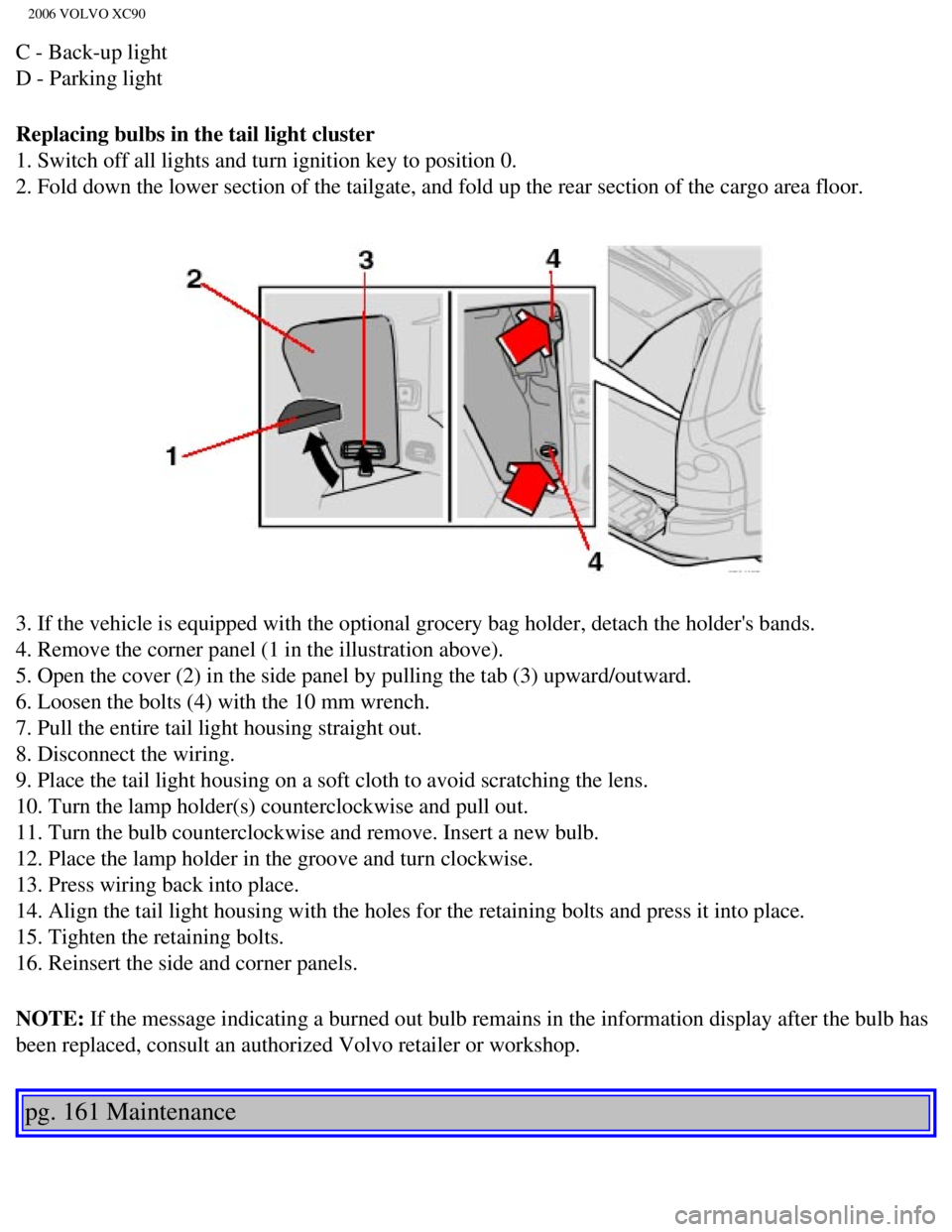
1. Switch off all lights and turn ignition key to position 0.
2. Fold down the lower section of the tailgate, and fold up the rear sec\
tion of the cargo area floor.
3. If the vehicle is equipped with the optional grocery bag holder, deta\
ch the holder's bands.
4. Remove the corner panel (1 in the illustration above).
5. Open the cover (2) in the side panel by pulling the tab (3) upwar\
d/outward.
6. Loosen the bolts (4) with the 10 mm wrench.
7. Pull the entire tail light housing straight out.
8. Disconnect the wiring.
9. Place the tail light housing on a soft cloth to avoid scratching the \
lens.
10. Turn the lamp holder(s) counterclockwise and pull out.
11. Turn the bulb counterclockwise and remove. Insert a new bulb.
12. Place the lamp holder in the groove and turn clockwise.
13. Press wiring back into place.
14. Align the tail light housing with the holes for the retaining bolts \
and press it into place.
15. Tighten the retaining bolts.
16. Reinsert the side and corner panels.
NOTE: If the message indicating a burned out bulb remains in the information \
display after the bulb has
been replaced, consult an authorized Volvo retailer or workshop.
pg. 161 Maintenance
file:///K|/ownersdocs/2006/2006_XC90/06xc90_09b.htm (12 of 24)12/30/20\
06 5:32:52 PM
Page 224 of 256
2006 VOLVO XC90
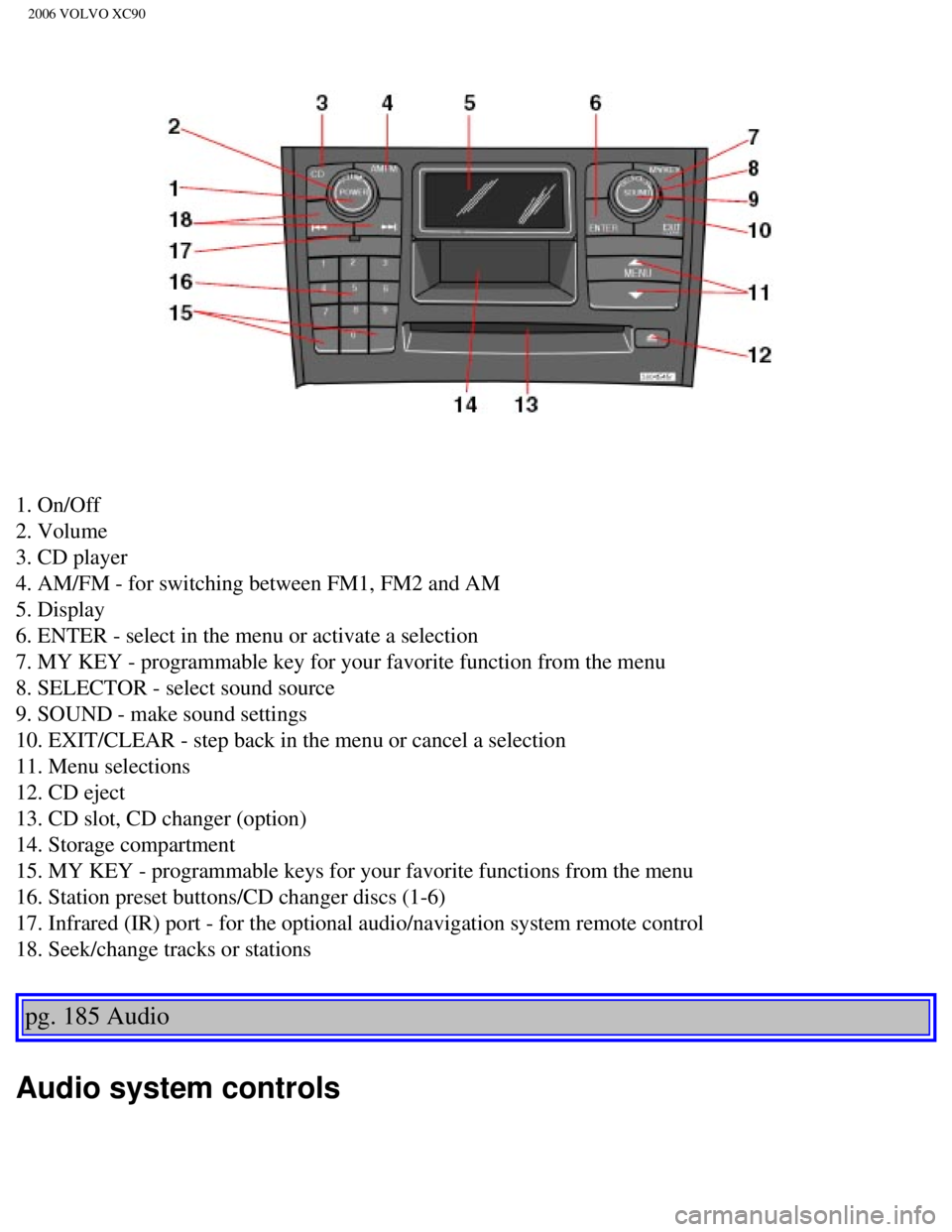
1. On/Off
2. Volume
3. CD player
4. AM/FM - for switching between FM1, FM2 and AM
5. Display
6. ENTER - select in the menu or activate a selection
7. MY KEY - programmable key for your favorite function from the menu
8. SELECTOR - select sound source
9. SOUND - make sound settings
10. EXIT/CLEAR - step back in the menu or cancel a selection
11. Menu selections
12. CD eject
13. CD slot, CD changer (option)
14. Storage compartment
15. MY KEY - programmable keys for your favorite functions from the menu\
16. Station preset buttons/CD changer discs (1-6)
17. Infrared (IR) port - for the optional audio/navigation system remo\
te control
18. Seek/change tracks or stations
pg. 185 Audio
Audio system controls
file:///K|/ownersdocs/2006/2006_XC90/06xc90_11a.htm (2 of 18)12/30/200\
6 5:32:55 PM
Page 225 of 256

The four buttons on the steering wheel keypad can be used to control the\
audio system. The steering
wheel keypad can be used to adjust volume, shift")
2006 VOLVO XC90
Steering wheel keypad (option)
The four buttons on the steering wheel keypad can be used to control the\
audio system. The steering
wheel keypad can be used to adjust volume, shift between preset stations\
and change CD tracks.
l Press the or buttons briefly to search for a radio station, or to go to the next/pre\
vious
track on a CD
l Press and hold down these buttons to search within a track.
Display
The display (1) shows the currently selected function, menu selections\
, etc.
Clean the display with a dry, soft, lint-free cloth. Do not use cleaning\
agents.
Accessing and using menus
In menu mode, you can change settings and program new functions in the a\
udio system. The various
file:///K|/ownersdocs/2006/2006_XC90/06xc90_11a.htm (3 of 18)12/30/200\
6 5:32:55 PM