door lock VOLVO XC90 2014 Owner´s Manual
[x] Cancel search | Manufacturer: VOLVO, Model Year: 2014, Model line: XC90, Model: VOLVO XC90 2014Pages: 308, PDF Size: 13.31 MB
Page 73 of 308
02 Instruments and controls
Left-side steering wheel lever
02
71
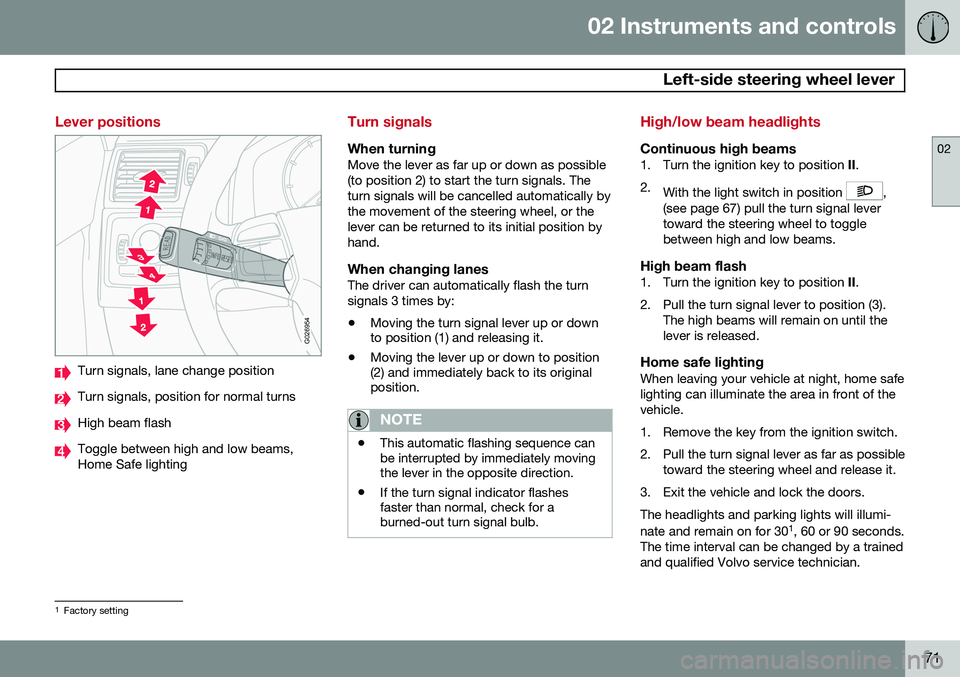
Lever positions
G026954
Turn signals, lane change position
Turn signals, position for normal turns
High beam flash
Toggle between high and low beams, Home Safe lighting
Turn signals
When turningMove the lever as far up or down as possible (to position 2) to start the turn signals. Theturn signals will be cancelled automatically bythe movement of the steering wheel, or thelever can be returned to its initial position byhand.
When changing lanesThe driver can automatically flash the turnsignals 3 times by:• Moving the turn signal lever up or down to position (1) and releasing it.
• Moving the lever up or down to position(2) and immediately back to its originalposition.
NOTE
• This automatic flashing sequence can be interrupted by immediately movingthe lever in the opposite direction.
• If the turn signal indicator flashesfaster than normal, check for aburned-out turn signal bulb.
High/low beam headlights
Continuous high beams1. Turn the ignition key to position
II.
2. With the light switch in position
,
(see page 67) pull the turn signal lever toward the steering wheel to togglebetween high and low beams.
High beam flash1. Turn the ignition key to position II.
2. Pull the turn signal lever to position (3). The high beams will remain on until thelever is released.
Home safe lightingWhen leaving your vehicle at night, home safelighting can illuminate the area in front of thevehicle.
1. Remove the key from the ignition switch.
2. Pull the turn signal lever as far as possibletoward the steering wheel and release it.
3. Exit the vehicle and lock the doors.The headlights and parking lights will illumi- nate and remain on for 30 1
, 60 or 90 seconds.
The time interval can be changed by a trained and qualified Volvo service technician.
1 Factory setting
Page 85 of 308
02 Instruments and controls
Power windows
02
83
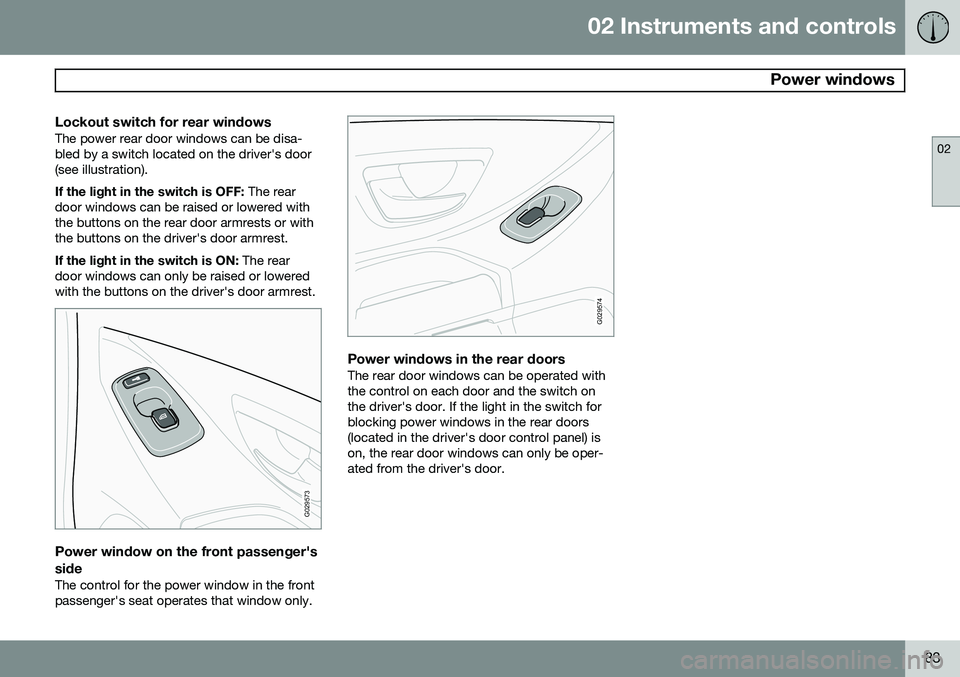
Lockout switch for rear windowsThe power rear door windows can be disa- bled by a switch located on the driver's door(see illustration). If the light in the switch is OFF: The rear
door windows can be raised or lowered with the buttons on the rear door armrests or withthe buttons on the driver's door armrest. If the light in the switch is ON: The rear
door windows can only be raised or lowered with the buttons on the driver's door armrest.
G029573
Power window on the front passenger's side
The control for the power window in the front passenger's seat operates that window only.
G029574
Power windows in the rear doorsThe rear door windows can be operated with the control on each door and the switch onthe driver's door. If the light in the switch forblocking power windows in the rear doors(located in the driver's door control panel) ison, the rear door windows can only be oper-ated from the driver's door.
Page 88 of 308
02 Instruments and controls
Mirrors
02
86* Option/accessory, for more information, see Introduction.
For information about the optional folding mirror function see page 64.
WARNING
The mirrors should always be adjusted prior to driving. Objects seen in the pas-senger's side wide-angle door mirror arecloser than they appear to be.
Mirror memory function (with the
central locking system)*
If you lock the vehicle and later unlock it with the same remote key and open the driver's
door, the door mirrors (and the driver's seat)will automatically move to the position theywere in when you left the vehicle. This featurewill work in the same way with all of theremote key transmitters (up to 3) that you usewith your vehicle. This feature will not func-tion if you lock your vehicle with the key.
Water repellent glassThe side door mirrors can be treatedwith a water repellent coating. The
symbol to the left indicates these windowshave this coating.
The coating improves vision by causing the water to run off quickly. For information on cleaning this type of glass, see page 210.
CAUTION
Use the heating function to remove ice, snow, or mist from the mirrors.
Page 91 of 308
02 Instruments and controls
HomeLink®
Wireless Control System*
02
* Option/accessory, for more information, see Introduction.89
Introduction
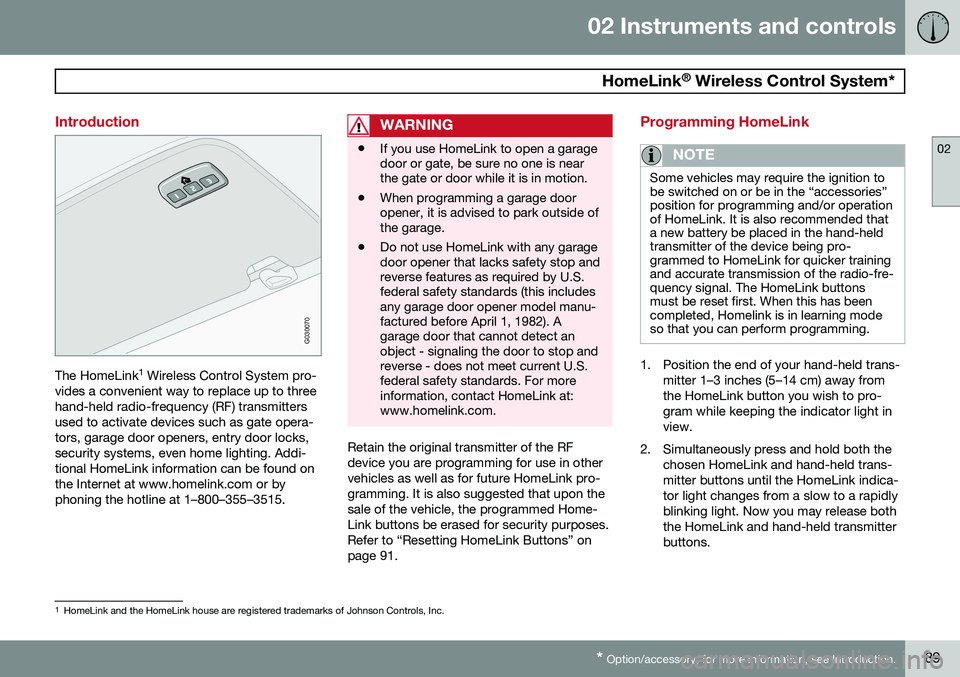
G030070
The HomeLink 1
Wireless Control System pro-
vides a convenient way to replace up to three hand-held radio-frequency (RF) transmittersused to activate devices such as gate opera-tors, garage door openers, entry door locks,security systems, even home lighting. Addi-tional HomeLink information can be found onthe Internet at www.homelink.com or byphoning the hotline at 1–800–355–3515.
WARNING
• If you use HomeLink to open a garage door or gate, be sure no one is nearthe gate or door while it is in motion.
• When programming a garage dooropener, it is advised to park outside ofthe garage.
• Do not use HomeLink with any garagedoor opener that lacks safety stop andreverse features as required by U.S.federal safety standards (this includesany garage door opener model manu-factured before April 1, 1982). Agarage door that cannot detect anobject - signaling the door to stop andreverse - does not meet current U.S.federal safety standards. For moreinformation, contact HomeLink at:www.homelink.com.
Retain the original transmitter of the RF device you are programming for use in othervehicles as well as for future HomeLink pro-gramming. It is also suggested that upon thesale of the vehicle, the programmed Home-Link buttons be erased for security purposes.Refer to “Resetting HomeLink Buttons” onpage 91.
Programming HomeLink
NOTE
Some vehicles may require the ignition to be switched on or be in the “accessories”position for programming and/or operationof HomeLink. It is also recommended thata new battery be placed in the hand-heldtransmitter of the device being pro-grammed to HomeLink for quicker trainingand accurate transmission of the radio-fre-quency signal. The HomeLink buttonsmust be reset first. When this has beencompleted, Homelink is in learning modeso that you can perform programming.
1. Position the end of your hand-held trans-
mitter 1–3 inches (5–14 cm) away from the HomeLink button you wish to pro-gram while keeping the indicator light inview.
2. Simultaneously press and hold both the chosen HomeLink and hand-held trans-mitter buttons until the HomeLink indica-tor light changes from a slow to a rapidlyblinking light. Now you may release boththe HomeLink and hand-held transmitterbuttons.
1HomeLink and the HomeLink house are registered trademarks of Johnson Controls, Inc.
Page 92 of 308
02 Instruments and controls
HomeLink®
Wireless Control System*
02
90* Option/accessory, for more information, see Introduction.
NOTE
Some devices may require you to replace this Programming Step 2 with proceduresnoted in the “Gate Operator / CanadianProgramming” section. If the HomeLinkindicator light does not change to a rapidlyblinking light after performing these steps,contact HomeLink at www.homelink.comor by phoning the hotline at1–800–355–3515.
3. Firmly press, hold for five seconds and
release the programmed HomeLink but-
ton up to two separate times to activate the door. If the door does not activate,press and hold the just-trained HomeLinkbutton and observe the indicator light.
• If the indicator light
stays on con-
stantly, programming is complete and your device should activate when the HomeLink button is pressed andreleased.
• If the indicator light blinks
rapidly for
two seconds and then turns to aconstant light continue with “Pro- gramming” steps 4-6 to complete the
programming of a rolling code equip- ped device (most commonly a garagedoor opener). 4. At the garage door opener receiver
(motor-head unit) in the garage, locate the “learn” or “smart” button. This canusually be found where the hangingantenna wire is attached to the motor-head unit.
5. Firmly press and release the “learn” or “smart” button. (The name and color ofthe button may vary by manufacturer.)There are 30 seconds to initiate step 6.
6. Return to the vehicle and firmly press, hold for two seconds and release the pro-grammed HomeLink button. Repeat the“press/hold/release” sequence a secondtime, and, depending on the brand of thegarage door opener (or other rolling codeequipped device), repeat this sequence athird time to complete the programmingprocess.
HomeLink should now activate your rollingcode equipped device.
Gate Operator/Canadian ProgrammingCanadian radio-frequency laws require trans-mitter signals to “time-out” (or quit) after sev-eral seconds of transmission – which may notbe long enough for HomeLink to pick up thesignal during programming. Similar to thisCanadian law, some U.S. gate operators aredesigned to “time-out” in the same manner. If you live in Canada or you are having diffi-culties programming a gate operator orgarage door opener by using the “Program-ming” procedures,
replace “Programming
HomeLink” step 2 with the following :
• Continue to press and hold the HomeLink button while you
press and release -
every two seconds (“cycle”) your hand-
held transmitter until the HomeLink indi-cator light changes from a slow to a rap-idly blinking light. Now you may releaseboth the HomeLink and hand-held trans-mitter buttons.
Proceed with “Programming” step 3 to com- plete.
Using HomeLink
To operate, simply press and hold the pro- grammed HomeLink button until the traineddevice begins to operate (this may take sev-eral seconds). Activation will now occur forthe trained device (i.e., garage door opener,gate operator, security system, entry doorlock, home/office lighting, etc.). For conven-ience, the hand-held transmitter of the devicemay also be used at any time. In the eventthat there are still programming difficulties orquestions, contact HomeLink at:www.homelink.com or by phoning the hotlineat 1–800–355–3515.
Page 102 of 308
03 Climate
Electronic climate control (ECC)
03
100* Option/accessory, for more information, see Introduction.
switch will light up to indicate that the defrost function is engaged.
• Blower speed increases automatically and the air conditioning will switch on (ifnot already on and if the passenger com-partment blower is not turned off) todehumidify the air in the passenger com-partment.
• Recirculation will not function whiledefrost is engaged.
The climate system will return to its previous settings when the defroster function isswitched off.
Rear window and door mirror
defrosters
This function defrosts/deices the rear window and door mirrors. The LED in the switch willlight up to indicate that the heating function isengaged. For additional information on thisfunction see page 75. Never use ice scrapers made of metal as they can easily scratch the mirror surface.
Heated front seats*
1. Press the switch once for maximum seat heating. Both LEDs in the switch will be lit. 2. Press the switch a second time for com-
fort heating. One LED in the switch will belit.
3. Press the switch a third time to turn the heating off completely. The LED will gooff.
The seat heating for the passenger seatshould be switched off when the seat is notoccupied.
Heated rear seats (XC90 Executive*)
G030976
Button for rear seat heating Heating for the respective outboard rear seats can be switched on or off with buttons on either side of the center console (see theillustration). To switch on rear seat heating:
–Press the button.
> The symbol in the button will illumi-
nate.
To switch off rear seat heating:
–Press the button.
> The symbol in the button will go out.
Temperature
These controls are used to individually set the temperature for both sides of the passengercompartment. Please note that the compart-ment will not be heated or cooled faster bysetting the temperature higher or lower thannecessary. Set the control to the temperature you prefer.
Blower control 1
Turn the control clockwise to increase or counterclockwise to decrease the blowerspeed. Pressing the
AUTO switch will auto-
matically regulate blower speed and overridemanual adjustment. Turning the blower control counterclockwise until an orange LED comes on will turn boththe blower and the air conditioning off.
1 See also see page 94.
Page 107 of 308
04 Interior
Front seats
04
* Option/accessory, for more information, see Introduction.105
Power seat*
OperationDriver's seat: The seat can be adjusted if the
ignition key is in position I, II or if the engine
is running. It can also be adjusted as follows with the ignition off:
• Within several minutes after the driver's door has been unlocked from the outside,has been opened, and remains open.
• Within a short period if the driver's doorhas just been closed.
• Within a short period if the driver's doorhas not been opened after the ignitionhas been switched off.
Passenger seat: The seat can only be
adjusted if the ignition key is in position I, II or
if the engine is running.
G027036
Power seat adjustment controls
Seat adjustmentAdjust the power seat(s) with the two controls at the side of the seat as follows:
Front edge of seat (raise/lower)
Forward – rearward
Rear edge of seat (raise/lower)
Backrest tilt
NOTE
The power seats have an overload protec- tor that activates if a seat is blocked byany object. If this occurs, switch off theignition (key in position 0 ) and wait for ashort period before operating the seatagain.
Emergency stopIf the seat accidentally begins to move, press any of the buttons to stop the seat.
NOTE
Please refer to the following page for infor- mation on programming the memory func-tion in the driver's seat.
Remote keyless entry system and the driver's seat
The remote key transmitter also controls the position of the electrically operated driver'sseat in the following way:
• Adjust the seat to your preferences.
• When you leave your vehicle, lock it using the remote key.
The position of the seat is now stored in the remote key.
Page 108 of 308
04 Interior
Front seats
04
106* Option/accessory, for more information, see Introduction.
Automatic seat adjustmentTo move the seat to the position in which you left it:
1. Unlock the driver's door with the same
remote key (the one used to lock the doors)
2. Open the driver's door within 2 minutes. The driver's seat will automatically move to the position in which you left it.
NOTE
• The seat will move to this position even if someone else has moved it to adifferent seating position and lockedthe vehicle with a different remote key.
• This feature will work in the same waywith all of the remote key transmitters(up to 3 ) that you use with your vehi-cle.
• This feature will not function if you lockyour vehicle with the key.
WARNING
•Because the driver's seat can be adjusted with the ignition off, childrenshould never be left unattended in thevehicle.
• Movement of the seat can be STOP-PED at any time by pressing any but-ton on the power seat control panel.
• Do not adjust the seat while driving.
• The seat should be adjusted so thatthe brake pedal can be depressedfully. In addition, position the seat asfar rearward as comfort and controlallow.
• The seat rails on the floor must not beobstructed in any way when the seat isin motion.
G027037
Programming the memoryThree different seating and door mirror posi- tions can be stored in the driver seat's mem-ory. The following example explains how button 1 can be programmed. Buttons 2 and 3 can beprogrammed in the same way. To program (store) a seat position in button 1:
1. Move the seat to the desired position
using the seat adjustment controls (see page 104).
2. Press and hold down the MEM (memory)
button.
Page 113 of 308
04 Interior
Interior lighting
04
}}
111
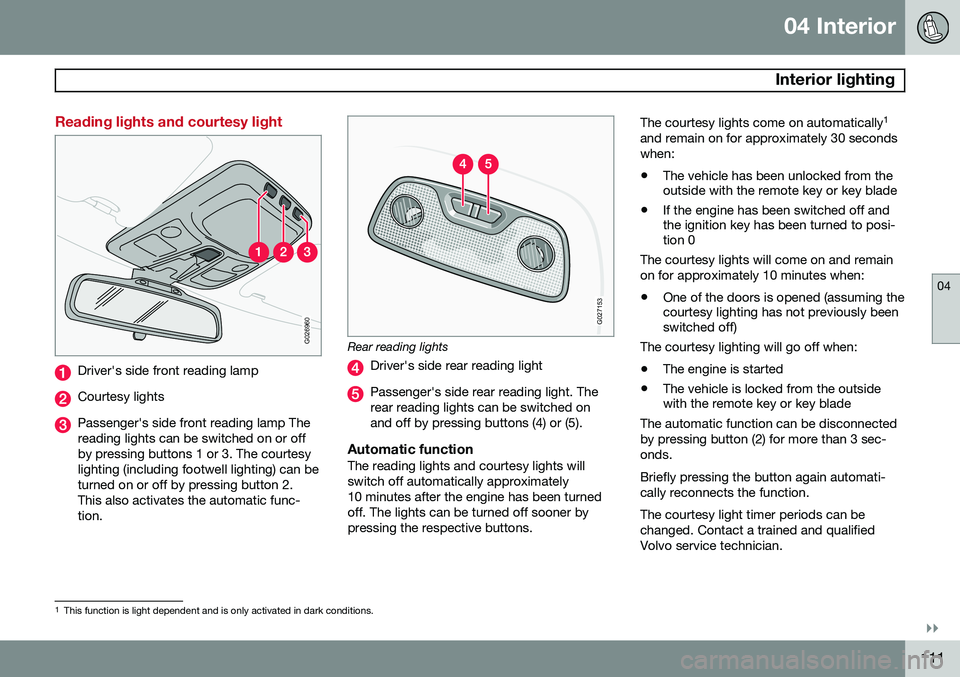
Reading lights and courtesy light
G026960
Driver's side front reading lamp
Courtesy lights
Passenger's side front reading lamp The reading lights can be switched on or offby pressing buttons 1 or 3. The courtesylighting (including footwell lighting) can beturned on or off by pressing button 2.This also activates the automatic func-tion.
G027153
Rear reading lights
Driver's side rear reading light
Passenger's side rear reading light. The rear reading lights can be switched onand off by pressing buttons (4) or (5).
Automatic functionThe reading lights and courtesy lights willswitch off automatically approximately10 minutes after the engine has been turnedoff. The lights can be turned off sooner bypressing the respective buttons.The courtesy lights come on automatically
1
and remain on for approximately 30 secondswhen: • The vehicle has been unlocked from the outside with the remote key or key blade
• If the engine has been switched off andthe ignition key has been turned to posi-tion 0
The courtesy lights will come on and remain on for approximately 10 minutes when:
• One of the doors is opened (assuming the courtesy lighting has not previously beenswitched off)
The courtesy lighting will go off when:
• The engine is started
• The vehicle is locked from the outsidewith the remote key or key blade
The automatic function can be disconnected by pressing button (2) for more than 3 sec-onds. Briefly pressing the button again automati- cally reconnects the function. The courtesy light timer periods can be changed. Contact a trained and qualifiedVolvo service technician.
1 This function is light dependent and is only activated in dark conditions.
Page 123 of 308
04 Interior
Securing cargo
04
121
Steel grid (accessory)
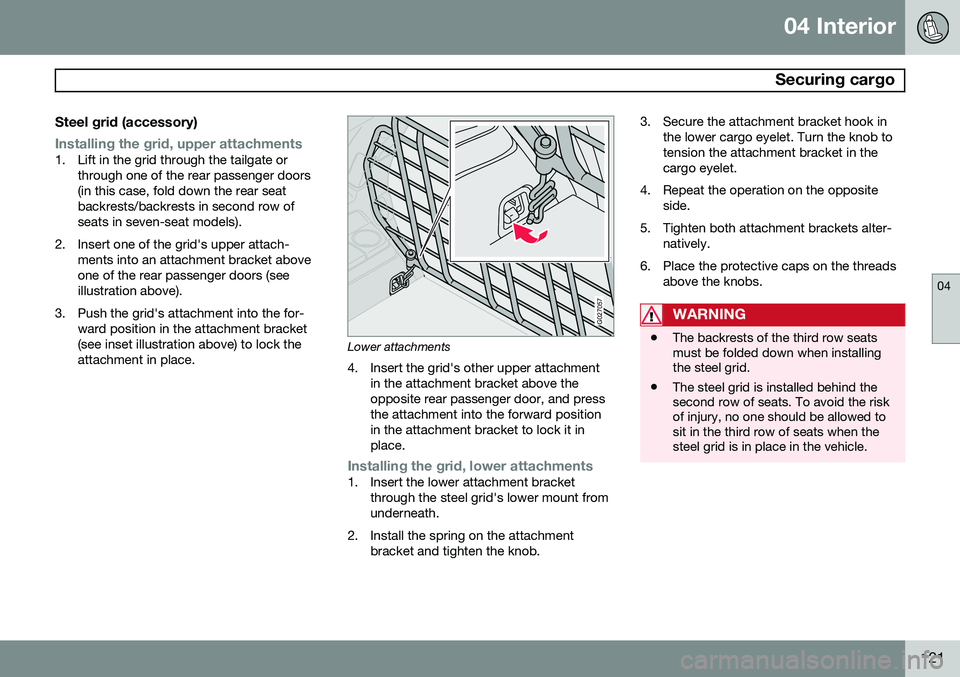
Installing the grid, upper attachments1. Lift in the grid through the tailgate orthrough one of the rear passenger doors (in this case, fold down the rear seatbackrests/backrests in second row ofseats in seven-seat models).
2. Insert one of the grid's upper attach- ments into an attachment bracket aboveone of the rear passenger doors (seeillustration above).
3. Push the grid's attachment into the for- ward position in the attachment bracket(see inset illustration above) to lock theattachment in place.
G027057
Lower attachments
4. Insert the grid's other upper attachment in the attachment bracket above the opposite rear passenger door, and pressthe attachment into the forward positionin the attachment bracket to lock it inplace.
Installing the grid, lower attachments1. Insert the lower attachment bracketthrough the steel grid's lower mount from underneath.
2. Install the spring on the attachment bracket and tighten the knob. 3. Secure the attachment bracket hook in
the lower cargo eyelet. Turn the knob totension the attachment bracket in thecargo eyelet.
4. Repeat the operation on the opposite side.
5. Tighten both attachment brackets alter- natively.
6. Place the protective caps on the threads above the knobs.
WARNING
•The backrests of the third row seats must be folded down when installingthe steel grid.
• The steel grid is installed behind thesecond row of seats. To avoid the riskof injury, no one should be allowed tosit in the third row of seats when thesteel grid is in place in the vehicle.