tow VOLVO XC90 2015 User Guide
[x] Cancel search | Manufacturer: VOLVO, Model Year: 2015, Model line: XC90, Model: VOLVO XC90 2015Pages: 570, PDF Size: 12.44 MB
Page 88 of 570

SAFETY
86www.volvocars.com/us In Canada Volvo Cars of Canada Corp. National Customer Service9130 Leslie Street, Suite 101Richmond Hill, Ontario L4B 0B91-800-663-8255www.volvocars.com/ca
Airbag decals
Airbag decal on the outside of both sun visors
Passenger's side airbag decal
WARNING
•
Children must never be allowed in the front passenger's seat.
• Occupants in the front passenger's seatmust never sit on the edge of the seat, sitleaning toward the instrument panel orotherwise sit out of position.
• The occupant's back must be as uprightas comfort allows and be against the seatback with the seat belt properly fastened.
• Feet must be on the floor, e.g., not on thedash, seat or out of the window.
WARNING
•
No objects or accessory equipment, e.g. dashboard covers, may be placed on,attached to, or installed near the air baghatch (the area above the glove compart-ment) or the area affected by airbagdeployment.
• There should be no loose articles, suchas coffee cups on the floor, seat, or dash-board area.
• Never try to open the airbag cover on thesteering wheel or the passenger's sidedashboard. This should only be done by atrained and qualified Volvo service techni-cian.
• Failure to follow these instructions canresult in injury to the vehicle occupants.
Related information
• Seat belts (p. 58)
• Occupant weight sensor (p. 78)
Page 104 of 570
INSTRUMENTS AND CONTROLS
* Option/accessory, for more information, see Introduction.
102
Operating the laminated panoramic roof *
When opened automatically, the sun shade and roof open completely. In the ventilation position, the rear edge of the front section of the roof is raised.
Operation
WARNING
• During manual closing, if the laminated panoramic roof is obstructed, immediatelyopen it again.
• Never open or close the laminated panor-amic roof if it is obstructed in any way.
• Never allow a child to operate the lamina-ted panoramic roof.
• Never leave a child alone in a vehicle.
• When leaving the vehicle, ensure that the ignition is in mode
0. Never leave a
remote key in the vehicle.
• Never extend any object or body part though the open laminated panoramicroof, even if the vehicle's ignition is com-pletely switched off.
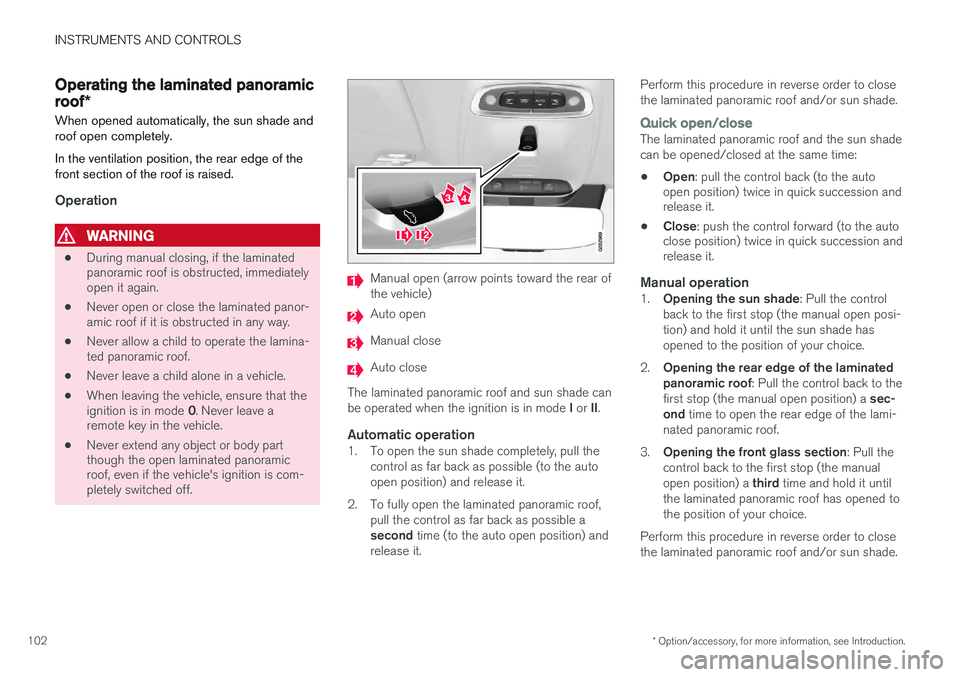
Manual open (arrow points toward the rear of the vehicle)
Auto open
Manual close
Auto close
The laminated panoramic roof and sun shade can be operated when the ignition is in mode I or II.
Automatic operation1. To open the sun shade completely, pull the
control as far back as possible (to the auto open position) and release it.
2. To fully open the laminated panoramic roof, pull the control as far back as possible a second time (to the auto open position) and
release it. Perform this procedure in reverse order to close the laminated panoramic roof and/or sun shade.
Quick open/closeThe laminated panoramic roof and the sun shade can be opened/closed at the same time: •
Open
: pull the control back (to the auto
open position) twice in quick succession and release it.
• Close
: push the control forward (to the auto
close position) twice in quick succession andrelease it.
Manual operation1. Opening the sun shade : Pull the control
back to the first stop (the manual open posi- tion) and hold it until the sun shade hasopened to the position of your choice.
2. Opening the rear edge of the laminatedpanoramic roof : Pull the control back to the
first stop (the manual open position) a sec-
ond time to open the rear edge of the lami-
nated panoramic roof.
3. Opening the front glass section : Pull the
control back to the first stop (the manual open position) a third time and hold it until
the laminated panoramic roof has opened to the position of your choice.
Perform this procedure in reverse order to closethe laminated panoramic roof and/or sun shade.
Page 137 of 570

INSTRUMENTS AND CONTROLS
135
SymbolMeaning
Airbags Stop the vehicle in a safe place and do not continue driving. If this light comes on while the vehicle is being driven, or remainson after the vehicle has beenstarted, the airbag system's diag-nostic functions have detected afault. Have the system(s) inspec-ted by a trained and qualifiedVolvo service technician as soonas possible.
A
B
Brake system If this symbol illuminates, the brake fluid level may be too low.Stop the vehicle in a safe placeand check the level in the brakefluid reservoir. See also the warn-ing following this table.
SymbolMeaning
A
B
Parking brake This symbol flashes while the parking brake is being applied andthen glows steadily when theparking brake has been set. If the symbol flashes in any other situation, this indicates a fault. Seethe text message in the instru-ment panel.
SymbolMeaning
Oil pressure If the symbol illuminates during driving, stop the vehicle, theengine oil level is too low. Stop theengine immediately and check theengine oil level. Add oil if neces-sary. If the oil level is normal andthe symbol remains illuminated,have the vehicle towed to thenearest authorized Volvo work-shop or trained and qualified Volvoservice technician.
Generator not charging This symbol illuminates during driving if a fault has occurred inthe electrical system. Contact anauthorized Volvo workshop ortrained and qualified Volvo servicetechnician.
AUS models
B Canadian models
Page 138 of 570
INSTRUMENTS AND CONTROLS
136
WARNING
•If the fluid level is below the
MIN mark in
the brake fluid reservoir or if a warning message is displayed in the text window: DO NOT DRIVE . Have the vehicle towed
to a trained and qualified Volvo service technician and have the brake systeminspected.
• If the
BRAKE and ABS symbols illumi-
nate at the same time, there is a risk ofreduced vehicle stability.
Related information
• Instrument panel (p. 128)
• Indicator symbols in the instrument panel(p. 126)
Compass
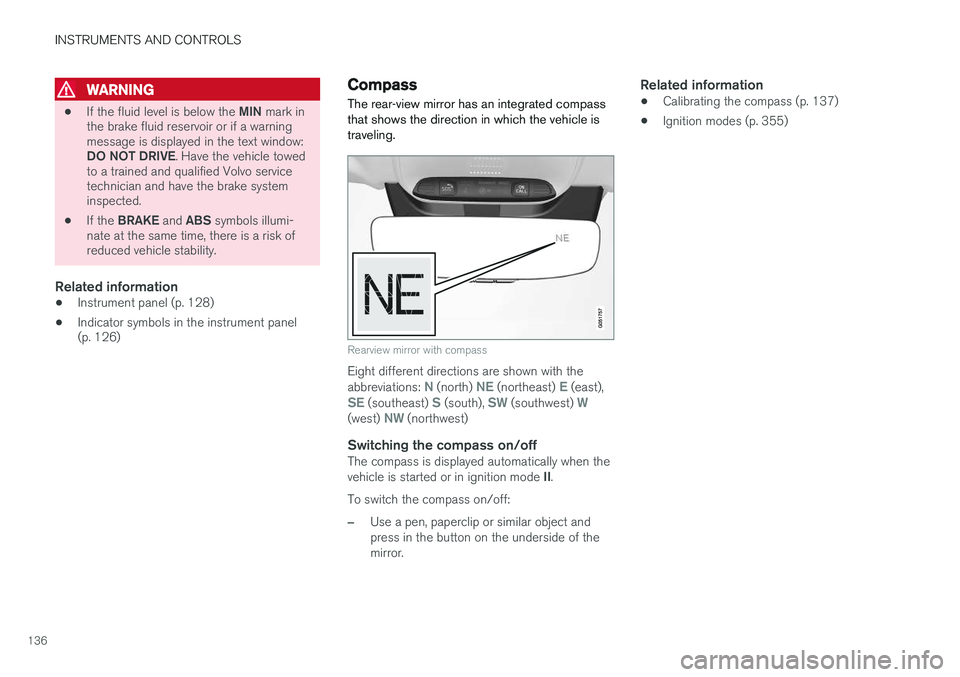
The rear-view mirror has an integrated compass that shows the direction in which the vehicle istraveling.
Rearview mirror with compass
Eight different directions are shown with the abbreviations: N (north) NE (northeast) E (east),SE (southeast) S (south), SW (southwest) W(west) NW (northwest)
Switching the compass on/offThe compass is displayed automatically when the vehicle is started or in ignition mode II.
To switch the compass on/off:
–Use a pen, paperclip or similar object and press in the button on the underside of themirror.
Related information
• Calibrating the compass (p. 137)
• Ignition modes (p. 355)
Page 142 of 570
INSTRUMENTS AND CONTROLS
140
Daytime Running Lights (DRL)
The car monitors ambient lighting conditions. With the ring on the left-side steering wheel lever in the
position and the ignition in
mode II (or the engine running), the lights toggle
automatically between DRL and low beam head- lights.
Ring in the AUTO position.
NOTE
The use of Daytime Running Lights is recom- mended in the United States and is manda-
tory in Canada .
With the headlight ring in the 0 position: •
In the
US: DRL will be off
• In
Canada : DRL will be on
With the headlight ring in the
8
position
and the ignition in mode II or if the engine is running :
• In the
US: DRL will be off
• In
Canada : DRL will be on
With the headlight ring in the
position:
• DRL will be
on (the low beam headlights will
automatically switch on in dark conditions)
US models only : DRL can be deactivated in the
center display's Settings view. With
selected, a tunnel detection function
activates the low beams when the vehicle enters a tunnel. With the headlight ring in the
position:
• DRL will be
off and the low beam headlights
will be on
High and low beam headlights
When the engine is started, the low beams are activated automatically if the headlight control is in position
.
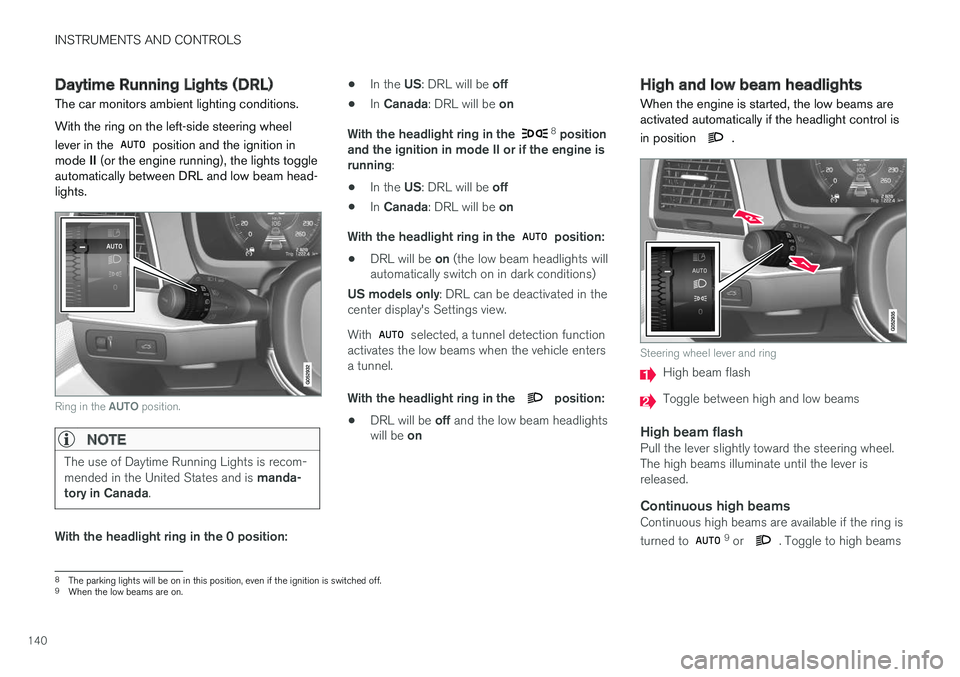
Steering wheel lever and ring
High beam flash
Toggle between high and low beams
High beam flashPull the lever slightly toward the steering wheel. The high beams illuminate until the lever isreleased.
Continuous high beamsContinuous high beams are available if the ring is turned to 9 or . Toggle to high beams
8 The parking lights will be on in this position, even if the ignition is switched off.
9 When the low beams are on.
Page 143 of 570

INSTRUMENTS AND CONTROLS
141
by moving the lever forward. Return to low beams by moving the lever toward the steering wheel. The
symbol will illuminate in the instrument
panel when the high beams are on.
Active high beamsThe active high beam system uses a camera at the upper edge of the windshield to detect theheadlights of oncoming vehicles or the taillightsof a vehicle directly ahead. When this happens,the headlights will automatically switch from highbeams to low beams. When the camera no longer detects the head- lights/taillights of other vehicles, your headlightswill switch back to high beams after several sec-onds.
OperationActivate/deactivate this function by turning the ring on the left-side steering wheel lever to
.
If the ring is not in this position, toggling between high and low beams must be done manually. If the ring is turned to another position while the high beams are on, the headlights will automati-cally switch to low beams. A white symbol (
) in the instrument panel
indicates that the function has been activated. When the high beams are on, the symbol will change to blue.
NOTE
•Keep the windshield in front of the cam- era free of ice, snow, dirt, etc.
• Do not mount or in any way attach any-thing on the windshield that couldobstruct the camera.
If a message is displayed in the instrument panel saying that active high beams are temporarilyunavailable, switching between high and lowbeams will have to be done manually. However, the light switch can remain in the
position.
The same applies if a message saying that the windshield sensors are blocked and the
symbol are displayed. The symbol will go
out if this happens. Automatic high beams may be temporarily unavailable (e.g., in heavy fog or rain). When thesystem becomes active again or if the sensors inthe windshield are no longer obscured, the mes- sages will disappear and the
symbol will
illuminate.
WARNING
• Automatic high beams are a driving aid designed to help provide the best possi-ble headlight illumination in good drivingconditions.
• The driver is always responsible for man-ually toggling between high and lowbeams when this is required by traffic orweather conditions.
CAUTION
In the following situations, it may be neces- sary to switch between high and low beamsmanually:
• In heavy fog or rain
• In blowing snow or slush
• In bright moonlight
• In freezing rain
• In areas with dim street lighting
• When oncoming vehicles have dim front lighting
• If there are pedestrians on or near theroad
• If there are reflective objects, such assigns, near the road
• When oncoming vehicles' lights areobscured by e.g., fences, bushes, etc.
Page 148 of 570
INSTRUMENTS AND CONTROLS
* Option/accessory, for more information, see Introduction.
146
Home safe lighting
The home safe lighting function illuminates the area in front of the vehicle in dark conditions.
This function turns on the headlights, parking lights, outer door handle lights *, license plate
lights, front ceiling lighting and footwell lighting for a set amount of time. The length of time that these lights remain illumi- nated can be set in the center display: 1. Tap
Settings in Top view.
2. Tap
My CarLightsExterior LightsHome Safety Lights.
3. Select
Off, 30 sec, 60 sec or 90 sec.
To activate home safe lighting: 1. Switch off the ignition (mode 0).
2. Push the turn signal lever as far as possible towards the dashboard and release it.
3. Exit the vehicle and lock the doors.
Related information
• Using the center display (p. 46)
• Settings view (p. 106)
Passenger compartment lighting
The passenger compartment lighting is con- trolled using the buttons in the ceiling above thefront and rear seats.
All passenger compartment lighting can be turned on and off manually within 30 minutesafter:
• the vehicle is unlocked but the engine has not been started
• the engine is switched off and the ignition is in mode
0.
Front interior lighting
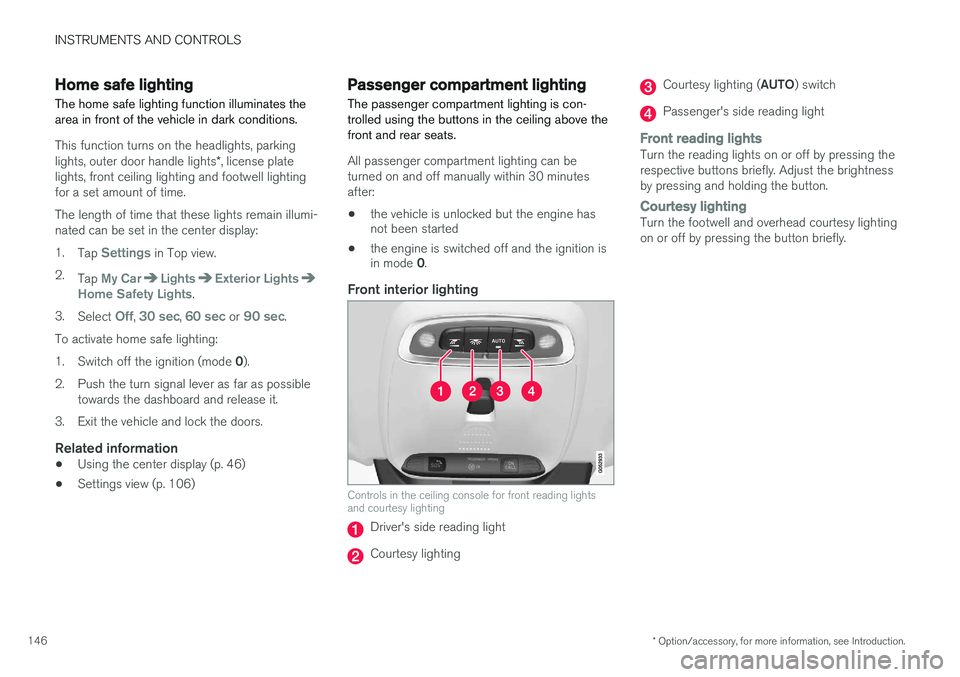
Controls in the ceiling console for front reading lights and courtesy lighting
Driver's side reading light
Courtesy lighting
Courtesy lighting ( AUTO) switch
Passenger's side reading light
Front reading lightsTurn the reading lights on or off by pressing the respective buttons briefly. Adjust the brightnessby pressing and holding the button.
Courtesy lightingTurn the footwell and overhead courtesy lighting on or off by pressing the button briefly.
Page 158 of 570
INSTRUMENTS AND CONTROLS
* Option/accessory, for more information, see Introduction.
156
Windshield and headlight washers
Use the windshield/headlight washers to help improve visibility.
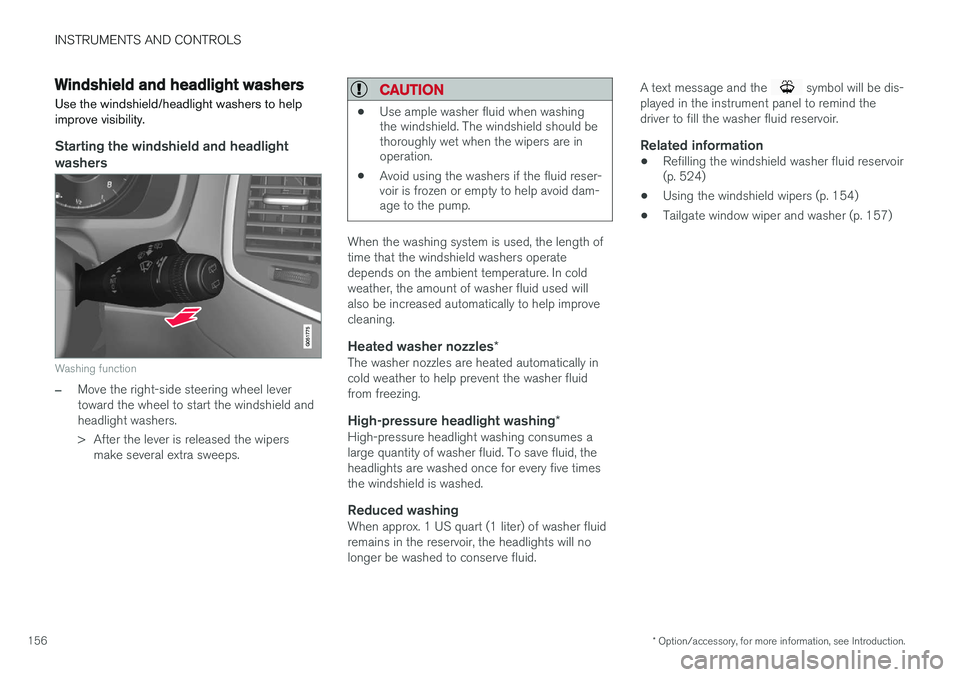
Starting the windshield and headlight washers
Washing function
–Move the right-side steering wheel lever toward the wheel to start the windshield andheadlight washers.
> After the lever is released the wipers make several extra sweeps.
CAUTION
• Use ample washer fluid when washing the windshield. The windshield should bethoroughly wet when the wipers are inoperation.
• Avoid using the washers if the fluid reser-voir is frozen or empty to help avoid dam-age to the pump.
When the washing system is used, the length of time that the windshield washers operatedepends on the ambient temperature. In coldweather, the amount of washer fluid used willalso be increased automatically to help improvecleaning.
Heated washer nozzles
*The washer nozzles are heated automatically incold weather to help prevent the washer fluidfrom freezing.
High-pressure headlight washing *High-pressure headlight washing consumes alarge quantity of washer fluid. To save fluid, theheadlights are washed once for every five timesthe windshield is washed.
Reduced washingWhen approx. 1 US quart (1 liter) of washer fluidremains in the reservoir, the headlights will nolonger be washed to conserve fluid. A text message and the
symbol will be dis-
played in the instrument panel to remind the driver to fill the washer fluid reservoir.
Related information
• Refilling the windshield washer fluid reservoir (p. 524)
• Using the windshield wipers (p. 154)
• Tailgate window wiper and washer (p. 157)
Page 172 of 570
INSTRUMENTS AND CONTROLS
* Option/accessory, for more information, see Introduction.
170
Folding the second row backrests
The second row of seats has three individual seating positions whose backrests can befolded down separately.
CAUTION
• To help avoid damage to the seat uphols- tery, before a rear seat backrest is foldeddown, remove any objects from the seatand ensure that the seat belts are notbuckled.
• The integrated booster cushion
* in the
center position must be stowed (foldeddown) before the backrest is foldeddown.
• The center seating position armrest mustbe folded up before the backrest isfolded down.
NOTE
•It may be necessary to adjust the front seat backrests and/or move these seatsforward in order to fold down the rearseat backrests completely.
• It may also be necessary to move thesecond row of seats rearward.
WARNING
Adjust the seat and be sure it is locked in the new position before driving.
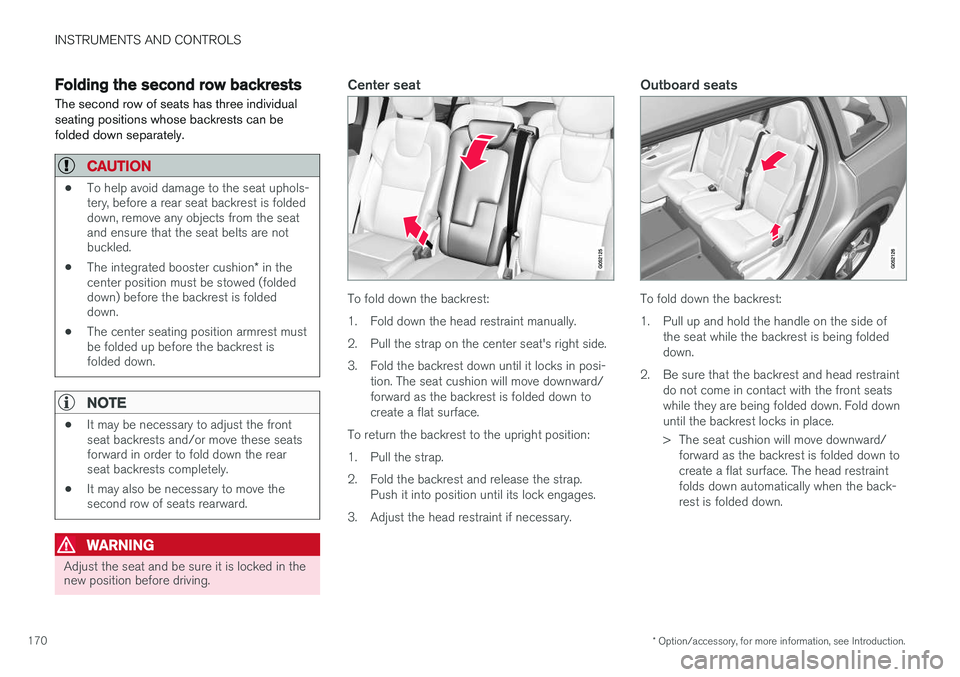
Center seat
To fold down the backrest:
1. Fold down the head restraint manually.
2. Pull the strap on the center seat's right side.
3. Fold the backrest down until it locks in posi-
tion. The seat cushion will move downward/ forward as the backrest is folded down tocreate a flat surface.
To return the backrest to the upright position:
1. Pull the strap.
2. Fold the backrest and release the strap. Push it into position until its lock engages.
3. Adjust the head restraint if necessary.
Outboard seats
To fold down the backrest:
1. Pull up and hold the handle on the side of the seat while the backrest is being folded down.
2. Be sure that the backrest and head restraint do not come in contact with the front seatswhile they are being folded down. Fold downuntil the backrest locks in place.
> The seat cushion will move downward/forward as the backrest is folded down to create a flat surface. The head restraintfolds down automatically when the back-rest is folded down.
Page 196 of 570
CLIMATE
* Option/accessory, for more information, see Introduction.
194
Air distribution
The incoming air is distributed through a number of different vents in the passenger compartment.
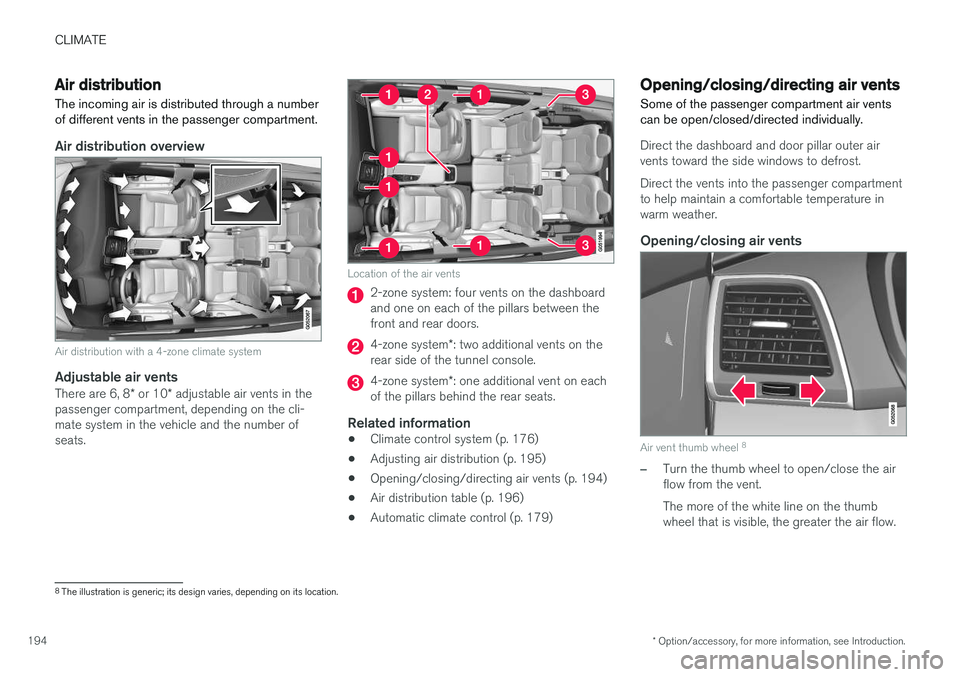
Air distribution overview
Air distribution with a 4-zone climate system
Adjustable air vents
There are 6, 8 * or 10 * adjustable air vents in the
passenger compartment, depending on the cli- mate system in the vehicle and the number ofseats.
Location of the air vents
2-zone system: four vents on the dashboard and one on each of the pillars between thefront and rear doors.
4-zone system *: two additional vents on the
rear side of the tunnel console.
4-zone system *: one additional vent on each
of the pillars behind the rear seats.
Related information
• Climate control system (p. 176)
• Adjusting air distribution (p. 195)
• Opening/closing/directing air vents (p. 194)
• Air distribution table (p. 196)
• Automatic climate control (p. 179)
Opening/closing/directing air vents
Some of the passenger compartment air vents can be open/closed/directed individually.
Direct the dashboard and door pillar outer air vents toward the side windows to defrost. Direct the vents into the passenger compartment to help maintain a comfortable temperature inwarm weather.
Opening/closing air vents
Air vent thumb wheel 8
–Turn the thumb wheel to open/close the air flow from the vent. The more of the white line on the thumb wheel that is visible, the greater the air flow.
8
The illustration is generic; its design varies, depending on its location.