head up display VOLVO XC90 2015 Service Manual
[x] Cancel search | Manufacturer: VOLVO, Model Year: 2015, Model line: XC90, Model: VOLVO XC90 2015Pages: 570, PDF Size: 12.44 MB
Page 277 of 570
DRIVER SUPPORT
275
City Safety warning level settingsCity Safety is always activated but the function's warning distance can be adjusted.
NOTE
City Safety cannot be turned off and activates automatically each time the engine is started.
Setting a warning level (distance)The distance set for warnings determines the system's responsiveness and sets the distance atwhich visual, audible and tangible (haptic) warn-ings will be triggered. If the driver feels that warnings are given too often, the warning level can be lowered. Thismeans that warnings will be provided later, result-ing in fewer warnings being given. To do so:1. Tap
Settings in the center display's Top
view.
2. Tap
My CarIntelliSafeCity Safety.
3. Choose among
Earlier, Normal or Later.
Begin by choosing
Earlier. If too many warnings
are given, change to Normal.
The setting
Later should only used in exceptional
circumstances, e.g., for a more dynamic driving style.
WARNING
• No automatic system can be guaranteed to function 100% correctly in all situa-tions. For that reason, never test CitySafety by driving toward a person orobject. This could result in serious injuryor death.
• Even if the setting
Earlier has been
selected, warnings may be perceived as being given late, e.g., if the difference inspeed is great or if the vehicle aheadbrakes suddenly.
• City Safety can provide a warning for apotential collision but it can never shortenthe driver's reaction time.
• To help make City Safety as effective as possible, always using the setting
Earlieris recommended.
Related information
•City Safety limitations (p. 278)
• City Safety
™ (p. 273)
• Rear Collision Warning (RCW) (p. 277)
Detecting cyclists and pedestrians with City Safety
City Safety can detect vehicles, cyclists and pedestrians.
VehiclesCity Safety detects most types of vehicles that are either stationary, moving in the same direc-tion as your vehicle or approaching when you areabout to turn left. In order for City Safety to detect a vehicle in darkness, its headlights and taillights must be onand clearly visible.
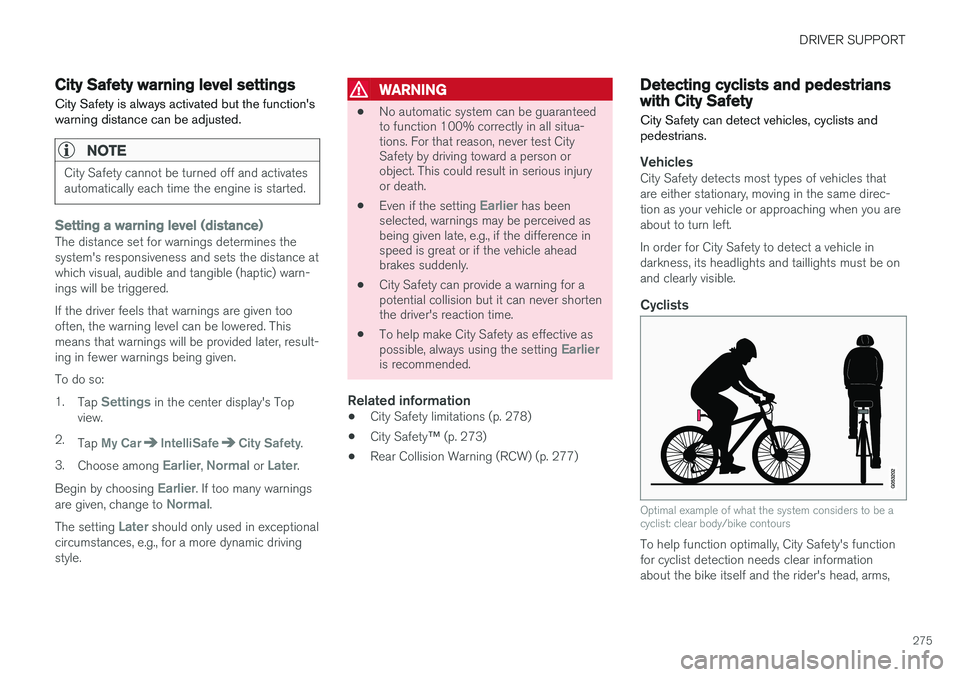
Cyclists
Optimal example of what the system considers to be a cyclist: clear body/bike contours
To help function optimally, City Safety's function for cyclist detection needs clear informationabout the bike itself and the rider's head, arms,
Page 281 of 570

DRIVER SUPPORT
279
HeatIf the temperature in the passenger compartment is very high, the camera and radar sensor may betemporarily turned off for approx. 15 minutesafter the engine has been started to protect theirelectronic components. When the temperaturehas cooled sufficiently, the camera and radarsensor will restart automatically. The visual warning signal may also be temporarily disabled due to high passenger compartmenttemperatures caused by strong sunlight. Warnings may not be given if the distance to the vehicle ahead is short and the driver is activelyoperating the vehicle (clearly depressing a pedalor turning the steering wheel).
Reduced visibilityCity Safety's functions may be greatly impeded or deactivated by e.g., intense snowfall or rain, indense fog, in very dusty conditions or if there isblowing snow in front of the vehicle. Condensa-tion, ice, snow or dirt on the windshield may alsoreduce the system's functionality.
NOTE
•Keep the windshield in front of the radar sensor free of ice, snow, dirt, etc.
• Snow or ice on the hood deeper than2 inches (5 cm) may obstruct the sensor.Keep the hood free of ice and snow.
• Do not mount or in any way attach any-thing on the windshield that couldobstruct the radar sensor.
Camera and radar sensor's field of visionThe camera and radar sensor have limited fields of vision. In some situations they may detect avehicle, pedestrian or cyclist later than expectedor not detect them at all. Other vehicles that are dirty may be detected later than others and in dark conditions, motorcy-cles may be detected late or not at all. If a text message is displayed in the instrument panel indicates that the camera or radar sensorare blocked, it may be difficult for City Safety todetect a vehicle, pedestrian or cyclist and thesystem's functionality may be reduced. Camera and radar sensor components should only be serviced or replaced by a trained andqualified Volvo service technician.
Other limitations
WARNING
• Warnings and braking may be delayed or not occur at all if traffic, weather or otherconditions prevent the camera and/orradar sensor from detecting pedestrians,cyclists or other vehicles correctly.
• Other vehicles can only be detected indarkness if their headlights and taillightsare clearly visible.
• The sensors have a limited range forpedestrians and cyclists. The systemfunctions best at speeds up to 30 mph(50 km/h). For stationary or slow-movingvehicles, the system functions best atspeeds up to approx. 43 mph (70 km/h).
• Warnings for stationary or slow-movingvehicles may be impeded by darkness orpoor visibility.
• Warnings and braking for pedestrians andcyclists will not be provided at speedsabove approx. 50 mph (80 km/h).
• Do not place, attach or mount any objectson the inside or outside of the windshieldnear or over the sensor. This could affectthe camera-based functions.
Page 282 of 570

DRIVER SUPPORT
280
Action by the driver
Backing upCity Safety is temporarily deactivated while the vehicle is backing up.
Low speedCity Safety is not activated at very low speeds (under approx. 3 mph (4 km/h). This means thatthe system will not be triggered if your vehicleapproaches a vehicle ahead, such as when park-ing.
Active driverAction by the driver always has priority. For this reason, City Safety may not react or react laterthan expected in situations in which the driver isactively operating the vehicle, even if a collision isimminent. This is also done to help eliminateexcessive warnings.
Related information
•City Safety
™ (p. 273)
City Safety ™ troubleshooting
Messages pertaining to any possible problems with City Safety will be displayed in the instru-ment panel.
Troubleshooting and remedial action
Location of the camera and the radar sensor
If a message is displayed in the instrument panel saying that the camera/radar sensor is blocked,
City Safety cannot detect vehicles, cyclists orpedestrians ahead of you, which means that thesystem is not functioning properly. However, this message will not be displayed in all situations in which the camera/radar sensor isobstructed. For this reason, the driver mustensure that the area of the windshield in front ofthe camera/radar sensor is always kept clean. The following table shows some of the situationsthat can cause the message to be displayed andsuggested actions.
CauseAction
The area of the wind- shield in front of thecamera/radar sensor isdirty or covered by ice orsnow.Clean the wind- shield or removethe ice/ snow.
Thick fog or heavy rain/ snow blocks reduces thecamera/radar sensor'srange of visibility.No action. The driver should beextra alert in condi-tions of this type.
There is dirt between the inside of the wind-shield and the camera/radar sensor.Have the area of the windshieldcleaned by atrained and quali-fied Volvo servicetechnician.
Page 292 of 570
DRIVER SUPPORT
* Option/accessory, for more information, see Introduction.
290
Turning the Speed Limiter * off
The Speed Limiter (SL) can be turned off.
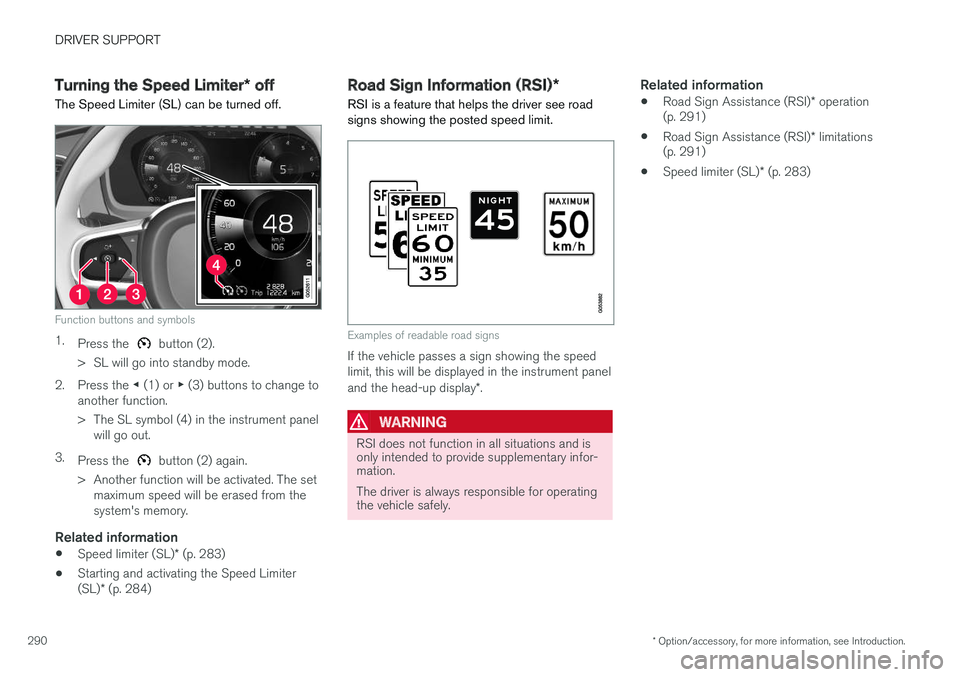
Function buttons and symbols
1. Press the button (2).
> SL will go into standby mode.
2. Press the ◀ (1) or ▶ (3) buttons to change to
another function.
> The SL symbol (4) in the instrument panel will go out.
3. Press the
button (2) again.
> Another function will be activated. The set maximum speed will be erased from the system's memory.
Related information
• Speed limiter (SL)
* (p. 283)
• Starting and activating the Speed Limiter (SL)
* (p. 284)
Road Sign Information (RSI) *
RSI is a feature that helps the driver see road signs showing the posted speed limit.
Examples of readable road signs
If the vehicle passes a sign showing the speed limit, this will be displayed in the instrument panel and the head-up display *.
WARNING
RSI does not function in all situations and is only intended to provide supplementary infor-mation. The driver is always responsible for operating the vehicle safely.
Related information
• Road Sign Assistance (RSI)
* operation
(p. 291)
• Road Sign Assistance (RSI)
* limitations
(p. 291)
• Speed limiter (SL)
* (p. 283)
Page 316 of 570
DRIVER SUPPORT
* Option/accessory, for more information, see Introduction.
314
Distance Alert *
Distance Alert is a function that alerts the driver if the time interval to the vehicle ahead is too short.
Distance Alert is active at speeds above approxi- mately 18 mph (30 km/h) and only reacts to avehicle ahead that is driving in the same direc-tion. No information is provided for vehicles driv-ing toward you, moving very slowly, or at a stand-still.
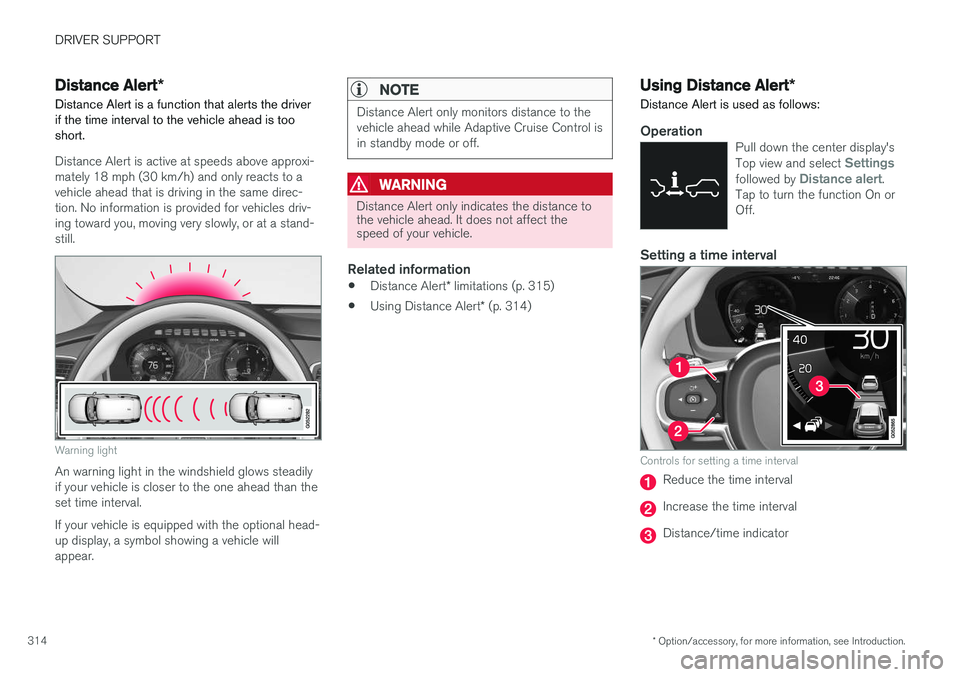
Warning light
An warning light in the windshield glows steadily if your vehicle is closer to the one ahead than theset time interval. If your vehicle is equipped with the optional head- up display, a symbol showing a vehicle willappear.
NOTE
Distance Alert only monitors distance to the vehicle ahead while Adaptive Cruise Control isin standby mode or off.
WARNING
Distance Alert only indicates the distance to the vehicle ahead. It does not affect thespeed of your vehicle.
Related information
• Distance Alert
* limitations (p. 315)
• Using Distance Alert
* (p. 314)
Using Distance Alert *
Distance Alert is used as follows:
OperationPull down the center display's Top view and select Settingsfollowed by Distance alert.
Tap to turn the function On or Off.
Setting a time interval
Controls for setting a time interval
Reduce the time interval
Increase the time interval
Distance/time indicator
Page 321 of 570
DRIVER SUPPORT
* Option/accessory, for more information, see Introduction.319
•
An audible signal indicates that CTA has detected something that is approaching fromthe side. The signal will come from either theleft or right infotainment system speakers,depending on which the side of your vehiclethe approaching vehicle/ object has beendetected.
• A warning is indicated using the Park Assist
*
system's graphic in the instrument panel.
• An icon is also shown in the Park Assist Camera's
* Top view.
Related information
• Activating/deactivating Cross Traffic Alert(CTA)
* (p. 319)
• Blind Spot Information (BLIS)
* with Cross
Traffic Alert (CTA) * symbols and messages
(p. 322)
• Cross Traffic Alert (CTA)
* limitations (p. 320)
Activating/deactivating Cross Traffic Alert (CTA) *
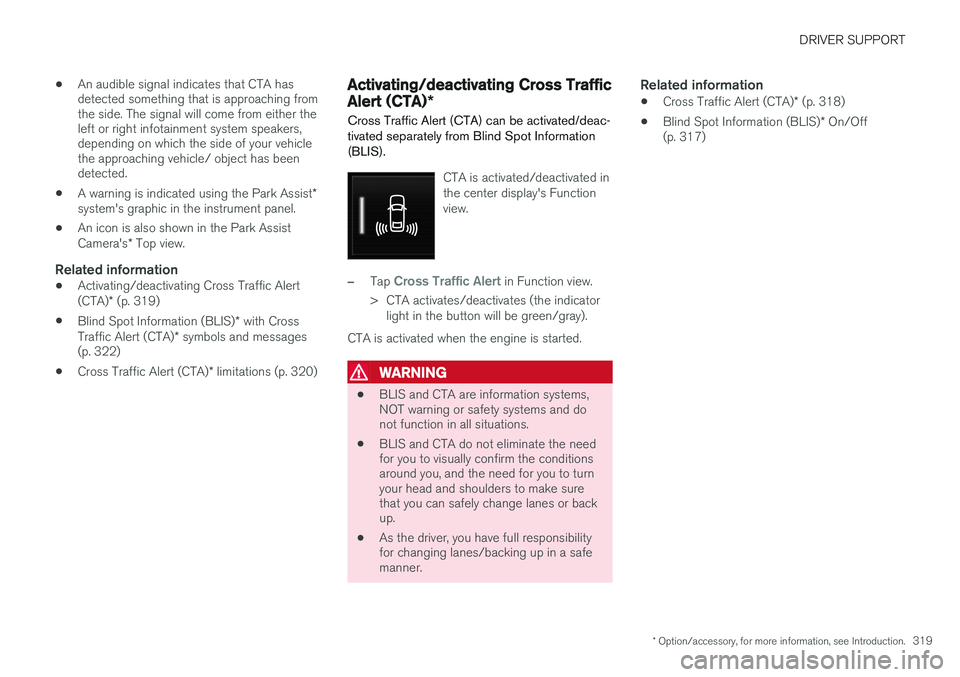
Cross Traffic Alert (CTA) can be activated/deac- tivated separately from Blind Spot Information(BLIS).
CTA is activated/deactivated in the center display's Functionview.
–Tap Cross Traffic Alert in Function view.
> CTA activates/deactivates (the indicator light in the button will be green/gray).
CTA is activated when the engine is started.
WARNING
• BLIS and CTA are information systems, NOT warning or safety systems and donot function in all situations.
• BLIS and CTA do not eliminate the needfor you to visually confirm the conditionsaround you, and the need for you to turnyour head and shoulders to make surethat you can safely change lanes or backup.
• As the driver, you have full responsibilityfor changing lanes/backing up in a safemanner.
Related information
•
Cross Traffic Alert (CTA)
* (p. 318)
• Blind Spot Information (BLIS)
* On/Off
(p. 317)
Page 333 of 570
STARTING AND DRIVING
* Option/accessory, for more information, see Introduction.331
Driving on wet or salted roadsProlonged driving on wet or salted roads can affect brake function and increase stopping dis-tance. Be sure to keep a safe distance to thevehicle ahead when driving under these condi-tions.
Brake pad inspection
On vehicles equipped with a jack*, the condition
of the brake pads can be checked by raising thevehicle and performing a visual inspection of thebrake pads.
WARNING
• If the vehicle has been driven immediately prior to a brake pad inspection, the wheelhub, brake components, etc., will be veryhot. Allow time for these components tocool before carrying out the inspection.
• Apply the parking brake and put the gear selector in the Park (
P) position.
• Block the wheels standing on the ground, use rigid wooden blocks or large stones.
WARNING
•
Use the jack intended for the vehicle when changing a tire. For any other job,use stands to support the vehicle.
• The jack should be kept well-greased andclean, and should not be damaged.
• Be sure the jack is on a firm, level, non-slippery surface.
• No objects should be placed between thebase of jack and the ground, or betweenthe jack and the attachment bar on thevehicle.
• The jack must correctly engage the jackattachment.
• Never allow any part of your body to beextended under a vehicle supported by ajack.
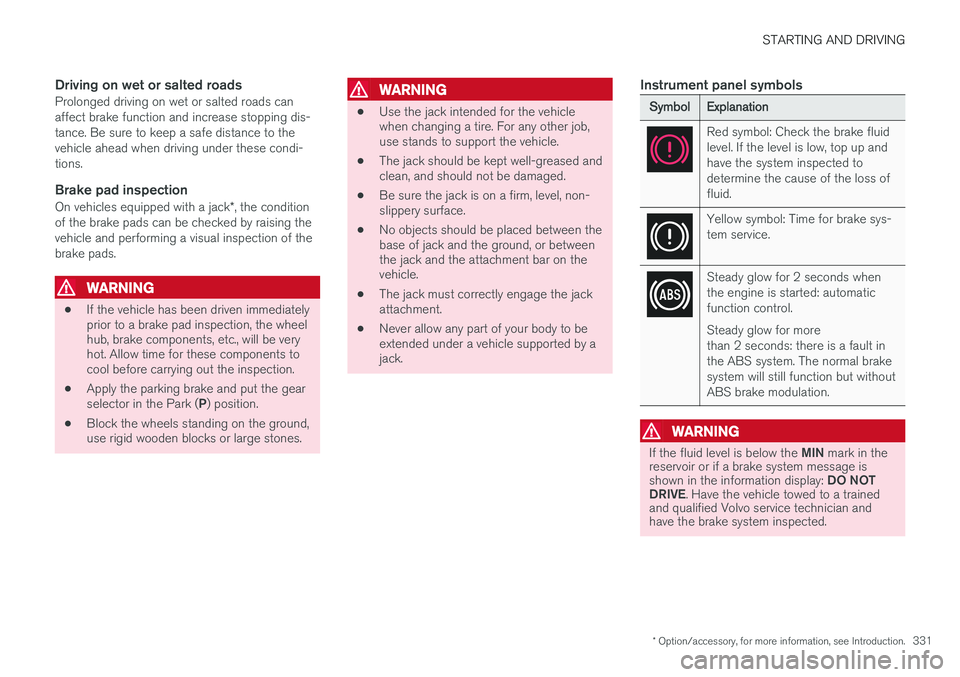
Instrument panel symbols
SymbolExplanation
Red symbol: Check the brake fluid level. If the level is low, top up andhave the system inspected todetermine the cause of the loss offluid.
Yellow symbol: Time for brake sys- tem service.
Steady glow for 2 seconds when the engine is started: automaticfunction control. Steady glow for more than 2 seconds: there is a fault inthe ABS system. The normal brakesystem will still function but withoutABS brake modulation.
WARNING
If the fluid level is below the
MIN mark in the
reservoir or if a brake system message is shown in the information display: DO NOT
DRIVE . Have the vehicle towed to a trained
and qualified Volvo service technician and have the brake system inspected.
Page 357 of 570
STARTING AND DRIVING
* Option/accessory, for more information, see Introduction.355
Ignition modes
The vehicle's ignition can be put in various modes (levels) to make different functions availa-ble.
The vehicle's ignition has 3 modes: 0, I, and II
that can be used to operate various functions without starting the engine. The following tableshows examples of which functions are availablein the respective modes.
ModeFunctions available
0• The odometer, clock and tem- perature gauge are illuminated
• Power seats
* can be adjusted
• The power windows can be oper-ated
• The 12-volt socket in the cargocompartment can be used
• The center display is activatedand can be used
• The infotainment system can beused for a limited time
In this mode, certain functions can only be used for a limited time to helpminimize battery drain
I• The laminated panoramic roof
*,
power seats */windows,12-volt
sockets in the passenger com- partment, Bluetooth, navigation system *, climate system blower,
windshield wipers can be oper- ated
• The infotainment system will start(if it was started when the ignitionwas switched off)
ModeFunctions available
II• The headlights illuminate
• Warning/indicator lights illumi- nate for 5 seconds
• A number of other functions willalso be activated. However, the heated seats
* and heated rear
window functions can only be activated when the engine is run-ning.
This mode should only be used for very short periods to help avoiddraining the battery.
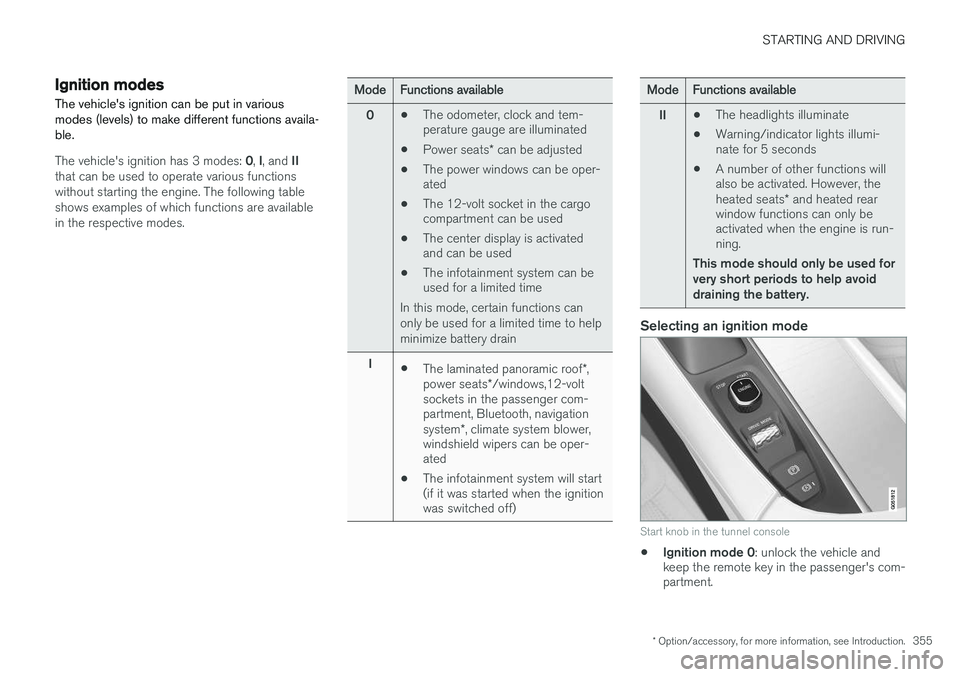
Selecting an ignition mode
Start knob in the tunnel console
• Ignition mode 0
: unlock the vehicle and
keep the remote key in the passenger's com- partment.
Page 394 of 570
INFOTAINMENT
* Option/accessory, for more information, see Introduction.
392
Sending text messages
1.
From App view, tap Messages to open.
2. •To reply to a message: tap the name of the contact who sent the message and then tap
Answer.
• To create a new message: tap
Create
new
+. Select the contact who will
receive the message or enter a phone number.
3. Write the message. 4. Tap
Send.
Message notificationSee the article "Text message settings" for a list of possible settings.
Related information
• Text message settings (p. 392)
Phone settings
The following settings can be made for a paired and connected cell phone.
Cell phones
–Pull down the center display's Top view and tap
SettingsCommunicationPhoneand choose among the following settings: •
Ringtones: select a ring tone (tones from
the cell phone or the vehicle can be used). Not all cell phones are fully com-patible and it may not be possible to usetheir ring tones in the vehicle. Go towww.volvocars.com for additional informa-tion.
•
Sort order for contacts: select sort cri-
teria for the phone book (list of contacts).
To show call notifications in the head-up dis- play *, see the article "Head-up display."
Related information
• Text message settings (p. 392)
• Bluetooth settings (p. 404)
• Phone (p. 387)
• Handling phone calls (p. 390)
• Head-up display (HUD)
* (p. 117)
Text message settings
The following settings can be made for text mes- sages received through a paired and connectedcell phone.
Text message settings
–Pull down the center display's Top view and tap
SettingsCommunicationText
Messages and choose among the following
settings:
•
Notification in center display: shows
text messages in the center display's sta- tus bar.
•
Notification in driver display: shows
text messages in the instrument panel. With this alternative active, incoming mes-sages can be handled from the right-sidesteering wheel keypad.
•
Text message tone: select an audible
signal for incoming text messages.
Related information
• Connecting/disconnecting a cell phone (p. 389)
• Pairing a cell phone (p. 387)
• Handling text messages (p. 391)
Page 430 of 570
NAVIGATION*
* Option/accessory, for more information, see Introduction.
428
Sensus Navigation
Sensus Navigation enables you to set itineraries, search for certain types of points of interestalong your route, store special destinations,obtain traffic information en route, etc.
Sensus Navigation shows the vehicle's exact location and if you deviate from the set route, thesystem can make the necessary adjustments toguide you to your destination. Being familiar with the contents of this manual will help you to fully utilize the features and func-tions offered by Sensus Navigation. By enabling you to reach your destination quickly and by the most direct route, Sensus Navigationalso helps contribute to improving the environ-ment.
Related information
• Getting started with Sensus Navigation (p. 432)
• Buttons and information on the map (p. 428)
Buttons and information on the map
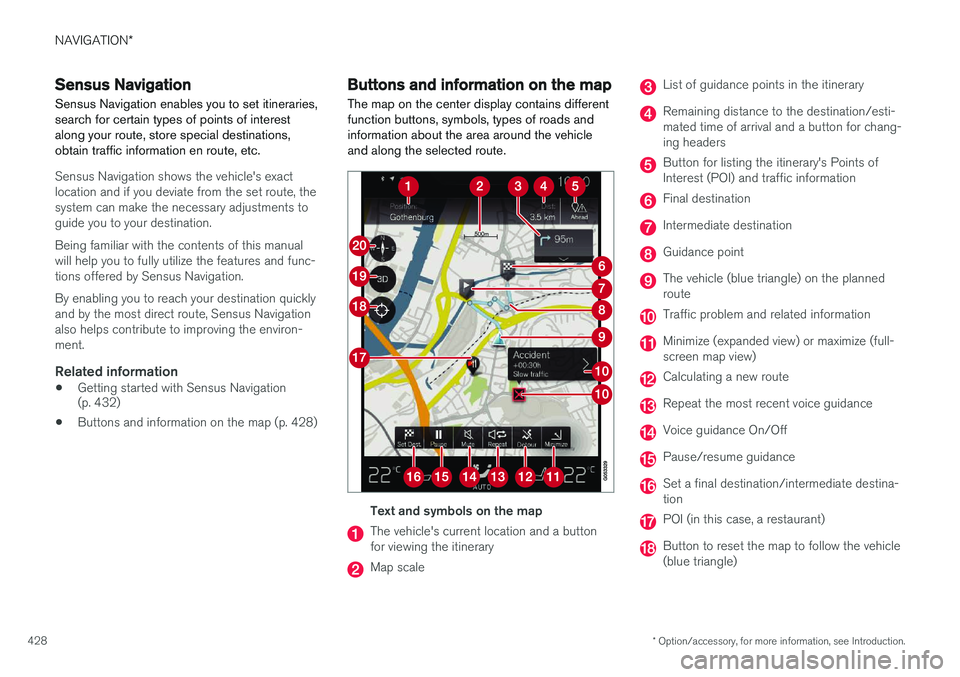
The map on the center display contains different function buttons, symbols, types of roads andinformation about the area around the vehicleand along the selected route.
Text and symbols on the map
The vehicle's current location and a button for viewing the itinerary
Map scale
List of guidance points in the itinerary
Remaining distance to the destination/esti- mated time of arrival and a button for chang-ing headers
Button for listing the itinerary's Points of Interest (POI) and traffic information
Final destination
Intermediate destination
Guidance point
The vehicle (blue triangle) on the planned route
Traffic problem and related information
Minimize (expanded view) or maximize (full- screen map view)
Calculating a new route
Repeat the most recent voice guidance
Voice guidance On/Off
Pause/resume guidance
Set a final destination/intermediate destina- tion
POI (in this case, a restaurant)
Button to reset the map to follow the vehicle (blue triangle)