ESP VOLVO XC90 T8 2016 Owner´s Manual
[x] Cancel search | Manufacturer: VOLVO, Model Year: 2016, Model line: XC90 T8, Model: VOLVO XC90 T8 2016Pages: 546, PDF Size: 10.26 MB
Page 151 of 546
INSTRUMENTS AND CONTROLS
}}
* Option/accessory, for more information, see Introduction.149
Courtesy lighting (AUTO) switch
Passenger's side reading light
Front reading lights
Turn the reading lights on or off by pressing the respective buttons briefly. Adjust the brightnessby pressing and holding the button.
Courtesy lighting
Turn the footwell and overhead courtesy lighting on or off by pressing the button briefly.
Courtesy lighting switch
Activate the automatic function by briefly press- ing the AUTO button in the ceiling console. The
indicator light in the button will illuminate. WithAUTO activated, the courtesy lighting will switch
on and off as follows: The courtesy lighting: • comes on when the vehicle is unlocked and when the ignition is switched off
• goes off when the engine is started andwhen the vehicle is locked
• comes on or goes off when one of the sidedoors is opened or closed
• remains on for 2 minutes if a side door isopen
The courtesy lighting switches off when:
Rear interior lighting
Rear reading lights
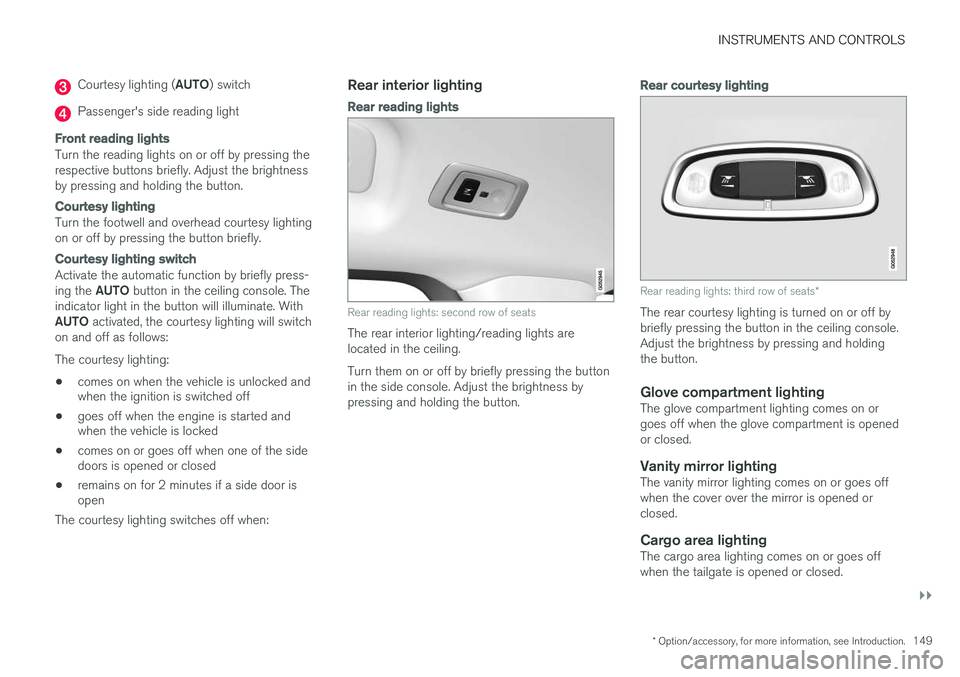
Rear reading lights: second row of seats
The rear interior lighting/reading lights are located in the ceiling. Turn them on or off by briefly pressing the button in the side console. Adjust the brightness bypressing and holding the button.
Rear courtesy lighting
Rear reading lights: third row of seats *
The rear courtesy lighting is turned on or off by briefly pressing the button in the ceiling console.Adjust the brightness by pressing and holdingthe button.
Glove compartment lightingThe glove compartment lighting comes on orgoes off when the glove compartment is openedor closed.
Vanity mirror lightingThe vanity mirror lighting comes on or goes offwhen the cover over the mirror is opened orclosed.
Cargo area lightingThe cargo area lighting comes on or goes offwhen the tailgate is opened or closed.
Page 191 of 546
CLIMATE
}}
* Option/accessory, for more information, see Introduction.189
Climate system controls in the center display
All climate system functions can be controlled from the center display's climate bar and Cli-mate view.
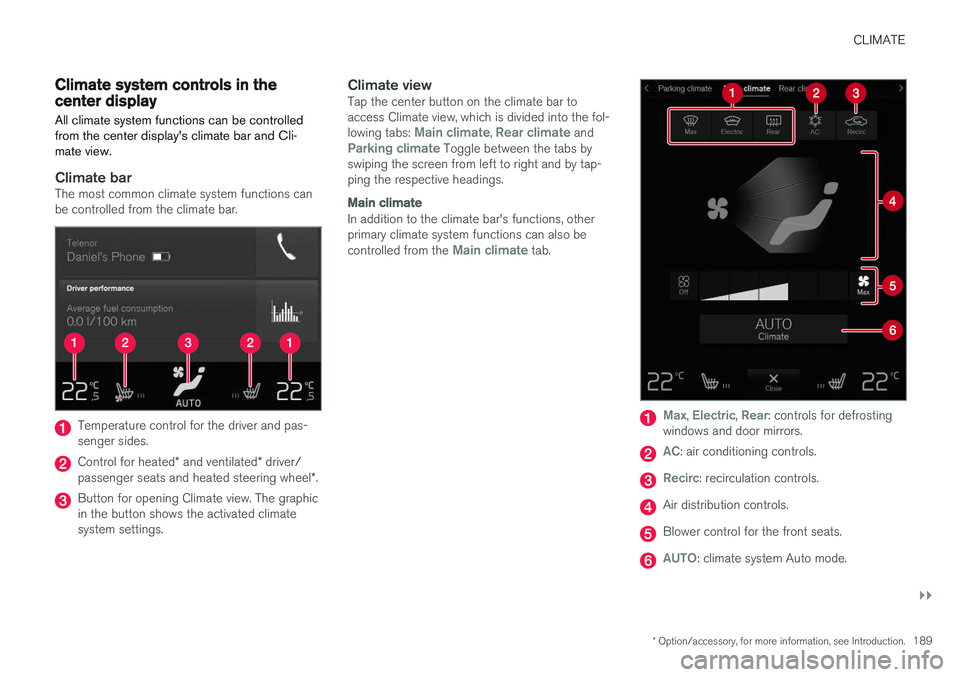
Climate barThe most common climate system functions can be controlled from the climate bar.
Temperature control for the driver and pas- senger sides.
Control for heated * and ventilated * driver/
passenger seats and heated steering wheel *.
Button for opening Climate view. The graphic in the button shows the activated climatesystem settings.
Climate viewTap the center button on the climate bar toaccess Climate view, which is divided into the fol- lowing tabs:
Main climate, Rear climate andParking climate Toggle between the tabs by
swiping the screen from left to right and by tap- ping the respective headings.
Main climate
In addition to the climate bar's functions, other primary climate system functions can also be controlled from the
Main climate tab.
Max, Electric, Rear: controls for defrosting
windows and door mirrors.
AC: air conditioning controls.
Recirc: recirculation controls.
Air distribution controls.
Blower control for the front seats.
AUTO: climate system Auto mode.
Page 196 of 546
||
CLIMATE
194
From the rear seat
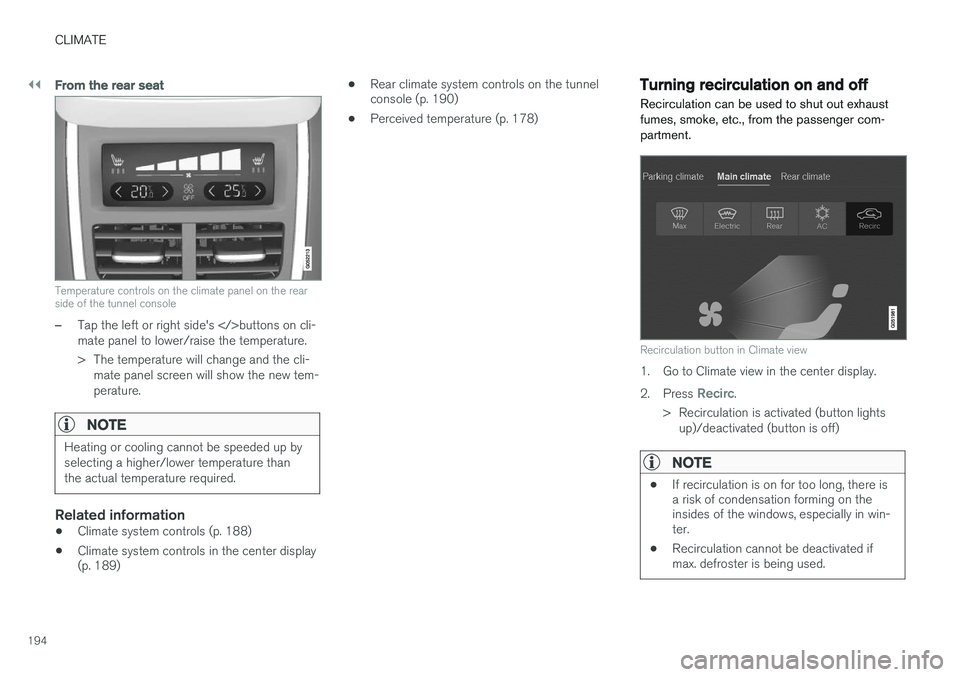
Temperature controls on the climate panel on the rear side of the tunnel console
–Tap the left or right side's buttons on cli-
mate panel to lower/raise the temperature.
> The temperature will change and the cli- mate panel screen will show the new tem- perature.
NOTE
Heating or cooling cannot be speeded up by selecting a higher/lower temperature thanthe actual temperature required.
Related information
• Climate system controls (p. 188)
• Climate system controls in the center display (p. 189) •
Rear climate system controls on the tunnelconsole (p. 190)
• Perceived temperature (p. 178)
Turning recirculation on and off
Recirculation can be used to shut out exhaust fumes, smoke, etc., from the passenger com-partment.
Recirculation button in Climate view
1. Go to Climate view in the center display. 2. Press
Recirc.
> Recirculation is activated (button lights up)/deactivated (button is off)
NOTE
• If recirculation is on for too long, there is a risk of condensation forming on theinsides of the windows, especially in win-ter.
• Recirculation cannot be deactivated ifmax. defroster is being used.
Page 199 of 546
CLIMATE
* Option/accessory, for more information, see Introduction.197
2. Activate/deactivate the respective defroster
functions when the engine is started by selecting/deselecting the boxes for
Auto
Electric Front Defroster and Auto Electric
Rear Defroster.
The heating function will switch off automatically when the window/mirror is sufficiently warm andthe ice/condensation has disappeared.
Related information
• Climate system controls (p. 188)
• Climate system controls in the center display (p. 189)
• Defrosting windows and mirrors (p. 195)
• Air conditioning (p. 198)
• Turning recirculation on and off (p. 194)
• Adjusting air distribution (p. 202)
• Setting the blower speed (p. 191)
• Automatic climate control (p. 187)
• Turning front seat ventilation
* on and off
(p. 200)
• Turning steering wheel heating
* on and off
(p. 197)
Turning steering wheel heating * on
and off
The steering wheel can be heated electrically for added comfort in cold weather.
Activating/deactivating steering wheel
heating
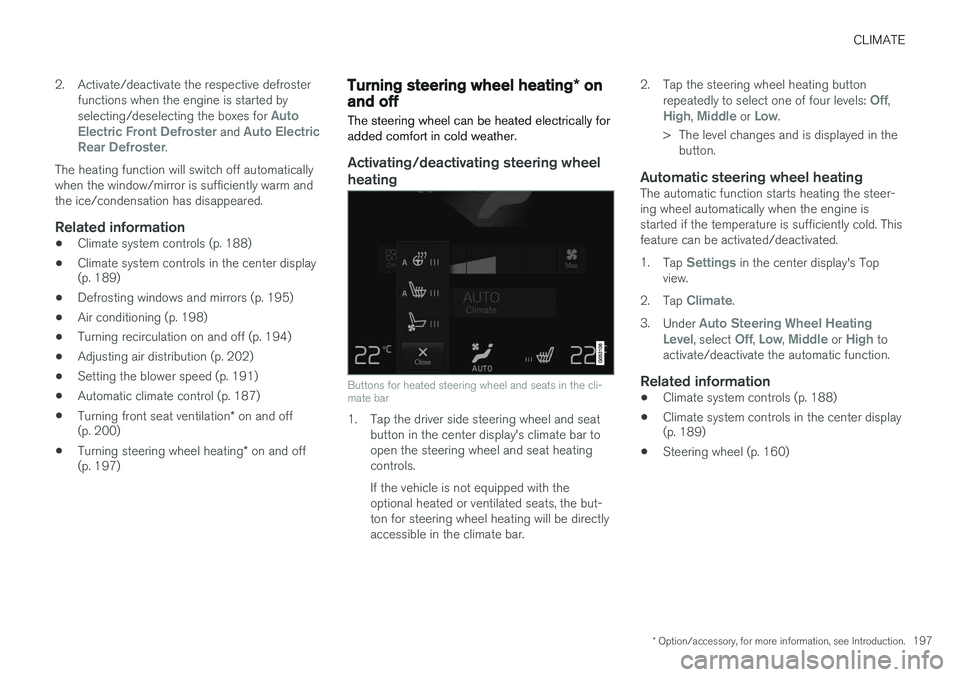
Buttons for heated steering wheel and seats in the cli- mate bar
1. Tap the driver side steering wheel and seat button in the center display's climate bar to open the steering wheel and seat heatingcontrols. If the vehicle is not equipped with the optional heated or ventilated seats, the but-ton for steering wheel heating will be directlyaccessible in the climate bar. 2. Tap the steering wheel heating button
repeatedly to select one of four levels:
Off,High, Middle or Low.
> The level changes and is displayed in the button.
Automatic steering wheel heatingThe automatic function starts heating the steer- ing wheel automatically when the engine isstarted if the temperature is sufficiently cold. Thisfeature can be activated/deactivated. 1. Tap
Settings in the center display's Top
view.
2. Tap
Climate.
3. Under
Auto Steering Wheel Heating
Level, select Off, Low, Middle or High to
activate/deactivate the automatic function.
Related information
• Climate system controls (p. 188)
• Climate system controls in the center display (p. 189)
• Steering wheel (p. 160)
Page 204 of 546
CLIMATE
202
Opening/closing/directing air vents
Some of the passenger compartment air vents can be open/closed/directed individually.
Direct the dashboard and door pillar outer air vents toward the side windows to defrost. Direct the vents into the passenger compartment to help maintain a comfortable temperature inwarm weather.
Opening/closing air vents
Air vent thumb wheel 6
–Turn the thumb wheel to open/close the air flow from the vent. The more of the white line on the thumb wheel that is visible, the greater the air flow.
Directing air flow
Air flow control 6
–Move the control from side to side or up/ down to direct the flow of air from the vent.
Related information
•
Air distribution (p. 201)
• Adjusting air distribution (p. 202)
• Air distribution table (p. 204)
Adjusting air distribution
Air distribution can be adjusted manually.
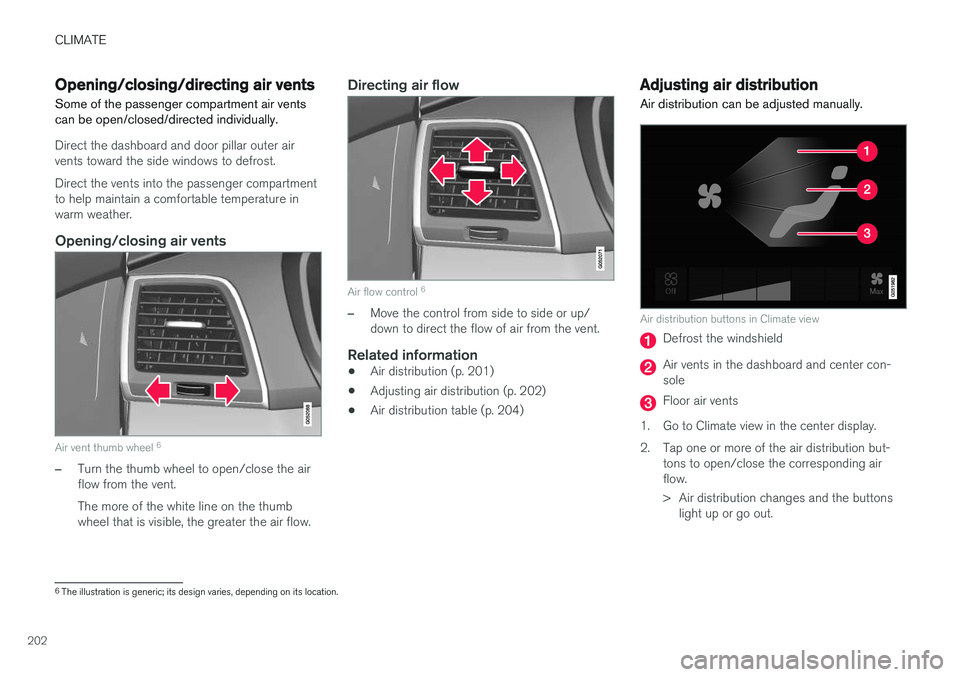
Air distribution buttons in Climate view
Defrost the windshield
Air vents in the dashboard and center con- sole
Floor air vents
1. Go to Climate view in the center display.
2. Tap one or more of the air distribution but- tons to open/close the corresponding air flow.
> Air distribution changes and the buttonslight up or go out.
6The illustration is generic; its design varies, depending on its location.
Page 218 of 546
||
LOADING AND STORAGE
* Option/accessory, for more information, see Introduction.
216
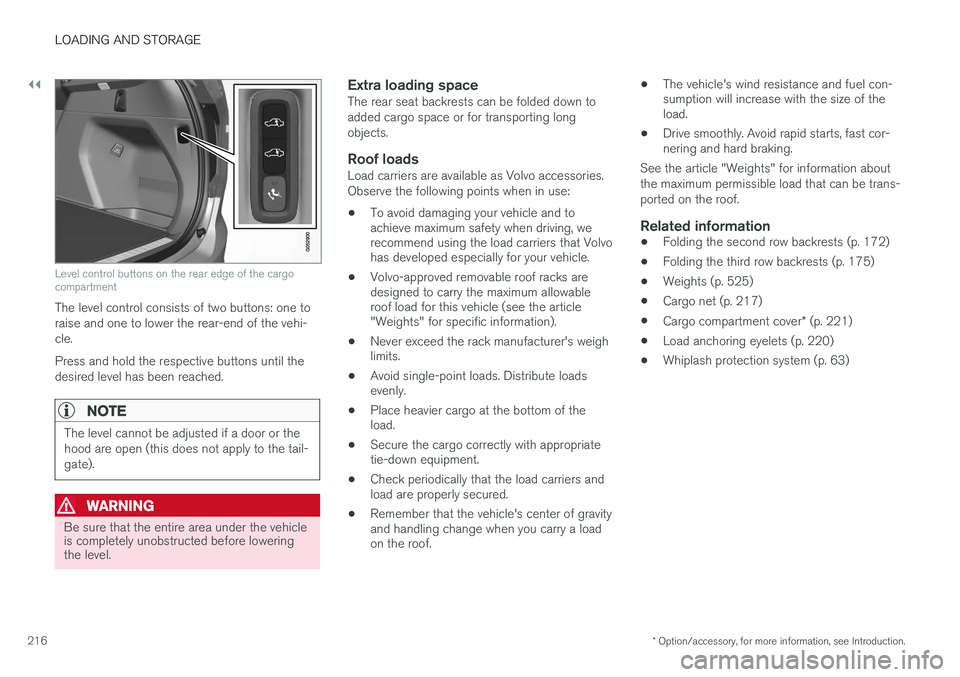
Level control buttons on the rear edge of the cargo compartment
The level control consists of two buttons: one to raise and one to lower the rear-end of the vehi-cle. Press and hold the respective buttons until the desired level has been reached.
NOTE
The level cannot be adjusted if a door or the hood are open (this does not apply to the tail-gate).
WARNING
Be sure that the entire area under the vehicle is completely unobstructed before loweringthe level.
Extra loading spaceThe rear seat backrests can be folded down to added cargo space or for transporting longobjects.
Roof loadsLoad carriers are available as Volvo accessories.Observe the following points when in use:
• To avoid damaging your vehicle and to achieve maximum safety when driving, werecommend using the load carriers that Volvohas developed especially for your vehicle.
• Volvo-approved removable roof racks aredesigned to carry the maximum allowableroof load for this vehicle (see the article"Weights" for specific information).
• Never exceed the rack manufacturer's weighlimits.
• Avoid single-point loads. Distribute loadsevenly.
• Place heavier cargo at the bottom of theload.
• Secure the cargo correctly with appropriatetie-down equipment.
• Check periodically that the load carriers andload are properly secured.
• Remember that the vehicle's center of gravityand handling change when you carry a loadon the roof. •
The vehicle's wind resistance and fuel con-sumption will increase with the size of theload.
• Drive smoothly. Avoid rapid starts, fast cor-nering and hard braking.
See the article "Weights" for information about the maximum permissible load that can be trans-ported on the roof.
Related information
• Folding the second row backrests (p. 172)
• Folding the third row backrests (p. 175)
• Weights (p. 525)
• Cargo net (p. 217)
• Cargo compartment cover
* (p. 221)
• Load anchoring eyelets (p. 220)
• Whiplash protection system (p. 63)
Page 220 of 546
||
LOADING AND STORAGE
218
WARNING
•Objects in the cargo compartment should always be securely anchored.
• The nets upper hooks must be securelyinserted into the ceiling mounting pointsand the lower spring hooks must besecurely hooked onto the cargo anchor-ing eyelets.
• A damaged net must never be used.
Attaching1. Fold out the cargo net and fold out the upper
rod. Be sure it locks in position.
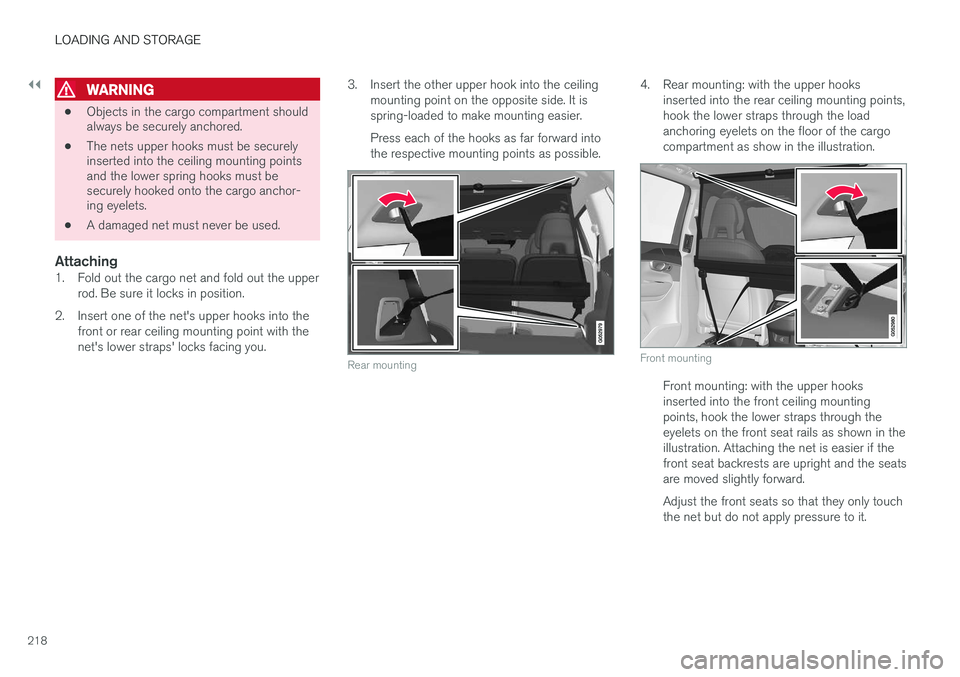
2. Insert one of the net's upper hooks into the front or rear ceiling mounting point with the net's lower straps' locks facing you. 3. Insert the other upper hook into the ceiling
mounting point on the opposite side. It isspring-loaded to make mounting easier. Press each of the hooks as far forward into the respective mounting points as possible.
Rear mounting
4. Rear mounting: with the upper hooks inserted into the rear ceiling mounting points, hook the lower straps through the loadanchoring eyelets on the floor of the cargocompartment as show in the illustration.
Front mounting
Front mounting: with the upper hooks inserted into the front ceiling mountingpoints, hook the lower straps through theeyelets on the front seat rails as shown in theillustration. Attaching the net is easier if thefront seat backrests are upright and the seatsare moved slightly forward. Adjust the front seats so that they only touch the net but do not apply pressure to it.
Page 221 of 546
LOADING AND STORAGE
}}
* Option/accessory, for more information, see Introduction.219
CAUTION
Pressure from the front seats against the cargo net could damage the net and/or itsbrackets.
5. Pull the lower straps taut.
Removing and storing
1. Reduce tension on the net by pressing the
button on the lower straps' respective locks and allow some slack on both sides.
2. Press in the catches and release both of the straps' hooks.
3. Remove the upper hooks from the ceiling mounting points.
4. Press the red button on the upper rod to allow it to fold.
5. Fold and roll up the net. Store the net under the cargo compartment floor.
Related information
• Cargo compartment cover
* (p. 221)
• Load anchoring eyelets (p. 220)
• Steel cargo grid
* (p. 219)
• Loading (p. 215)
Steel cargo grid
*
Your vehicle can be equipped with a steel grid that helps prevent objects in the cargo area frommoving forward into the passenger compart-ment.
The steel grid is made up of the grid itself and two separate mounting brackets. Each of thebrackets has a screw cover and there are twoplastic sleeves for the grid.
WARNING
• No one should ever be allowed to remain in the cargo compartment when the vehi-cle is moving.
• The steel grid may only be used in therear position described in this article. Theceiling attachment points above the front seats are
not intended to anchor the
steel grid.
• The third row of seats (7-seat models
*
only): these seats must be folded down when the steel grid is mounted in thevehicle.
• After being mounted, be sure that thesteel grid is securely anchored in place.
Mounting1. Fold down the rear seats (second row of
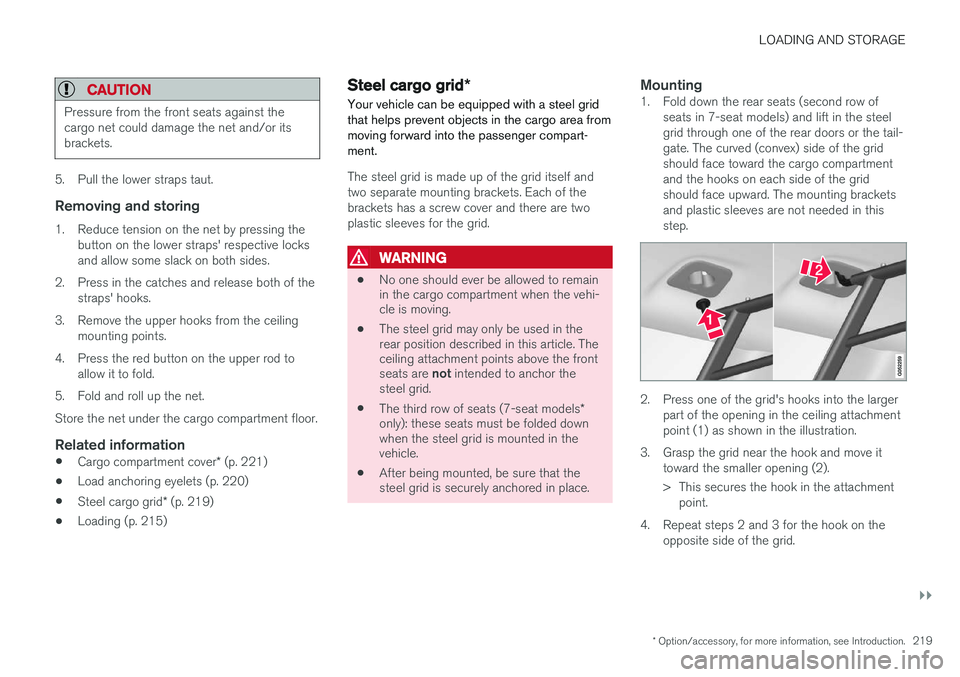
seats in 7-seat models) and lift in the steel grid through one of the rear doors or the tail-gate. The curved (convex) side of the gridshould face toward the cargo compartmentand the hooks on each side of the gridshould face upward. The mounting bracketsand plastic sleeves are not needed in thisstep.
2. Press one of the grid's hooks into the largerpart of the opening in the ceiling attachment point (1) as shown in the illustration.
3. Grasp the grid near the hook and move it toward the smaller opening (2).
> This secures the hook in the attachmentpoint.
4. Repeat steps 2 and 3 for the hook on the opposite side of the grid.
Page 231 of 546
LOCKS AND ALARM
229
2. Press the button on the driver's door control
panel. >
Rear child lock Activated will be dis-
played in the instrument panel and the indicator light in the button will illuminateto show that the child safety locking func-tion is activated.
While the child safety locks are activated:
• the rear door windows can only be opened from the driver door control panel
• the rear doors cannot be opened from theinside
To deactivate:
–Press the button in the driver door control panel. >
Rear child lock Deactivated will be dis-
played in the instrument panel and the indicator light in the button will go out toshow that the child safety locking functionis deactivated.
When the ignition is switched off, the current set-ting for the child safety locks will be stored. If thelocks were activated at that time, they will con-tinue to be activated when the ignition isswitched on again.
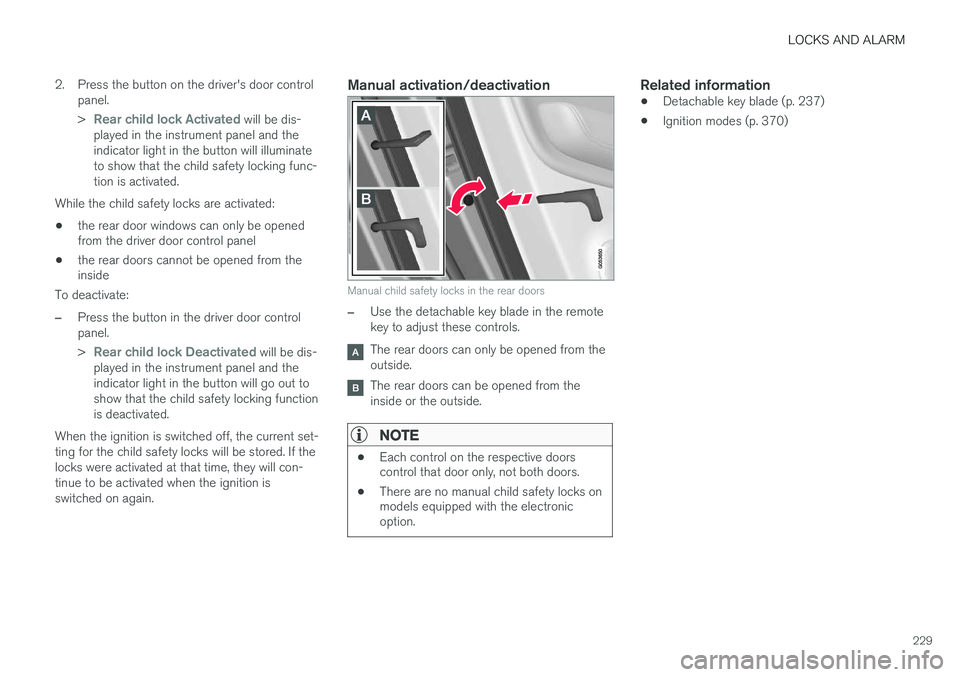
Manual activation/deactivation
Manual child safety locks in the rear doors
–Use the detachable key blade in the remote key to adjust these controls.
The rear doors can only be opened from the outside.
The rear doors can be opened from the inside or the outside.
NOTE
• Each control on the respective doors control that door only, not both doors.
• There are no manual child safety locks onmodels equipped with the electronicoption.
Related information
• Detachable key blade (p. 237)
• Ignition modes (p. 370)
Page 233 of 546
LOCKS AND ALARM
* Option/accessory, for more information, see Introduction.231
(1) This device may not cause harmful interfer- ence, and (2) this device must accept any interference received, including interference that may causeundesired operation. Any changes or modification not expressly approved by the party responsible for compliancecould void the user