ECU VOLVO XC90 T8 2018 Owner´s Manual
[x] Cancel search | Manufacturer: VOLVO, Model Year: 2018, Model line: XC90 T8, Model: VOLVO XC90 T8 2018Pages: 686, PDF Size: 11.51 MB
Page 195 of 686
SEATS AND STEERING WHEEL
}}
193
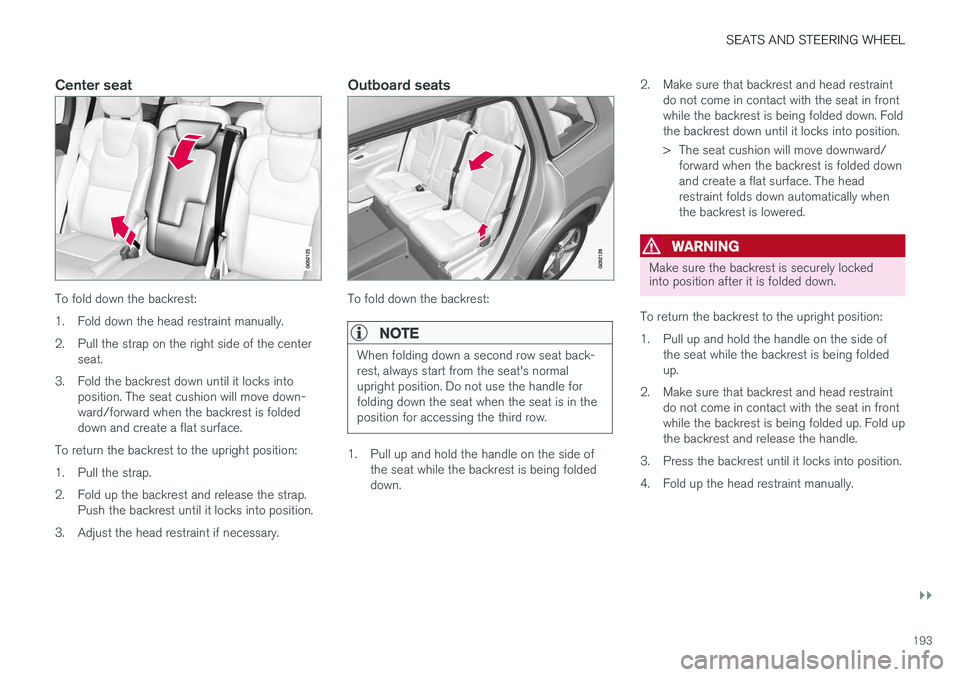
Center seat
To fold down the backrest:
1. Fold down the head restraint manually.
2. Pull the strap on the right side of the centerseat.
3. Fold the backrest down until it locks into position. The seat cushion will move down- ward/forward when the backrest is foldeddown and create a flat surface.
To return the backrest to the upright position:
1. Pull the strap.
2. Fold up the backrest and release the strap. Push the backrest until it locks into position.
3. Adjust the head restraint if necessary.
Outboard seats
To fold down the backrest:
NOTE
When folding down a second row seat back- rest, always start from the seat's normalupright position. Do not use the handle forfolding down the seat when the seat is in theposition for accessing the third row.
1. Pull up and hold the handle on the side of the seat while the backrest is being folded down. 2. Make sure that backrest and head restraint
do not come in contact with the seat in frontwhile the backrest is being folded down. Foldthe backrest down until it locks into position.
> The seat cushion will move downward/forward when the backrest is folded down and create a flat surface. The headrestraint folds down automatically whenthe backrest is lowered.
WARNING
Make sure the backrest is securely locked into position after it is folded down.
To return the backrest to the upright position:
1. Pull up and hold the handle on the side of the seat while the backrest is being folded up.
2. Make sure that backrest and head restraint do not come in contact with the seat in frontwhile the backrest is being folded up. Fold upthe backrest and release the handle.
3. Press the backrest until it locks into position.
4. Fold up the head restraint manually.
Page 196 of 686
||
SEATS AND STEERING WHEEL
* Option/accessory.
194
WARNING
Make sure that the rear seat backrest and head restraint are locked securely in placeafter the seat is folded up. The head restraints at the outer seats must always be raised when there is a passenger inone of these spots of the rear seat.
WARNING
The head restraints on the outboard second- row seats must always be folded up whenthere are passengers in the third row of seats *.
Related information
• Adjusting the second row head restraints (p. 194)
• Moving the second row seats forward/rear- ward
* (p. 195)
• Adjusting the second row backrest tilt (p. 196)
• Getting into and out of the third row of seats
* (p. 197)
• Folding the third row backrests
* (p. 198)
Adjusting the second row headrestraints
Adjust the center head restraint in the rear seat to the seat occupant's height. Fold down the outboard head restraints * to improve rear visibil-
ity.
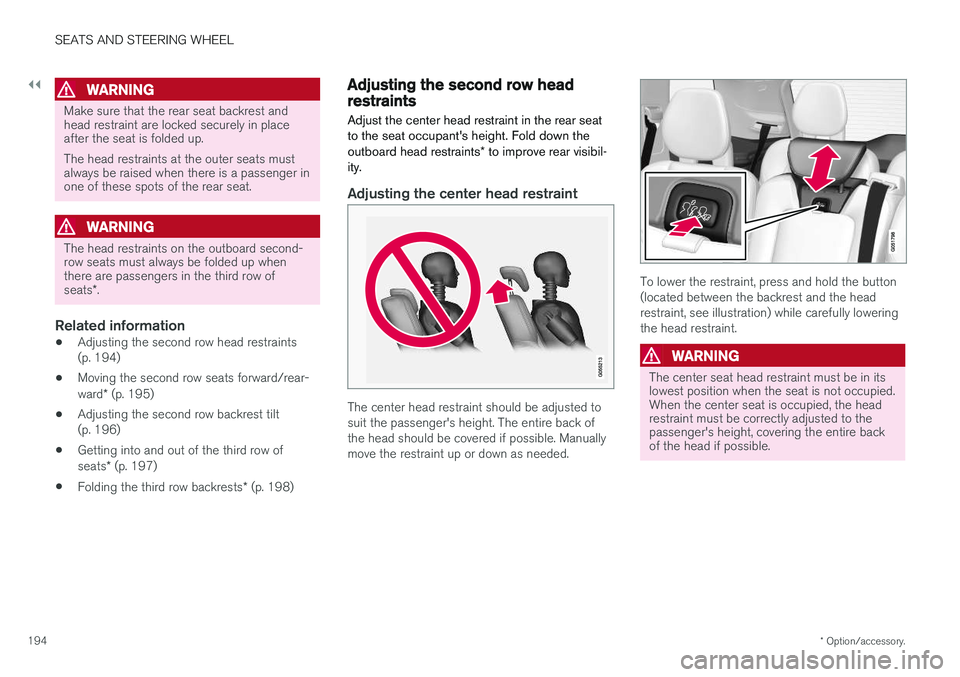
Adjusting the center head restraint
The center head restraint should be adjusted to suit the passenger's height. The entire back ofthe head should be covered if possible. Manuallymove the restraint up or down as needed.
To lower the restraint, press and hold the button (located between the backrest and the headrestraint, see illustration) while carefully loweringthe head restraint.
WARNING
The center seat head restraint must be in its lowest position when the seat is not occupied.When the center seat is occupied, the headrestraint must be correctly adjusted to thepassenger's height, covering the entire backof the head if possible.
Page 197 of 686
SEATS AND STEERING WHEEL
}}
* Option/accessory.195
Electrically folding down the rear seat's outboard head restraints *
The outer head restraints can be folded via the center display's function view. The head restraintcan be folded down when the vehicle is in igni- tion mode 0.
Tap the
Headrest Fold button
to activate/deactivate folding.
Manually push the head restraint until it clicks into position.
WARNING
Do not lower the head restraint if there are passengers in any of the rear seats.
WARNING
The head restraint must be locked in the upright position after it has been folded up.
WARNING
The head restraints on the outboard second- row seats must always be folded up whenthere are passengers in the third row of seats *.
Related information
• Folding the second row backrests (p. 192)
• Moving the second row seats forward/rear- ward
* (p. 195)
• Adjusting the second row backrest tilt (p. 196)
• Getting into and out of the third row of seats
* (p. 197)
• Folding the third row backrests
* (p. 198)
Moving the second row seats
forward/rearward *
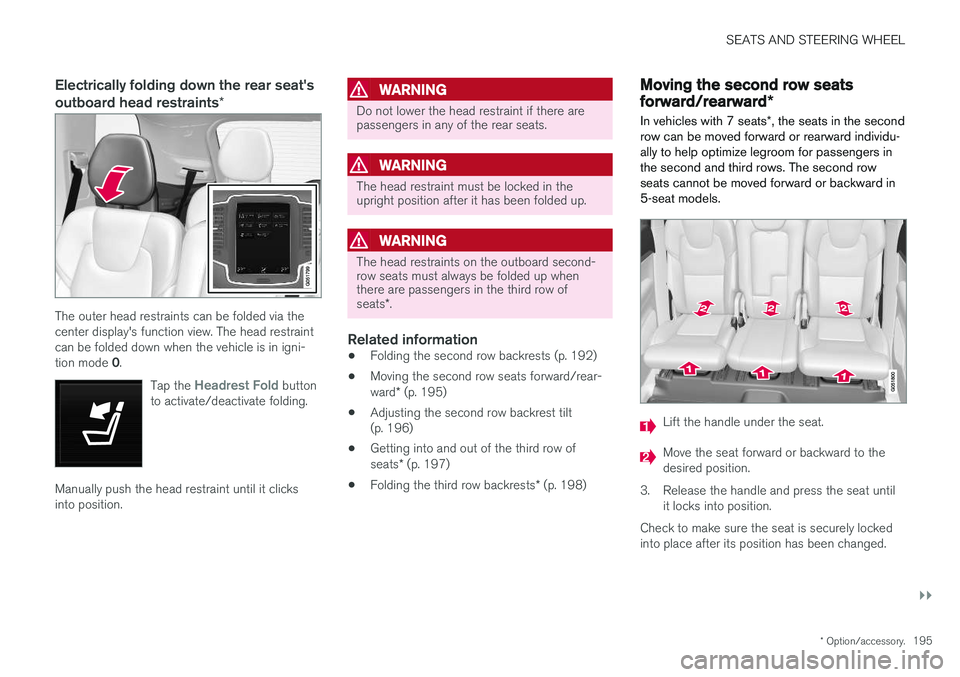
In vehicles with 7 seats *, the seats in the second
row can be moved forward or rearward individu- ally to help optimize legroom for passengers inthe second and third rows. The second rowseats cannot be moved forward or backward in5-seat models.
Lift the handle under the seat.
Move the seat forward or backward to the desired position.
3. Release the handle and press the seat until it locks into position.
Check to make sure the seat is securely lockedinto place after its position has been changed.
Page 198 of 686
||
SEATS AND STEERING WHEEL
* Option/accessory.
196
WARNING
• Adjust the seat and ensure it locks into position before driving. Use caution whenadjusting the seat. Uncontrolled or care-less adjustments could lead to injury.
• Long objects must always be securelytied down to help prevent injury or dam-age in the event of sudden braking.
• Always turn off the engine and apply theparking brake when loading or unloadingthe vehicle.
• Put the gear selector in
P to help prevent
the gear selector from being inadvertentlymoved.
Related information
• Folding the second row backrests (p. 192)
• Adjusting the second row head restraints(p. 194)
• Adjusting the second row backrest tilt(p. 196)
• Getting into and out of the third row of seats
* (p. 197)
• Folding the third row backrests
* (p. 198)
Adjusting the second row backresttilt
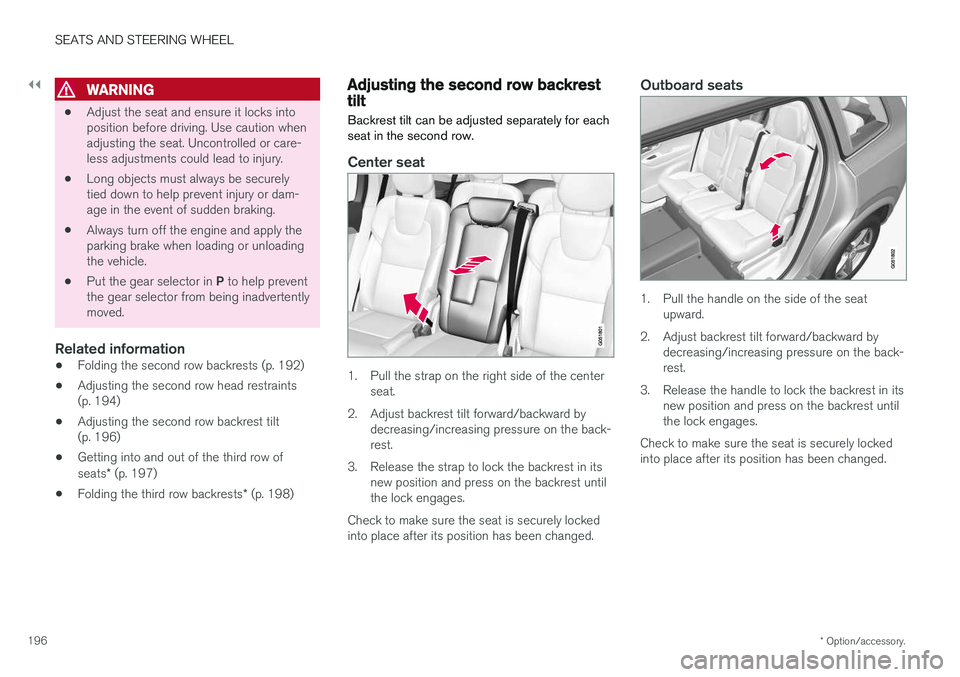
Backrest tilt can be adjusted separately for each seat in the second row.
Center seat
1. Pull the strap on the right side of the center seat.
2. Adjust backrest tilt forward/backward by decreasing/increasing pressure on the back- rest.
3. Release the strap to lock the backrest in its new position and press on the backrest untilthe lock engages.
Check to make sure the seat is securely lockedinto place after its position has been changed.
Outboard seats
1. Pull the handle on the side of the seat upward.
2. Adjust backrest tilt forward/backward by decreasing/increasing pressure on the back- rest.
3. Release the handle to lock the backrest in its new position and press on the backrest untilthe lock engages.
Check to make sure the seat is securely lockedinto place after its position has been changed.
Page 199 of 686
SEATS AND STEERING WHEEL
* Option/accessory.197
WARNING
•Adjust the seat and ensure it locks into position before driving. Use caution whenadjusting the seat. Uncontrolled or care-less adjustments could lead to injury.
• Long objects must always be securelytied down to help prevent injury or dam-age in the event of sudden braking.
• Always turn off the engine and apply theparking brake when loading or unloadingthe vehicle.
• Put the gear selector in
P to help prevent
the gear selector from being inadvertentlymoved.
Related information
• Folding the second row backrests (p. 192)
• Adjusting the second row head restraints(p. 194)
• Moving the second row seats forward/rear- ward
* (p. 195)
• Getting into and out of the third row ofseats
* (p. 197)
• Folding the third row backrests
* (p. 198)
Getting into and out of the third row
of seats *
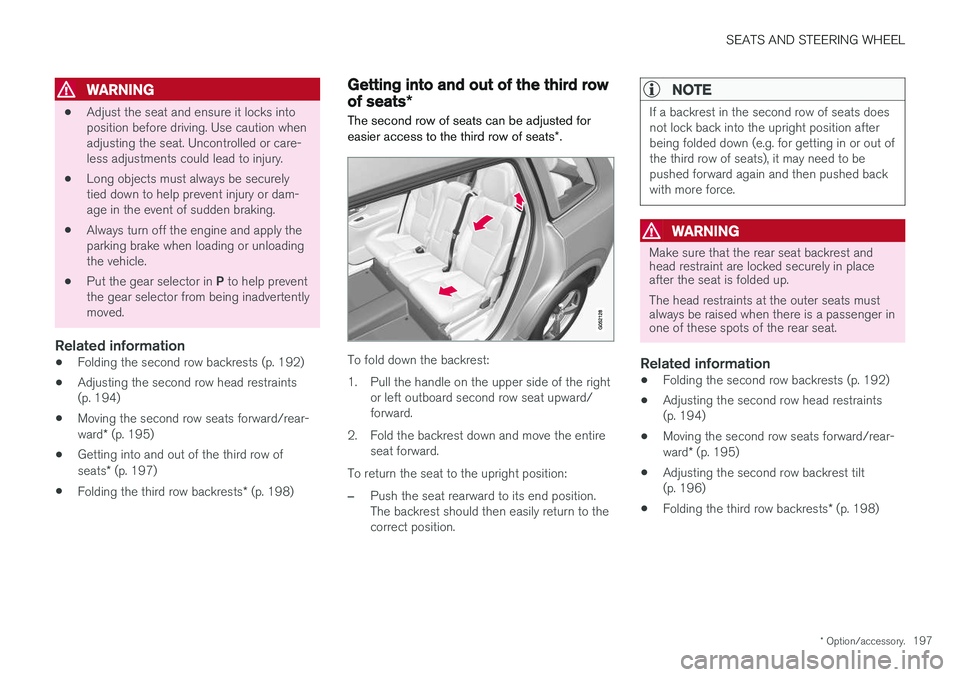
The second row of seats can be adjusted for easier access to the third row of seats *.
To fold down the backrest:
1. Pull the handle on the upper side of the right
or left outboard second row seat upward/ forward.
2. Fold the backrest down and move the entire seat forward.
To return the seat to the upright position:
–Push the seat rearward to its end position. The backrest should then easily return to thecorrect position.
NOTE
If a backrest in the second row of seats does not lock back into the upright position afterbeing folded down (e.g. for getting in or out ofthe third row of seats), it may need to bepushed forward again and then pushed backwith more force.
WARNING
Make sure that the rear seat backrest and head restraint are locked securely in placeafter the seat is folded up. The head restraints at the outer seats must always be raised when there is a passenger inone of these spots of the rear seat.
Related information
• Folding the second row backrests (p. 192)
• Adjusting the second row head restraints (p. 194)
• Moving the second row seats forward/rear- ward
* (p. 195)
• Adjusting the second row backrest tilt (p. 196)
• Folding the third row backrests
* (p. 198)
Page 200 of 686
SEATS AND STEERING WHEEL
* Option/accessory.
198
Folding the third row backrests *
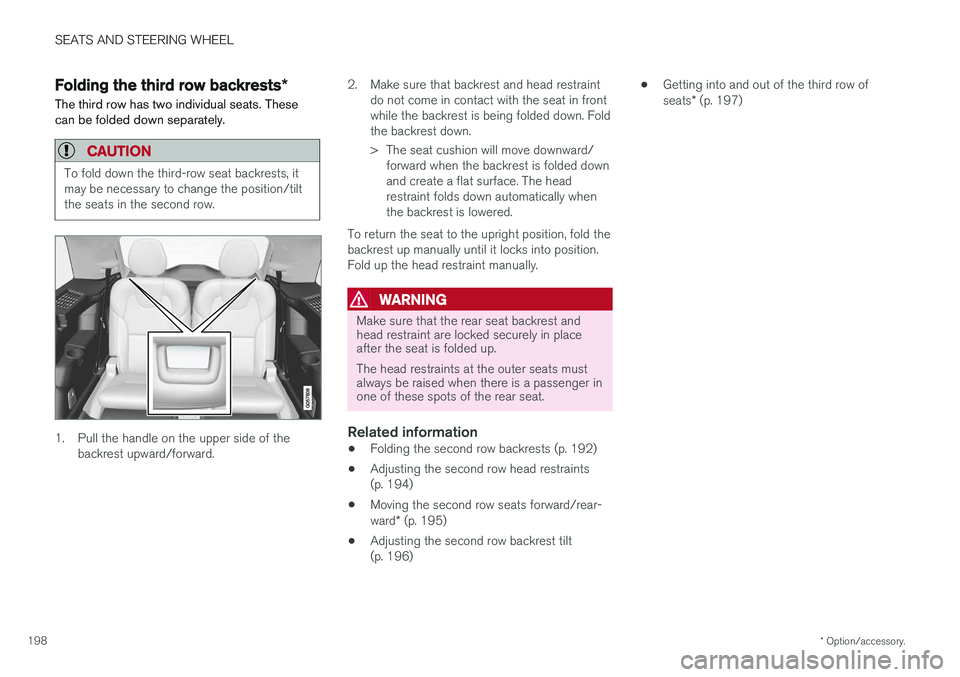
The third row has two individual seats. These can be folded down separately.
CAUTION
To fold down the third-row seat backrests, it may be necessary to change the position/tiltthe seats in the second row.
1. Pull the handle on the upper side of the backrest upward/forward. 2. Make sure that backrest and head restraint
do not come in contact with the seat in front while the backrest is being folded down. Foldthe backrest down.
> The seat cushion will move downward/forward when the backrest is folded down and create a flat surface. The headrestraint folds down automatically whenthe backrest is lowered.
To return the seat to the upright position, fold thebackrest up manually until it locks into position.Fold up the head restraint manually.
WARNING
Make sure that the rear seat backrest and head restraint are locked securely in placeafter the seat is folded up. The head restraints at the outer seats must always be raised when there is a passenger inone of these spots of the rear seat.
Related information
• Folding the second row backrests (p. 192)
• Adjusting the second row head restraints (p. 194)
• Moving the second row seats forward/rear- ward
* (p. 195)
• Adjusting the second row backrest tilt (p. 196) •
Getting into and out of the third row of seats
* (p. 197)
Page 205 of 686
CLIMATE CONTROL
}}
* Option/accessory.203
On vehicles equipped with the Interior Air Quality System
*, there is also an air quality sensor in the
climate system's air intake.
Related information
• Climate (p. 202)
• Interior Air Quality System
* (p. 206)
Perceived temperature
The climate control system regulates the climate in the passenger compartment based on per-ceived temperature, not actual temperature.
The selected passenger compartment tempera- ture is based on the physical perception of thecurrent ambient temperature, airflow speed,humidity, sunlight in the passenger compartment,etc. The system has a sunlight sensor that detects which side of the vehicle the sunlight is shiningon and adjusts the temperature accordingly. Thismeans that the temperature of the air coming outof the vents may be different for the left and rightsides, even if the temperature setting is the samefor both sides.
Related information
• Climate (p. 202)
Climate control system voice
commands1
Voice commands can be used for the climate control system to e.g. change temperature, acti- vate seat heating * or change blower speed.
Tap and say one of the following commands:
• "
Climate" - starts a command dialog for cli-
mate controls and provides examples of commands that can be used.
• "
Set temperature to X degrees" - sets
desired temperature.
• "
Raise temperature"/"Lower
temperature" - raises/lowers the set tem-
perature.
• "
Sync temperature" - synchronizes the
temperature for all climate zones in the vehi- cle with the temperature set for the driver'sside.
• "
Air on feet"/"Air on body" - opens the
desired air vent.
• "
Air on feet off"/"Air on body off" - closes
the desired air vent.
• "
Set fan to max"/"Turn off fan" - changes
blower speed to Max/Off.
• "
Raise fan speed"/"Lower fan speed" -
raises/lowers the set blower speed.
1 Certain markets only.
Page 251 of 686
KEY, LOCKS AND ALARM
* Option/accessory.249
secure when handing over the vehicle to e.g. a young driver, parking attendant or workshop. Thesettings for a Red Key cannot be changed by itsuser; a regular remote key is needed to changesettings.
Related information
•
Red Key
* settings (p. 249)
• Remote key (p. 239)
Red Key
* settings
The holder of a regular remote key can adjust settings for a Red Key. Certain driver supportfunctions are always active.
1. Tap Settings in the center display's Top
view.
2. Tap
SystemDriver ProfilesRed Key.
> The following settings can be made:
•
Set Time Gap For Adaptive Cruise Control
•Reduced Maximum Volume
•Max Speed Limit
•Speed Limit Warning
Adaptive Cruise Control *:
•Default setting: Longest interval
Reduced maximum volume (On/Off):
•Default setting: On
Speed Limiter (On/Off):
•Setting interval: 50-250 km/h (30-160 mph)
• The default setting is 120 km/h (75 mph)
• Increments: 1 km/h (1 mph)
The following symbol and message will be shown in the instrument panel
Red key Speed limitation cannot
be exceeded.
Speed reminder (On/Off):
• Setting interval: 0-250 km/h (0-160 mph)
• Default setting: 50, 70 and 90 km/h (30, 45 and 55 mph)
• Increments: 1 km/h (1 mph)
• Maximum number of simultaneous remind-ers: 6
Driver support functionsThe following driver support functions will alwaysbe active for a Red Key user:
• Blind Spot Information (BLIS)
*
• Lane Keeping Aid (LKA)
*
• Distance Alert
*
• City Safety
• Driver Alert Control (DAC)
*
• Road Sign Information
*
Related information
•Red Key - restricted remote key
* (p. 248)
Page 254 of 686
||
KEY, LOCKS AND ALARM
* Option/accessory.
252
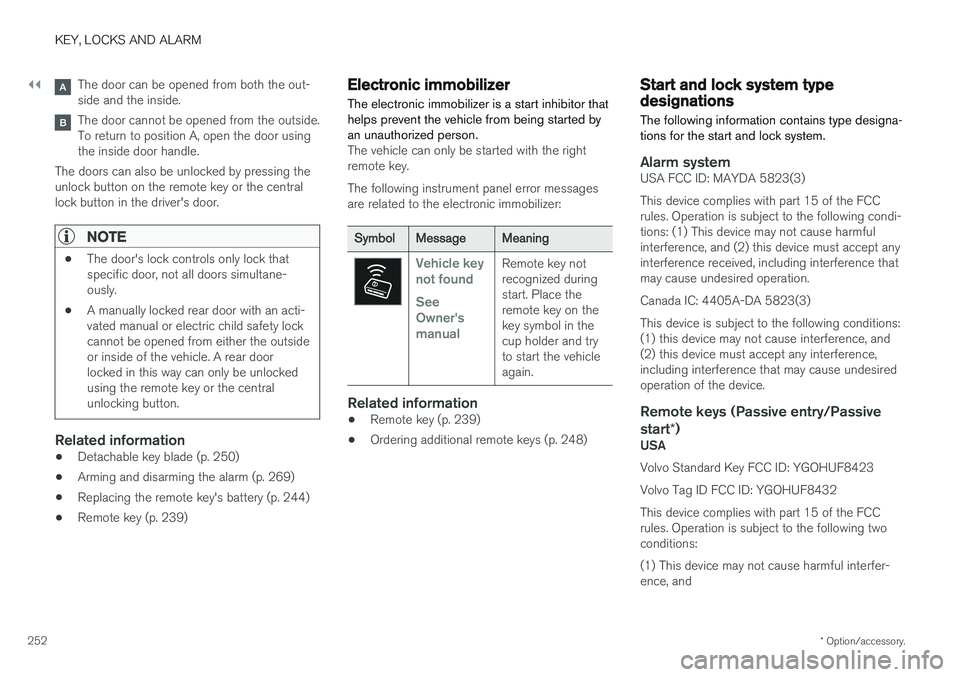
The door can be opened from both the out- side and the inside.
The door cannot be opened from the outside. To return to position A, open the door usingthe inside door handle.
The doors can also be unlocked by pressing theunlock button on the remote key or the centrallock button in the driver's door.
NOTE
• The door's lock controls only lock that specific door, not all doors simultane-ously.
• A manually locked rear door with an acti-vated manual or electric child safety lockcannot be opened from either the outsideor inside of the vehicle. A rear doorlocked in this way can only be unlockedusing the remote key or the centralunlocking button.
Related information
• Detachable key blade (p. 250)
• Arming and disarming the alarm (p. 269)
• Replacing the remote key's battery (p. 244)
• Remote key (p. 239)
Electronic immobilizer
The electronic immobilizer is a start inhibitor that helps prevent the vehicle from being started byan unauthorized person.
The vehicle can only be started with the right remote key. The following instrument panel error messages are related to the electronic immobilizer:
SymbolMessageMeaning
Vehicle key not found See Owner'smanualRemote key not recognized duringstart. Place theremote key on thekey symbol in thecup holder and tryto start the vehicleagain.
Related information
• Remote key (p. 239)
• Ordering additional remote keys (p. 248)
Start and lock system typedesignations
The following information contains type designa- tions for the start and lock system.
Alarm systemUSA FCC ID: MAYDA 5823(3) This device complies with part 15 of the FCC rules. Operation is subject to the following condi-tions: (1) This device may not cause harmfulinterference, and (2) this device must accept anyinterference received, including interference thatmay cause undesired operation. Canada IC: 4405A-DA 5823(3)This device is subject to the following conditions: (1) this device may not cause interference, and(2) this device must accept any interference,including interference that may cause undesiredoperation of the device.
Remote keys (Passive entry/Passive start *)
USA Volvo Standard Key FCC ID: YGOHUF8423 Volvo Tag ID FCC ID: YGOHUF8432This device complies with part 15 of the FCC rules. Operation is subject to the following two conditions: (1) This device may not cause harmful interfer- ence, and
Page 269 of 686
KEY, LOCKS AND ALARM
}}
* Option/accessory.267
Activating and deactivating privatelocking
Private locking is activated using the function button in the center display and a PIN code.
NOTE
For the valet lock function to be activated the car must be in at least ignition mode I.
Entering security code before initial useThe first time the function is used, a security code must be selected. This code can then beused to deactivate private locking if the selectedPIN code has been lost or forgotten. The securitycode functions as a PUK (security) code for allPIN codes used for private locking. Save the security code in a safe place.To create a security code:
1. Tap the button for private locking in Function
view.
> A pop-up window will appear. 2. Enter your security code.
> The security code is saved. The privatelocking function is now ready for activa- tion.
If the system has been reset, the above proce-dure will need to be repeated.
Activating private locking1. Tap the button for private locking in Function view.
> A pop-up window will appear.
2. Enter the code you would like to use to unlock the glove compartment and the tail- gate and tap
Confirm.
> The glove compartment and tailgate will lock. A green indicator light will illuminate next to the button in Function view to con-firm locked status.
Deactivating private locking1. Tap the button for private locking in Function view.
> A pop-up window will appear.
2. Enter the code used for locking and tap
Confirm.
> The glove compartment and tailgate will unlock. The green indicator light next to the button in Function view will go out toconfirm unlocked status.
NOTE
If you have forgotten or lost your PIN code or if the PIN code has been entered incorrectlymore than three times, the security code canbe used to deactivate private locking.
NOTE
If private locking is activated and the vehicle is unlocked using Volvo On Call * or the Volvo
On Call * app, private locking will be deacti-
vated automatically.