ECU VOLVO XC90 T8 2018 Owner´s Manual
[x] Cancel search | Manufacturer: VOLVO, Model Year: 2018, Model line: XC90 T8, Model: VOLVO XC90 T8 2018Pages: 686, PDF Size: 11.51 MB
Page 637 of 686
MAINTENANCE AND SERVICE
}}
635
Cleaning fabric upholstery andceiling liner Only use cleaning agents and car care products recommended by Volvo. Clean regularly andtreat stains immediately for best results. It isimportant to vacuum before using a cleaningagent.
Fabric upholstery and ceiling linerNever scrape or rub a stain, as this could damage the upholstery. Never use strong stain removers,as this could change the color of the upholstery. Use soapy water or a similar detergent. For more difficult stains caused by oil, ice cream, shoe pol-ish, etc., use a stain remover. Consult with yourVolvo retailer.
Related information
•Cleaning the interior (p. 633)
• Cleaning the center display (p. 633)
• Cleaning the seat belt (p. 635)
• Cleaning floor mats and inlay mats (p. 635)
• Cleaning leather upholstery (p. 636)
• Cleaning the leather steering wheel(p. 637)
• Cleaning interior plastic, metal and wood sur-faces (p. 638)
Cleaning the seat belt
Only use cleaning agents and car care products recommended by Volvo. Clean regularly andtreat stains immediately for best results. It isimportant to vacuum before using a cleaningagent.
Seat beltsUse water and a synthetic soap solution. Spe- cially designed textile cleaning agents are availa-ble for purchase at Volvo retailers. Make sure thebelt is dry before it is retracted.
Related information
• Cleaning the interior (p. 633)
• Cleaning the center display (p. 633)
• Cleaning fabric upholstery and ceiling liner(p. 635)
• Cleaning floor mats and inlay mats (p. 635)
• Cleaning leather upholstery (p. 636)
• Cleaning the leather steering wheel(p. 637)
• Cleaning interior plastic, metal and wood sur-faces (p. 638)
Cleaning floor mats and inlay mats
Only use cleaning agents and car care products recommended by Volvo. Clean regularly andtreat stains immediately for best results. It isimportant to vacuum before using a cleaningagent.
Inlay mats and floor matsRemove the inlay mats to clean the floor mats and inlay mats separately. Use a vacuum toremove dust and dirt. Each inlay mat is securedinto place with pins. Remove the inlay mat by grasping the inlay mat at each pin and lifting the mat straight up. Put the inlay mat back into place by pressing it in at each pin.
Page 638 of 686
||
MAINTENANCE AND SERVICE
* Option/accessory.
636
WARNING
• Never use more than one inlay mat at a time on the driver's floor. If any other typeof floor mat is used, remove the originalmat from the driver's seat floor beforedriving. All types of mats must be securelyanchored in the attachment points in thefloor. Make sure the floor mat does notimpede the movement of the brake pedalor accelerator pedal in any way, as thiscould be a serious safety hazard.
• Volvo's floor mats are specially manufac-tured for your vehicle. They must be prop-erly secured in the attachment points inthe floor to help ensure they cannot slideand become trapped under the pedals.
After vacuuming, a specially designed textilecleaning agent should be used to remove stainson floor mats. Floor mats should be cleaned withproducts recommended by Volvo retailers.
Related information
• Cleaning the interior (p. 633)
• Cleaning the center display (p. 633)
• Cleaning fabric upholstery and ceiling liner(p. 635)
• Cleaning the seat belt (p. 635)
• Cleaning leather upholstery (p. 636) •
Cleaning the leather steering wheel(p. 637)
• Cleaning interior plastic, metal and wood sur-faces (p. 638)
Cleaning leather upholstery
Only use cleaning agents and car care products recommended by Volvo. Clean regularly andtreat stains immediately for best results. It isimportant to vacuum before using a cleaningagent.
Leather upholstery *Volvo's leather upholstery is treated to protect its original appearance. Over time, sunlight, grease,dirt, etc. could break down the protective layer.This could result in scratches and cracking. Leather upholstery is a natural product that changes and acquires a beautiful patina overtime. Regular cleaning and treatments arerequired to preserve the qualities and color of theleather. Volvo offers a comprehensive product,Volvo Leather Care Kit/Wipes, for cleaning andtreating leather upholstery that, when used asdirected, preserves the leather's protective coa-ting. For best results, Volvo recommends cleaning and applying protective cream one to four times ayear (or more as needed). Volvo Leather Care Kit951 0251 and Volvo Leather Softener 9437429 are available for purchase at Volvo retailers.
Page 643 of 686
MAINTENANCE AND SERVICE
641
Automatic car washes The vehicle should be washed as soon as it becomes dirty. This makes the vehicle easier toclean because dirt does not attach as strongly. Italso reduces the risk of scratches and keeps thevehicle looking new.
Automatic car washesAn automatic car wash is a fast and easy way to keep your vehicle clean, but it does not reach allareas of the vehicle. For best results, Volvo rec-ommends hand washing your vehicle or supple-menting automatic car washes with a hand wash.
NOTE
Volvo recommends not washing the vehicle in an automatic car wash during the first fewmonths; the paintwork on new vehicles takessome time to fully harden.
CAUTION
Before driving the vehicle into a car wash, deactivate the Automatic Braking when Sta-tionary and Automatic Parking Brake Applica-tion functions. If the functions are not deacti-vated, the brake system will seize when thevehicle is stationary and the vehicle will not beable to roll.
CAUTION
For automatic car washes in which the vehicle is pulled forward on rolling wheels:
1. Before washing the vehicle, make surethat the automatic rain sensor is deacti- vated. If it is not deactivated and inadver-tently starts, the wiper arms could bedamaged.
2. To help prevent damage from the auto- matic car wash machinery, make surethat the door mirrors are folded in, anten-nas retracted or removed, and any auxili-ary lights secured.
3. Drive into the automatic car wash.
4. Turn off the "Automatic Braking when Stationary" function using the switch in the tunnel console.
5. Turn off the "Automatic Parking Brake Application" function in the center dis-play's Top view.
6. Turn off the engine by turning the start knob in the tunnel console clockwise.Hold the knob in position for at least2 seconds.
The vehicle is now ready for the automatic carwash.
CAUTION
The system will automatically change to P
mode if the above steps are not followed. In P
mode, the wheels are locked, which they should not be when the vehicle is beingwashed in a car wash.
Related information
• Cleaning the exterior (p. 638)
• Polishing and waxing (p. 639)
• Hand washing (p. 639)
• High-pressure washing (p. 642)
• Cleaning the wiper blades (p. 642)
• Cleaning exterior plastic, rubber and trim components (p. 643)
• Cleaning rims (p. 644)
• Corrosion protection (p. 644)
Page 649 of 686
MAINTENANCE AND SERVICE
}}
647
It is important to use the right color.
Related information
•
Paintwork (p. 645)
• Touching up minor paint damage (p. 645)
Changing rear window wipers
The wiper blades help remove water from the windshield and rear window. Along with thewasher fluid, they clean the glass and helpimprove visibility while driving. The windshieldand rear window wiper blades can be replaced.
Changing rear window wipers
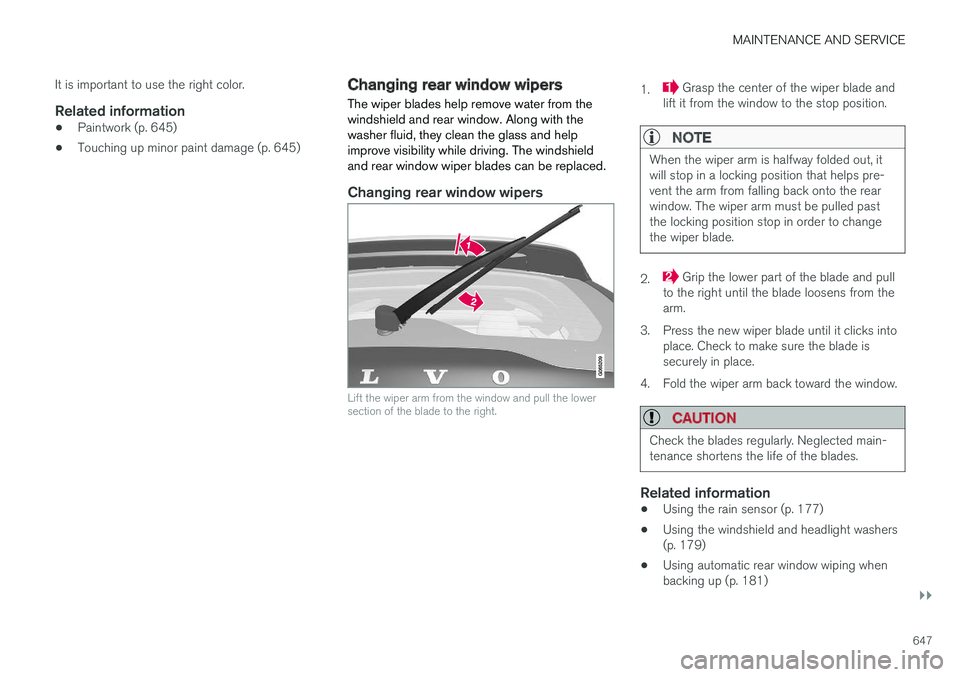
Lift the wiper arm from the window and pull the lower section of the blade to the right.
1. Grasp the center of the wiper blade and
lift it from the window to the stop position.
NOTE
When the wiper arm is halfway folded out, it will stop in a locking position that helps pre-vent the arm from falling back onto the rearwindow. The wiper arm must be pulled pastthe locking position stop in order to changethe wiper blade.
2. Grip the lower part of the blade and pull
to the right until the blade loosens from the arm.
3. Press the new wiper blade until it clicks into place. Check to make sure the blade issecurely in place.
4. Fold the wiper arm back toward the window.
CAUTION
Check the blades regularly. Neglected main- tenance shortens the life of the blades.
Related information
• Using the rain sensor (p. 177)
• Using the windshield and headlight washers (p. 179)
• Using automatic rear window wiping whenbacking up (p. 181)
Page 650 of 686
MAINTENANCE AND SERVICE
* Option/accessory.
648 •
Heated windshield washer nozzles
* (p. 177)
• Using the rain sensor's memory function (p. 178)
• Using the rear window wiper/washer(p. 180)
• Filling washer fluid (p. 650)
• Windshield wipers in the service position(p. 649)
• Replacing windshield wiper blades (p. 648)
• Using the windshield wipers (p. 176)
Replacing windshield wiper blades
The wiper blades help remove water from the windshield and rear window. Along with thewasher fluid, they clean the glass and helpimprove visibility while driving. The windshieldand rear window wiper blades can be replaced.
Replacing wiper blades
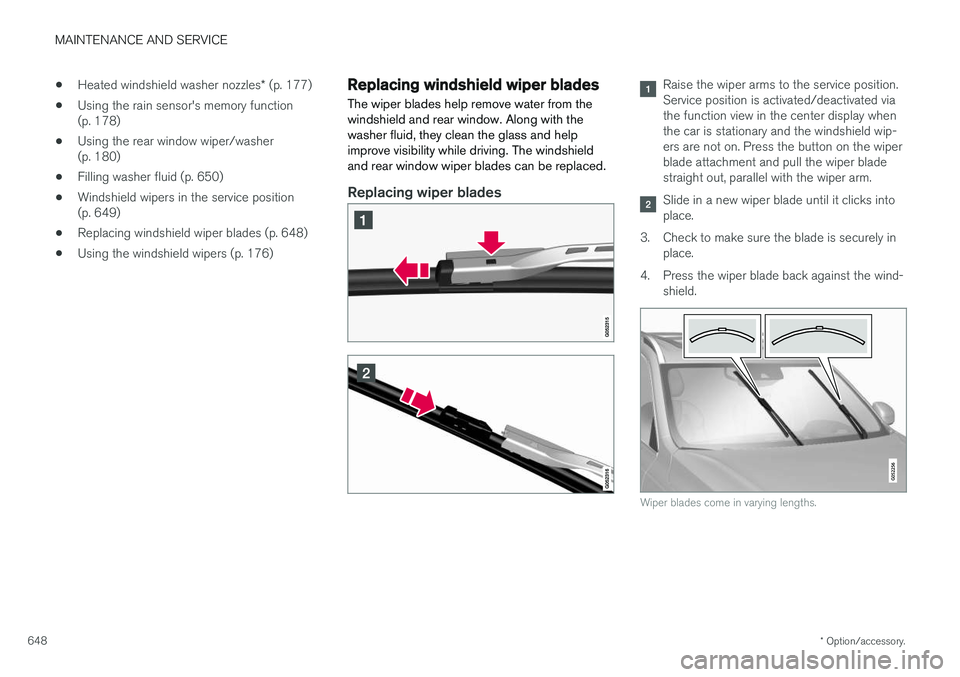
Raise the wiper arms to the service position. Service position is activated/deactivated viathe function view in the center display whenthe car is stationary and the windshield wip-ers are not on. Press the button on the wiperblade attachment and pull the wiper bladestraight out, parallel with the wiper arm.
Slide in a new wiper blade until it clicks into place.
3. Check to make sure the blade is securely in place.
4. Press the wiper blade back against the wind- shield.
Wiper blades come in varying lengths.
Page 679 of 686
INDEX
677
Roll Stability Control 273
Roof load, max. weight 659
RSC (Roll Stability Control) 273
Run-off Mitigation 373, 374
S
Safety 42
pregnancy 43
Safety belt, see Seat belt 47
Safety defects, reporting 44
Safety mode 61 starting/moving 62
Sealing compound 572
Seat, see Seats 184
Seat belt reminder 51
Seat belts 47 Automatic locking retractor/Emergency
locking retractor 65
buckling/unbuckling 48
pregnancy 43
seat belt reminder 51
seat belt tensioner 50
securing child restraint systems 67, 69, 71
Seat belt tensioner 50 resetting 51
Seats
heating 215, 216
manual front seat 184
memory function front seat 186, 187
power front seats 185
ventilation 217
whiplash protection 46
Sensors air quality 207
climate 202
Sensus connection and entertainment 30
Sensus Navigation 359
Service position 649
Service program 598
Set time interval 293
settings 135 Categories 136
contextual 133
resetting 135
settings menu 135
Shiftlock 442
Side airbag 60
Side Impact Protection System 60
SIM card 533
SIPS (Side Impact Protection System) 60Sirius Satellite radio Travel link 502
SiriusXM ® Satellite radio
traffic information 498, 499, 500
Slippery conditions 461
Slippery road conditions 461
Software updates 33
Sound settings 486, 527 phone 528
playing media 508, 509
text message 527
Spare tire 569, 570
Speed camera 361
Speed Limiter 278, 281, 282, 285 getting started 279
shut down 281
temporary deactivation 280
Speed symbols, tires 554
Spin control 274
Stability and traction control system 274, 277 operation 275, 276
Stability system 274
Stains 633, 635, 636, 637, 638 Start and lock system type designations 252
Page 680 of 686
INDEX
678Start battery 469, 615
overload 469
Start engine 424 Starting the engine after a collision 62
Start the vehicle 424
Steel cargo grid 592Steering assistance at risk of colli-
sion 372, 373, 374, 375, 376, 377, 378, 380 Steering assistance at risk of rear-end col-
lision 377, 378 Steering power level, see Steering wheel
resistance 272 Steering resistance at risk of head-on colli-
sion 375, 376
Steering wheel 199 heating 218
keypad 199
paddle 199
steering wheel adjustment 199
Steering wheel keypad 199
Steering wheel paddles 441Steering wheel resistance, speed-depend- ent 272
Stone chips and scratches 645, 646
Storage compartments 580 center console 581
glove compartment 585
sun visor 586
Sunroof pinch protection 166
Sun shade panoramic roof 172, 175
pinch protection 166
rear door 169
Sun visor 586 mirror lighting 163
Symbols indicator symbols 94
Symbols and messages Adaptive Cruise Control 309
center display's status bar 124
Collision warner with auto-brake 346
hybrid-related 419
parking climate 236
Symbols and messages for Assistance at
risk of collision 380
system updates 601
T
Tailgate locking/unlocking 243, 256
open/close with foot movement 265
power 261
unlocking from inside 259
Technician certification 37 Temperature adjusting 226, 227, 228
perceived 203
Temperature monitoring 411 Temporary spare spare tire 569
Temporary tire sealing system execution, checking 573
Inflating tires 577
location 572
overview 572
sealing compound 572
Terms and conditions services 34
users 536
Tire dimensions 554, 564
Tire pressure decal 559Tire pressure monitoring calibrating 561
Tires 550 direction of rotation 552
glossary of terms 553
inflation pressure table 665
mounting 568
pressure 665
Page 682 of 686
INDEX
680Vehicle key bat. low 244 Vehicle modem
connecting vehicle to Internet 532
settings 533
Vehicle recovery 477
Vehicle status 602 inflation pressure 562
Vehicle upholstery 633, 635, 636, 637, 638
Vehicle weight 659
Ventilation 207, 208, 209 Seats 217
Video 512, 514 settings 513
Voice control 145 climate 203
phone 147
radio and media 148
settings 148
VOL mark 550
Volvo ID 26 create and register 27
W
Warning light Adaptive Cruise Control 298
stability and traction control system 274
Warning lights airbags SRS 97
alternator does not charge 97
brake system error 97
low oil pressure 97
parking brake applied 97
seat belt reminder 97
starter battery not charging 97
WARNING 97
Warning sound parking brake 435
warning symbols 97 Warning symbols safety 42
Warranties 598Washer Headlights 179
rear window 180, 181
washer fluid, filling 650
Windshield 179
Washer fluid 650
Washer nozzles, heated 177
Waxing 639
Weights Curb weight 659
Wheel bolts 565 locking 565
Wheels cleaning 644
mounting 568
removal 566
Snow chains 571
Wheels and tires Load index and speed symbol 554
Whiplash protection 46
Whiplash Protection System 46
WHIPS (Whiplash Protection System) 46 Wi-Fi connecting vehicle to Internet 531
delete network 535 sharing Internet connection, tethering,
hotspot 533
technology and security 535
Window sun shade 169
Windows and glass 166 Windshield heating 222
projected image 142, 144
Windshield washing 179