light VOLVO XC90 T8 2018 Owner´s Manual
[x] Cancel search | Manufacturer: VOLVO, Model Year: 2018, Model line: XC90 T8, Model: VOLVO XC90 T8 2018Pages: 686, PDF Size: 11.51 MB
Page 182 of 686
WINDOWS, GLASS AND MIRRORS
* Option/accessory.
180 •
Windshield wipers in the service position (p. 649)
• Replacing windshield wiper blades (p. 648)
• Changing rear window wipers (p. 647)
• Using the windshield wipers (p. 176)
Using the rear window wiper/washer
The rear window wiper/washer cleans the rear window. Use the right-side steering wheel leverto start and control the wiper/washer.
Activating the rear window wiper/ washer
NOTE
The rear window wiper is equipped with over- heating protection that switches off the motorwiper if it becomes overheated. The rear win-dow wiper can be operated again after a cool-ing-down period.
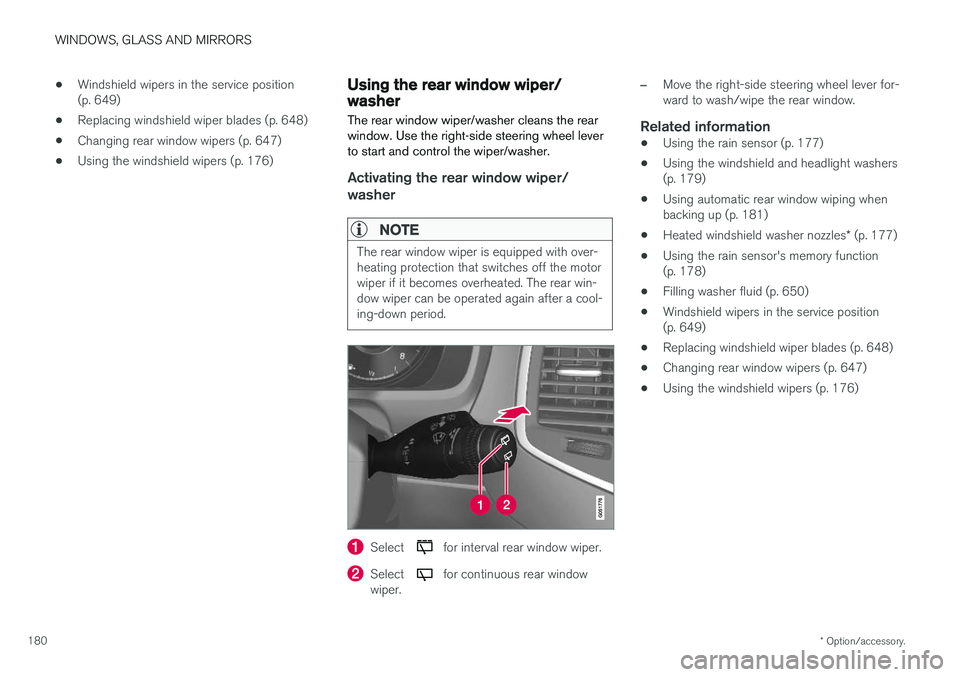
Select for interval rear window wiper.
Select for continuous rear window
wiper.
–Move the right-side steering wheel lever for- ward to wash/wipe the rear window.
Related information
• Using the rain sensor (p. 177)
• Using the windshield and headlight washers(p. 179)
• Using automatic rear window wiping whenbacking up (p. 181)
• Heated windshield washer nozzles
* (p. 177)
• Using the rain sensor's memory function(p. 178)
• Filling washer fluid (p. 650)
• Windshield wipers in the service position(p. 649)
• Replacing windshield wiper blades (p. 648)
• Changing rear window wipers (p. 647)
• Using the windshield wipers (p. 176)
Page 183 of 686
WINDOWS, GLASS AND MIRRORS
* Option/accessory.181
Using automatic rear window wipingwhen backing up
If reverse gear is engaged while the windshield wipers are on, the rear window wipers will start.This function is deactivated when a differentgear is selected.
1. Tap Settings in the Top view in the center
display.
2. Tap
My CarWipers.
3. Select
Auto Rear Wiper to activate/deacti-
vate automatic rear window wiping when backing up.
If the rear window wipers are already in continu-ous wiper mode, no change will be made.
Related information
• Using the rain sensor (p. 177)
• Using the windshield and headlight washers(p. 179)
• Heated windshield washer nozzles
* (p. 177)
• Using the rain sensor's memory function(p. 178)
• Using the rear window wiper/washer(p. 180)
• Filling washer fluid (p. 650)
• Windshield wipers in the service position(p. 649)
• Replacing windshield wiper blades (p. 648) •
Changing rear window wipers (p. 647)
• Using the windshield wipers (p. 176)
Page 188 of 686
||
SEATS AND STEERING WHEEL
* Option/accessory.
186 Only one movement (forward/rearward/up/ down) can be performed at a time. The front seat backrests cannot be folded down completely.
Related information
•
Manual front seats (p. 184)
• Power front seats
* (p. 185)
• Storing memory settings in power front seats
* (p. 186)
• Using stored memory in a powered front seat (p. 187)
• Adjusting front seat massage settings
*
(p. 188)
• Adjusting front seat cushion length (p. 189)
• Front seat massage settings
* (p. 188)
• Adjusting front seat side bolster settings
*
(p. 190)
• Adjusting front seat lumbar support
* (p. 190)
• Adjusting the passenger seat from the driv- er's seat
* (p. 191)
Storing memory settings in power
front seats *
The memory function can be used to store the settings for the seat, door mirrors and head-up display *.
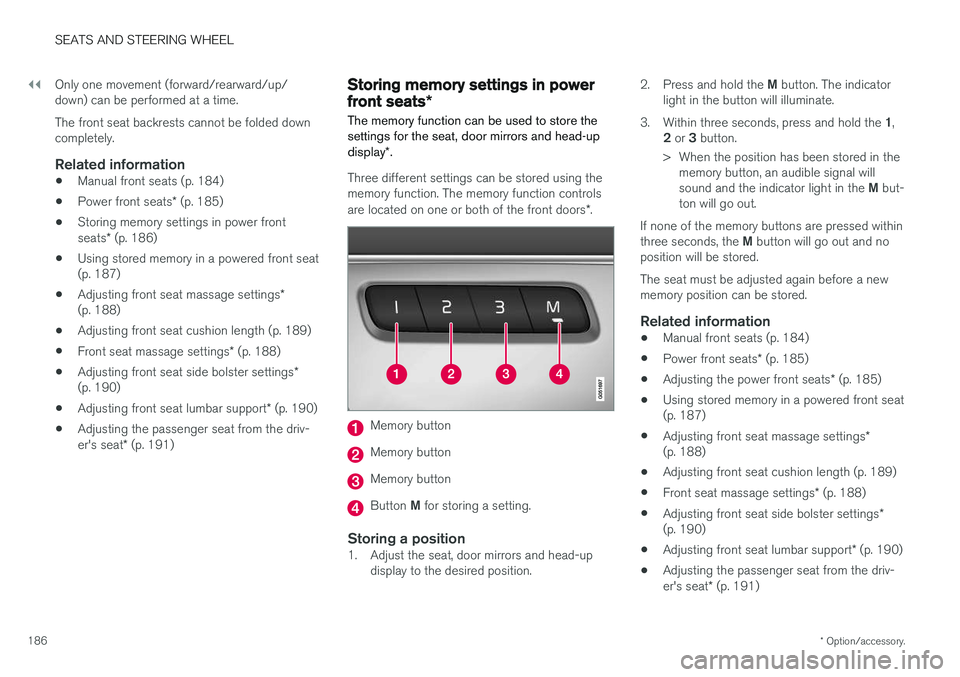
Three different settings can be stored using the memory function. The memory function controls are located on one or both of the front doors *.
Memory button
Memory button
Memory button
Button M for storing a setting.
Storing a position1. Adjust the seat, door mirrors and head-up
display to the desired position. 2.
Press and hold the M button. The indicator
light in the button will illuminate.
3. Within three seconds, press and hold the 1,
2 or 3 button.
> When the position has been stored in the memory button, an audible signal will sound and the indicator light in the M but-
ton will go out.
If none of the memory buttons are pressed withinthree seconds, the M button will go out and no
position will be stored. The seat must be adjusted again before a new memory position can be stored.
Related information
• Manual front seats (p. 184)
• Power front seats
* (p. 185)
• Adjusting the power front seats
* (p. 185)
• Using stored memory in a powered front seat(p. 187)
• Adjusting front seat massage settings
*
(p. 188)
• Adjusting front seat cushion length (p. 189)
• Front seat massage settings
* (p. 188)
• Adjusting front seat side bolster settings
*
(p. 190)
• Adjusting front seat lumbar support
* (p. 190)
• Adjusting the passenger seat from the driv- er's seat
* (p. 191)
Page 202 of 686
||
SEATS AND STEERING WHEEL
200
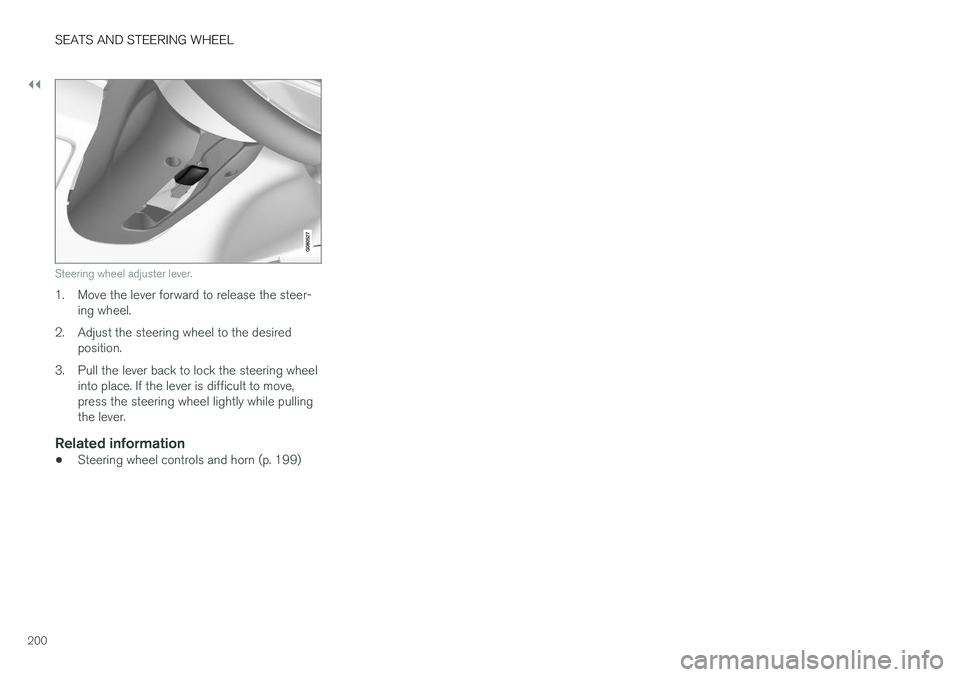
Steering wheel adjuster lever.
1. Move the lever forward to release the steer-ing wheel.
2. Adjust the steering wheel to the desired position.
3. Pull the lever back to lock the steering wheel into place. If the lever is difficult to move, press the steering wheel lightly while pullingthe lever.
Related information
• Steering wheel controls and horn (p. 199)
Page 204 of 686
CLIMATE CONTROL
* Option/accessory.
202
Climate
The vehicle is equipped with electronic climate control. The climate system cools, heats anddehumidifies the air in the passenger compart-ment.
All of the climate system functions are controlled from the center display and the buttons on thecenter console. Certain rear seat functions can also be controlled from the climate controls * on the rear of the tun-
nel console.
Related information
• Climate zones (p. 202)
• Climate control sensors (p. 202)
• Perceived temperature (p. 203)
• Climate control system voice commands (p. 203)
• Parking climate (p. 230)
• Air quality (p. 204)
• Air distribution (p. 207)
• Climate system controls (p. 213)
Climate zones
The vehicle is divided into climate zones to make it possible to set different temperatures for dif-ferent parts of the passenger compartment.
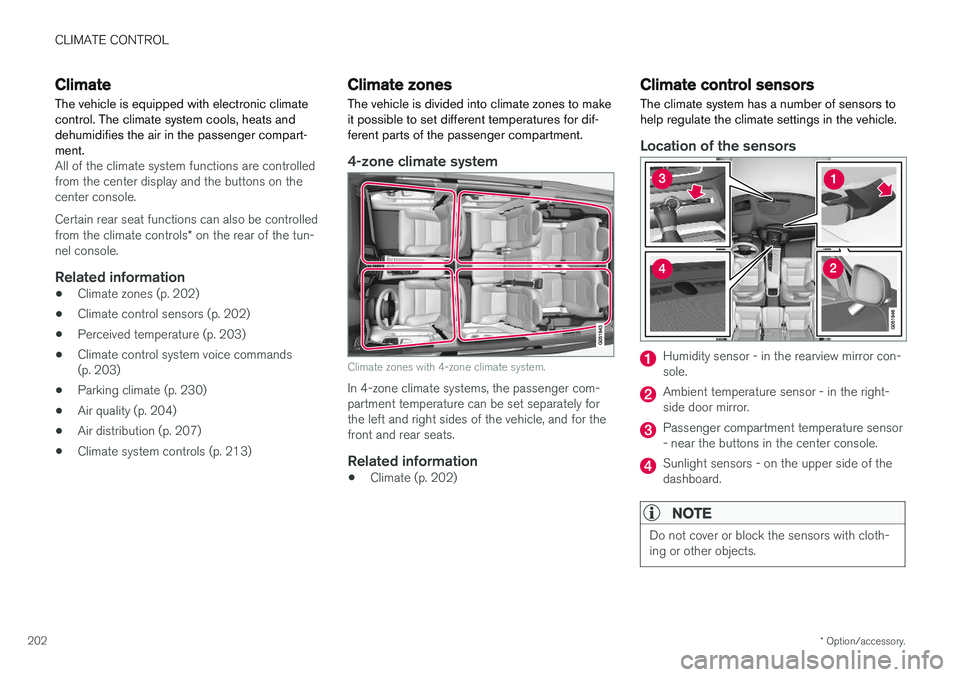
4-zone climate system
Climate zones with 4-zone climate system.
In 4-zone climate systems, the passenger com- partment temperature can be set separately forthe left and right sides of the vehicle, and for thefront and rear seats.
Related information
• Climate (p. 202)
Climate control sensors
The climate system has a number of sensors to help regulate the climate settings in the vehicle.
Location of the sensors
Humidity sensor - in the rearview mirror con- sole.
Ambient temperature sensor - in the right- side door mirror.
Passenger compartment temperature sensor - near the buttons in the center console.
Sunlight sensors - on the upper side of the dashboard.
NOTE
Do not cover or block the sensors with cloth- ing or other objects.
Page 205 of 686
CLIMATE CONTROL
}}
* Option/accessory.203
On vehicles equipped with the Interior Air Quality System
*, there is also an air quality sensor in the
climate system's air intake.
Related information
• Climate (p. 202)
• Interior Air Quality System
* (p. 206)
Perceived temperature
The climate control system regulates the climate in the passenger compartment based on per-ceived temperature, not actual temperature.
The selected passenger compartment tempera- ture is based on the physical perception of thecurrent ambient temperature, airflow speed,humidity, sunlight in the passenger compartment,etc. The system has a sunlight sensor that detects which side of the vehicle the sunlight is shiningon and adjusts the temperature accordingly. Thismeans that the temperature of the air coming outof the vents may be different for the left and rightsides, even if the temperature setting is the samefor both sides.
Related information
• Climate (p. 202)
Climate control system voice
commands1
Voice commands can be used for the climate control system to e.g. change temperature, acti- vate seat heating * or change blower speed.
Tap and say one of the following commands:
• "
Climate" - starts a command dialog for cli-
mate controls and provides examples of commands that can be used.
• "
Set temperature to X degrees" - sets
desired temperature.
• "
Raise temperature"/"Lower
temperature" - raises/lowers the set tem-
perature.
• "
Sync temperature" - synchronizes the
temperature for all climate zones in the vehi- cle with the temperature set for the driver'sside.
• "
Air on feet"/"Air on body" - opens the
desired air vent.
• "
Air on feet off"/"Air on body off" - closes
the desired air vent.
• "
Set fan to max"/"Turn off fan" - changes
blower speed to Max/Off.
• "
Raise fan speed"/"Lower fan speed" -
raises/lowers the set blower speed.
1 Certain markets only.
Page 210 of 686
||
CLIMATE CONTROL
208one on each side of the pillars between the front and rear doors.
Seven seats - one additional vent on each of the pillars behind the rear doors.
Related information
•
Climate (p. 202)
• Adjusting air distribution (p. 208)
• Opening, closing and directing air vents(p. 209)
• Air distribution options (p. 210)
Adjusting air distribution
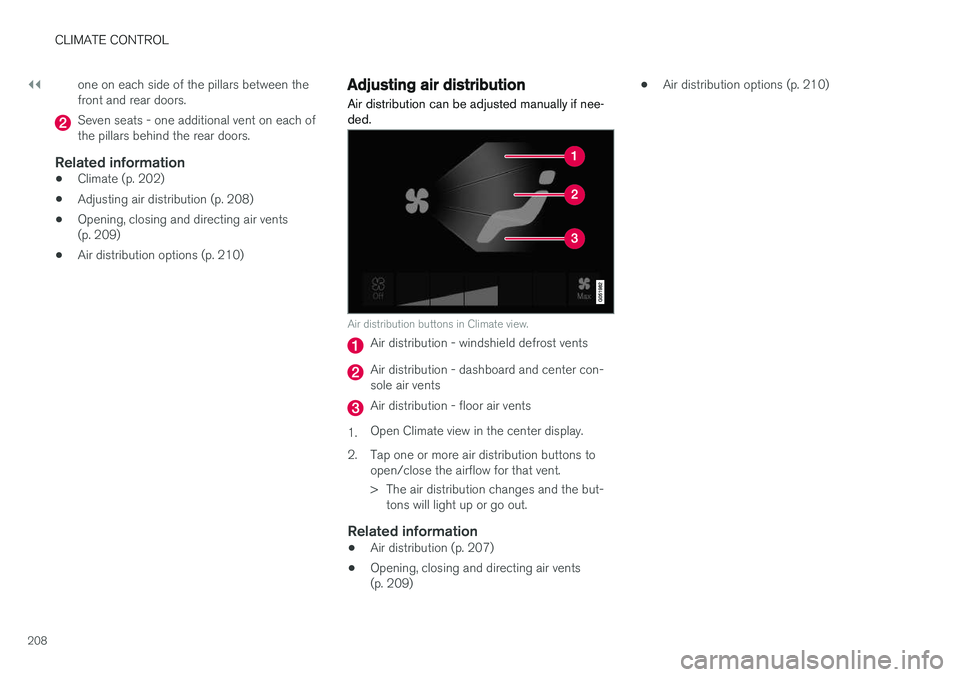
Air distribution can be adjusted manually if nee- ded.
Air distribution buttons in Climate view.
Air distribution - windshield defrost vents
Air distribution - dashboard and center con- sole air vents
Air distribution - floor air vents
1. Open Climate view in the center display.
2. Tap one or more air distribution buttons to open/close the airflow for that vent.
> The air distribution changes and the but-tons will light up or go out.
Related information
• Air distribution (p. 207)
• Opening, closing and directing air vents (p. 209) •
Air distribution options (p. 210)
Page 219 of 686
CLIMATE CONTROL
* Option/accessory.217
Activating and deactivating the heated rear seats from the rear seat
Seat heating controls and indicator lights on the rear side of the tunnel console.
–Press repeatedly on the left or right seat heating buttons in the climate panel on thetunnel console to select one of four levels:
Off, High, Medium or Low.
> The level will be changed and the climate panel screen will show the new level.
Related information
• Climate system controls (p. 213)
Activating and deactivating front
seat ventilation
*
The seats can be ventilated to provide increased comfort in warm weather.
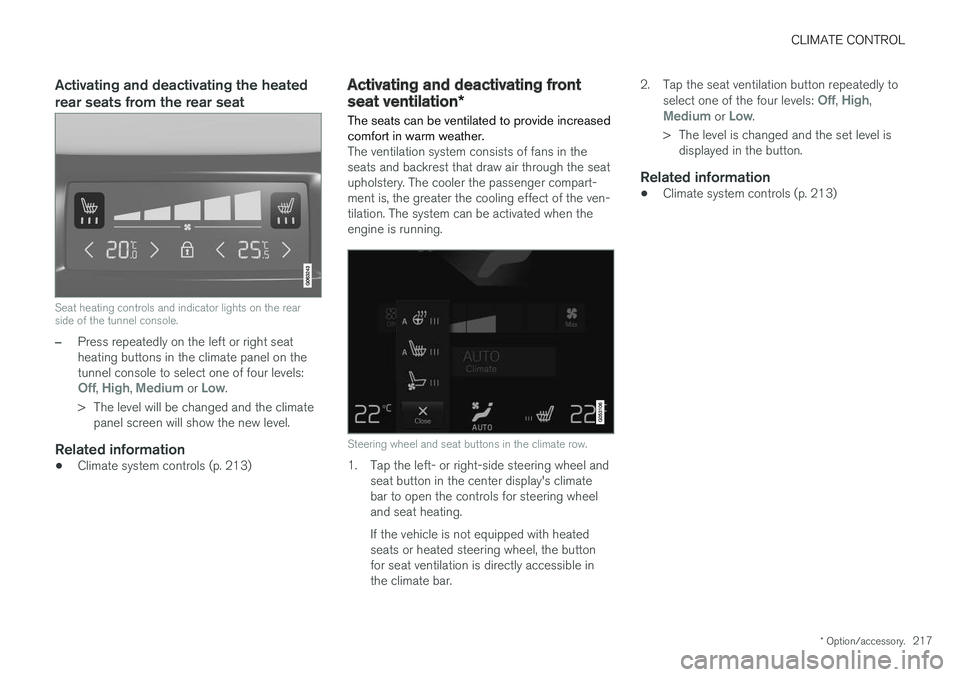
The ventilation system consists of fans in the seats and backrest that draw air through the seatupholstery. The cooler the passenger compart-ment is, the greater the cooling effect of the ven-tilation. The system can be activated when theengine is running.
Steering wheel and seat buttons in the climate row.
1. Tap the left- or right-side steering wheel and seat button in the center display's climate bar to open the controls for steering wheeland seat heating. If the vehicle is not equipped with heated seats or heated steering wheel, the buttonfor seat ventilation is directly accessible inthe climate bar. 2. Tap the seat ventilation button repeatedly to
select one of the four levels:
Off, High,Medium or Low.
> The level is changed and the set level is displayed in the button.
Related information
• Climate system controls (p. 213)
Page 221 of 686
CLIMATE CONTROL
}}
219
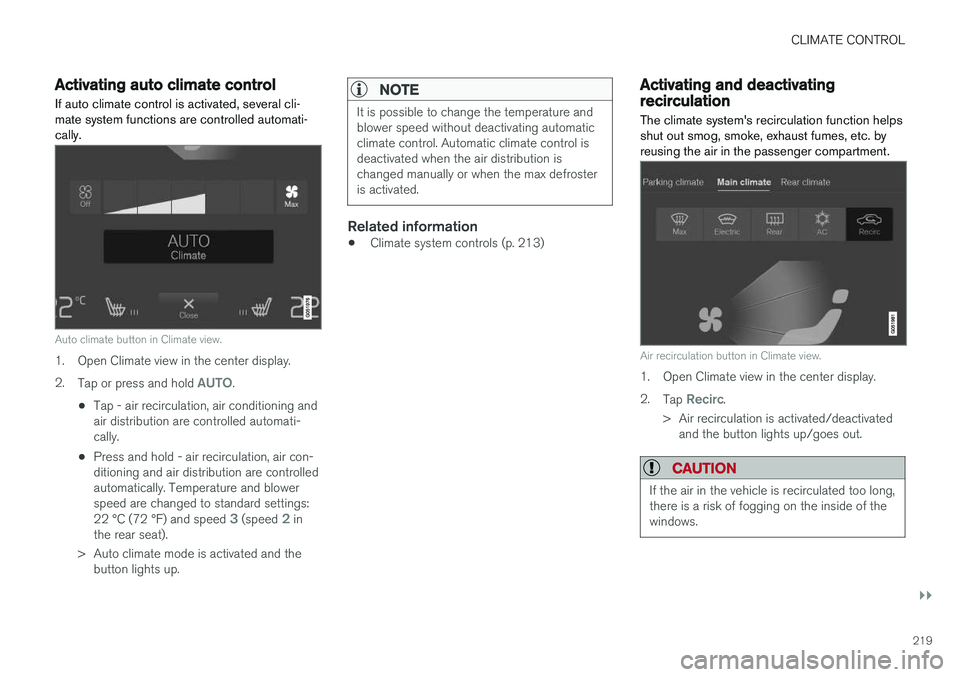
Activating auto climate controlIf auto climate control is activated, several cli- mate system functions are controlled automati-cally.
Auto climate button in Climate view.
1. Open Climate view in the center display. 2. Tap or press and hold
AUTO.
• Tap - air recirculation, air conditioning and air distribution are controlled automati-cally.
• Press and hold - air recirculation, air con-ditioning and air distribution are controlledautomatically. Temperature and blowerspeed are changed to standard settings: 22 °C (72 °F) and speed
3 (speed 2 in
the rear seat).
> Auto climate mode is activated and the button lights up.
NOTE
It is possible to change the temperature and blower speed without deactivating automaticclimate control. Automatic climate control isdeactivated when the air distribution ischanged manually or when the max defrosteris activated.
Related information
• Climate system controls (p. 213)
Activating and deactivatingrecirculation
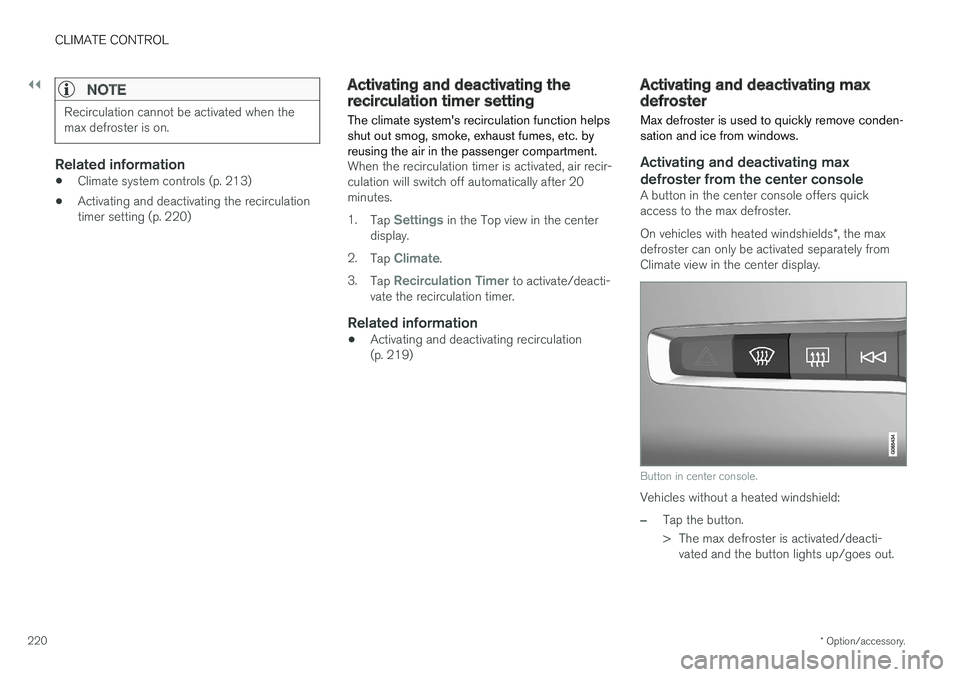
The climate system's recirculation function helps shut out smog, smoke, exhaust fumes, etc. byreusing the air in the passenger compartment.
Air recirculation button in Climate view.
1. Open Climate view in the center display. 2. Tap
Recirc.
> Air recirculation is activated/deactivated and the button lights up/goes out.
CAUTION
If the air in the vehicle is recirculated too long, there is a risk of fogging on the inside of thewindows.
Page 222 of 686
||
CLIMATE CONTROL
* Option/accessory.
220
NOTE
Recirculation cannot be activated when the max defroster is on.
Related information
• Climate system controls (p. 213)
• Activating and deactivating the recirculation timer setting (p. 220)
Activating and deactivating therecirculation timer setting
The climate system's recirculation function helps shut out smog, smoke, exhaust fumes, etc. byreusing the air in the passenger compartment.
When the recirculation timer is activated, air recir- culation will switch off automatically after 20minutes. 1. Tap
Settings in the Top view in the center
display.
2. Tap
Climate.
3. Tap
Recirculation Timer to activate/deacti-
vate the recirculation timer.
Related information
• Activating and deactivating recirculation (p. 219)
Activating and deactivating maxdefroster
Max defroster is used to quickly remove conden- sation and ice from windows.
Activating and deactivating max defroster from the center console
A button in the center console offers quick access to the max defroster. On vehicles with heated windshields *, the max
defroster can only be activated separately from Climate view in the center display.
Button in center console.
Vehicles without a heated windshield:
–Tap the button.
> The max defroster is activated/deacti- vated and the button lights up/goes out.