sport mode VOLVO XC90 TWIN ENGINE 2018 User Guide
[x] Cancel search | Manufacturer: VOLVO, Model Year: 2018, Model line: XC90 TWIN ENGINE, Model: VOLVO XC90 TWIN ENGINE 2018Pages: 686, PDF Size: 17 MB
Page 476 of 686

STARTING AND DRIVING
* Option/accessory.
474 Trailer Stability Assist*
Trailer Stability Assist (TSA 8
) is a function
designed to help stabilize a vehicle that is tow-
ing a trailer when the vehicle and trailer have
begun to sway. The function is part of the Elec-
tronic Stability Control system ESC 9
.
Reasons for swayingA vehicle towing a trailer may begin to sway for
various reasons. Normally this only occurs at high
speeds. However, if the trailer is overloaded or
unevenly distributed, e.g. too far back, there is a
risk of swaying even at low speeds.
Swaying may be caused by factors such as:
• The vehicle and trailer are hit by a sudden,
strong crosswind.
• The vehicle and trailer are traveling on an
uneven road or over a bump.
• Sudden movements of the steering wheel.
Once swaying has begun, it can be difficult or
impossible to stop it. This makes the vehicle and
trailer difficult to control and there is a risk of
swerving into oncoming traffic or driving off the
road.
Trailer Stability Assist functionTrailer Stability Assist continuously monitors the
vehicle's movements, particularly lateral move- ments. If swaying is detected, the brakes are
applied individually on the front wheels, which has
a stabilizing effect on the vehicle and trailer. This
is often enough to enable the driver to regain
control of the vehicle.
If the Trailer Stability Assist function's first
attempt is not adequate to stop the swaying
motion, the brakes are applied on all wheels and
engine power is temporarily reduced. As the
swaying motion begins to decrease and the vehi-
cle and trailer have once again become stable,
TSA stops regulating the brakes/engine power
and the driver regains control of the vehicle.
NOTE
Trailer Stability Assist is deactivated if the
driver selects the sport mode by deactivating
ESC in the center display's menu system. Trailer Stability Assist may not intervene if the
driver tries to compensate for the swaying motion
by moving the steering wheel rapidly, because
the system will then not be able to determine if it
is the trailer or the driver causing the swaying. When Trailer Stability Assist is
activated, the ESC symbol is
displayed in the instrument
panel.
Related information
•
Driving with a trailer (p. 472)
• Electronic Stability Control (p. 274) 8
Trailer Stability Assist
9 Electronic Stability Control
Page 478 of 686
STARTING AND DRIVING
476Towing using a towline
This section refers to one vehicle being towed
behind another using a towline.
Twin Engine vehicles may not be towed behind
another vehicle due to the risk of damage to the
electric motor. If the vehicle cannot be driven and
needs to be moved, it must be transported on a
tow truck with all four wheels on the bed of the
truck.
Towing another vehicleTowing another vehicle requires a lot of power -
use the AWD drive mode. This helps charge the
hybrid battery and improve the vehicle's driving
and roadholding characteristics.
Before towing another vehicle, check applicable
speed limit regulations.
Jump startingDo not tow the vehicle to start the engine. Use an
auxiliary battery if the start battery's charge level
is so low that the engine cannot be started.
CAUTION Attempts to tow-start the vehicle could cause
damage to the electrical drive motor and
three-way catalytic converter.
Related information
•
Attaching and removing the towing eyelet
(p. 476)
• Hazard warning flashers (p. 161)
• Recovery (p. 477)
• Jump starting using another battery (p. 469)
• Selecting ignition mode (p. 428) Attaching and removing the towing
eyelet
Use the towing eyelet to tow another vehicle.
Screw the towing eyelet securely into place in
the threaded outlet behind the cover on the
right-hand side of the rear bumper.
NOTE If the vehicle is equipped with a towbar, there
is no rear attachment for the towing eye.
Attaching the towing eyelet
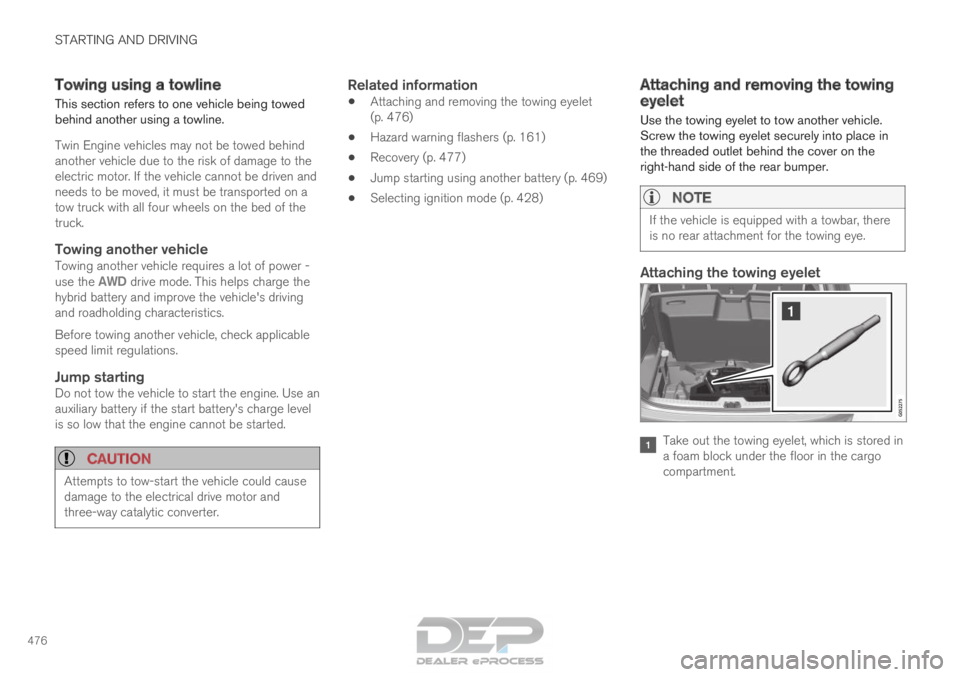
Take out the towing eyelet, which is stored in
a foam block under the floor in the cargo
compartment.
Page 500 of 686
AUDIO, MEDIA AND INTERNET
* Option/accessory.
498 SiriusXM
®
Satellite radio*
The SiriusXM ®
Satellite system broadcasts from
of a number of high elevation satellites in geo-
synchronous orbit.
Listening to satellite radioThe digital signals from the satellites are line-of-
sight, which means that physical obstructions
such as bridges, tunnels, etc, may temporarily
interfere with signal reception.
Avoid any obstructions, such as metallic objects
transported on roof racks or in a ski box, or other
antennas that may impede signals from the
SiriusXM ®
satellites.
Selecting SiriusXM ®
Satellite radio
mode
1. From the center display's Home view, swipe from right to left to come to App view. 2.
Tap the SiriusXM ®
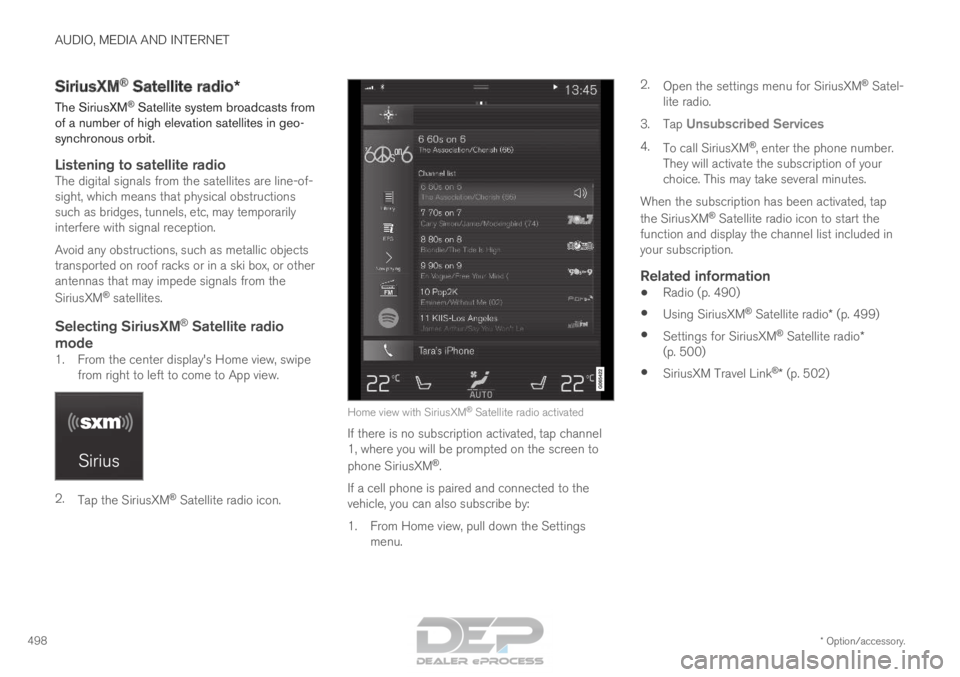
Satellite radio icon. Home view with SiriusXM
®
Satellite radio activated
If there is no subscription activated, tap channel
1, where you will be prompted on the screen to
phone SiriusXM ®
.
If a cell phone is paired and connected to the
vehicle, you can also subscribe by:
1.
From Home view, pull down the Settings
menu. 2.
Open the settings menu for SiriusXM ®
Satel-
lite radio.
3. Tap Unsubscribed Services
4. To call SiriusXM ®
, enter the phone number.
They will activate the subscription of your
choice. This may take several minutes.
When the subscription has been activated, tap
the SiriusXM ®
Satellite radio icon to start the
function and display the channel list included in
your subscription.
Related information
• Radio (p. 490)
• Using SiriusXM ®
Satellite radio* (p. 499)
• Settings for SiriusXM ®
Satellite radio*
(p. 500)
• SiriusXM Travel Link ®
* (p. 502)
Page 505 of 686

AUDIO, MEDIA AND INTERNET
}}
* Option/accessory. 503
•
SiriusXM Travel Link ®
* - Sports (p. 506)
• SiriusXM Travel Link ®
* - Weather (p. 503)
• SiriusXM Travel Link ®
* - Notifications
(p. 504) SiriusXM Travel Link
®
* - Weather
This SiriusXM Travel Link service provides
weather-related information near the vehicle, at a
local ski resort, etc.
From the SiriusXM Travel Link home screen, to
display weather-related information:
– Tap the
Weather button to display this
screen.
At the top of the screen, the following categories
will be displayed:
• Search (the magnifying glass icon)
• Local
• Ski condition
• Areas
• Favorites
Tap the category of your choice.
SearchTap the magnifying glass icon. If the function is
supported in the current context, a keyboard will
appear on the screen. Enter the text of your
choice and tap Search for detailed information
from the SiriusXM Travel Link database.
Local 4Information from the closest weather station will
be displayed and the following alternatives are
available: •
Map view
• Today
• 5 days
Map view
Tap the map to display it in full-screen mode. Tap
Back to return to the original map view.
Tap Map options to display the following alter- natives.
• Weather radar
• Storm attributes
• Surface features
• Tropical storm tracks
• Winds
Tap the relevant box to the right of the option to
select/deselect it. Tap Done to confirm and
return to the previous screen or Cancel.
Today
Tap to see the current temperature, or the tem-
perature in 3/6 hours.
Tap
Back to return to the Local screen or Close
to return to the SiriusXM Travel Link home
screen.
4 This is the weather default unless another alternative has been selected\
.
Page 553 of 686

WHEELS AND TIRES
}}
551
imprinted on the sidewall of the tire. The last four
digits in the series is the Department of
Transportation (DOT) stamp and indicates the
week and year the tire was manufactured. The
tire in the illustration has 0717 as the last four
digits, which means it was manufactured week 7
of 2017.
Tire ageTires degrade over time, even when they are not
being used. It is recommended that tires gener-
ally be replaced after 6 years of normal service.
Heat caused by hot climates, frequent high load-
ing conditions or Ultra Violet (U.V.) exposure can
accelerate the aging process. The temporary
spare
2
should also be replaced at 6-year inter-
vals, even if it has never been used. A tire with
e.g., visible cracks or discoloration should be
replaced immediately.
Tire economy
• Maintain correct tire pressure.
• Avoid fast starts, hard braking and tire
screeching.
• Tire wear increases with speed.
• Correct front wheel alignment is very impor-
tant.
• Unbalanced wheels impair tire economy and
driving comfort. •
Tires must maintain the same direction of
rotation throughout their lifetime.
• When replacing tires, the tires with the most
tread should be mounted on the rear wheels
to reduce the chance of oversteer during
hard braking.
• Hitting curbs or potholes can damage the
tires and/or wheels permanently.
Tire rotationYour vehicle has no required tire rotation. Driving
style, tire pressure, climate and road conditions
affect how quickly the tires age and exhibit signs
of wear. Maintaining the correct tire pressure
helps keep tread wear evenly distributed.
To help prevent differences in tread depth and
wear patterns forming on the tires, the front and
rear wheels should be rotated, i.e. the front tires
moved to the rear and the rear tires moved to the
front. Ideally, tire rotation should be done the first
time after approximately 5000 km (ca
3100 miles) and thereafter at 10,000 km
(approx. 6200 miles) intervals.
If you have any questions regarding tread depth,
Volvo recommends consulting an authorized
Volvo workshop. If significant differences in wear
(> 1 mm difference in tread depth) between the
tires have already occurred, the least worn tires
should always be mounted on the rear wheels. A
front-wheel skid (understeer) is usually easier to control than a rear-wheel skid (oversteer). If the
front wheels skid, the vehicle will continue in a
straight line instead of the rear wheels skidding
to the side, which could cause you to completely
lose control of the vehicle. It is therefore impor-
tant that the rear wheels never lose grip before
the front wheels.
Storing wheels and tiresWhen storing complete wheels (tires mounted on
rims), they should be suspended off the floor or
placed on their sides on the floor.
Tires not mounted on rims should be stored on
their sides or standing upright, but should not be
suspended.
CAUTION
Tires should preferably be stored in a cool,
dry, dark place, and should never be stored in
close proximity to solvents, gasoline, oils, etc.
2
Not available on all models.
Page 657 of 686

SPECIFICATIONS
}}
655 Vehicle Emission Control Information. US
models. Your Volvo is designed to meet all appli-
cable emission standards, as evidenced by the
certification label on the underside of the hood.
For further information regarding these regula-
tions, please consult your Volvo retailer. Vehicle Emission Control Information.
Canadian models. Your Volvo is designed to
meet all applicable emission standards, as evi-
denced by the certification label on the underside
of the hood. For further information regarding
these regulations, please consult your Volvo
retailer. Vehicle Identification Number (VIN). The
VIN plate is located on the top left surface of the
dashboard. The Vehicle Identification Number
(VIN) should always be quoted in all correspond-
ence concerning your vehicle with the retailer and
when ordering parts. Tire inflation pressures. This label indicates
the correct inflation pressures for the tires that
were on the vehicle when it left the factory. Federal Motor Vehicle Safety Standards
(FMVSS) specifications (USA) and Ministry of
Transport (CMVSS) standards (Canada). Your
Volvo is designed to meet all applicable safety
standards, as evidenced by the certification label
on the driver's side B-pillar (the structural mem-
ber at the side of the vehicle, at the rear of the
driver's door opening). This label also includes
codes for paint color, etc. For further information
regarding these regulations, please consult your
Volvo retailer. U.S. models have the upper decal;
Canadian models have the lower one.