steering VOLVO XC90 TWIN ENGINE 2018 Owner's Guide
[x] Cancel search | Manufacturer: VOLVO, Model Year: 2018, Model line: XC90 TWIN ENGINE, Model: VOLVO XC90 TWIN ENGINE 2018Pages: 686, PDF Size: 17 MB
Page 158 of 686
||LIGHTING
156
Tunnel detection
The vehicle will detect if it enters a tunnel and
shift from daytime running lights to low beams.
Note that the left-hand steering wheel lever must
be in
position for tunnel detection to work.
Related information
•
Lighting panel and controls (p. 152)
• Ignition modes (p. 427)
• Daytime running lights (p. 154) Using high beam
High beam is operated via the left-hand steering
wheel lever. High beam is the vehicle's strongest
lighting and should be used when driving in dark
conditions, provided it does not blind other road
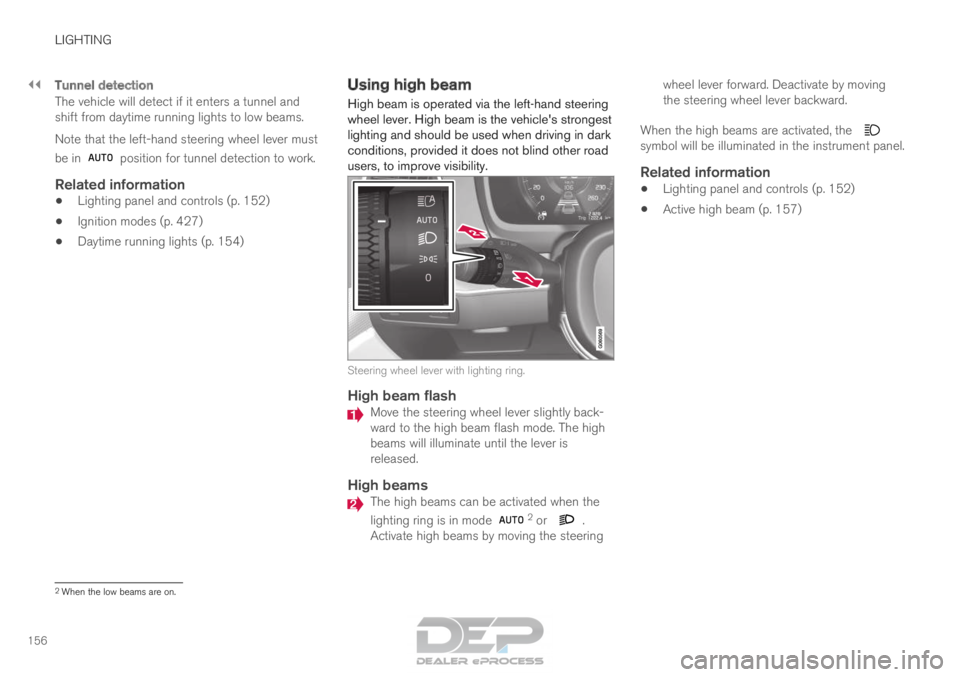
users, to improve visibility. Steering wheel lever with lighting ring.
High beam flash
Move the steering wheel lever slightly back-
ward to the high beam flash mode. The high
beams will illuminate until the lever is
released.
High beams
The high beams can be activated when the
lighting ring is in mode
2
or .
Activate high beams by moving the steering wheel lever forward. Deactivate by moving
the steering wheel lever backward.
When the high beams are activated, the symbol will be illuminated in the instrument panel.
Related information
•
Lighting panel and controls (p. 152)
• Active high beam (p. 157) 2
When the low beams are on.
Page 159 of 686

LIGHTING
}}
* Option/accessory. 157
Active high beam
Active high beams is a function that uses cam-
era sensors in the upper edge of the windshield
to detect the headlights of approaching vehicles
or the taillights of the vehicle directly ahead.
When either of these is detected, the vehicle's
headlights will automatically switch from high
beams to low beams. Active high beam is enabled by moving the lighting ring
on the steering wheel lever to
.
The function can also detect street lighting.
When the camera sensor no longer detects an
approaching vehicle or a vehicle ahead, the head-
lights will return to high beams. This function can be used in dark conditions
when the vehicle's speed is approx. 20 km/h
(approx. 12 mph) or higher.
If active high beams are deactivated when the
high beams are on, the headlights will automati-
cally switch to low beams.
When active high beams are activated, a white symbol will be displayed in the instrument
panel.
When high beams are on, the symbol will be blue.
For LED headlights, this applies even if the high
beams are partially dimmed, i.e. if the headlights
are illuminated with slightly more than low beams.
Vehicles with LED 3
headlights*
If the active high beams are equipped with the
auto on/off function 4
, the headlights will return to
high beams a second or so after the camera sen-
sor no longer detects the headlights of approach-
ing vehicles or the taillights of a vehicle ahead.
Limitations for active high beams
The camera sensor on which the function is
based has limitations. If this symbol and the message Active
High Beam Temporarily unavailable is displayed in the instru-
ment panel, switching between high
and low beams must be done manually. The light-
ing ring on the steering wheel lever can remain in
the position. The symbol will go out
when the message is displayed. The same applies if this symbol along
with the message
Windscreen
sensor Sensor blocked, see Owner's manual is displayed. Active high beams may be temporarily unavailable
in certain situations, e.g. heavy fog or rain. When
active high beams become available again, or the
windshield sensors are no longer blocked, the
message will disappear and the
symbol will
be displayed.
WARNING Automatic high beam is an aid in using the
best possible light based on prevailing condi-
tions.
The driver is always responsible for manually
switching between high and low beam when
traffic situations or weather conditions require
this.
3
LED (Light Emitting Diode)4 Depends on the vehicle's equipment level.
Page 160 of 686
||LIGHTING
158
Related information
•
Lighting panel and controls (p. 152)
• Using high beam (p. 156)
• Camera limitations (p. 332) Using turn signals
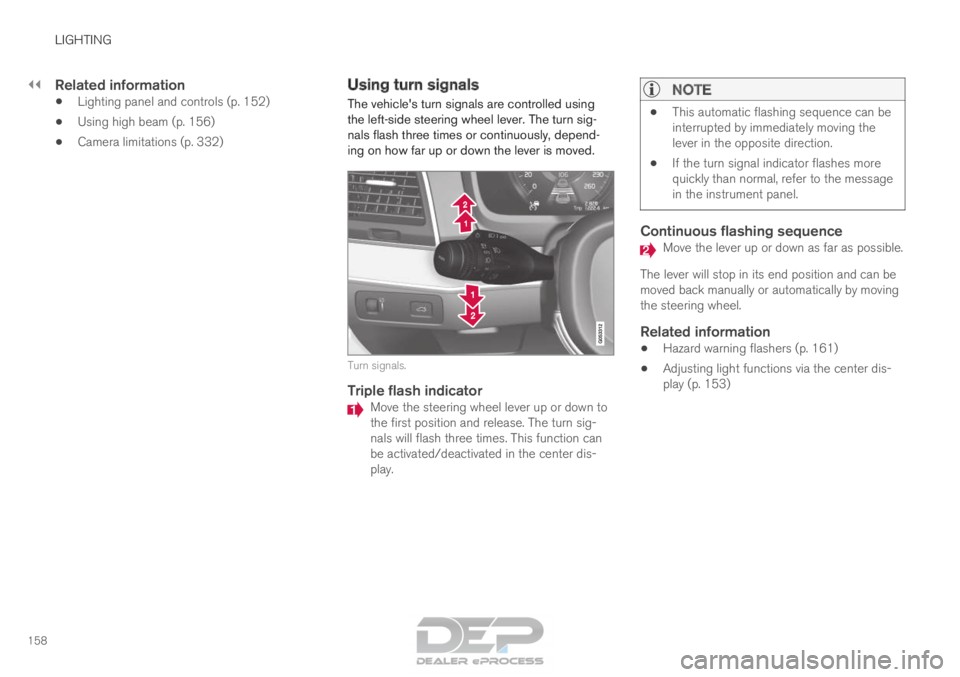
The vehicle's turn signals are controlled using
the left-side steering wheel lever. The turn sig-
nals flash three times or continuously, depend-
ing on how far up or down the lever is moved. Turn signals.
Triple flash indicator
Move the steering wheel lever up or down to
the first position and release. The turn sig-
nals will flash three times. This function can
be activated/deactivated in the center dis-
play.
NOTE •
This automatic flashing sequence can be
interrupted by immediately moving the
lever in the opposite direction.
• If the turn signal indicator flashes more
quickly than normal, refer to the message
in the instrument panel.
Continuous flashing sequence Move the lever up or down as far as possible.
The lever will stop in its end position and can be
moved back manually or automatically by moving
the steering wheel.
Related information
• Hazard warning flashers (p. 161)
• Adjusting light functions via the center dis-
play (p. 153)
Page 161 of 686

LIGHTING
}}
* Option/accessory. 159
Active Bending Lights*
Active Bending Lights (ABL) are designed to
help provide maximum illumination in curves and
intersections. Depending on equipment level,
vehicles with LED 5
headlights* may be equipped
with Active Bending Lights. Headlight pattern with function deactivated (left) and
activated (right).
Active Bending Lights follow the movement of
the steering wheel to help provide maximum illu-
mination in curves and intersections, improving
visibility for the driver.
The function is automatically activated when the
engine is started. If a fault is detected in the sys-
tem, the symbol will illuminate in the
instrument panel and a message will be dis-
played. The function is only active in weak daylight or
dark conditions and only when the vehicle is mov-
ing and the low beams are on.
Deactivating/activating the functionThe function is activated as the default factory
setting and can be activated and deactivated in
the center display's Function view:
Tap the Active BendingLights button.
Related information
• Adjusting light functions via the center dis-
play (p. 153) Rear fog light
The rear fog light is considerably brighter than
ordinary taillights and should only be used to
help other road users see the vehicle when visi-
bility is reduced by conditions such as fog,
snow, smoke or dust. Rear fog light button.
The rear fog light consists of a light on the rear
of the vehicle on the driver's side.
The rear fog light can only be switched on when
the ignition is in II mode or when the engine is
running and the lighting ring is in position or .
Press the button for On/Off. The symbol in
the instrument panel illuminates when the rear
fog light is on. 5
LED (Light Emitting Diode)
Page 163 of 686
LIGHTING
* Option/accessory.161
Hazard warning flashers
Hazard warning flashers warn other road users
by all of the vehicle's turn signals being activated
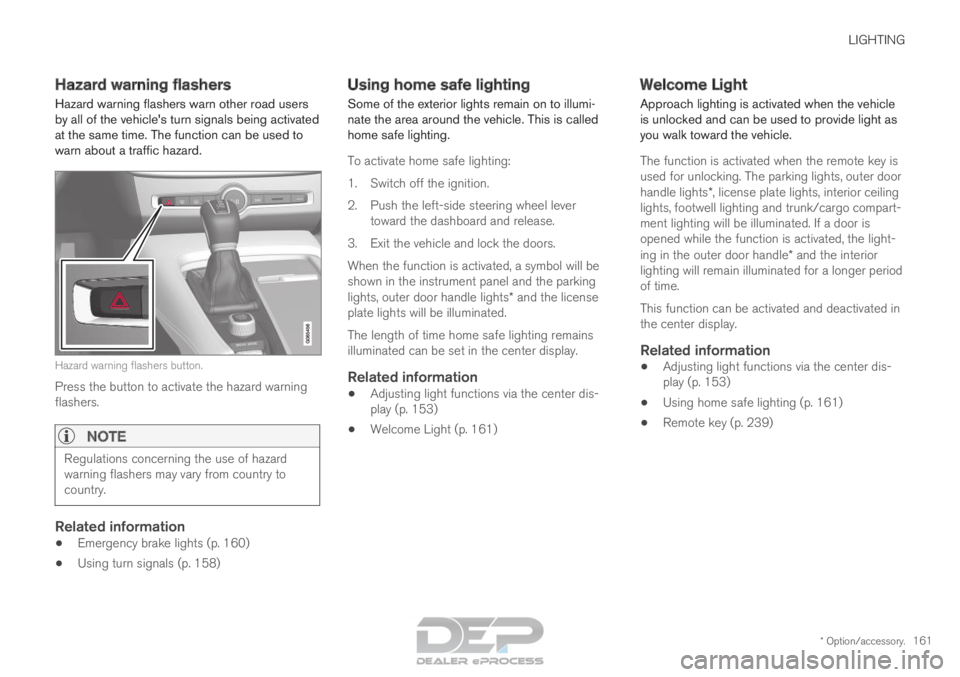
at the same time. The function can be used to
warn about a traffic hazard. Hazard warning flashers button.
Press the button to activate the hazard warning
flashers.
NOTE Regulations concerning the use of hazard
warning flashers may vary from country to
country.
Related information
•
Emergency brake lights (p. 160)
• Using turn signals (p. 158) Using home safe lighting
Some of the exterior lights remain on to illumi-
nate the area around the vehicle. This is called
home safe lighting.
To activate home safe lighting:
1.
Switch off the ignition.
2. Push the left-side steering wheel lever toward the dashboard and release.
3. Exit the vehicle and lock the doors.
When the function is activated, a symbol will be
shown in the instrument panel and the parking
lights, outer door handle lights* and the license
plate lights will be illuminated.
The length of time home safe lighting remains
illuminated can be set in the center display.
Related information
• Adjusting light functions via the center dis-
play (p. 153)
• Welcome Light (p. 161) Welcome Light
Approach lighting is activated when the vehicle
is unlocked and can be used to provide light as
you walk toward the vehicle.
The function is activated when the remote key is
used for unlocking. The parking lights, outer door
handle lights*, license plate lights, interior ceiling
lights, footwell lighting and trunk/cargo compart-
ment lighting will be illuminated. If a door is
opened while the function is activated, the light-
ing in the outer door handle* and the interior
lighting will remain illuminated for a longer period
of time.
This function can be activated and deactivated in
the center display.
Related information
• Adjusting light functions via the center dis-
play (p. 153)
• Using home safe lighting (p. 161)
• Remote key (p. 239)
Page 166 of 686
LIGHTING
* Option/accessory.
164 Adjusting interior lighting
Illumination in the vehicle varies depending on
ignition mode. The interior lighting can be
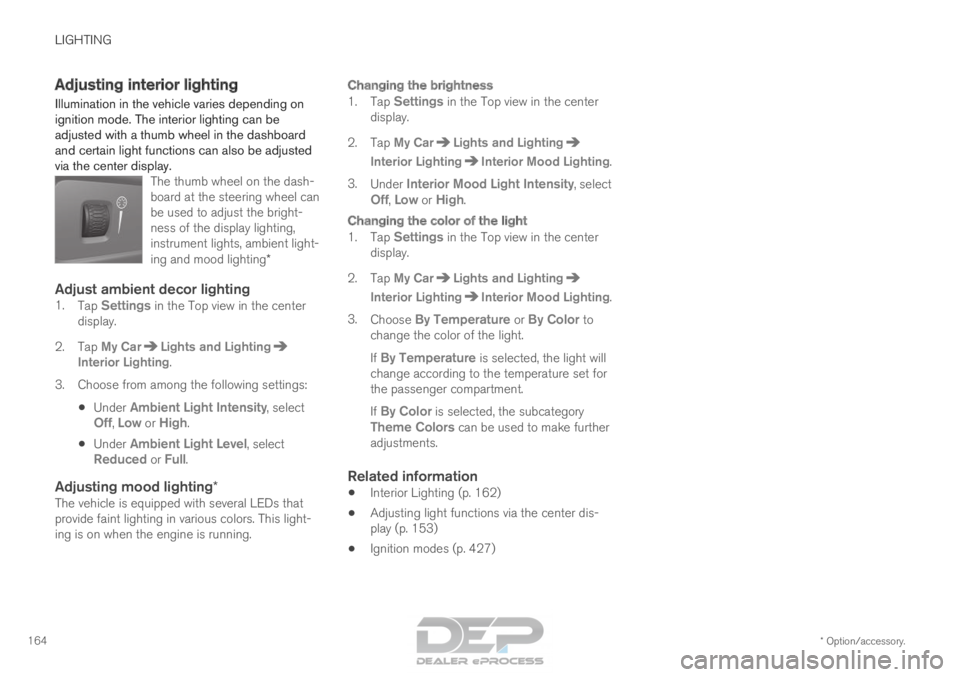
adjusted with a thumb wheel in the dashboard
and certain light functions can also be adjusted
via the center display. The thumb wheel on the dash-
board at the steering wheel can
be used to adjust the bright-
ness of the display lighting,
instrument lights, ambient light-
ing and mood lighting*
Adjust ambient decor lighting1.Tap Settings in the Top view in the center
display.
2.
Tap My Car Lights and Lighting
Interior Lighting.
3.
Choose from among the following settings:
• Under
Ambient Light Intensity, select
Off, Low or High.
• Under
Ambient Light Level, select
Reduced or Full.
Adjusting mood lighting*The vehicle is equipped with several LEDs that
provide faint lighting in various colors. This light-
ing is on when the engine is running.
Changing the brightness
1. Tap Settings in the Top view in the center
display.
2.
Tap My Car Lights and Lighting
Interior Lighting Interior Mood Lighting
.
3. Under Interior Mood Light Intensity, select
Off,
Low or High.
Changing the color of the light
1. Tap Settings in the Top view in the center
display.
2.
Tap My Car Lights and Lighting
Interior Lighting Interior Mood Lighting
.
3. Choose By Temperature or By Color to
change the color of the light.
If By Temperature is selected, the light will change according to the temperature set for
the passenger compartment.
If By Color is selected, the subcategory
Theme Colors can be used to make further adjustments.
Related information
• Interior Lighting (p. 162)
• Adjusting light functions via the center dis-
play (p. 153)
• Ignition modes (p. 427)
Page 178 of 686

WINDOWS, GLASS AND MIRRORS
* Option/accessory.
176 •
Locking and unlocking using the remote key
(p. 241)
• Locking and unlocking from inside the vehi-
cle (p. 257) Using the windshield wipers
The windshield wipers clean the windshield. The
right-side steering wheel lever is used to adjust
windshield wiper settings. Right-hand steering wheel lever.
Thumb wheel, used to set rain sensor sensi-
tivity and interval wiper speed.
Single sweepMove the lever down and release for a
single sweep.
Wipers offMove the lever to position 0 to turn off
the windshield wipers.
Interval wipersSet the number of sweeps per time unit
with the thumb wheel when interval wip-
ers are selected.
Continuous wipersMove the lever upward for the wipers to
operate at normal speed. Move the lever upward again for the wip-
ers to operate at high speed.
CAUTION
Before activating the wipers, make sure that
the wiper blades are not frozen in place and
that any snow or ice on the windshield and
rear window has been scraped away.
CAUTION
Use plenty of washer fluid when the wipers
clean the windshield. The windshield must be
wet when the windshield wipers are working.
Related information
•
Using the rain sensor (p. 177)
• Using the windshield and headlight washers
(p. 179)
• Using automatic rear window wiping when
backing up (p. 181)
• Heated windshield washer nozzles* (p. 177)
• Using the rain sensor's memory function
(p. 178)
• Using the rear window wiper/washer
(p. 180)
Page 179 of 686

WINDOWS, GLASS AND MIRRORS
}}
* Option/accessory. 177
•
Filling washer fluid (p. 650)
• Windshield wipers in the service position
(p. 649)
• Replacing windshield wiper blades (p. 648)
• Changing rear window wipers (p. 647) Heated windshield washer nozzles*
The washer nozzles are heated automatically in
cold weather to prevent the washer fluid from
freezing.
Related information
• Using the rain sensor (p. 177)
• Using the windshield and headlight washers
(p. 179)
• Using automatic rear window wiping when
backing up (p. 181)
• Using the rain sensor's memory function
(p. 178)
• Using the rear window wiper/washer
(p. 180)
• Filling washer fluid (p. 650)
• Windshield wipers in the service position
(p. 649)
• Replacing windshield wiper blades (p. 648)
• Changing rear window wipers (p. 647)
• Using the windshield wipers (p. 176) Using the rain sensor
The rain sensor monitors the amount of water on
the windshield and automatically starts the wind-
shield wipers. Rain sensor sensitivity can be
adjusted using the thumb wheel on the right-
hand steering wheel lever.
Right-hand steering wheel lever.
Rain sensor button
Thumb wheel, sensitivity/interval wiper speed
When the rain sensor is activated, the rain
sensor symbol will be displayed in the instrument
panel.
Activating the rain sensorWhen the rain sensor is activated, the engine
must be running or the ignition must be in mode I
or II. The windshield wiper lever must also be in
position 0 or in the single sweep position.
Page 181 of 686

WINDOWS, GLASS AND MIRRORS
}}
* Option/accessory. 179
•
Windshield wipers in the service position
(p. 649)
• Replacing windshield wiper blades (p. 648)
• Changing rear window wipers (p. 647)
• Using the windshield wipers (p. 176) Using the windshield and headlight
washers
The windshield and headlight washers clean the
windshield and headlights. Use the right-side
steering wheel lever to start the windshield and
headlight washers.
Starting the windshield and headlight
washers Washing function, right-hand steering wheel lever.
–
Move the right-hand steering wheel lever
toward the steering wheel to start the wind-
shield and headlight washers.
>
After the lever is released, the wipers
make several extra sweeps.
CAUTION Avoid activating the washer system when it is
frozen or the fluid reservoir is empty. Other-
wise, there is a risk of damaging the pump.
Headlight washer*To save washer fluid, the headlights are washed
automatically according to a defined interval
when the headlights are on.
Reduced washingWhen there is about 1 liter (1 qt) of washer fluid
left in the reservoir and the
Washer fluid Level
low, refill message is displayed in the instrument
panel together with the symbol, the washer
fluid supply to the headlights is cut off. This is to
prioritize windshield cleaning and visibility
through it. The headlights are only washed if high
or low beam is on.
Related information
• Using the rain sensor (p. 177)
• Using automatic rear window wiping when
backing up (p. 181)
• Heated windshield washer nozzles* (p. 177)
• Using the rain sensor's memory function
(p. 178)
• Using the rear window wiper/washer
(p. 180)
• Filling washer fluid (p. 650)
Page 182 of 686
WINDOWS, GLASS AND MIRRORS
* Option/accessory.
180 •
Windshield wipers in the service position
(p. 649)
• Replacing windshield wiper blades (p. 648)
• Changing rear window wipers (p. 647)
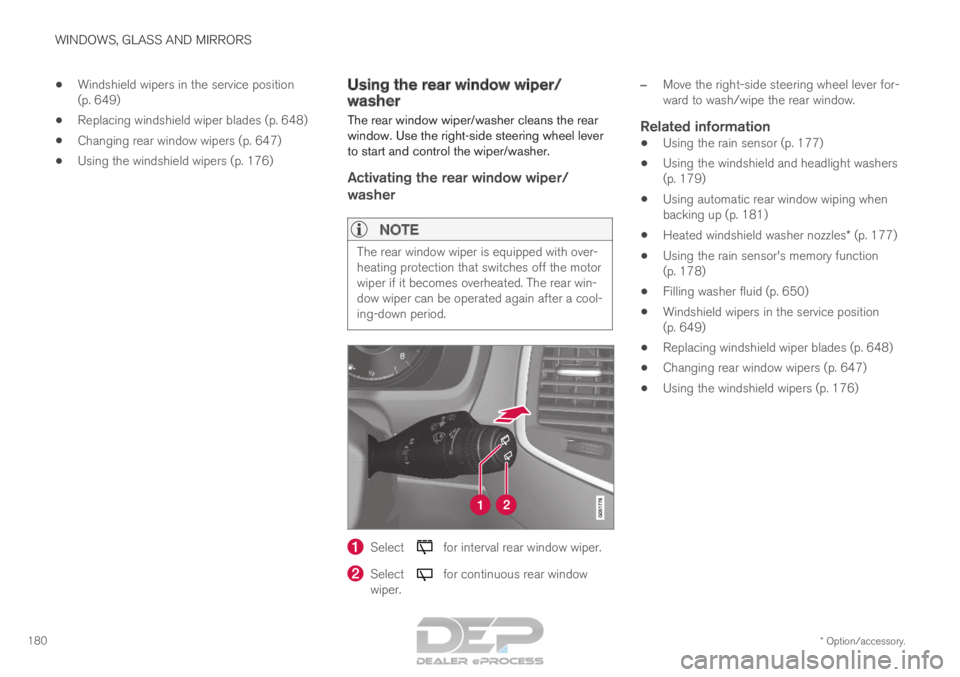
• Using the windshield wipers (p. 176) Using the rear window wiper/
washer
The rear window wiper/washer cleans the rear
window. Use the right-side steering wheel lever
to start and control the wiper/washer.
Activating the rear window wiper/
washer
NOTE The rear window wiper is equipped with over-
heating protection that switches off the motor
wiper if it becomes overheated. The rear win-
dow wiper can be operated again after a cool-
ing-down period.
Select for interval rear window wiper.
Select for continuous rear window
wiper. –
Move the right-side steering wheel lever for-
ward to wash/wipe the rear window.
Related information
• Using the rain sensor (p. 177)
• Using the windshield and headlight washers
(p. 179)
• Using automatic rear window wiping when
backing up (p. 181)
• Heated windshield washer nozzles* (p. 177)
• Using the rain sensor's memory function
(p. 178)
• Filling washer fluid (p. 650)
• Windshield wipers in the service position
(p. 649)
• Replacing windshield wiper blades (p. 648)
• Changing rear window wipers (p. 647)
• Using the windshield wipers (p. 176)