warning lights VOLVO XC90 TWIN ENGINE 2018 Owners Manual
[x] Cancel search | Manufacturer: VOLVO, Model Year: 2018, Model line: XC90 TWIN ENGINE, Model: VOLVO XC90 TWIN ENGINE 2018Pages: 686, PDF Size: 17 MB
Page 6 of 686
4
Resetting user data when the vehiclechanges owners134
Resetting center display settings135
Setting types in the center display135
Table of settings in the center display136
Driver profiles137
Selecting a driver profile138
Changing a driver profile's name139
Resetting driver profile settings139
Linking a remote key to a driver profile139
Messages in the center display140
Handling messages in the center display141
Handling messages saved from thecenter display142
Head-up display*142
Activating and deactivating the head-up display*144
Head-up display settings*144
Voice control145
Using voice commands146
Voice control for cellular phones147
Voice control for radio and media148
Voice control settings148
LIGHTING
Lighting panel and controls152
Adjusting light functions via the cen-ter display153
Parking lights154
Daytime running lights154
Low beams155
Using high beam156
Active high beam157
Using turn signals158
Active Bending Lights*159
Rear fog light159
Brake lights160
Emergency brake lights160
Hazard warning flashers161
Using home safe lighting161
Welcome Light161
Interior Lighting162
Adjusting interior lighting164
WINDOWS, GLASS AND MIRRORS
Windows, glass and mirrors166
Pinch protection for windows andsun curtains166
Reset procedure for pinch protection167
Power windows167
Operating the power windows168
Using sun curtains*169
Rearview/door mirrors169
Adjusting the rearview mirror dim-ming function170
Adjusting the door mirrors171
Panoramic roof*172
Operating the panoramic roof*173
Auto closing the panoramic roof* suncurtain175
Using the windshield wipers176
Heated windshield washer nozzles*177
Using the rain sensor177
Using the rain sensor's memory function178
Using the windshield and headlightwashers179
Using the rear window wiper/washer180
Using automatic rear window wipingwhen backing up181
Page 84 of 686
DISPLAYS AND VOICE CONTROL
* Option/accessory.
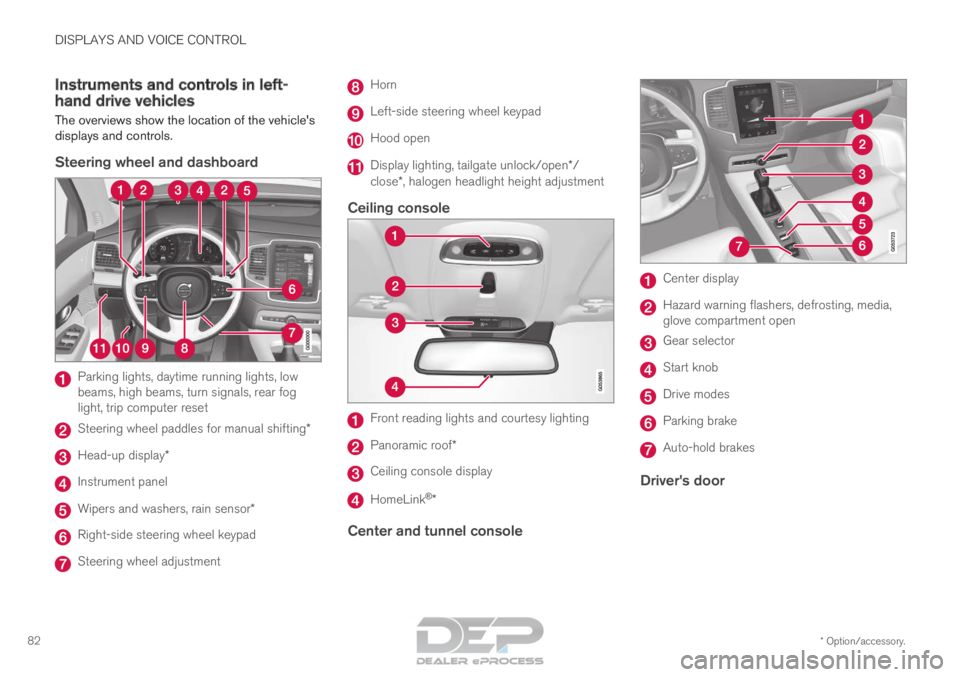
82 Instruments and controls in left-
hand drive vehicles
The overviews show the location of the vehicle's
displays and controls.
Steering wheel and dashboard Parking lights, daytime running lights, low
beams, high beams, turn signals, rear fog
light, trip computer reset
Steering wheel paddles for manual shifting*
Head-up display*
Instrument panel
Wipers and washers, rain sensor*
Right-side steering wheel keypad
Steering wheel adjustment Horn
Left-side steering wheel keypad
Hood open
Display lighting, tailgate unlock/open*/
close*, halogen headlight height adjustment
Ceiling console Front reading lights and courtesy lighting
Panoramic roof*
Ceiling console display
HomeLink
®
*
Center and tunnel console Center display
Hazard warning flashers, defrosting, media,
glove compartment open
Gear selector
Start knob
Drive modes
Parking brake
Auto-hold brakes
Driver's door
Page 98 of 686
||DISPLAYS AND VOICE CONTROL
96
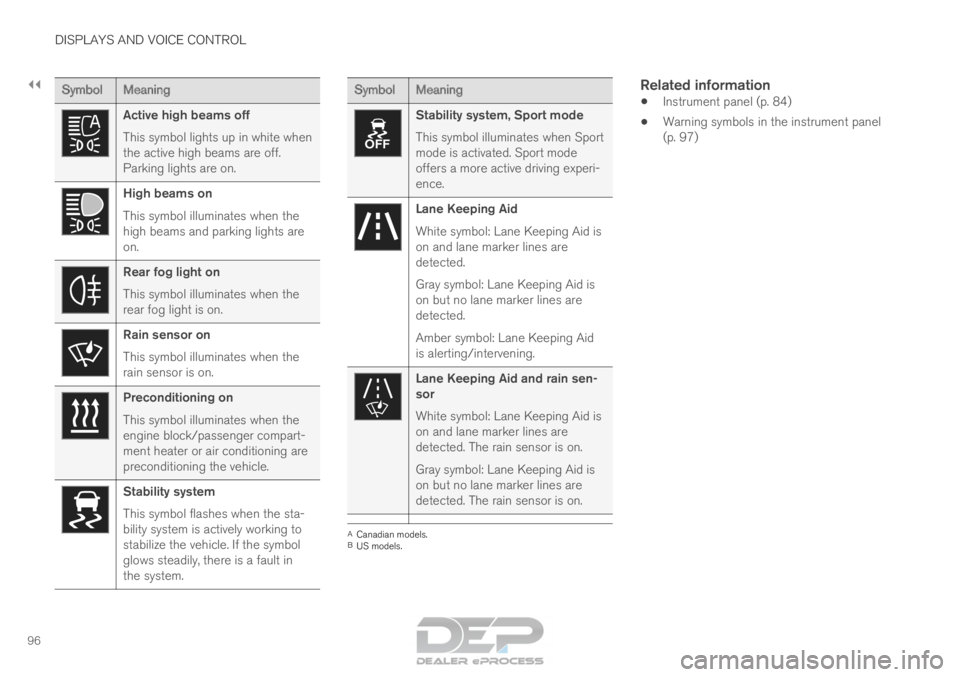
Symbol
Meaning Active high beams off
This symbol lights up in white when
the active high beams are off.
Parking lights are on.
High beams on
This symbol illuminates when the
high beams and parking lights are
on.
Rear fog light on
This symbol illuminates when the
rear fog light is on.
Rain sensor on
This symbol illuminates when the
rain sensor is on.
Preconditioning on
This symbol illuminates when the
engine block/passenger compart-
ment heater or air conditioning are
preconditioning the vehicle.
Stability system
This symbol flashes when the sta-
bility system is actively working to
stabilize the vehicle. If the symbol
glows steadily, there is a fault in
the system. Symbol
Meaning Stability system, Sport mode
This symbol illuminates when Sport
mode is activated. Sport mode
offers a more active driving experi-
ence.
Lane Keeping Aid
White symbol: Lane Keeping Aid is
on and lane marker lines are
detected.
Gray symbol: Lane Keeping Aid is
on but no lane marker lines are
detected.
Amber symbol: Lane Keeping Aid
is alerting/intervening.
Lane Keeping Aid and rain sen-
sor
White symbol: Lane Keeping Aid is
on and lane marker lines are
detected. The rain sensor is on.
Gray symbol: Lane Keeping Aid is
on but no lane marker lines are
detected. The rain sensor is on.
A
Canadian models.
B US models.
Related information
• Instrument panel (p. 84)
• Warning symbols in the instrument panel
(p. 97)
Page 155 of 686
LIGHTING
* Option/accessory.153
WARNINGThe vehicle lighting system cannot in all situa-
tions determine when the daylight is too weak
or not strong enough, e.g. when there is fog
or rain.
The driver is always responsible for driving the
vehicle with lighting that is safe for the traffic
conditions and as specified by applicable traf-
fic regulations.
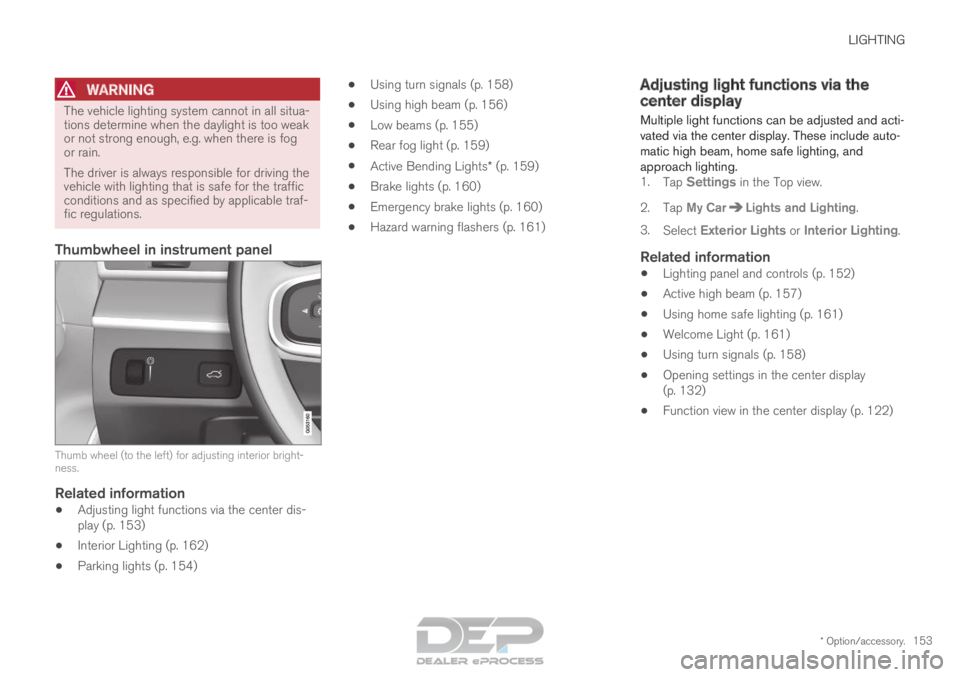
Thumbwheel in instrument panel
Thumb wheel (to the left) for adjusting interior bright-
ness.
Related information
•
Adjusting light functions via the center dis-
play (p. 153)
• Interior Lighting (p. 162)
• Parking lights (p. 154) •
Using turn signals (p. 158)
• Using high beam (p. 156)
• Low beams (p. 155)
• Rear fog light (p. 159)
• Active Bending Lights* (p. 159)
• Brake lights (p. 160)
• Emergency brake lights (p. 160)
• Hazard warning flashers (p. 161) Adjusting light functions via the
center display
Multiple light functions can be adjusted and acti-
vated via the center display. These include auto-
matic high beam, home safe lighting, and
approach lighting. 1. Tap Settings in the Top view.
2.
Tap My Car Lights and Lighting
.
3. Select Exterior Lights or Interior Lighting.
Related information
• Lighting panel and controls (p. 152)
• Active high beam (p. 157)
• Using home safe lighting (p. 161)
• Welcome Light (p. 161)
• Using turn signals (p. 158)
• Opening settings in the center display
(p. 132)
• Function view in the center display (p. 122)
Page 157 of 686
LIGHTING
}}
* Option/accessory. 155
With the steering wheel lever's lighting ring in the position, the daytime running lights (DRL
1
)
will illuminate when the vehicle is driven in day-
light conditions. The headlights will switch auto-
matically from daytime running lights to low
beams in weak daylight or dark conditions. The
headlights will also switch to low beams if the
front fog lights* and/or rear fog light are acti-
vated.
US models: When mode is selected, the
daytime running lights can be deactivated in the
center display. The parking lights will also be
deactivated. In weak daylight or dark conditions,
the parking lights and low beams will be illumi-
nated.
In the US: With the lighting ring in the or
position, the daytime running lights will be
off.
In Canada: With the lighting ring in the or
position, the daytime running lights will be
on.
NOTE Volvo recommends use of Daytime Running
Lights in the US. Its use is mandatory in Can-
ada.
WARNING The system is an energy saving aid – it cannot
in all situations determine when the daylight is
too weak or not strong enough, e.g. when
there is fog or rain.
The driver is always responsible for driving the
vehicle with lighting that is safe for the traffic
conditions and as specified by applicable traf-
fic regulations.
Related information
•
Lighting panel and controls (p. 152)
• Ignition modes (p. 427)
• Low beams (p. 155) Low beams
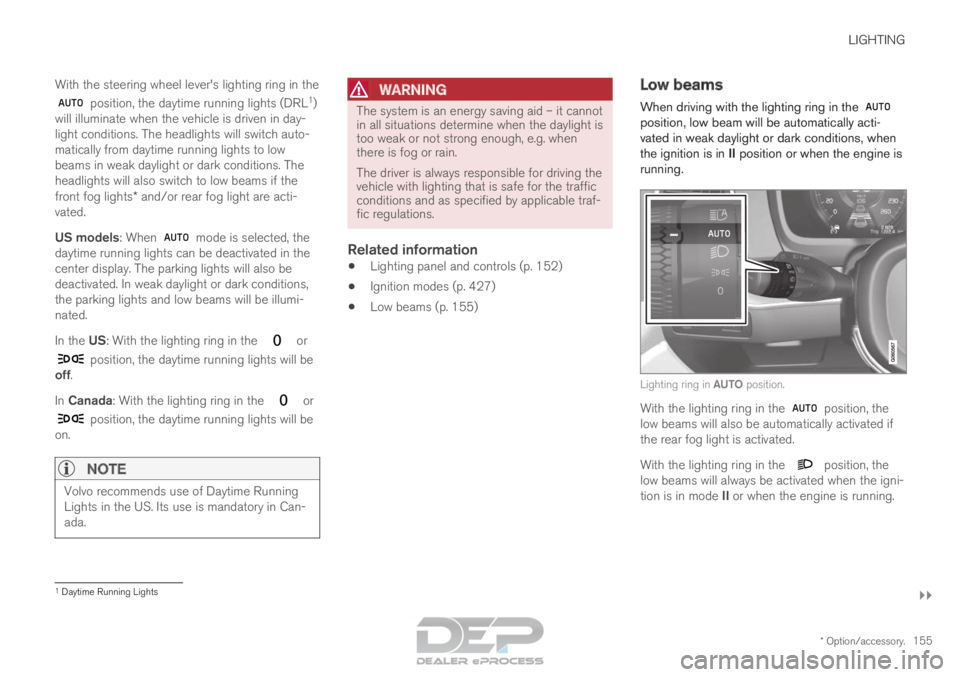
When driving with the lighting ring in the position, low beam will be automatically acti-
vated in weak daylight or dark conditions, when
the ignition is in II position or when the engine is
running. Lighting ring in AUTO position.
With the lighting ring in the
position, the
low beams will also be automatically activated if
the rear fog light is activated.
With the lighting ring in the position, the
low beams will always be activated when the igni-
tion is in mode II or when the engine is running. 1
Daytime Running Lights
Page 159 of 686

LIGHTING
}}
* Option/accessory. 157
Active high beam
Active high beams is a function that uses cam-
era sensors in the upper edge of the windshield
to detect the headlights of approaching vehicles
or the taillights of the vehicle directly ahead.
When either of these is detected, the vehicle's
headlights will automatically switch from high
beams to low beams. Active high beam is enabled by moving the lighting ring
on the steering wheel lever to
.
The function can also detect street lighting.
When the camera sensor no longer detects an
approaching vehicle or a vehicle ahead, the head-
lights will return to high beams. This function can be used in dark conditions
when the vehicle's speed is approx. 20 km/h
(approx. 12 mph) or higher.
If active high beams are deactivated when the
high beams are on, the headlights will automati-
cally switch to low beams.
When active high beams are activated, a white symbol will be displayed in the instrument
panel.
When high beams are on, the symbol will be blue.
For LED headlights, this applies even if the high
beams are partially dimmed, i.e. if the headlights
are illuminated with slightly more than low beams.
Vehicles with LED 3
headlights*
If the active high beams are equipped with the
auto on/off function 4
, the headlights will return to
high beams a second or so after the camera sen-
sor no longer detects the headlights of approach-
ing vehicles or the taillights of a vehicle ahead.
Limitations for active high beams
The camera sensor on which the function is
based has limitations. If this symbol and the message Active
High Beam Temporarily unavailable is displayed in the instru-
ment panel, switching between high
and low beams must be done manually. The light-
ing ring on the steering wheel lever can remain in
the position. The symbol will go out
when the message is displayed. The same applies if this symbol along
with the message
Windscreen
sensor Sensor blocked, see Owner's manual is displayed. Active high beams may be temporarily unavailable
in certain situations, e.g. heavy fog or rain. When
active high beams become available again, or the
windshield sensors are no longer blocked, the
message will disappear and the
symbol will
be displayed.
WARNING Automatic high beam is an aid in using the
best possible light based on prevailing condi-
tions.
The driver is always responsible for manually
switching between high and low beam when
traffic situations or weather conditions require
this.
3
LED (Light Emitting Diode)4 Depends on the vehicle's equipment level.
Page 162 of 686

||LIGHTING
160
The rear fog light turns off automatically when
the start knob is turned clockwise to turn off the
ignition or when the lighting ring is turned to the
or position.
NOTE
Regulations concerning rear fog light use vary
from country to country.
Related information
•
Lighting panel and controls (p. 152)
• Ignition modes (p. 427) Brake lights
The brake lights are automatically illuminated
when braking.
The brake lights illuminate when the brake pedal
is depressed. They also illuminate when the
brakes are automatically applied by one of the
driver support systems.
Related information
•
Emergency brake lights (p. 160)
• Brake functions (p. 429) Emergency brake lights
The emergency brake lights are activated to
warn following vehicles of hard braking.
This function causes an additional taillight on
each side of the vehicle to illuminate.
The emergency brake lights are activated in the
event of hard braking or if the ABS system is
activated and the vehicle is traveling at a high
speed.
After the driver decelerates to a low speed and
then releases the brake, the brake lights resume
their normal brightness.
Related information
• Brake lights (p. 160)
• Brakes (p. 429)
• Hazard warning flashers (p. 161)
Page 163 of 686
LIGHTING
* Option/accessory.161
Hazard warning flashers
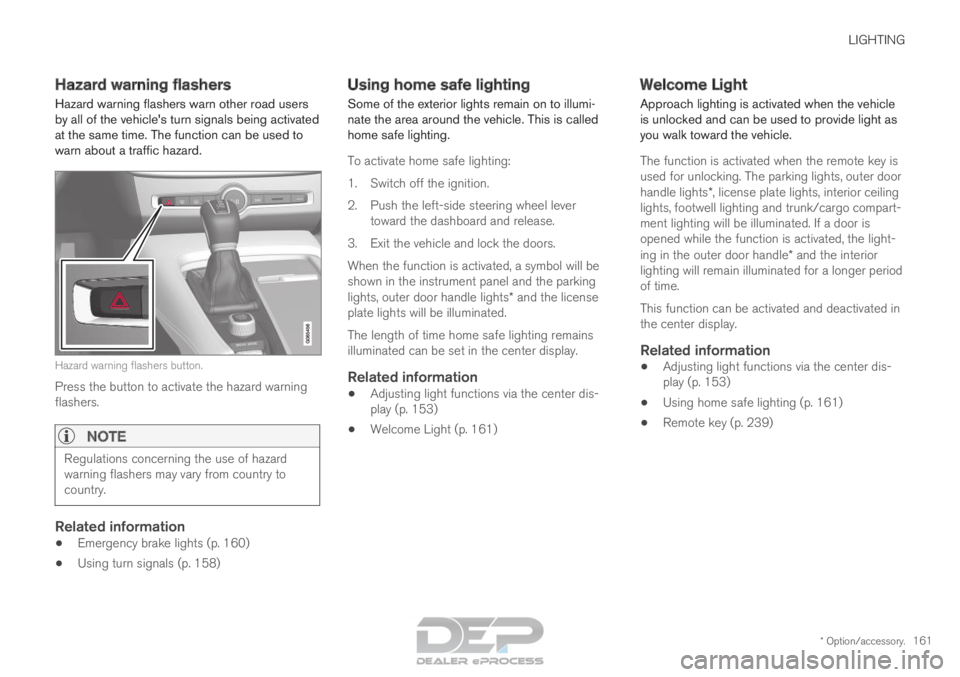
Hazard warning flashers warn other road users
by all of the vehicle's turn signals being activated
at the same time. The function can be used to
warn about a traffic hazard. Hazard warning flashers button.
Press the button to activate the hazard warning
flashers.
NOTE Regulations concerning the use of hazard
warning flashers may vary from country to
country.
Related information
•
Emergency brake lights (p. 160)
• Using turn signals (p. 158) Using home safe lighting
Some of the exterior lights remain on to illumi-
nate the area around the vehicle. This is called
home safe lighting.
To activate home safe lighting:
1.
Switch off the ignition.
2. Push the left-side steering wheel lever toward the dashboard and release.
3. Exit the vehicle and lock the doors.
When the function is activated, a symbol will be
shown in the instrument panel and the parking
lights, outer door handle lights* and the license
plate lights will be illuminated.
The length of time home safe lighting remains
illuminated can be set in the center display.
Related information
• Adjusting light functions via the center dis-
play (p. 153)
• Welcome Light (p. 161) Welcome Light
Approach lighting is activated when the vehicle
is unlocked and can be used to provide light as
you walk toward the vehicle.
The function is activated when the remote key is
used for unlocking. The parking lights, outer door
handle lights*, license plate lights, interior ceiling
lights, footwell lighting and trunk/cargo compart-
ment lighting will be illuminated. If a door is
opened while the function is activated, the light-
ing in the outer door handle* and the interior
lighting will remain illuminated for a longer period
of time.
This function can be activated and deactivated in
the center display.
Related information
• Adjusting light functions via the center dis-
play (p. 153)
• Using home safe lighting (p. 161)
• Remote key (p. 239)
Page 340 of 686

||DRIVER SUPPORT
338
3 - Auto-brake
The automatic braking function is activated at the
last moment.
If the driver has not taken evasive action by this
stage and a collision is imminent, the automatic
braking function will be triggered. This occurs
whether or not the driver is pressing the brake
pedal. Full braking force will be applied to reduce
the speed at impact or reduced braking effect will
be applied if this is sufficient to avoid the colli-
sion.
The seat belt tensioners may be activated along
with the automatic braking function. See "Seat
belt tensioners" for more information.
In certain situations, auto-braking may begin with
a limited braking force before applying full brak-
ing force.
If City Safety has prevented a collision, the vehi-
cle will be kept at a standstill until the driver
takes action. If the vehicle has slowed to avoid
colliding with a slower-moving vehicle ahead, your
speed will be reduced to that vehicle's speed.
Auto-braking can always be cancelled if the
driver presses hard on the accelerator pedal.
NOTE
When City Safety activates the brakes, the
brake lights come on. When City Safety applies the brakes, a text mes-
sage will appear in the instrument panel to notify
the driver that the function is/was activated.
WARNING
City Safety may not be used to change how
the driver operates the vehicle. The driver
must not only rely on City Safety to brake the
vehicle.
Related information
•
City Safety™ (p. 335) Setting a warning distance for City
Safety
City Safety is always active, but the function's
warning distance can be adjusted.
NOTE The City Safety function cannot be deacti-
vated. It is activated automatically each time
the engine/electric motor is started.
The alert distance determines the sensitivity of
the system and regulates the distance at which
the light, sound and brake pulsations will be acti-
vated.
To select warning distance:
1.
Select Settings My Car IntelliSafe
in
the center display's Top view.
2. Under City Safety Warning, tap Late,
Normal or Early to set the desired warning distance.
If the driver feels that the Early setting is giving
too many warnings or finds them irritating, the
Normal or Late warning distance settings can
be selected instead.
If the driver feels that the warnings are too fre-
quent and distracting, the warning distance can
be reduced. This will reduce the total number of
warnings, but it will also result in City Safety pro-
viding warnings at a later stage.
Page 341 of 686

DRIVER SUPPORT
}}
339
The
Late warning distance setting should there-
fore only be used in exceptional cases, such as
when a more dynamic driving style is preferred.
WARNING •
No automatic system can guarantee
100% correct function in all situations.
You should therefore never test use of
City Safety in the direction of people, ani-
mals or vehicles – this could lead to
severe damage, serious personal injury or
even death.
• City Safety warns the driver if there is a
risk of collision, but the function cannot
reduce the driver's reaction time.
• Even if the warning distance has been set
to Early, warnings may be perceived as
late in certain situations – e.g. when there
are large speed differences or if the vehi-
cle ahead suddenly brakes heavily.
• With the warning distance set to
Early,
warnings come further in advance. This
may cause the warnings to come more
frequently than with warning distance
Normal, but is recommended since it can
make City Safety more effective.
NOTE The warning with direction indicators for Rear
Collision Warning is deactivated if the colli-
sion warning distance in the City Safety func-
tion is set to the lowest level "
Late".
The seat belt tensioning and braking func-
tions remain active.
Related information
• City Safety™ (p. 335) Detecting obstacles with City Safety
City Safety can detect vehicles, cyclists, large
animals and pedestrians.
VehiclesCity Safety detects most types of vehicles that
are either stationary, moving in the same direc-
tion as your vehicle or those described in "City
Safety in crossing traffic".
For City Safety to be able to detect a vehicle in
the dark, its headlights and taillights must be on
and clearly visible.
Cyclists Optimal examples of what City Safety would interpret to
be a cyclist: clear body and bicycle shapes.
For optimal performance, the system's function
for cyclist detection needs the clearest possible
information about the contours of the bicycle and
of the cyclist's head, arm, shoulders, legs, torso