buttons VOLVO XC90 TWIN ENGINE 2019 Service Manual
[x] Cancel search | Manufacturer: VOLVO, Model Year: 2019, Model line: XC90 TWIN ENGINE, Model: VOLVO XC90 TWIN ENGINE 2019Pages: 697, PDF Size: 10.33 MB
Page 293 of 697

DRIVER SUPPORT
}}
* Option/accessory. 291
Automatic Speed Limiter limitations
Automatic Speed Limiter (ASL) utilizes the
speed limit information provided by the RSI 22
function, not from the speed limit signs that the
vehicle passes.
If RSI 22
is unable to interpret and provide ASL
with speed information, ASL will go into standby
mode and switch over to SL. The driver will then
have to actively brake to bring the vehicle down
to the appropriate speed.
ASL will be reactivated when RSI 22
is once again
able to interpret and provide speed information to
ASL.
See “Road Sign Information limitations” for more
information.
Related information
Speed limiter (p. 283)
Automatic Speed Limiter (p. 287)
Automatic Speed Limiter limitations (p. 291)
Activating/deactivating Road Sign Informa-
tion (p. 365) Cruise control
Cruise Control (CC) helps the driver maintain an
even speed to provide a more relaxing driving
experience on highways and long, straight roads
with even traffic flows.
Overview Function buttons and symbols
23
. : Activates Cruise Control from standby
mode and resumes the set speed : Increases the set speed
: From standby mode - activates Cruise
Control and sets the current speed : From active mode - deactivates/puts
Cruise Control in standby mode : Reduces the set speed
Marker for set speed
The vehicle's current speed
Set speed
NOTE
In vehicles equipped with Adaptive Cruise
Control*, it is possible to switch between
cruise control and Adaptive Cruise Control –
see the heading "Switching between CC and
ACC". 22
Road Sign Information (RSI)
23 Note: This illustration is general and details may vary depending on mod\
el.
Page 295 of 697
DRIVER SUPPORT
}}
293
30 km/h (20 mph) or higher. The lowest speed
that can be set is 30 km/h (20 mph).
To start Cruise Control:
– With the function displayed, press
(2) on the steering wheel keypad.
>
Cruise Control will be started and the
vehicle's current speed will be set.
NOTE Cruise control can then not be connected at
speeds below 30 km/h (20 mph).
Related information
Cruise control (p. 291) Managing Cruise Control speed
Cruise Control (CC 25
) can be set to various
speeds.
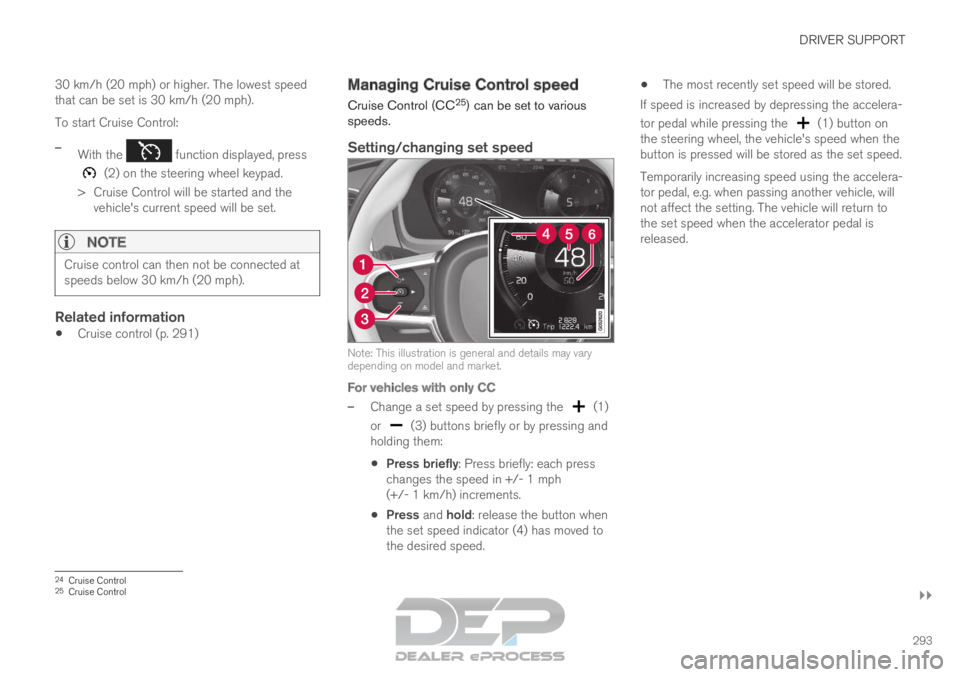
Setting/changing set speed Note: This illustration is general and details may vary
depending on model and market.
For vehicles with only CC
–
Change a set speed by pressing the (1)
or (3) buttons briefly or by pressing and
holding them:
Press briefly: Press briefly: each press
changes the speed in +/- 1 mph
(+/- 1 km/h) increments.
Press and hold: release the button when
the set speed indicator (4) has moved to
the desired speed.
The most recently set speed will be stored.
If speed is increased by depressing the accelera-
tor pedal while pressing the (1) button on
the steering wheel, the vehicle's speed when the
button is pressed will be stored as the set speed.
Temporarily increasing speed using the accelera-
tor pedal, e.g. when passing another vehicle, will
not affect the setting. The vehicle will return to
the set speed when the accelerator pedal is
released. 24
Cruise Control
25 Cruise Control
Page 296 of 697
||DRIVER SUPPORT
294
For vehicles with both CC and ACC
–
Change a set speed by pressing the (1)
or (3) buttons briefly or by pressing and
holding them:
Press briefly: Press briefly: each press
changes the speed in +/- 5 mph
(+/- 5 km/h) increments.
Press and hold: release the button when
the set speed indicator (4) has moved to
the desired speed.
The most recently set speed will be stored.
If speed is increased by depressing the accelera-
tor pedal while pressing the (1) button on
the steering wheel, the vehicle's speed when the
button is pressed will be stored as the set speed.
Temporarily increasing speed using the accelera-
tor pedal, e.g. when passing another vehicle, will
not affect the setting. The vehicle will return to
the set speed when the accelerator pedal is
released.
Using engine braking instead of
applying the brakes
Cruise Control regulates speed by lightly applying
the brakes. On downgrades, it can sometimes be
desirable to roll a bit faster and let speed be
reduced instead by engine braking alone. The
driver can temporarily disengage the Cruise Con-
trol braking function. To disengage CC:
– Press the accelerator pedal about halfway
down and then release it.
>
Cruise Control will automatically disen-
gage the automatic brake function and
speed will only be reduced using the
engine braking function.
How drive mode affects cruise controlThe way the cruise control maintains the vehicle's
speed can vary depending on the selected drive
mode 26
.
Cruise Control Eco Cruise with ECO drive
mode
In the ECO drive mode, cruise control's accelera-
tion and deceleration will be smoother than in
other drive modes to help provide optimal fuel
efficiency and reduced environmental impact.
Because of this, the vehicle's actual speed may
be slightly above or below the set speed.
Cruise Control Dynamic Cruise
With the Dynamic drive mode, cruise control's
acceleration and deceleration will be faster and
more immediate than in other drive modes.
Related information
Cruise control (p. 291)
Drive modes (p. 454) Deactivating and putting Cruise
Control in standby mode
Cruise Control (CC 27
) can be temporarily put
into standby mode and then reactivated.
Deactivating and putting Cruise Control
in standby mode Note: This illustration is general and details may vary
depending on model.
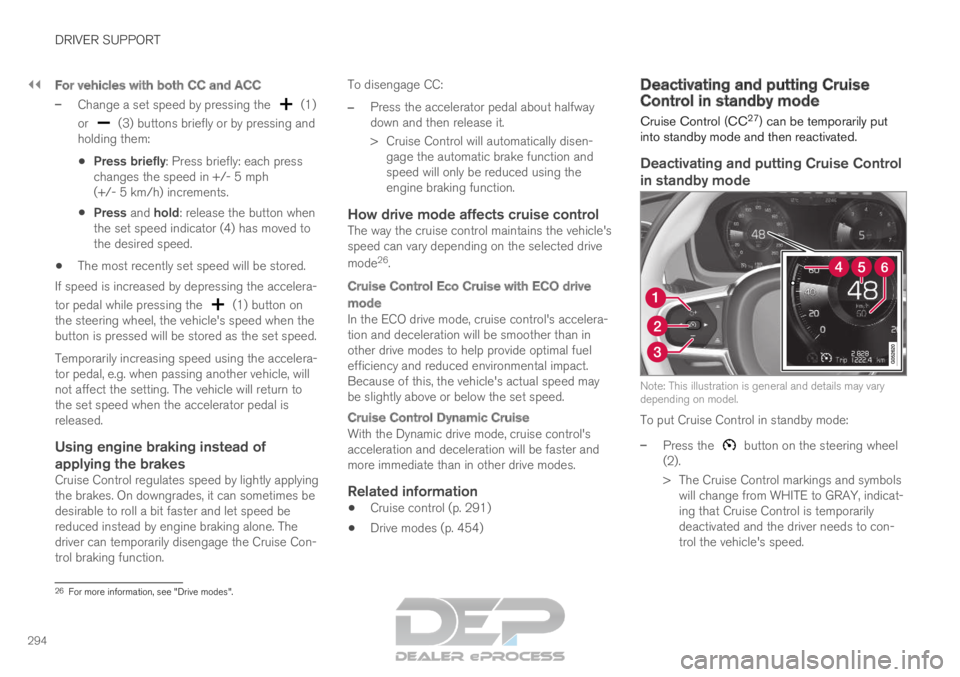
To put Cruise Control in standby mode:
–
Press the button on the steering wheel
(2).
>
The Cruise Control markings and symbols
will change from WHITE to GRAY, indicat-
ing that Cruise Control is temporarily
deactivated and the driver needs to con-
trol the vehicle's speed. 26
For more information, see "Drive modes".
Page 298 of 697

DRIVER SUPPORT
* Option/accessory.
296 Switching off Cruise Control
Cruise control (Cruise Control - CC) can be
turned off. Function buttons and symbols
29
.
To turn off Cruise Control:
1. Press the button on the steering wheel
(2).
>
Cruise Control will go into standby mode.
2. Press the ◀ (1) or ▶ (3) buttons on the
steering wheel to select another function.
>
The Cruise Control symbol (4) in
the instrument panel will go out and the
set speed will be erased. 3.
Press the (2) button on the steering
wheel keypad again.
>
Another function will be activated.
NOTE In vehicles equipped with Adaptive Cruise
Control*, it is possible to switch between
cruise control and Adaptive Cruise Control –
see the heading "Switching between CC and
ACC".
Related information
Cruise control (p. 291)
Switching between Cruise Control and Adap-
tive Cruise Control (p. 313) Distance Alert*
30
The Distance Alert 31
function can help the driver
become aware if the time interval to the vehicle
in front is too short.
However, the vehicle must be equipped with a
head-up display in order to display the Distance
Alert, which will then be indicated by a symbol
on the windshield as long as the time interval to
the vehicle ahead is shorter than the set time
interval.
Distance Alert is active at speeds above 30 km/h
(20 mph) and only reacts for vehicles ahead mov-
ing in the same direction as your vehicle. No dis-
tance information is provided for oncoming, slow-
moving or stationary vehicles. 29
Note: This illustration is general and details may vary depending on mod\
el.
30 The Distance Alert function is only available in vehicles that can displ\
ay information on the windshield with a head-up display.
31 Distance Alert
Page 304 of 697

||DRIVER SUPPORT
* Option/accessory.
302
Overview
Controls Function buttons and symbols
39
. : Activates Adaptive Cruise Control from
standby mode and resumes the set speed : Increases the set speed
: From standby mode - activates the
Adaptive Cruise Control and stores the cur-
rent speed : From active mode - deactivates/
switches the Adaptive Cruise Control to
standby mode : Reduces the set speed
Increases the time interval to the vehicle
ahead Reduces the time interval to the vehicle
ahead
Target vehicle indicator: ACC has detected
and is following a target vehicle using the set
time interval
Symbol for time interval to the vehicle ahead
NOTE
In vehicles equipped with Adaptive Cruise
Control*, it is possible to switch between
cruise control and Adaptive Cruise Control –
see the heading "Switching between CC and
ACC".
Instrument panel Speed indicators
39
. Set speed
Speed of the vehicle ahead.
The current speed of your vehicle.
See "Adaptive Cruise Control symbols and mes-
sages" for examples of different combinations of
symbols depending on the traffic situation.
Related information
Adaptive Cruise Control and collision warning
(p. 303)
Head-up display for Adaptive Cruise Control
with collision warning (p. 304)
Activating and starting Adaptive Cruise Con-
trol (p. 304) 39
Note: This illustration is general and details may vary depending on mod\
el.
Page 307 of 697

DRIVER SUPPORT
}}
* Option/accessory. 305
ACC will only regulate the time
interval to the vehicle ahead
when the distance symbol
shows two vehicles.
A speed interval will be marked
at the same time.
The higher speed is the set
speed for your vehicle and the
lower speed is the speed of the
vehicle ahead (target vehicle).
Related information
Adaptive Cruise Control* (p. 300) Managing Adaptive Cruise Control
speed
Adaptive Cruise Control (ACC 43
) can be set to
various speeds.
Setting/changing set speed Note: This illustration is general and details may vary
depending on model and market.
: Increases the set speed.
: Reduces the set speed.
Set speed.–
Change a set speed by pressing the (1)
or (2) buttons briefly or by pressing and
holding them:
Press briefly: Press briefly: each press
changes the speed in +/- 5 mph
(+/- 5 km/h) increments.
Press and hold: release the button when
the set speed indicator (3) has moved to
the desired speed.
The most recently set speed will be stored.
If speed is increased by depressing the accelera-
tor pedal while pressing the (1) button on
the steering wheel, the vehicle's speed when the
button is pressed will be stored as the set speed.
Temporarily increasing speed using the accelera-
tor pedal, e.g. when passing another vehicle, will
not affect the setting. The vehicle will return to
the set speed when the accelerator pedal is
released. 42
Adaptive Cruise Control
43 Adaptive Cruise Control
Page 320 of 697
||DRIVER SUPPORT
318
When the vehicle is approaching an off-ramp
or a fork in the road, the driver should steer
toward the desired lane to indicate to Pilot
Assist the desired direction of travel.
Pilot Assist strives to keep the vehicle
in the center of the lane
When Pilot Assist provides steering assistance, it
strives to position the vehicle in the center of the
lane between the lane markings. For the smooth-
est driving experience possible, the driver should
permit the vehicle to find the optimal positioning.
The driver should check that the vehicle is posi-
tioned safely in the lane and can always adjust
the vehicle's position by applying more force to
the steering wheel.
If Pilot Assist does not position the vehicle
appropriately in the lane, the driver should
turn off Pilot Assist or switch to Adaptive
Cruise Control.
Overview
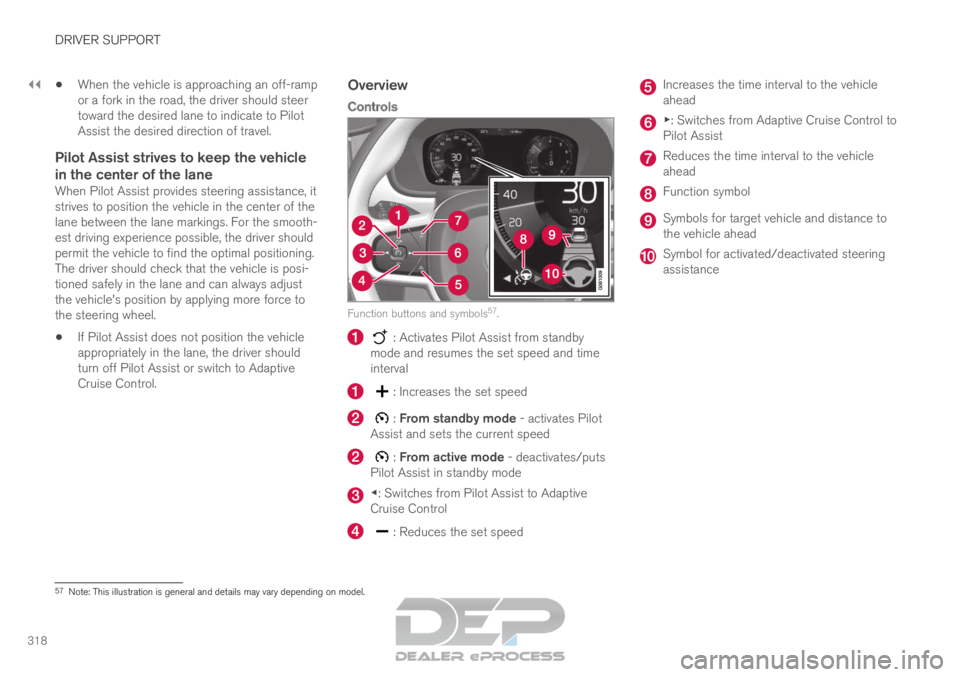
Controls Function buttons and symbols
57
. : Activates Pilot Assist from standby
mode and resumes the set speed and time
interval : Increases the set speed
: From standby mode - activates Pilot
Assist and sets the current speed : From active mode - deactivates/puts
Pilot Assist in standby mode ◀: Switches from Pilot Assist to Adaptive
Cruise Control
: Reduces the set speed Increases the time interval to the vehicle
ahead
▶: Switches from Adaptive Cruise Control to
Pilot Assist
Reduces the time interval to the vehicle
ahead
Function symbol
Symbols for target vehicle and distance to
the vehicle ahead
Symbol for activated/deactivated steering
assistance
57
Note: This illustration is general and details may vary depending on mod\
el.
Page 324 of 697
DRIVER SUPPORT
322Managing Pilot Assist speed
Pilot Assist can be set to various speeds.
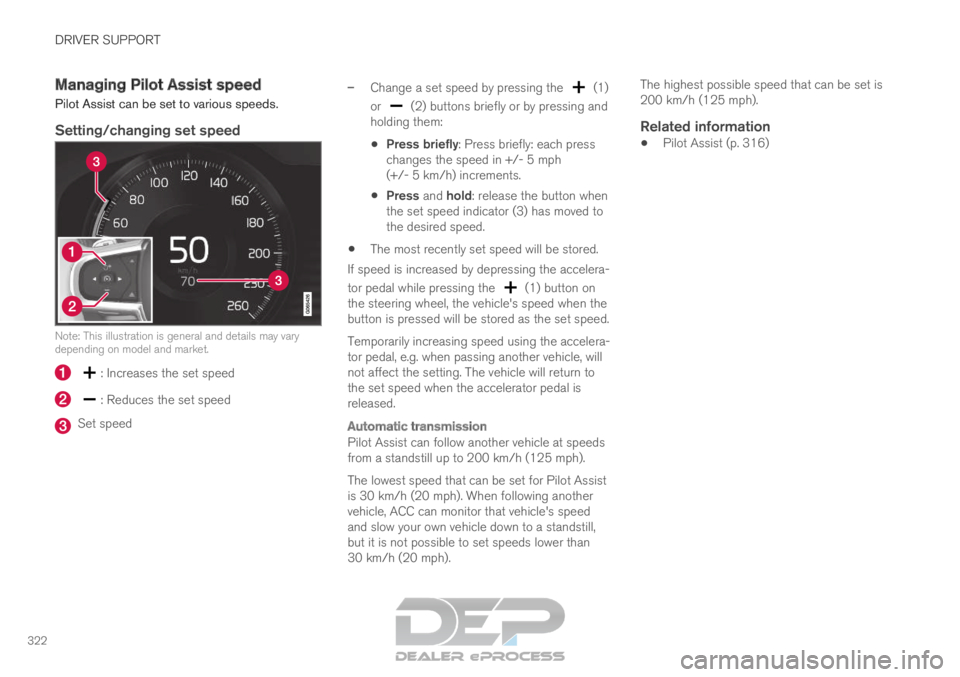
Setting/changing set speed
Note: This illustration is general and details may vary
depending on model and market.
: Increases the set speed
: Reduces the set speed
Set speed –
Change a set speed by pressing the (1)
or (2) buttons briefly or by pressing and
holding them:
Press briefly: Press briefly: each press
changes the speed in +/- 5 mph
(+/- 5 km/h) increments.
Press and hold: release the button when
the set speed indicator (3) has moved to
the desired speed.
The most recently set speed will be stored.
If speed is increased by depressing the accelera-
tor pedal while pressing the (1) button on
the steering wheel, the vehicle's speed when the
button is pressed will be stored as the set speed.
Temporarily increasing speed using the accelera-
tor pedal, e.g. when passing another vehicle, will
not affect the setting. The vehicle will return to
the set speed when the accelerator pedal is
released.
Automatic transmission
Pilot Assist can follow another vehicle at speeds
from a standstill up to 200 km/h (125 mph).
The lowest speed that can be set for Pilot Assist
is 30 km/h (20 mph). When following another
vehicle, ACC can monitor that vehicle's speed
and slow your own vehicle down to a standstill,
but it is not possible to set speeds lower than
30 km/h (20 mph). The highest possible speed that can be set is
200 km/h (125 mph).
Related information
Pilot Assist (p. 316)
Page 404 of 697

||DRIVER SUPPORT
* Option/accessory.
402 The color of the side field changes as the vehicle
moves closer to the object – from YELLOW to
RED.
Side field color
Distance in meters (feet)
Yellow
0,25–0,9 (0,8–3,0)
Red 0–0,25 (0–0,8)When the sensor field is RED, the audible pulsing
signal will become more rapid.
Related information
Park Assist Camera* (p. 396) Starting the Park Assist Camera
The Park Assist Camera starts automatically
when reverse gear is engaged or can be started
manually using one of the center display's func-
tion buttons.
Camera view when backing upWhen reverse gear is engaged, the screen shows
the rear view 121
.
Camera view when manually starting
the camera
Start the Park Assist Camera
using this button in the center
display's Function view.
The screen will first show the
most recently used camera
view. However, each time the
engine is started, the previous side view will be
replaced by the 360° view and a previously dis-
played zoomed-in rear view will be replaced by
the regular rear view.
Automatically deactivating the cameraFront view switches off when the vehicle's speed
reaches 25 km/h (16 mph) to help avoid dis-
tracting the driver. It will be automatically reactiva-
ted if the vehicle's speed falls below 22 km/h
(14 mph) within 1 minute as long as the vehicle's
speed has not exceeded 50 km/h (31 mph). Other camera views switch off at 15 km/h
(9 mph) and are not reactivated.
Related information
Park Assist Camera* (p. 396) 121
In Canada, it is also possible to select the 360° view.
Page 466 of 697
STARTING AND DRIVING
* Option/accessory.
464 Leveling control settings*
Turn off leveling control before lifting the vehicle
with a jack to help avoid problems with the
pneumatic suspension.
The vehicle can be lowered or raised to make it
easier to load or for passengers to get in and
out.
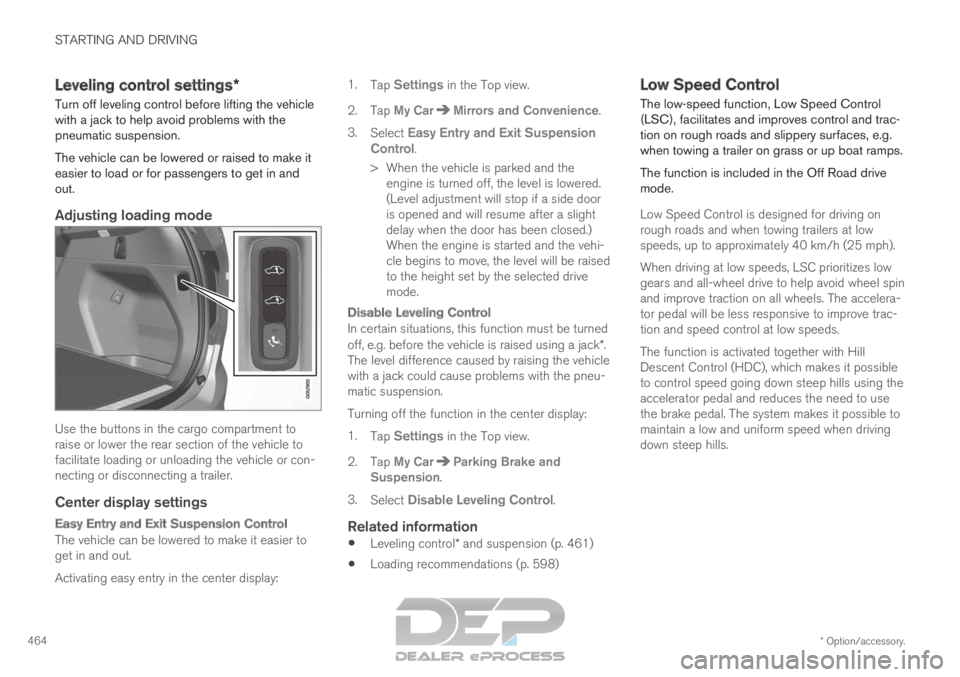
Adjusting loading mode Use the buttons in the cargo compartment to
raise or lower the rear section of the vehicle to
facilitate loading or unloading the vehicle or con-
necting or disconnecting a trailer.
Center display settings
Easy Entry and Exit Suspension Control
The vehicle can be lowered to make it easier to
get in and out.
Activating easy entry in the center display: 1.
Tap Settings in the Top view.
2.
Tap My Car Mirrors and Convenience
.
3. Select Easy Entry and Exit Suspension
Control.
>
When the vehicle is parked and the
engine is turned off, the level is lowered.
(Level adjustment will stop if a side door
is opened and will resume after a slight
delay when the door has been closed.)
When the engine is started and the vehi-
cle begins to move, the level will be raised
to the height set by the selected drive
mode.
Disable Leveling Control
In certain situations, this function must be turned
off, e.g. before the vehicle is raised using a jack*.
The level difference caused by raising the vehicle
with a jack could cause problems with the pneu-
matic suspension.
Turning off the function in the center display:
1. Tap Settings in the Top view.
2.
Tap My Car Parking Brake and
Suspension .
3. Select Disable Leveling Control.
Related information
Leveling control* and suspension (p. 461)
Loading recommendations (p. 598) Low Speed Control
The low-speed function, Low Speed Control
(LSC), facilitates and improves control and trac-
tion on rough roads and slippery surfaces, e.g.
when towing a trailer on grass or up boat ramps.
The function is included in the Off Road drive
mode.
Low Speed Control is designed for driving on
rough roads and when towing trailers at low
speeds, up to approximately 40 km/h (25 mph).
When driving at low speeds, LSC prioritizes low
gears and all-wheel drive to help avoid wheel spin
and improve traction on all wheels. The accelera-
tor pedal will be less responsive to improve trac-
tion and speed control at low speeds.
The function is activated together with Hill
Descent Control (HDC), which makes it possible
to control speed going down steep hills using the
accelerator pedal and reduces the need to use
the brake pedal. The system makes it possible to
maintain a low and uniform speed when driving
down steep hills.