light VOLVO XC90 TWIN ENGINE 2019 Repair Manual
[x] Cancel search | Manufacturer: VOLVO, Model Year: 2019, Model line: XC90 TWIN ENGINE, Model: VOLVO XC90 TWIN ENGINE 2019Pages: 697, PDF Size: 10.33 MB
Page 226 of 697

||CLIMATE CONTROL
* Option/accessory.
224
Activating and deactivating windshield
heating from the center display Windshield heating button in Climate view.
1. Open Climate view in the center display.
2.
Tap Electric.
>
Windshield heating is activated/deacti-
vated and the button lights up/goes out.
NOTE Triangular areas at the far sides of the wind-
shield are not heated and will take slightly
longer to defrost/de-ice.
NOTE
The heated windshield may affect the per-
formance of transponders and other commu-
nication equipment.
Related information
Climate system controls (p. 215)
Activating and deactivating automatic wind-
shield heating* (p. 224) Activating and deactivating
automatic windshield heating*
Windshield heating is used to quickly remove
condensation and ice from the windshield.
Windshield heating can be set to automatically
activate when the engine is started. With auto-
matic start activated, heating will be activated
when there is a risk of ice or condensation on the
windows or mirrors. Heating is automatically
switched off when the window or door mirror is
sufficiently warm and the condensation or ice is
gone.
1. Tap Settings in the Top view in the center
display.
2. Tap Climate.
3. Select Auto Front Defroster to activate/
deactivate automatic windshield heating.
Related information
Activating and deactivating the heated wind-
shield* (p. 223)
Page 227 of 697

CLIMATE CONTROL
225
Activating and deactivating the
heated rear window and door
mirrors
The heated rear window and door mirrors are
used to quickly remove condensation and ice
from the glass.
Activating and deactivating the heated
rear window and door mirrors from the
center console
A button in the center console offers quick
access to the heated rear window and door mir-
rors functions.
Button in center console.
–
Tap the button.
>
Heated windows and door mirrors are
activated and the button lights up/goes
out.
Activating and deactivating the heated
rear window and door mirrors from the
center display Rear window/door mirror heating button in Climate view.
1. Open Climate view in the center display.
2.
Tap Rear.
>
Heated windows and door mirrors are
activated and the button lights up/goes
out.
Related information
Climate system controls (p. 215)
Automatically activating and deactivating the
heated rear window and door mirrors
(p. 225) Automatically activating and
deactivating the heated rear window
and door mirrors
The heated rear window and door mirrors are
used to quickly remove condensation and ice
from the glass.
It is possible to select whether rear window and
door mirror heating should be automatically acti-
vated or deactivated when the engine is started.
With automatic start activated, heating will be
activated when there is a risk of ice or condensa-
tion on the windows or mirrors. Heating is auto-
matically switched off when the window or door
mirror is sufficiently warm and the condensation
or ice is gone.
1. Tap Settings in the Top view in the center
display.
2. Tap Climate.
3. Select Auto Rear Defroster to activate/
deactivate automatic rear window and door
heating.Related information
Activating and deactivating the heated rear
window and door mirrors (p. 225)
Page 228 of 697

CLIMATE CONTROL
226Setting the blower speed for the
front seats
The blower can be set to several different auto-
matically controlled speeds for the front seat.
Blower control buttons in Climate view.
1. Open Climate view in the center display.
2.
Tap the desired blower speed: Off,
1-5 or
Max.
>
The blower speed will be changed and the
buttons for the set speed will light up.
CAUTION The air conditioning will not engage if the
blower is turned off completely, which may
cause fogging on the inside of the windows.
NOTE The climate system automatically adapts air-
flow as needed within the set blower speed,
which means that airflow speed may vary
slightly within the same blower speed.
Related information
Climate system controls (p. 215) Setting the blower speed for the
rear seats
The blower can be set to several different auto-
matically controlled speeds for the rear seat.
Setting blower speed for the rear seats
from the front seats Blower control buttons in the Rear climate tab in Cli-
mate view.
1. Open Climate view in the center display and
select the Rear climate tab.
Page 229 of 697

CLIMATE CONTROL
* Option/accessory.227
2.
Tap the desired blower speed, 1-5.
The blower speed for the second and third
rows of seats* can be switched off by tap-
ping 2nd row climate.
The blower speed for the third row of seats is
linked to the setting for the second row, but
can be switched off separately by pressing
3rd row climate.
>
The blower speed will be changed and the
buttons for the set speed will light up.
Setting blower speed for the rear seats
from the rear seats
1. Tap the unlock button on the tunnel con- sole's climate panel to access the controls. Blower controls on the rear climate panel of the tunnel
console.
2.
Tap the desired blower speed, 1-5.
>
The blower speed will be changed and the
buttons for the set speed will light up.
NOTE The blower speed for the rear seat cannot be
set if the blower speed for the front seat is
Off.
The rear seat blower speed can only be
turned off from the climate view in the center
display.
NOTE The climate system automatically adapts air-
flow as needed within the set blower speed,
which means that airflow speed may vary
slightly within the same blower speed.
Related information
Climate system controls (p. 215)
Page 232 of 697

||CLIMATE CONTROL
* Option/accessory.
230
Related information
Climate system controls (p. 215) Activating and deactivating air
conditioning
The air conditioning cools and dehumidifies
incoming air as needed. Air conditioning button in Climate view.
1. Open Climate view in the center display.
2.
Tap AC.
>
The air conditioning is activated/deacti-
vated and the button lights up/goes out.
When the air conditioning is activated, it
will be switched on and off automatically
by the climate system as needed.
NOTE For optimum function of the air conditioning,
close all side windows and the panoramic
roof*.
NOTE
The air conditioning cannot be activated when
the fan speed is set to
Off.
Related information
Climate system controls (p. 215)
Page 233 of 697

CLIMATE CONTROL
}}
* Option/accessory. 231
Activating and deactivating climate
control for the third-row seats*
The air conditioning cools and dehumidifies
incoming air as needed. Air conditioning button in the Rear climate tab in Cli-
mate view.
1. Open Climate view in the center display and select the Rear climate tab.
2. Tap 3rd row climate.
>
The air conditioning is activated/deacti-
vated and the button lights up/goes out.
NOTE The air conditioning for the third row of seats
is automatically activated if any of the third
row seat belts are buckled.
It is not possible to manually activate air con-
ditioning for the third row of seats if the main
air conditioning system is deactivated or the
climate system for the second row of seats is
deactivated.
Related information
Climate system controls (p. 215) Parking climate
Parking climate is an umbrella term for various
functions that improve the passenger compart-
ment climate when the vehicle is parked, e.g.
preconditioning. Parking climate functions are controlled from the
Parking climate tab in the center display's Climate view.
Related information
Climate (p. 204)
Preconditioning (p. 232)
Page 235 of 697
CLIMATE CONTROL
}}
* Option/accessory. 233
Starting and stopping
preconditioning
Preconditioning heats or cools the passenger
compartment before driving. Preconditioning
can be started in the center display or from a
cellular phone.
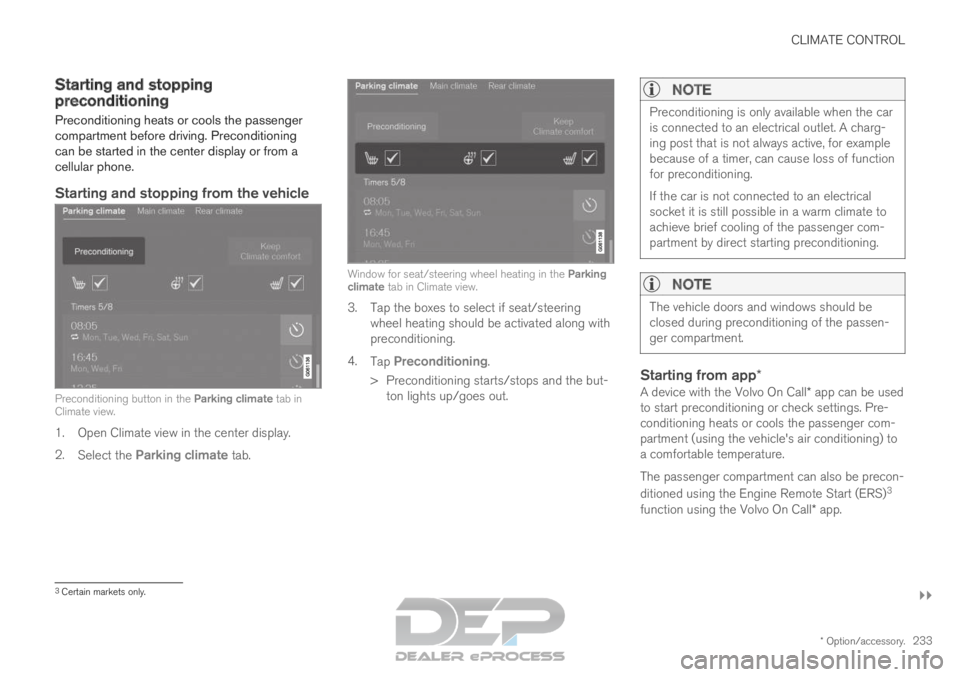
Starting and stopping from the vehicle Preconditioning button in the Parking climate tab in
Climate view.
1. Open Climate view in the center display.
2. Select the Parking climate tab. Window for seat/steering wheel heating in the Parking
climate tab in Climate view.
3. Tap the boxes to select if seat/steering
wheel heating should be activated along with
preconditioning.
4. Tap Preconditioning.
>
Preconditioning starts/stops and the but-
ton lights up/goes out.
NOTE Preconditioning is only available when the car
is connected to an electrical outlet. A charg-
ing post that is not always active, for example
because of a timer, can cause loss of function
for preconditioning.
If the car is not connected to an electrical
socket it is still possible in a warm climate to
achieve brief cooling of the passenger com-
partment by direct starting preconditioning.
NOTE
The vehicle doors and windows should be
closed during preconditioning of the passen-
ger compartment.
Starting from app*
A device with the Volvo On Call* app can be used
to start preconditioning or check settings. Pre-
conditioning heats or cools the passenger com-
partment (using the vehicle's air conditioning) to
a comfortable temperature.
The passenger compartment can also be precon-
ditioned using the Engine Remote Start (ERS) 3
function using the Volvo On Call* app. 3
Certain markets only.
Page 237 of 697
CLIMATE CONTROL
}}
235
4.
Tap Date to set a time for a specific date.
Tap Days to set a time for one or more days
of the week.
With Days: Activate/deactivate the repeat
function by selecting/deselecting the
Repeat weekly checkbox.
5. With Date: Select a date for preconditioning
by scrolling in the date list using the arrows.
With Days: Select days of the week for pre-
conditioning by tapping the buttons for the
days.
6.
Set the time at which preconditioning should
be completed by scrolling using the arrows in
the clock.
7. Tap Confirm to add a timer setting.
>
The timer setting will be added to the list
and activated.
Editing a timer setting1. Open Climate view in the center display.
2. Select the Parking climate tab.
3.
Tap the timer setting you would like to
change.
> A pop-up window will appear.
4. To edit a timer setting, follow the procedures described under the heading "Adding a timer
setting" above.
Related information
Preconditioning (p. 232)
Preconditioning timer (p. 234)
Activating and deactivating preconditioning
timer (p. 235)
Deleting preconditioning timer settings
(p. 236) Activating and deactivating
preconditioning timer
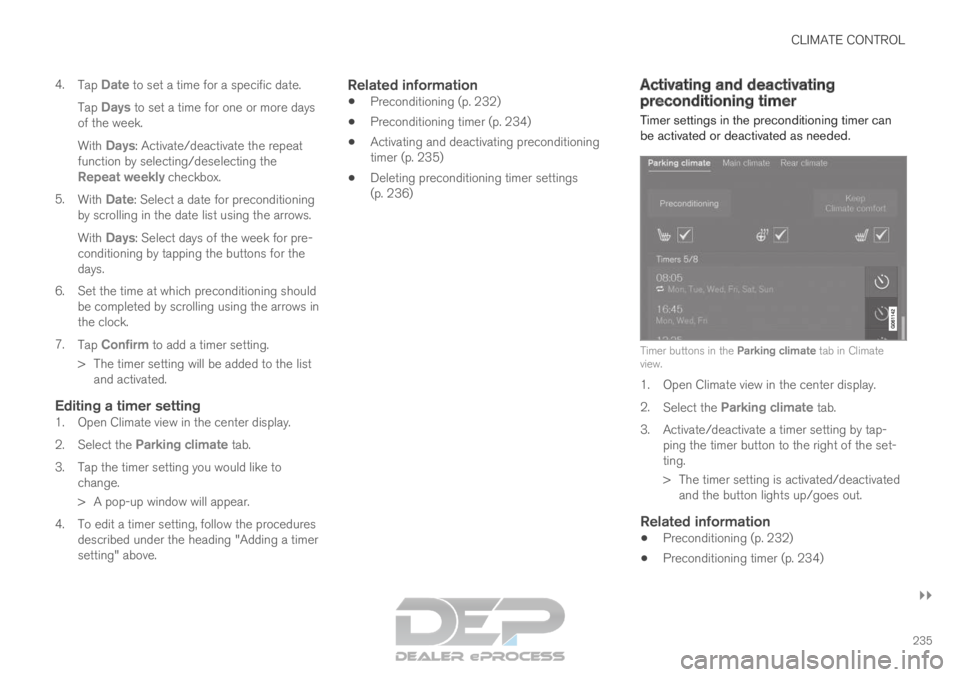
Timer settings in the preconditioning timer can
be activated or deactivated as needed. Timer buttons in the Parking climate tab in Climate
view.
1. Open Climate view in the center display.
2.
Select the Parking climate tab.
3.
Activate/deactivate a timer setting by tap-
ping the timer button to the right of the set-
ting.
> The timer setting is activated/deactivated and the button lights up/goes out.
Related information
Preconditioning (p. 232)
Preconditioning timer (p. 234)
Page 239 of 697
CLIMATE CONTROL
237
Climate comfort retaining function
The climate in the passenger compartment can
be maintained when the vehicle is parked, e.g. if
the engine is turned off but the driver or passen-
gers remain in the vehicle.
This function can only be direct-started.
The function utilizes several of the vehicle's sys-
tems: Residual heat from the engine is used to
help heat the passenger compartment to a
comfortable temperature.
In warm weather, the ventilation system cools
the passenger compartment by blowing air in
from outside.
NOTE Climate comfort maintenance will be deacti-
vated if the vehicle is locked from the outside
in order to avoid using residual engine heat
unnecessarily. This function is intended to be
used to maintain climate comfort when the
driver or a passenger remains in the vehicle
after the engine is turned off.
Related information
Parking climate (p. 231)
Starting and switching off the climate retain-
ing function when parking (p. 237) Starting and switching off the
climate retaining function when
parking
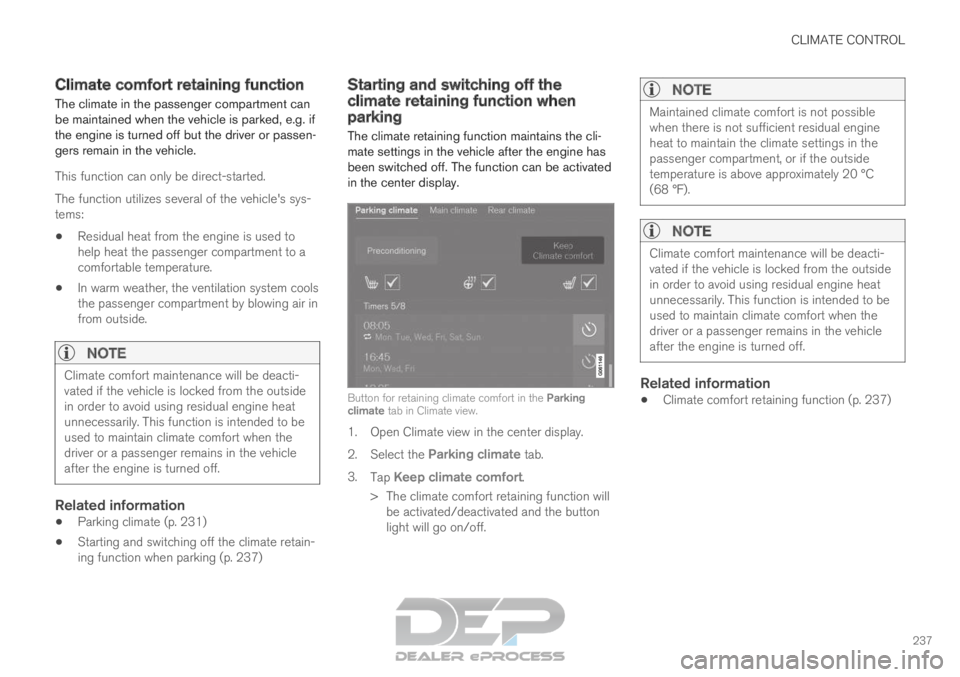
The climate retaining function maintains the cli-
mate settings in the vehicle after the engine has
been switched off. The function can be activated
in the center display. Button for retaining climate comfort in the Parking
climate tab in Climate view.
1. Open Climate view in the center display.
2.
Select the Parking climate tab.
3. Tap Keep climate comfort.
>
The climate comfort retaining function will
be activated/deactivated and the button
light will go on/off.
NOTE Maintained climate comfort is not possible
when there is not sufficient residual engine
heat to maintain the climate settings in the
passenger compartment, or if the outside
temperature is above approximately 20 °C
(68 °F).
NOTE
Climate comfort maintenance will be deacti-
vated if the vehicle is locked from the outside
in order to avoid using residual engine heat
unnecessarily. This function is intended to be
used to maintain climate comfort when the
driver or a passenger remains in the vehicle
after the engine is turned off.
Related information
Climate comfort retaining function (p. 237)
Page 244 of 697
KEY, LOCKS AND ALARM
* Option/accessory.
242 Lock indication
When the vehicle is locked or unlocked, the turn
signals will flash to indicate that the vehicle has
been locked or unlocked correctly.
Exterior confirmationLocking
The turn signals will flash once and the door
mirrors will fold in 1
to confirm the vehicle is
locked.
Unlocking
The turn signals will flash twice and the door
mirrors will fold out 1
to confirm the vehicle is
unlocked.
All doors, tailgate and hood must be closed for
confirmation to be given. If only the driver's door
is closed when the vehicle is locked 2
, the vehicle
will be locked but the turn signals will only flash
to indicate locking when all doors and the hood
and tailgate have been closed.
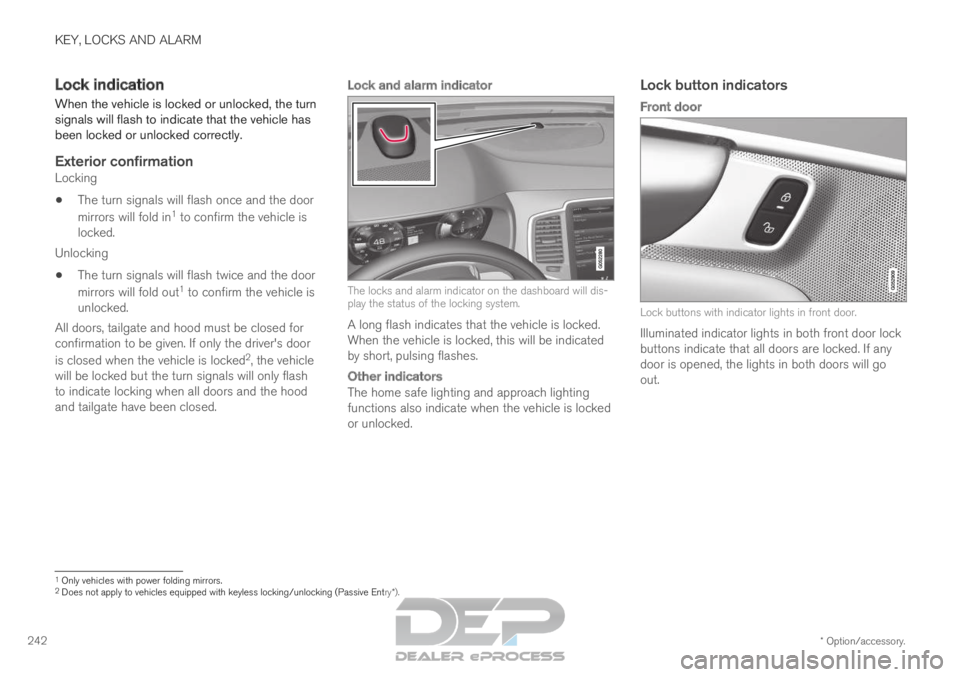
Lock and alarm indicator The locks and alarm indicator on the dashboard will dis-
play the status of the locking system.
A long flash indicates that the vehicle is locked.
When the vehicle is locked, this will be indicated
by short, pulsing flashes.
Other indicators
The home safe lighting and approach lighting
functions also indicate when the vehicle is locked
or unlocked.
Lock button indicators
Front door Lock buttons with indicator lights in front door.
Illuminated indicator lights in both front door lock
buttons indicate that all doors are locked. If any
door is opened, the lights in both doors will go
out. 1
Only vehicles with power folding mirrors.
2 Does not apply to vehicles equipped with keyless locking/unlocking (Pas\
sive Entry*).