light VOLVO XC90 TWIN ENGINE 2019 Service Manual
[x] Cancel search | Manufacturer: VOLVO, Model Year: 2019, Model line: XC90 TWIN ENGINE, Model: VOLVO XC90 TWIN ENGINE 2019Pages: 697, PDF Size: 10.33 MB
Page 170 of 697
||WINDOWS, GLASS AND MIRRORS
* Option/accessory.
168
WARNING Children, other passengers or objects can be
trapped by the moving parts.
Always operate the windows with caution.
Do not allow children to play with the
operating controls.
Never leave a child alone in the vehicle.
Remember to always cut the current to
the power windows by setting the vehi-
cle's electrical system to ignition mode 0
and then taking the remote key with you
when leaving the vehicle.
Never stick objects or body parts out
through the windows, even if the vehicle
electrical system is completely turned off.
Related information
Operating the power windows (p. 168)
Pinch protection for windows and sun cur-
tains (p. 166)
Reset procedure for pinch protection
(p. 167) Operating the power windows
All power windows can be operated using the
control panel in the driver's door. The control
panels in the other doors can be used to oper-
ate that particular door.
The power windows have pinch protection. If
there is any problem with the pinch protection, a
rest procedure can be tested.
WARNING Children, other passengers or objects can be
trapped by the moving parts.
Always operate the windows with caution.
Do not allow children to play with the
operating controls.
Never leave a child alone in the vehicle.
Remember to always cut the current to
the power windows by setting the vehi-
cle's electrical system to ignition mode 0
and then taking the remote key with you
when leaving the vehicle.
Never stick objects or body parts out
through the windows, even if the vehicle
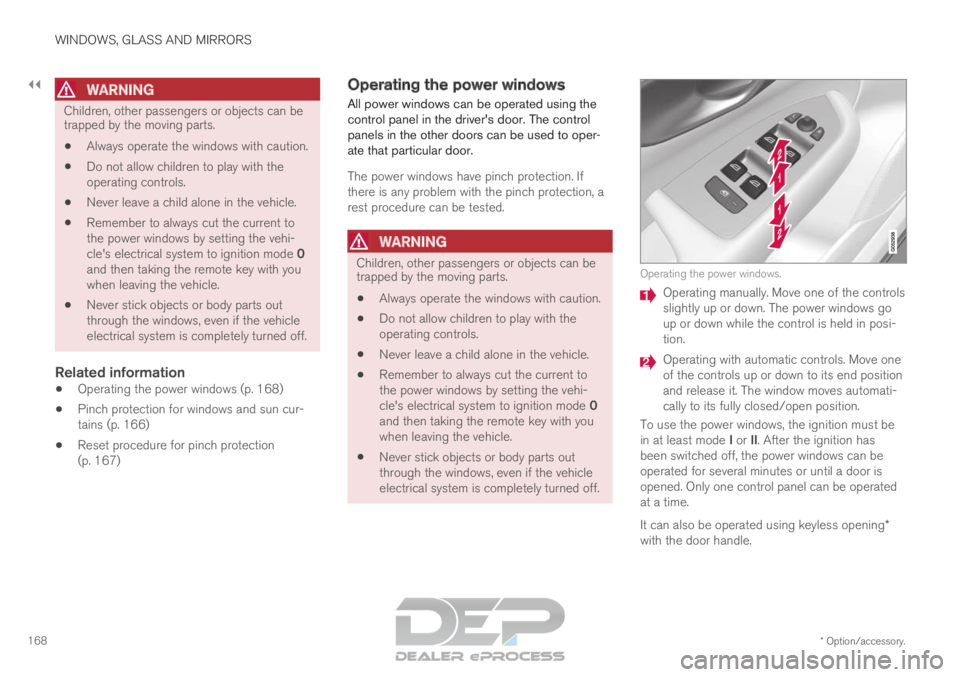
electrical system is completely turned off. Operating the power windows.
Operating manually. Move one of the controls
slightly up or down. The power windows go
up or down while the control is held in posi-
tion.
Operating with automatic controls. Move one
of the controls up or down to its end position
and release it. The window moves automati-
cally to its fully closed/open position.
To use the power windows, the ignition must be
in at least mode I or II. After the ignition has
been switched off, the power windows can be
operated for several minutes or until a door is
opened. Only one control panel can be operated
at a time.
It can also be operated using keyless opening*
with the door handle.
Page 171 of 697

WINDOWS, GLASS AND MIRRORS
}}
* Option/accessory. 169
WARNINGMake sure that no child or other passenger
comes into contact with the windows as they
are closing with keyless closing*.
NOTE
One way to reduce the pulsating wind noise
heard when the rear windows are open is to
also open the front windows slightly.
NOTE
The windows cannot be opened at speeds
over approx. 180 km/h (ca112 mph), but they
can be closed.
The driver is always responsible for following
applicable traffic regulations.
Related information
Power windows (p. 167)
Pinch protection for windows and sun cur-
tains (p. 166)
Reset procedure for pinch protection
(p. 167)
Keyless locking and unlocking* (p. 259)
Locking and unlocking using the remote key
(p. 246) Using sun curtains*
There are integrated sun curtains in each rear
door.
Rear door – manually operated The illustration is generic – the design may vary.
Hook with locking mechanism
– Pull up the sun curtain and hook it to the
upper section of the door frame.
The window can be opened and closed when the
sun curtain is being used.
Related information
Pinch protection for windows and sun cur-
tains (p. 166)
Reset procedure for pinch protection
(p. 167)
Power windows (p. 167) Rearview/door mirrors
The rearview mirror and door mirrors can be
used to improve the driver's visibility behind the
vehicle.
Rearview mirrorThe rearview mirror can be easily adjusted man-
ually. The rearview mirror can be equipped with
HomeLink*, auto-dim* and compass*.
Door mirrors
WARNING The door mirror on the passenger side is
curved to improve visibility. Objects in the mir-
ror may appear farther away than they actually
are.
The joystick in the drivers' door control panel is
used to adjust the position of the door mirrors.
There are also several automatic settings that
can also be connected to the memory function
buttons for the power seat*.
Related information
HomeLink ®
* (p. 489)
Compass* (p. 493)
Adjusting the rearview mirror dimming func-
tion (p. 170)
Adjusting the door mirrors (p. 171)
Page 172 of 697
WINDOWS, GLASS AND MIRRORS
* Option/accessory.
170
Storing positions for seats, mirrors and head-
up display* (p. 186)
Activating and deactivating the heated rear
window and door mirrors (p. 225) Adjusting the rearview mirror
dimming function
Bright light entering the vehicle from behind, e.g.
from the headlights of following vehicles, could
reflect in the rearview mirror and door mirrors
and cause a glare. Use the dimming function
when light from behind is distracting.
Auto-dimIf bright light enters the vehicle from behind, the
door mirrors will automatically dim. Auto-dim is
always active when the engine is running, except
when reverse gear is engaged.
NOTE Adjustments to the sensitivity level will not be
noticeable immediately but will instead take
effect after a short period of time.
The sensitivity level for dimming will affect both
the rearview mirror and door mirrors.
To change the dimming sensitivity level:
1.
Tap Settings in the Top view in the center
display.
2.
Tap My Car Mirrors and Convenience
.
3. Under Rearview Mirror Auto Dimming ,
select
Normal, Dark or Light.
The rearview mirror instead has two sensors -
one pointing forward and one pointing rearward - which work together to identify and eliminate
glare. The forward-pointing sensor monitors
ambient light, while the rearward-pointing sensor
monitors light from the headlights of following
vehicles.
For the door mirrors to be equipped with auto-
dim, the rearview mirror must also be equipped
with auto-dim.
NOTE
If the sensors are obstructed by e.g. a parking
permit, transponder, sunshade or objects on
the seats or in the cargo compartment in a
way that prevents light from reaching the sen-
sors, the auto-dim function in the door and
rearview mirrors will be reduced.
Related information
Rearview/door mirrors (p. 169)
Adjusting the door mirrors (p. 171)
Page 173 of 697
WINDOWS, GLASS AND MIRRORS
}}
* Option/accessory. 171
Adjusting the door mirrors
To improve visibility to the rear, the door mirrors
need to be adjusted to the driver's height and
seating position. There are several automatic
settings that can also be connected to the mem-
ory function buttons for the power seat*.
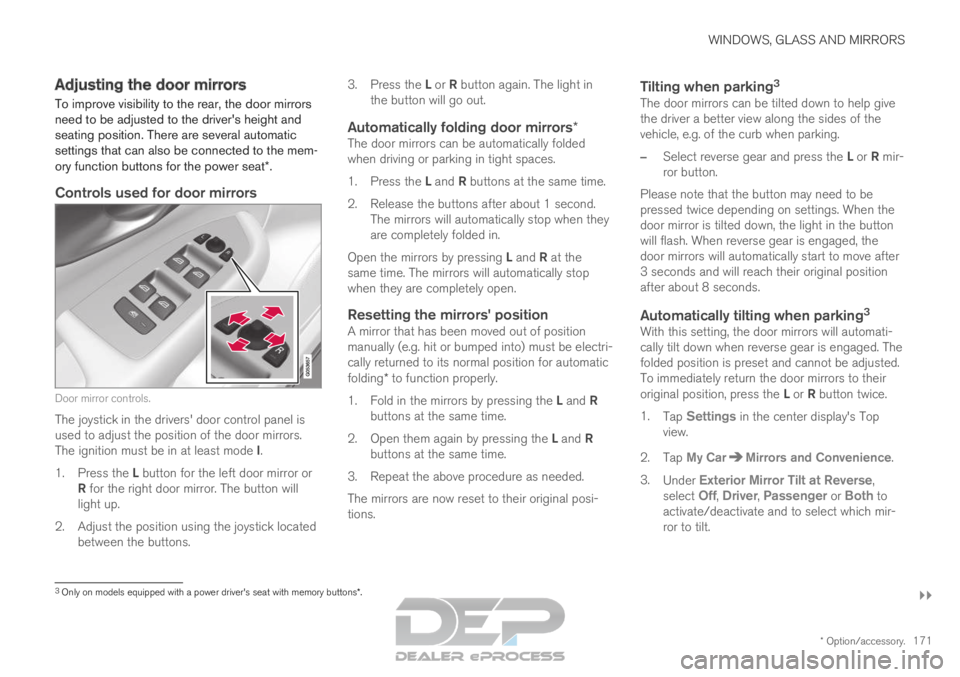
Controls used for door mirrors Door mirror controls.
The joystick in the drivers' door control panel is
used to adjust the position of the door mirrors.
The ignition must be in at least mode I.
1. Press the L button for the left door mirror or
R for the right door mirror. The button will
light up.
2.
Adjust the position using the joystick located
between the buttons. 3.
Press the L or R button again. The light in
the button will go out.
Automatically folding door mirrors*The door mirrors can be automatically folded
when driving or parking in tight spaces.
1. Press the L and R buttons at the same time.
2. Release the buttons after about 1 second. The mirrors will automatically stop when they
are completely folded in.
Open the mirrors by pressing L and R at the
same time. The mirrors will automatically stop
when they are completely open.
Resetting the mirrors' positionA mirror that has been moved out of position
manually (e.g. hit or bumped into) must be electri-
cally returned to its normal position for automatic
folding* to function properly.
1. Fold in the mirrors by pressing the L and R
buttons at the same time.
2. Open them again by pressing the L and R
buttons at the same time.
3. Repeat the above procedure as needed.
The mirrors are now reset to their original posi-
tions.
Tilting when parking 3The door mirrors can be tilted down to help give
the driver a better view along the sides of the
vehicle, e.g. of the curb when parking.
–
Select reverse gear and press the L or R mir-
ror button.
Please note that the button may need to be
pressed twice depending on settings. When the
door mirror is tilted down, the light in the button
will flash. When reverse gear is engaged, the
door mirrors will automatically start to move after
3 seconds and will reach their original position
after about 8 seconds.
Automatically tilting when parking 3With this setting, the door mirrors will automati-
cally tilt down when reverse gear is engaged. The
folded position is preset and cannot be adjusted.
To immediately return the door mirrors to their
original position, press the L or R button twice.
1. Tap Settings in the center display's Top
view.
2.
Tap My Car Mirrors and Convenience
.
3. Under Exterior Mirror Tilt at Reverse ,
select
Off, Driver, Passenger or Both to
activate/deactivate and to select which mir-
ror to tilt.
3 Only on models equipped with a power driver's seat with memory button\
s*.
Page 174 of 697
||WINDOWS, GLASS AND MIRRORS
* Option/accessory.
172
Automatic folding when the vehicle is
locked*
The door mirrors can automatically fold in when
the vehicle is locked and open when the vehicle
is unlocked using the remote key.
1.
Tap Settings in the center display's Top
view.
2.
Tap My Car Mirrors and Convenience
.
3. Select Fold Mirror When Locked to acti-
vate/deactivate.
Related information
Rearview/door mirrors (p. 169)
Adjusting the rearview mirror dimming func-
tion (p. 170)
Storing positions for seats, mirrors and head-
up display* (p. 186)
Activating and deactivating the heated rear
window and door mirrors (p. 225) Panoramic roof*
The panoramic roof is divided into two glass
sections. The front section can be opened verti-
cally at the rear edge (ventilation position) or hor-
izontally (open position). The rear section cannot
be moved.
The panoramic roof has a wind deflector and
sun curtain made of perforated fabric (located
beneath the glass sections) for extra protection
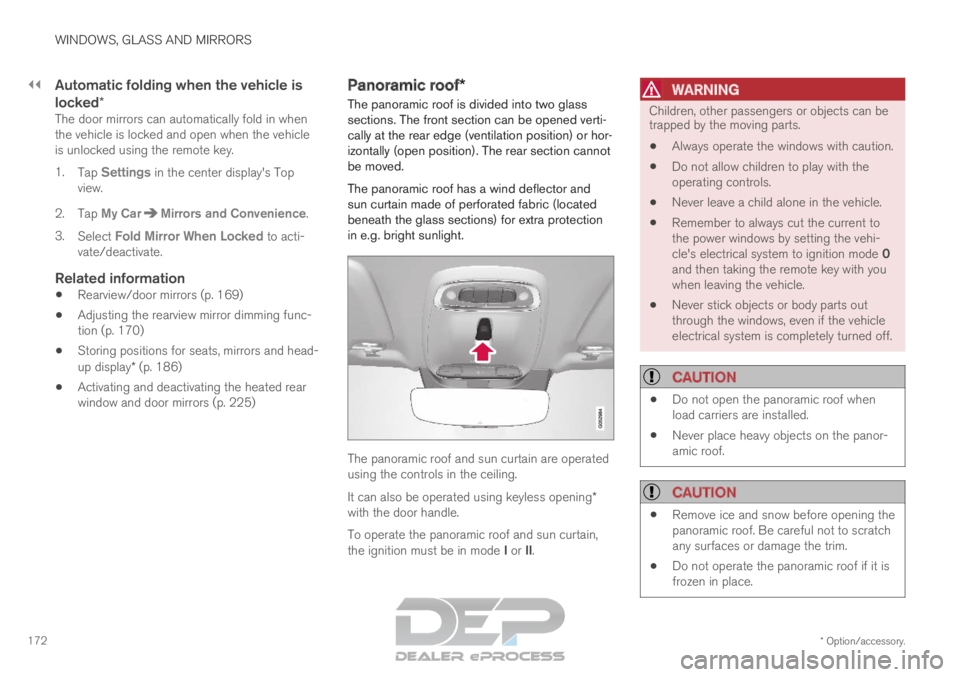
in e.g. bright sunlight. The panoramic roof and sun curtain are operated
using the controls in the ceiling.
It can also be operated using keyless opening*
with the door handle.
To operate the panoramic roof and sun curtain,
the ignition must be in mode I or II.
WARNING Children, other passengers or objects can be
trapped by the moving parts.
Always operate the windows with caution.
Do not allow children to play with the
operating controls.
Never leave a child alone in the vehicle.
Remember to always cut the current to
the power windows by setting the vehi-
cle's electrical system to ignition mode 0
and then taking the remote key with you
when leaving the vehicle.
Never stick objects or body parts out
through the windows, even if the vehicle
electrical system is completely turned off.
CAUTION
Do not open the panoramic roof when
load carriers are installed.
Never place heavy objects on the panor-
amic roof.
CAUTION
Remove ice and snow before opening the
panoramic roof. Be careful not to scratch
any surfaces or damage the trim.
Do not operate the panoramic roof if it is
frozen in place.
Page 178 of 697
WINDOWS, GLASS AND MIRRORS
* Option/accessory.
176
Keyless locking and unlocking* (p. 259)
Locking and unlocking using the remote key
(p. 246) Wiper blades and washer fluid
The wipers and the washer fluid are used to
improve visibility and the headlight pattern.
The washer nozzles are heated* automatically in
cold weather to prevent the washer fluid from
freezing.
When there is approximately 1 liter (1 qt) of
washer fluid remaining, a message to refill will
appear in the instrument panel.
Related information
Using the rain sensor (p. 177)
Using the windshield and headlight washers
(p. 179)
Using automatic rear window wiping when
backing up (p. 181)
Using the rain sensor's memory function
(p. 178)
Using the rear window wiper/washer
(p. 180)
Filling washer fluid (p. 662)
Windshield wipers in the service position
(p. 661)
Replacing windshield wiper blades (p. 660)
Changing rear window wipers (p. 659)
Using the windshield wipers (p. 176) Using the windshield wipers
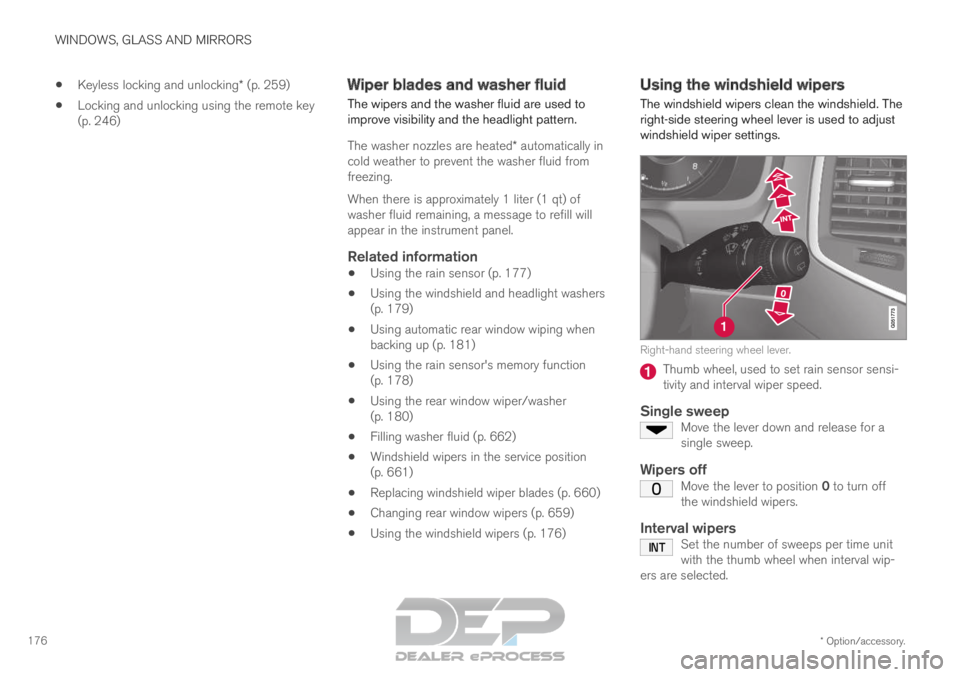
The windshield wipers clean the windshield. The
right-side steering wheel lever is used to adjust
windshield wiper settings. Right-hand steering wheel lever.
Thumb wheel, used to set rain sensor sensi-
tivity and interval wiper speed.
Single sweepMove the lever down and release for a
single sweep.
Wipers offMove the lever to position 0 to turn off
the windshield wipers.
Interval wipersSet the number of sweeps per time unit
with the thumb wheel when interval wip-
ers are selected.
Page 179 of 697
WINDOWS, GLASS AND MIRRORS
}}
177
Continuous wipersMove the lever upward for the wipers to
operate at normal speed. Move the lever upward again for the wip-
ers to operate at high speed.
CAUTION
Before activating the wipers, make sure that
the wiper blades are not frozen in place and
that any snow or ice on the windshield and
rear window has been scraped away.
CAUTION
Use plenty of washer fluid when the wipers
clean the windshield. The windshield must be
wet when the windshield wipers are working.
Related information
Using the rain sensor (p. 177)
Using the windshield and headlight washers
(p. 179)
Using automatic rear window wiping when
backing up (p. 181)
Wiper blades and washer fluid (p. 176)
Using the rain sensor's memory function
(p. 178)
Using the rear window wiper/washer
(p. 180)
Filling washer fluid (p. 662)
Windshield wipers in the service position
(p. 661)
Replacing windshield wiper blades (p. 660)
Changing rear window wipers (p. 659) Using the rain sensor
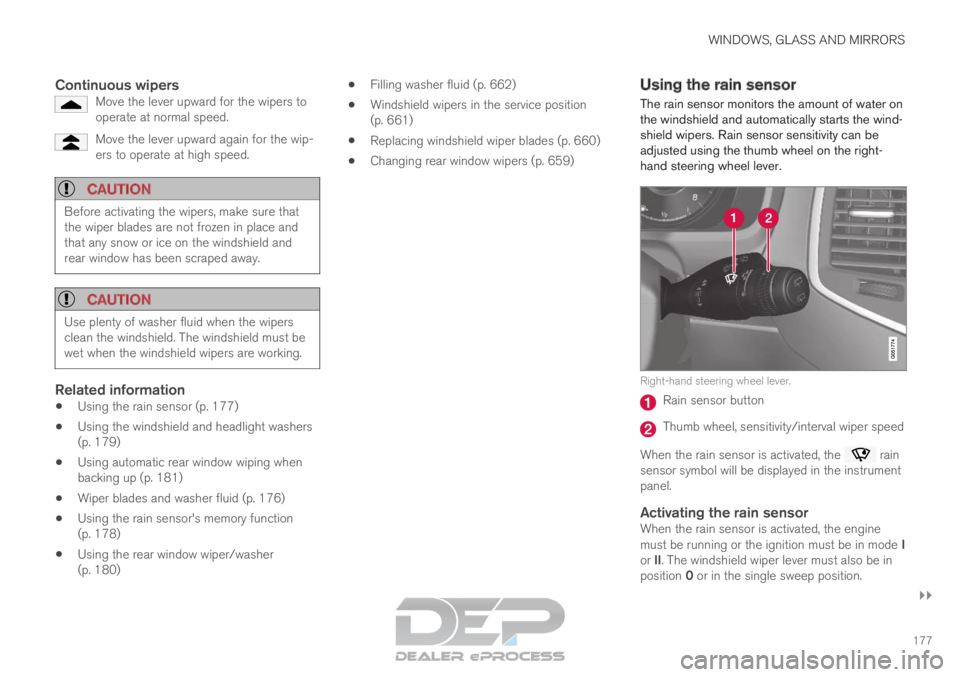
The rain sensor monitors the amount of water on
the windshield and automatically starts the wind-
shield wipers. Rain sensor sensitivity can be
adjusted using the thumb wheel on the right-
hand steering wheel lever. Right-hand steering wheel lever.
Rain sensor button
Thumb wheel, sensitivity/interval wiper speed
When the rain sensor is activated, the rain
sensor symbol will be displayed in the instrument
panel.
Activating the rain sensorWhen the rain sensor is activated, the engine
must be running or the ignition must be in mode I
or II. The windshield wiper lever must also be in
position 0 or in the single sweep position.
Page 180 of 697
||WINDOWS, GLASS AND MIRRORS
178
Activate the rain sensor by pressing the rain sen-
sor button .
If the lever is pressed down, the wipers will make
additional sweeps across the windshield.
Turn the thumb wheel upward for increased sen-
sitivity and downward for decreased sensitivity.
The wipers will make one extra sweep when the
thumb wheel is turned upward.
Deactivate the rain sensor
Deactivate the rain sensor by pressing the rain sensor button or moving the lever upward to
another wiper mode.
The rain sensor is automatically deactivated in
ignition mode 0 or when the engine is switched
off.
The rain sensor is also automatically deactivated
when the wiper blades are put in the service
position. The rain sensor will reactivate when
service mode is switched off.
CAUTION The windshield wipers may start inadvertently
and be damaged in automatic car washes.
Deactivate the rain sensor when the engine is
running or when the ignition is in mode I or II.
The symbol in the instrument panel will go
out.
Related information
Using the windshield and headlight washers
(p. 179)
Using automatic rear window wiping when
backing up (p. 181)
Wiper blades and washer fluid (p. 176)
Using the rain sensor's memory function
(p. 178)
Using the rear window wiper/washer
(p. 180)
Filling washer fluid (p. 662)
Windshield wipers in the service position
(p. 661)
Replacing windshield wiper blades (p. 660)
Changing rear window wipers (p. 659)
Using the windshield wipers (p. 176) Using the rain sensor's memory
function
The rain sensor monitors the amount of water on
the windshield and automatically starts the wind-
shield wipers.
Activating/deactivating memory
function
The rain sensor's memory function can be set to
activate so that the rain sensor button does not
need to be pressed each time the engine is
started:
1.
Tap Settings in the Top view in the center
display.
2.
Tap My Car Wipers
.
3. Select Rain Sensor Memory to activate/
deactivate the memory function.
Related information
Using the rain sensor (p. 177)
Using the windshield and headlight washers
(p. 179)
Using automatic rear window wiping when
backing up (p. 181)
Wiper blades and washer fluid (p. 176)
Using the rear window wiper/washer
(p. 180)
Filling washer fluid (p. 662)
Page 181 of 697
WINDOWS, GLASS AND MIRRORS
}}
* Option/accessory. 179
Windshield wipers in the service position
(p. 661)
Replacing windshield wiper blades (p. 660)
Changing rear window wipers (p. 659)
Using the windshield wipers (p. 176) Using the windshield and headlight
washers
The windshield and headlight washers clean the
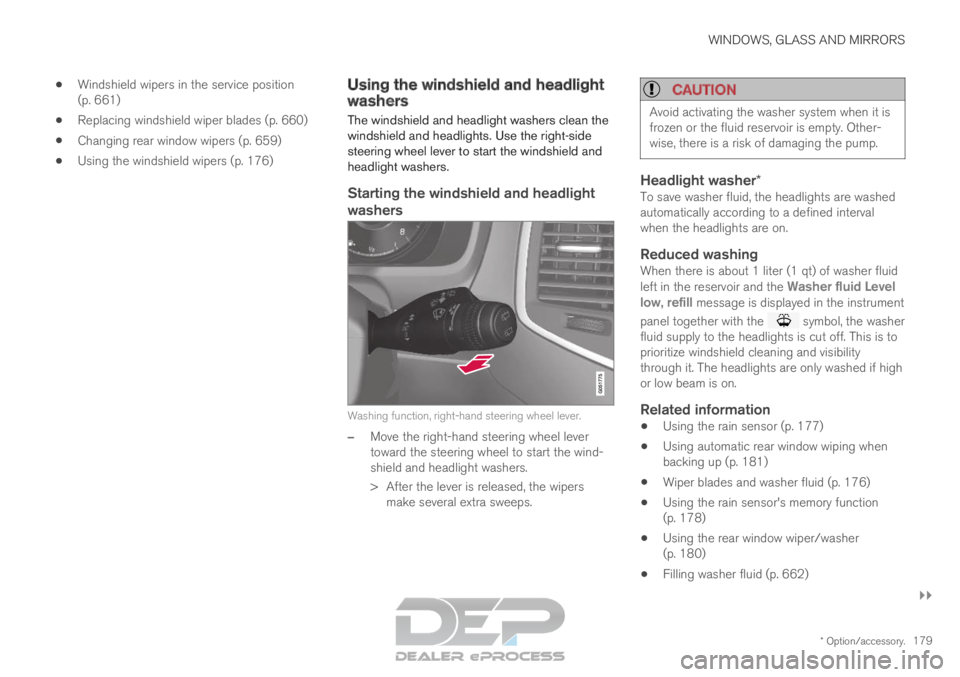
windshield and headlights. Use the right-side
steering wheel lever to start the windshield and
headlight washers.
Starting the windshield and headlight
washers Washing function, right-hand steering wheel lever.
–
Move the right-hand steering wheel lever
toward the steering wheel to start the wind-
shield and headlight washers.
>
After the lever is released, the wipers
make several extra sweeps.
CAUTION Avoid activating the washer system when it is
frozen or the fluid reservoir is empty. Other-
wise, there is a risk of damaging the pump.
Headlight washer*To save washer fluid, the headlights are washed
automatically according to a defined interval
when the headlights are on.
Reduced washingWhen there is about 1 liter (1 qt) of washer fluid
left in the reservoir and the
Washer fluid Level
low, refill message is displayed in the instrument
panel together with the symbol, the washer
fluid supply to the headlights is cut off. This is to
prioritize windshield cleaning and visibility
through it. The headlights are only washed if high
or low beam is on.
Related information
Using the rain sensor (p. 177)
Using automatic rear window wiping when
backing up (p. 181)
Wiper blades and washer fluid (p. 176)
Using the rain sensor's memory function
(p. 178)
Using the rear window wiper/washer
(p. 180)
Filling washer fluid (p. 662)
Page 182 of 697
WINDOWS, GLASS AND MIRRORS
180
Windshield wipers in the service position
(p. 661)
Replacing windshield wiper blades (p. 660)
Changing rear window wipers (p. 659)
Using the windshield wipers (p. 176) Using the rear window wiper/
washer
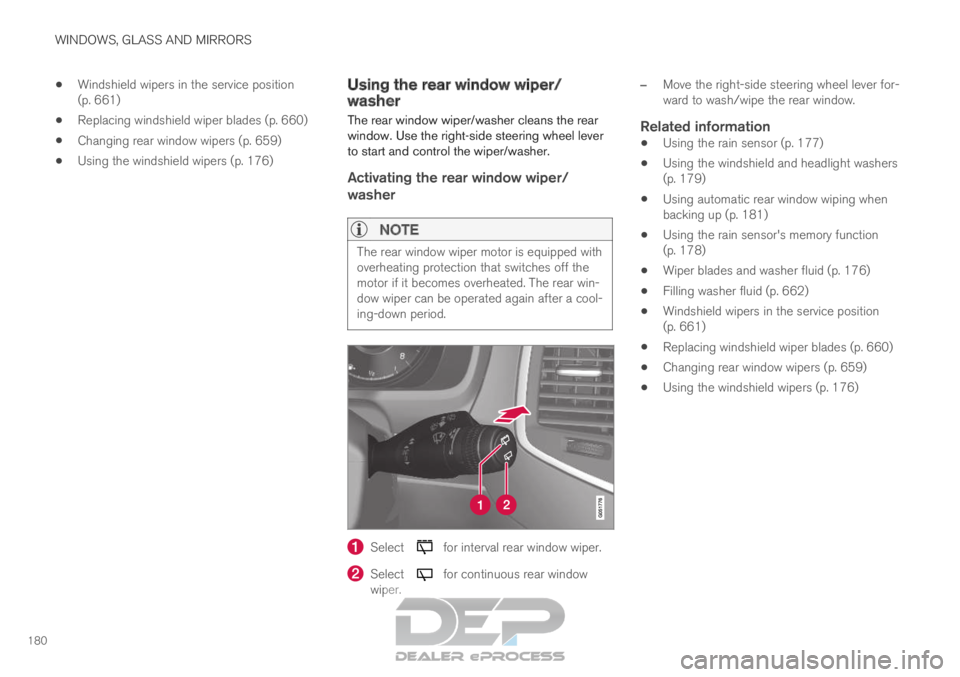
The rear window wiper/washer cleans the rear
window. Use the right-side steering wheel lever
to start and control the wiper/washer.
Activating the rear window wiper/
washer
NOTE The rear window wiper motor is equipped with
overheating protection that switches off the
motor if it becomes overheated. The rear win-
dow wiper can be operated again after a cool-
ing-down period.
Select for interval rear window wiper.
Select for continuous rear window
wiper. –
Move the right-side steering wheel lever for-
ward to wash/wipe the rear window.
Related information
Using the rain sensor (p. 177)
Using the windshield and headlight washers
(p. 179)
Using automatic rear window wiping when
backing up (p. 181)
Using the rain sensor's memory function
(p. 178)
Wiper blades and washer fluid (p. 176)
Filling washer fluid (p. 662)
Windshield wipers in the service position
(p. 661)
Replacing windshield wiper blades (p. 660)
Changing rear window wipers (p. 659)
Using the windshield wipers (p. 176)