service indicator VOLVO XC90 TWIN ENGINE HYBRID 2017 User Guide
[x] Cancel search | Manufacturer: VOLVO, Model Year: 2017, Model line: XC90 TWIN ENGINE HYBRID, Model: VOLVO XC90 TWIN ENGINE HYBRID 2017Pages: 584, PDF Size: 14.2 MB
Page 258 of 584
LOCKS AND ALARM
* Option/accessory, for more information, see Introduction.256
Alarm
The alarm system provides a warning if anattempt is made to break into the vehicle.
The following conditions will trigger the alarm:
•a door/hood/tailgate are opened
•the battery is disconnected
•the alarm siren is disconnected
If a problem is detected in the alarmsystem, this symbol and Alarmsystem failure Service required willbe displayed in the instrument panel.Do not attempt to repair any of the componentsin the alarm system yourself; this could affect theinsurance policy on the vehicle. Contact a trainedand qualified Volvo service technician.
NOTE
One of the alarm sensors, which is sensitiveto metallic objects, is located under the tunnelconsole cup holders. Avoid leaving coins,keys, etc., in the cup holders because theymay inadvertently trigger the alarm.
Arming the alarm
–Lock the vehicle by pressing the remotekey's lock button. On models with theoptional Passive Entry system, the vehiclecan also be locked by pressing the outerindentation for locking on one of the doorhandles or by pressing the tailgate's rubber-ized pressure plate.
If the vehicle is equipped with a power tail-gate*, the button on the lower edge of thetailgate can also be used to lock the vehicleand arm the alarm.
Disarming the alarm
The alarm can be disarmed by:
•Unlock the vehicle by pressing the remotekey's unlock button
•Pressing the pressure-sensitive area on theinside of one of the door handles on modelswith the optional Passive Entry system.
•Pressing the tailgate's rubberized pressureplate on models with the optional PassiveEntry system.
Turning off a triggered (sounding)
alarm
–Press the remote key's unlock button or putthe ignition in mode I by turning the startknob to START and releasing it.
Alarm signals
The following occurs if the alarm has been trig-gered:
•A siren will sound for 30 seconds or until thealarm is turned off
•All turn signals flash for 5 minutes or untilthe alarm is turned off
If the door that triggered the alarm is left open,the alarm cycle will be repeated 10 times.
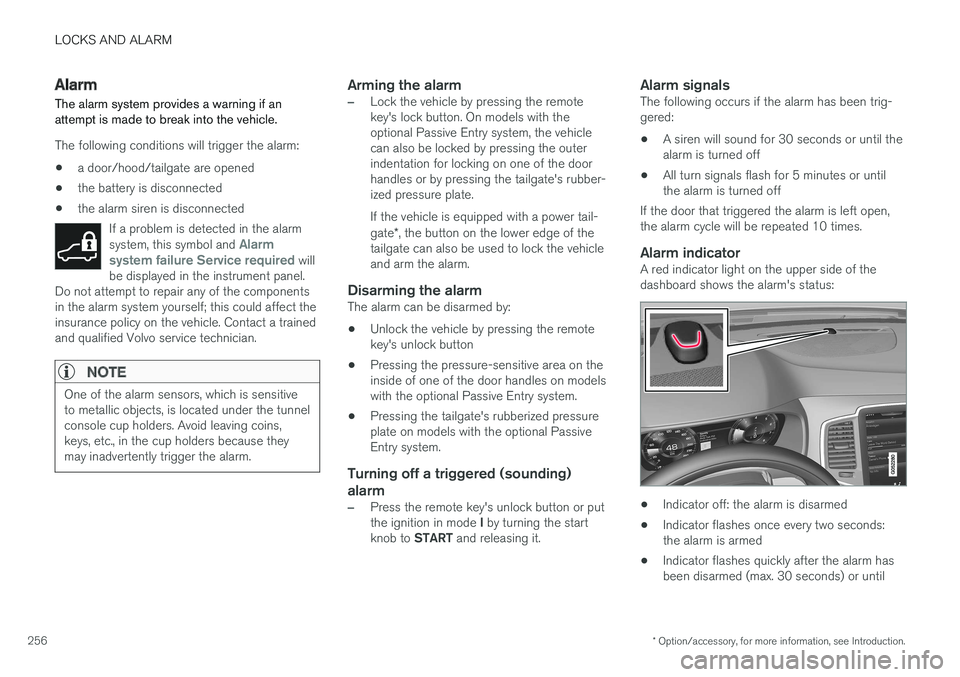
Alarm indicator
A red indicator light on the upper side of thedashboard shows the alarm's status:
•Indicator off: the alarm is disarmed
•Indicator flashes once every two seconds:the alarm is armed
•Indicator flashes quickly after the alarm hasbeen disarmed (max. 30 seconds) or until
Page 393 of 584

STARTING AND DRIVING
391
Fuel
Volvo recommends the use of detergent gaso-line to control engine deposits.
Deposit control gasoline (detergent
additives)
Detergent gasoline is effective in keeping injec-tors and intake valves clean. Consistent use ofdeposit control gasolines will help ensure gooddrivability and fuel economy. If you are not surewhether the gasoline contains deposit controladditives, check with the service station operator.
NOTE
Volvo does not recommend the use of exter-nal fuel injector cleaning systems.
Unleaded fuel
Each Volvo has a three-way catalytic converterand must use only unleaded gasoline. U.S. andCanadian regulations require that pumps deliver-ing unleaded gasoline be labeled "UNLEADED".Only these pumps have nozzles which fit yourvehicle's filler inlet. It is unlawful to dispense lea-ded fuel into a vehicle labeled "unleaded gaso-line only". Leaded gasoline damages the three-way catalytic converter and the heated oxygensensor system. Repeated use of leaded gasolinewill lessen the effectiveness of the emission con-trol system and could result in loss of emissionwarranty coverage. State and local vehicle
inspection programs will make detection of mis-fueling easier, possibly resulting in emission testfailure for misfueled vehicles.
NOTE
Some U.S. and Canadian gasolines contain anoctane enhancing additive called methyl-cyclopentadienyl manganese tricarbonyl(MMT). If such fuels are used, your EmissionControl System performance may be affected,and the Check Engine Light (malfunctionindicator light) located on your instrumentpanel may light. If this occurs, please returnyour vehicle to a trained and qualified Volvoservice technician for service.
Gasoline containing alcohol and ethers,
"Oxygenated fuels"
Some fuel suppliers sell gasoline containing"oxygenates" which are usually alcohols orethers. In some areas, state or local laws requirethat the service pump be marked indicating useof alcohols or ethers. However, there are areas inwhich the pumps are unmarked. If you are notsure whether there is alcohol or ethers in thegasoline you buy, check with the service stationoperator. To meet seasonal air quality standards,some areas require the use of "oxygenated" fuel.
Volvo allows the use of the following "oxygen-ated" fuels; however, the octane ratings listedmust still be met.
Alcohol – Ethanol
Fuels containing up to 10% ethanol by volumemay be used. Ethanol may also be referred to asEthyl alcohol, or "Gasohol".
Ethers – MTBE: Fuels containing up to15% MTBE may be used.
Methanol
Do not use gasolines containing methanol(methyl alcohol, wood alcohol). This practice canresult in vehicle performance deterioration andcan damage critical parts in the fuel system. Suchdamage may not be covered under the NewVehicle Limited Warranty.
Related information
•Octane rating (p. 392)
•Opening/closing the fuel filler door (p. 393)
Page 395 of 584
STARTING AND DRIVING
}}
393
Opening/closing the fuel filler door
The fuel tank has a filling system that does nothave a cover.
Opening/closing the fuel filler door
An arrow next to the fuel pumpsymbol in the instrument panelindicates the side of the vehiclewhere the fuel filler door islocated.
1. Press the button on the lighting panel.
>Pressure equalization in the fuel tank cau-ses a slight delay before the fuel fillerdoor opens. Fuel tank Fuel lid isopening will be displayed in the instru-ment panel, followed by Fuel tank Readyfor refueling.
2.After refueling, close the fuel filler door bypressing lightly.
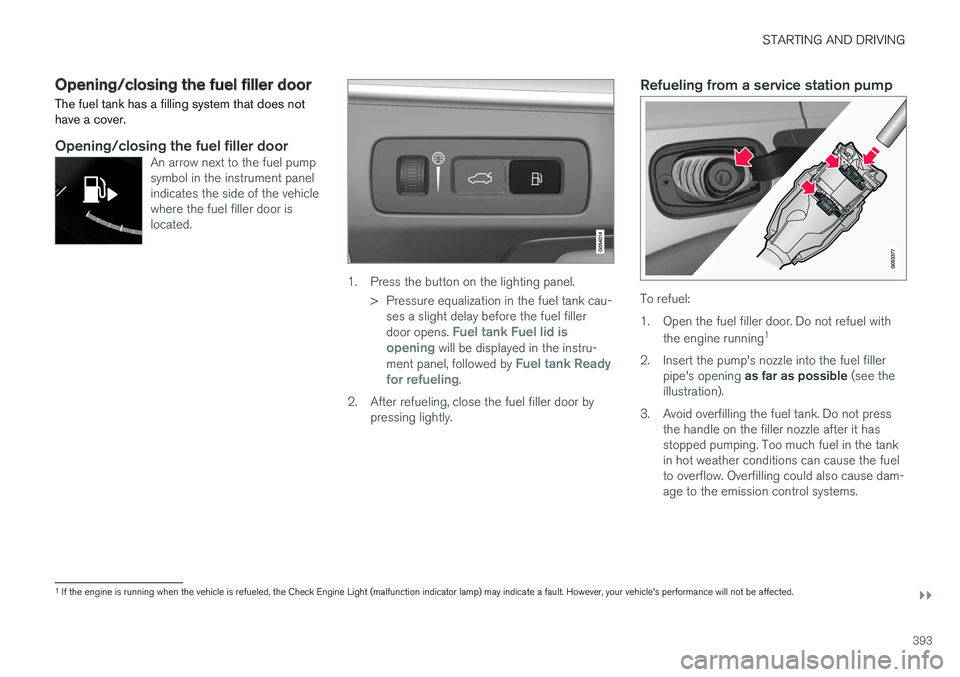
Refueling from a service station pump
To refuel:
1.Open the fuel filler door. Do not refuel with
the engine running1
2. Insert the pump's nozzle into the fuel fillerpipe's opening as far as possible (see theillustration).
3. Avoid overfilling the fuel tank. Do not pressthe handle on the filler nozzle after it hasstopped pumping. Too much fuel in the tankin hot weather conditions can cause the fuelto overflow. Overfilling could also cause dam-age to the emission control systems.
1If the engine is running when the vehicle is refueled, the Check Engine Light (malfunction indicator lamp) may indicate a fault. However, your vehicle's performance will not be affected.
Page 409 of 584
STARTING AND DRIVING
407
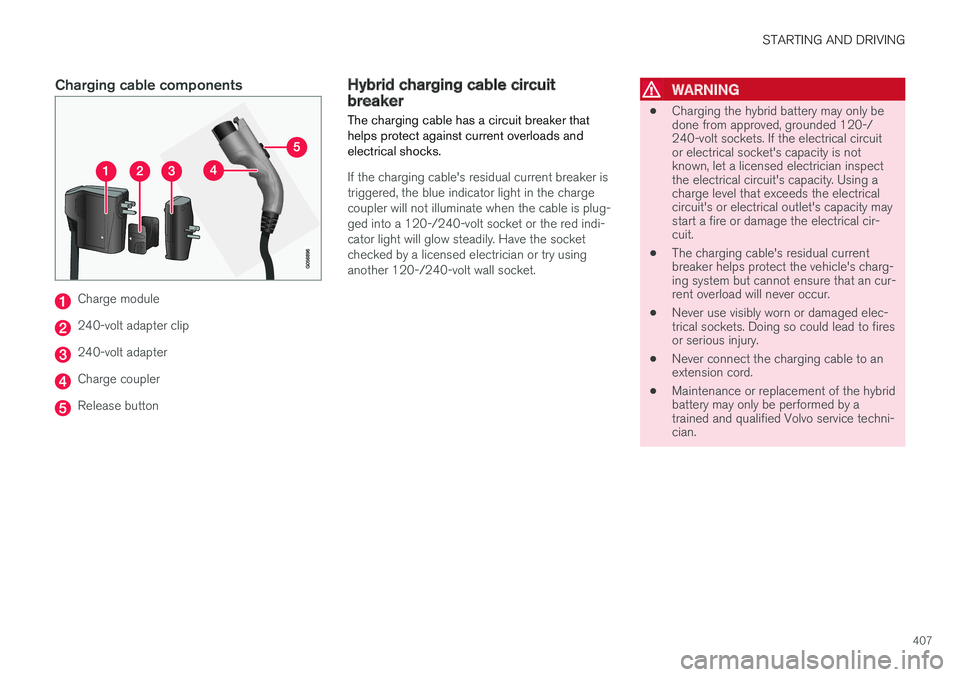
Charging cable components
Charge module
240-volt adapter clip
240-volt adapter
Charge coupler
Release button
Hybrid charging cable circuitbreaker
The charging cable has a circuit breaker thathelps protect against current overloads andelectrical shocks.
If the charging cable's residual current breaker istriggered, the blue indicator light in the chargecoupler will not illuminate when the cable is plug-ged into a 120-/240-volt socket or the red indi-cator light will glow steadily. Have the socketchecked by a licensed electrician or try usinganother 120-/240-volt wall socket.
WARNING
•Charging the hybrid battery may only bedone from approved, grounded 120-/240-volt sockets. If the electrical circuitor electrical socket's capacity is notknown, let a licensed electrician inspectthe electrical circuit's capacity. Using acharge level that exceeds the electricalcircuit's or electrical outlet's capacity maystart a fire or damage the electrical cir-cuit.
•The charging cable's residual currentbreaker helps protect the vehicle's charg-ing system but cannot ensure that an cur-rent overload will never occur.
•Never use visibly worn or damaged elec-trical sockets. Doing so could lead to firesor serious injury.
•Never connect the charging cable to anextension cord.
•Maintenance or replacement of the hybridbattery may only be performed by atrained and qualified Volvo service techni-cian.
Page 411 of 584

STARTING AND DRIVING
409
SymbolMessageExplanation
Reduced performance
Max vehicle speed limited
The hybrid battery is not sufficiently charged for higher speeds. Charge the battery as soon as pos-sible.
Hybrid system
Harsh behavior at low speed, vehicleok to use
The hybrid system is not functioning completely properly. Contact a Volvo retailer or a trained andqualified Volvo service technician as soon as possible to have the system checked.
Hybrid system failure
Service required
The hybrid system is out of order. Contact a Volvo retailer or a trained and qualified Volvo servicetechnician as soon as possible to have the system checked.
Charge cable
Remove before start
The charging cable has not been disconnected and the driver has attempted to start the engine.Disconnect the cable from the vehicle, put the cover back in place and close the charger door.
Charge cable
Removed? Turn and hold start knob7s
The driver has already attempted to start the engine with the charging cable still connected. Besure the cable is completely disconnected, the cover is in place and the charger door is closed.
Related information
•Charging the hybrid battery (p. 413)
•Charger status indicators (p. 417)
•Hybrid battery charge status (p. 415)
Page 416 of 584
||
STARTING AND DRIVING
414
NOTE
The capacity of the hybrid battery diminishessomewhat with age and use, which couldresult in increased use of the gasoline engineand consequently, slightly higher fuel con-sumption.
Charging is indicated in three ways:
•Charge module (the unit that is plugged intothe wall socket): The blue indicator light onthe cable's charge module will flash red sev-eral times when the unit is plugged into awall socket while a safety check is being per-formed and will then glow steadily blue toindicate that the charger is ready to use.
•A green indicator light in the vehicle's charg-ing socket will flash green while the batteryis charging and will glow steadily green whenthe hybrid battery is fully charged. The blueindicator light in the charge module will alsoflash while charging is underway and willglow steadily blue when charging is comple-ted.
•A gauge in the instrument panel will alsoindicate the battery's charge level.
The hybrid battery charging process also chargesthe vehicle's start battery.
If the hybrid battery's temperature is below –13 ºF (–10 ºC) or above +104 ºF (+40 ºC), someof the vehicle's functions may be reduced or not
be available at all (e.g., drive mode may not beavailable).
The electric motor cannot be used if the hybridbattery's temperature is too low or too high. If thePURE drive mode is selected, the gasolineengine will be used.
Temperature control
During charging, if the temperature in the charg-ing cable becomes too high and reaches a criticallimit, charging will be interrupted.
CAUTION
If charging is interrupted repeatedly, have thecharging cable and the vehicle's chargingsystem inspected by a trained and qualifiedVolvo service technician.
Charging using the gasoline engine
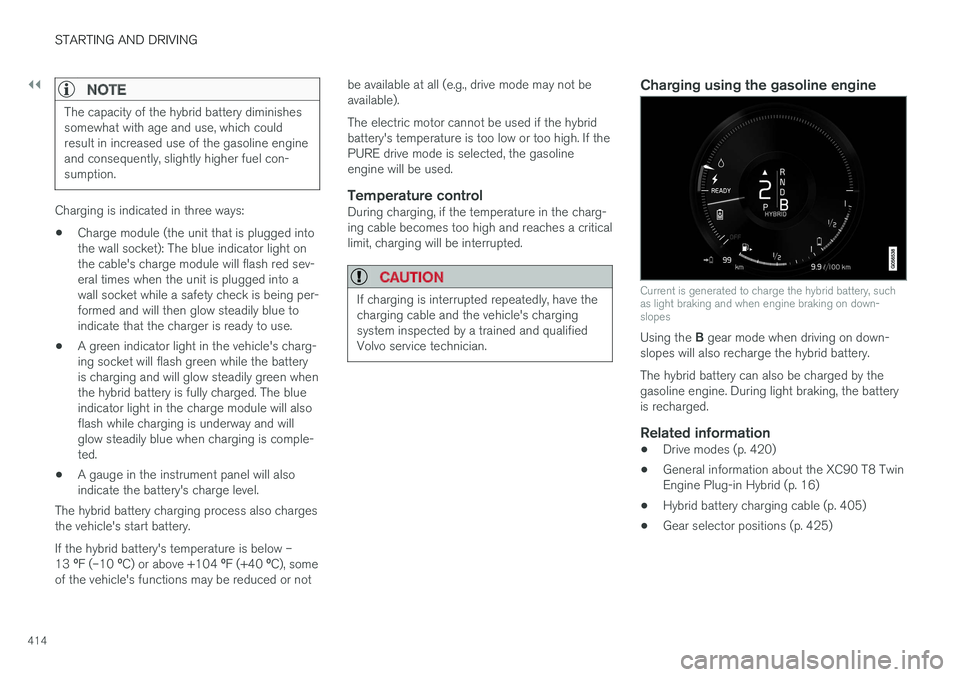
Current is generated to charge the hybrid battery, suchas light braking and when engine braking on down-slopes
Using the B gear mode when driving on down-slopes will also recharge the hybrid battery.
The hybrid battery can also be charged by thegasoline engine. During light braking, the batteryis recharged.
Related information
•Drive modes (p. 420)
•General information about the XC90 T8 TwinEngine Plug-in Hybrid (p. 16)
•Hybrid battery charging cable (p. 405)
•Gear selector positions (p. 425)
Page 419 of 584
STARTING AND DRIVING
}}
417
Charger status indicators
The red and blue lights in the charging cable'scharge module give an indication of the chargestatus.
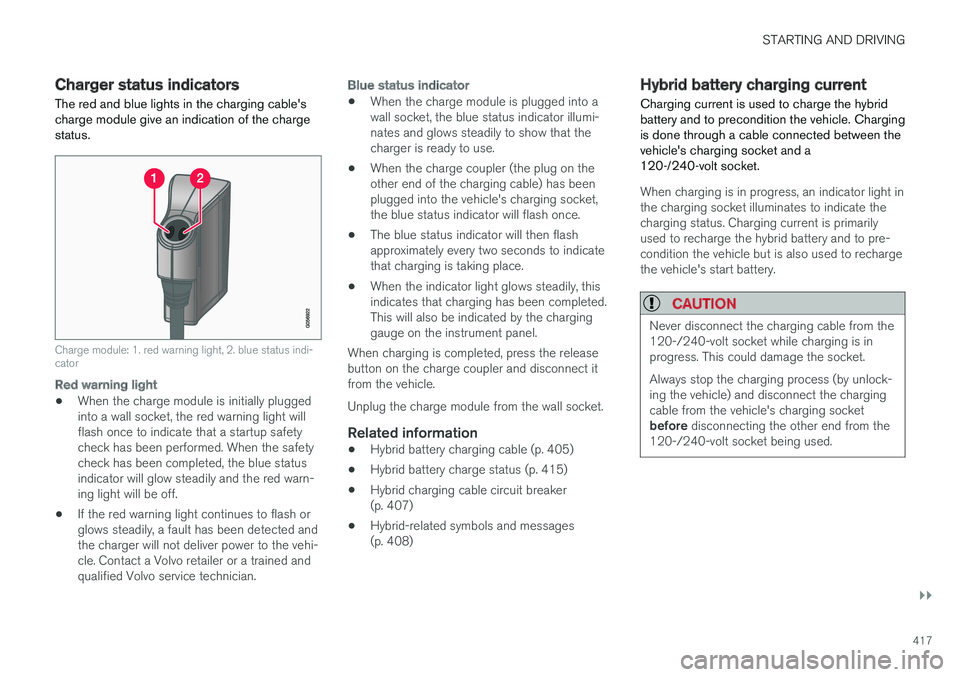
Charge module: 1. red warning light, 2. blue status indi-cator
Red warning light
•When the charge module is initially pluggedinto a wall socket, the red warning light willflash once to indicate that a startup safetycheck has been performed. When the safetycheck has been completed, the blue statusindicator will glow steadily and the red warn-ing light will be off.
•If the red warning light continues to flash orglows steadily, a fault has been detected andthe charger will not deliver power to the vehi-cle. Contact a Volvo retailer or a trained andqualified Volvo service technician.
Blue status indicator
•When the charge module is plugged into awall socket, the blue status indicator illumi-nates and glows steadily to show that thecharger is ready to use.
•When the charge coupler (the plug on theother end of the charging cable) has beenplugged into the vehicle's charging socket,the blue status indicator will flash once.
•The blue status indicator will then flashapproximately every two seconds to indicatethat charging is taking place.
•When the indicator light glows steadily, thisindicates that charging has been completed.This will also be indicated by the charginggauge on the instrument panel.
When charging is completed, press the releasebutton on the charge coupler and disconnect itfrom the vehicle.
Unplug the charge module from the wall socket.
Related information
•Hybrid battery charging cable (p. 405)
•Hybrid battery charge status (p. 415)
•Hybrid charging cable circuit breaker(p. 407)
•Hybrid-related symbols and messages(p. 408)
Hybrid battery charging current
Charging current is used to charge the hybridbattery and to precondition the vehicle. Chargingis done through a cable connected between thevehicle's charging socket and a120-/240-volt socket.
When charging is in progress, an indicator light inthe charging socket illuminates to indicate thecharging status. Charging current is primarilyused to recharge the hybrid battery and to pre-condition the vehicle but is also used to rechargethe vehicle's start battery.
CAUTION
Never disconnect the charging cable from the120-/240-volt socket while charging is inprogress. This could damage the socket.
Always stop the charging process (by unlock-ing the vehicle) and disconnect the chargingcable from the vehicle's charging socketbefore disconnecting the other end from the120-/240-volt socket being used.
Page 485 of 584
WHEELS AND TIRES
483
Tire direction of rotation
Incorrectly mounted tires impair the car's brakingproperties and ability to force aside rain, snowand slush.
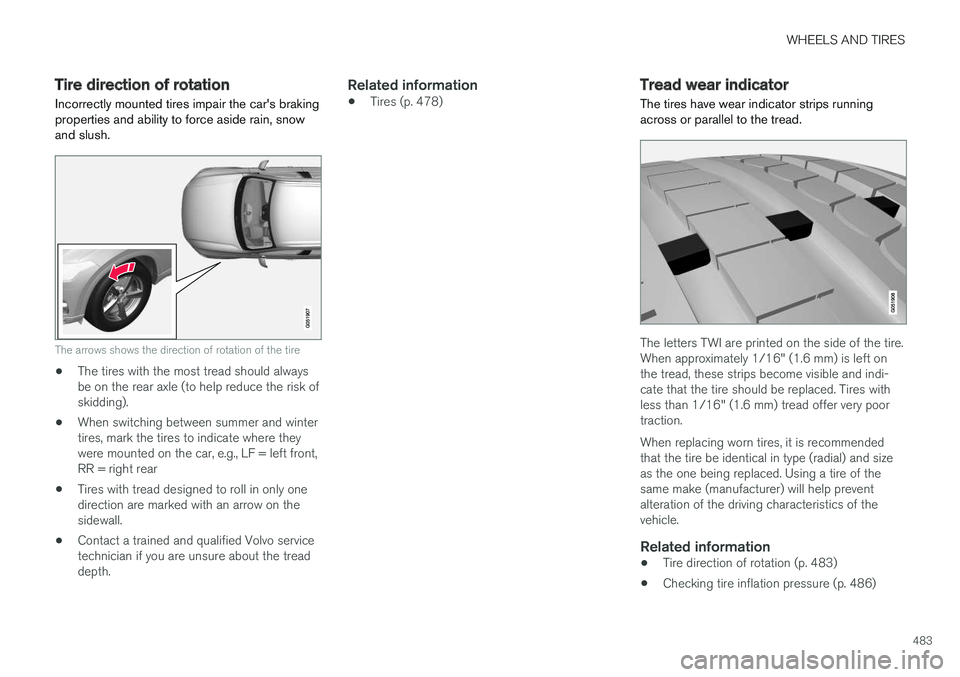
The arrows shows the direction of rotation of the tire
•The tires with the most tread should alwaysbe on the rear axle (to help reduce the risk ofskidding).
•When switching between summer and wintertires, mark the tires to indicate where theywere mounted on the car, e.g., LF = left front,RR = right rear
•Tires with tread designed to roll in only onedirection are marked with an arrow on thesidewall.
•Contact a trained and qualified Volvo servicetechnician if you are unsure about the treaddepth.
Related information
•Tires (p. 478)Tread wear indicator
The tires have wear indicator strips runningacross or parallel to the tread.
The letters TWI are printed on the side of the tire.When approximately 1/16" (1.6 mm) is left onthe tread, these strips become visible and indi-cate that the tire should be replaced. Tires withless than 1/16" (1.6 mm) tread offer very poortraction.
When replacing worn tires, it is recommendedthat the tire be identical in type (radial) and sizeas the one being replaced. Using a tire of thesame make (manufacturer) will help preventalteration of the driving characteristics of thevehicle.
Related information
•Tire direction of rotation (p. 483)
•Checking tire inflation pressure (p. 486)
Page 494 of 584
||
WHEELS AND TIRES
492
the inflation pressure recommended by the vehi-cle manufacturer on the vehicle placard or tireinflation pressure label. (If your vehicle has tiresof a different size than the size indicated on thevehicle placard or tire inflation pressure label, youshould determine the proper tire inflation pres-sure for those tires.)
As an added safety feature, your vehicle hasbeen equipped with a tire pressure monitoringsystem (TPMS) that illuminates a low tire pres-sure telltale when one or more of your tires issignificantly under-inflated. Accordingly, when thelow tire pressure telltale illuminates, you shouldstop and check your tires as soon as possible,and inflate them to the proper pressure.
Driving on a significantly under-inflated tire cau-ses the tire to overheat and can lead to tire fail-ure. Under-inflation also reduces fuel efficiencyand tire tread life, and may affect the vehicle'shandling and stopping ability. Please note thatthe TPMS is not a substitute for proper tire main-tenance, and it is the driver's responsibility tomaintain correct tire pressure, even if under-infla-tion has not reached the level to trigger illumina-tion of the TPMS low tire pressure telltale.
Your vehicle has also been equipped with aTPMS malfunction indicator to indicate when thesystem is not operating properly. The TPMS mal-function indicator is combined with the low tirepressure telltale.
When the system detects a malfunction, the tell-tale will flash for approximately one minute andthen remain continuously illuminated. Thissequence will continue upon subsequent vehiclestart-ups as long as the malfunction exists. Whenthe malfunction indicator is illuminated, the sys-tem may not be able to detect or signal low tirepressure as intended.
TPMS malfunctions may occur for a variety ofreasons, including the installation of replacementor alternate tires or wheels on the vehicle thatprevent the TPMS from functioning properly.Always check the TPMS malfunction telltale afterreplacing one or more tires or wheels on yourvehicle to ensure that the replacement or alter-nate tires and wheels allow the TPMS to con-tinue to function properly.
Messages in the instrument panel
When the TPMS symbol illuminates, the followingtext messages may also be displayed:
•Tire pressure low
•Tire pressure system Temporarilyunavailable
•Tire pressure system Service required
If TPMS cannot determine which tire(s) have lowinflation pressure:
•All four tires will be shown as affected in thecenter display
After changing wheels, always calibrate the sys-tem to avoid false warnings.
TPMS does not replace the need for regular tireinspection and maintenance.
NOTE
If you change to tires with a different dimen-sion than the factory-installed ones, theTPMS system must be calibrated for thesetires.
TPMS cannot be turned off.
WARNING
Incorrect inflation pressure could lead to tirefailure, resulting in a loss of control of thevehicle.
Related information
•Checking tire inflation pressure (p. 493)
•Reinflating tires equipped with the TirePressure Monitoring System (TPMS)(p. 494)
•Ignition modes (p. 400)
Page 508 of 584

||
MAINTENANCE AND SERVICING
506
Related information
•Climate system service (p. 511)System updates
Updates are available for infotainment-relatedservices and Internet connections. If system soft-ware updates are available, they can be to bedownloaded all at once or separately.
System (software) updates arehandled through theDownload Center app in thecenter display's App view. Taponce to start a download app inHome view's lower sub-view. Ifno search for updates hasbeen performed since the last time the infotain-ment system was started, a search will be initi-ated.
No search will begin if a software download isunderway.
An icon in the System updates button indicatesthe number of updates that are currently availa-ble. Tap the button to display a list of updatesthat can be installed in the vehicle.
For additional information and answers to com-monly asked questions pertaining to the functionand downloading system updates, go to sup-port.volvocars.com.
Background searches for software updatesis activated by default when the vehicle isdelivered from the factory.
NOTE
Downloading data may affect other systemfeatures that share the Internet connection. Adownload can be cancelled at any time or theother features can be temporarily turned offwhile the software download is underway.
NOTE
An update may be interrupted when the igni-tion is switched off.
However, an update does not have to becompleted when the ignition is switched off; itwill resume automatically when the ignition isswitched on again.
Updating all system software
–Select Install all at the bottom of the list.
To avoid displaying a list, select Install all by theSystem updates button.
Updating individual programs
–Select Install to choose the software to bedownloaded.
Cancelling a download
–Tap the activity indicator that replaced theInstall button on the screen when the down-load began.