ESP VOLVO XC90 TWIN ENGINE HYBRID 2017 Owner's Manual
[x] Cancel search | Manufacturer: VOLVO, Model Year: 2017, Model line: XC90 TWIN ENGINE HYBRID, Model: VOLVO XC90 TWIN ENGINE HYBRID 2017Pages: 584, PDF Size: 14.2 MB
Page 151 of 584
INSTRUMENTS AND CONTROLS
}}
* Option/accessory, for more information, see Introduction.149
Active high beams may be temporarily unavailable(e.g., in heavy fog or rain). When the systembecomes active again or if the sensors in thewindshield are no longer obscured, the messages
will disappear and the symbol will illumi-nate.
WARNING
•Automatic high beams are a driving aiddesigned to help provide the best possi-ble headlight illumination in good drivingconditions.
•The use of aftermarket or non-Volvoglass can have an adverse effect on theautomatic high beam function.
•The driver is always responsible for man-ually toggling between high and lowbeams when this is required by traffic orweather conditions.
CAUTION
In the following situations, it may be neces-sary to switch between high and low beamsmanually:
•In heavy fog or rain
•In blowing snow or slush
•In bright moonlight
•In freezing rain
•In areas with dim street lighting
•When oncoming vehicles have dim frontlighting
•If there are pedestrians on or near theroad
•If there are reflective objects, such assigns, near the road
•When oncoming vehicles' lights areobscured by e.g., fences, bushes, etc.
•When there are vehicles on connectingroads
•At the top of hills or in dips in the road
•In sharp curves
Related information
•City Safety™ troubleshooting (p. 332)
•Lighting panel and controls (p. 144)
Active Bending Lights*
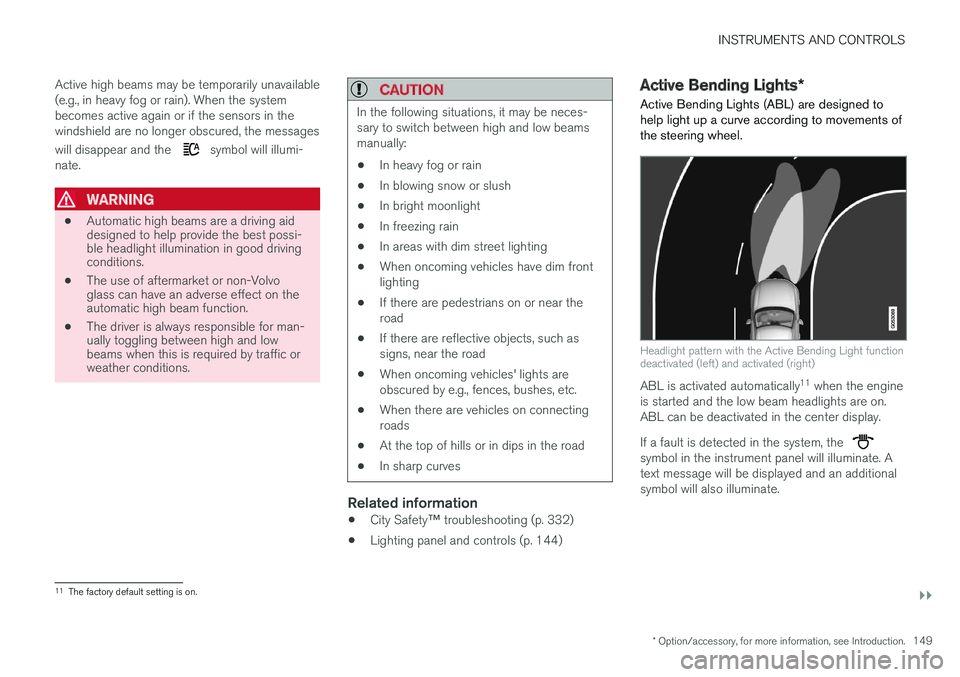
Active Bending Lights (ABL) are designed tohelp light up a curve according to movements ofthe steering wheel.
Headlight pattern with the Active Bending Light functiondeactivated (left) and activated (right)
ABL is activated automatically11 when the engineis started and the low beam headlights are on.ABL can be deactivated in the center display.
If a fault is detected in the system, the symbol in the instrument panel will illuminate. Atext message will be displayed and an additionalsymbol will also illuminate.
11The factory default setting is on.
Page 154 of 584
||
INSTRUMENTS AND CONTROLS
152
NOTE
•This automatic flashing sequence can beinterrupted by immediately moving thelever in the opposite direction.
•If the turn signal indicator flashes fasterthan normal, see the message in theinstrument panel.
Continuous flashing sequence
Move the lever as far up or down as possibleto start the turn signals.
The turn signals will be cancelled automaticallyby the movement of the steering wheel, or thelever can be returned to its initial position byhand.
Related information
•Lighting panel and controls (p. 144)
•Hazard warning flashers (p. 151)
•Settings view (p. 115)
Passenger compartment lighting
The passenger compartment lighting is con-trolled using the buttons in the ceiling above thefront and rear seats.
All passenger compartment lighting can beturned on and off manually within 30 minutesafter:
•the vehicle is unlocked but the engine hasnot been started
•the engine is switched off and the ignition isin mode 0.
Front interior lighting
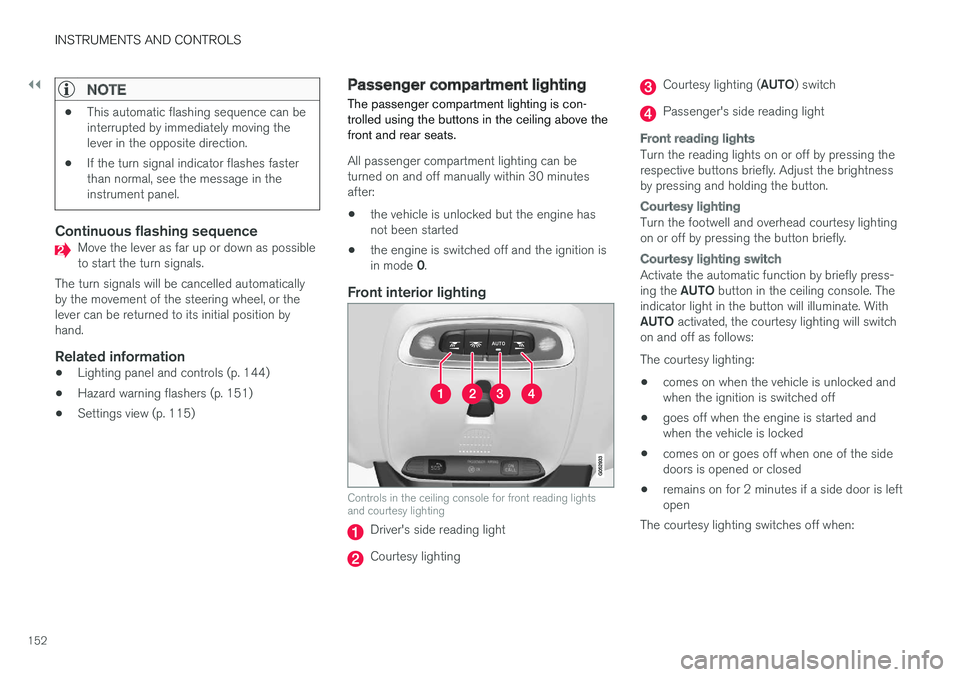
Controls in the ceiling console for front reading lightsand courtesy lighting
Driver's side reading light
Courtesy lighting
Courtesy lighting (AUTO) switch
Passenger's side reading light
Front reading lights
Turn the reading lights on or off by pressing therespective buttons briefly. Adjust the brightnessby pressing and holding the button.
Courtesy lighting
Turn the footwell and overhead courtesy lightingon or off by pressing the button briefly.
Courtesy lighting switch
Activate the automatic function by briefly press-ing the AUTO button in the ceiling console. Theindicator light in the button will illuminate. WithAUTO activated, the courtesy lighting will switchon and off as follows:
The courtesy lighting:
•comes on when the vehicle is unlocked andwhen the ignition is switched off
•goes off when the engine is started andwhen the vehicle is locked
•comes on or goes off when one of the sidedoors is opened or closed
•remains on for 2 minutes if a side door is leftopen
The courtesy lighting switches off when:
Page 202 of 584
||
CLIMATE
200
Climate view
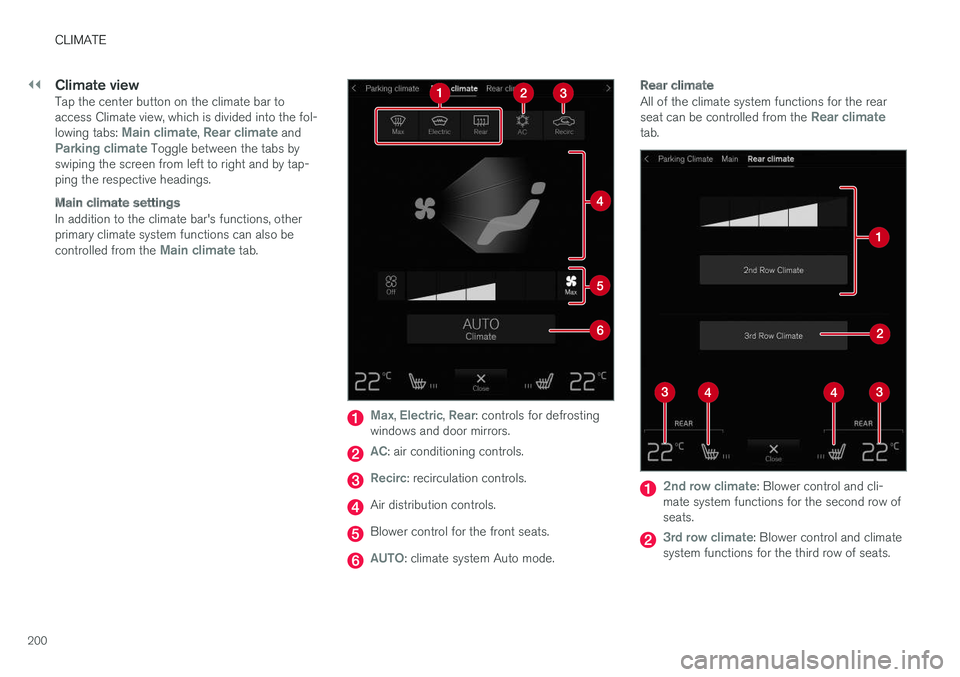
Tap the center button on the climate bar toaccess Climate view, which is divided into the fol-lowing tabs: Main climate, Rear climate andParking climate Toggle between the tabs byswiping the screen from left to right and by tap-ping the respective headings.
Main climate settings
In addition to the climate bar's functions, otherprimary climate system functions can also becontrolled from the Main climate tab.
Max, Electric, Rear: controls for defrostingwindows and door mirrors.
AC: air conditioning controls.
Recirc: recirculation controls.
Air distribution controls.
Blower control for the front seats.
AUTO: climate system Auto mode.
Rear climate
All of the climate system functions for the rearseat can be controlled from the Rear climatetab.
2nd row climate: Blower control and cli-mate system functions for the second row ofseats.
3rd row climate: Blower control and climatesystem functions for the third row of seats.
Page 207 of 584
CLIMATE
205
•Rear climate system controls on the tunnelconsole (p. 201)
•Perceived temperature (p. 188)
Turning recirculation on and off
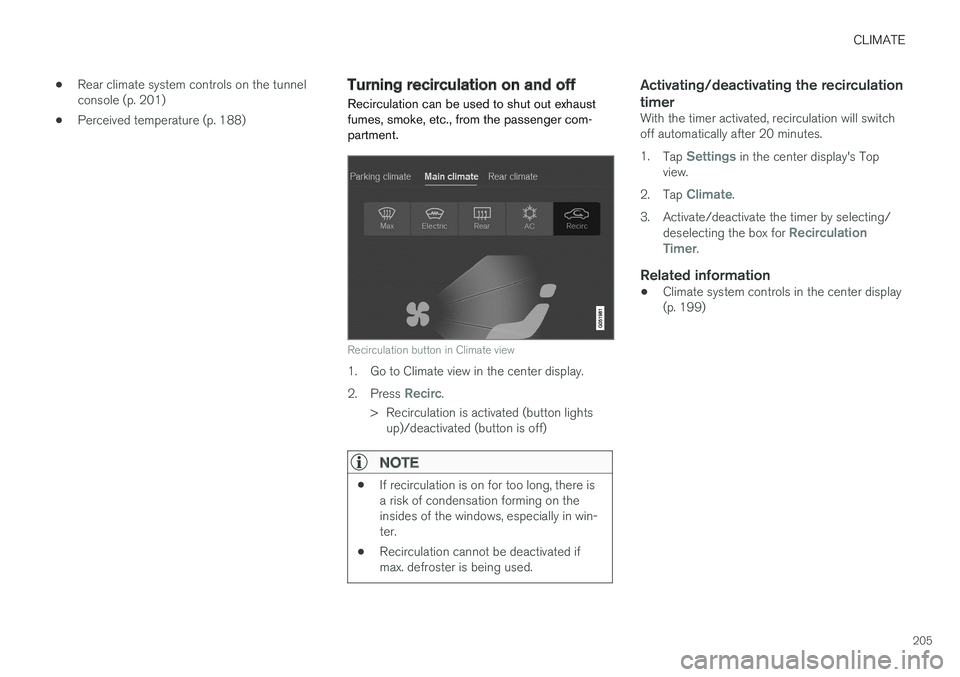
Recirculation can be used to shut out exhaustfumes, smoke, etc., from the passenger com-partment.
Recirculation button in Climate view
1. Go to Climate view in the center display.
2.Press Recirc.
>Recirculation is activated (button lightsup)/deactivated (button is off)
NOTE
•If recirculation is on for too long, there isa risk of condensation forming on theinsides of the windows, especially in win-ter.
•Recirculation cannot be deactivated ifmax. defroster is being used.
Activating/deactivating the recirculation
timer
With the timer activated, recirculation will switchoff automatically after 20 minutes.
1.Tap Settings in the center display's Topview.
2.Tap Climate.
3.Activate/deactivate the timer by selecting/deselecting the box for RecirculationTimer.
Related information
•Climate system controls in the center display(p. 199)
Page 210 of 584
||
CLIMATE
* Option/accessory, for more information, see Introduction.208
2. Activate/deactivate the respective defrosterfunctions when the engine is started byselecting/deselecting the boxes for AutoElectric Front Defroster and Auto ElectricRear Defroster.
The heating function will switch off automaticallywhen the window/mirror is sufficiently warm andthe ice/condensation has disappeared.
Related information
•Climate system controls (p. 199)
•Climate system controls in the center display(p. 199)
•Defrosting windows and mirrors (p. 206)
•Air conditioning (p. 209)
•Turning recirculation on and off (p. 205)
•Adjusting air distribution (p. 213)
•Setting the blower speed (p. 201)
•Automatic climate control (p. 198)
•Turning front seat ventilation* on and off(p. 211)
•Turning steering wheel heating* on and off(p. 208)
Turning steering wheel heating* onand off
The steering wheel can be heated electrically foradded comfort in cold weather.
Activating/deactivating steering wheel
heating
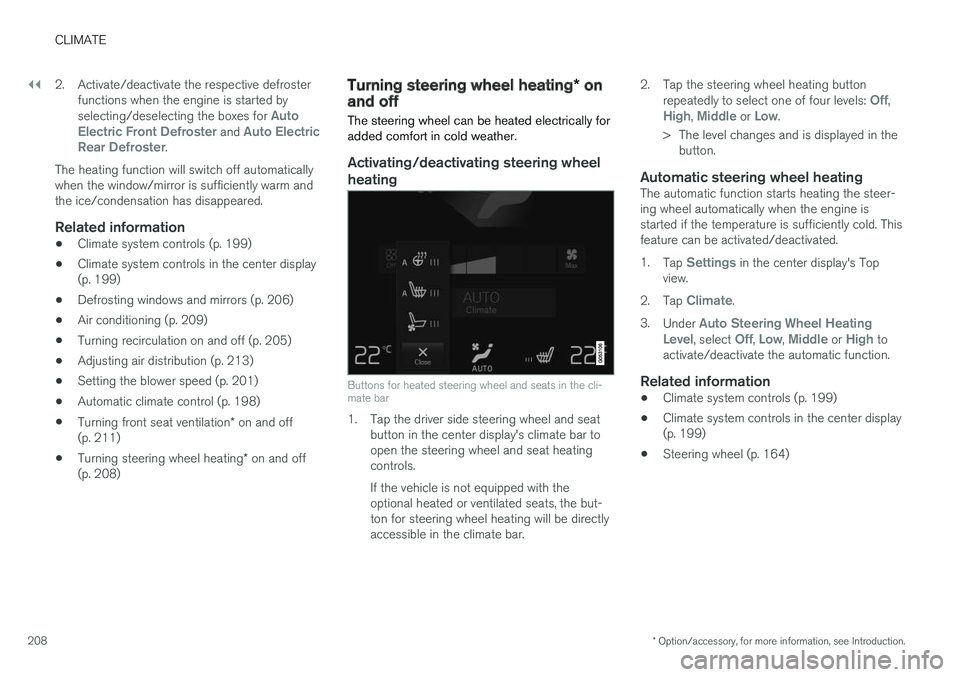
Buttons for heated steering wheel and seats in the cli-mate bar
1. Tap the driver side steering wheel and seatbutton in the center display's climate bar toopen the steering wheel and seat heatingcontrols.
If the vehicle is not equipped with theoptional heated or ventilated seats, the but-ton for steering wheel heating will be directlyaccessible in the climate bar.
2.Tap the steering wheel heating buttonrepeatedly to select one of four levels: Off,High, Middle or Low.
>The level changes and is displayed in thebutton.
Automatic steering wheel heating
The automatic function starts heating the steer-ing wheel automatically when the engine isstarted if the temperature is sufficiently cold. Thisfeature can be activated/deactivated.
1.Tap Settings in the center display's Topview.
2.Tap Climate.
3.Under Auto Steering Wheel HeatingLevel, select Off, Low, Middle or High toactivate/deactivate the automatic function.
Related information
•Climate system controls (p. 199)
•Climate system controls in the center display(p. 199)
•Steering wheel (p. 164)
Page 215 of 584
CLIMATE
}}
213
Opening/closing/directing air vents
Some of the passenger compartment air ventscan be open/closed/directed individually.
Direct the dashboard and door pillar outer airvents toward the side windows to defrost.
Direct the vents into the passenger compartmentto help maintain a comfortable temperature inwarm weather.
Opening/closing air vents
Air vent thumb wheel 6
–Turn the thumb wheel to open/close the airflow from the vent.
The more of the white lines on the thumbwheel that are visible, the greater the air flow.
Directing air flow
Air flow control 6
–Move the control from side to side or up/down to direct the flow of air from the vent.
Related information
•Air distribution (p. 212)
•Adjusting air distribution (p. 213)
•Air distribution table (p. 215)
Adjusting air distribution
Air distribution can be adjusted manually.
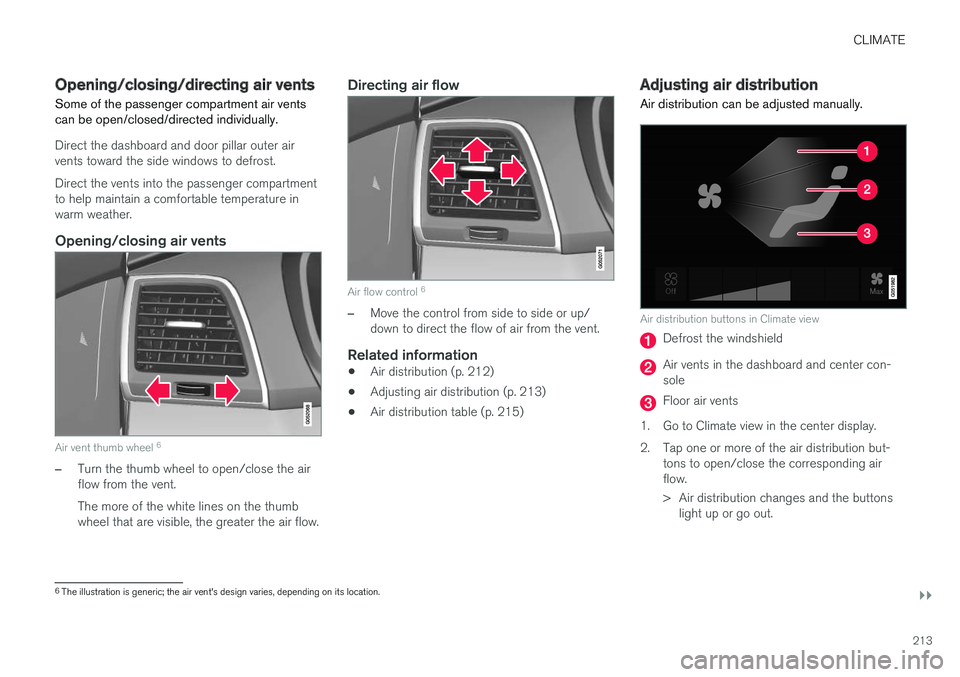
Air distribution buttons in Climate view
Defrost the windshield
Air vents in the dashboard and center con-sole
Floor air vents
1.Go to Climate view in the center display.
2. Tap one or more of the air distribution but-tons to open/close the corresponding airflow.
> Air distribution changes and the buttonslight up or go out.
6The illustration is generic; the air vent's design varies, depending on its location.
Page 221 of 584
LOADING AND STORAGE
}}
* Option/accessory, for more information, see Introduction.219
Raising/lowering the rear-end of the
vehicle *
Using the buttons on the read edge of the cargocompartment, the rear-end of the vehicle (thelevel of the cargo compartment floor) can beraised or lowered for easier loading or to make
attaching a trailer1 simpler.
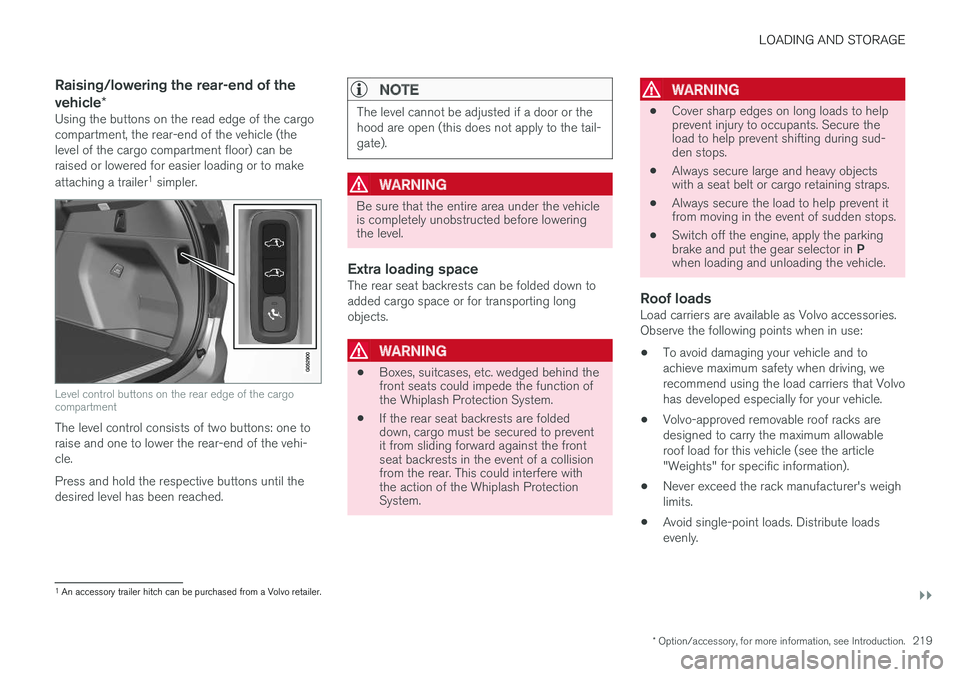
Level control buttons on the rear edge of the cargocompartment
The level control consists of two buttons: one toraise and one to lower the rear-end of the vehi-cle.
Press and hold the respective buttons until thedesired level has been reached.
NOTE
The level cannot be adjusted if a door or thehood are open (this does not apply to the tail-gate).
WARNING
Be sure that the entire area under the vehicleis completely unobstructed before loweringthe level.
Extra loading space
The rear seat backrests can be folded down toadded cargo space or for transporting longobjects.
WARNING
•Boxes, suitcases, etc. wedged behind thefront seats could impede the function ofthe Whiplash Protection System.
•If the rear seat backrests are foldeddown, cargo must be secured to preventit from sliding forward against the frontseat backrests in the event of a collisionfrom the rear. This could interfere withthe action of the Whiplash ProtectionSystem.
WARNING
•Cover sharp edges on long loads to helpprevent injury to occupants. Secure theload to help prevent shifting during sud-den stops.
•Always secure large and heavy objectswith a seat belt or cargo retaining straps.
•Always secure the load to help prevent itfrom moving in the event of sudden stops.
•Switch off the engine, apply the parkingbrake and put the gear selector in Pwhen loading and unloading the vehicle.
Roof loads
Load carriers are available as Volvo accessories.Observe the following points when in use:
•To avoid damaging your vehicle and toachieve maximum safety when driving, werecommend using the load carriers that Volvohas developed especially for your vehicle.
•Volvo-approved removable roof racks aredesigned to carry the maximum allowableroof load for this vehicle (see the article"Weights" for specific information).
•Never exceed the rack manufacturer's weighlimits.
•Avoid single-point loads. Distribute loadsevenly.
1An accessory trailer hitch can be purchased from a Volvo retailer.
Page 222 of 584

||
LOADING AND STORAGE
* Option/accessory, for more information, see Introduction.220
•Place heavier cargo at the bottom of theload.
•Secure the cargo correctly with appropriatetie-down equipment.
•Check periodically that the load carriers andload are properly secured.
•Remember that the vehicle's center of gravityand handling change when you carry a loadon the roof.
•The vehicle's wind resistance and fuel con-sumption will increase with the size of theload.
•Drive smoothly. Avoid rapid starts, fast cor-nering and hard braking.
CAUTION
The optional panoramic roof should not beopened while load carriers are installed onthe vehicle.
See the article "Weights" for information aboutthe maximum permissible load that can be trans-ported on the roof.
Related information
•Folding the second row backrests (p. 178)
•Folding the third row backrests (p. 180)
•Weights (p. 563)
•Cargo net (p. 223)
•Cargo compartment cover* (p. 227)
•Load anchoring eyelets (p. 226)
•Whiplash protection system (p. 65)
•Locking/unlocking the tailgate (p. 249)
Passenger compartment storagespaces
The following is an overview of the passengercompartment and its storage spaces.
Front seats
Storage spaces in the door panel, near the steeringwheel, the glove compartment and the sun visors
Page 226 of 584

||
LOADING AND STORAGE
* Option/accessory, for more information, see Introduction.224
3. Insert the other upper hook into the ceilingmounting point on the opposite side. It isspring-loaded to make mounting easier.
Press each of the hooks as far forward intothe respective mounting points as possible.
Rear mounting
4.Rear mounting: with the upper hooksinserted into the rear ceiling mounting points,hook the lower straps through the loadanchoring eyelets on the floor of the cargocompartment as show in the illustration.
Front mounting
Front mounting: with the upper hooksinserted into the front ceiling mountingpoints, hook the lower straps through theeyelets on the front seat rails as shown in theillustration. Attaching the net is easier if thefront seat backrests are upright and the seatsare moved slightly forward.
Adjust the front seats so that they only touchthe net but do not apply pressure to it.
CAUTION
Pressure from the front seats against thecargo net could damage the net and/or itsbrackets.
5. Pull the lower straps taut.
Removing and storing
1. Reduce tension on the net by pressing thebutton on the lower straps' respective locksand allow some slack on both sides.
2. Press in the catches and release both of thestraps' hooks.
3. Remove the upper hooks from the ceilingmounting points.
4. Press the red button on the upper rod toallow it to fold.
5. Fold and roll up the net.
Store the net under the cargo compartment floor.
Related information
•Cargo compartment cover* (p. 227)
•Load anchoring eyelets (p. 226)
•Steel cargo grid* (p. 225)
•Loading (p. 218)
Page 240 of 584
LOCKS AND ALARM
238
Remote key
The remote key is used to lock/unlock the vehi-cle and must be in the passenger compartmentin order to start the engine.
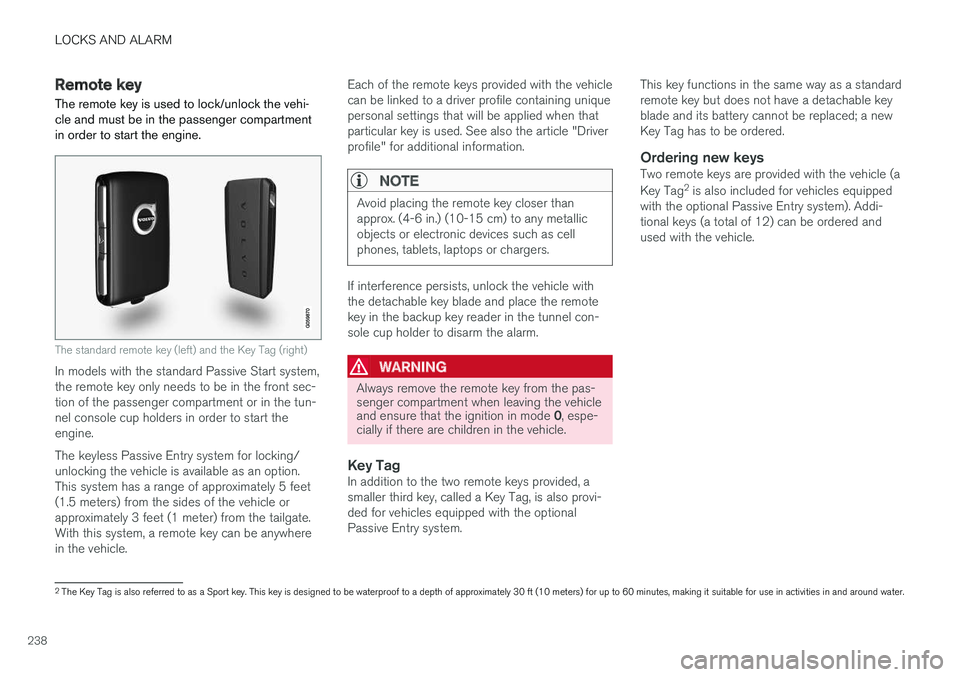
The standard remote key (left) and the Key Tag (right)
In models with the standard Passive Start system,the remote key only needs to be in the front sec-tion of the passenger compartment or in the tun-nel console cup holders in order to start theengine.
The keyless Passive Entry system for locking/unlocking the vehicle is available as an option.This system has a range of approximately 5 feet(1.5 meters) from the sides of the vehicle orapproximately 3 feet (1 meter) from the tailgate.With this system, a remote key can be anywherein the vehicle.
Each of the remote keys provided with the vehiclecan be linked to a driver profile containing uniquepersonal settings that will be applied when thatparticular key is used. See also the article "Driverprofile" for additional information.
NOTE
Avoid placing the remote key closer thanapprox. (4-6 in.) (10-15 cm) to any metallicobjects or electronic devices such as cellphones, tablets, laptops or chargers.
If interference persists, unlock the vehicle withthe detachable key blade and place the remotekey in the backup key reader in the tunnel con-sole cup holder to disarm the alarm.
WARNING
Always remove the remote key from the pas-senger compartment when leaving the vehicleand ensure that the ignition in mode 0, espe-cially if there are children in the vehicle.
Key Tag
In addition to the two remote keys provided, asmaller third key, called a Key Tag, is also provi-ded for vehicles equipped with the optionalPassive Entry system.
This key functions in the same way as a standardremote key but does not have a detachable keyblade and its battery cannot be replaced; a newKey Tag has to be ordered.
Ordering new keys
Two remote keys are provided with the vehicle (a
Key Tag2 is also included for vehicles equippedwith the optional Passive Entry system). Addi-tional keys (a total of 12) can be ordered andused with the vehicle.
2The Key Tag is also referred to as a Sport key. This key is designed to be waterproof to a depth of approximately 30 ft (10 meters) for up to 60 minutes, making it suitable for use in activities in and around water.